
GDS-DOCK-V2-SAM24U - Station d'accueil RAM Mount - Notice d'utilisation et mode d'emploi gratuit
Retrouvez gratuitement la notice de l'appareil GDS-DOCK-V2-SAM24U RAM Mount au format PDF.


| Type de produit | Station d'accueil pour tablette |
| Marque | RAM Mount |
| Modèle | GDS-DOCK-V2-SAM24U |
| Compatibilité | Samsung Galaxy Tab A 8.0 (SM-A240) et modèles similaires |
| Matériau | ABS renforcé, acier inoxydable |
| Système de montage | Compatible avec bras RAM Mount (bille de 1 pouce) |
| Dimensions (approx) | 15 x 10 x 5 cm |
| Poids | 250 g environ |
| Alimentation | Alimentation USB-C (prise secteur incluse) |
| Fonctions principales | Maintien sécurisé de la tablette, ports de chargement, accès aux boutons |
| Entretien et nettoyage | Nettoyer avec un chiffon doux et sec, éviter produits abrasifs |
| Sécurité | Utiliser les vis fournies pour une fixation robuste |
| Pièces détachées et réparabilité | Pièces disponibles sur demande via le service client |
| Informations générales | Garantie 3 ans |
FOIRE AUX QUESTIONS - GDS-DOCK-V2-SAM24U RAM Mount
Questions des utilisateurs sur GDS-DOCK-V2-SAM24U RAM Mount
0 question sur cet appareil. Repondez a celles que vous connaissez ou posez la votre.
Poser une nouvelle question sur cet appareil
Téléchargez la notice de votre Station d'accueil au format PDF gratuitement ! Retrouvez votre notice GDS-DOCK-V2-SAM24U - RAM Mount et reprennez votre appareil électronique en main. Sur cette page sont publiés tous les documents nécessaires à l'utilisation de votre appareil GDS-DOCK-V2-SAM24U de la marque RAM Mount.
MODE D'EMPLOI GDS-DOCK-V2-SAM24U RAM Mount
Parts Index:
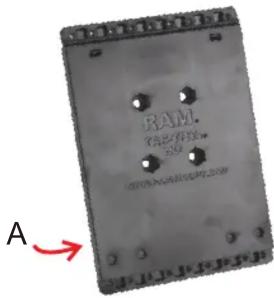
A. Vehicle Dock Backing Plate (QTY. 1)
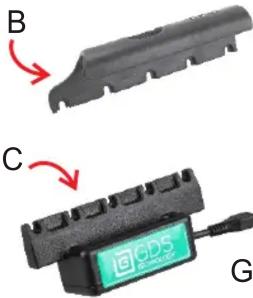
B. Top Cup (QTY. 1) Cup Design May Vary
C. GDS ^TM Docking Cup (QTY. 1)
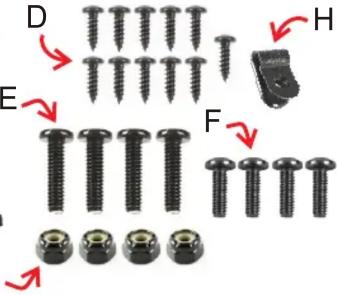
D. #4 X 3/8" Sheet Metal Screw (QTY. 10)
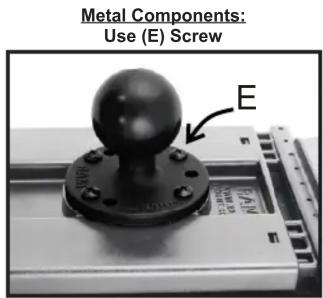
E. #8 X 5/8" Machine Screw (QTY. 4)
F. #8 X 1/2" Machine Screw (QTY. 4)
G. #8 Nylock Nut (QTY. 4)
H. Cable Retention Clip (QTY. 1)
Assembly
- Use five (D) Screws to attach (B) Top cup to (A) Back Plate.

- Use five (D) screws to attach (C) Docking cup to bottom of (A) Back plate.

To prevent screws from protruding behind vehicle dock, avoid over-tightening.

natural_image
Close-up of a mechanical component with mounting holes and arrows indicating features (no text or symbols visible)- Use (E or F) Screws and (G) Nuts to attach vehicle dock to any RAM® mounting system, depending on the type of the component used:

- Insert Micro USB 2.0 cable into GDS™ Dock's Micro USB 2.0 receiver. When plugged in, tablet will detect power source within two seconds. User must supply a USB wall charger or cigarette adapter with appropriate charging specifications for mounted device.

natural_image
Close-up of two black and green audio/video cables with connectors (no text or symbols visible)For open cockpit or outdoor use, it is recommended to apply electrical tape to your USB connection.
- Snap USB cable into (H) cable retention clip.

natural_image
Close-up of a black cable with a small square clip and an arrow labeled 'H' indicating direction (no text or symbols beyond the label)- Using (D) Screw, attach (H) Cable retention clip into any of the available wholes shown behind vehicle dock.

natural_image
Close-up of a black electronic device with a green cable and labeled component 'H' (no readable text or symbols beyond label)Adjust USB cable appropriately along cable retention clip before tightening.
Lack of or improper use of wire retnetion/cable management may void warranty.
RPR-INS-GDS-DOCK-V2
National Products Inc.
8410 Dallas Ave S
Seattle WA 98108
Phone: (206) 763-8361
Fax: (206) 763-9615
www.rammount.com
support@rammount.com
Proper Insertion of IntelliSkin™
-
Insert top of tablet upward against top cup, expanding spring tension.
-
Press bottom of tablet flush against Tab-Tite back plate.
-
Rest bottom of tablet straight downward, docking on the pins of docking cup. When plugged in, tablet will detect power source within two seconds.

natural_image
Hand inserting a tablet device into a stand, showing the screen and green sensor (no text or symbols visible)
natural_image
Hand holding a tablet device with a green sensor attached, no visible text or symbols
natural_image
Hand holding a smartphone mounted on a tripod stand with a green sensor attached (no visible text or symbols)- To remove, pull tab upward, located on back of vehicle dock.

natural_image
Close-up of a hand adjusting a black mechanical component with an arrow indicating upward motion (no text or symbols visible)3 YEAR WARRANTY ON ALL ELECTRONIC COMPONENTS LIFETIME WARRANTY ON ALL NON-ELECTRONIC COMPONENTS
The exclusive NPI Lifetime Warranty states that all GDS ^™ non-electronic components and parts are warranted against defect in materials and workmanship for the life of the product or part. NPI's Lifetime Warranty covers the product or its components only. The mounted device is not covered under the Lifetime Warranty and will not be replaced if damaged as a result of mount failure. This warranty is expressly limited to persons in the United States, and all foreign countries who purchase GDS ^™ for resale or use in the ordinary course of the buyer's business. This warranty does not cover any product or part that has been abused, worn out, heated, ground or otherwise altered, used for a purpose other than that for which it was intended, or used in a manner inconsistent with any instructions regarding its use.
MORE DOCKS AND DEVICES WITH GDS™ TECHNOLOGY

natural_image
Close-up of a black and green QDS ECH1 device with a circular logo on the dome (no readable text or symbols beyond branding)GDS™ Desktop Dock Pro

natural_image
Black rectangular battery pack with five vertical slots and a green circular button (no text or symbols visible)GDS™ 6 Gang Dock Charger

natural_image
Illustration of a smartphone with attached USB cable (no text or symbols)GDS™ to USB Adapter

natural_image
Exterior view of a gray electronic device labeled 'FAM' with a GDS tag, no readable text or symbols beyond branding.GDS™ Locking Vehicle Dock

natural_image
Close-up of a black electronic component with a green indicator button (no visible text or symbols)GDS™ Vehicle Phone Dock
Visit for alternate docks or IntelliSkin™ for any tablet or phone.www.gdstech.com
National Products Inc.
8410 Dallas Ave S
Seattle WA 98108
Phone: (206) 763-8361
Fax: (206) 763-9615
www.rammount.com
support@rammount.com
natural_image
Simple black-and-white icon of a rectangular frame with a plus sign and a plus sign, no text or symbols present.IntelliSkin™

natural_image
Abstract geometric pattern with nested black and white shapes forming a maze-like structure (no text or symbols)GDS
TECHNOLOGY™
GDS™, IntelliSkin™, GDS Tech™, GDS Technology™ and GDS Compatible™ are trademarks or registered trademarks of National Products Inc. The distinctive D Shape™ of the GDS™ connector is a trademark of National Products Inc.
PATENTS AND TRADEMARKS WWW.RAMMOUNT.COM/IP

natural_image
Simple black rounded rectangle shape on white background (no text or symbols)RPR-INS-GDS-DOCK-V2
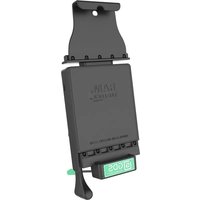

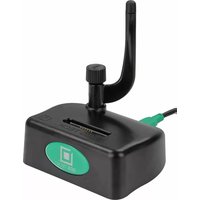
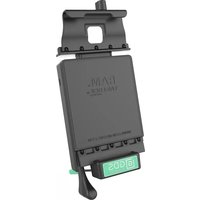
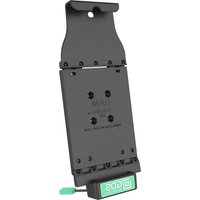
Marque : RAM Mount
Modèle : GDS-DOCK-V2-SAM24U
Catégorie : Station d'accueil