
Tybox 117 - Thermostat DELTA DORE - Notice d'utilisation et mode d'emploi gratuit
Retrouvez gratuitement la notice de l'appareil Tybox 117 DELTA DORE au format PDF.


| Marque | Delta Dore |
| Modèle | Tybox 117 |
| Type de produit | Thermostat d'ambiance programmable |
| Alimentation | 2 piles alcalines AA (1.5V) |
| Dimensions (L x H x P) | 80 x 80 x 30 mm |
| Poids | Environ 120 g (piles incluses) |
| Écran | Écran LCD rétroéclairé |
| Plage de température | De 5 °C à 30 °C |
| Précision | 0.5 °C |
| Programmation | Programmation hebdomadaire (jour/nuit, confort/réduit) |
| Modes | Confort, Réduit, Hors gel, Manuel, Auto |
| Fonctionnalités | Détection d'ouverture de fenêtre (option), entrée fil pilote (option) |
| Réglages | Température, horloge, programmation personnalisable |
| Entretien et nettoyage | Nettoyer avec un chiffon doux sec ; ne pas utiliser de produits abrasifs |
| Sécurité | Protection contre les surtensions, voyant de changement de piles |
| Pièces détachées et réparabilité | Piles remplaçables, pas de pièces détachées disponibles ; en cas de panne, contacter le SAV Delta Dore |
| Garantie | 2 ans (pièces et main-d'œuvre) |
| Informations générales | Thermostat conçu pour le chauffage électrique individuel, installation murale |
FOIRE AUX QUESTIONS - Tybox 117 DELTA DORE
Questions des utilisateurs sur Tybox 117 DELTA DORE
0 question sur cet appareil. Repondez a celles que vous connaissez ou posez la votre.
Poser une nouvelle question sur cet appareil
Téléchargez la notice de votre Thermostat au format PDF gratuitement ! Retrouvez votre notice Tybox 117 - DELTA DORE et reprennez votre appareil électronique en main. Sur cette page sont publiés tous les documents nécessaires à l'utilisation de votre appareil Tybox 117 de la marque DELTA DORE.
MODE D'EMPLOI Tybox 117 DELTA DORE

DELTA
DORE

2703293 Rev.05
TYBOX 117 - 127 - 137 - 147 - 157

www.deltadore.com


Important product
information (4)


5s Press time

Room temperature

Set-point temperature
PROG
x1
PROG
x7
AUTO

Turn the selector dial to AUTO.
Your thermostat follows the programme.
Depending on the configuration during installation, your device will constantly display the temperature setting or the room temperature. To change these settings, refer to the»installation guide» or contact your installation engineer.

Information button
In AUTO mode, pressing the i button displays the room temperature or the temperature setting, depending on the configuration during installation.


Time setting
![graph LR A["20:12"] --> B["31 ↑1"] B --> C["10:12 ↑1"] C --> D["12 ↑1"] D --> E["10:02 ↑2"] E --> F["20:12 ..."] F --> G["6 ↑23"] G --> H["8 ↑0"] H --> I["10:00 ↑59"] I --> J["10:52 ↑10"] J --> K["12 ↑11"] K --> L["EXIT"] M["Turn the selector dial to The days flash. Press + or - to select the day, t…](/content/2026/06/1316763/images/6c16698778f40a2c0478d53d82c5e462ed681d2e071aa9ce3aaeb819403947e7.jpg)

Set-point Temperature Setting
![graph TD A["Adjusting the Comfort setting (from 5 to 30°C in 0.5°C increments)"] --> B["Confirm"] B --> C["Economy setting (from 5 to 30°C in 0.5°C increments)"] C --> D["Confirm Confirm"] D --> E["Frost Protection setting (from 5 to 16°C in 0.5°C increments)"] E --> F["Adjusting the Frost Setting"]…](/content/2026/06/1316763/images/6c760b14c58d00023c62f6935d144a57ba9042e56fd4b621ed3b5cf7caf438d4.jpg)


Manual mode
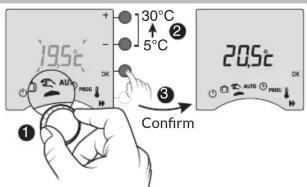
This mode is used to choose a set-point
temperature that remains constant.
Turn the selector dial to 2.
To cancel the current manual mode, turn the selector dial.


Override

Press the button
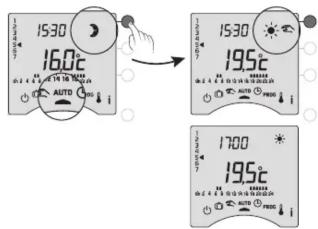
If you wish to cancel the override that is currently active, press the button again. At 5pm, the programme will return to the normal schedule.

PROG
Turn the selector dial to PROG.
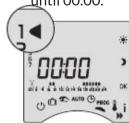
- Create your 24-hour programme

Press the buttons - or to create your different Economy or Comfort periods.
Exemple : Comfort from 6:00 to 8:00 and from 17:00 to 23:00
PROG x1


Setback period
Press until 06.00.

Comfort period
Press until 08.00.

The programme may be weekly (PROGx7) or daily (PROGx1). This choice is made using the switch on the back of the device.
This programming can also be done in one-hour, half-hour, or quarter-hour stages. If you wish to change these settings, refer to the «installation guide» or contact your installation engineer.

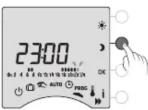
Press until 17.00.
Press until 23.00.


To exit the mode, turn the selector dial.
Confirm and continue on to the next day to program it separately or confirm the program and copy it to the next day.
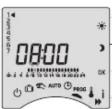
PROG x7

Press until 06.00

Press until 08.00
[Non-Text]

Press until 17.00

[Non-Text]

Press until 23.00

Press until 00.00
(三) 1924
(1) 1/2

(五) 2017年1月1日至2018年1月1日(含)的公司股票交易均价为4.56元/股,与前一交易日收盘价相比,涨幅为-0.97%。
Repeat for each day of the week.
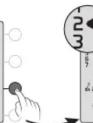
2 ▶ 7
•
[Non-Text]
2 ▶ 7
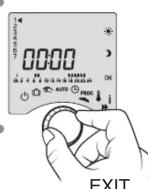
To exit the mode, turn the selector dial.
The programme begins on day 1 (Monday) and at 00:00.
1: Monday,
•
.
.
7
7. Sunday,
The programming may be done in increments of one hour, 30 minutes, or 15 minutes (refer to the "installation guide", menu 1-02).

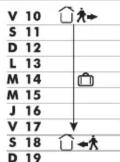

This mode protects your home from frost if you are absent for several days. Turn the selector dial 📄 and enter the return date.
Enter the return date

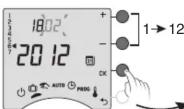
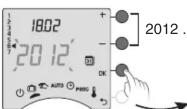
The Frost Protection setting is adjustable (§ «Setting temperatures»).
To change the mode in progress, press OK again. To cancel the current absence mode, turn the selector dial.
Return to AUTO mode at the end of the countdown, at 00:00.


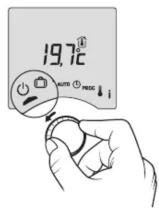

This mode is used to switch your heating installation off. Turn the selector dial to ⏻. In this mode, the device displays the room temperature.

When the batteries symbol appears, you have approximately 1 month to change the batteries (2 1.5 V LR03 or AAA alkaline batteries).

You have approximately 30 seconds to change the batteries before the time setting is reset (if this happens, reprogramme the date and time).
Marque : DELTA DORE
Modèle : Tybox 117
Catégorie : Thermostat