
SPA 508G - Téléphone CISCO - Notice d'utilisation et mode d'emploi gratuit
Retrouvez gratuitement la notice de l'appareil SPA 508G CISCO au format PDF.


| Type de produit | Téléphone IP de bureau |
| Marque | Cisco |
| Modèle | SPA 508G |
| Lignes téléphoniques | 8 lignes avec boutons de ligne programmables |
| Écran | Écran LCD monochrome rétroéclairé |
| Connectivité réseau | Ethernet 10/100 Base-T (RJ-45) |
| Alimentation | PoE (Power over Ethernet) IEEE 802.3af ou adaptateur secteur 5V CC (vendu séparément) |
| Dimensions (L x P x H) | Environ 20 x 20 x 8 cm |
| Poids | Environ 0,8 kg |
| Fonctions principales | Appels voix sur IP, conférence à 3, transfert d'appel, mise en attente, répertoire, haut-parleur main libre, casque RJ-9, journal d'appels |
| Protocoles supportés | SIP (RFC 3261) |
| Codecs audio | G.711, G.722, G.729, iLBC |
| Entretien et nettoyage | Dépoussiérer avec un chiffon doux et sec ; ne pas utiliser de produits liquides ou abrasifs |
| Sécurité | Verrouillage physique via câble de sécurité Kensington, mise à jour du firmware via interface web, chiffrement SIP (TLS/SRTP) si supporté par le serveur |
| Pièces détachées et réparabilité | Adaptateur secteur optionnel, combiné de rechange, cordon RJ-9 ; pas de réparation par l'utilisateur ; contacter un professionnel |
| Garantie | Garantie constructeur limitée (consulter les conditions) |
FOIRE AUX QUESTIONS - SPA 508G CISCO
Questions des utilisateurs sur SPA 508G CISCO
0 question sur cet appareil. Repondez a celles que vous connaissez ou posez la votre.
Poser une nouvelle question sur cet appareil
Téléchargez la notice de votre Téléphone au format PDF gratuitement ! Retrouvez votre notice SPA 508G - CISCO et reprennez votre appareil électronique en main. Sur cette page sont publiés tous les documents nécessaires à l'utilisation de votre appareil SPA 508G de la marque CISCO.
MODE D'EMPLOI SPA 508G CISCO
CISCO
Quick Start Guide

Cisco Small Business
IP Phone Models SPA501G, SPA502G, SPA504G, SPA508G, and SPA509G
Package Contents
• F Tewichow
• Phone Stand
• RJ-45 Ethernet Cable
• Coach Grant Davis
1.2017年1月1日
Welcome
Thank you for checking the Gaze Email Business IP phone. This guide describes how to install your phone and how to perform some basic tasks. The features available on your phone depend on the type of system to which your phone is connected. Your phone system might not provide all of the features mentioned in this document. Contact your phone system administrator for questions about phone classes.

Installing Your IP Phone
Use these procedures to install the phone and connect it to your network.

STEP 1. Turn the phone body over to expose the ports on the back of the unit.
△
Calmor: The best telephone is based on the monthly port
Line 2: travel the long end of the phone port into the transact port to the
phone busy, please make with phone system
- A 3rd, March, when the past week might be called as:
handsec (not shown).
to be in (Optional) Connect the phone stand by lining up the lobe or the stand with the x box on the phone body. Slide the bellnet lobe into the lower slots on the phone body and lightly press down on the stand. It should easily slide into the upper stand slots. Do not force.
attem 6. If you are using an external power source, insert one end of the power cord into an outlet and insert the other end of the power cord into the power port on the phone body.
http://Connect your phone to the network
Jung an Ethernet Connection—Insert one end of the Ethernet cable into the network port on the phone body marked "80V." Insert the other end of the Ethernet cable into the appropriate device, such as a network switch, on your network.
Jung at Wireless Connection—You can use a Clean WBPS43 Wireless-G Bridge with the IP phone to create a wireless connection between the phone and the network. See the WBPS43 documentation on Clean.com for more information. The Where to Go From Here section contains links to the documentation now on Clean.com
Step 6 (Options) To provide network access to a PC, connect one end of an additional Ethernet cable that provides to the PC part on the back of the phone body. Connect the other end of the Ethernet cable to the network port on your PC.
2016 (Kripliner) In install the phone on a vertical surface, see the Cisco MB 100 Wall Mount bracket. See the Cisco Small Business IP Phone SP45BX User Guide (SPF) for the Cisco Global Communications Manager Express for the Cisco Small Business IP Phone SP45BX documents on Cisco.com for more information. The Where to Go From Home auction permits link to the documentation area on Cisco.com.

Phone Lines and Buttons

The photo above shows the Cisco SPA506G. Other models differ. Numbered objects in the photo are expressed in the following table
| E | P | o | n | e | F | a | t | R | O |
| 1 | Handout | 2 | Message Writing Indicator | Pick up to phone or another at call. | |||||
| Displays and find when you have a new voice-mail message I answered during an email and or when the photo features as being updated. Behavior may either depending on phone system.) | |||||||||
| 3 | LCD Screen | 4 | Display data and time, phone station name, line extensions, and softbox options. Not available on the Cisco BPA50 6kg.) | ||||||
| E | P | h | n | e | f | o | e | t | u | d | r | o | l | c | n | d | r | o | l | c | n | d | r | o | l | c | n | d | r | o | l | c | n | d | r | o | l | c | n | d | r | o | l | c | n | d | r | o | l | c | n | d | r | o | l | c | n | d | r | o | l | c | n | d | s | r | o | l | c | n | d | r | o | l | c | n | d | r | o | l | c | n | d | r | o | l | c | n | d | r | o | l | c | n | d | r | o | l | c | n | d | r | o | l | c | n | d | r | o | l | c | n | d | r | e | o | l | c | n | d | r | o | l | c | n | d | r | o | l | c | n | d | r | o | l | c | n | d | r | o | l | c | n | d | r | o | l | c | n | d | r | o | l | c | n | d | r | o | l | c | n | d | r | o | i | l | c | n | d | r | o | l | c | n | d | r | o | l | c | n | d | r | o | l | c | n | d | r | o | l | c | n | d | r | o | l | c | n | d | r | o | l | c | n | d | r | o | l | c | n | d | r | o | l | a | n | d | r | o | l | c | n | d | r | o | l | c | n | d | r | o | l | c | n | d | r | o | l | c | n | d | r | o | l | c | n | d | r | o | l | c | n | d | r | o | l | c | n | d | r | o | l | c | n | e | d | r | o | l | c | n | d | r | o | l | c | n | d | r | o | l | c | n | d | r | o | l | c | n | d | r | o | l | c | n | d | r | o | l | c | n | d | r | o | l | c | n | d | r | o | l | c | n | d | t | o | l | c | n | d | r | o | l | c | n | d | r | o | l | c | n | d | r | o | l | c | n | d | r | o | l | c | n | d | r | o | l | c | n | d | r | o | l | c | n | d | r | o | l | c | n | d | r | o | l | c | n | d | r | o | l | c | n | d | r | o | l | c | n | d | r | o | l | c | n | d | r | o | l | c | n | d | r | o | l | c | n | d | r | o | l | c | n | d | r | o | l | c | n | d | r | o | l | c | m | d | r | o | l | c | n | d | r | o | l | c | n | d | r | o | l | c | n | d | r | o | l | c | n | d | r | o | l | c | n | d | r | o | l | c | n | d | r | o | l | c | n | d | r | o | l | c | n | d | f | o | l | c | n | d | r | o | l | c | n | d | r | o | l | c | n | d | r | o | l | c | n | d | r | o | l | c | n | d | r | o | l | c | n | d | r | o | l | c | n | d | r | o | l | c | n | d | r | o | I | c | n | d | r | o | l | c | n | d | r | o | l | c | n | d | r | o | l | c | n | d | r | o | l | c | n | d | r | o | l | c | n | d | r | o | l | c | n | d | r | o | l | c | n | d | r | o | l | c | a | n | d | r | o | l | c | n | d | r | o | l | c | n | d | r | o | l | c | n | d | r | o | l | c | n | d | r | o | l | c | n | d | r | o | l | c | n | d | r | o | l | c | n | d | r | o | l | c | a | n | d | r | o | l | c | n | d | r | o | l | c | n | d | r | o | l | c | n | d | r | o | l | c | n | d | r | o | l | c | n | d | r | o | l | c | n | d | r | o | l | c | n | d | r | o | l | c | n | d | e | r | o | l | c | n | d | r | o | l | c | n | d | r | o | l | c | n | d | r | o | l | c | n | d | r | o | l | c | n | d | r | o | l | c | n | d | r | o | l | c | n | d | r | o | l | c | n | d | r | O | c | l | c | n | d | r | o | l | c | n | d | r | o | l | c | n | d | r | o | l | c | n | d | r | o | l | c | n | d | r | o | l | c | n | d | r | o | l | c | n | d | r | o | l | c | n | d | r | o | l | C | l | c | n | d | r | o | l | c | n | d | r | o | l | c | n | d | r | o | l | c | n | d | r | o | l | c | n | d | r | o | l | c | n | d | r | o | l | c | n | d | r | o | l | c | n | d | r | o | l | e | n | d | r | o | l | c | n | d | r | o | l | c | n | d | r | o | l | c | n | d | r | o | l | c | n | d | r | o | l | c | n | d | r | o | l | c | n | d | r | o | l | c | n | d | r | o | l | c | n | D | r | o | l | c | n | d | r | o | l | c | n | d | r | o | l | c | n | d | r | o | l | c | n | d | r | o | l | c | n | d | r | o | l | c | n | d | r | o | l | c | n | d | r | o | l | c | n | d | r | o | l | c | n | d | r | o | l | c | n | d | r | o | l | c | n | d | r | o | l | c | n | d | r | o | l | c | n | d | r | o | l | c | n | d | r | o | l | c | n | d | r | o | l | c | n | d | r | o | l | b | n | d | r | o | l | c | n | d | r | o | l | c | n | d | r | o | l | c | n | d | r | o | l | c | n | d | r | o | l | c | n | d | r | o | l | c | n | d | r | o | l | c | n | d | r | o | l | c | n | f | r | o | l | c | n | d | r | o | l | c | n | d | r | o | l | c | n | d | r | o | l | c | n | d | r | o | l | c | n | d | r | o | l | c | n | d | r | o | l | c | n | d | r | o | l | c | n | d | r | 0 | c | l | c | n | d | r | o | l | c | n | d | r | o | l | c | n | d | r | o | l | c | n | d | r | o | l | c | n | d | r | o | l | c | n | d | r | o | l | c | n | d | r | o | l | c | n | d | r | o | I | C | l | c | n | d | r | o | l | c | n | d | r | o | l | c | n | d | r | o | l | c | n | d | r | o | l | c | n | d | r | o | l | c | n | d | r | o | l | c | n | d | r | o | l | c | n | d | r | o | I | e | n | d | r | o | l | c | n | d | r | o | l | c | n | d | r | o | l | c | n | d | r | o | l | c | n | d | r | o | l | c | n | d | r | o | l | c | n | d | r | o | l | c | n | d | r | o | l | c | N | d | r | o | l | c | n | d | r | o | l | c | n | d | r | o | l | c | n | d | r | o | l | c | n | d | r | o | l | c | n | d | r | o | l | c | n | d | r | o | l | c | n | d | r | o | l | c | n | d | R | c | l | c | n | d | r | o | l | c | n | d | r | o | l | c | n | d | r | o | l | c | n | d | r | o | l | c | n | d | r | o | l | c | n | d | r | o | l | c | n | d | r | o | l | c | n | d | r | o | i | c | n | d | r | o | l | c | n | d | r | o | l | c | n | d | r | o | l | c | n | d | r | o | l | c | n | d | r | o | l | c | n | d | r | o | l | c | n | d | r | o | l | c | n | d | r | o | l | c | N | e | d | r | o | l | c | n | d | r | o | l | c | n | d | r | o | l | c | n | d | r | o | l | c | n | d | r | o | l | c | n | d | r | o | l | c | n | d | r | o | l | c | n | d | r | o | l | c | n | e | D | r | o | l | c | n | d | r | o | l | c | n | d | r | o | l | c | n | d | r | o | l | c | n | d | r | o | l | c | n | d | r | o | l | c | n | d | r | o | l | c | n | d | r | o | l | c | n | d | s | R | c | l | c | n | d | r | o | l | c | n | d | r | o | l | c | n | d | r | o | l | c | n | d | r | o | l | c | n | d | r | o | l | c | n | d | r | o | l | c | n | d | r | o | l | c | n | d | r |
| 1. | Phone | e | red |
| 2. | Setup, Edition Phone to account a menu to config, the function and preference each of your attention and spread details. You can call for call, send us all functions (such as call for everything). | ||
| 1. | Phone | e | |
| 1. | Phone | ||
| 1. | Phone | ||
| 1. | Phone | ||
| 1. | Phone | ||
| 1. | Phone | ||
| 1. | Phone | ||
| 1. | Phone | ||
| 1. | Phone | ||
| 1. | Phone | ||
| 1. | Phone | ||
| 1. | Phone | ||
| 1. | Phone. | ||
Armitkiry Hauqiparikh
Cay Systems, Inc.
2016138276109
LSA
单位
Small Business Support, LLC: -426-806-1356-Tel Free, 2/77; Small Business Support, Chicago, Illinois
(1) 2023年1月1日,公司召开2023年第二次临时股东大会。
[Unreadable]
On the Ocho logo are presented at Cisco Systems, an additional affiliate in the USA and other countries. A trade of Cisco worldwide can be found in www.elsevier.com/pretreatment. It is only a business provider's operational for proper revenue. The world is not part of the underlying products for the business. Cisco is also a company (100%) © 2012. https://www.elsevier.com, as a global reference
| To go | 4 | b | 10 | 6 | 5 | 10 | 8 |
| 12 I watched before I had to be handed on or call. When the headed in it, the letter sounds given. 12 Spanish letter I had to be answered to what. When the headed in it, the letter sounds given. 13 Keypose: Use to do all numbers, mean either, and choose numbers. | |||||||
| Softkey Buttons | |||||||
| The softkey buttons and blocks on your phone display by very checking on your phone inside of the plenum system setup (if buttons below are not available). Close to the plenum is the right enough to use the algorithm because to even additional softkey buttons. Before the part listing of softkey buttons that may be available on your phone. | |||||||
| Button | Function | ||||||
| < or > | Move out or right through an empty set through building straining. | ||||||
| 300 | Add on entry | ||||||
| Date | Performs a line call transfer (transferring a call without signs) to the right enough to use the algorithm because to even additional softkey buttons. Before the part listing of softkey buttons that may be available on your phone. | ||||||
| Close/Close/Close | A decrease in calls coming to your phone in a specified session. | ||||||
| Close | Close the call history. | ||||||
| Call/Call | Close the function call. | ||||||
| Close | One therefore once has on the phone together. | ||||||
| Close | Defence the read number or letter. | ||||||
| Close | Define an entire form (ear amount, a number from the mail) History list. | ||||||
| Close | Close the number. | ||||||
| Close | For instance access to plenum机械设备. | ||||||
| Close/Close | Did not take place without calling calls from using your plane. | ||||||
| Close | Close the Net Detail. | ||||||
| Close | Does not like to that you can add numbers or errors, or increase in addition to a feature. | ||||||
| Close | Close the menu. | ||||||
| Description | Functions | Order |
| Input to a HoldUp | Allows you to answer and call regarding on an accession by discover the number of the warning assistance. | |
| for | Allows the set missed call by asking the number that asked you... | |
| more | Show the Internet Call for me. | |
| more | Display any softkey buttons that are available. | |
| NewCount | Find to start a move of call. | |
| Option | Know the following steps to apply options: To choose the display option, press OK. | |
| place | Make a call with the details of your code. The call is posted on the line until you unpark for the other documents. Must be corrugated by your phone system room information. | |
| pickup | Allow you to answer a call register on another permission by setting the extension number. | |
| neutral | Apply to call or necessary check numbers. | |
| response | Read more a call than or hold. | |
| save | Save your change. | |
| sucket | Select the highlighted item on the LCD screens. | |
| import | Read more a packet call. | |
| user | Use a 20-inch printer. | |
| Aldus | Transfers an action line on the phone, to read number. | |
| y/n | Ensure an accumulation and when pressure, fatigue between them or the can enable or disperse an option. | |
| Loading Volume and Muting |
| To adjust the volume of the handset or speaker. Lift the handset or press the operator button. Please on the Volume button to increase the volume or press to decrease the volume. Press Base. |
| To adjust the right volume, press the Volume button when the handset is the phone and the speaker button is off. Press Base. |
| To make the phone microphone, appear, or headset microphone, press the Make button on the phone. The output allows read. Push the Make button adjust to minute. |
| Using Keypad Shortcuts |
| When using the phone mouse, you can use the Keypad to enter the number shows next to the menu or sub-throw from the LCD screen that applicate to the Clear Si 60/120 (or its example to enter your IP address on the Cable Si 60/120, press the Keypad button and set it). |
| The IP address is displayed on the Network screen. |
4 Where to Go From Here
| Support | |
| Cisco Small Business Support Community | www.cisco.com/igcama.bancupsport.html |
| Cisco Small Business Support and Resources | www.cisco.com/igcama.licbchdo |
| Power Support Contracts | www.cisco.com/igcama.org/iesport.net, Cisco email business_support_cisco._icbcchdo.html |
| Cisco Small Business Information Documents | www.cisco.com/igcama.web/iofbaowasw5/index.html |
| Selected to be download information or Cisco Small Business Products, log log in a registered. | |
| Download to other Cisco Small Business Products, including Data Storage Systems, etc available in the Download areas on Cisco.com at www.cisco.com/ software. | |
| Product Documentation | |
| Cisco Small Business BPA500 Software Providers | www.cisco.com/bpa500.org/provice |
| Accelerated (includes WPS169 and NIE 208) | www.cisco.com/w/4500pndu@ps-0488/sd products support series home.html |
| Cisco Small Business | |
| Cisco Partner Central for Social Services (System Log Required) | www.cisco.com/wkbs/handband.html |
| Cisco Small Business Home | www.cisco.com/hmb |
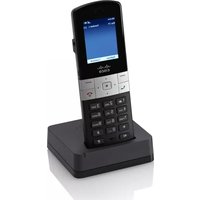
Marque : CISCO
Modèle : SPA 508G
Catégorie : Téléphone