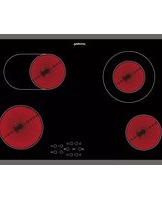
PCTAC K7042 IN - Cuisinière PRIVILEG - Notice d'utilisation et mode d'emploi gratuit
Retrouvez gratuitement la notice de l'appareil PCTAC K7042 IN PRIVILEG au format PDF.


| Type de produit | Cuisinière |
| Marque | Privileg |
| Modèle | PCTAC K7042 IN |
| Type de cuisson | Mixte (gaz + électrique) |
| Nombre de foyers | 4 (gaz) |
| Type d’allumage | Allumage intégré |
| Type de four | Four électrique à chaleur tournante |
| Capacité du four | 70 litres |
| Fonctions du four | Chaleur tournante, gril, chaleur classique |
| Alimentation | 220-240 V / 50-60 Hz / 3,5 kW |
| Dimensions (L x P x H) | 60 x 60 x 85 cm |
| Poids net | 48 kg |
| Matériau de la surface | Émail vitrifié |
| Entretien et nettoyage | Nettoyage manuel des brûleurs et du four avec produits non abrasifs |
| Sécurité | Dispositif de sécurité gaz (thermocouple) sur chaque brûleur |
| Pièces détachées | Grilles, brûleurs, vitre de four disponibles |
| Indice de réparabilité | 7,5 / 10 |
| Classe énergétique du four | A |
| Température maximale du four | 250 °C |
| Couleur | Inox |
FOIRE AUX QUESTIONS - PCTAC K7042 IN PRIVILEG
Questions des utilisateurs sur PCTAC K7042 IN PRIVILEG
0 question sur cet appareil. Repondez a celles que vous connaissez ou posez la votre.
Poser une nouvelle question sur cet appareil
Téléchargez la notice de votre Cuisinière au format PDF gratuitement ! Retrouvez votre notice PCTAC K7042 IN - PRIVILEG et reprennez votre appareil électronique en main. Sur cette page sont publiés tous les documents nécessaires à l'utilisation de votre appareil PCTAC K7042 IN de la marque PRIVILEG.
MODE D'EMPLOI PCTAC K7042 IN PRIVILEG
These instructions shall also be available on website: docs.whirlpool.eu

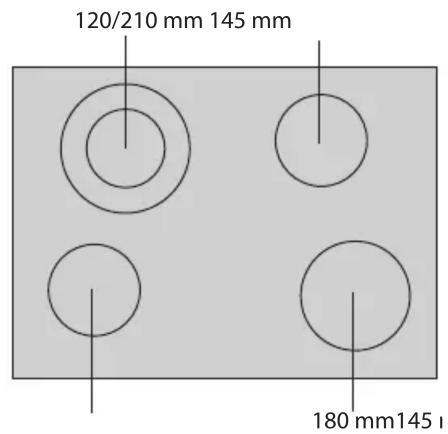
DIMENSIONS OF THE HOB (mm)

![graph TD B[" B "] --> C[" "] B --> D[" "] B --> E[" "] B --> F[" "] B --> G[" "] B --> H[" "] B --> I[" "] B --> J[" "] B --> K[" "] B --> L[" "] B --> M[" "] B --> N[" "] B --> O[" "] B --> P[" "] B --> Q[" "] B --> R[" "] B --> S[" "] B --> T[" "] B --> U[" "] B --> V[" "] B --> W[" "] B --> X[" "…](/content/2026/06/1315907/images/e2111edd1c81edefbb177928c06bf494a07360dfbbe47749d840c6d5d6d37cfe.jpg)
| A On/Off D Key lock | |||
| B Cooking zone and timer selection | F Multiple zone Activation/Deactivation (if present) | ||
| C-E Heat setting increase and decrease | |||
Upon first installation, the control panel performs a functional test for about 1 second, after which it automatically switches to the "Key lock" function.

To deactivate the function, press and hold button “D”; an acoustic signal will sound and the corresponding led will turn off.
NOTE: If a reset occurs, repeat the procedure described above.
To switch the hob on, keep button “A” pressed for approx. 2 seconds. The 4 cooking zone displays show “0”. If within 20 seconds none of the cooking zones is activated, the hob switches off automatically as a safety precaution.
Press one of the buttons “B” corresponding to the cooking zone you intend to use.

Select the heat setting required with buttons “E” or “C”. The other selectable cooking settings go from 1 to 9. Press buttons +/- at the same time to cancel all settings.
Pressing button “+” when level 9 is reached, the “Booster” function is activated and the letter “A” appears on the display.
IMPORTANT: the control is deactivated 10 seconds after the heat setting has been selected. To change the heat setting, first press the selection button "B" again, then proceed to change the setting, using buttons "E" or "C".

MULTIPLE ZONE (if present): After selecting the desired zone and setting the level (as described in the previous section) press “F”: an indicator above the button turns on, activating the additional zone. The multiple zone can only be used if:
1) The cooking zone is provided with multiple zone;
2) The power level selected is greater than 0.
To deactivate the multiple zone, press button “B” of the desired zone, then press “F” again.
To set the Timer function, select the desired cooking zone and power setting then press the cooking zone key again and a luminous dot will appear on the display of the timer-controlled cooking zone.

The indication "00" blinks on the 2 displays. Press buttons "C" or "E" to set the time from 1 to 99.
IMPORTANT: after 10 seconds the timer displays will show the power setting of the other cooking zones. To view the remaining cooking time, press the timer-controlled cooking zone key twice.

The KEY LOCK function is switched on by holding down button “D” until a dot lights up above the function button. The Key lock function locks all the hob’s other functions, with the exception of the On/Off button “A”. The function remains on even after the hob is switched off and on again and can be deactivated by pressing button “D” again until the dot above the function button goes off.
RESIDUAL HEAT INDICATOR
H When the cooking zone is switched off, the residual heat indicator “H” remains on or flashes alternating with “0” until the temperature of the hob returns within safety levels.
IMPORTANT: The hob's safety features include an automatic switching off function. Prolonged use of the same heat setting triggers automatic switch-off of the cooking zone (for example, after around 1 hour at maximum heat setting, the cooking zone switches off).
BE CAREFUL: To avoid permanently damaging the glass-ceramic top, do not use:
- Pots with bottoms that are not perfectly flat.
- Metal pots with enamelled bottom.
Any aesthetic defects (scratches, surface marks, etc.) must be reported immediately upon installation.


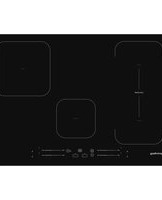
Marque : PRIVILEG
Modèle : PCTAC K7042 IN
Catégorie : Cuisinière