
T4.5 - Tapis de course Reebok - Notice d'utilisation et mode d'emploi gratuit
Retrouvez gratuitement la notice de l'appareil T4.5 Reebok au format PDF.


| Type de produit | Tapis de course |
| Marque | Reebok |
| Modèle | T4.5 |
| Dimensions (L x l x H) | 190 x 85 x 145 cm |
| Poids | 75 kg |
| Poids maximum d'utilisation | 120 kg |
| Alimentation | 220-240 V, 50-60 Hz |
| Puissance moteur | 2,5 CV en continu |
| Vitesse réglable | 0,8 à 16 km/h |
| Inclinaison réglable | 0 à 12 % |
| Surface de course (L x l) | 140 x 45 cm |
| Écran d'affichage | Écran LCD avec rétroéclairage |
| Programmes d'entraînement | 12 programmes préréglés + manuel |
| Fonctions de mesure | Temps, distance, calories, vitesse, fréquence cardiaque |
| Capteur cardiaque | Poignées métalliques avec capteurs |
| Système d'amortissement | Amortissement à 6 points |
| Entretien et nettoyage | Nettoyage avec un chiffon humide et un détergent doux. Lubrification du tapis tous les 3 mois. |
| Sécurité | Clé de sécurité magnétique, arrêt d'urgence |
| Pièces détachées et réparabilité | Disponibles via le fabricant ou revendeur agréé. Garantie 2 ans. |
| Accessoires inclus | Clé de sécurité, manuel d'utilisation |
FOIRE AUX QUESTIONS - T4.5 Reebok
Questions des utilisateurs sur T4.5 Reebok
0 question sur cet appareil. Repondez a celles que vous connaissez ou posez la votre.
Poser une nouvelle question sur cet appareil
Téléchargez la notice de votre Tapis de course au format PDF gratuitement ! Retrouvez votre notice T4.5 - Reebok et reprennez votre appareil électronique en main. Sur cette page sont publiés tous les documents nécessaires à l'utilisation de votre appareil T4.5 de la marque Reebok.
MODE D'EMPLOI T4.5 Reebok
RFE International Ltd
The Performance Centre
Maidstone Road, Kingston
Milton Keynes MK10 0BD
+44 (0) 1908 793 020
info@rfeinternational.com
Customer Support
0800 440 2459
techsupport@feinternational.com
reebokfitness.info
Reebok

Welcome from Reebok Fitness
Thank you for choosing Reebok. Before you get started, please read these instructions carefully. If you experience any difficulties, our support team will be happy to help – or check out our website at reebokfitness.info
Important note:
Consult your doctor before starting any exercise programme. If you feel any sickness, chest pain, dizziness or breathlessness during your training, stop exercising and consult your doctor immediately.
If you have any further queries please contact our customer support team on the details provided either at the foot of this page or on the back of the manual.

Customer Support
0800 440 2459
techsupport@feinternational.com
Reebok
Contents
Reebok T4.5 Treadmill
reebokfitness.info
Parts 02
Assembly....04
Precautions....08
Functions 10
Correct Use 11
Warm Up 12
Computer 13
Maintenance 23
Troubleshooting 24
Parts ID....26
Limited Warranty 32
Model name: Reebok T4.5 Treadmill
Serial number:

These details can be found on the underside of your product.
Checking The Parts
Before you begin, please check all parts are present and undamaged. If you are missing any parts, please call our Technical Support team on the number tge top of this page.
267×2
258 × 1
221 × 1
130×1


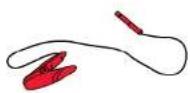
265 × 1

264 × 1

263×1

262×1

| Blister Pack | A x15MM | B x16MM | C x1 | |
| 837 x 4M10x58 | 126 x 6M8x15 |  | 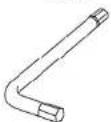 | 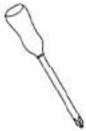 |
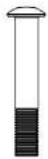 | [ST3X] | E x1 | Silicone Oil x1 | D x1 |
| 843 x 6M4x15mm |  |  |  | |
A × 1
5MM
B×1
6MM
C×1
E×1
Silicone Oil x1
D×1
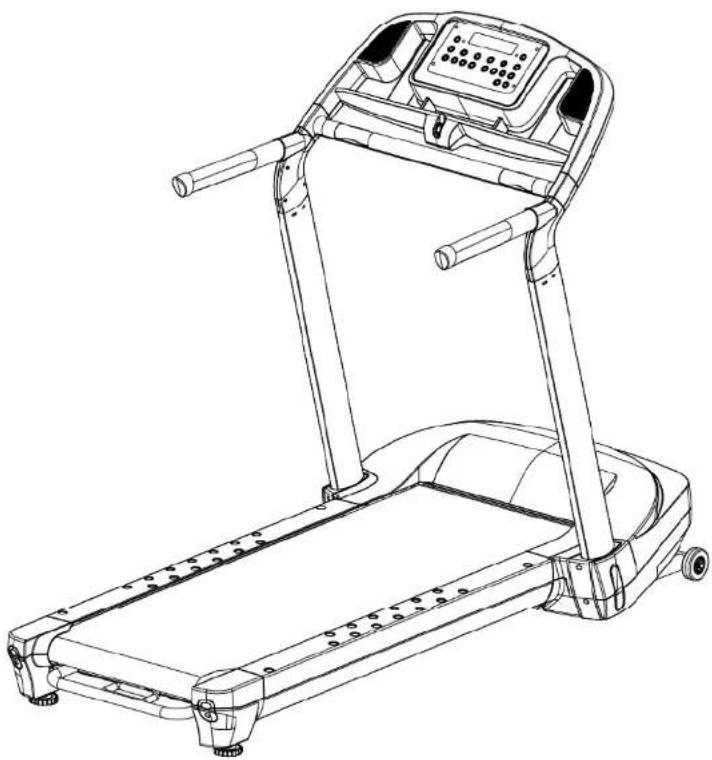
Assembly
Reebok T4.5 Treadmill
04
Customer Support 0800 440 2459
Reebok T4.5 Treadmill
05
reebokfitness.info
Uprights
- Remove the treadmill from the box.
- Lift the uprights to the unfolded position and secure using 4 x 837 bolts.
- Cover these bolts with 2 x 221 caps
You will require:


Handlebars
- Push one handlebar into the left hand side of the console support frame.
- Secure the handlebar using 3 x 126 bolts.
- Repeat for the right hand handlebar.
You will require:

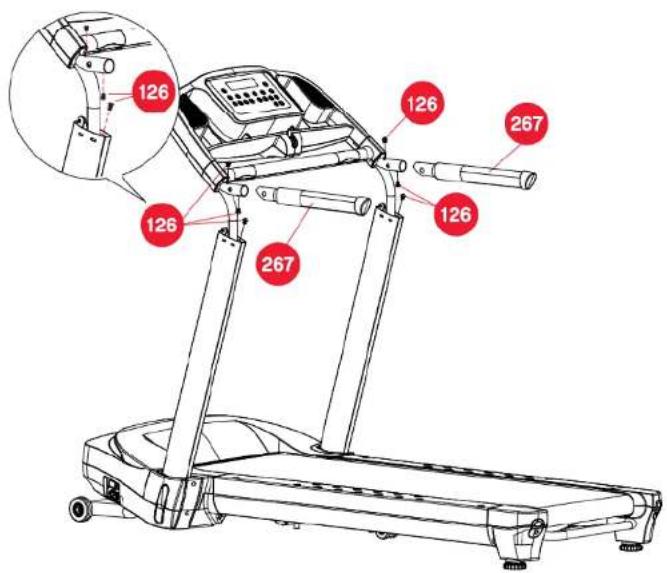
Handlebar Covers
- Clip the handlebar covers over the handlebars and secure using 6 x 843 screws.
You will require:

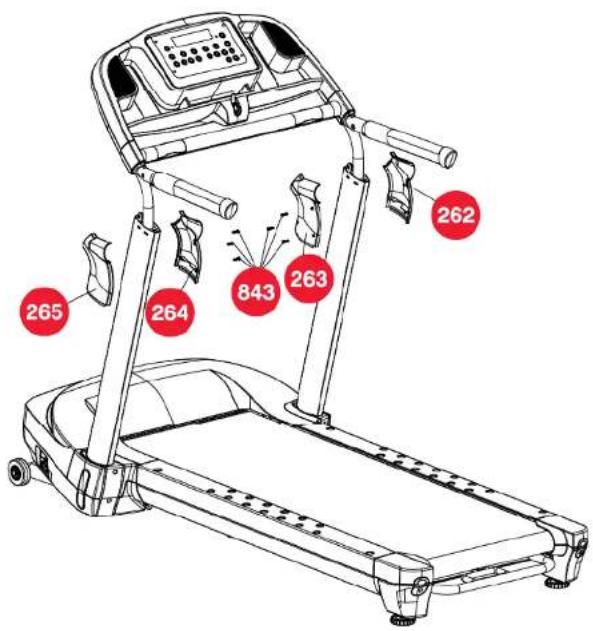
Adjusting The Feet
- If your treadmill is slightly unbalanced due to uneven floor surfaces, you can adjust the feet to prevent any wobbling. This is done by screwing the feet in or out until the treadmill sits evenly on the floor.

WARNING!

Before using your treadmill, you must set a user ID. Please refer to the computer section for guidance on how to do this. We advise you run your treadmill for ten minutes prior to use.
Precautions
Reebok T4.5 Treadmill
08
Customer Support 0800 440 2459
These instructions are intended to provide important information for use and maintenance of the equipment as well as for your personal safety. Keep this user manual in a safe place for future reference.
WARNING!
This product is made for home use only and tested up to a maximum body weight of 130 kilograms.
RFE International Ltd. assumes no responsibility for personal injury or property damage sustained by or through the use of this equipment. It is the responsibility of the owner to ensure that all users of this equipment are adequately informed of all warnings and precautions.
SCOPE
• Maximum user weight of 130kg.
- This product is designed for physical exercise by adults. This product is not suitable for use by persons under 14 years of age.
• Never allow more than one person on the equipment at a time.
ENVIRONMENT
- Ensure that those present are aware of possible hazards e.g. moveable parts during training.
- Ensure that sufficient space is available to use the product.
- Please ensure that liquids or perspiration are wiped off the product.
- This product is designed to be used and stored indoors. Do not store the product outside, or in damp/ dusty environments.
- The product is made for home use only. Warranty and manufacturer's liability do not extend to any product or damage to the product caused by commercial use.
Reebok T4.5 Treadmill
09
reebokfitness.info
USER HEALTH
- Consult your doctor before starting any exercise programme to receive advice on the optimal training.
- Ensure the product is on a flat, level surface with at least 0.5m of clear area surrounding the product.
• incorrect/excessive training can cause health injuries. - If you feel sickness, chest pain, fits of dizziness or breathlessness during your training, immediately stop the training and consult your doctor.
PRODUCT PREPARATION
- Ensure that training only starts after correct assembly, adjustment and inspection of the product.
• Follow the steps of the assembly instructions carefully. - Only use suitable tools for assembly and ask for assistance if necessary.
• Only use original Reebok parts as delivered (see checklist).
SAFETY CHECKS (Before Every Use)
- Tighten all adjustable parts to prevent sudden movement while training.
• Tighten all nuts and bolts.
• Check that the tension knob is secure. - Ensure the product is on a flat, level surface.
• Do not use the product without shoes or with loose shoes. - Be aware of non-fixed or moving parts whilst mounting or dismounting the product.
- Do not wear loose or poorly fitting clothing that may become trapped in the product.
Functions
Reebok T4.5 Treadmill
10
Customer Support 0800 440 2459
Correct Use
Reebok T4.5 Treadmill
11
reebokfitness.info
Fold
- Lift the bar at the back of the treadmill (behind the rear roller).
- Lift the treadmill deck until you hear a click.
The click will confirm the treadmill deck is locked into its folded position.

Unfold
- Ensure the castor wheel lock pin is located as per diagram.
- Push the lever on the underside of the treadmill to lower the deck.
The soft drop mechanism will assist you with lowering the deck.
WARNING! ▲ Stand to one side whilst the treadmill is lowered.
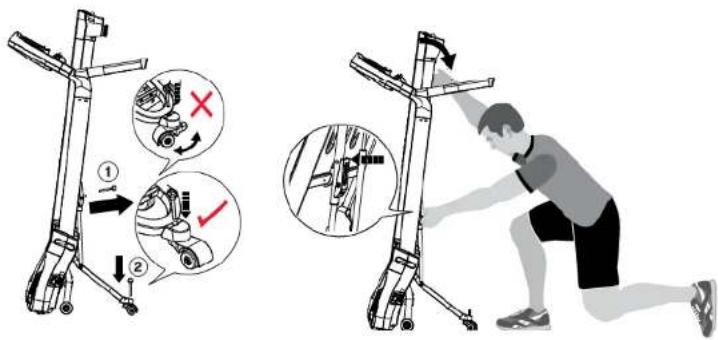
RFE4489_RE013431_T4.5 TREADMILLUM_FINAL2.indd 10-11
Transport
- Fold up the treadmill as per the instructions.
- Remove the lock pin in the castor wheel.
- Push the lock pin on the underside of the deck in to allow the treadmill to lower a little
WARNING! ⚠️ Stand Stand clear of the lowering deck.

- Pull the treadmill to desired location.
- Re fold the treadmill ensuring both lock pins (underside of deck and castor) are relocated.
Correct Use
We recommend you use your treadmill in the following way:

28/06/2010 11:58
Warm Up
Reebok T4.5 Treadmill
12
Customer Support 0800 440 2459
Warming Up
It is important to warm up before exercising to prepare your body for the workout it is about to do. The first phase of a warm up is to increase your heart rate and get blood pumping around your body faster. Choose an activity which will warm up the same muscles you are going to use during your workout.
- 5-10 minutes heart rate raising activity
2 Static stretching
- Workout
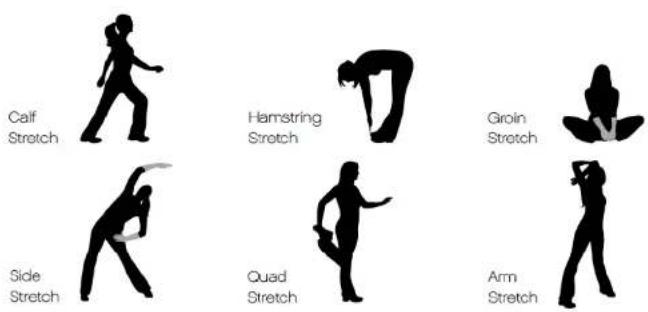
Stretches
Hold each stretch for about 30 seconds. Stretching should not hurt; only stretch your muscles to as far as is comfortable. If you have a tight or previously injured muscle stretch the affected muscle group within the warm up. Do not perform any sudden movements while warming up.
Cool Down
Following your workout you should carry out a cool down. This should gradually bring your heart rate back to a resting level. To do a cool down perform an activity of your choice at a low intensity e.g. a steady 5 minute jog. This should be followed by static stretches, similar to those in the warm up. Again, hold each stretch for 30 seconds.
Computer
Reebok T4.5 Treadmill
13
reebokfitness.info
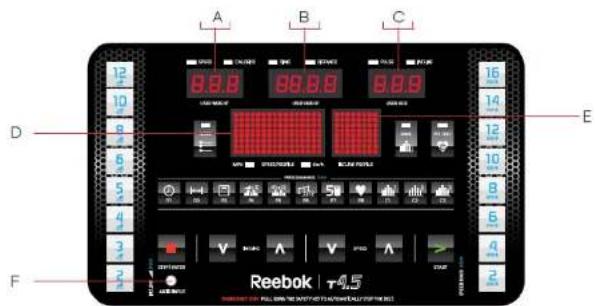


A - Speed / Calories / User weight
B - Time / distance / User height
C - Pulse / Incline / User Age
D - Speed profile
E - Incline Profile
Γ - Audio Input
Computer
Reebok T4.5 Treadmill
14
Customer Support 0800 440 2459

Safety Key
The safety key must be inserted into the front of the console in order to operate the treadmill. Always insert the safety key and attach the clip to your clothing waistband before beginning your workout. If you should encounter problems and need to stop the treadmill quickly, simply pull on the cord (removing the safety key from the console). To continue your workout turn the power switch to off, set the speed to stop and then reinsert the safety key into the console.
WARNING!
During any programme, you can override the speed by pressing SPEED V and A buttons. You can also override the incline using the INCLINE V and A buttons. If you encounter problems and need to stop the treadmill quickly, simply pull the safety key or press the ■ button.
reebokfitness.info
Reebok T4.5 Treadmill
Miles/KM Conversion
To convert from miles to km or vice versa, press and > at the same time. The console will beep and show the current setting "ML" or "KM". Press > to change this setting, and press the button to confirm your selection. The console will beep to confirm the settings have been saved. Now, press to return to the main screen
Sleep Mode
If the treadmill is left idle for 3 minutes without receiving any input, the console will enter Sleep Mode. To exit Sleep Mode, press any button.
To Set-Up User Information & Assign Yourself A User ID:
The first time you turn your treadmill on, you will have the option to set up a user profile.
- With UI flashing, use the SPEED V and A buttons to choose your ID (between 1 and 9).
- Press the ■ button to select your ID number.
- You now need to set your age. The default age is 35. Press the SPEED V and A buttons to adjust this age, and confirm your choice using the ■ button.
- The weight value needs to be set next. The default setting is 150lb/68Kg. Press SPEED V and A buttons to adjust this value. Pressing ■ will confirm your choice.
- Now set the user height. The default for this is 53" or 160 cm. Again, use the SPEED V and A buttons to adjust this value, and confirm using the ■ button.
Quick Start
To exercise without any preset programme:
Insert the safety key into the front of the console, and attach to the users waistband. Turn the power on. Press > and the treadmill belt will begin to move.
Computer
Reebok T4.5 Treadmill
16
Customer Support 0800 440 2459
Reebok T4.5 Treadmill
17
reebokfitness.info
Preset Programmes
Your T45 treadmill has 9 preset programmes:
Target Time Programme (P1)
A programme where you can workout for a set amount of time.
Target Distance Programme (P2)
A programme where you can workout for a set distance.
Target Calories Programme (P3)
A programme where you can workout until you have burnt a set number of calories.
Incline Interval Programme (P4)
A programme, with 12 level options, where you can perform an interval based workout over various incline levels.
Speed Interval Programme (P5)
A programme, with 12 level options, where you can perform an interval based workout over various speed levels.
Weight loss Programme(P6)
A programme with 12 level options, intended for a medium intensity workout over varied inclines and speeds.
5K/3 Mile Programme (P7)
A programme over either 3 miles or 5Km.
Heart Rate Control Programme (P8)
A programme where the treadmill automatically adjusts the incline and speed of your workout according to your heart rate.
Custom Programme (P9)
A programme where you can design your own workout. You can setup changes in speed and incline to happen every minute.
Target Time Programme (P1)

1 Press.

-
Set your target time using SPEED V and A buttons.
-
Press > to begin your workout.
The time will count down at an initial speed of 3.2Km/h or 2.0mph
Target Distance Programme (P2)

1 Press.

-
Set your target time using SPEED V and A buttons.
-
Press > to begin your workout. The program will count down from your target distance.
Calories Programme (P3)

- Press

- Set your target calories using SPEED V and A buttons (0 calories will be flashing on the screen). Press ■ to confirm
- Press > to begin your workout This programme will count down from your target calories, starting with an initial running speed of 3.2 Km/h or 2.0mph.
Incline Interval Programme (P4)
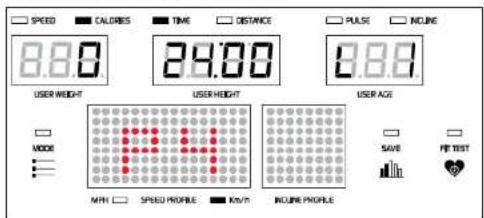
- Press.

- Set your level using SPEED V and A buttons (L1 will be flashing). Press ■ to confirm.
- Set the time of your workout (the default is 24.00 minutes, and will be flashing on the screen). Adjust this value using the SPEED V and A buttons and confirm your choice using the ■ button. The time will adjust in 4 minute intervals
4 Press > to begin your workout
Speed Interval Programme (P5)

- Press.

- Set your level using SPEED V and A buttons (L1 will be flashing). Press ■ to confirm.
- Set the time of your workout (the default is 24.00 minutes, and will be flashing on the screen). Adjust this value using the SPEED V and A buttons and confirm your choice using the ■ button. The time will adjust in 4 minute intervals.
- Press > to begin your workout.
Weight Loss Programme (P6)

- Press

- Set your level using SPEED V and A buttons and confirm your choice by pressing the ■ button.
- Now the screen will be flashing "30.00" minutes for the default workout time. You can adjust this using the SPEED V and A buttons and confirm your choice using the ■ button. The time will adjust in 5 minute intervals
- Press > to begin your workout.
5K Programme (P7)
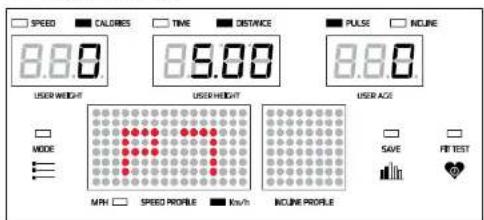
- Press.

-
The preset distance of 5Km or 3 miles will be displayed.
-
Press > to begin your workout.
The program will start with an initial speed of 3.2Km/h or 2.0 mph.
Heart Rate Control Programme (P8)

- Press

- The screen will show a calculated target heart rate based on your age. You can adjust this value using SPEED V and A buttons. Press the ■ button to confirm your choice.

To calculate your target heart rate use the following rule:
Deduct your age from 220 e.g. for a 35 year old person, their maximum heart rate (MHR) is 220 - 35 = 185 beats per minute
- Decide the percentage of your MHR you want to work at e.g. 85%
As a guide:
50-70% MHR = Health/Fat Burning
70-80% MHR = Fitness/Bodyshaping
80-90% MHR = High Intensity Performance
- Multiply your maximum heart rate by the percentage value e.g. 185 x 0,85 - 157bpm
-
Now enter your workout time. The default of 60.00 minutes will be displayed. You can adjust this using the SPEED V and A buttons. Again, confirm your choice using the ■ button. The time will adjust in 3 minute intervals.
-
Press > to begin your 3 minute warm up

During the warm up the only button that will function is the ■ button to pause the workout or > to re-start. The warm up will continue until your heart rate reaches your target heart rate zone, up to a maximum of 9 minutes. During this time the incline and speed will be adjusted at 30 second intervals to try and get you warmed up to your target heart rate. If, after 9 minutes you have not reached your target heart rate "FAIL" will show on the screen and you should review the level setting you selected
If you see a "P" fashing in the pulse window, the treadmill is unable to detect your pulse. The computer checks your pulse every 30 seconds and without a reading is unable to alter the speed to ensure you continue working within your target heart rate zone. If the computer fails to detect a heart rate for more than 30 seconds, incline and speed will fall to L0 and 3.2Km/h or 5mph.
If you exceed your target heart rate for over 3 minutes the heart rate will flash and the treadmill will enter a cool down phase.
Once the warm up is completed, and your heart rate is at your target level, you will begin the Heart Rate Control Programme. The treadmill will continue to monitor your pulse every 30 seconds. The treadmill will adjust the incline level of your workout to try and keep you working at your target heart rate (between 0 and 15%). If you are running at 15% incline on a given speed, and still not working at your desired heart rate then the speed will increase by 0.5mph or 0.8 km/h at 30 second intervals until you reach your target zone.
Computer
Reebok T4.5 Treadmill
22
Customer Support 0800 440 2459
Maintenance
Reebok T4.5 Treadmill
23
reebokfitness.info
Custom Programme (C1, C2, C3)

- Press.

- C1 will display on the screen, if you press 📄 C1 will display on the screen
- You can now start to create your programme. For every minute (up to a maximum of 60 minutes) you can enter a specific incline and speed level which you wish to work at
- At the end of the programme there will be an automatic cool down period.
To change the time of an already saved programme, press > before the time reaches zero. Pressing > again will switch the setting between extended and reduced mode. Extended mode enables the user to continue working out, up to a maximum of 60.00 minutes. During this time you can adjust the speed and incline settings as normal. Entering reduced mode followed by pushing the button, will end the workout and delete all subsequent speed and incline settings saved within that programme
You will then be asked if the programme should be saved for future use. Press the ■ button to save or BACK button to continue without saving.
Proper maintenance is very important to ensure your equipment is always in top working condition. Improper maintenance could cause damage or shorten the life of your equipment as well as exceeding the warranty coverage.
- Ensure the running belt lubrication is checked and carried out (when required). This is likely to be every 4 weeks of use, or 20 hours.
- Check periodically (4 weeks) that the running belt is centered and has not moved to one side. In this instance stop the machine and carry out the belt adjustment (directions in the troubleshooting section).
• To ensure all components of the machine (including the frame) are in a good condition please ensure any perspiration or dust is wiped clean on a regular basis. This can be done by using a soft, damp cloth. Please don't use detergents as this may affect the colouring or operation of the components.
• To ensure correct operation the machine must be stored in a dry, indoor environment at all times. - Inspect and tighten all parts of the machine regularly. Any worn parts must be replaced immediately. Pay particular attention to nuts, bolts, screws and washers.
Troubleshooting
Reebok T4.5 Treadmill
24
Customer Support 0800 440 2459
Q How do I lubricate my treadmill deck?
A At the back of the running deck / machine (opposite end to the computer) on each side there are two Allen head bolts. Turn these bolts anticlockwise five full turns to release the belt tension. Lift the edge of the treadmill running belt approximately 30 to 40cm from the front roller. Apply 10ml of silicone oil under the running belt, from front to back and across the width of the running deck. Tighten the bolts five turns, clockwise, to add tension to the belt.
WARNING!
Do not over lubricate the running belt, as this will cause the running belt to slip. After application power your treadmill up to 6mph or 10 Km/h for 5 to 10 minutes. Wipe any excess oil away. If necessary, repeat for a further 10 minutes.
Q How often should I lubricate my treadmill deck?
A The running belt has been adjusted properly by the factory. However transportation, uneven flooring or other unpredicted reasons could cause the belt to shift off centre resulting in the belt rubbing with the plastic side rail or end caps and possibly causing damage. To adjust the belt back to its correct position, use the tension bolts at the back of the deck in the following way:
-
If your belt tends to move to the right, rotate the right tension bolt clockwise. We recommend adjustments of 1 circle at a time, and follow with a test. If your belt continues to move to the right, simply adjust the left belt tension bolt by turning it 1 circle counter-clockwise, follow with a test.
-
If your belt tends to move to the left, rotate the left tension bolt clockwise 1 circle at a time, and follow with a test. If the belt continues to move to the left, simply adjust the right tension bolt counterclockwise.
-
If your belt appears to be loose, simply tighten both bolts evenly 1 circle.
-
If it appears tight, simply loosen both bolts evenly 1 circle.
WARNING!
Run your Treadmill for 5 - 10 minutes after adjusting the belt
Q What is the safety key for and where does it go?
A The safety key is a red plastic key that should be inserted into the front of the computer when using the treadmill, this is an automatic cut off so if you have any problems or get into any difficulties you can pull the key out to stop the machine. The treadmill will not work without this key being inserted.
Reebok T4.5 Treadmill
25
reebokfitness.info
Q I have just ordered my treadmill and there are some parts missing can you help?
A Yes, if you are missing parts from your new machine these can be ordered on our helpline 0800 440 2459. When you call we will require your full address, the part numbers (you require) from the user manual that and your machine serial number.
Q How long is my warranty on my treadmill?
A All Reebok treadmills come with a manufacturers warranty this varies on each machine, this should be printed in your manual, if you have any questions regarding your warranty please don't hesitate to contact our helpline 0800 440 2459.
Q My treadmill is out of the warranty can you still help me?
A Yes we can still help, we have a large network of engineers that cover 98% of the British Isles and can provide replacement parts. For a quote on parts or engineer call out please contact our helpline on 0800 440 2459.
Q Can I keep my equipment in my garage?
A We advise to keep the equipment indoors, away from moisture and dust. Do not store the product outside, or in damp or dusty environments.
Q Is there a maximum user weight for my treadmill?
A There is a maximum user weight with all our treadmills this varies on each machine, this should be printed in your manual, if you have any questions regarding the user weight, please don't hesitate to contact our helpline 0800 440 2459.
Q Why is there a black dust starting to appear under my treadmill?
A Occasionally a black dust can start to appear under your treadmill this is due to normal wear and tear. You can remove the dust easily with a vacuum cleaner. If you want to keep the dust away from the floor we would recommend for you to place your treadmill on a protective mat.
Parts ID
Reebok T4.5 Treadmill
26
Customer Support 0800 440 2459
Reebok T4.5 Treadmill
27
reebokfitness.info
Diagram 1
T45 363 Motor Hood x 1
T45-378 Motor Cover - Lower x 1
T45-372 Motor cover Protect Cushion - Front x 1
T45-371 Front motor Hood decorate Cover - Left x 1
T45-348 Front motor Hood Decorate Cover - Right x 1
T45-369 Incline Motor x 1
T45-368 DC Motor x 1
T45-427 Driving Belt x 1
T45-366 230X20xT30 Tension Bearing Fix Plate x 1
T45-310 48X415X44xT30 Tension Bearing Fix Plate Base x 1
T45-558 6004 Bearing x 2
T45-327 OD23X39 Axle x 1
T45-313 Cushion x 2
T45-362 Rear Elevation Support Tube - Left x 1
T45-361 Rear Elevation Support Tube - Right x 1
T45-324 OD3.4xL34 Plastic Bushing x 2
T45-317 20mmx17mmx99.5mm Sprng x 2
T45-360 R12.8X100 T25 Rear Elevation Support Tube Fix Plate x 2
T45-359 100.5x30x33 Rear Elevation Support Tube Fix Holder x 2
T45-320 Rear Transport Wheel Holder x 1
T45-322 ID8X50X18X20.5 Rear Transport Wheel x 2
T45-358 8X57 lock Pin x 2
T45-367 Soft Drop Shock Holder x 1
T45-356 Soft Drop Shock x 2
T45-355 Soft Drop Locker x 1
T45-354 2215x282x22 Soft Drop Shock Holder Nylon Cover x 1
T45-334 Spring x 1
T45-328 Rear Transport Wheel Frame x 1
T45-329 Rear Transport Wheel Cover x I
T45-330 6900Z Bearing x 2
T45-331 Power Switch Board Plate x 1
T45-332 Power Switch 16A x 1
T45-333 Power Cord Plug x 1
T45-365 Electronic Protector 10A x 1
T45-335 Motor Control Board x 1
T45-336 Connecting Rate x 1
T45-337 Transformer x 1
T45-802 M4x15 Screw x 62
T45-541 M6x12 Screw x 4
T45-807 8X14x2 Spring Washer x 16
T45-220 6X10x2 Spring Washer x 2
T45-836 M20 C-Clip x 1
T45-834 M8x14 Allen Bolt x2
T45-373 8x17x1.5 Washer x 4
T45-338 M8 Nut x 10
145-814 85x205x2 Curve Washer x 4
T45-863 M8x38 Bolt x 4
T45-815 M10x38 Bolt x 2
T45-823 M10x35 Bolt x
145-817 M10x45 Bolt
T45-818 Max20 Bolt
T45-819 M25 Spring
T45-812 M10 Nut
T45-821 M10x67 Bolt
T45-824 M8x65 Bolt
T45-338 M8 Nut x 1
T45-424 M10 Spring x 1
T45-825 M8 Spring x 4
T45-833 85x17x1 Washer x2
T45-816 M42x11 Screw x 2
T45-828 M3x8 Screw x 2

Diagram 2
T45-147 Overlay x1
T45-145 Computer x 1
T45-138 Console Housing Decorate Cover - Left x 1
T45-135 Console Housing Decorate Cover - Right x 1
T45-132 Console Housing - Upper x 1
T45-131 Console Housing - Lower x 1
T45-130 Safety Key x 1
T45-109 Safety Key Base x 1
T45-111 73.94x52.45xT2.5 Safety Key Base Fix Plate x 1
T45-136 Loud Speaker x 2
T45-843 M4x19 Screw x 30
T45-802 M4x15 Screw x 62
T45-845 M4.2x15 Screw x 2
T45-839 M4x12 Screw x 4
T45 840 M3.6x16 Sorow x 4
T45-801 M3x16 Screw x 9

Diagram 3
T45-256 Console Support Frame x 1
T45-273 Upright - Left x 1
T45-239 Upright - Right x 1
T45-257 Hand Pulse Sensor Cover - Upper x 1
T45-251 Hand Pulse Sensor Cover - Lower x 1
T45-720 Hand Pulse Sensor Wire x 2
T45-267 Handebar x 2
T45-248 ID45xL328xT3.0 Foam Grip x 2
T45-235 Handlebar End Cap x 2
T45-265 Left Handlebar Cover - Outside x 1
T45-264 Left Handlebar Cover - Inside
T45-263 Right Handlebar Cover - Outside x 1
T45-262 Right Handlebar Cover - Inside x 1
T45-261 Left Side Motor Hood Decorate Cover x
T45-244 Right Side Motor Hood decorate over x 1
T45-243 Left Upright Lower Cover - Front x 1
T45-259 Left Upright Lower Cover - Rear x 1
T45-218 Right Upright Lower Cover - Front x 1
T45-242 Right Upright Lower Cover - Fear x 1
T45-258 Left Upright Fix Bolt Cover x 1
T45-221 Right Upright Fix Bolt Cover x 1
T45-231 ID25xOD31xOD38x13 Sleeve x 4
T45-843 M4x19 Screw x 30
T45-802 M3x16 Screw x 62
T45-126 M8x15 Allen Head Bolt x 10
T45-837 M10x67 Bolt x 4
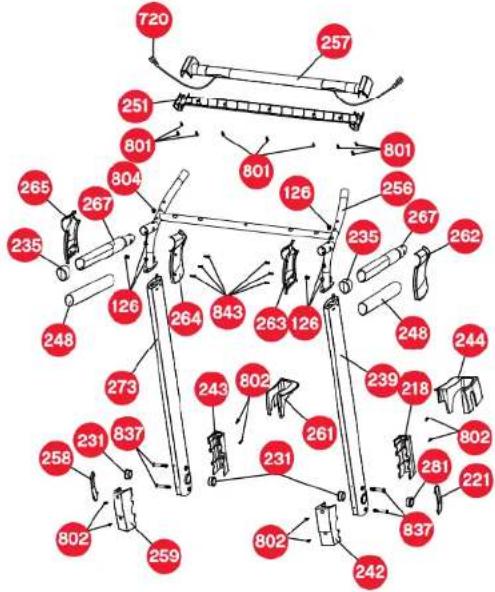
Diagram 4
T45-452 Left side rail 995mm (TR410) x 1
T45-450 Right side rail -995mm x 1
T45-448 Non slip cushion x 30
T45-459 Left Rear end cap -upper x 1
T45-458 Right Rear End cap - upper x 1
T45-406 Left Rear End cap - lower x 1
T45-456 Right Rear End cap - lower x 1
T45-455 Left Rear End Cap decorate cover x 1
T45-409 Right Rear End Cap decorate cover x 1
T45-469 T16XW500XL2770 running belt x 1
T45-470 M8X16-30X26 protector x 10
T45-471 Running deck x 1
T45-802 M4X15 Screw x 62
T45-807 8X14X2 Spring washer x 16
T45-338 MB Nut x 10
T45-864 M8x25 Screw x 8
![graph TD A["450"] --> B["448"] B --> C["448"] C --> D["452"] D --> E["448"] E --> F["459"] F --> G["802"] G --> H["455"] H --> I["406"] I --> J["409"] J --> K["864"] K --> L["470"] L --> M["807"] M --> N["338"] N --> O["471"] O --> P["470"] P --> Q["338"] Q --> R["864"] R --> S["469"] S --> T["456"]…](/content/2026/06/1315218/images/884ae3d22782b55317bc353d6f8fdcd69c956ae7993f1e9eba59160aa895edc3.jpg)
Diagram 5
| T45-562 | Main Frame x 1 | T45-518 | Main Frame Bottom Cover - Lower x 1 |
| T45-557 | Front Transport Wheel Frame x 1 | T45-520 | Main Frame Bottom Cover - Upper x 1 |
| T45-554 | OD76x251D16 Transport Wheel x 2 | T45-521 | 25mmx175mm Spring x 1 |
| T45-552 | OD58x553mm Front Roller x 1 | T45-802 | M4x15 Screw x 62 |
| T45-549 | 15x595mm Front Roller Shaft x 1 | T45-541 | M6x12 Screw x 4 |
| T45-546 | OD58x469mm Rear Roller x 1 | T45-373 | 8x17x15 Washer x 4 |
| T45-507 | 1496x6048 Rear roller Shaft x 1 | T45-812 | M10 Nut x 6 |
| T45-542 | Main Frame Cross Bar x 1 | T45-830 | 16x26x2 Washer x 2 |
| T45-538 | 15xL400x730 EVA Tube x 1 | T45-831 | M15 Spring x 2 |
| T45-535 | ∅6x80619-M6x50 Pole x 1 | T45-832 | M10x53 Allen bolt x 2 |
| T45-512 | M8X16-30X26 Protector x 1 | T45-544 | M6x10 Screw x 2 |
| T45-532 | 11X18x24 Bushing x 2 | T45-605 | M6x70 Allen bolt x 3 |
| T45-531 | Folding Tie Rod Bushing x 1 | T45-860 | 6.5x12.6x1.25 Washer x 3 |
| T45-530 | Folding Tie Rod Fix Holder x 1 | T45-865 | M10x40 - Screw x 2 |
| T45-515 | Folding Tie Rod Handle x 1 | T45-866 | 6.4x24x2 Washer x 1 |
| T45-525 | Rear Adjustment Cushion Holder x 2 | T45-847 | M6 Nut x 1 |
N.B. All given quantities are for the complete, assembled product.

Limited Warranty
Reebok T4.5 Treadmill
32
Customer Support 0800 440 2459
RFE International Ltd warrants products to be free from defective workmanship and materials, under normal use and service conditions, for the period of 2 years from the date of purchase. Details of these service conditions can be found within the product's user manual.
In order to validate warranty dates, a proof of purchase is required. This warranty only extends to the original purchaser and will only be covered in the country the machine was purchased.
RFE's obligation under this warranty is limited to replacing or repairing, at RFE's discretion, the product through one of its authorised service centres. All repairs for which warranty claims are made must be pre-authorised by RFE.
This warranty does not extend to any defect caused by abuse, misuse, additions, modifications or repairs not provided by an RFE authorised service centre.
Products used for commercial or rental purposes and/or used as store display models are not covered by this warranty. This product is designed for home use.
No other warranty beyond that specifically set forth above is authorised by RFE. RFE is not responsible or liable for indirect, special or consequential damages arising out of or in connection with the use or performance of the product or damages with respect to any economic loss, loss of property, loss of revenues or profits, loss of enjoyment or use, costs of removal, installation or other consequential damages of whatsoever nature.
We advise that your product is kept in a room with a constant environment; preventing your product from being exposed to extremes in temperature, heat, humidity and moisture. Guidance on the correct storage of equipment is contained within the product's user manual.
PLEASE RETAIN YOUR RECEIPT AS PROOF OF PURCHASE.
Your statutory rights remain unaffected.
Reecycle
Reebok products are recyclable. At the end of its useful life please dispose of this Reebok product correctly and safely at a local refuse site.


RoHS
RFE4489_RE013431_T4.5 TREADMILLUM_FINAL2.indd 32-33
Performance
range

28/06/2010 11:59


- WELCOME FROM REEBOK FITNESS
- IMPORTANT NOTE
- CONTENTS
- CHECKING THE PARTS
- ASSEMBLY
- UPRIGHTS
- HANDLEBARS
- HANDLEBAR COVERS
- ADJUSTING THE FEET
- WARNING
- PRECAUTIONS
- 08
- SCOPE
- ENVIRONMENT
- 09
- USER HEALTH
- PRODUCT PREPARATION
- SAFETY CHECKS (BEFORE EVERY USE)
- FUNCTIONS
- CORRECT USE
- FOLD
- UNFOLD
- TRANSPORT
- WARM UP
- WARMING UP
- STRETCHES
- COOL DOWN
- COMPUTER
- SAFETY KEY
- MILES/KM CONVERSION
- SLEEP MODE
- TO SET-UP USER INFORMATION & ASSIGN YOURSELF A USER ID
- QUICK START
- PRESET PROGRAMMES
- TARGET TIME PROGRAMME (P1)
- TARGET DISTANCE PROGRAMME (P2)
- TARGET CALORIES PROGRAMME (P3)
- INCLINE INTERVAL PROGRAMME (P4)
- SPEED INTERVAL PROGRAMME (P5)
- WEIGHT LOSS PROGRAMME(P6)
- 5K/3 MILE PROGRAMME (P7)
- HEART RATE CONTROL PROGRAMME (P8)
- CUSTOM PROGRAMME (P9)
- 22
- MAINTENANCE
- 23
- TROUBLESHOOTING
- Q HOW DO I LUBRICATE MY TREADMILL DECK
- Q HOW OFTEN SHOULD I LUBRICATE MY TREADMILL DECK
- Q WHAT IS THE SAFETY KEY FOR AND WHERE DOES IT GO
- Q I HAVE JUST ORDERED MY TREADMILL AND THERE ARE SOME PARTS MISSING CAN YOU HELP
- Q HOW LONG IS MY WARRANTY ON MY TREADMILL
- Q MY TREADMILL IS OUT OF THE WARRANTY CAN YOU STILL HELP ME
- Q CAN I KEEP MY EQUIPMENT IN MY GARAGE
- Q IS THERE A MAXIMUM USER WEIGHT FOR MY TREADMILL
- Q WHY IS THERE A BLACK DUST STARTING TO APPEAR UNDER MY TREADMILL
- PARTS ID
- 26
- 27
- DIAGRAM 1
- DIAGRAM 2
- DIAGRAM 3
- DIAGRAM 4
- DIAGRAM 5
- LIMITED WARRANTY
- REECYCLE
- PERFORMANCE
- RANGE
Marque : Reebok
Modèle : T4.5
Catégorie : Tapis de course