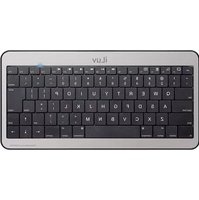
IBTKB20 - Clavier ILUV - Notice d'utilisation et mode d'emploi gratuit
Retrouvez gratuitement la notice de l'appareil IBTKB20 ILUV au format PDF.


| Type de produit | Clavier Bluetooth |
| Marque | iLuv |
| Modèle | IBTKB20 |
| Connexion | Bluetooth 4.0 |
| Portée | 10 mètres |
| Batterie | Lithium-ion rechargeable, 300 mAh |
| Autonomie | 30 heures |
| Temps de charge | 2 heures |
| Dimensions | 280 x 120 x 15 mm |
| Poids | 400 g |
| Nombre de touches | 78 |
| Compatibilité | Windows, Mac, Android, iOS |
| Matériau | Plastique ABS |
| Couleur | Noir |
| Fonctions spéciales | Touches multimédia, veille automatique |
| Entretien et nettoyage | Nettoyer avec un chiffon doux et sec, éviter les liquides |
| Sécurité | Ne pas exposer à l'eau, ne pas démonter |
| Pièces détachées et réparabilité | Pièces détachées disponibles sur demande |
| Informations générales | Utilisation intérieure uniquement, température 0-40°C |
FOIRE AUX QUESTIONS - IBTKB20 ILUV
Questions des utilisateurs sur IBTKB20 ILUV
0 question sur cet appareil. Repondez a celles que vous connaissez ou posez la votre.
Poser une nouvelle question sur cet appareil
Téléchargez la notice de votre Clavier au format PDF gratuitement ! Retrouvez votre notice IBTKB20 - ILUV et reprennez votre appareil électronique en main. Sur cette page sont publiés tous les documents nécessaires à l'utilisation de votre appareil IBTKB20 de la marque ILUV.
MODE D'EMPLOI IBTKB20 ILUV
Designed by iLuv in New York
Bluetooth Keyboard for iPad / iPad 2
Pairing Instructions
iBTKB20
Welcome.
iLuv®
Innovative Lifestyle Unquestionable Value®
CONTENTS
Bluetooth Keyboard for iPad / iPad 2 | iBTKB20

CONTROLS / FEATURES 3

PAIRING 4.5
WARRANTY 6
2

CONTROLS / FEATURES
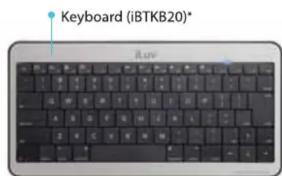
*Some keys (Home, End, etc.) are Mac compatible and do not work with iPad.
3
NOTE : Insert 2 "AAA" Batteries (Not Included)


PAIRING
1
Go to Settings on iPad

2

3
Switch ON | Push CONNECT button

ON/OFF CONNECT (Pair)
4

4

PAIRING
5
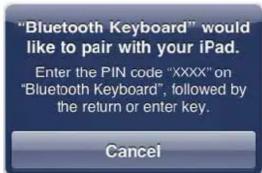
"XXXX": iPad will prompt and provide PIN code. Type PIN code on keyboard and press return.
6
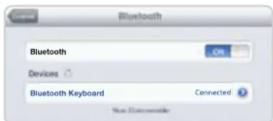
IMPORTANT
When keyboard is turned off, connection with paired iPad must be re-established when powering back on. Switch to ON and press any key twice to reconnect.
press Command + Space.
NOTE: To change language,
WARRANTY
ONE YEAR LIMITED WARRANTY | UNE GARANTIE LIMITEE D'AN GARANTIA LIMITADA DE UM ANO | GARANTÍA LIMITADA DE UM ANO EINEM JAHR EINGESCHRÄNKTE GARANTIE | GARANZIA LIMITATA UN ANNO 1년 제한 보증 | 壹年有限保証 | 一年有限保証 1年 制限保証 | 1JAAR VOOR BEPERKTE GARANTIE
EUROPEAN UNION
TWO YEAR LIMITED WARRANTY | GARANTIE LIMITEE DE DEUX ANS GARANTIA LIMITADA DE DOIS | ANOSGARANTÍA LIMITADA 2 ANOS DREI JAHREN EINGESCHRÄNKTE GARANTIE | ARANZIA LIMITATA DUE ANNI 2년 제한 보증 | 两年有限保证 2年 制限保證 | 2 JAAR VOOR BEPERKTE GARANTIE
iLuv®, Innovative Lifestyle Unquestionable Value® and GreeNology® trademarks are the exclusive properties of jWIN Electronics Corp. and are registered with the U.S. Patent and Trademark Office, and may be registered or pending registration in other countries. All other iLuv® trademarks, service marks, and logos may be registered or pending registration in the U.S. or in other countries. iPad is a trademark of Apple Inc. registered in the U.S. and other countries. All other trademarks or registered trademarks are the property of their respective owners.
© 2011 iLuv Creative Technology. All rights reserved. No portion of this printed material or product enclosed herewith including design, shape or graphics, may be reproduced or transmitted in any form by any means, electronic or mechanical, including photocopying, recording or use of an information storage and retrieval system or otherwise without the expressed written consent of iLuv Creative Technology. Any unauthorized distribution or reproduction of this printed material or product, or any portion thereof, will be prosecuted to the fullest possible extent of the law.
Printed in China
5
6
Marque : ILUV
Modèle : IBTKB20
Catégorie : Clavier