
091FL RF - Thermostat Salus - Notice d'utilisation et mode d'emploi gratuit
Retrouvez gratuitement la notice de l'appareil 091FL RF Salus au format PDF.


| Type de produit | Thermostat RF programmable |
| Marque | Salus |
| Modèle | 091FL RF |
| Catégorie | Thermostat |
| Dimensions (H x L x P) | 86 x 86 x 30 mm |
| Poids | 150 g |
| Alimentation | 2 piles AA (1,5 V) |
| Affichage | LCD rétroéclairé |
| Communication | RF 868 MHz |
| Plage de température | 5 °C à 35 °C |
| Précision | ±0,5 °C |
| Programmation | 7 jours, 4 périodes par jour |
| Fonctions principales | Contrôle de température, programmation horaire, mode vacances, antigel |
| Entretien et nettoyage | Nettoyer avec un chiffon doux et sec. Ne pas utiliser de produits abrasifs. |
| Sécurité | Protection enfant, arrêt automatique en cas de surchauffe |
| Pièces détachées et réparabilité | Piles disponibles dans le commerce. Pas de pièces internes remplaçables par l'utilisateur. |
| Garantie | 2 ans |
| Matériau | Plastique ABS |
| Couleur | Blanc |
| Montage | Mural (avec chevilles et vis fournies) |
| Contenu de l'emballage | Thermostat, support mural, piles, notice d'utilisation |
FOIRE AUX QUESTIONS - 091FL RF Salus
Questions des utilisateurs sur 091FL RF Salus
0 question sur cet appareil. Repondez a celles que vous connaissez ou posez la votre.
Poser une nouvelle question sur cet appareil
Téléchargez la notice de votre Thermostat au format PDF gratuitement ! Retrouvez votre notice 091FL RF - Salus et reprennez votre appareil électronique en main. Sur cette page sont publiés tous les documents nécessaires à l'utilisation de votre appareil 091FL RF de la marque Salus.
MODE D'EMPLOI 091FL RF Salus
091FL RF Quick Guide Programming
1. Seng Time
To set the day, press D unl the present day is shown. For example: 1=Monday 7=Sunday. This number is displayed at the top of the LCD display
To set the hour, press H unl you reach the correct hour
To set the Minutes, press M unl you reach the current me
2. Standard Thermostat
For ease of use the 091FL comes factory set. The factory seng can be used with no adjustment to the thermostat aer the me has been set. The highest Temperature (SUN) is 19 Deg. C and the lowest Temperature (Moon) is 15 Deg. C. The thermostat will work on the high temperature between 6am and 11pm and the low temperature between 11pm and 6am. Switching between the high and low temperature is simple and is explained in secon 3
3. Manual Override
The easiest way to override the thermostat is to press either the SUN or the MOON buon to the reverse the program. For example if you feel it is too hot then press the MOON buon on the front of the thermostat this will temporarily change the program so that the thermostat will follow the lowest temp even though it is in the high temperature part of the program. This works the same for pressing the SUN buon in the low temperature part of the program. You can determine what part of the program you are in by the symbol displayed on the LCD. For example: SUN/MOON. If the thermostat is in override a small hand will be displayed in the boom right of the display. Press OK to cancel any override. Additionally you can use the MOON buon if you exit the property during a high temperature period, however remember to check the thermostat on entry and adjust accordingly
4. Changing Standard Temperatures
If you nd that the factory set temperatures are not suited to your lifestyle they can be simply changed. The highest temp is displayed by the SUN symbol and the lowest temperature is displayed by the MOON symbol. Once these High and Low temperatures have been selected the thermostat will follow the prole of Program 1 (default).
- To set the comfort temperature press the TEMP buon, the displayed temperature will ash
- Then press the SUN buon to adjust the Highest temperature
- Press the MOON buon to adjust the Lowest temperatures
- Press OK to Finish
Note these temperatures can be changed at any me
For more informaon about changing the factory default sengs please refer to the back of this guide
Changing the Default Programming
5. Changing default programs 1-3
For ease of use the unit has been pre-programmed with 3 default programs for typical me and temperature sengs. These programs are numbered 1, 2 and 3. As explained in item 1, the default program is number 1. Details of all programs can be found on page 18 of the full instrucon Manual. You can select the same program or a combinaon of 1, 2 or 3 for the complete week. For example: Program 1 for Mon-Friday and program 3 for Sat & Sunday. Program 0 and 4-8 will be explained later
- Press the PROG buon. You are now ready to enter the program selecon for the current day.
- Now press the PROG# to select you choice of 1, 2 or 3. The number is displayed boom right of the LCD display
- Press the PROG buon again; you can now enter your program selecon for the next day by repeang the above process. Do this for all 7 days of the week
- Press OK when you are nished
6. Programming default programs 0, 4 & 5
In addition to programs 1-3 there are 3 more default programs. Again these can be mixed with programs 1-3
- Program 0 - this allows you to select frost protecon only. For example: if you select on a specific day or days there will be no comfort or economy temperatures. This is ideal for holidays or if the property is unoccupied for long periods of me.
- Program 4 – this uses the selected comfort temperature for the complete day(s)
- Program 5 – this uses the selected economy temperature for the complete day(s)
7. Programs 6, 7 & 8
Unlike the other programs, programs 6-8 can be changed. To set your own program select 6, 7 or 8 using the method in item 4 above. You will noce that when 6 -8 are selected the rst black square is ashing on the LCD display shown below

By pressing the SUN buon the comfort temperature will be selected for that hour, keep pressing the SUN buon for every hour that the comfort temperature is required. The example above shows a complete day of comfort temperature

When you require the economy temperature for a specific period of me press the moon buon, when comfort is selected there is no black square shown in the me period. The display above shows economy from mid-night unl 1pm
Once you are happy with your program sengs press OK to save
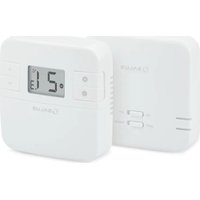
Marque : Salus
Modèle : 091FL RF
Catégorie : Thermostat