
TM 200 COSI - Téléphone mobile TELEFUNKEN - Notice d'utilisation et mode d'emploi gratuit
Retrouvez gratuitement la notice de l'appareil TM 200 COSI TELEFUNKEN au format PDF.


| Marque | Telefunken |
| Modèle | TM 200 COSI |
| Type de produit | Téléphone mobile |
| Dimensions | Environ 120 x 55 x 15 mm |
| Poids | Environ 120 g |
| Écran | Écran couleur TFT, 2.4 pouces |
| Appareil photo | Appareil photo arrière VGA |
| Batterie | Lithium-ion 1000 mAh amovible |
| Autonomie en veille | Jusqu'à 200 heures |
| Autonomie en communication | Jusqu'à 4 heures |
| Réseau | GSM 900/1800 MHz |
| Connectivité | Bluetooth 2.1, prise casque 3.5 mm |
| Stockage | Emplacement microSD jusqu'à 32 Go |
| Fonctions principales | Appels, SMS, réveil, radio FM, lecteur MP3, lampe torche |
| Entretien et nettoyage | Nettoyer avec un chiffon doux et sec. Ne pas utiliser de produits abrasifs. |
| Sécurité | Ne pas exposer à l'humidité, aux températures extrêmes ou aux chocs. |
| Pièces détachées | Batterie, chargeur, écouteurs disponibles |
| Réparabilité | Pour toute réparation, contacter le service après-vente agréé Telefunken. |
| Contenu de la boîte | Téléphone, batterie, chargeur, câble USB, écouteurs, manuel d'utilisation |
| Garantie | 2 ans |
FOIRE AUX QUESTIONS - TM 200 COSI TELEFUNKEN
Questions des utilisateurs sur TM 200 COSI TELEFUNKEN
0 question sur cet appareil. Repondez a celles que vous connaissez ou posez la votre.
Poser une nouvelle question sur cet appareil
Téléchargez la notice de votre Téléphone mobile au format PDF gratuitement ! Retrouvez votre notice TM 200 COSI - TELEFUNKEN et reprennez votre appareil électronique en main. Sur cette page sont publiés tous les documents nécessaires à l'utilisation de votre appareil TM 200 COSI de la marque TELEFUNKEN.
MODE D'EMPLOI TM 200 COSI TELEFUNKEN
TELEFUNKEN®
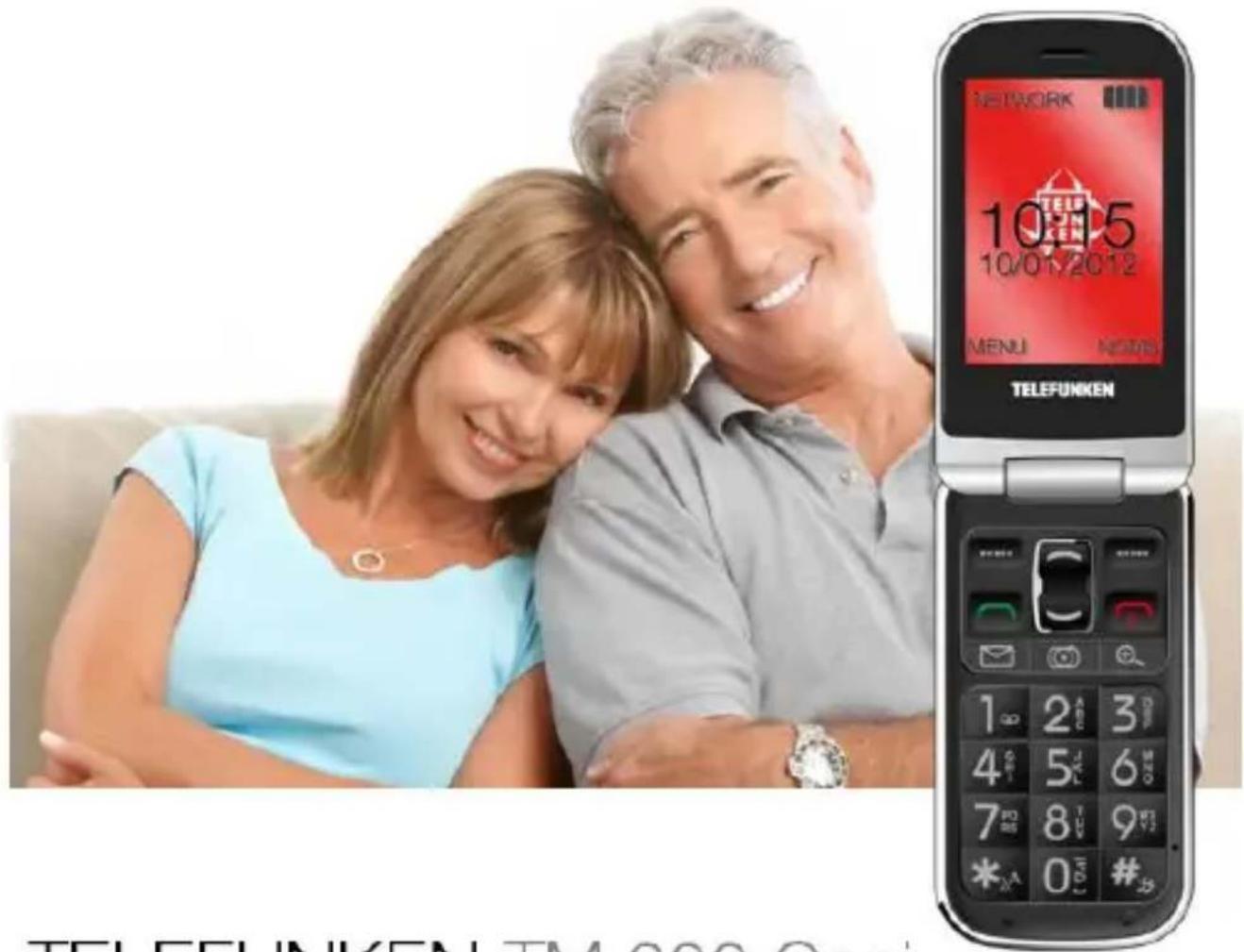
TELEFUNKEN TM 200 Cosi
INSTRUCCIONES DE USO USER GUIDE
TELEFUNKEN TM 200 Cosi
Teléfono móvil universal
ESPAÑOL


- Receptor
- Pantalla LCD
- Navegación arriba
- Tecla programable derecha
- Tecla programable izquierda
- Terminar llamada/Rechazar llamada/Encender/Apagar
- Descolgar
- Navegación abajo
- Acceso directo a mensajes
- Lupa
- Cámara
- Teclado
- Micrófono
- Método de entrada
- Activar/Desactivar el modo silencio
- Activar/Desactivar el modo manos libres
A. Lente de la cámara
B. Indicador luminoso de llamada
C. Indicador luminoso de mensaje
D. Conector de auriculares
E. Subir volumen
F. Bajar volumen
G. Carga
H. Orificio para la correa
I. Conector de carga
J. Botón de llamada de emergencia - SOS
K. Altavoz
L. Compartimento de la batería
Índice
Descripción....3
Índice....4
Instalación....6
Instalar la tarjeta SIM y la batería....6
Cargador....7
Funciones Básicas 8
Encender el teléfono....8
Cambiar el idioma y la fecha....8
Hacer una llamada....8
Responder/rechazar una llamada....9
Control del volumen....9
Símbolos de estado....10
Símbolos de pantalla....11
Libreta Telefónica....12
Acceder a la Agenda de contactos....12
Añadir nueva entrada....12
Opciones....13
Mensajes....14
Escribir un mensaje....14
Buzón de Entrada....15
Ajustes de mensajes....15
Función SOS....16
Iniciar el procedimiento de emergencia....16
Activar/Desactivar la función....16
Establecer la función....17
Historial de Llamadas....17
Llamadas perdidas....17
Llamadas enviadas....17
Llamadas recibidas....17
Borrar el Registro de llamadas....17
Tiempo de llamada....18
Cámara....18
Radio FM....19
Multimedia....20
Alarma 20
Calculadora....21
Ajustes....21
Perfiles de usuario....21
Configuración del Teléfono....23
Ajustes de Llamada....23
Ajustes de Emergencia....24
Bloqueo de funciones....24
Configuración de Red....24
Configuración de Seguridad....25
Conectividad....25
Restaurar los Ajustes de Fábrica....26
Servicios....26
Seguridad y Garantía....27
Precaución al volante....27
Precauciones de uso en instalaciones y dispositivos médicos....27
Teléfono móvil....27
Precauciones en ambientes potencialmente explosivos....28
Precauciones con dispositivos electrónicos....28
Seguridad y uso general en vehículos....28
Seguridad en aeronaves....28
Uso de la batería....29
Límite de responsabilidad....29
Garantía....29
Duración de la garantía....30
Cobertura....30
Exclusions....30
Instalación
Instalar la tarjeta SIM y la batería
La ranura para la SIM se encuentra detrás de la batería.
Deslice hacia abajo y retire la tapa de la batería sin tocar el botón de llamada de emergencia.
Extraiga la batería.
Inserte la tarjeta SIM en la ranura y cierre la tapa.
Vea la siguiente ilustración. Tenga cuidado al insertar la tarjeta SIM.
Vuelva a colocar la batería de forma que las pestañas queden ajustadas a las del teléfono.
Vuelva a colocar la tapa de la batería.

Cargador
Conecte el cargador a la toma de corriente o a la alimentación USB, después conecte la clavija mini USB al puerto mini USB del lateral derecho del teléfono, o en el conector de la parte posterior.
Cuando el teléfono se esté cargando correctamente y esté apagado, el símbolo de carga del teléfono parpadeará.
En el modo en Espera, el símbolo de la batería de la esquina superior derecha presentará una animación.
La carga se detendrá automáticamente cuando la batería esté completamente cargada. Desconecte el cargador.
Símbolos de la batería
 | La batería está casi agotada y debe recargarse. |
 | La batería está totalmente cargada. |
Tipo de batería
Tiempo en espera
Tiempo de llamada
Batería de iones de Litio
100-150 horas
3.5 horas
Atención:
Tras tres ciclos de recarga la batería contará con su capacidad total.
Cargue la batería a temperaturas entre 0°C y +40°C.
Después de un largo período la batería perderá capacidad.
Sobrecargar la batería provocará una pérdida prematura de funcionalidad.
Funciones Básicas
Encender el teléfono
Pulse y mantenga durante 3 segundos el botón rojo de Terminar llamada para encender y apagar el teléfono.
Si no hay insertada ninguna tarjeta SIM o si la tarjeta SIM está dañada, la pantalla mostrará "Inserte SIM".
Atención
Póngase en contacto con su proveedor del servicio si no le proporcionaron ningún número PIN/PUK con la tarjeta.
Intentos restantes para introducción del PIN: Pulse # para mostrar los intentos restantes; si no hay más intentos posibles, aparecerá "SIM bloqueada". En este caso, desbloquee la tarjeta SIM introduciendo el número PUK:
Introduzca y confirme el número PUK.
Introduzca y confirme el nuevo número PIN.
Cambiar el idioma y la fecha
La tarjeta SIM determina el idioma por defecto. Vea la información de Ajustes para cambiar el idioma, la hora y la fecha.
Hacer una llamada
En modo en Espera, introduzca el número deseado (use la tecla programable derecha para borrar la última entrada; pulse y manténgala para borrar todo el número) y pulse el botón verde de marcar para hacer una llamada. Opciones (pulse la tecla programable izquierda):
Una vez conectada la llamada, tiene las siguientes opciones:
| Llamada única en espera | Poner en espera la llamada actual mientras hace una segunda llamada. |
| Terminar llamada única | Finalizar la llamada actual. |
| Terminar todas las llamadas | Terminar todas las llamadas actuales. |
| Nueva llamada | Hacer una nueva llamada. |
| Agenda de contactos | Visualizar la agenda telefónica. |
| Mensajes | Editar un mensaje. |
| Historial de llamadas | Visualizar el registro de llamadas. |
| Grabador de Sonidos | Grabar la llamada actual. |
| Silenciar | Desactivar y activar el micrófono. |
| DTMF | Activar/Desactivar la multi-frecuencia del tono-dual. |
Pulse la tecla programable derecha durante una llamada para activar el modo de manos libres.
Responder/rechazar una llamada
Responder una llamada
Pulse la tecla verde de marcar para responder una llamada.
Pulse la tecla programable izquierda (Opciones).
| Responder | Responder a la llamada actual. |
| Rechazar | Desviar la llamada actual al buzón de voz. |
Finalizar una llamada
Pulse la tecla programable derecha (silenciar el tono de llamada), pulse de nuevo la tecla programable derecha (rechazar una llamada).
Pulse el botón rojo de terminar llamada para finalizarla directamente.
Control del volumen
Volumen de Llamada
Durante una llamada, pulse uno de los botones de volumen del lateral izquierdo del teléfono, pulse + para subir el volumen o - para bajarlo.
Volumen de los tonos del teclado
En el modo en Espera, pulse uno de los botones de volumen del lateral izquierdo del teléfono, pulse + para subir el volumen de los tonos de las teclas, o - para bajarlo.
Símbolos de estado
 | Fuerza de la señal de red |  | Fuerza de la señal de redinsuficiente, sin red |
 | Sólo Timbre |  | SMS sin leer |
 | Timbre + vibración |  | MMS no Leído |
 | Sólo Vibración |  | Alarma activa |
 | Silencio |  | Nivel de batería |
 | Movilidad (Roaming) |  | Auriculares conectados |
 | Llamada Perdida |  | Correo de voz recibido |
 | Reproducción de Música |  | Bluetooth activado |
 | Enviando mensaje... |  | Mensaje fallido |
Símbolos de pantalla
 | Insertar SIM |  | Borrado |
 | Error |  | Llamada en espera |
| [010A] | Advertencia |  | Llamada terminada |
| [433E] | Pregunta |  | Llamada entrante |
| [023W] | Información | [CTXK] | Llamada entrante privada |
| [480H] | Confirmación | [TA36] | Llamada de conferencia |
 | Mensaje recibido |  | Llamada saliente |
 | Mensaje enviado |  | Alarma |
 | Procesando, espere por favor | ||
Libreta Telefónica
En la agenda telefónica puede almacenar sus contactos y sus números de teléfono. Los contactos pueden almacenarse en la tarjeta SIM, en el teléfono o en ambos. Su teléfono admite hasta 300 contactos.
Puede establecer la marcación rápida y el número; tiene 9 programaciones disponibles.
Acceder a la Agenda de contactos
Pulse la tecla programable derecha, que se utiliza como acceso directo a la agenda. O
Pulse la tecla programable izquierda para acceder al menú y púlsela una segunda vez para acceder a la Agenda de contactos.
Añadir nueva entrada
Cuando esté dentro de la Libreta, puede añadir una nueva entrada siguiendo estos pasos:
- Pulse la tecla programable izquierda para acceder al menú 'Opciones'.
- Desplácese hasta la 4ª: 'Añadir nueva entrada' y pulse la tecla programable izquierda (Aceptar).
- Escoja el almacenamiento (SIM o Tfno.) y pulse la tecla programable izquierda (Aceptar).
- Escoja la 1ª línea ('Nombre') con la tecla programable izquierda.
- Escriba el nombre de su contacto con el teclado y pulse la tecla programable izquierda dos veces para validar.
- Después desplácese a la 2ª línea 'Número' y escoja Editar, pulsando la tecla programable izquierda.
- Introduzca el número de su contacto y pulse la tecla programable dos veces para validar.
- Una vez se hayan registrado el nombre y el número, puede añadir la entrada a la libreta telefónica, pulsando la tecla programable derecha (Hecho).
- El teléfono le preguntará si desea guardar la entrada. Pulse la tecla programable izquierda para Sí.
- De vuelva en la agenda, encontrará la nueva entrada al desplazarse por los contactos.
Opciones
Una vez en la agenda, puede acceder al menú 'Opciones', pulsando la tecla programable izquierda.
Ver
Pulse Aceptar (tecla programable izquierda) para mostrar el número del contacto y su nombre.
Llamar
Pulse Aceptar para llamar al contacto.
Enviar mensaje
Pulse Aceptar para comenzar a escribir un SMS al contacto seleccionado (vea el párrafo dedicado en este manual).
Añadir Nueva Entrada
Vea la sección dedicada en este manual.
Editar
Pulse Aceptar para modificar la entrada seleccionada.
Borrar
Pulse Aceptar para suprimir la entrada seleccionada.
Copiar
Pulse Aceptar para hacer una copia del contacto en otro almacenamiento.
Mover
Pulse Aceptar para mover el contacto a otro almacenamiento.
Ajustes de la agenda de contactos.
| Ajuste | Función |
| Almacenamiento Preferido | Predefinir su almacenamiento preferido (Tfno. o SIM) |
| Marcación rápida | Establecer la marcación rápida |
| Números Extra | Registrar su número y los números de SOS |
| Estado de memoria | Estado de la memoria del teléfono y de la tarjeta SIM |
| Copiar contactos | Copiar todos sus contactos en otro almacenamiento |
| Mover contactos | Mover todos sus contactos a otro almacenamiento |
| Borrar todos los contactos | Borrar todos sus contactos |
Mensajes
Escribir un mensaje
- Pulse la tecla programable izquierda (Menú) para acceder al menú.
- Utilice la tecla de navegación abajo para encontrar el menú Mensajes.
- Pulse de nuevo la tecla programable izquierda (Aceptar) para acceder al menú Mensajes.
- Pulse de nuevo la tecla programable izquierda (Opciones) para escribir un mensaje. Introduzca su texto con el teclado y pulse la tecla programable izquierda (Opciones) para abrir el menú Opciones.
- Pulse de nuevo la tecla programable izquierda (Aceptar) para abrir "Enviar a". Utilice los botones de navegación arriba/abajo para seleccionar 'Introducir receptor', 'Añadir desde contactos', o 'Añadir desde registro de llamadas'. Pulse la tecla programable izquierda (Seleccionar) para seleccionar un contacto o número.
- Pulse de nuevo la tecla programable izquierda (Opciones) y utilice los botones de navegación arriba/abajo para seleccionar 'Enviar' y pulse la tecla programable izquierda (Aceptar).
Opciones de Mensaje
| Enviar a | Enviar un mensaje al número deseado. |
| Método de Entrada | Multitoque ABC, Multitoque abc, Multitoque Abc, Inteligente ABC, Inteligente abc, Inteligente Abc, Multitoque ES, Multitoque es, Multitoque Es, Multitoque FR, Multitoque fr, Multitoque Fr, Multitoque AL, Multitoque al, Multitoque Al, Multitoque PT, Multitoque pt, Multitoque Pt, Numérico, Insertar Símbolos |
| Cambiar a MMS | Los mensajes se pueden cambiar a un formato multimedia y enviarse al número deseado. |
| Avanzado | Hay disponibles opciones avanzadas para editar texto, plantillas de texto, datos adjuntos, número de contacto, nombre de contacto y marcadores. |
Buzón de Entrada
Leer un mensaje
- Pulse la tecla programable izquierda (Menú) para acceder al menú.
- Utilice la tecla de navegación abajo para encontrar el menú Mensajes.
- Pulse la tecla programable izquierda (Aceptar) para entrar, y desplácese a la 2ª línea 'Buzón de Entrada'.
- Aquí puede desplazarse por todos los SMS recibidos y pulsar la tecla programable izquierda (Aceptar) para abrirlos.
Responder a un SMS
- Siga los pasos anteriores para acceder al SMS al que desee responder.
- Una vez abierto el SMS, pulse la tecla programable izquierda (Opciones) y escoja la 1ª opción 'Responder'.
- Escriba su mensaje con el teclado.
- Pulse la tecla programable izquierda (Opciones), y púlsela de nuevo en la primera línea 'Enviar a'.
- Pulse la tecla programable izquierda (Opciones), y púlsela de nuevo en la primera línea 'Enviar'.
Ajustes de mensajes
Mensajes SMS
| Ajuste de Perfil | Seleccionar perfil. |
| Servidor de Correo de Voz | Seleccionar el Servidor del Correo de Voz. |
| Ajustes Comunes | Seleccione Activado/Desactivado para Informe de Entrega, Ruta de Respuesta y Guardar Mensajes Enviados. |
| Estado de memoria | Muestra el estado de la memoria para el teléfono y la tarjeta. |
| Almacenamiento preferido | Seleccione entre SIM y Teléfono. |
| Ajustes de Portador | Seleccione entre GPRS preferido, GSM preferido y sólo GSM. |
| Perfiles | Seleccionar Perfil, Cuenta de datos, Conexión, Nombre de usuario y Contraseña). |
| Ajustes comunes | Redactar (Tiempo de Diapositiva, Modos de Creación, Redimensionar Imagen, Firma Automática, Firma)Envío (Período de Validez, Informe de Entrega, Informe de Lectura, Prioridad, Tiempo de Entrega, Enviar y guardar)Recuperación (Red Doméstica, Movilidad, Filtros, Informe de Lectura, Informe de Entrega)Almacenamiento preferido (Teléfono, Tarjeta de Memoria)Estado de memoria (Teléfono, Tarjeta de Memoria) |
Función SOS
Iniciar el procedimiento de emergencia
Para hacer una llamada de emergencia, pulse y mantenga el Botón de llamada de emergencia o púlselo 2 veces en un segundo. El teléfono enviará entonces los SMS de Emergencia predefinidos a los números de la Lista de números de la función de Emergencia. El teléfono comenzará a llamar a los números de la Lista de números. Si la llamada no obtiene respuesta antes de 30 segundos, el teléfono llamará al siguiente número y así sucesivamente.
El proceso se repetirá tres veces mientras nadie responda.
- Abra el menú con la tecla programable izquierda (Menú)
- Desplácese hasta 'Ajustes' y ábralos pulsando Aceptar.
- Desplácese hasta la 4ª línea 'Ajustes de Emergencia'.
Activar/Desactivar la función
- Una vez en el menú 'Ajustes de Emergencia', pulse la tecla programable izquierda (Aceptar) en la primera 'Activo'.
- Escoja entre Activado o Desactivado y valide con Aceptar.
Establecer la función
Lista de números
- Entre en la opción 'Lista de números' pulsando Aceptar.
- Puede predefinir hasta 5 números pulsando Opciones en la línea que desee cambiar.
-
Puede escoger el número de la Libreta Telefónica:
a. Desplácese a la entrada que quiera añadir como número de emergencia.
b. Pulse la tecla programable izquierda (Aceptar) para guardarlo. -
O escoger la Entrada Manual:
a. Introduzca un nombre en la 1ª línea
b. Introduzca el número en la 2ª línea
c. Guárdelo con Aceptar
Enviar SMS
Cuando esté en el menú, active la función en la 1ª opción 'Ajustes'.
Para editar los SMS de emergencia:
- Abra 'Mensaje' pulsando Aceptar
- Pulse Editar
- Escriba su mensaje de emergencia utilizando el teclado, por ejemplo: "¡Tengo un problema, ven rápidamente!"
- Pulse Aceptar para guardar su mensaje.
Historial de Llamadas
En este Menú puede acceder a todas sus llamadas, con las siguientes acciones:
Llamadas perdidas
Muestra la lista de llamadas perdidas
Llamadas enviadas
Muestra la lista de llamadas enviadas
Llamadas recibidas
Muestra la lista de llamadas recibidas
Borrar el Registro de llamadas
Borra todos los registros
Tiempo de llamada
Mostrar tiempos de conversación individuales para las llamadas perdidas, marcadas y recibidas, y reiniciar todos los tiempos.
Cámara
Puede capturar imágenes o vídeos con su teléfono móvil.
- Pulse la tecla programable izquierda (Menu) para acceder al menú.
- Utilice la tecla de navegación abajo para encontrar el menú Cámara.
- Pulse de nuevo la tecla programable izquierda (Aceptar) para acceder al menú Cámara.
Está listo para capturar una imagen. La pantalla muestra la imagen y debajo puede ver tres iconos. Pulse el icono de la cámara (medio) para capturar la imagen. En el menú Cámara encuentra las siguientes opciones:
- Cambiar a grabador de vídeo: Pulse el icono de la cámara para iniciar la grabación.
- Fotografías: Ver todas las imágenes almacenadas en el teléfono.
- Configuración de Cámara: Personalizar varios ajustes para la cámara. Sus opciones son: 'Sonido de disparo', 'EV', 'Contraste', 'Anti-parpadeo', 'Temporizador', 'Disparo continuo', 'Configuración de imagen', 'Balance de blanco', 'Modo de escena', 'Configuración de efecto', 'Almacenamiento' y 'Restaurar valores predeterminados'.
- Configuración del CamCorder: Ajustes similares a los anteriormente descritos para imágenes fijas. Aquí puede personalizar varios ajustes para cámara de vídeo. Sus opciones son: 'EV', 'Modo nocturno', 'Anti-parpadeo', 'Configuración de vídeo', 'Calidad de vídeo', 'Tamaño de archivo alcanzado', Tiempo límite alcanzado', 'Grabar audio', 'Balance de blanco', 'Configuración de efecto', 'Almacenamiento', y 'Restaurar valores predeterminados'.
Radio FM
Antes de escuchar la radio FM, asegúrese de insertar los auriculares, ya que éstos se usan a modo de antena FM.
- Pulse la tecla programable izquierda (Menu) para acceder al menú.
- Utilice la tecla de navegación abajo para encontrar el menú Radio FM.
- Pulse de nuevo la tecla programable izquierda (Aceptar) para acceder al menú Radio FM.
Para utilizar la radio, debe conectar primero los auriculares. Si aún no los ha conectado, el teléfono se lo recordará.
En la pantalla principal de la radio puede:
- Utilizar las teclas arriba y abajo para cambiar la frecuencia.
- Utilizar las teclas numéricas para sintonizar con una emisora presintonizada.
- Utilizar el acceso directo de la cámara para reproducir/pausar la radio.
En las opciones:
- En el menú 'Lista de canales' puede registrar hasta 30 frecuencias (las 9 primeras pueden lanzarse con el teclado).
- 'Entrada manual' le permite ir directamente a un canal introduciendo su frecuencia.
- Utilizando 'Búsqueda automática de presintonías' puede buscar automáticamente todos los canales disponibles, para luego encontrarlos en la 'Lista de canales'.
En los 'Ajustes', se establece el modo de 'Reproducción en segundo plano', el 'Altavoz', el 'Formato de grabación', la 'Calidad de audio' y el 'Almacenamiento de grabación'. - Utilice la opción 'Grabar' para grabar la emisora de audio que está escuchando.
- 'Añadir' le permite continuar a partir de una grabación previa.
- 'Lista de archivos' contiene todas sus grabaciones.
Multimedia
Su teléfono viene con un reproductor multimedia para reproducir archivos de vídeo y audio.
- Pulse la tecla programable izquierda (Menú) para acceder al menú.
- Utilice la tecla de navegación abajo para encontrar el menú Multimedia.
- Pulse la tecla programable izquierda (Aceptar) para acceder al menú Multimedia.
- Pulse de nuevo la tecla programable izquierda (Aceptar) para acceder al Reproductor de Audio. Aparecerá el menú de reproducción de audio.
- Pulse de nuevo la tecla programable izquierda (Lista) para ver todos los archivos.
- Pulse la tecla programable izquierda (Opciones) para acceder al menú Opciones. Aquí puede establecer las opciones de su reproductor de audio de la siguiente manera:
- En 'Actualizar Lista' se actualiza su lista de reproducción tras agregar nueva música.
- En 'Ajustes' se configura: 'Lista de reproducción', 'Lista automática', 'Repetir', 'Orden aleatorio', 'Reproducción en segundo plano', y los 'Ajustes Bluetooth'.
- Los ajustes para el reproductor de vídeo son similares.
Alarma
En su teléfono hay disponibles un total de 5 alarmas.
- Pulse la tecla programable izquierda (Menú) para acceder al menú.
- Utilice la tecla de navegación abajo para encontrar el menú Alarma.
- Pulse la tecla programable izquierda (Aceptar) para acceder al menú Alarma. Aparecen los ajustes de 5 alarmas. Utilice los botones de navegación arriba/abajo para seleccionar una alarma y pulse la tecla programable izquierda (Editar) para seleccionarla. Se muestra el menú de Configuración de alarma.
- En el menú de Configuración de alarma, puede seleccionar y ajustar la 'Hora', 'Establecer Frecuencia', 'Establecer Tono', 'Establecer Tipo de Alerta'.
Calculadora
Su teléfono viene con una calculadora básica para sumar, restar, multiplicar y dividir.
- Pulse la tecla programable izquierda (Menú) para acceder al menú.
- Utilice la tecla de navegación abajo para encontrar el menú Calculadora.
- Pulse la tecla programable izquierda (Aceptar) para acceder al menú Calculadora.
- Pulse los botones numéricos para introducir el primer valor y seleccione el operador +, -, ×, ÷.
Ajustes
El menú Ajustes se utiliza para personalizar el teléfono. Estos ajustes pueden cambiarse con una amplia variedad de submenús. Para navegar por los submenús pulse la tecla programable izquierda para acceder al menú.
Utilice la tecla de navegación abajo para encontrar el menú Ajustes. Pulse la tecla programable izquierda (Aceptar) para acceder al menú Ajustes. Éste consiste en: Perfiles de Usuario, Configuración del Teléfono, Ajustes de Llamada, Ajustes de Emergencia, Bloqueo de Funciones, Configuración de Seguridad, Conectividad y Restaurar Ajustes de Fábrica.
Perfiles de usuario
Hay varios perfiles de usuario que usted puede activar o personalizar accediendo a este menú.
| General | - Configuración de tono (Llamada entrante; Encender; Apagar; Tapa abierta; Tapa cerrada; Mensaje; Teclado numérico) - Volumen (Timbre; Tono de las teclas) - Tipo de alerta (Timbre; Sólo vibrar; Vibrar y sonar; Vibrar y después sonido) - Tipo de Timbre (Único, Repetir, Ascendente) - Tono adicional (Advertencia; Error; Campo activado; Conectar) - Modo de respuesta (Respuesta de la tapa; Cualquier tecla Resp.) |
| Reunión | - Configuración de tono (Llamada entrante; Encender; Apagar; Tapa abierta; Tapa cerrada; Mensaje; Teclado numérico) - Volumen (Timbre; Tono de las teclas) - Tipo de alerta (Timbre; Sólo vibrar; Vibrar y sonar; Vibrar y después sonido)- Tipo de Timbre (Úrico, Repetir, Ascendente)- Tono adicional (Advertencia; Error; Campo activado; Conectar)- Modo de respuesta (Respuesta de la tapa; Cualquier tecla Resp.) |
| Exterior | - Configuración de tono (Llamada entrante; Encender; Apagar; Tapa abierta; Tapa cerrada; Mensaje; Teclado numérico)- Volumen (Timbre; Tono de las teclas)- Tipo de alerta (Timbre; Sólo vibrar; Vibrar y sonar; Vibrar y después sonido)- Tipo de Timbre (Único, Repetir, Ascendente)- Tono adicional (Advertencia; Error; Campo activado; Conectar)- Modo de respuesta (Respuesta de la tapa; Cualquier tecla Resp.) |
| Interior | - Configuración de tono (Llamada entrante; Encender; Apagar; Tapa abierta; Tapa cerrada; Mensaje; Teclado numérico)- Volumen (Timbre; Tono de las teclas)- Tipo de alerta (Timbre; Sólo vibrar; Vibrar y sonar; Vibrar y después sonido)- Tipo de Timbre (Único, Repetir, Ascendante)- Tono adicional (Advertencia; Error; Campo activado; Conectar)- Modo de respuesta (Respuesta de la tapa; Cualquier tecla Resp.) |
| Silencio | En este modo, el teléfono no suena, sino que vibra en su lugar. Puede activarlo desde la pantalla principal manteniendo pulsada la tecla #. |
| Auriculares | - Configuración de tono (Llamada entrante; Encender; Apagar; Tapa abierta; Tapa cerrada; Mensaje; Teclado numérico)- Volumen (Timbre; Tono de las teclas)- Tipo de alerta (Timbre; Sólo vibrar; Vibrar y sonar; Vibrar y después sonido)- Tipo de Timbre (Único, Repetir, Ascendiente)- Tono adicional (Advertencia; Error; Campo activado; Conectar)- Modo de respuesta (Respuesta de la tapa; Cualquier tecla Resp.) |
| Bluetooth | - Configuración de tono (Llamada entrante; Encender; Apagar; Tapa abierta; Tapa cerrada; Mensaje; Teclado numérico)- Volumen (Timbre; Tono de las teclas)- Tipo de alerta (Timbre; Sólo vibrar; Vibrar y sonar; Vibrar y después sonido)- Tipo de Timbre (Único, Repetir, Ascendinte)- Tono adicional (Advertencia; Error; Campo activado; Conectar)- Modo de respuesta (Respuesta de la tapa; Cualquier tecla Resp.) |
Configuración del Teléfono
| Hora y Fecha | Establecer Hora – Establecer FechaEstablecer formato de Hora (12; 24)Establecer formato de Fecha (dd mm aaaa; mm dd aaaa; aaaa mm dd) |
| Programar Encendido y Apagado | Esta función le permite planificar el ENCENDIDO/APAGADO de su producto.Estado (Deshabilitar; Habilitar)Asunto (Encender; Apagar)Ajustar Hora |
| Idioma | Automático, English, Français, Español, Deutsch |
| Pantalla | Papel tapiz (Sistema: Imagen 1, 2 o 3; Definido por el usuario)Mostrar Fecha y Hora (Activado, Desactivado) |
| Modo Avión | Estos ajustes le permiten desactivar las conexiones de red mientras el teléfono permanece Encendido.Modo NormalModo Avión (Sí; No)Preguntar al encender (Sí; No) |
| Tamaño de Fuente | Predeterminada por Tema, Pequeño, Grande |
| Iluminación de pantalla LCD | Brillo (1-5)Tiempo (seg.) (1-60) |
Ajustes de Llamada
| Identificación de llamada | Definido por la red, Ocultar identificador, Enviar identificador |
| Llamada en Espera | Activar, Desactivar, Consultar Estado |
| Desvío de Llamadas | - Todas las Llamadas de Voz: desviar incondicionalmente todas las llamadas entrantes al número que establezca,- Si No Localizable: si la red no puede encontrarle (fuera de servicio/sin servicio/apagado), desviar las llamadas entrantes al número que establezca,- Si No Hay Respuesta: si su teléfono no responde a la llamada antes de un cierto tiempo, desviará su llamada al número queestablezca,- Si está Ocupado: si ya está hablando, desviará las llamadas al número que establezca,- Todas las Llamadas de Datos: desviar todas las llamadas al número de la tarjeta GSM que establezca,- Cancelar Todos los Desvíos: cancelar todos los desvíos de llamada. |
| Bloqueo de Llamadas | - Llamadas Enviadas: bloquear las llamadas salientes para todas, para internacionales, o excepto a RPMT doméstica,- Llamadas Recibidas: bloquear todas las llamadas entrantes o cuando se encuentra en movilidad,- Cancelar Todo: cancelar todos los bloqueos (introducir contraseña),- Cambiar contraseña de bloqueo |
| Configuración Avanzada | - Lista Negra: Modo: Activado/Desactivado; Números de la Lista Negra- Volver a Marcar Automáticamente: Activado/Desactivado- Visualización del tiempo de llamada: Activado/Desactivado- Aviso del tiempo de llamada: Desactivado, Único, Periódico- Finalización rápida automática: Definir: Activado/Desactivado; Duración |
Ajustes de Emergencia
Por favor, consulte la sección correspondiente
Bloqueo de funciones
Esta función le permite bloquear algunas de las funciones del teléfono si no quiere que aparezcan en el Menú. Puede bloquear/desbloquear las siguientes funciones: Cámara, reproductor de audio, radio FM, Entretenimiento y juegos, Lista de tareas Pendientes, Calculadora y Servicios.
Configuración de Red
| Selección de red | Seleccionar la red con nueva búsqueda, automática o manual. |
| Redes preferidas | Introduzca sus redes preferidas. |
| Conexión GPRS | Seleccione entre Siempre y Sólo Cuando sea Necesario. |
Configuración de Seguridad
| Bloqueo de SIM | Activado, Desactivado (introducir contraseña) |
| Bloqueo del teléfono | Activado, Desactivado (introducir contraseña) |
| Cambiar Contraseña | PIN (PIN Anterior; PIN Nuevo; Introducir de nuevo)PIN2 (PIN Anterior; PIN Nuevo; Introducir de nuevo)Bloqueo del Teléfono (Contraseña Anterior; Contraseña Nueva; Introducir de nuevo) |
| Bloqueo de Llamadas | Llamadas enviadas (Todas las Llamadas: Activar, Desactivar, Consultar Estado; llamadas Internacionales: Activar, Desactivar, Consultar Estado; llamadas Internacionales excepto domésticas: Activar, Desactivar, Consultar Estado) |
| Llamadas recibidas (Todas las Llamadas: Activar, Desactivar, Consultar Estado; En estado de movilidad: Activar, Desactivar, Consultar Estado | |
| Cancelar Todo | |
| Cambiar contraseña de bloqueo | |
| Marcación Fija | Modo (Activado, Desactivado) (introducir PIN 2)Lista de marcación fija |
Conectividad
| Alimentación | Activar/Desactivar el Bluetooth |
| Visibilidad | Escoja si desea que otros dispositivos sean capaces de detectar su teléfono cuando el Bluetooth está activado. |
| Mi dispositivo | Mostrar el dispositivo Bluetooth vinculado a su teléfono |
| Buscar dispositivo de audio | Le permite buscar y vincularse con un dispositivo de audio Bluetooth |
| Cambiar nombre de dispositivo | El nombre por defecto es TM200 |
| Opciones Avanzadas | Ruta de audio: Seleccione entre Permanecer en el Teléfono y Transmitirlo a Auriculares BT; Almacenamiento: Seleccione entre Teléfono, Tarjeta de memoria y Preguntar Siempre; Permiso para Compartir: Seleccione entre Control, Total y Sólo Lectura; Dirección del Dispositivo |
| Acerca de | Información general |
Utilizar el Bluetooth aumenta el consumo de energía.
La distancia recomendada entre los 2 dispositivos es de hasta 10 metros como máximo (33 pies).
Restaurar los Ajustes de Fábrica
Para restaurar los ajustes de fábrica debe introducir la contraseña.
Código PIN1 por defecto: 1234
Código de bloqueo del teléfono por defecto: 0000
Servicios
| Página de Inicio | Visitar las páginas de inicio establecidas. |
| Marcadores | Añadir y editar marcadores. |
| Páginas Recientes | Ver el historial de páginas visitadas. |
| Introducir dirección | Introducir una dirección para acceder al sitio, clic en Opciones →completar para acceder a páginas web. |
| Buzón de Entrada del Servicio | Servicios de red de la bandeja de entrada de correo. |
| Ajustes | Establecer los parámetros de red: Perfiles, Opciones del Explorador (Límite de tiempo; Mostrar Imágenes, Cache, Cookies), Ajustes del servicio de mensajes (Habilitar Push; Habilitar carga de servicio; Habilitar Lista Blanca; Lista Blanca), Limpiar cache y limpiar cookies. |
Seguridad y Garantía
Esta sección incluye información importante acerca del uso seguro y eficiente. Por favor, lea esta información antes de utilizar el teléfono.
Precaución al volante
- Por favor, preste atención a la seguridad del tráfico. Compruebe las leyes y normativas sobre el uso de su teléfono en la zona en la que conduce. Obedézcalas siempre.
- Utilice la función de manos libres del teléfono, si es posible.
- Salga de la carretera y aparque antes de hacer o responder una llamada si las condiciones lo requieren.
Precauciones de uso en instalaciones y dispositivos médicos
- Cuando utilice el dispositivo cerca de marcapasos, por favor mantenga el teléfono siempre a más de 20 centímetros del marcapasos. No lleve el teléfono en el bolsillo del pecho. Utilice la oreja contraria al marcapasos para minimizar el potencial de interferencias. Por favor, apague el teléfono si es necesario.
- Si utiliza algún otro dispositivo médico personal, por favor consulte al fabricante de su dispositivo para determinar si está adecuadamente aislado de la energía de RF.
- En instalaciones con necesidades especiales, como hospitales o centros de salud, por favor preste atención a las restricciones de uso de teléfonos móviles. Apague su teléfono si es necesario.
Teléfono móvil
- Por favor, utilice los accesorios originales o los aprobados por el fabricante del teléfono. Utilizar cualquier accesorio no autorizado puede afectar al rendimiento de su teléfono móvil, dañar su teléfono o incluso poner en peligro su integridad física y violar normativas locales acerca de terminales de telecomunicación.
- Apague su teléfono antes de limpiarlo. Utilice un paño húmedo o anti-estático para limpiar el teléfono. No utilice un paño seco ni tejido conductivo. No utilice limpiadores químicos o abrasivos que podrían dañar el teléfono móvil.
- Dado que su teléfono móvil puede producir un campo electromagnético, no lo coloque junto a objetos magnéticos, como discos de ordenador.
- Utilizar el teléfono junto a aparatos eléctricos como un TV, teléfono, radio y ordenador personal puede causar interferencias.
- No exponga su teléfono móvil a la luz solar directa ni lo almacene en zonas calurosas. Las altas temperaturas pueden acortar la vida de los dispositivos electrónicos.
-
Mantenga su teléfono seco, cualquier líquido podría dañar su teléfono.
-
No lo deje caer, ni lo golpee ni lo trate con rudeza. Una manipulación brusca puede romper los circuitos impresos internos.
- No conecte el teléfono con ninguna mejora incompatible.
- No trate de desmontar el teléfono móvil ni la batería.
- No almacene el teléfono junto con artículos inflamables ni explosivos.
- No cargue el teléfono sin la batería.
Precauciones en ambientes potencialmente explosivos
- Apague su teléfono antes de entrar en cualquier área con una atmósfera potencialmente explosiva, como áreas de repostaje, instalaciones de trasferencia o almacenamiento de combustibles o productos químicos.
- No extraiga, instale ni cargue baterías en dichas áreas. Una chispa en una atmósfera potencialmente explosiva puede provocar una explosión o incendio, causando lesiones corporales o incluso la muerte.
- Para evitar posibles interferencias con operaciones de demolición, apague su teléfono cuando esté cerca de detonadores eléctricos, en una zona de demolición, o en áreas en las que se informe de “apagar dispositivos electrónicos”. Obedezca todas las señales e instrucciones.
Precauciones con dispositivos electrónicos
Algunos dispositivos electrónicos son susceptibles a las interferencias electromagnéticas emitidas por el teléfono móvil si no están aislados adecuadamente, como el sistema electrónico de los vehículos; por favor, si es necesario, contacte con los fabricantes de los dispositivos antes de utilizar el teléfono.
Seguridad y uso general en vehículos
- El sistema de airbags, el freno, el sistema de control de velocidad y el sistema de expulsión de aceite no se verán afectados por la transmisión inalámbrica. Si encuentra problemas, por favor contacte con el proveedor de su vehículo. No coloque su teléfono en la zona sobre el airbag ni en la zona de expansión del airbag. Los airbags se inflan con una enorme fuerza. Si hay un teléfono colocado en la zona de expansión del airbag y éste se infla, el teléfono puede salir despedido con mucha fuerza y causar lesiones graves a los ocupantes del vehículo.
- Por favor apague su teléfono móvil en una estación de servicio.
Seguridad en aeronaves
- Por favor apague su teléfono móvil antes del despegue del avión. Para proteger el sistema de comunicaciones del avión frente a interferencias, está prohibido utilizar teléfonos móviles durante el vuelo. Las normativas de seguridad requieren que un miembro de la tripulación le dé permiso para utilizar el teléfono mientras el avión se encuentra en tierra.
- Si el teléfono móvil tiene la función de encendido automático, por favor compruebe el ajuste de la alarma para asegurarse de que su teléfono no se encenderá automáticamente durante el vuelo.
Uso de la batería
- No cortocircuite la batería, ya que esto puede provocar que la unidad se sobrecaliente o se incendie.
- No almacene la batería en zonas calurosas ni la tire al fuego. De lo contrario causará una explosión.
- No desmonte ni readapte la batería. De lo contrario causará una fuga de líquido, sobrecalentamiento, explosión e incendio de la batería.
- Por favor almacene la batería en un lugar fresco y seco si no la utiliza durante un largo período.
- La batería puede recargarse cientos de veces, pero con el tiempo se gastará. Cuando el tiempo de funcionamiento (tiempo de conversación y en espera) sea notablemente más corto de lo normal, es hora de sustituirla por una nueva.
- Por favor deje de utilizar el cargador y la batería si están dañados o muestran evidencias de desgaste.
- Devuelva la batería gastada al proveedor o eliminela de acuerdo con las normativas medioambientales. No la elimine con la basura doméstica.
- Por favor, utilice baterías originales o las aprobadas por el fabricante del teléfono. Utilizar una batería no autorizada puede afectar el rendimiento de su terminal o causar riesgo de explosión, etc.
Advertencia: Si la batería está dañada, no la descargue. Si el líquido entra en contacto con los ojos o la piel, límpiese bien con agua limpia y consulte a un doctor.
Límite de responsabilidad
El fabricante no será responsable de ninguna pérdida de bienes, ni de daños indirectos, especiales, incidentales o consecuentes derivados, resultantes o en conexión con el uso de este producto. Tanto si se ha advertido al fabricante como si no, conocía o debería haber conocido la posibilidad de dichos daños. El usuario deberá consultar la tarjeta garantía adjunta para información completa de la garantía y servicios.
Garantía
La garantía no cubre los daños causados si usted (o cualquier persona no autorizada) intenta reparar el teléfono.
Si el teléfono emite humo, ruido, o un olor poco usual, apáguelo inmediatamente. Contacte con su proveedor.
La garantía se aplica al teléfono y no incluye los accesorios. Lo siguiente es considerado accesorio:
Baterías recargables
Cable USB
Sin embargo, estos accesorios pueden pedirse a nuestro departamento técnico.
Por email: postventa@sopeg.fr o llame al 687035185.
Duración de la garantía
Este producto está cubierto por una garantía de 12 meses de duración. El período de la garantía comienza el día en que se compra el producto.
Deberá probar la garantía con la factura original, o el recibo, o cualquier documento en que aparezca la fecha de compra.
Cobertura
Un producto defectuoso deberá devolverse al distribuidor con todos los accesorios, manual de instrucciones y embalaje original, junto con una nota para explicar el defecto.
La fecha de compra del producto determina el comienzo del período de garantía.
El período de garantía no se amplía en caso de reparación o cambio por nuestro servicio post-venta.
Exclusions
Los daños o defectos causados por el uso inapropiado del producto y el uso de accesorios distintos de los suministrados con el producto o recomendados por el fabricante y en este manual de instrucciones no están cubiertos por la garantía.
La garantía no cubre daños causados por relámpagos, agua o fuego, ni cualquier otro daño causado durante el transporte.
La garantía quedará cancelada si el número de serie de este producto ha sido retirado, modificado, borrado, o es ilegible.
La garantía también será cancelada si este producto ha sido reparado, modificado o afectado por un tercero y una persona, servicio o compañía no autorizada.
TELEFUNKEN TM 200 Cosi
Universal mobile phone
ENGLISH
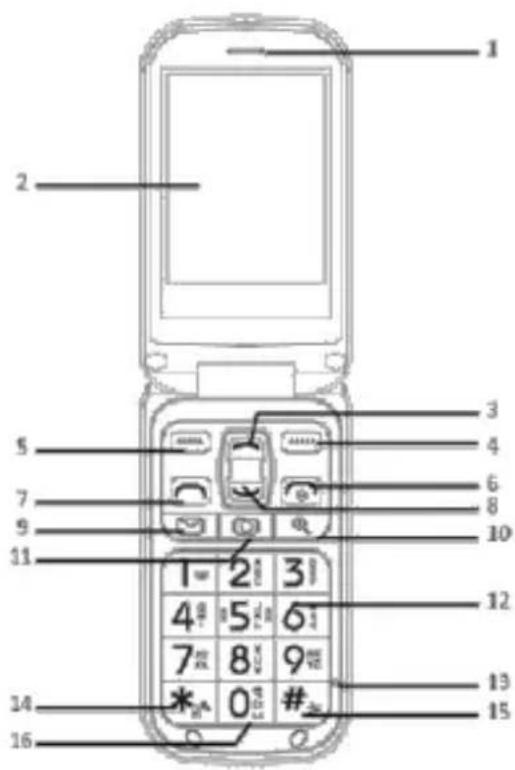
- Receiver
- LCD display
- Navigation up
- Right softkey
- Left softkey
- End call/reject call/poweron/off
- Pick up key
- Navigation down
- Message shortcut
- Magnifier
- Camera
- Keypad
- Microphone
- Input method
- Activate/Desactivate silent mode
- Activate/Desactivate handsfree mode
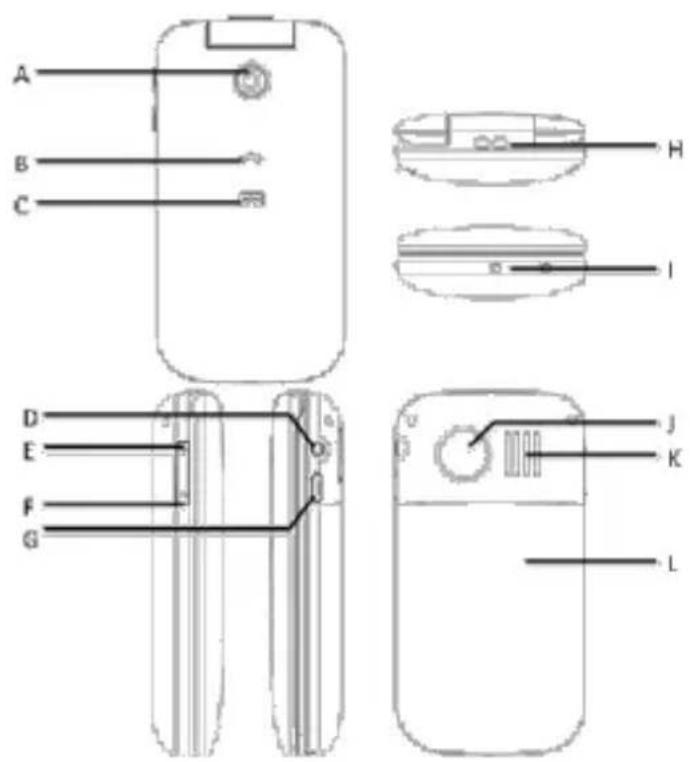
A. Camera lens
B. Call light signal
C. Message light signal
D. Earphones jack
E. Volume up
F. Volume down
G. Charging
H. Strap hole
I. Charge connector (craddle)
J. SOS - emergency call button
K. Loudspeaker
L. Battery compartment
Summary
Description 32
Summary....33
Installation....35
Installing SIM card and battery 35
Charger 36
Basic Features....37
Switching the phone ON....37
Changing language and date....37
Making a call....37
Answering/rejecting a call....38
Volume control....38
Status symbols....39
Display symbols 40
Phonebook....41
To enter the Phonebook....41
Add a new entry....41
Options....41
Message....43
Write a message....43
Inbox 43
Message settings....44
SOS function 45
Launch the emergency process....45
Activate/Desactivate the function....45
Set the function....45
Call History 46
Missed calls....46
Dalled calls....46
Received calls....46
Delete call log....46
Call time....46
Camera....46
FM Radio 47
Multimedia....48
Alarm 48
Calculator 48
Settings....49
User profiles....49
Phone Setup 50
Call Settings....51
Emergency Settings....51
Block functions 51
Network Setup....52
Security Setup....52
Connectivity....52
Restore Factory Settings....53
Services....53
Security and Warranty....54
Precaution while driving....54
Medical Devices and facilities use precautions....54
Mobile phone....54
Precautions for potentially explosive atmospheres....55
Precautions for Electronic devices....55
Safety and general use in vehicles....55
Aircraft safety....55
Battery use....55
Limitation of Liability 56
Warranty....56
Warranty duration....57
Coverage....57
Exclusions 57
Installation
Installing SIM card and battery
The SIM slot is behind the battery.
Slide down and remove the battery cover without touching the emergency call button.
Remove the battery.
Insert the SIM card into the slot and close the cover.
See following illustration. Be careful when inserting the SIM card.
Replace the battery with the battery contacts touching the contacts in the phone.
Replace the battery cover.

Charger
Connect the charger to mains or USB power, then connect the mini USB plug to the mini USB port on the right side of the phone or on the back on the cradle.
The charging symbol on the phone flashes when charging correctly and the phone is switched off.
In standby mode the battery symbol in the top right corner of the display is animated.
Charging stops automatically when the battery is fully charged. Unplug the charger.
Battery symbols
 | The battery is nearly empty and must be charged. |
 | The battery is fully charged. |
Battery type
Standby time
Call time
Lithium ion battery
100-150 hrs
3.5 hrs
Attention:
After three charging cycles the battery will have its full capacity
Charge the battery in temperatures from 0°C to +40°C.
Over a longer period of time the battery will lose capacity.
Overcharging the battery will result in earlier loss of function.
Switching the phone ON
Press and hold the red end call button 📞 for 3 seconds to switch the phone on or off. If no SIM card is inserted or if the SIM card is damaged the display shows "Insert SIM". Attention
Contact your service provider if no PIN/PUK number was provided with the SIM card.
Remaining times for PIN input tries: Press # to display the remaining tries; "SIM locked" is displayed if no more input is possible. In this case unlock the SIM card by entering the PUK number:
Enter and confirm the PUK number.
Input and confirm new PIN number.
Changing language and date
The SIM card determines the default language. See Settingsinformation for changing language, time and date.
Making a call
Enter the desired number in standby mode (use the right softkey to delete the last input; press and hold to delete entire number) and press the green dial button ☐ to make a call. Options (press the left softkey):
After the call is connected you have the following options:
| Hold single call | Hold the current call while making a second call. |
| End single call | End the current call. |
| End all calls | End all current calls. |
| New call | Make a new call. |
| Phonebook | Display the phonebook. |
| Messages | Edit a message. |
| Call history | Display call history. |
| Sound Recorder | Record the current call. |
| Mute | Turn microphone on and off. |
| DTMF | Activate/deactivate dual-tone multi-frequency. |
Press the right softkey during a call to activate hands-free mode.
Answering/rejecting a call
Answering a call
Press the green dial button 📄 to answer a call. Press the left softkey (Options).
| Answer | Answer the current call. |
| Reject | Forward the current call to voice mail. |
Ending a call
Press the right softkey (mute the ring tone), press right softkey again (reject a call).
Press the red end call button 📞 to end the call directly.
Volume control
Call Volume
During a call press one of the volume buttons on the left side of the phone, press + to increase the volume or press - to decrease the volume.
Key tone volume
In standby mode press one of the volume buttons on the left side of the phone, press + to increase the volume or press - to decrease the key tone volume.
Status symbols
 | Network signal strength |  | Network signal strength insufficient, no network |
 | Ring only |  | Unread SMS |
 | Ring + vibration |  | Unread MMS |
 | Vibration only |  | Alarm active |
 | Silent |  | Battery level |
 | Roaming |  | Headset connected |
 | Missed call |  | Voicemail received |
 | Music playback |  | Bluetooth activated |
 | Sending message... |  | Message failed |
Display symbols
 | Insert SIM |  | Deleted |
 | Error |  | Call on hold |
| [ABC] | Warning |  | Call ended |
 | Query |  | Incoming call |
| [ABDA] | Information | [T8W0] | Private incoming call |
 | Confirmation | [120H] | Conference call |
 | Message received |  | Outgoing call |
 | Message sent |  | Alarm |
| [KCK] | Processing, please wait | ||
Phonebook
In the phonebook you can store your contacts and their phone numbers. The contacts can be stored on SIM card, in the phone or on both. Your phone accepts up to 300 contacts.
You can set the speed dial status and the number; you have 9 presets available.
To enter the Phonebook
Press the right softkey wich is used as a shortcut to the Phonebook.
Or
Press the left softkey to enter the menu and press it a second time to enter the Phonebook.
Add a new entry
When in the phonebook, you can add a new entry following these steps:
- Press the left softkey to enter the 'Option' menu.
- Scroll to the 4 ^th : 'Add a new entry' and press the left softkey (Ok).
- Choose the storage (either Sim or phone) and press the left softkey (Ok)
- Choose the 1 ^st line ('Name') with the left softkey.
- Type the name of your contact using the keypad and press the left softkey two times to validate.
- Then scroll to the 2^nd line named 'Mobile Number' and choose Edit by pressing the left softkey.
- Enter your contact number and press the softkey two times to validate.
- Once the number and the name are registered, you can add the entry into the phonebook by pressing the right softkey (Done).
- The phone asks you if you want to save the entry, press the left softkey for Yes.
- Back in the phonebook, you will find the new entry by scrolling through the contacts.
Options
Once in the phonebook, you can enter the 'Option' menu by pressing the left softkey
View
Press Ok (left softkey) to display the contact number and its name.
Call
Press Ok to call the contact.
Send message
Press Ok to start typing a SMS to the contact you chose (see the dedicated paragraph in this manual).
Add New Entry
See the dedicated section in this manual.
Edit
Press Ok to modify the selected entry.
Delete
Press Ok to suppress the selected entity.
Copy
Press Ok to make a copy of the contact in another storage.
Move
Press Ok to move the contact into another storage.
Phonebook settings
| Setting | Function |
| Preferred Storage | Preset your preferred storage (Phone or SIM) |
| Speed dial | Set the speed dial |
| Extra numbers | Register your number and SOS nimbers |
| Memory status | Memory status of the phone and the SIM card |
| Copy contacts | Copy all your contacts in another storage |
| Move contacts | Move all your contacts in another storage |
| Delete all contacts | Delete all your contact |
Write a message
- Press the left softkey (Menu) to access the menu.
- Use the navigation button down to find the Messages menu.
- Press the left softkey (OK) again to access the Messages menu.
- Press the left softkey (Option) again to write a message. Enter your text with the keypad and press the left softkey (Option) to open the Option menu.
- Press the left softkey (Ok) again to open 'Send to'. Use the navigation buttons up/down to select 'Enter recipient',
- 'Add from contacts' or 'Add from call log'. Press the left softkey (Select) to select contact or number.
- Press the left softkey (Option) again and use the navigation buttons up/down to select 'Send' and press the left softkey (Ok).
Options in Message
| Send to | Send a message to the desired number. |
| Input Method | Multitap ABC, Multitap abc, Multitap Abc, Smart ABC, Smart abc, Smart Abc, Multitap ES, Multitap es, Multitap Es, Multitap FR, Multitap fr, Multitap Fr, Multitap DE, Multitap de, Multitap De, Multitap PT, Multitap pt, Multitap Pt, Numeric, Insert Symbols |
| Switch to MMS | Messages can be switched to a multimedia format and sent to a desired number. |
| Advanced | Advanced options are available for editing text insert, text templates, attachments, contact number, contact name and bookmarks. |
Inbox
Read a message
- Press the left softkey (Menu) to access the menu.
- Use the navigation button down to find the Messages menu.
- Press the left softkey (OK) to enter and scroll to the 2 ^nd line 'Inbox'
- Here you can scroll through all the SMS you received and press the left softkey (Ok) to open it.
Reply to a SMS
- Follow the previous steps to access to the SMS you want to reply to.
- Once the SMS opened, press the left softkey (Option) and choose the 1 ^st option 'Reply'.
- Type in your message with the keypad.
- Press the left softkey (Option), press it again on the first line 'Send to'.
- Press the left softkey (Option), press it again on the first line 'Send'.
Message settings
SMS Messages
| Profile Setting | Select profile. |
| Voice Mail Server | Select voicemail server. |
| Common Setting | Select On/Off for Delivery Report, Reply Path and Save Sent Message. |
| Memory status | Display memory status for phone and card. |
| Preferred storage | Select between SIM and Phone. |
| Bearer Settings | Select between Prefer GPRS, Prefer GSM and GSM Only |
MMS Messages
| Profiles | Select profile, Activate or Edit (Profile name, MMSC address, Data account, Connection, User Name and Password). |
| Common settings | Compose (Slide Time, Creation Modes, Picture resizing, Auto Signature, Signature)Sending (Validity Period, Delivery Report, Read Report, Priority, Delivery Time, Send and Save)Retrieval (Home Network, Roaming, Filters, Read Report, Delivery Report)Preferred storage (Phone, Memory card)Memory status (Phone, Memory card) |
Launch the emergency process
To make an emergency call, press and hold the Emergency call button or press it twice in a second. The phone will then send the presetted Emergency SMS to the numbers in the Numbers list of the Emergency function. The phone will then start to call the numbers from the Numbers list. If the call is not answered within 30 seconds, the phone will then call the next number and so on.
The process will repeat three times as long as nobody answers.
- Open the menu with the left softkey (Menu)
- Scroll to 'Settings' and open it by pressing Ok.
- Scroll to the 4 ^th line 'Emergency Settings'
Activate/Desactivate the function
- Once in the 'Emergency Settings' menu, press the left softkey (Ok) on the first line 'Active'
- Choose On or Off and validate with Ok
Set the function
Numbers list
- Enter the 'Number list' option by pressing Ok
- You can preset up to 5 numbers by pressing Option on the line you want to change.
-
You can choose the number from the Phonebook:
a. Scroll to the entry you want to add as an emergency number.
b. Press the left softkey (Ok) to save it -
Or by choosing Manual Input:
a. Enter a name on the 1 ^st line
b. Enter the number on the 2^nd line
c. Save it with Ok
Send SMS
When in the menu, activate the function into the 1 ^st option 'Settings'
To edit the emergency SMS:
- Open 'Message' by pressing Ok
- Press Edit
- Type in your emergency message using the keyboard for example: "I have a problem, come quickly!"
- Press Ok to save your message.
Call History
You can access to all your calls in thus Menu, with the following actions:
Missed calls
Displays missed calls list
Dialled calls
Displays dialed call list
Received calls
Displays received calls list
Delete call log
Delete all logs
Call time
Display individual conversation times for missed, dialled and received calls and reset all times.
Camera
You can capture images or video with your mobile phone.
- Press the left softkey (Menu) to access the menu.
- Use the navigation button down to find the Camera menu.
- Press the left softkey (OK) again to access the Camera menu.
You are ready to take a picture. The screen shows the image and at the bottom you see three icons. Press the camera icon (middle) to capture the image. In the Camera menu you have the following options:
- Switch to video recorder: Press the camera icon [O] to start the recording.
- To Image Viewer: View all images stored on the phone.
- Camera Settings: Personalize several settings for the camera, your options are 'Shutter Sound', 'EV', 'Contrast', 'Anti-flicker', 'Delay Timer', 'Cont. Shot', 'Image Setting', White Balance', 'DSC Mode', 'Effect Setting', 'Storage' and 'Restore Default'.
- CamCorder Settings: Similar to the previously described camera settings for
still images you can here personalize several settings for the video camera. Your options are 'EV', 'Night Mode', 'Banding', 'Video Settings', 'Video Quality', 'File Size Limit', 'Record Time Limit', 'Record Audio', 'White Balance', 'Effect Setting', 'Storage' and 'Restore Default'.
FM Radio
Before listening to FM radio make sure to insert the earphones, since they are used as FM antenna at the same time.
- Press the left softkey (Menu) to access the menu.
- Use the navigation button down to find the FM Radio menu.
- Press the left softkey (OK) again to access the FM Radio menu.
To use the radio, you need to plug the earphones first. If you did not yet connect your earphones the phone will remind you.
On the radio main screen you can:
- Use the up and down key to change the frequency.
- Use the numbers key to launch a preset station.
- Use the Camera shortcut to play/pause the radio.
In the options:
- In the 'Channel List' menu you can register up to 30 frequencies (the 9 first can be launched using the keypad).
- 'Manual Input' allows you to go directly to a channel by entering the frequency.
- Using 'Preset auto search' you can search automatically every available channel and then find them in 'Channel list'.
In the 'Settings' set the 'Background Play' mode, 'LoudSpeaker', the 'Record Format', the 'Audio Quality', and the 'Record Storage'. - Use the option 'Record' to record the radio station you are listening to.
- 'Append' allows you to continue a previous record.
- 'File List' contains all your records.
Multimedia
Your phone comes with a multimedia player to playback audio and video files.
- Press the left softkey (Menu) to access the menu.
- Use the navigation button down to find the Multimedia menu.
- Press the left softkey (OK) again to access the Multimedia menu.
- Press the left softkey (OK) again to select Audio Player. The audio playback menu is displayed.
- Press the left softkey (List) again to show all files.
- Press the left softkey (Option) again to enter the Option menu. Here you can set the options for your audio player as follows:
- In 'Refresh List' you refresh your playlist after adding new music.
In 'Settings' you set the 'Pre. Play List', 'List Auto Gen', 'Repeat', 'Shuffle', 'Background Play' and the 'Bluetooth Settings'. - The settings for the video player are similar.
Alarm
A total of 5 alarm settings are available for your phone.
- Press the left softkey (Menu) to access the menu.
- Use the navigation button down to find the Alarm menu.
- Press the left softkey (Ok) again to access the Alarm menu. 5 alarm settings are displayed. Use the navigation buttons up/down to select an alarm and press the left softkey (Edit) to select. The Alarm Settings menu is displayed.
- In the Alarm Settings menu you can select and set the 'Time', 'Set Freq', 'Set Tone', and 'Set Alert Type'.
Calculator
Your phone comes with a basic calculator for addition, subtraction, multiplication and division.
- Press the left softkey (Menu) to access the menu.
- Use the navigation button down to find the Calculator menu.
- Press the left softkey (Ok) again to access the Calculator menu.
- Press the number buttons to enter the first value and select + - x ÷ operation.
Settings
The Settings menu is used to personalize the phone. These settings can be changed in a variety of submenus. To navigate to the submenus press the left softkey to access the menu.
Use the navigation button down to find the Settings menu. Press the left softkey (OK) again to open the Settings menu. It consists of User Profiles, Phone Setup, Call Settings, Emergency Setting, Block Function, Security Setup, Connectivity and Restore Factory Settings.
User profiles
There is several user profiles you can either activate or customize by entering this menu.
| General | - Tone Setup (Incoming Call; Power ON;Power Off; Cover Open; Cover Close; Message; Keypad) - Volume (Ringtone; Key Tone) - Alert Type (Ring; Vibration Only; Vibra and Ring; Vibra Then Ring) - Ring Type (Single; Repeat; Ascending) - Extra Tone (Warning; Error; Camp on; Connect) - Answer Mode (Cover Answer; Any Key) |
| Meeting | - Tone Setup (Incoming Call; Power ON;Power Off; Cover Open; Cover Close; Message; Keypad) - Volume (Ringtone; Key Tone) - Alert Type (Ring; Vibration Only; Vibra and Ring; Vibra Then Ring) - Ring Type (Single; Repeat; Ascending), Extra Tone (Warning; Error; Camp on; Connect) - Answer Mode (Cover Answer; Any Key) |
| Outdoor | - Tone Setup (Incoming Call; Power ON;Power Off; Cover Open; Cover Close; Message; Keypad) - Volume (Ringtone; Key Tone) - Alert Type (Ring; Vibration Only; Vibra and Ring; Vibra Then Ring) - Ring Type (Single; Repeat; Ascending) - Extra Tone (Warning; Error; Camp on; Connect) - Answer Mode (Cover Answer; Any Key) |
| Indoor | - Tone Setup (Incoming Call; Power ON;Power Off; Cover Open; Cover Close; Message; Keypad) - Volume (Ringtone; Key Tone) - Alert Type (Ring; Vibration Only; Vibra and Ring; Vibra Then Ring) - Ring Type (Single; Repeat; Ascending) - Extra Tone (Warning; Error; Camp on; Connect)- Answer Mode (Cover Answer; Any Key) |
| Silent | In this mode, the phone doesn't ring but vibrates instead. You can activate it from the main screen by holding the key # |
| Headset | - Tone Setup (Incoming Call; Power ON;Power Off; Cover Open; Cover Close; Message; Keypad)- Volume (Ringtone; Key Tone)- Alert Type (Ring; Vibration Only; Vibra and Ring; Vibra Then Ring)- Ring Type (Single; Repeat; Ascending), Extra Tone (Warning; Error; Camp on; Connect)- Answer Mode (Cover Answer; Any Key) |
| Bluetooth | - Tone Setup (Incoming Call; Power ON;Power Off; Cover Open; Cover Close; Message; Keypad)- Volume (Ringtone; Key Tone)- Alert Type (Ring; Vibration Only; Vibra and Ring; Vibra Then Ring)- Ring Type (Single; Repeat; Ascending), Extra Tone (Warning; Error; Camp on; Connect)- Answer Mode (Cover Answer; Any Key) |
Phone Setup
| Time and Date | Set Time - Set DateSet Time Format (12; 24)Set Date Format (dd mm yyyy; mm dd yyyy; yyyy mm dd) |
| Schedule Power On/Off | This feature allows to plan Switch ON/OFF of your product.Status (Disable; Enable)Subject (Power On; Power Off)Set Time |
| Language | Automatic, English, French, Spanish, German |
| Idle Screen Display | Wallpaper (System: Image 1, 2 or 3; Download)Show Date and Time (On, Off) |
| Flight Mode | This settings allow to switch of network communications while your phone stays ON.Normal ModeFlight Mode (Yes; No)Query When Power On (Yes; No) |
| Font Size | Theme Default, Small, Large |
| BackLight | Brightness (1-5) |
| Setting | Time (sec) (1-60) |
Call Settings
| Caller ID | Set by network, Hide ID, Send ID. |
| Call Waiting | Activate, Deactivate, Query status. |
| Call Divert | - Divert All Voice Calls: unconditionally transfer all your incoming calls to the number you set,- Divert If Unreachable: when the network cannot find you (out of service/no service/off), forward incoming calls to the number you set,- Divert If No Answer: when your phone is not answering calls at a certain time, it will forward your call to the number you set,- Divert If Busy: when you are on a call forward your calls to the number you set,- Divert All Data Calls: forwarding all calls to the GSM card number that you set,- Cancel All Diverts: cancel all call forwarding. |
| Call Barring | - Outgoing Calls: bar outgoing calls for all, international calls or except to Home PLMN),- Incoming Calls: bar all incoming calls or when in roaming,- Cancel All: cancel all call barring (enter password),- Change Barring Password. |
| Advance settings | - Black List: Mode: On/Off; Black List Number- Auto Redial: On/Off- Call Time Display: On/Off- Call Time Reminder: Off, Single, Periodic- Auto Quick End: Set: On/Off; Duration |
Emergency Settings
Please refer to the corresponding section
Block functions
This function allows you to block some of the phones functions if you don't want them to appear in the Menu. You can block/unblock the following functions: Camera, Audio player, FM Radio, Fun & Games, To Do List, Calculator and Services.
Network Setup
| Network selection | Select network with new search, automatic or manual. |
| Preferred Networks | Enter your preferred networks. |
| GPRS Connection | Select between Always and When Needed. |
Security Setup
| SIM Lock | On, Off (enter password) |
| Phone Lock | On, Off (enter password) |
| Change password | PIN (Enter Old PIN; New PIN; Enter Again)PIN2 (Enter Old PIN; New PIN; Enter Again)Phone Lock (Enter Old Password; New Password; Enter Again) |
| Call Barring | Outgoing Calls (All Calls: Activate, Deactivate, Query Status; International Calls: Activate, Deactivate, Query Status; International Calls Except To Home PLMN: Activate, Deactivate, Query Status) |
| Incoming Calls (All Calls: Activate, Deactivate, Query Status; When Roaming: Activate, Deactivate, Query Status) | |
| Cancel All | |
| Change Barring Password | |
| Fixed Dial | Mode (On, Off) (enter PIN2)Fixed Dial List |
Connectivity
| Power | Activate/Desactivate the Bluetooth |
| Visibility | Choose if you want other devices to be able to detect your phone when the Bluetooth is on |
| My Device | Show the Bluetooth device linket to your phone |
| Inquiry Audio Device | Allows you to search and pair with an audio Bluetooth device |
| Change device name | The default name is TM200 |
| Advanced | Audio Path: Select between Leave in Phone and Forward to BT Headset; Storage: Select between Phone, Memory card and Always ask; Sharing permission: Select between Full Control and Read Only; Device Address |
| About | General informations |
Using the Bluetooth increase the energy consumption.
The recommended distance is up to 10 meters maximum (33 feet) between the 2 devices.
Restore Factory Settings
You have to enter the password to restore to factory settings.
Default PIN1 code: 1234
Default phone lock code: 0000
Services
| Homepage | Visit set homepages. |
| Bookmarks | Add and edit bookmarks. |
| Recent Pages | View history of visited pages. |
| Input address | Input address to access the site, click Option-complete to access web pages. |
| Service inbox | Network services mail inbox. |
| Settings | Set network parameters: Profiles, Browser options (Timeout; Show images, Cache, Cookies), Service message settings (Enable push; Enable service loading; Enable white list; White list), Clear cache and clear cookies. |
Security and Warranty
This section includes some important information on safe and efficient operation. Please read this information before using the phone.
Precaution while driving
- Please pay attention to the traffic safety. Check the laws and regulations on the use of your phone in the area where you drive. Always obey them.
- Use hands-free function of the phone, if available.
- Pull off the road and park before making or answering a call if conditions require.
Medical Devices and facilities use precautions.
- When using your phone near pacemakers, please always keep the phone more than twenty centimeters from the pacemaker when the phone is switched on. Do not carry the phone in the breast pocket. Use the ear opposite the pacemaker to minimize the potential for interference, please switched off the mobile phone if necessary.
- If you use any other personal medical device, please consult the manufacturer of your device to determine if it is adequately shielded from RF energy.
- In those facilities with special demand, such as hospital or health care facilities, please pay attention to the restriction on the use of mobile phone. Switch off you phone if required.
Mobile phone
- Please use original accessories or accessories approved by the phone manufacturer. Using any unauthorized accessories may affect your mobile phone's performance, damage your phone or even cause danger to your body and violate related local regulations about telecom terminals.
- Turn off your phone before you clean it. Use a damp or anti-static cloth to clean the phone. Do not use dry cloth or conductive fabric. Do not use chemical or abrasive cleaners which may damage the mobile phone.
- As your mobile phone can produce electromagnetic field, do not place it near magnetic items such as computer disks.
- Using the phone near electrical appliances such as TV, telephone, radio and personal computer can cause interference.
- Do not expose your mobile phone to direct sunlight or store it in hot areas. High temperature can shorten the life of electronic devices.
-
Keep your phone dry, any liquid may damage your phone.
-
Do not drop, knock or harshly threat the phone. Rough handling can break internal circuit boards.
- Do not connect the phone with any incompatible enhancement.
- Do not attempt to disassemble the mobile phone or battery.
- Do not store the phone with flammable or explosive articles.
- Do not charge the mobile phone without battery.
Precautions for potentially explosive atmospheres
- Switch off your phone prior to entering any area with potentially explosive atmospheres, such as fueling areas, fuel or chemical transfer or storage facilities.
- Do not remove, install, or charge batteries in such areas. Spark in a potentially explosive atmosphere can cause an explosive or fire resulting in bodily injury or even death.
- To avoid possible interference with blasting operations; switch off your phone when you are near electrical blasting caps, in a blasting area, or in areas posted "turn off electronic devices." Obey all signs and instruction.
Precautions for Electronic devices
Some electronic devices are susceptible to electromagnetic interference sent by mobile phone if inadequately shielded, such as electronic system of vehicles; please consult the manufacturers of device before using the phone if necessary.
Safety and general use in vehicles
- Safety airbag, brake, speed control system and oil eject system shouldn't be affected by wireless transmission. If you do meet problems above, please contact your automobile provider. Do not place your phone in the area over an airbag or in the airbag deployment area. Airbags inflate with great force. If a phone is placed in the airbag deployment area and the airbag inflates, the phone may be propelled with great force and cause serious injury to occupants of vehicle.
- Please turn off your mobile phone at a refueling station.
Aircraft safety
- Please turn off your mobile phone before the airplane takes off. In order to protect airplane's communication system from interference, it is forbidden to use mobile phone in flight. Safety regulations require you to have permission from a crew member to use your phone while the plane is on the ground.
- If the mobile phone has the function of automatic timing power-on, please check your alarm setting to make sure that your phone will not be automatically turned on during flight.
Battery use
- Do not short-circuit the battery, as this can cause the unit to overheat or ignite.
- Do not store battery in hot areas or throw it into fire. Otherwise, it will cause explosion.
- Do not disassemble or refit the battery. Otherwise, it will cause liquid leakage, overheating, explosion and ignition of the battery.
- Please store the battery in a cool dry place if you don't use it for a long period.
- The battery can be recharged for hundreds of times, but it will eventually wear out. When the operating time (talk time and standby time) is noticeably shorter than normal, it is time to replace it with a new one.
- Please stop using the charger and battery when they are damaged or show evidence of aging.
- Return the worm-out battery to the provider or dispose of it in accordance with environment regulations. Do not dispose of it in household rubbish.
- Please use original batteries or batteries approved by the phone manufacturer. Using any unauthorized battery may affect your handset performance or may cause danger of explosion, etc.
Warning: if the battery is damaged, do not discharge it. If the leakage does come into contact with the eyes or skin, wash thoroughly in clean water and consult a doctor.
Limitation of Liability
Manufacture should not be liable for any loss of profits or indirect, special, incidental or consequential damages resulting from or arising out of or in connection with using this product. Whether or not manufacture had been advised, knew or should have known the possibility of such damages. The user should refer to the enclosed warranty card for full warranty and service information.
Warranty
The warranty does not cover damage caused if you (or any unauthorized person) tried to repair the phone.
If the phone is emitting smoke, noise, or an unusual smell, immediately turn it off. Contact your store.
The warranty concerns the phone and does not include the accessories. The following are considered accessories:
Rechargeable batteries
USB cable
However, these accessories may be ordered from our technical division:
By email: assistance@sopeg.fr or +33 (0) 545 608 251 (International number)
Warranty duration
This product is covered by 12 month warranty duration. The warranty period starts the day the product has been purchased.
You will have to prove the warranty with the original invoice or the receipt or any documents on which the purchasing date appears.
Coverage
A defective product shall be returned to the distributor with all the accessories, instruction manual and gift box together with a note to explain the default.
The date you purchased the product defines the day the warranty period starts.
The warranty period is not extended in case of repairing or exchange by our after sales service.
Exclusions
Damage or defaults caused by a non appropriated use of the product and the use of other accessories than those provided with the product or recommended by the manufacturer and in this instruction manual are not covered by the warranty.
The warranty doesn't cover damages caused by lightning, water or fire or any other damage caused during transportation.
The warranty will be cancelled if the serial number of this product has been removed, modified, deleted or is illegible.
The warranty will also be cancelled if this product has been repaired, modified or affected by a third party and non authorized person, service or company

- TELEFUNKEN®
- TELEFUNKEN TM 200 Cosi
- Teléfono móvil universal
- Índice
- Descripción....3
- Índice....4
- Instalación....6
- Funciones Básicas 8
- Libreta Telefónica....12
- Mensajes....14
- Función SOS....16
- Historial de Llamadas....17
- Instalación
- Instalar la tarjeta SIM y la batería
- Cargador
- Atención:
- Funciones Básicas
- Encender el teléfono
- Cambiar el idioma y la fecha
- Hacer una llamada
- Responder/rechazar una llamada
- Control del volumen
- Volumen de Llamada
- Volumen de los tonos del teclado
- Libreta Telefónica
- Acceder a la Agenda de contactos
- Añadir nueva entrada
- Opciones
- Ver
- Llamar
- Enviar mensaje
- Editar
- Borrar
- Copiar
- Mover
- Mensajes
- Escribir un mensaje
- Buzón de Entrada
- Leer un mensaje
- Responder a un SMS
- Ajustes de mensajes
- Mensajes SMS
- Función SOS
- Iniciar el procedimiento de emergencia
- Activar/Desactivar la función
- Establecer la función
- Lista de números
- Enviar SMS
- Historial de Llamadas
- Tiempo de llamada
- Cámara
- Radio FM
- Multimedia
- Alarma
- Calculadora
- Ajustes
- Perfiles de usuario
- Ajustes de Emergencia
- Bloqueo de funciones
- Restaurar los Ajustes de Fábrica
- Seguridad y Garantía
- Precaución al volante
- Precauciones de uso en instalaciones y dispositivos médicos
- Teléfono móvil
- Precauciones en ambientes potencialmente explosivos
- Precauciones con dispositivos electrónicos
- Seguridad y uso general en vehículos
- Seguridad en aeronaves
- Uso de la batería
- Límite de responsabilidad
- Garantía
- Duración de la garantía
- Cobertura
- Exclusions
- Universal mobile phone
- Summary
- Installation
- Installing SIM card and battery
- Charger
- Attention:
- Switching the phone ON
- Changing language and date
- Making a call
- Answering a call
- Ending a call
- Volume control
- Call Volume
- Key tone volume
- Phonebook
- To enter the Phonebook
- Add a new entry
- Options
- Send message
- Add New Entry
- Edit
- Delete
- Copy
- Move
- Write a message
- Inbox
- Read a message
- Reply to a SMS
- Message settings
- SMS Messages
- MMS Messages
- Launch the emergency process
- Activate/Desactivate the function
- Set the function
- Numbers list
- Send SMS
- Call History
- Camera
- FM Radio
- Alarm
- Calculator
- Settings
- User profiles
- Emergency Settings
- Block functions
- Restore Factory Settings
- Services
- Security and Warranty
- Precaution while driving
- Medical Devices and facilities use precautions.
- Mobile phone
- Precautions for potentially explosive atmospheres
- Precautions for Electronic devices
- Safety and general use in vehicles
- Aircraft safety
- Battery use
- Limitation of Liability
- Warranty
- Warranty duration
- Coverage
Marque : TELEFUNKEN
Modèle : TM 200 COSI
Catégorie : Téléphone mobile