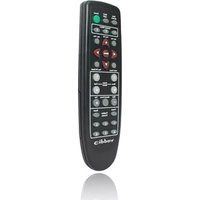
IR Remote Commander - Télécommande Vaddio - Notice d'utilisation et mode d'emploi gratuit
Retrouvez gratuitement la notice de l'appareil IR Remote Commander Vaddio au format PDF.


| Type de produit | Télécommande infrarouge |
| Marque | Vaddio |
| Modèle | IR Remote Commander |
| Alimentation | 2 piles AAA (non incluses) |
| Portée | Jusqu'à 10 mètres |
| Fréquence | Infrarouge (IR) |
| Compatibilité | Caméras PTZ Vaddio |
| Dimensions | Environ 15 x 4 x 2 cm |
| Poids | Environ 100 g (avec piles) |
| Fonctions principales | Contrôle à distance des mouvements, zoom, mise au point et préréglages des caméras PTZ Vaddio |
| Matériau | Plastique ABS |
| Entretien et nettoyage | Nettoyer avec un chiffon doux et sec. Ne pas utiliser de produits abrasifs. |
| Sécurité | Ne pas exposer à l'humidité, aux températures extrêmes ou aux chocs. |
| Pièces détachées et réparabilité | Non réparable par l'utilisateur. Contacter le service après-vente Vaddio. |
| Garantie | 2 ans |
| Certifications | CE, RoHS |
| Accessoires inclus | Manuel d'utilisation |
FOIRE AUX QUESTIONS - IR Remote Commander Vaddio
Questions des utilisateurs sur IR Remote Commander Vaddio
0 question sur cet appareil. Repondez a celles que vous connaissez ou posez la votre.
Poser une nouvelle question sur cet appareil
Téléchargez la notice de votre Télécommande au format PDF gratuitement ! Retrouvez votre notice IR Remote Commander - Vaddio et reprennez votre appareil électronique en main. Sur cette page sont publiés tous les documents nécessaires à l'utilisation de votre appareil IR Remote Commander de la marque Vaddio.
MODE D'EMPLOI IR Remote Commander Vaddio
Vaddio™ IR Remote Commander
Enhanced IR Remote Controller
The Vaddio IR Remote Commander was designed to work with the Vaddio camera packages based on the Vaddio HD-18, Sony® EVI-D70, EVI-D100 and BRC-300 Pan/Tilt/Zoom Cameras. The IR Remote is compatible with the following list of Vaddio camera systems:
• Vaddio ClearVIEW HD-18 Systems (Camera, WallVIEW and CCU Versions)
- WallVIEW™ 70 PTZ, WallVIEW 100 PTZ, WallVIEW 300 PTZ
- CeilingVIEW™ 70 PTZ and CeilingVIEW 70 PTZ HideAway
- Vaddio EZCamera™ series Model 100 PTZ and Model 70 PTZ systems
- Vaddio 100 PTZ and 70 PTZ Integrator's camera kits
The Vaddio IR Remote Commander is also a 100% compatible replacement IR remote for the Sony PTZ Cameras

Figure 1: Vaddio IR Remote Commander Enhanced, ergonomically designed and user-friendly handheld remote control (Actual size)
SAVE THESE INSTRUCTIONS
The information contained in this manual will help you install and operate you IR Remote Commander. If these instructions are lost or misplaced, Vaddio keeps copies of Specifications,

CARE AND CLEANING
OPERATING AND STORAGE CONDITIONS
WARRANTY INFORMATION
Installation and User Guides and most pertinent product drawings for the Vaddio product line on the Vaddio website. All manuals for the cameras mentioned in this manual can be found and can be downloaded from www.vaddio.com free of charge.
The IR Remote Commander was designed, built and tested for use indoors only. Please use two (2) Size/Format AAA, 1.5V batteries only. Use alkaline batteries for best results.
Do not attempt to take the products in this system apart. There are no user-serviceable parts inside.
- Do not spill liquids on the products and keep these devices away from food and liquid
• For smears or smudges, wipe with a clean, soft cloth. Do not use any abrasive chemicals.
Do not store or operate the IR Remote under the following conditions for any circumstance:
• Temperatures above 40^ C ( 104^ F) or temperatures below 0^ C ( 32^ F)
- High humidity, dusty, condensing or wet environments
- In inclement weather or under severe vibration
- Temperatures above 40^ (104°F) or temperatures below 0^ (32°F) - High humidity, dusty, condensing or wet environments - In inclement weather or under severe vibration
Hardware* Warranty - One year limited warranty on all parts. Vaddio warrants this product against defects in materials and workmanship for a period of one year from the day of purchase if Vaddio receives notice of such defects during the warranty. They will, at its option, repair or replace products that prove to be defective. See Warranty and RMA Policy documentation.
Exclusions - The above warranty shall not apply to defects resulting from: improper or inadequate maintenance by the customer, customers applied software or interfacing, unauthorized modifications or misuse, operation outside the normal environmental specifications for the product, use of the incorrect power supply, or improper site operation and maintenance.
Vaddio Customer service – Vaddio will test, repair, or replace the product or products without charge if the unit is under warranty. If the product is out of warranty, Vaddio will test then repair the product or products. The cost of parts and labor charge will be estimated by a technician and confirmed by the customer prior to repair. All components must be returned for testing as a complete unit. Vaddio will not accept responsibility for shipment after it has left the premises.
Vaddio Technical support - Vaddio technicians will determine and discuss with the customer the criteria for repair costs and/or replacement. Vaddio Technical Support can be contacted through one of the following resources: e-mail support at support@vaddio.com or online at www.vaddio.com.
Return Material Authorization (RMA) number - Before returning a product for repair or replacement request an RMA from Vaddio's technical support. Provide a technician with a return phone number, e-mail address, shipping address, and product serial numbers. Describe the reason for repairs or returns as well as the date of purchase. Include your assigned RMA number in all correspondence with Vaddio. Write your assigned RMA number on the outside of the box when returning the product.
Voided warranty – The warranty does not apply if the original serial number has been removed or if the product has been disassembled or damaged through misuse, accident, modifications, or unauthorized repair.
Shipping and handling - Vaddio will not pay for inbound shipping transportation or insurance charges or accept any responsibility for laws and ordinances from inbound transit. Vaddio will pay for outbound shipping, transportation, and insurance charges all items under warranty but will not assume responsibility for loss and/or damage by the outbound freight carrier.
- If the return shipment appears damaged, retain the original boxes and packing material for inspection by the carrier.
- Contact your carrier immediately.
Products not under warranty - Payment arrangements are required before outbound shipment for all out of warranty products.
*Vaddio manufactures its hardware products from parts and components that are new or equivalent to new in accordance with industry standard practices.
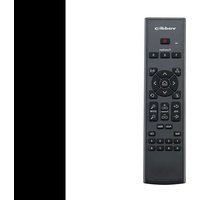

Marque : Vaddio
Modèle : IR Remote Commander
Catégorie : Télécommande