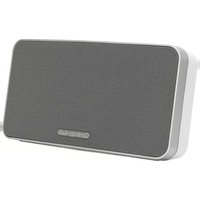
Minx Go V2 - Haut-parleur CAMBRIDGE - Notice d'utilisation et mode d'emploi gratuit
Retrouvez gratuitement la notice de l'appareil Minx Go V2 CAMBRIDGE au format PDF.


| Type de produit | Haut-parleur Bluetooth portable |
| Marque | Cambridge |
| Modèle | Minx Go V2 |
| Dimensions (L x l x H) | 200 x 70 x 70 mm |
| Poids | 0,5 kg |
| Alimentation | Batterie rechargeable lithium-ion 2200 mAh |
| Autonomie | Jusqu'à 10 heures |
| Connectivité | Bluetooth 4.2, entrée AUX 3,5 mm |
| Puissance | 2 x 5 W |
| Réponse en fréquence | 80 Hz - 20 kHz |
| Fonctions principales | Lecture sans fil, fonction mains libres, contrôle du volume |
| Entretien et nettoyage | Nettoyer avec un chiffon doux et sec. Ne pas utiliser de produits abrasifs. |
| Sécurité | Ne pas exposer à l'eau ou à l'humidité. Utiliser uniquement le chargeur fourni. |
| Pièces détachées et réparabilité | Contacter le service après-vente Cambridge pour les pièces détachées. |
| Informations générales | Garantie 2 ans. Fabriqué en Chine. |
FOIRE AUX QUESTIONS - Minx Go V2 CAMBRIDGE
Questions des utilisateurs sur Minx Go V2 CAMBRIDGE
0 question sur cet appareil. Repondez a celles que vous connaissez ou posez la votre.
Poser une nouvelle question sur cet appareil
Téléchargez la notice de votre Haut-parleur au format PDF gratuitement ! Retrouvez votre notice Minx Go V2 - CAMBRIDGE et reprennez votre appareil électronique en main. Sur cette page sont publiés tous les documents nécessaires à l'utilisation de votre appareil Minx Go V2 de la marque CAMBRIDGE.
MODE D'EMPLOI Minx Go V2 CAMBRIDGE
User manual
Important!
Connect the charging adaptor to the Go and charge for 4 hours before first use.
The charging LED will indicate orange - whilst charging and green - when fully charged.
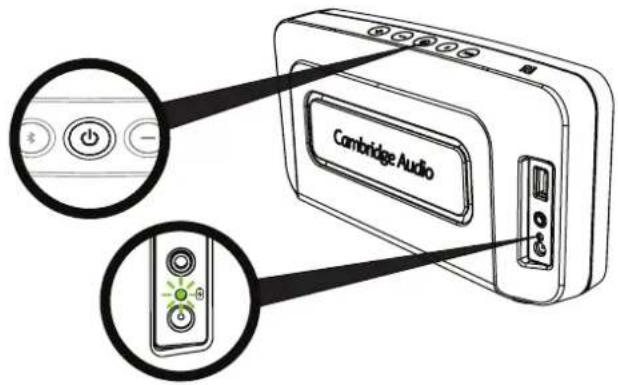
Press and hold the power button ⏻ on the top of the unit for two seconds to turn it on.
Bluetooth set-up
Press the ✿ button to select the Bluetooth input.

Pairing Your Device Manually
- Press and hold the 🎨 button for two seconds to enter Bluetooth pairing mode. The flashing blue LED, indicates pairing mode.
- Enable Bluetooth connectivity on your Bluetooth device (eg. phone, tablet etc) and pair with the Go (you may need to consult your phone or tablet operating instructions).
If your Bluetooth device is NFC enabled
You may need to ensure Bluetooth is enabled on your device.
- Touch your NFC device against the logo on top of the Go.
- Go will enter automatic pairing mode and 'Go' should appear on your device.

Successful pairing will be signalled by a 'beep' from the unit and the LED will stop flashing.

Pairing a second device
To pair a different device, press and hold the 📄 button for two seconds to enter pairing mode and pair your Bluetooth device as described in the Bluetooth instructions.
To talk to us, call +44 (0)203 514 1521 (UK Local)
or 1-877-357-8204 (USA)
Aux input

Press the AUX button to select the Aux input. There is an Aux input on the rear of the unit that allows any analogue device to be connected. LED will turn green to indicate Aux input is selected.
TOP TIPS
Auto power down
To save power, your Go will automatically turn off after 30 minutes if no music is playing. Press the power button to turn the Go back on.
Low battery warning
A flashing red LED indicates that the battery is too low and the Go will enter a standby mode where no music can be played. This LED will continue flashing for 30 minutes after which the Go will turn off.

USB Charging
The Go can be used to charge compatible mobile devices. If the charging adaptor is not connected this will drain the battery.
! Battery Safety
Your Go contains a high performance battery and charging system that is designed to work in temperatures that do not exceed 50°C (122°F). Leaving this product in an automobile where temperatures may exceed this limit may result in permanent battery damage, fire or explosion. Do not leave your product in any location where temperatures may exceed this limit. Please recharge the battery every two months to maintain the battery in optimal condition.
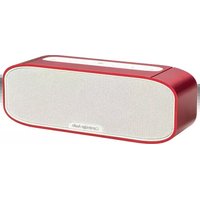


Marque : CAMBRIDGE
Modèle : Minx Go V2
Catégorie : Haut-parleur