
FRA212PLL - Radio-réveil MPMAN - Notice d'utilisation et mode d'emploi gratuit
Retrouvez gratuitement la notice de l'appareil FRA212PLL MPMAN au format PDF.


| Type de produit | Radio-réveil |
| Marque | Mpman |
| Modèle | FRA212PLL |
| Dimensions (L x H x P) | 150 x 100 x 80 mm |
| Poids | 300 g |
| Alimentation principale | 230 V, 50 Hz |
| Alimentation de secours | 1 pile CR2032 (non fournie) |
| Type de réception radio | FM PLL |
| Bande de fréquences FM | 87,5 – 108 MHz |
| Nombre de présélections | 10 stations |
| Affichage | LED rouge, 4 chiffres |
| Fonction alarme | Radio ou buzzer |
| Répétition d'alarme (Snooze) | Oui, 5 minutes |
| Fonction veilleuse | Non |
| Prise casque | Non |
| Entretien et nettoyage | Chiffon doux et sec |
| Sécurité | Ne pas exposer à l'humidité ni aux sources de chaleur |
| Pièces détachées / Réparabilité | Pile de secours disponible dans le commerce |
| Informations générales | Radio-réveil compact avec réglage automatique de l'heure via PLL |
FOIRE AUX QUESTIONS - FRA212PLL MPMAN
Questions des utilisateurs sur FRA212PLL MPMAN
0 question sur cet appareil. Repondez a celles que vous connaissez ou posez la votre.
Poser une nouvelle question sur cet appareil
Téléchargez la notice de votre Radio-réveil au format PDF gratuitement ! Retrouvez votre notice FRA212PLL - MPMAN et reprennez votre appareil électronique en main. Sur cette page sont publiés tous les documents nécessaires à l'utilisation de votre appareil FRA212PLL de la marque MPMAN.
MODE D'EMPLOI FRA212PLL MPMAN
PLL ALARM CLOCK RADIO
Model : FRA212PLL
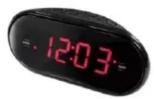
INSTRUCTION MANUAL
WARNING:
TO REDUCE THE RISK OF FIRE OR ELECTRIC SHOCK, DO NOT EXPOSE THIS APPARATUS TO RAIN OR MOISTURE.

The lighting flash with arrowhead symbol, with an equilateral triangle is intended to alert the user to the presence of uninsulated dangerous voltage within the products enclosure that may be of sufficient magnitude to constitute a risk of electric shock to persons.
CAUTION
RISK OF ELECTRIC SHOCK
CAUTION: TO REDUCE THE RISK OF ELECTRIC SHOCK, DO NOT REMOVE COVER (OR BACK). NO USER SERVICEABLE PARTS INSIDE REFER SERVICING TO QUALIFIED SERVICE PERSONNEL.

The exclamation point within an equilateral triangle is intended to alert the user to the presence of important operating and maintenance (servicing) instruction in the literature accompanying the appliance.
WARNING
- The ventilation should not be impeded by covering the ventilation openings with items, such as newspapers, table-cloths, curtains, etc.
- No naked flame sources, such as lighted candles, should be placed on the apparatus.
- It shall not be exposed to dripping or splashing and that no objects filled with liquids, such as water, shall be placed on the apparatus.
- Do not place the product in closed bookcases or racks without proper ventilation.
- The batteries (Battery pack or batteries installed) shall not be exposed to excessive heat such as sunshine, fire or the like.
- Excessive sound pressure from earphones and headphones can cause hearing loss.
- Where the mains plug or an appliance coupler is used as the disconnect device, the disconnect device shall remain readily operable.

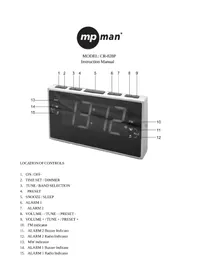
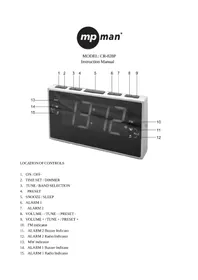
1 Speaker
2 SOURCE/AL OFF button
3 AL1/+ button
4 AL2/- button
5 DIMMER button
6 HOUR/▶ button
7 MIN/◄button
8 CLK/MEM button
9 SNOOZE/SLEEP button
10 AL1 buzzer indicator
CONNECTING THE UNIT TO POWER
Before plug in the AC power cord to the AC wall outlet, please make sure that the voltage of your electricity supply is same as that indicated on the rating plate.
BATTERY BACKUP
Insert two pieces UM-4 batteries (not supplied) into the battery compartment. Be sure to observe the proper polarity (the "+" and "-" signs) as indicated inside the battery compartment.
In case of power failure or interrupted AC power, the current time and alarm time settings, the stored radio stations are preserved in the memory of the unit by means of battery back-up function.
SETTING THE CLOCK
-
With the unit in CLOCK mode, press and hold the CLK/MEM button for about 1 second, the time will begin to flash on the display.
-
Press the HOUR/▶ button to adjust the hour.
-
Press the MIN/■ button to adjust the minute.
-
When the correct time is selected, press the CLK/MEM button again to confirm.
SETTING THE ALARMS
-
With the unit in CLOCK mode, press the AL1/+ or AL2/-button. The ALARM time will begin to flash on the display.
-
Press the HOUR/▶ button to adjust the alarm hour
-
Press the MIN/«button to adjust the alarm minute.
-
When the desired alarm time is selected, press the AL1/+ or AL2/-button to confirm.
-
Press the AL1/+ or AL2/− button to select the ALARM sound mode - buzzer or currently set radio station. The alarm buzzer or radio indicator will light up.
SNOOZE FUNCTION
- Whenever the alarm (radio or buzzer) activates, it can be temporarily suspended for a short
period of 9 minutes by pressing the SNOOZE button once
- The buzzer or radio will then automatically activate again after the 9 minutes SNOOZE period
has ended.
- This procedure can be repeated for up to approximately one hour.
TURN OFF THE ALARM
When the Alarm activate, press the SOURCE/AL.OFF button to turn off the Alarm.
LISTENING TO THE AM/FM RADIO
-
Press the SOURCE/AL.OFF button to select AM or FM band
-
Press the HOUR/▶ or MIN/▶ button step by step to tune to the desired radio stations.
-
Press and hold the HOUR/▶ or MIN/▶ button for approx. 1 second, it will start to search the next radio station in the direction of the search. The search operation simply finds stations with strong signals. Stations with weak reception can only be tuned in manually.
-
To turn off the radio, press and hold the SOURCE/AL.OFF button for approx.. 1 second.
SAVING A RADIO STATION TO THE MEMORY
- Tune the radio to the desired station.
-
Press and hold the CLK/MEM button to store this radio station in the next memory station number. The display will show PXX (XX is the memory station number from 01 to 10)
-
Up to 10 AM and 10 FM radio stations can be stored in the memory.
TO LISTEN TO A SAVED RADIO STATION
-
Press the SOURCE/AL.OFF button to select AM or FM band.
-
Press the CLK/MEM button to skip to the next stored radio station.
SLEEP TO MUSIC FUNCTION
- This function allows you to listen to the radio while you fall asleep.
- Press the SNOOZE button, the display will show the default sleep time of 90 minutes.
- Press the SNOOZE button repeatedly to set the desired sleep time.
(90-80-70-60-50-40-30-20-10 min. or OFF) - After the pre-set time has elapsed, the radio will turn off automatically
TURN OFF THE RADIO
Press and hold the SOURCE/AL OFF button for approximate 1 second, the radio will turn off.
DIMMER CONTROL
Press the DIMMER button to select the brightness of the display
SPECIFICATIONS
Frequency Range: AM 522 - 1620 KHz
FM 87.5 – 108 MHz
Power Supply: AC 230V \~ 50 Hz
AC/DC Adaptor DC6V 200mA
Back-Up Battery: 2 pc. UM4
Specifications are subject to change without prior notice.
- WARNING
- CAUTION
- RISK OF ELECTRIC SHOCK
- CONNECTING THE UNIT TO POWER
- BATTERY BACKUP
- SETTING THE CLOCK
- SETTING THE ALARMS
- SNOOZE FUNCTION
- TURN OFF THE ALARM
- LISTENING TO THE AM/FM RADIO
- SAVING A RADIO STATION TO THE MEMORY
- TO LISTEN TO A SAVED RADIO STATION
- SLEEP TO MUSIC FUNCTION
- TURN OFF THE RADIO
- DIMMER CONTROL
- SPECIFICATIONS
Marque : MPMAN
Modèle : FRA212PLL
Catégorie : Radio-réveil