RDU341 - Thermostat SIEMENS - Notice d'utilisation et mode d'emploi gratuit
Retrouvez gratuitement la notice de l'appareil RDU341 SIEMENS au format PDF.


| Type de produit | Thermostat d'ambiance programmable |
| Marque | Siemens |
| Modèle | RDU341 |
| Dimensions (L x H x P) | 80 x 80 x 25 mm |
| Poids | 120 g |
| Alimentation | 2 piles AAA (1.5 V) ou 24 V AC/DC |
| Affichage | Écran LCD rétroéclairé |
| Plage de température | 5 °C à 35 °C |
| Précision | ±0.5 °C |
| Fonctions principales | Régulation PID, programmation hebdomadaire, mode vacances, détection de fenêtre ouverte |
| Sortie | Relais 230 V, 2 A (chauffage/refroidissement) |
| Compatibilité | Chaudière, pompe à chaleur, climatisation |
| Indice de protection | IP30 |
| Matériau du boîtier | Plastique ABS blanc |
| Entretien et nettoyage | Essuyer avec un chiffon doux et sec. Ne pas utiliser de nettoyants abrasifs. |
| Sécurité | Protection antigel, verrouillage enfant, température minimale/maximale |
| Pièces détachées et réparabilité | Piles remplaçables, fusible accessible. Réparation par un professionnel agréé Siemens. |
| Informations générales | Utilisation en intérieur uniquement. Température de stockage : -10 °C à 60 °C |
FOIRE AUX QUESTIONS - RDU341 SIEMENS
Questions des utilisateurs sur RDU341 SIEMENS
0 question sur cet appareil. Repondez a celles que vous connaissez ou posez la votre.
Poser une nouvelle question sur cet appareil
Téléchargez la notice de votre Thermostat au format PDF gratuitement ! Retrouvez votre notice RDU341 - SIEMENS et reprennez votre appareil électronique en main. Sur cette page sont publiés tous les documents nécessaires à l'utilisation de votre appareil RDU341 de la marque SIEMENS.
MODE D'EMPLOI RDU341 SIEMENS
SIEMENS

Instructions d'utilisation
RDU341
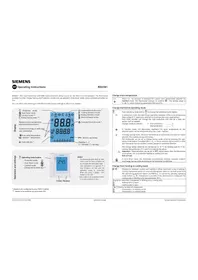
Le RDU341 - le thermostat d'ambiance avec communication KNX vous permet de régler la température idéale de la pièce. Le thermostat propose les modes Confort, Économie d'énergie et Protection, et peut fonctionner en mode temporisation automatique à l'aide d'un programme fourni via le bus.
Vous pouvez soit profiter des réglages d'usine du thermostat, soit les ajuster selon vos besoins.

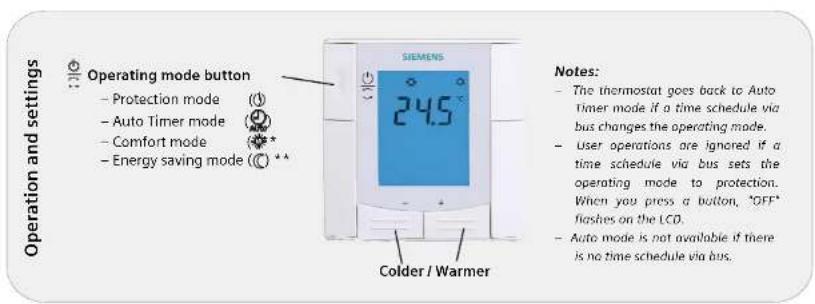
* Nécessite une configuration par votre installateur CVC
** Nécessite l'activation via le paramètre P02
Modifier la température ambiante
| +/- | Press + or - to increase or decrease the current room temperature setpoint for Comfort mode. The thermostat changes to Comfort 。The setting range is 5...40 °C, unless limited by parameters P09 and P10. |
Modifier le mode de fonctionnement du thermostat
| ● | Press operating mode button ⬤ to change the operating mode display. |
| ○ | In protection mode, the plant stops operating. However, if the room temperature drops below 8 °C, heating is switched on to protect the room against frost.Your HVAC installer can change the frost protection limit and set a heat protection limit as needed:Changes made by installer: ↙ Frost protection: ...... °CHeat protection: ...... °C |
| ☀ | In Comfort mode, the thermostat maintains the room temperature on the setpoint which can be readjusted using the + and - buttons. |
| °C | In Energy Saving mode, the room temperature is maintained at a lower or higher setpoint, thus saving energy and money.The thermostat can be set to Energy Saving mode either by pressing the operating mode button if enabled (PO2 - 2), or via an external signal (switch or KNX bus command) such as window contact, keycard or presence detector. |
| The energy saving setpoints are factory-set to 15 °C for heating and 30 °C for cooling. Use parameters P11 and P12 to adjust the values. | |
| ⚠️ | Important: These setpoints can be set to OFF; which means that the thermostat is not active., i.e. no protective heating or cooling function.Risk of frost! |
| 💡 | In Auto timer mode, the thermostat automatically switches between Comfort and Energy Saving mode according to the scheduler via KNX bus. |
Passer du mode chauffage au mode refroidissement
| Changeover between cooling and heating is either automatic using a heating / cooling changeover sensor or a remote changeover switch or via instruction from the central management station via KNX bus, or manual by pressing operating mode button No changeover is possible if the thermostat is configured for cooling only or heating only, (see parameter P01). |
| Display for automatic changeover or heating only / cooling only: Heating valve is open Cooling valve is open |
| Display for manual changeover: Thermostat is in heating mode Thermostat is in cooling mode |
Minuterie temporaire pour prolonger le mode Confort
| When Energy Saving operating mode is active, press operating mode buttonto temporarily return to Comfort mode. symbol appears. Press operating mode button again to stop the timer.You can only extend Comfort mode if parameter P02 = 1.Duration * : P68 = 0...360 min, factory setting = 0 min. |
Verrouillage des boutons
| GHz | Press operating mode button for 5 seconds to lock or unlock the buttons if manual button lock is configured (parameter P14 = 2).The thermostat automatically locks the buttons 20 seconds after the last adjustment if "Auto lock" is configured (P14 = 1).The key symbol ° indicates locked buttons. |
Défauts externes
| AL1 * | These messages inform you on external faults *: |
| AL2 * | AL1 :.... AL2 :.... |
Mise en service
Vous pouvez ajuster un certain nombre de paramètres de contrôle pour adapter le thermostat à votre système et optimiser les performances de contrôle. Vous pouvez le faire pendant le fonctionnement soit via les boutons du thermostat, soit à l'aide d'un outil de mise en service.
Procédez comme suit pour modifier les paramètres de contrôle les plus importants : (Votre installateur de CVC peut définir des paramètres supplémentaires)
| +/- | 1. Press the - and + buttons simultaneously at least 3 seconds. Release, and within 2 seconds, press + again for 3 seconds. "P01" is displayed. |
| 2. Repeatedly press the + or - button to select the required parameter. | |
| 3. Press + and - simultaneously. The current value of the selected parameter begins to flash, allowing you to change the value by repeatedly pressing + or -. | |
| 4. The next parameter is displayed when you press + and - again simultaneously. | |
| 5. Repeat steps 2 to 4 to display and change additional parameters.. | |
| 6. Press + or - until "End" is displayed, and then press + and - simultaneously to save the change and exit parameter entry mode. |
| Parameter | Description | Factory setting Setting range Adj | ||
| P01 | Control sequence | 1 (Cooling only) | 0 = Heating only1 = Cooling only2 = Manual H or C3 = Auto Changeover | |
| P02 | Mode selection by user via operating mode button** Without time schedule via KNX, Auto is equal to Comfort. | 1 (Auto **, Protection) | 1 = Auto **, Protection2 = Auto **, Comfort, Energy Saving, Protection | |
| P04 | Selection of °C or °F | °C | 0 = °C1 = °F | |
| P05 | Sensor calibration | 0.0 °C | -3 ... +3 °C | |
| P06 | Standard temperature display | 0 (Room temp.) | 0 = Room temperature1 = Setpoint | |
| P07 | Additional user information | 0 (no display) | 0 = No display1 = Temp. in °C / °F2 = Outside temperature (via bus)3 = Time of day (12h, via bus)4 = Time of day (24h, via bus) | |
| P08 | Comfort basic setpoint | 21 °C | 5 ... 40 °C | |
| P09 | Minimum setpoint limitation in Comfort (Wmincont) | 5 °C | 5 ... 40 °C | |
| P10 | Maximum setpoint limitation in Comfort (Wmaxcont) | 35 °C | 5 ... 40 °C | |
| P11 | Setpoint of heating in Energy Saving (Wheatcont) | 15 °C | OFF, 5 °C...Wcoolcont | |
| P12 | Setpoint of cooling in Energy Saving (Wcoolcont) | 30 °C | OFF, Wheatcont...40 °C | |
| P14 | Button lock(Press operating mode button for 5 seconds to lock or unlock the buttons) | 0 (Disabled) | 0 = Disabled1 = Auto lock2 = Manual lock |
* Doit être configuré par votre installateur de CVC. Tous les réglages de température peuvent être effectués par incréments de 0,5 °C. √ Veuillez noter toutes les modifications que vous effectuez !

Marque : SIEMENS
Modèle : RDU341
Catégorie : Thermostat