
MBP33S-2 - Moniteur pour bébé MOTOROLA - Notice d'utilisation et mode d'emploi gratuit
Retrouvez gratuitement la notice de l'appareil MBP33S-2 MOTOROLA au format PDF.


| Type de produit | Moniteur pour bébé |
| Marque | Motorola |
| Modèle | MBP33S-2 |
| Dimensions (unité parent) | Environ 70 x 40 x 20 mm |
| Dimensions (unité bébé) | Environ 60 x 70 x 40 mm |
| Poids (unité parent) | Environ 100 g |
| Poids (unité bébé) | Environ 110 g |
| Alimentation | Adaptateur secteur 5 V / 1 A |
| Autonomie (unité parent) | Jusqu'à 8 heures en veille |
| Portée | Jusqu'à 300 m en champ libre |
| Fréquence | 2,4 GHz |
| Fonctions principales | Audio bidirectionnel, veilleuse, sonde de température, alertes de mouvement |
| Entretien et nettoyage | Nettoyer avec un chiffon doux et sec. Ne pas utiliser de produits abrasifs. |
| Sécurité | Technologie sans fil à faible émission |
| Pièces détachées et réparabilité | Batterie rechargeable remplaçable; adaptateur secteur standard |
| Informations générales | Moniteur numérique avec portée étendue et écran LCD |
FOIRE AUX QUESTIONS - MBP33S-2 MOTOROLA
Questions des utilisateurs sur MBP33S-2 MOTOROLA
0 question sur cet appareil. Repondez a celles que vous connaissez ou posez la votre.
Poser une nouvelle question sur cet appareil
Téléchargez la notice de votre Moniteur pour bébé au format PDF gratuitement ! Retrouvez votre notice MBP33S-2 - MOTOROLA et reprennez votre appareil électronique en main. Sur cette page sont publiés tous les documents nécessaires à l'utilisation de votre appareil MBP33S-2 de la marque MOTOROLA.
MODE D'EMPLOI MBP33S-2 MOTOROLA

MODELS: MBP33S, MBP33S-2, MBP33S-3, MBP33S-4
QUICK START GUIDE
For a full explanation of all features and instructions, please refer to the User's Guide.
1. Setting up your Digital Video Baby Monitor
A. Connecting power supply for the Baby Unit

Connect the small plug of the power adapter to the Baby Unit and the other end to the electrical outlet. Only use the enclosed adapter (5V DC/600mA). Ensure the ON/OFF switch is at "ON" position.
B. Installing the battery pack for the Parent Unit

Insert the wire tab of the rechargeable battery pack into the contact slot as shown above and fit the battery pack into the compartment.
C. Fastening the cover for the Parent Unit
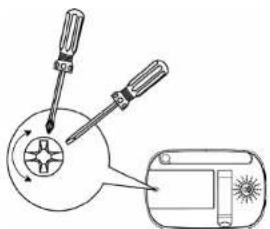
Small cross head or Flat end screw driver
D. Connecting power supply for the Parent Unit
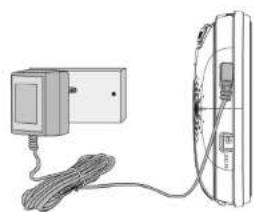
Connect the small plug of the power adapter to the parent unit and the other end to the electrical outlet. Only use the enclosed adapter (5V DC / 600mA). Recommend charging at least 16 hours before first use.
WARNING:
STRANGULATION HAZARD: Children have STRANGLED in cords. Keep this cord out of the reach of children (more than 3ft (1m) away) from the crib. Do not use with an extension cord. Only use the AC Adapters provided.
2. Basic operation of the keys
| Parent Unit | ||
| ON/OFF button Press and hold to switch on/off the Unit. | ||
| UP/DOWN buttons Press to adjust menu settings or volume level. | ||
| LEFT/RIGHT buttons | Press to access different menu options or brightness level. | |
| MENU button Press to open menu options or exit. | ||
| OK | OK button Press to confirm a selection. | |
| VIDEO button Press to turn on/off the LCD display. | ||
| TALK button Press and hold to talk to your baby. | ||
| Baby Unit | ||
| ON/OFF switch | Push power switch to the right to switch on the Unit. Push power switch to the left to switch off the Unit. | |
3. General Information
If your product is not working properly...
- Read this Quick Start Guide or the User's Guide.
- Contact Customer Service:
US and Canada 1-888-331-3383
Email: support@motorolamonitors.com

motorola
Manufactured, distributed or sold by Binatone Electronics International LTD., official licensee for this product. MOTOROLA and the Stylized M Logo, are trademarks or registered trademarks of Motorola Trademark Holdings, LLC. and are used under license. All other trademarks are the property of their respective owners.
© 2014 Motorola Mobility LLC. All rights reserved.
Printed in China
EN_US Version 7.0
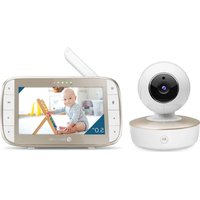
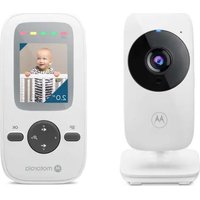
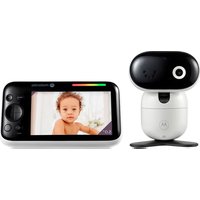

Marque : MOTOROLA
Modèle : MBP33S-2
Catégorie : Moniteur pour bébé