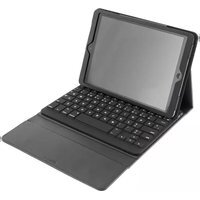
IPDAIR-240 - Clavier Deltaco - Notice d'utilisation et mode d'emploi gratuit
Retrouvez gratuitement la notice de l'appareil IPDAIR-240 Deltaco au format PDF.


| Type de produit | Clavier sans fil |
| Marque | Deltaco |
| Modèle | IPDAIR-240 |
| Dimensions (L x l x h) | 440 x 130 x 25 mm |
| Poids | 600 g |
| Alimentation | 2 piles AAA (non incluses) |
| Connectivité | Sans fil 2,4 GHz avec récepteur USB |
| Portée sans fil | Jusqu'à 10 mètres |
| Nombre de touches | 104 touches |
| Rétroéclairage | Non |
| Fonctions principales | Saisie de texte, navigation, touches multimédia |
| Compatibilité | Windows, macOS, Linux |
| Entretien et nettoyage | Dépoussiérer régulièrement avec un chiffon doux et sec. Éviter les liquides. |
| Sécurité | Ne pas exposer à l'humidité ou à une source de chaleur. |
| Pièces détachées et réparabilité | Piles, récepteur USB (remplacement possible) |
| Informations générales | Conception ergonomique, faible encombrement |
FOIRE AUX QUESTIONS - IPDAIR-240 Deltaco
Questions des utilisateurs sur IPDAIR-240 Deltaco
0 question sur cet appareil. Repondez a celles que vous connaissez ou posez la votre.
Poser une nouvelle question sur cet appareil
Téléchargez la notice de votre Clavier au format PDF gratuitement ! Retrouvez votre notice IPDAIR-240 - Deltaco et reprennez votre appareil électronique en main. Sur cette page sont publiés tous les documents nécessaires à l'utilisation de votre appareil IPDAIR-240 de la marque Deltaco.
MODE D'EMPLOI IPDAIR-240 Deltaco
Bluetooth keyboard case
EN User Manual
SE Användarhandledning
FI Käyttöohje
DK Brugervejledning
NO Brukerveiledning

EN – User Manual SE – Användarhandledning

This wireless Bluetooth keyboard is configured to connect
to an iPad.
Installation
For first time use you will have to charge the keyboard's battery. Connect the included USB cable from the keyboard to your computer or other charging station. The battery indicator will light up during charging and will turn off when the battery is fully charged. Charging can take up to 3 hours to complete. When the battery is low on power the indicator will light up.
Connection
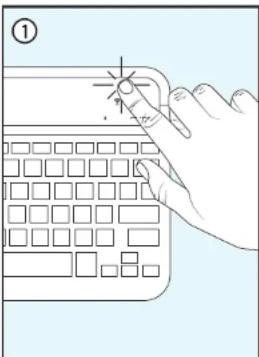
① Turn on the keyboard pressing the power button for 5 seconds.
② Press the power button for 1 second. An indicator light will start to blink and the keyboard is now discoverable to other devices.
③ Search for Bluetooth devices on your iPad's settings.
④ When the keyboard appears on your device list, you can then connect to it.
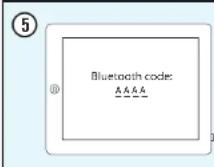
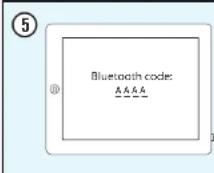
⑤ A code will appear on your screen. Type this code on your keyboard and press the "enter" key.
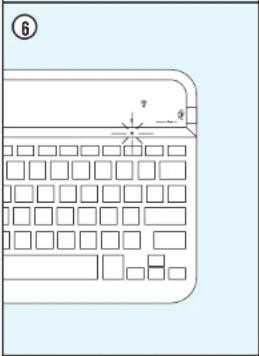
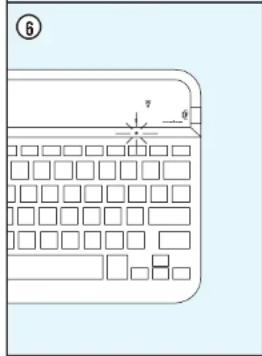
⑥ When the keyboard is connected the Bluetooth indicator light will stay off and your keyboard is now ready to use.
Support
Please contact us if you have any problems with the use or installation of your product.
We appreciate you being prepared to provide us with some basic information such as your operating system and the item number so that we may better help you.
Contact us by e-mail: help@deltaco.eu.
More product and support information can be found at www.deltaco.eu.

Du har köpt ett trådlöst tangentberd som använder Bluetooth för att anslutas till en iPad mini.
Installation
Fbr att använda tangentbordet behöver du först ladda det. Anslut den medföljande USB-kabeln till din dator. Laddningsindikatom lyser medan tangentbordet laddas och slocknar när batteriet är fullt laddat. Laddningen kan ta upp till 3 timmar. När batteriet börjar bli unladdal lyser batteri-indikatom.
Ihopkoppling
① Starta tangentbordet genom att hålla ner knappen på ovansidan av tangentbordet i 5 sekunder.
② Häll nere knappen igen i en sekund. En indikatorlampa börjar nu blinka och tangentbordet blir synligt för andra.
③ Sök efter Bluetooth-enheter på din iPad.
④ Når langentbordet hittats väljer du att koppla ihop enheterna.
⑤ En kod visas på skärmen för att du ska skriva den på tangentbordet och avsluta med enter.
6 När langentbordet är ihopkopplat kommer indikatorlampan slockna och langentbordet är klart att användas.
Användarstöd
Om du har problem med att installera eller använda din produkt skall du inte tveka att ta kontakt med oss! Vi uppskattar om du har så mycket information om din datormilj som möjligt tillgånglig; version av operativsystem och vilken produkt från Deltaco del gäller.
I Sverige nár du oss på 0200-877771 vardagar 09:00-17:00,
eller via e-post till help@deltapo.se.
Mer information om produkt och användarstöd finns på www.deltaco.eu.


FI – Käyttöohje DK – Brugervejledning

Olet ostanut langattoman näppäimistön, jonka voi yhdistää iPad mini laitteeseen Bluetooth-yhteyden kautta.
Asennus
Voidaksesi käyttää näppäimistöä, täytyy se ladata ensin. Liitä mukana tuleva USB-kaapeli tietokoneeseesi. Merkkivalo loistaa kun näppäimistö latautuu ja sammuu kun akku on täysi. Lataus kestää 3 tuntia. Kun akku alkaa tyhjentya loistaa akun merikivalo.
Liittäminen
① Käynnistä näppäimistö pitämällä virtanäppäintä alhaalla 5 sekuntia.
② Pidä näppäintä alhaalla sekunnin ajan. Merkkivalo alkaa vilkkua ja näppäimistö voidaan myt havaita muissa laitteissa.
③ Elsi Bluetooth-laitteita iPad laitleeslasi.
④ Kun näppäimistö en löytynyt, liität laitteet toisiinsa.
⑤ Näytöllä näkyy koodi. Näppäile se näppäimistilläsi ja paina Enter.
⑥ Kun näppäimistõ on liitelty tielokoneeseen merkäivalo sammuu ja näppäimistõ on käyttövalmis.
Asiakastuki
los sinulla on orgelmia asentaessasi ja käyttäessäsi tuotettasi, clathan yhteyttä meihin! Olisimme ilaisia jos sinulla yhteyttä ohtaessasi olisi käsillä mahdollisimman paljon tietoa koskien tietokoneympänstbäsi (käytöjärjestelmäsi ja mika DELTACO:n tuote on kyseessä).
Tavoitat meidät numerosta 0207120390 arkisin 09:00-17:00 tai sähköpostilla oscittoesta info@deltacu.fi.
Lisätieloja tuotteesta ja asiakastuesta saat osoitteesta www.deltaco.eu.


Du har köbt et trádlgst Bluetooth-tastatur som er lavet til iPad mini.
Installation
For at anvende tastaturet skal du først oplade det, Tilslut det medifligende USB-kabel fra tastaturet til din computer eller anden ladestation. Opladningsindikatoren lyser mens tastaturet oplades og slukker när batteriet er fuldt oplade. Opladningen kan tage op til 3 timer. Når batteriniveauet er lavt lyser batteriindikatoren.
Tilslutning
① Tænd tastaturet ved af trykke knappen på oversiden af tastaturet ned i 5 sekunder.
② Tryk igen knappen ned i 1 sekund. En indikatorlampe begynder nu at blinke og tastaturet bliver synligt for andre.
③ Søg efter Bluetooth-enheder på din iPad.
④ Når tastaturet bliver synligt på din liste af enheder, kan det tilsluttes.
⑤ En kode vises på skærmen. Tast koden på dit tastatur og tryk på "ENTER".
6 Når lastaturet er forbundet, slukker indikatorlampen og lastaturet er klar til brug.
Support
Hvis du har problemer med at installare eller anvende dit produkt, skal du være velkommen til at kontakte os! Vi sætter pris på, hvis du har de basale informationer klar som styresystem og varenummer, sa vi kan hjælpe bedst muligt.
Kontakt us på e-mail: help@deltace.eu.
Mere information om produkt- og brugervejledning findes på www.deltaco.eu.


NO – Brukerveiledning

Du har kjøpt et trådløst tastatur som bruker Bluetooth for å kobles til en iPad mini.
Innstallasjon
For å bruke tastaturet trenger du først å lade det, Koble den medfølgende USB-kabelen til din datamaskin. Ladingsindikatoren lyser mens tastaturet lades og slukkes når batteriet er fullt ladet. Ladingen kan ta opp til 3 timer. Når batteriet begynner å bli utladet lyser batteri-indikatoren.
Sammenkobling
① Sett på tastaturet gjennom å holde nede knappen på oversiden av tastaturet i 5 sekunder.
② Hold nede knappen igjen i ett sekund. En indikatorlampe begemner nå å blinke og tastaturet blir synlig for andre.
③ Søk etter Bluetooth-enheler på din iPad.
④ Når tastaturet er funnelt velger du å koble sammen enhelene
En kode vises på skjermen for at du skal skrive den på tastaturet og avslutte med enter.
⑥ Når tastaturel er sammenkoblet kommer indikatorlampen å sickne og tastaturel er klart for bruk.
Brukerstøtte
Om du har problemer med å installere eller bruke dift produkt skal du ikke nølle med å ta kontakt med oss! Vi setter pris på at du har så mye informasjon om din datamilje som mulig tilgjengelig; versjon av operativsystem og hvilket produkt fra Deltaco det gjelder.
I Norge när du oss på 22 830 906 hverdager 08:00-17:00, eller via e-post til help@deltaco.no.
Mer informasjon om produkt og brukerstette fins på www.deltaco.eu.



EN: help@deltaco.eu
SE: help@deltaco.se
0200-877771
FI: help@deltaco.fi
020-7120395
DK: help@deltaco.dk
NO: help@deltaco.no


Marque : Deltaco
Modèle : IPDAIR-240
Catégorie : Clavier