
WorkCentre 5024 - Imprimante XEROX - Notice d'utilisation et mode d'emploi gratuit
Retrouvez gratuitement la notice de l'appareil WorkCentre 5024 XEROX au format PDF.


| Type de produit | Imprimante multifonction monochrome laser |
| Marque | Xerox |
| Modèle | WorkCentre 5024 |
| Fonctions | Impression, copie, numérisation, télécopie (optionnel) |
| Technologie d'impression | Laser monochrome |
| Format de papier maximal | A4 |
| Vitesse d'impression | Jusqu'à 24 ppm |
| Résolution d'impression | Jusqu'à 1200 x 1200 dpi |
| Capacité papier | Bac principal 250 feuilles, bac multifonction 50 feuilles |
| Écran | Écran tactile couleur |
| Connectivité | USB 2.0, Ethernet 10/100/1000 Base-T, Wi-Fi (optionnel) |
| Dimensions (L x P x H) | Environ 420 x 430 x 500 mm |
| Poids | Environ 20 kg |
| Alimentation | 220-240 V, 50/60 Hz |
| Consommation électrique | Veille < 8 W, impression < 500 W |
| Cycle mensuel | Jusqu'à 20 000 pages |
| Cartouche toner | Toner WorkCentre 5024 (rendement environ 3000 pages) |
| Entretien | Nettoyage extérieur avec chiffon doux, remplacement du toner et du tambour |
| Sécurité | Fonctions de sécurité réseau, verrouillage du panneau de commande |
| Pièces détachées et réparabilité | Disponibles auprès de Xerox et revendeurs agréés |
FOIRE AUX QUESTIONS - WorkCentre 5024 XEROX
Questions des utilisateurs sur WorkCentre 5024 XEROX
0 question sur cet appareil. Repondez a celles que vous connaissez ou posez la votre.
Poser une nouvelle question sur cet appareil
Téléchargez la notice de votre Imprimante au format PDF gratuitement ! Retrouvez votre notice WorkCentre 5024 - XEROX et reprennez votre appareil électronique en main. Sur cette page sont publiés tous les documents nécessaires à l'utilisation de votre appareil WorkCentre 5024 de la marque XEROX.
MODE D'EMPLOI WorkCentre 5024 XEROX
New Augmented Reality Support
Augmented reality is now powering our customer support team. With the help of CareAR ^™ , A Xerox Company, and its augmented reality platform, we can see what you see virtually and help fix the issues faster as if we were there with you.
CareAR® Assist enables our support team to provide annotated guidance using circles, arrows, and other shapes that "stick" in the space displayed in the live video shown your mobile device. This enables faster diagnosis and problem resolution, plus creates an engaging customer experience. At the same time, remote support keeps everyone safe.
WHAT IS AUGMENTED REALITY?
Augmented reality is an interactive experience in which computer-generated images—sometimes in 3D—are overlayed in real time onto digital images of the real world and viewed using a camera. Support includes:
- See what I see – Our support expert becomes immersed in your environment using the device's rear video camera. This gives the expert a visual display of what needs attention.
- Real-time graphical guidance – Experience real-time guidance using annotations, such as arrows, pulsating circles, and other features, which are overlayed on the live video. These graphical instructions "stick" to where they are drawn even when the mobile device is pointed at another object and then re-pointed to the original object.
- Privacy – Only the rear-facing camera is used so you are not seen.
YOUR BENEFITS
Graphical guidance resolves the problem faster by:
• Enabling Xerox customer support to see exactly what you see for faster diagnostics
• Eliminating miscommunication because annotations prioritize what to focus on
- Showing the problem and visually identifying the steps to resolve it rather than just explaining them
• Not waiting for an engineer and keeping everyone safe
HOW DOES XEROX SUPPORT WORK WITH CAREAR?
We will invite you to a CareAR Assist session via a text message or email. Then you will be prompted to either download the CareAR Assist app on your mobile device or join the support session using a web browser. Please make sure you are near the equipment requiring support. The connection is secure and safe.

Get CareAR Assist from Apple app store

Get CareAR Assist on Google Play
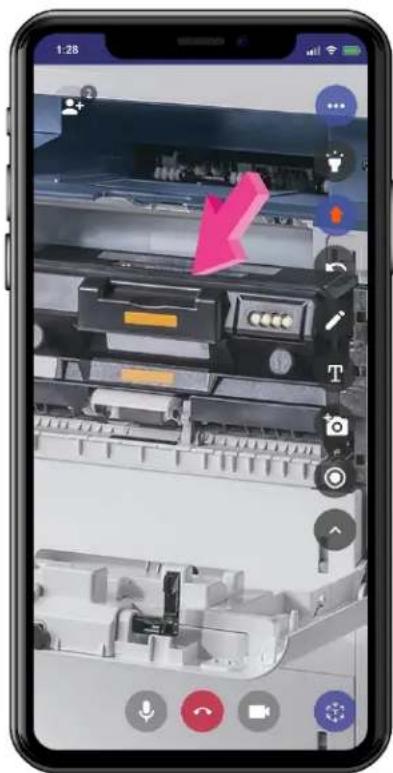
CLICK IMAGE TO WATCH VIDEO
WHAT DO I NEED?
An Android or an iOS device with the following minimum requirements:
| Mobile Device | Native App | Mobile Browser |
| iOS iOS 11+ | Safari | /WebKit 11+ |
| Android Android 9+ | Google Chrome 28+, Mozilla Firefox 24+, Opera mobile 12+ | |
Marque : XEROX
Modèle : WorkCentre 5024
Catégorie : Imprimante