
Mi TV 2 55 - Téléviseur Xiaomi - Notice d'utilisation et mode d'emploi gratuit
Retrouvez gratuitement la notice de l'appareil Mi TV 2 55 Xiaomi au format PDF.


| Type de produit | Téléviseur LED |
| Marque | Xiaomi |
| Modèle | Mi TV 2 55 |
| Taille diagonale | 55 pouces (139,7 cm) |
| Résolution | 3840 x 2160 pixels (4K UHD) |
| Technologie d'affichage | LCD avec rétroéclairage LED |
| Smart TV | Oui - MIUI TV |
| Dimensions (avec pied) | Environ 1240 x 770 x 260 mm |
| Poids net | Environ 15 kg |
| Alimentation | 100-240 V ~ 50/60 Hz |
| Consommation électrique (typique) | 180 W |
| Consommation en veille | Moins de 0,5 W |
| Connectivité | HDMI 2.0 (x3), USB 2.0 (x2), Wi-Fi 802.11ac, Bluetooth 4.0 |
| Fonctions principales | HDR10, Dolby Vision, décodeur DVB-T2/C/S2 |
| Entretien et nettoyage | Utiliser un chiffon doux et sec. Ne pas utiliser de produits chimiques. |
| Sécurité | Éviter les chocs, ne pas exposer à l'humidité, ventiler correctement |
| Pièces détachées disponibles | Télécommande, support mural |
| Réparabilité | Indice de réparabilité estimé : 6/10 |
FOIRE AUX QUESTIONS - Mi TV 2 55 Xiaomi
Questions des utilisateurs sur Mi TV 2 55 Xiaomi
0 question sur cet appareil. Repondez a celles que vous connaissez ou posez la votre.
Poser une nouvelle question sur cet appareil
Téléchargez la notice de votre Téléviseur au format PDF gratuitement ! Retrouvez votre notice Mi TV 2 55 - Xiaomi et reprennez votre appareil électronique en main. Sur cette page sont publiés tous les documents nécessaires à l'utilisation de votre appareil Mi TV 2 55 de la marque Xiaomi.
MODE D'EMPLOI Mi TV 2 55 Xiaomi
Mi TV 2 55'
Manual
1 Take out components
2 Take out TV according to the image

natural_image
Technical line drawing of a mechanical assembly with no visible text or symbols
natural_image
Diagram of a mechanical or electrical component with two hands pressing down on a textured surface, no text or symbols present.



3 Components

Bracket x2
-Left and right brackets. There are special set crews on the rear side of the TV left and right.
Mi home speaker system (linear loudspeaker)
It contains two linear loudspeakers and the subwoofer. Linear loudspeakers connect up to the TV and to the power supply only; subwoofer connects up to the TV only. After you're able to use the speaker system.
Additional tools box
There is a screwdriver for brackets mount. Look at the additional tools image below for details.
Screen
Now you can take out the screen. We recommend you to put the screen on the soft area for comfortable mounting of the brackets.
 | [73KY] | 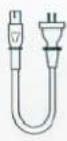 |  |  |  |  |  |
| Remote controller | Screwdriver | Speaker system cable | S/PDIF cable (subwoofer) | Screws x5 | 3D glasses x2 | Antenna adapter | Antenna disconnecting switch |
Elements that aren't included to the standard set: Mi TV and Mi speaker system combined with special wall holders, which you should separate.
5
Brackets and speakers system mount

01
Brackets mount
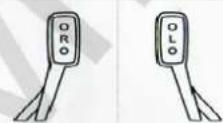
On the rear side of the brackets indicated which is for left and right sides of the TV.
02
Connect the speakers system to the TV
Power AUX stereo input coaxial S/PDIF input

Using S/PDIF cable, connect Mi speakers system (linear loudspeaker) to the Mi TV audio input.
03
Supply TV and Mi speaker system
Supply a TV and Mi speakers system
04
Launching
With the first launching use the manual for successful TV setting.
!
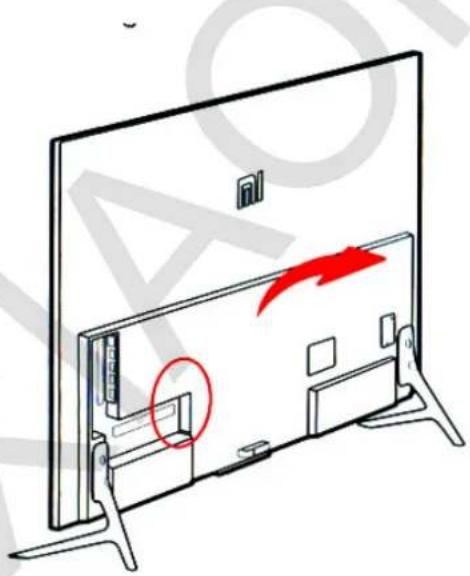
Due the brackets mount select the threaded hole for adjusting screw. If you choose bottom threaded hole you can place the speaker system under the screen (linear loudspeaker), amplifier, DVD and other devices.
First of all supply Mi speakers system (subwoofer), after connect TV and the speakers system (linear loudspeaker).

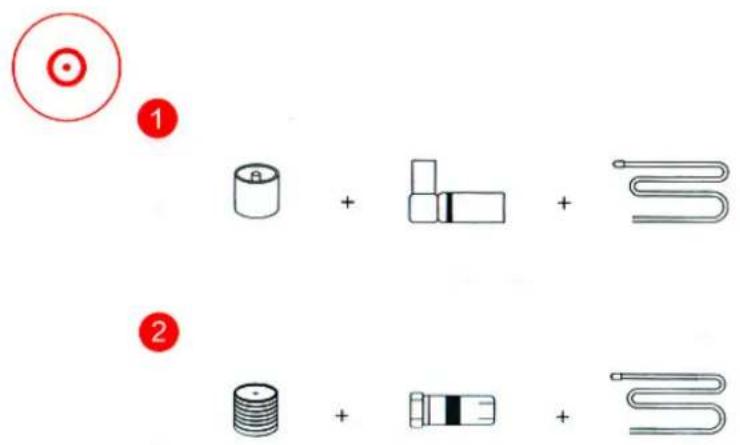
When you need to connect wired/wireless input or connect a device for F-input, you can choose appropriate connection method:
- IEC input + wireless isolator + coaxial cable
- IF input + wireless adapter isolator + coaxial cable
7
Sensor panel control
Launching: supply and touch the sensor panel of Mi TV for lunching.
Position: Mi sensor panel located in the bottom of the device.
Functions: touch the panel easily to manage TV functions: remote search.
8
Remote controller
Selection and movement of the various options
Return to the previous step
Return to the main page

flowchart
graph TD
    A["Turn off/ on"] --> B["Conformation"]
    B --> C["Menu"]
    C --> D["Volume"]
    D --> E["+/-"]
    E --> F["Switch"]
    F --> G["Downward Arrow"]
    G --> H["Arrow Down"]
    H --> I["Downward Arrow Left"]
    I --> J["Arrow Up"]
    J --> K["Downward Arrow Right"]
    K --> L["Arrow Down"]
    L --> M["Downward Arrow Left"]
    M --> N["Arrow Up"]
    N --> O["Downward Arrow Right"]
Battery box

Pay attention on two points
- First of all you withdraw isolating plate. Push the cover of the battery compartment and put it down. Then take the isolating plate located between batteries and close the cover of the remote controller.
2.TV and remote control. There is a special Bluetooth system, which is valid for 20 meters in the right bottom corner of the TV. Push buttons and in the same time and hear the sound, after dismiss the button (follow the signed distance, please) and a remote will contact the TV. Then the remote playbacks two beeps, that means the conjugation is successful.
Power: push the turn-off button, push and hold button for turn-off, reboot or set time of shutdown.
Main page: push the button for quick return on the main page. Push and hold the button for 2 seconds to watch through the list of the valid applications.
Menu: demonstration of the interface and other functions. In the online video interface enter the search, in the interface of files
Choice controller (up, down, left, right). While video watching using this buttons you also can quickly rewind video back and forward.
Choice confirmation: confirm your current choice. While video watching you can pause or playback a video.
Return (undo): returns a previous step.

Parameters:
Main parameters:
Screen: 55 inch Resolution: 3840x2160 (4K)
Main components parameters:
Processor: Cortex A9.4, double channel processor, Flash memory: 8 Gb flash memory eMMC Graphic processor: Mali-450 MP4
Ports:
Input: HDMI x3; AV x1; VGA x1, analogue TV (DTMB) x1 Input: analogue audio input.
Interface
Antenna: 2-frequency 2.4 GHz, 5Ghz Wi-Fi: (802.11 a/b/g/ac, support 2x2 MIMO)
Audio/Video formats:
Audio: FLAC/ AC3/ WMA/ MP3/ AMR/ DTS/ AAC/ OGG Video: AVC/ MPEG2/4 / H.263, H.265. VP8, COOK Sound effects: Dolby Audio x2 (steady volume and other control functions)
Multiscreen:
Support image, music and video on the main Millian technology, compatible with Air Play. DLNA, Miracast and WIDI.
3D available
Power
Requirements: rated power 180W Standby mode <5W Sound parameters: Crossover 170Hz
Mi speaker system (liner loudspeaker)
Interface S/PDIF port; AUX stereo port; power; Bluetooth Frequency: range: 170-20000Hz Components: 2-inch broadband speaker x6, high-frequency speaker x2
Mi speaker system (subwoofer)
Interface: Bluetooth Frequency range: 20-170Hz Size: 8-inch


- Mi TV 2 55'
- Bracket x2
- Mi home speaker system (linear loudspeaker)
- Additional tools box
- Screen
- 5
- Brackets and speakers system mount
- 01
- 02
- 03
- 04
- !
- 7
- Sensor panel control
- 8
- Remote controller
- Pay attention on two points
- Parameters:
- Main parameters:
- Main components parameters:
- Ports:
- Interface
- Audio/Video formats:
- Multiscreen:
- 3D available
- Power
- Mi speaker system (subwoofer)
Marque : Xiaomi
Modèle : Mi TV 2 55
Catégorie : Téléviseur