
Yi Action Camera - Caméscope Xiaomi - Notice d'utilisation et mode d'emploi gratuit
Retrouvez gratuitement la notice de l'appareil Yi Action Camera Xiaomi au format PDF.


| Type de produit | Caméscope d'action |
| Marque | Xiaomi |
| Modèle | Yi Action Camera |
| Dimensions (L x l x H) | 60,4 x 42 x 21,2 mm |
| Poids | 72 g |
| Alimentation | Batterie lithium-ion rechargeable 1050 mAh |
| Enregistrement vidéo | 1080p à 60 ips |
| Photo | 16 Mpx |
| Stabilisation d'image | Électronique |
| Étanchéité | Jusqu'à 40 m avec boîtier étanche inclus |
| Mémoire | Carte microSD jusqu'à 64 Go |
| Connectivité | WiFi 802.11 b/g/n, Bluetooth 4.0 |
| Capteur | Sony IMX206 |
| Angle de vue | 155° grand angle |
| Entretien et nettoyage | Nettoyer l'objectif avec un chiffon doux ; éviter toute immersion sans boîtier |
| Sécurité | Utiliser le boîtier étanche pour les activités nautiques ; ne pas exposer à des températures extrêmes |
| Pièces détachées et réparabilité | Batterie et câble USB remplaçables ; réparation par centre agréé |
| Informations générales | Garantie 2 ans, manuel disponible en ligne |
FOIRE AUX QUESTIONS - Yi Action Camera Xiaomi
Questions des utilisateurs sur Yi Action Camera Xiaomi
0 question sur cet appareil. Repondez a celles que vous connaissez ou posez la votre.
Poser une nouvelle question sur cet appareil
Téléchargez la notice de votre Caméscope au format PDF gratuitement ! Retrouvez votre notice Yi Action Camera - Xiaomi et reprennez votre appareil électronique en main. Sur cette page sont publiés tous les documents nécessaires à l'utilisation de votre appareil Yi Action Camera de la marque Xiaomi.
MODE D'EMPLOI Yi Action Camera Xiaomi
Getting started with Yi Action Camera
Included:

Yi Camera x1

Users guide x1

Battery x1

Micro-USB cable x1
Operating of a camera Operating of a camera
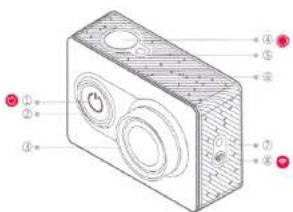
① power-ON button/switching of the mode
② ring-shaped LED indicator
① lens
④ video/photo button
status indicator
⑥ microphone
② WIFI indicator
① power-ON WIFI/button for
Bluetooth

① status indicator
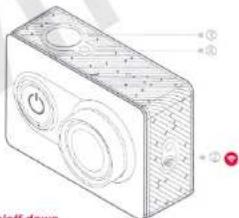
① micro-USB Connector
⑪ socket for TF Card
@ socket for HDMI
battery cover
status indicator
② holes for dynamics
⑧ slot for monoped
If you do not use high-quality TF a card (max. Supports a card on 64 Gg), it can effect quality of filming or cause its interruption.
Charging Main Operations Main Operations
For additional charge it is possible to connect USB cable to the power adapter or to the PC. It is recommended to use adapters 5V/1.5A and more portable power units.


natural_image
Technical line drawing of a rectangular electronic device with internal components and mounting holes (no text or symbols)
Power on/off down
Power On: press the button
Power Off: press the button for longer (if unloaded, the red indicator lights up)
Connection/shut down of WIFI
2) Connecting to WIFI: press the button and you are connected/be
disconnected from WIFI. After successful connection to WIFI, the dark blue indicator will light up.
Switching-off WIFI: press the button, and you at once are connected/be disconnected from WIFI. The indicator blinks 5 times and once extinguished.
3) Switching of a mode
After switch on of the camera, push a button power. On to change a mode photo/video;
Photo: factory adjustments of a mode for operating of camera after loading by default, (they can be changed through the mobile app.), press the button of a photo/video - now is possible to take a picture.
Video: push a button power on for switching in a mode of video (red indicators will inform that you are switched into videomode), press the button of a photo/video and it is possible to remove now (in this case red indicators will blink). Once again press the button of a photo/video and you stop filming.
4) Color of the LED Indicator indicates charging level
blue: 60%-100%
purple: 15%-49%
The LED Indicator

Yi Sport Camera App Accessories for Yi Camera The main specifications of Yi Camera
5) Installation on mobile Yi Sport Camera Application
System requirements of phone Android 4.1 and above or IOS 7. For installation on mobile phone Yi Camera of the application, scan a QR-code which is from the right side. Follow the further instructions for completion of installation and successful interface of the chamber with mobile.

6) Firmware Update
Updating of the camera through the mobile application: first make sure, that phone is connected to the Internet, open the mobile application, after interface to the camera if there is a new version, phone will automatically request updating.
7) Return to factory installations
After inclusion of the chamber, press the button of power on and on button WIFI at the same time and keep them in current 2 seconds. After you will hear a sound signal, release these two buttons ---you have returned to factory installations, and your camera will automatically reboot.
8) Accessories for Yi Camera


Battery

Remote control

xiaomi-mi.com
Lens: F2.8 DFOV 1550
Focal length: 2.73 +-5%MM
Video standard: the highest supported standard 1080Px60fps
Sensor: Sony CMOS 16 - megapixel camera
Weight: 72g (Camera + battery)
Standards of storage: MICRO SDHC and Micro SDXC card
Product Name: Yi Camera
In: 1A 5V
Standard consumption of energy: 2 w
The operating standard: GB/T 29298-2012
XIAOMI-MI.com
Presence of toxic and harmful substances Warranty Conditions
| Name | Toxic and harmful substances or elements | |||||
| Po | Hg | Cd | Cr2+ | PBB | PGDE | |
| Basis of the camera | 0 | 0 | 0 | 0 | 0 | 0 |
| Battery | 0 | 0 | 0 | 0 | 0 | 0 |
| Cable | 0 | 0 | 0 | 0 | 0 | 0 |
| Circuit board | x | 0 | 0 | 0 | 0 | 0 |
| Explain | O: Toxic and harmful substance in all accessories of the given arrangement to occur in quantity below limiting value according to SJ/T11363-2008 * Requirements of restriction availability of poisonous and harmful substances in the goods *.X: Means availability of toxic and harmful substances at least in one of in accessories of the given arrangement in the quantity exceeding limiting value, according to SJ/T11363-2006 * Requirements of restriction availability of poisonous and harmful substances in the goods". | |||||
Into guarantee service enters:
- In current of 7 days from the moment of purchase if service center Mi will detect occurrence of a problem of an arrangement, you can return the goods or change it;
- In current of 15 days from the moment of purchase if service center Mi will detect occurrence of a problem of an arrangement, you can change the goods or take advantage of free corrective maintenance;
- In current of 12 months from the moment of purchase if service center Mi will detect occurrence of a problem of an arrangement, you can take advantage of free corrective maintenance.
Warranty Conditions
Conditions of guarantee repair
The list of circumstances (including, but not being limited) at which warranty service is impossible:
- Completion of maintenance service, falling, the negligent attitude, abuse, hit of a liquid, accident if have torn or have covered a label and marks of an arrangement;
- Validity of a guarantee has ended;
- The damages which have arisen at force-majeur circumstances such, as impact of a lightning, a fire or flooding.

- Getting started with Yi Action Camera
- Operating of a camera Operating of a camera
- Charging Main Operations Main Operations
- Yi Sport Camera App Accessories for Yi Camera The main specifications of Yi Camera
- 5) Installation on mobile Yi Sport Camera Application
- 6) Firmware Update
- 7) Return to factory installations
- Lens: F2.8 DFOV 1550
- Presence of toxic and harmful substances Warranty Conditions
- Warranty Conditions
Marque : Xiaomi
Modèle : Yi Action Camera
Catégorie : Caméscope