
C1004-E - Haut-parleur AXIS - Notice d'utilisation et mode d'emploi gratuit
Retrouvez gratuitement la notice de l'appareil C1004-E AXIS au format PDF.


| Type de produit | Haut-parleur encastrable |
| Marque | Axis |
| Modèle | C1004-E |
| Puissance nominale | 20 W RMS |
| Puissance maximale | 40 W |
| Impédance | 8 ohms |
| Réponse en fréquence | 80 Hz à 20 kHz |
| Dimensions (diamètre) | 165 mm |
| Dimensions (profondeur) | 75 mm |
| Poids | 0,8 kg |
| Matériau du boîtier | Plastique ABS |
| Grille | Grille métallique amovible |
| Couleur | Blanc |
| Indice de protection | IP44 |
| Utilisation | Intérieur et extérieur abrité |
| Alimentation | Via amplificateur |
| Fonctions principales | Reproduction sonore haute fidélité |
| Entretien et nettoyage | Essuyer avec un chiffon doux et sec |
| Sécurité | Utiliser uniquement avec un amplificateur compatible |
| Pièces détachées et réparabilité | Grille et câbles disponibles |
| Informations générales | Garantie 2 ans |
FOIRE AUX QUESTIONS - C1004-E AXIS
Questions des utilisateurs sur C1004-E AXIS
0 question sur cet appareil. Repondez a celles que vous connaissez ou posez la votre.
Poser une nouvelle question sur cet appareil
Téléchargez la notice de votre Haut-parleur au format PDF gratuitement ! Retrouvez votre notice C1004-E - AXIS et reprennez votre appareil électronique en main. Sur cette page sont publiés tous les documents nécessaires à l'utilisation de votre appareil C1004-E de la marque AXIS.
MODE D'EMPLOI C1004-E AXIS
AXISC1004-ENetworkCabinetSpeaker
Solutionoverview
This manual describes how you make the device accessible to your audiosystem, and how to configure the device directly from its interface (for instance when you set the device without an audio or video management software).
If you are using a audio or video management software, you can us that software for configuring the device. The following management software are available for controlling your audiosystem:
AXISAudioManageEdgeAudiomanagementsoftware formalsystemsCome pre-installed audio devices withafirmwareequaltoorhigherthan10.0.
-AXISAudioManagerEdgeusermanual
- AXISAudioManagerPro—Advancedaudiomanagementsoftwareforlargesystems.
-AXISAudioManagerProusermanual
- AXISCameraStation—Advancedvideomanagementsoftwareforlargesystems.
-AXISCameraStationusermanual
- AXISCompanion—Videomanagementsoftwareforsmallsystems.
-AXISCompanionusermanual
Formoreinformation,seeAudiomanagementsoftware.

Towatchthisvideo, gotothewebversionofthisdocument.
help.axis.com/?&tpiald=25379&tsection=solution-overview
Anoverviewofhownetworkaudioworks.
Installation

Towatchthisvideo, gotothewebversionofthisdocument.
help.axis.com/?&tpiald=25379&tsection=solution-overview
Installationvideofortheproduct.
Getstarted
Findthedeviceonthenetwork
TofindAxisdevicesonthenetworkandassignthemIPaddressesinWindows®, useAXISIPUtilityorAXISDeviceManager. Both applicationsarefreeandcanbedownloadedfromaxis.com/support.
FomoreinformationabouthowfindandassignRaddressesgetHowtassignrRaddressandaccessyoudevice.
Browsersupport
Youcanusethedevicewiththefollowingbrowsers:
| ChromeTM | Firefox® | EdgeTM | Safari® | |
| Windows® | recommended | recommended | √ | |
| macOS® | recommendedrecommended | √ | √ | |
| Linux® | recommendedrecommended | √ | ||
| Otheroperatingsystems* | √ | √ | √ | √ |
*TouseAXISOSwebinterfacewithiOS15oriPadOS15,gotoSettingsSettings > Safari > Advanced > ExperiAevrDateFeatures andExperiBenedures NSURLSessionWebsocket.
If you need more information about recommended browsers, goto AXISOSPortal.
Accessthedevice
OpenabrowserandentertheIPaddressorhostnameoftheAxisdevice.
Entethusernamepasswordyouaccess the device for the first time you must the other password set new password for the root account on page 4.
Setanewpasswordfortherootaccount
Important
The default administrator username is south the password for root to set the device factory default settings. See Resettofactorydefaultsettingsonpage35

Towatchthisvideo, gotothewebversionofthisdocument. help.axis.com/?&tpiald=25379&tsection=set-a-new-password-for-the-root-account
Supporttip:Passwordsecurityconfirmationcheck
TypepasswordFollowthenstructionsaboutsecurepasswordSeeSecurepasswordsorpag6
Retypethepasswordtoconfirmthespelling.
- ClickSave. The password has now been configured.
Securepasswords
Important
Axisdevicessendtheinitiallysetpasswordincleartextoverthenetwork.Toprotectyourdeviceafterthefirstlogin,setupasecureandencryptedHTTPSconnectionandthenchangethepassword.
The device password the primary protection for your data and services. Axis devices do not impose a password policy as they may be used in various types of installations.
Toprotectyourdatawestronglyrecommendthatyou:
- Useapasswordwithatleast8characters,preferablycreatedbyapasswordgenerator.
- Don'texposethepassword.
- Changethepasswordatarecurringinterval, atleastonceayear.
Additionalsettings
Calibrateandrunaremotespeakertest
Youcanrunaspeakertesttoverifyfromaremotelocationthataspeakerisworkingasintended.Thespeakerperformsthetestby playingaseriesoftesttonesthatareregisteredbythebuilt-inmicrophone.Everytimeyourunthetest,theregisteredvaluesare comparedwiththevaluesthatwereregisteredduringthecalibration.
Note
Thetestmustbecalibratedfromitsmountedpositionattheinstallationsite.Ifthespeakerismovedorifitslocal surroundingschange,forinstanceifawallisbuilltorremoved,thespeakershouldbere-calibrated
During calibration, it is recommended that someone is physically present at the installations, it is to list to the test tones and ensure that the test tones are not muffled or blocked by any unintended obstructions in the speaker's acoustic path.
- Gotothedeviceinterface>Audio>Speakertest.
2.Tocalibratetheaudiodevice,clickCalibrate.
Note
OncetheAxisproductiscalibrated,thespeakertestcanberunatanytime.
3.Torunthespeakertest,clickRunthetest.
Note
It is possible our calibration by pressing the control button or physical device. See Product overview page 38 to identify the control button.
SetupdirectSIP(P2P)
Usepeer-to-peerwhenthecommunicationisbetweenafewuseragentswithinthesamelPnetworkandthereisnoneedforextra features that PBX-servercoulprovideTo betterunderstandhowP2WorkssePeer-to-peetSIF(P2PSIP)brpage1.2.
Formoreinformationaboutsettingoptions,see SIPonpage27.
GdSystemSIPSBettingandelecEnableSIP.
- To allow the device to receive incoming calls, select Allow incoming calls.
- UnderCallhandling, setthetimeoutanddurationforthecall.
- UnderPorts, enter the port numbers.
SIPortThenetworkportusedoSIRommunicationThesignalingtraffichroughthisportnon-encrypted. Thedefaultportnumberis5060.Enteradifferentportnumberifrequired.
TLSportThenetworkPortusedoencryptedIRommunicationThesignalingraffichroughthisports encryptedwithTransportLayerSecurity(TLS).Thedefaultportnumberis5061.Enteradifferentportnumber ifrequired.
RTBtarportEntethortusedothefirstRTmediastreaminsILcallThedefaultstarporfor mediatransportis4000.SomefirewallsmightblockRTPtrafficoncertainportnumbers.Aportnumbermust bebetween1024and65535.
5.UnderNATtraversal,selecttheprotocolsyouwanttoenableforNATtraversal.
Note
UseNATtraversalwhenthedeviceisconnectedtothenetworkfrombehindaNATrouterorafirewall.Formoreinformation seeNATtraversalpage13.
UnderAudioselecteastaudiocodewithdesiredaudiaqualityfoSIRallsDrag-and-dropchange thepriority.
- Under Additional, select additional options.
UDP-to-TCBwitchingSelectallowcallswitchtransport protocols from UDP(Use Datagram Protocol) toTCP(Transmission Control Protocol) temporarily. Thereasonforswitchingistoavoidfragmentation, and the switchcantakeplaceifarequestis within 200 bytes of themaximumtransmission unit (MTU) or larger than 1300 bytes.
AllowwarewriteSelect sendhedral Paddress instead of the router's public Paddress.
AllowcontactrewriteSelectsendhlocalAddressinsteadoftherouter'publicAddress.
RegistewithserveeverySethowoftenyouwanthdevicoregisterwiththeSIBervefothexisting SIPaccounts.
-DTMFpayloadtype-ChangesthedefaultpayloadtypeforDTMF.
8.ClickSave.
SetupSIPthroughaserver(PBX)
UseaPBX-serverwhenthecommunicationsshouldbebetweenaninfinitenumberofuseragentswithinandoutsidethelPnetwork.AdditionafeaturesouldaddedthesetuppendingthePBX-providerTo betterunderstandhowP2WorksseePrivateBranchExchange(PBX)onpage 12.
Formoreinformationaboutsettingoptions,see SIPonpage27.
- Request the following information from your PBX provider:
-UserID
-Domain
-Password
-AuthenticationID
-CallerID
-Registrar
-RTPstartport
ZaddnewaccountgdoSystemSIPSIAccountandclickAccount.
-
EnterthedetailsyoureceivedfromyourPBXprovider.
-
SelectRegistered.
-
Selectatransportmode.
6.ClickSave.
Setup&IBettingthe sameway of peer-to-peer Se SetupdirectSIF(P2P)brpag & more information.
Setuprulesforevents
Youcancreaterulestomakeyourdeviceperformactionswhencertaineventsoccur.Aruleconsistsofconditionsandactions.The conditionscanbeusedtotriggertheactions.Forexample,thedevicecanplayanaudioclipaccordingtoascheduleorwhenit receivesacall,orsendanemailifthedevicechangesIPaddress.
Tolearnmore,checkoutourguideGetstartedwithrulesforevents.
Sendanemailifaspeakertestfails
In this example the audiodevice is configured to send an email to a defined recipient when as peaker test fails. The speaker test is configured to be performed 18:00 everyday.
- Setupascheduleforthespeakertest:
GodthevicinterfaceSystemEventsSchedules.
1.2 Createaschedulethatstartsat18:00andendsat18:01everyday.Nameit "Dailyat6pm".
- Createanemailrecipient:
do the devic interface System Events Recipients.
2.2 ClickAddrecipient.
2.3 Nametherecipient "Speakertestrecipients"
2UndeTypeselecEmail.
2.5 de Send e maitoenteth e mail addresses of the recipients Use commas separate multiple addresses.
2.6 Enterthedetailsfortheemailaccountofthesender.
2.7ClickTesttosendatestemail.
Note
Some email providers have security filter that prevent users from receiving or viewing large attachments, from receiving scheduled emails and similar. Check the email provider's security policy to avoid delivery problems and locked email accounts.
2.8ClickSave.
- Setup the automated speaker test:
SiddhdevicinterfaceSystemEventsRules.
3.2ClickAddarule.
3.3 Enteranamefortherule.
3UndeConditionselecScheduleandelecfromthetriggelist
3.5 UnderSchedule, select your schedule ("Dailyat6pm").
316deActionselecRunautomatispeaketest.
3.7 ClickSave.
- Setup the condition for sending an email when the speaker test fails:
GothdevicinterfaceSystemEventsRules.
4.2ClickAddarule.
4.3 Enteranamefortherule.
4UndeConditionselecSpeaketestesult.
4LendeSpeaketeststatusselecDidn'pasthest.
4.6 de Action selec Send notification email.
4.7 UnderRecipient, select your recipient("Speakertestrecipients")
4.8Enterasubjectandamessage,andclickSave.
Playaudiowhenacameradetectsmotion
ThisexampleexplainshowtosetuptheaudiodevicetoplayanaudioclipwhenanAxisnetworkcameradetectsmotion.
Prerequisites
•TheAxisaudiodeviceandAxisnetworkcameraarelocatedonthesamenetwork.
- Themotiondetectionapplicationisconfiguredandrunninginthecamera.
1. Prepareanaudiocliplink:
1GtoAudioAudieclips.
1.2Click : >Createlinkforanaudioclip.
1.3 Setthevolumeandnumberoftimestorepeattheclip.
1.4Clickthecopyicontocopythelink.
2. Createanactionrule:
2GltSystemEventsRecipients.
2.2Click+Addrecipient.
2.3Typeanamefortherecipient,forexample"Speaker".
2SelectHTTPronthTypedrop-downlist.
2.5PastetheconfiguredlinkfromtheaudiodeviceintheURLfield.
2.6 Enter the username and password of the audiodevice.
2.7 ClickSave.
20# Rules and click Addule.
2.9Typeanamefortheactionrule,forexample"Playclip".
2.1 From the Conditionists select video motion detection alternatives and applications.
Note
If there are options for wide motion detection, then to Appsclic AXIS Video Motion Detection and turnonmotion detection.
2.1 From the Actionlist selec Send notification through HTTP.
2.12 UnderRecipient, select your recipient.
2.13 ClickSave.
StopaudiowithDTMF
Thisexampleexplainshowto:
- ConfigureDTMFonadevice.
- SetupaneventtostoptheaudiowhenaDTMFcommandissenttothedevice.
GoSystemSIPSBettings.
- MakesureEnableSIPisturnedon.
If you need to turn it on, remember to click Save afterwards.
3.GotoSlPaccounts.
- NexttotheSIPaccount, click

UndeDTMFclickDTMSequence.
6.UnderSequence,enter"1".
- UnderDescription, enter "stopaudio".
8.ClickSave.
GoSystemEventsRulesandClickAddrule.
- UnderName, enter "DTMFstopaudio".
1 UndeConditionselecDTMF.
12UndeDTMEventDselectstopudio.
13UndeActionselecStopplayingudiclip.
14.ClickSave.
SetupaudioforincomingSIPcalls
YoucansetuparulethatplaysanaudioclipwhenyoureceiveaSIPcall.
YoucanalsosetupanadditionalrulethatanswerstheSIPcallautomaticallyaftertheaudiocliphasended.Thiscanbeusefulin caseswhereanalarmoperatorwantstocalltheattentionofsomeonenearanaudiodeviceandestablishalineofcommunication. ThisisdonebymakingaSIPcalltotheaudiodevice,whichwillplayanaudiocliptoalertthepersonsneartheaudiodevice.When theaudiocliphasstoppedplaying,theSIPcallisautomaticallyansweredbytheaudiodeviceandcommunicationbetweenthealarm operatorandthepersonsneartheaudiodevicecantakeplace.
EnableSIPsettings:
- Gotothedeviceinterfaceofthespeaker, byenteringitsIPaddressinawebbrowser.
QdSystemSIPSBettingandelecEnableSIP.
- To allow the device to receive incoming calls, select Allow incoming calls.
4.ClickSave.
5.GotoSlPaccounts.
- Nexttothe SIP account, click

- UncheckAnswerautomatically.
PlayaudiowhenaSIPcallisreceived:
- GotoSettings>System>Events>Rulesandaddarule.
2.Typeanamefortherule.
- Inthelistofconditions, selectState.
Additionalsettings
- Inthelistofstates, select Ringing.
- Inthelistofactions, selectPlayaudioclip.
- In the list of clips, select the audioclip you want to play.
- Select how many timestore repeat the audioclip.0 means "playonce".
8.ClickSave.
AnswertheSIPcallautomaticallyaftertheaudiocliphasended:
- GotoSettings>System>Events>Rulesandaddarule.
2.Typeanamefortherule. - In the list of conditions, select Audioclip playing.
- CheckUsethisconditionasatrigger.
- Check Invert this condition.
6.Click+Addaconditiontoaddasecondconditiontotheevent. - Inthelistofconditions, selectState.
- Inthelistofstates, select Ringing.
- Inthelistofactions, selectAnswercall.
10.ClickSave.
Learnmore
SessionInitiationProtocol(SIP)
TheSessionInitiationProtocol(SIP)isusedtosetup,maintainandterminateVolPcalls.Youcanmakecallsbetweentwoormore parties,calledSIPuseragents.TomakeaSIPcallyoucanuse,forexample,SIPphones,softphonesorSIP-enabledAxisdevices.
The actual audiovideo is exchanged between the SIP user agents with a transport protocol, for example RTP (Real-Time Transport Protocol).
Youcanmakecallsonlocalnetworksusingapeer-to-peersetup,oracrossnetworksusingaPBX.
Peer-to-peerSIP(P2PSIP)
ThermostbasictypeofSIPcommunicationtakesplacedirectlybetweenwoormoreSIPuseragents.Thisiscalledpeer-to-peerSIP(P2PSIP).Ifittakesplaceonalocalnetwork,allthat'sneededaretheSIPaddressesoftheuseragents.AtypicalSIPaddressinthiscasewouldbesip:
Example

sip:192.168.1.101 sip:192.168.1.100
YoucansetupaSIP-enabledphonetocallanaudiodeviceonthesamenetworkusingapeer-to-peerSIPsetup.
PrivateBranchExchange(PBX)
WhenyoumakeSIPcallsoutsideyourlocalIPnetwork,aPrivateBranchExchange(PBX)canactasacentralhub.Themain componentofaPBXisaSIPserver,whichisalsoreferredtoasaSIPproxyoraregistrar.APBXworkslikeatraditionalswitchboard, showingtheclient'scurrentstatusandallowingforexamplecalltransfers,voicemail,andredirections.
ThePBXSIPservercanbesetupasalocalentityoroffsite.Itcanbehostedonanintranetorbyathirdpartyprovider.Whenyou makeSIPcallsbetweennetworks,callsareroutedthroughasetofPBXs,thatquerythelocationoftheSIPaddressstobereached.
Each SIPuseragentregisterswiththePBX, and can then reach the others by dialing the correct extension. Atypical SIPaddress in this case would be:
Example

flowchart
graph LR
    A["sip:myspeaker@company.com"] -->|SIP| C["PBX"]
    B["sip:myspeaker@company.com"] -->|SIP| C
    C -->|SIP| D["sip:office@company.com"]
NATtraversal
UseNAT(NetworkAddressTranslation)traversalwhentheAxisdeviceislocatedonanprivatenetwork(LAN)andyouwantto accessitfromoutsideofthatnetwork.
Note
TheroutermustsupportNATtraversalandUPnP®.
EachNATtraversalprotocolcanbeusedseparatelyorindifferentcombinationsdependingonthenetworkenvironment.
IOTheCInteractiveConnectivityEstablishmentprotocolincreasethe chances of finding themosefficienpatho successfulcommunicationbetweenpeerdevices.IfyoualsoenableSTUNandTURN,youimprovethelCEprotocol's chances.
STUNSTUNSessionTraversalUtilitiesfoNAT)client-servenetworkprotocolthatetsheAxislevicdeterminifitislocatedbehindaNATorfirewall,andifsoobtainthemappedpublicIPaddressandportnumberallocatedforconnectionstoremotehosts.EntertheSTUNserveraddress,forexample,anIPaddress.
TURNTURN(TraversalUsingRelaysaroundNAT)protocolthatetsdevicebehindNATouterFirewall receive incomingdatafromotherhostsoverTCPorUDP.EnterTURNserveraddressandthelogininformation.
Applications
AXISCameraApplicationPlatform(ACAP)isanopenplatformthatenablesthirdpartiestodevelopanalyticsandotherapplications forAxiproductsToindoutmoreaboutavailableapplicationsdownloadstrialsandicensesgdxaxis.com/applications.
TofindtheusermanualsforAxisapplications,gotohelp.axis.com.
Thedeviceinterface
Toreach the device interface, enter the device'sIPaddressinawebbrowser.

Showorhidethemainmenu.

Accesstheproducthelp.

Changethelanguage.

Setlightthemeordarktheme.


Theusermenucontains:
•Informationabouttheuserwhoisloggedin.
• Changeuser:Logoutthecurrentuserandloginanewuser.
Logout:Logoutthecurrentuser.

Thecontextmenucontains:
•Analyticsdata:Accepttosharenon-personalbrowserdata.
- Feedback:Shareanyfeedbacktohelpusimproveyouruserexperience.
•Legal:Viewinformationaboutcookiesandlicenses.
- About:Viewdeviceinformation,includingfirmwareversionandserialnumber.
LegacydevicinterfaceChangethedevicinterfacedthlegacydevicinterface.
Status
NTPsync
ShowsNTPsynchronizationinformation,includingifthedeviceisinsyncwithanNTPserverandthetimeremaininguntilthenextsync.
NTPsettings: ClicktogototheDateandtimepagewhereyoucanchangetheNTPsettings.
Deviceinfo
Showsdeviceinformation, including firmwareversion and serial number.
Upgradefirmware: ClicktogototheMaintenancepagewhereyoucandoafirmwareupgrade.
Audio
Overview
LocatdeviceClickplaysound that helps you identify the speaker. Fosomproducts LED will flash the device.
Calibrate ⓘ :Clicktocalibratethespeaker.
LaunchAXISAudioManagerEdge: Clicktolaunchtheapplication.
Devicesettings
Input: Turnonoroffaudioinput.Showsthetypeofinput.
Gain: Usetheslidertochangethegain. Clickthemicrophoneicontomuteorunmute.
Output: Showsthetypeofoutput.
Gain:Usetheslidertochangethegain.Clickthespeakericontomuteorunmute.
Stream
EncodingSelectencodingausfothenputourcstreamingYoucanonlychoosencodingaudioinputsturnednlfaudioinputistunedoff,clickEnableaudioinputtoturniton.
Echocancellation: Turnontoremoveechoesduringtwo-waycommunication.
Audioclips

Addclip:Clicktoaddanewaudioclip.

Clicktoplaytheaudioclip.

Clicktostopplayingtheaudioclip.

Thecontextmenucontains:
•Rename:Changethenameoftheaudioclip.
CreateinkCreateURwhichwhenusedplaytheaudicliprtheviceSpecifythovlumandnumberoftimestoplaytheclip.
- Download:Downloadtheaudiocliptoyourcomputer.
- Delete:Deletetheaudioclipfromthedevice.
Listenandrecord

Clicktolisten.

Clicktostartacontinuousrecordingoftheliveaudiostream.Clickagaintostoptherecording.Ifarecordingisongoing,it willresumeautomaticallyafterareboot.
Note
You can onlyister and record input turned for the device. Do Audio Devices setting make sure that input is turned on.

Clicktoshowthestoragethatisconfiguredforthedevice.Toconfigurethestorageyouneedtobelloggedinasan administrator.
Audiositesecurity
CAertificateSelectcertificatowwheyouaddevicesthaudioitwhenTLSauthenticationisnabledinAXISAudioManagerEdge.
Save: Clicktoactivate and save your selection.
Speakertest
Youcanusethespeakertesttoverifyfromaremotelocationthatthespeakerworksasintended.
CalibrateClickcalibratethespeakebeforeyoutestfothfirstimDuringcalibrationthespeakeplayseries oftesttonesthatareregisteredbythebuilt-inmicrophone.Whenyoucalibratethespeaker,itmustbeinstalledinit'sfinal position.Ifyoumovethespeakerlateron,orifit'ssurroundingschange,forexampleifawallisbuiltorremoved,youneed torecalibratethespeaker.
RunthestClickplaytheamseriesfestoneshatverplayedduringcalibrationandcomparethenwiththe registeredvaluesfromthecalibration.
Recordings

Clicktofiltertherecordings.
From: Showrecordingsdoneafteracertainpointintime.
To: Showrecordingsupuntilacertainpointintime.
Source

:Showrecordingsbasedonsource.
Event: Showrecordingsbasedonevents.
Storage: Showrecordingsbasedonstoragetype.

Clicktoplaytherecording.

Clicktostoptherecording.

Clicktoshowmoreinformationandoptionsabouttherecording.
Setexportrange: If you only want to export part of the recording, enter from whentowhen.

Clicktodeletetherecording.
Export: Clicktoexport(partof)therecording.
Apps
Addapp: Clicktoinstallanewapp.
Findmoreapps: ClicktogotoanoverviewpageofAxisapps.

Thecontextmenucontains:
AppogClickviewdogtheappeventsTheoghelpfulwhenyoucontactsupport.
Activaticicensewithkey,IfheapprequireslicenseyouneedactivateUsethisoptionyoudevice doesn'thaveinternetaccess. Ifoudon'havelicenskeygdaxis.com/applicationYouneedlicenscodandtheAxiproducterial numbertogeneratealicensekey.
ActivatlicenseautomaticallythapprequireslicenseyouneedactivateUsethisoptionyoudevichasinternetaccess.Youneedalicensecodetoactivatethelicense.
DeactivatethlicenseDeactivatethicensesetranothedevielfoudeactivatethicenseyoualso removeitfromthedevice.Todeactivatethlicenserequiresinternetaccess.

Note
- Settings
:Configuretheparameters.
DeleteDeletethappermanentlyfromthe device, you don't deactivate dicens firstitemains active.
The device's performance might be affected if your unseveral apps at the same time.
Start:Startorstoptheapp.
OpenClickaccesshapp'settings Theavailablesettingsdependor theapplicationSomeapplicationslon'havany settings.
System
Dateandtime
Thetimeformatdependsonthewebbrowser'slanguagesettings.
Note
Werecommendyoutosynchronizethedevice'sdateandtimewithanNTPserver.
Synchronization: Selectanoption for synchronizing the device's date and time.
Automatidatandim(manuaNTS Bervers) Synchronizewith the secure NTReestablishmen servers connected to the DHCP server. ManuaNTS Bervers Enteth address of two NTBervers When you set two NTBervers, the devices synchronizes and adaptsitstime based on input from both.
Automatic datandim(NTBerversusing DHCP) SynchronizewiththeNTBerversconnectedtheDHCBerver. -FallbackNTPservers: EntertheIPaddressofoneortwofallbackservers.
Automatidatendim(manuaNTBervers) SynchronizewithNTBerversfourchoice. ManuaNTBerversEntethdAddressbnetwdNTBerversWhenyoustwNTBerversthe devicesynchronizesandadaptsitstimebasedoninputfromboth.
CustomdatandimeManuallysethdatandimeClickGefronsystemtofetchdatandimsettings oncefromyourcomputerormobiledevice.
TimezoneSelectwhichtimezoneUseTimewilbautomaticallyadjustedodaylightsavingtimandstandardime.
Note
Thesystemusesthedateandtimesettingsinallrecordings,logsandsystemsettings.
Network
IPv4
AssignIPvAutomaticallySelectdethetworkoutassignallAddresstheDeviceAutomaticallyRecommend automaticIP(DHCP)formostnetworks.
IAddressEnteauniquedAddressfortheDeviceStaticAddressesareassignedatandomwithinisolatedetworks, providedthateachaddressisunique.Toavoidconflicts, werecommendyoutocontactyournetworkadministratorbeforeyou assignastaticIPaddress.
SubnetmaskEnteth subnetmaskAdefinwhataddressesarensidthedocalareanetworkAnyaddressoutsidthedocalareanetworkgoesthroughtherouter.
RouterEntethdAddressofthdefaultroute(gateway)usedconnectdeviceshatareattacheddifferennetworkandnetworksegments.
IPv6
AssignPvAutomaticallySelectdumorPvanddethenetworkouteassignardaddressthedeviceautomatically.
Hostname
Assignhostname automatically: Selecttoletthenetworkrouterassignahostnametothedeviceautomatically.
HostnameEntethostnamannuallytoase alternative way of accessing the device The Hostname used the server report and in the system log. Allowed characters are A-Z, a-z, 0-9 and -.
DNSservers
AssignDNSAutomaticallySelectdethnetworkoutassignsearchdomainsandDNServeaddressedthevice automatically.WerecommendautomaticDNS(DHCP)formostnetworks.
SearchdomainsWhenousehostnamethatisofullyqualifiedclickAddsearchdomainandentealomaininwhichto searchforthehostnameusedbythedevice.
DNServersClickAddDNServeandentethdAddressoftheDNServerThisprovidestranslationhostnamesdP addressesonyournetwork.
HTTPandHTTPS
Allow access through Select users allowed connection device through the HTTP HTTPS pod which protocols.
HTTPSisaproTOCOLthatprovidesencryptionforpagerequestsfromusersandforthepagesreturnedbythewebserver.The encryptedexchangeofinformationisgovernedbytheuseofanHTTPScertificate,whichguaranteestheauthenticityoftheserver.
TouseHTTPSorthdeviceyoumuststallarHTTPScertificateGoSystemSecuritycreateandnstalcertificates.
Note
If you view encrypted webpage through HTTPS, you might experience a drop in performance, especially when you request a page for the first time.
HTTP port Ent the HTTP port use Port 80 any port in the range 024-6553 are allowed you are ogged as an administrator, you can also enter any port in the range 1-1023. If you use a port in this range, you get awarning.
HTTPSportEnteth:HTTPSportusPort43banyportintherange 024-65535 areallowed if you are logged as an administrator, you can also enter any port in therange 1-1023. If you use a port in this range, you get awarning.
Certificate: SelectacertificatetoenableHTTPSforthedevice.
Friendlyname
Bonjour®:Turnontoallowautomaticdiscoveryonthenetwork.
BonjourNameEnterfriendlyname#visibleorthenetworkThedefaultnamesthdevicnamandMAAddress.
UseUPnP ^® :Turnontoallowautomaticdiscoveryonthenetwork.
UPnPname:Enterafriendlynametobevisibleonthenetwork.ThedefaultnameisthedevicenameandMACaddress.
One-clickcloudconnection
One-clickcloudconnection(O3C)togetherwithanO3CserviceprovideseasyandsecureinternetaccesstoliveandrecordedvideofromanylocationFomoreinformationseaxis.com/end-to-end-solutions/hosted-services.
AllowO3C:
One-clickThedefaultSettingPressandholdthecontrolbuttonorthedeviceconnector03Gervicovetheinternet.Youneedtoregisterthedevicewiththe03Cservicewithin24hoursafteryoupressthecontrolbutton. Otherwisethedevi/disconnectsfromthe03GervicOnceyouhavegisteredtheviceAlwaysenabledand thedevicestaysconnectedtothe03Cservice.
AlwaysThe device constantly attempts to connect O3C service through Internet Once you have registered the device, its stays connected to the O3C service. Use this option if the control button on the device is out of reach.
•No:Disablesthe03Cservice.
Proxysettings: If needed, enter the proxy setting to connect to the HTTP server.
Host:Entertheproxyserver'saddress.
Port: Enter the port number used for access.
LoginandPassword:neededenteusernameandpasswordfortheproxyserver.
Authenticationmethod:
BasicThismethodshmostcompatibleauthenticationscchemfoHTTPlt'sesecurecharthDigestmethod becauseitsendsstheusernameandpasswordunencryptedtotheserver.
DigestThis method more secure because alway transfer the password encrypted across the network.
AutoThis option let the device select the authentication method depending on the supported methods prioritizes the Digestmethod of the Basic method.
Owneauthenticationkey(OAK)ClickGetkeyfetchtheowneauthenticationkeyThisonlypossiblefthdevices connectedtotheinternetwithoutafirewallorproxy.
SNMP
TheSimpleNetworkManagementProtocol(SNMP) allows remotemanagementofnetworkdevices.
SNMP:SelecttheversionofSNMPtouse.
•v1andv2c:
ReadcommunityEntethecommunityname Database read-only access to supported SNMP Objects The defaultvalue is public.
WritecommunityEntethcommunitynamethahasead/writeaccessalsupportedSNMRobjects (exceptread-onlyobjects).Thedefaultvalueiswrite.
ActivattrapsturortactivattrapreportingThedevicesetrapstendmessagefoimportant eventsorstatuschangestoamanagementsystem.Inthedeviceinterface,youcansetuptrapsforSNMPv1 andv2c.TrapsareautomaticallyturnedoffifyouchangetoSNMPv3orturnoffSNMP.IfyouuseSNMPv3, youcansetuptrapsthroughtheSNMPv3managementapplication.
-Trapaddress:EnterthelPaddressorhostnameofthemannagementserver.
TrapcommunityEntethecommunity,wherethedevicsendstrapmessagegetchmanagement system.
-Traps:
-Coldstart: Sendsatrapmessagewhenthedevicestarts.
-Warmstart: SendsatrapmessagewhenyouchangeanSNMPsetting.
-Linkup: Sendsatrapmessagewhenalinkchangesfromdowntoup.
AuthenticationfailedSendstrapmessagewherarauthenticationattempfails.
Note
AllAxisVideoMIBtrapsareenabledwhenyouturnonSNMPv1andv2ctraps. Formoreinformation, see AXISOSPortal>SNMP.
vSNMR3ismoresecureversionwhichprovidesencryptionandsecurpasswordsTousSNMR3we recommendyoutoactivateHTTPS,asthepasswordisthensentthroughHTTPS.Thisalsopreventsunauthorized partiestoaccessunencryptedSNMPv1andv2ctraps.IfyouuseSNMPv3,youcansetuptrapsthroughtheSNMPv3 managementapplication.
Passwordto account'initial"EntethSNMPpasswordtoaccountnamed'initial"Althoughthe passwordcanbesentwithoutactivatingHTTPS,wedon'trecommendit.TheSNMPv3passwordcanonly besetonce,andpreferablyonlywhenHTTPSisenabled.Oncethepasswordisset,thepasswordfieldisno longerdisplayed.Tosetthepasswordagain,youmustresetthedevicetofactorydefaultsettings.
Connectedclients
Thelistshowsallclientsthatareconnectedtothedevice.
Update: Clicktorefreshthelist.
Security
Certificates
Certificatesareusedtoauthenticatedevicesonanetwork.Thedevicesupportstwotypesofcertificates:
- Client/servercertificates
Aclient/servercertificatevalidatesthedevice'sidentity,andcanbeself-signedorissuedbyaCertificateAuthority(CA). Aself-signedcertificateofferslimitedprotectionandcanbeusedbeforeaCA-issuedcertificatehasbeenobtained.
•CAcertificates
YoucanuseaCAcertificatetoauthenticateapeercertificate,forexampletovalidatetheidentityofanauthentication serverwhenthedeviceconnectstoanetworkprotectedbyIEEE802.1X.Thedevicehasseveralpre-installedCA certificates.
Theseformatsaresupported:
•Certificateformats:.PEM,.CER,and.PFX
- Privatekeyformats:PKCS#1andPKCS#12
Important
If you reset the device to factory default, all certificates are deleted. An pre-installed CA certificates are installed.

Filterthecertificatesinthelist.

Addcertificate: Clicktoaddacertificate.

Thecontextmenucontains:
- Certificateinformation:Viewaninstalledcertificate'sproperties.
- Delete certificate: Deletethe certificate.
CreatecertificatesigningequestCreatecertificatesigningequestsenderegistrationauthorityapply foradigitalidentitycertificate.
IEEE802.1x
IEEE802.1xisanIEEEstandardforport-basednetworkadmissioncontrolprovidingsecureauthenticationofwiredandwireless networkdevices.IEEE802.1xisbasedonEAP(ExtensibleAuthenticationProtocol).
ToaccessanetworkprotectedbyIEEE802.1x, networkdevicesmustauthenticatethemselves. Theauthenticationisperformedby anauthenticationserver, typicallyaRADIUSserver(forexampleFreeRADIUSandMicrosoftInternetAuthenticationServer).
Certificates
When configured without a CA certificate, server certificate validation is disabled and the device triesto authenticate itself regardless of what network it is connected to.
When using a certificate, in Axis' implementation, the device and the authentication server authentic at themselves with digital certificates using EAP-TLS (Extensible Authentication Protocol-Transport Layer Security).
Toallowthedevicetoaccessanetworkprotectedthroughcertificates,asignedclientcertificatemustbeinstalledonthedevice.
ClientertificateSelectclientertificateusdEEB02.1xTheauthenticationserveuseshecertificatovalidatethe client'sidentity.
CAcertificateSelectCAcertificateToValidatetheauthenticationserver'identityWhencertificateselectedthedevice triestoauthenticateitselfregardlessofwhatnetworkitisconnectedto.
EAPidentity: Entertheuseridentity associated with the client certificate.
EAPOLversion:SelecttheEAPOLversionthatisusedinthenetworkswitch.
UseIEEE802.1x:SelecttousetheIEEE802.1xprotocol.
Preventbrute-forceattacks
BlockingTurnortBlockbrute-forceattacksBrute-forceattackuserial-and-errooguessloginforencryptionkeys.
Blockingperiod: Enterthenumberofsecondstoblockabrute-forceattack.
Blocking conditions Enteth number authentication failures allowed per second before the block starts You can the number of failures allowed both on page level and device level.
IPaddressfilter
Usefilter:SelecttofilterwhichIPaddressesthataareallowedtoaccessthedevice.
PolicyChoosewhethetAllowaccessDenyaccessfocertainAddresses.
AddressesEntetheNumberthatareithealloweddeniedaccesstheDeviceYouaralsoustheCIDFormat.
Custom-signedfirmwarecertificate
ToinstalltestfirmwareorothercustomfirmwarefromAxisonthedevice,youneedacustom-signedfirmwarecertificate.The certificateverifiesthatthefirmwareisapprovedbyboththeviceownerandAxis.Thefirmwarecanonlyrunonaspecific devicewhichisidentifiedbyitsuniqueserialnumberandchipID.Custom-signedfirmwarecertificatescanonlybecreated byAxis,sinceAxisholdsthekeytosignthem.
ClickInstallinstalthcertificateYouneedinstalthcertificatebefore youinstalth firmware.
Users

Adduser: Clicktoaddanewuser.Youcanaddupto100users.
Username: Enterauniqueusername.
NewpasswordEnterpasswordfortheuserPasswordsmustbe64charactersongOnlyASCIprintablecharacters(code 32to126)areallowedinthepassword,forexampleletters,numbers,punctuation,andsomesymbols.
Repeatpassword: Enterthesamepasswordagain.
Role:
Administrator: Hasful accessal settings Administrators can also add up date and remove other users.
-Operator:Hasaccesstoallsettingsexcept:
-AllSystemsettings.
-Addingapps.
- Viewer: Doesn't have access to change any settings.

Thecontextmenucontains:
Updateuser: Edit the user's properties.
Deleteuser:Deletetheuser.Youcan'tdeletetherootuser.
Anonymoususers
AllowanonymousviewersTurrortallowanyondaccessthe devicesviewwithouthavingdogwithuseaccount.
AllowanonymousPTZoperators:Turnontoallowanonymoususerstopan,tilt,andzoomtheimage.
Events
Rules
Aruledefinestheconditionsthatmustbemetfortheproducttoperformanaction.Thelistshowsallthecurrentlyconfigured rulesintheproduct.
Note
Youcancreateupto256actionrules.

Addarule: Clicktocreatearule.
Name:Enteranamefortherule.
WaibetweenactionsEntetheniminuntim(hh:mm:ss)thatmuspasbetweenrul activations,ifusefulrules activatedbyforexampleday-nightmodeconditions,toavoidthatsmalllightchangesduringsunriseandsunsetactivate therulerepeatedly.
ConditionSelectconditionfromtheis&conditionmustbenefothdeviceperformactionlfmultiple conditionsaredefined,allofthemmustbemettotriggertheaction.Forinformationaboutspecificconditions,see Getstartedwithrulesforevents.
UsthisconditionastriggerSelectmakethisfirstconditionfunctiononlystartingtriggermeanshabncetherule isactivateditremainsactiveforaslongasalltheotherconditionsaremet,nomatterthestateofthefirstcondition.Ifyoudon't selectthisoption,therulewillsimplybeactivewheneveralltheconditionsaremet.
Invertthiscondition: Selectifyouwanttheconditiontobetheoppositeofyourselection.

Addacondition: Clicktoaddanadditionalcondition.
ActionSelectactionfromthe distancenteitrequiredInformationFoinformationaboutspecifiactionssee Getstartedwithrulesforevents.
Yourproductmayhavesomeofthefollowingpre-configuredrules:
Front-facing LED ActivationLiveStream Wherthemic phonesturned brandivstream received therthfront-facing LED on the audiodevicewillturngreen.
Front-facing LED Activation Recording (wherthemic phonon) turned brand recordings ongoing ther the front-facing LED ontheaudiodevicewillturngreen.
Front-facing EDActivationSIRWherthmicrophones turned brand SIRalls activetherth front-facing EDthe audiodevicewillturngreen.SIPmustbe enabled on the audiodevice before this event can be triggered.
Pre-announcementonePlaytoneincominga!WhenSIPcallsmadedtheaudiodevicetherpre-definedaudiclip isplayed.SIPmustbeenabledfortheaudiodevice.FortheSIPcallertoheararingtonewhiletheaudioclipisplayed,theSIP accountfortheaudiodevicemustbeconfiguredtonotanswerthecallautomatically.
Pre-announcementoneAnswerallafterincomingall-toneWhetheraudiLiphasendedthencomingSIP-calls answered.SIPmustbeenabledfortheaudiodevice.
LoudingeWhenSiRalismadatheaudiodevicepre-definedaudiopliplayedalongstheuisactiveSIP mustbeenabledfortheaudiodevice.
Recipients
Youcan setup your device to notify recipients about events or send files. The list shows all the recipients currently configured in the product, along with information about their configuration.
Note
Youcancreateupto20recipients.

Addarecipient: Clicktoaddarecipient.
Name:Enteranamefortherecipient.
Type:Selectfromthelist:
•FTP
HostEntethserver'sAddress:hostnamdf/ouentehostnamemaksurthatDNServeis specifiedunderSystem>Network>IPv4andIPv6.
-Port:EntertheportnumberusedbytheFTPserver.Thedefaultis21.
FolderEntethopaththedirectorywhereyouwantstorefilesthisdirectorydoesn'alreadyexist ontheFTPserver,youwillgetanerrormessagewhenuploadingfiles.
-Username:Entertheusernameforthelogin.
-Password:Enterthepasswordforthelogin.
Use temporary filename Select upload files with temporary automatically generated filename. The files get renamed to the desired names when the upload completes. If the upload is aborted/interrupted, you don't get any corrupt files. However, you probably still get the temporary files. This way you know that all file sthathavethedesiredname, are correct.
UsepassiveFTPUndenormaticircumstancetheproductsimplyrequeststhtargetFTBervetoperthe dataconnection.ThedeviceactivelyinitiatesboththeFTPcontrolanddataconnectionstothetargetserver.ThisisnormallyneededifthereisafirewallbetweenthedeviceandthetargetFTPserver.
- HTTP
URLEntethenetworkaddressdhdHTTBerveandhscripthatwilhandltherequestExample: http://192.168.254.10/cgi-bin/notify.cgi.
-Username:Entertheusernameforthelogin.
-Password:Enterthepasswordforthelogin.
ProxyTurromandentetherequiredinformationifproxyServermustpassedconnectandHTTP server.
- HTTPS
URLEntethenetworkaddressd the HTTPServeandthescriptthatwilhandltherequestforexample: https://192.168.254.10/cgi-bin/notify.cgi.
Validate servcertificate Select validate the certificate that was created by HTTPServer.
-Username:Entertheusernameforthelogin.
-Password:Enterthepasswordforthelogin.
ProxyTurromandentetherequiredinformationifproxyservemusbPassedconnectcdHTTPS server.
•Networkstorage
YoucanaddnetworkstoragesuchasaNAS(NetworkAttachedStorage)anduseitasarecipienttostorefiles.
ThefilesarestoredintheMatroska(MKV)fileformat.
-Host:EnterthelPaddressorhostnameforthenetworkstorage.
-Share:Enterthenameoftheshareonthehost.
-Folder:Enterthepathtothedirectorywhereyouwanttostorefiles.
-Username:Entertheusernameforthelogin.
-Password:Enterthepasswordforthelogin.
•SFTP
HostEntethserver'sAddress:hostnamdf/ouentehostnamemakesurthatDNServes specifiedunderSystem>Network>IPv4andIPv6.
-Port:EntertheportnumberusedbytheSFTPserver.Thedefaultis22.
FolderEntethepaththedirectorywhereyouwantstorefilesthisdirectorydoesn'talreadyexiston theSFTPserver,youwillgetanerrormessagewhenuploadingfiles.
-Username:Entertheusernameforthelogin.
-Password:Enterthepasswordforthelogin.
SSHospubliketype(MD5)Entethfingerprintoftheremothost'publickey(82-digit hexadecimalstring).TheSFTPclientsupportsSFTPserversusingSSH-2withRSA,DSA,ECDSA,andED25519
hostkeytypes.RSAisthepreferredmethodduringnegotiation,followedbyECDSA,ED25519,andDSA.Make suretoentertherightMD5hostkeythatisusedbyyourSFTPserver.WhiletheAxisdevicesupportsboth MD5andSHA-256hashkeys,werecommendusingSHA-256duetostrongersecurityoverMD5.Formore informationhowtoconfigurarSFTBerverwithtArxisdevicegtheAXISOPortal.
SSHospubliketype(SHA256)Entethingerprinttheremoth'spublickey(a3-digiBase64 encodedstring).TheSFTPclientsupportsSFTPserversusingSSH-2withRSA,DSA,ECDSA,andED25519host keytypes.RSAisthepreferredmethodduringnegotiation,followedbyECDSA,ED25519,andDSA.Make suretoentertherightMD5hostkeythatisusedbyyourSFTPserver.WhiletheAxisdevicesupportsboth MD5andSHA-256hashkeys,werecommendusingSHA-256duetostrongersecurityoverMD5.Formore informationhowtoconfigurerSFTBerverwitharAxisdevicegotheAX/SDPortal.
Use temporary filename Select upload files with temporary automatically generated filename. The files get renamed to the desired names when the upload completes. If the upload is aborted/interrupted, you don't get any corrupt files. However, you probably still get the temporary files. This way you know that all file sthathavethesiredname, are correct.
•SIP
-FromSIPaccount:Selectfromthelist.
-ToSIPaddress:EntertheSIPaddress.
SendmailEntethemailaddresssendmailstentemultipladdressesusecommasoseparatethem.
-Sendemailfrom:Entertheemailaddressofthesendingserver.
UsernameEntethesurnamefothemaiserveLeavthisfieldemptythemaiservedoesnot requireauthentication.
PasswordEntethepasswordothemaiserverLeavethisfieldemptythemaiservedoesnotequire authentication.
Emaiserve(SMTP)EntethnamothSMTBerverforexamplesmtp.gmail.comsmtp.mail.yahoo.com.
PortEntethoporthumbefothSMTBerverusingvaluesirtherange0-65535Thedefaultvalues587.
Encryption:Touseencryption,selecteitherSSLorTLS.
Validate server certificatelyfous encryptionselectoalidatchidentityoftheDeviceThe certificate canbeself-signedorissuedbyaCertificateAuthority(CA).
POAuthenticationTurrontentethename of the POServerforexamplepop.gmail.com.
Note
Some email providers have security filter that prevent users from receiving or viewing large amounts of attachments, from receiving scheduled emails and similar. Check the email provider's security policy to avoid you email account being locked or missing out on your expected emails.
•TCP
HostEntethserver'sAddress:hostnamd月份entehostnamemakourthatDNServes specifiedunderSystem>Network>IPv4andIPv6.
-Port:Entertheportnumberusedtoaccesstheserver.
Test: Clicktotestthesetup.

Thecontextmenucontains:
Viewrecipient: Clicktoviewalltherecipientdetails.
Copyrecipient: Clicktocopyarecipient. When you copy, you can make changesto thenew recipient.
Deleterecipient: Clicktodeletetherecipientpermanently.
Schedules
Schedulesandpulsescanbeusedasconditionsinrules.Thelistshowsalltheschedulesandpulsescurrentlyconfiguredinthe product,alongwithinformationabouttheirconfiguration.

Addschedule: Clicktocreateascheduleorpulse.
Manualtrigger
Themanualtriggerisusedtomanuallytriggerarule.Themanualtriggercanforexamplebeusedtovalidateactionsduring productinstallationandconfiguration.
MQTT
MQTT(MessageQueuingTelemetryTransport)isastandardmessagingprotocolforthelInternetofThings(IoT).Itwasdesignedfor simplifiedIoTintegrationandisusedinawidevarietyofindustriestoconnectremotedeviceswithasmalcodefootprintand minimalnetworkbandwidth.TheMQTTclientinAxisdevicefirmwarecansimplifyintegrationofdataandeventsproducedinthe devicetosystemswhicharenotvideomanagementsystems(VMS).
Setup the device as an MQTT client. MQTT communication is based on two entities, the clients and the broker. The clients can send and receive messages. The broker is responsible for routing messages between clients.
YoucanlearnmoreaboutMQTTinAXISOSPortal.
MQTTclient
Connect:TurnonorofftheMQTTclient.
Status: ShowsthecurrentstatusoftheMQTTclient.
Broker
Host:EnterthehostnameorIPaddressoftheMQTTserver.
Protocol: Selectwhichprotocoltouse.
Port: Entertheportnumber.
•1883isthedefaultvalueforMQTToverTCP
•8883isthedefaultvalueforMQTToverSSL
- 80isthedefaultvalueforMQTToverWebSocket
•443isthedefaultvalueforMQToverWebSocketSecure
Username: Entertheusernamethattheclientwillusetoaccesstheserver.
Password: Enterapasswordfortheusername.
ClientID:EnteraclientID.Theclientidentifierissenttotheserverwhentheclientconnectstoit.
ClearsessionControl: the behavior connection and disconnect time. Where selected the state information discarded at connect and disconnect.
Keep alive/intervalThe keep alive/erva enable the client to detect whether the server is done available without having to wait forthelongTCP/IPtimeout.
Timeout: Thetimeintervalinsecondstoallowaconnecttocomplete.Defaultvalue:60
DevictopiprefixUsedrthdefaultvaluesofthetopirtheconnectmessageandWtmessageorthMQTclientab, andinthepublicationconditionsontheMQTTpublicationtab.
Reconnectautomatically: Specifies whether the clients should reconnect automatically after disconnect.
Connectmessage
Specifiesifamessageshouldbesentoutwhenaconnectionisestablished.
Sendmessage:Turnontosendmessages.
Usedefault:Turnofftoenteryourowndefaultmessage.
Topic: Enterthetopicforthedefaultmessage.
Payload: Enterthecontentforthedefaultmessage.
Retain: SelecttokeepthestateofclientonthisTopic
QoS:ChangetheQoSlayerforthepacketflow.
LastWillandTestamentmessage
TheLastWillTestament(LWT)letsaclientprovideatestamentalalongwithitscredentialswhenconnectingtothebroker.Ifthe clientdisconnectsungracefullyatsomepointlater(maybebecausehispowersourcedied),itcanletthebrokerdeliveramessage tootherclients.ThisLWTmessagehasthesameformasanordinarymessageandgetsroutedviathesamemechanics.
Sendmessage:Turnontosendmessages.
Usedefault:Turnofftoenteryourowndefaultmessage.
Topic: Enterthetopicforthedefaultmessage.
Payload: Enterthecontentforthedefaultmessage.
Retain: SelecttokeepthestateofclientonthisTopic
QoS:ChangetheQoSlayerforthepacketflow.
MQTTpublication
UsedefaultopiprefixSelectUserdefaultopiprefixthatdefinedthedevictopiprefixtheMQTclientab.
Includetopicname: SelecttoincludethetopicthatdescribestheconditionintheMQTTtopic.
Includetopicnamespaces:SelecttoincludeONVIFtopicnamespacesintheMQTTtopic.
Includeserialnumber:Selecttoincludethedevice'sserialnumberintheMQTTpayload.

Addcondition: Clicktoaddacondition.
Retain: Defines which MQTT messages are sent as retained.
- None:Sendallmessagesasnon-retained.
•Property:Sendonlystatefulmessagesasretained. - All: Send both stateful and stateless messages as retained.
QoS:SelectthedesiredlevelfortheMQTTpublication.
MQTTsubscriptions

Addsubscription: ClicktoaddanewMQTTsubscription.
Subscriptionfilter:EntertheMQTTtopicthatyouwanttosubscribeto.
Usedevicetopicprefix:AddthesubscriptionfilterasprefixtotheMQTTtopic.
Subscriptiontype:
-Stateless:SelecttoconvertMQTTmessagesintoastatelessnessmessage.
StatefulSelectconverMQTmessagesintconditionThepayloadusedshstate.
QoS:SelectthedesiredlevelfortheMQTTsubscription.
SIP
SIPsettings
SessionInitiationProtocol(SIP)isusedforinteractivecommunicationsessionsbetweenusers.Thesessionscanincludeaudio andvideo.
EnableSIP:CheckthisoptiontomakeitpossibletoinitiateandreceiveSIPcalls.
Allowincomingcalls:CheckthisoptiontoallowincomingcallsfromotherSIPdevices.
Callhandling
Caltimeout Seth maximum time cal carlas before ends there is answer (max 0 min).
Incoming calibration Seth maximum time in incoming calcarlas(max 0 min).
Endalls after Sethen maximuntim that calcarlas(max60min) Select Infinite call duration if you don't want to limit the length of a call.
Ports
Aportnumbermustbebetween1024and65535.
SIPort thenetwork port used to SIP communication The signaling traffic through this port non-encrypted. The default port number is 5060. Enter different port number if required.
TLSportThenetworkportusedoencryptedSICommunicationThesignalingraffichroughthisportisencrypted withTransportLayerSecurity(TLS).Thedefaultportnumberis5061.Enteradifferentportnumberifrequired.
RTBtarport thenetwork port used to the first RTP mediastreaming Real The default starport numbers 4000. Some firewalls block RTP traffic concert in port numbers.
NATtraversal
UseNAT(NetworkAddressTranslation)traversalwhenthedeviceislocatedonanprivatenetwork(LAN)andyouwantto makeitavailablefromoutsideofthatnetwork.
Note
ForNATtraversaltowork,theroutermustsupportit.TheroutermustalsosupportUPnP*.
Each NAT traversal protocol can be used separately or indifferent combinations depending on the network environment.
The C(Interactive Connectivity Establishment) protocol increases the chances finding most efficient path to successful communication between peer devices. If you also enable STUN and TURN, you improve the ICE protocol's chances.
STUNSTUNSessionTraversaUtilitiesfoNATjsclient-servenetworkprotocothatetshdevicedeterminef
itislocatedbehindaNATorfirewall,andifsoobtainthemappedpublicIPaddressandportnumberallocatedfor
connectionstoremotehosts.EntertheSTUNserveraddress,forexample,anIPaddress.
TURNTURNTraversaUsingRelaysaroundNAT)protocolthatetsdevicebehindNATouterofirewallreceive incomingdatafromotherhostsoverTCPorUDP.EntertheTURNserveraddressandthelogininformation.
Audio
AudiocodeprioritySelecteasbnaudicodewiththedesiredaudioqualityfoßReallsDrag-and-dropo changethepriority.
Note
Theselectedcodecsmustmatchthecallrecipientcodec,sincetherecipientcodecisdecisivewhenacallismade.
• Audiodirection: Selectallowedaudiodirections.
Additional
UDP-to-TCBwitchingSelectallowcallswitchtransportprotocolfromUDP(UseDatagramProtocol)TCP (TransmissionControlProtocol)temporarily.Thereasonforswitchingistoavoidfragmentation,andtheswitchcan takeplaceifarequestiswithin200bytesofthemaximumtransmissionunit(MTU)orlargerthan1300bytes.
AllowiaewriteSelectsendhlocalPaddressinsteadfthrouter'publicPaddress.
AllovcontactewriteSelectsendthedocalPaddressinsteadtheouter'spublicPaddress.
RegistewitserveeverySehowofteryouwanthdevictoregistewiththeSIBervefothexisting SIPaccounts.
- DTMFpayloadtype:ChangesthedefaultpayloadtypeforDTMF.
SIPaccounts
AltcurrenSIPaccountsaristedundeSIPaccountsForegisteredaccountsthecoloredcircldetsyouknowthestatus.
TheaccountissuccessfullyregisteredwiththeSIPserver.
Thereisaproblemwiththeaccount.Possiblereasonscanbeauthorizationfailure,thattheaccountcredentialsarewrong,orthattheSIPservercan'tfindtheaccount.
Thepeetpee(default)accountautomaticallycreatedaccountYouandeletifyoucreateLeasbotheaccountandethataccountsdefaultThedefaultaccountalwaysusedwhenAPIXApplicationProgrammingInterface(API)callismadewithoutspecifyingwhichSIPaccounttocallfrom.

Account: ClicktocreateanewSIPaccount.
•Active:Selecttobeabletousetheaccount.
MakedefaultSelectmakethisdefaultaccountTheremusedefaultaccountandhereareonly beonedefaultaccount.
NameEnterdescriptivenamThisanfoexamplebefirstandashamearelopelocationThenames notunique.
- UserID: Entertheuniqueextensionorphonenumberassignedtothedevice.
- Peer-to-peer:UsefordirectcallstoanotherSIPdeviceonthelocalnetwork.
Registered Us for calls to SIR devices outside docahetworkthrough SIR server.
Domain availableentethpublicdomainamdwilbshowraprbfHslAddresswhercallingther accounts.
PasswordEntethepasswordassociatedwiththeSlAccountforuthenticatinggainsthslBerver.
AuthenticationIDEntethauthenticationIDusedforuthenticatingagainsttheSIServerIfthesametheuserID,youdon'tneedtoentertheauthenticationID.
- CallerID: Thenamewhichispresentedtotherecipientofcallsfromthedevice.
-Registrar:EnterthelPaddressfortheregistrar.
TransportmodeSelecthSIRansportmodfothaccountUPDTCPoTLSWheryouselectLSyougethe optiontousemediaencryption.
Mediæncryption(onlywithtransportmod TLS)Select the type of encryption from media(audiandvideo)rSIRalls.
- Certificate(onlywithtransportmodeTLS):Selectacertificate.
Verifyservercertificate(onlywithtransportmodeTLS)Checkverifytheservercertificate.
SecondarySIBerverTurnonifouwanthedevicdtryoregisteoprcondarSIBerveifegistration ontheprimarySIPserverfails.
- Answerautomatically: Selecttoautomaticallyansweranincomingcall.
SIRecureSelectusSecurSessionInitiationProtocol(SIPS)SIPSusethdLTransportmodetcencrypttraffic.
- Proxies

Proxy: Clicktoaddaproxy.
-Prioritize: If you have added two or more proxies, click top prioritizethem.
-Serveraddress:EnterthelPaddressoftheSlPproxyserver.
-Username:Ifrequired,entertheusernamefortheSIPproxyserver.
-Password:Ifrequired,enterthepasswordfortheSIPproxyserver.
-Video ⓘ
ViewareaSelecttheviewareatusforidecallsfouselechonethenativeviewsused.
ResolutionSelectresolutortusforidecallsThresolutionaffectstherequiredbandwidth.
FrameateSelectthe numbeoframepesecondovidecallsTheframeataffectsherequired bandwidth.
•DTMF
Use RT(PRFC2833) Select allow dual-ton multifrequency(DTMF) signaling the ton signals and telephony events in RTP packets.
UsSIPNFQ(RFC2976)SelectincludetheNFOmethodtheSIProtocolTheNFOmethodadds optionalapplicationlayerinformation,generallyrelatedtothesession.

DTMFsequence:Clicktoaddanactionruletriggeredbytouch-tone.Youmustactivatetheaction ruleintheEventstab.
SequenceEntethecharactersstriggetheactionruleAllowedcharacters0-9A-D#and.
-Description:Enteradescriptionoftheactiontobetriggered.
SIPtestcall
SIPaccount:Selectwhichaccounttomakethetestcallfrom.
SIPaddress:EnteraSIPaddressandclick

tomakeatestcallandverifythattheaccountworks.
Storage
Networkstorage
Addnetworkstorage: Clicktoaddanetworksharewhereyoucansaverecordings.
AddressEntethdAddressphostnameofhostervertypicallyNAS(NetworkAttachedStorage)We recommendyoutoconfigurethehosttouseafixed!Paddress(notDHCPsinceadynamic!Paddresscanchange)or thatyouuseDNS.WindowsSMB/CIFSnamesarenotsupported.
NetworkshareEntethenamofthsharedocationorthosterveSeveraAxisdevicescanusedsame networkshare,sinceeachdevicegetsitsownfolder.
Use the server required to log content the username and specific domain server type DOMAIN\username.
- Password: If the server requires a login, enter the password.
SMBversionSelecthSMBtoragprotocoversiortconnectthNASIfouselectAutothdeviciestres tonegotiateoneoftheseecureversionsSMB:3.02,3.0,or2.1.Select1.0or2.0toconnecttolderNASthatdon't supporthigherversions.YoucanreadmoreaboutSMBsupportinAxisdeviceshere.
AddharevenConnectiontesfailsSelectaddhenetworkshareveniferrorisdiscoveredduringthe connectiontest.Theerrorcanbe,forexample,thatyoudidn'tenterapasswordeventoughtheserverrequiresone.
RemovnetworkstorageClicktoemovtheconnectionthatetworkshareThisemoveslsettingsfothetworkshare.
Write protect turn to stop writing the network share and protect recordings from being removed. You can't format write-protected networkshare.
Ignore: Turnontostopstoringrecordingsonthenetworkshare.
RetentiontimeSelectHowlongkeeprecordingstdimithamountbldecordingstocomplywithregulationsegardingdatastorage.Ifthenetworkstoragebecomesfull,oldrecordingsareremovedbeforetheselectedtimeperiodhaspassed.
Tools
- Testconnection:Testtheconnectiontothenetworkshare.
Format: Formathenetworkshare;examplewheryouneedquicklyerasaldatacifish availablefile systemoption.
ClickUsetooltoactivatetheselectedtool.
Onboardstorage
Important
Riskofdatalossandcorruptedrecordings.DonotremovetheSDcardwhilethedeviceisrunning.UnmounttheSD cardbeforeyouremoveit.
Unmount: ClicktosafelyremovetheSDcard.
Writeprotect:TurnontostopwritingtotheSDcardandprotectrecordingsfrombeingremoved.Youcan'tformata write-protectedSDcard.
Autoformat:TurnontoautomaticallyformatanewlyinsertedSDcard.Itformatsthefilesystemintoext4.
IgnoreTurnortstopstoringecordingorth&CardWhenyougnorth&Cardtheviendongerecognizesthathe cardexists. Thesettingisonlyavailableforadministrators.
RetentiontimeSelecthowlongdeeprecordingstimithamountbldecordingstocomplywithregulationsegardingdatastorage.IftheSDcardbecomesfull,oldrecordingsareremovedbeforetheselectedtimeperiodhaspassed.
Tools
- Check:CheckforerrorsontheSDcard.Thisonlyworksfortheext4filesystem.
RepairRepairerrorsinthextFilesystemTorepairSDcardwiththeVFATilesystemejecthSDcardinsertt inacomputerandperformadiskrepair.
Format:mathS Card;examplewhen you needed changing the filesystem quickly, erase all data/FAT andext4 arethetwo available filesystem options. Therecommended format isext4, dueto its resilience against dataloss if the card isjected or if there is an abrupt power loss. However, you need a third-partyext4 driver or application to access the filesystem from Windows ^® .
EncryptUschistootformathSDcardandenablencryptionEncryptdeletesalldatastorethrSDcard. AfterusingEncryptlatahat'storeorthSDcardsprotectedusingencryption.
DecryptUschistootformathSDcardwithoutencryptionDecryptletealdatastorethrSDcardAfter usingDecryptdatathatsstoredontheSDcardisnotprotectedusingencryption. - Changepassword: ChangethepasswordrequiredtoencrypttheSDcard.
ClickUsetooltoactivatetheselectedtool.
WeatriggerSetvalueoftheSDcardwealevelwhichyouwantdriggeractionThewealevelangesfrom0–200%. AnewSDcardthathasneverbeenusedhasawearlevelof0%.A wearlevelof100%indicatesthattheSDcardisclosetoitsexpectedlifetime.Whenthewear-levelreaches200%thereisahighriskoftheSDcardmalfunctioning.Werecommend settingtheweartriggerbetween80–90%.ThisgivesyoutimetodownloadanyrecordingsaswellasreplacetheSDcardin timebeforeitpotentiallywearsout.Theweartriggerallowsyoutosetupaneventandgetanotificationwhenthewear levelreachesyoursetvalue.
ONVIF
ONVIFusers
ONVIF(OpenNetworkVideoInterfaceForum)isaglobalinterfacestandardthatmakesiteasierforend-users,integrators,consultants,andmanufacturerstotakeadvantageofthepossibilitiesofferedbynetworkvideotechnology.ONVIFenablesinteroperabilitybetweendifferentvendorproducts,increasedflexibility,reducedcostandfuture-proofsystems.

Adduser: ClicktoaddanewONVIFuser.
Username: Enterauniqueusername.
NewpasswordEnterpasswordfortheuserPasswordsmustto64charactersongOnlyASCIprintablecharacters(code 32to126)areallowedinthepassword,forexampleletters,numbers,punctuation,andsomesymbols.
Repeatpassword: Enterthesamepasswordagain
Role:
Administrator: Hasful accessal settings Administrators can also add up date and remove the users.
-Operator:Hasaccesstoallsettingsexcept:
-AllSystemsettings.
-Addingapps.
•Mediauser:Allowsaccesstothevideostreamonly.

Thecontextmenucontains:
Updateuser: Edit the user's properties.
Deleteuser:Deletetheuser.Youcan'tdeletetherootuser.
BycreatinganONVIFuser,youautomaticallyenableONVIFcommunication.UsetheusernameandpasswordforallONVIFcommunicationwiththedevicefomoreinformationsetheAxisDevelopeCommunityataxis.com.
ONVIFmediaprofiles
AnONVIFmediaprofileconsistsofasetofconfigurationsthatyoucanusetochangemediastreamsettings.

Addmediaprofile: ClicktoaddanewONVIFmediaprofile.
profile_x: Clickaprofiletoedit.
Detectors
Audiodetection
Thesesettingsareavailableforeachaudioinput.
SoundlevelAdjustesoundevetavalufrom0-100where0themostensitivand00theastensitivUse the activityindicatorasaguidewhenyousetthesoundlevel.Whenyoucreateevents,youcanusethesoundlevelasacondition. Youcanchoosetotriggeranactionifthesoundlevelrisesabove,fallsbeloworpassesthesetvalue.
Logs
Reportsandlogs
Reports
View the device server report Click to show information about the product status in pop-up window The Access Logis automatically included in the Server Report.
DownloadhdevicserverreportClickdownloadhserverreport createszipfile that contains complete serverreporttextfileinUTF-8format,aswellasasnapshotofthecurrentliveviewimage.Alwaysincludetheserver report.zipfilewhenyoucontactsupport.
DownloadherasreportClickdownloadarchivewithdetailedinformationabouttheserver'sstatusThe crashreportcontainsinformationthatisintheserverreportaswellasdetaileddebuginformation.Thisreportmight containsensitiveinformationsuchasnetworktraces.Itcantakeseveralminutestogeneratethereport.
Logs
View the system logClick to show information about system events such as device startup warning and critical messages.
View the access log Click show was failed to attempt to access the device, example when wronging password is used.
Networktrace
Important
Anetworktracefilemightcontainsensitiveinformation,forexamplecertificatesorpasswords.
Anetworktracefilecanhelpyoutroubleshootproblemsbyrecordingactivityonthenetwork.Selectthedurationofthetracein secondsorminutes,andclickDownload.
Remotesystemlog
Syslogisastandardformessagelogging.Itallowsseparationofthesoftwarethatgeneratesmessages,thesystemthatstores them,andthesoftwarethatreportsandanalyzesthem.Eachmessageislabeledwithafacilitycode,whichindicatesthesoftware typegeneratingthemessage,andassignedaseveritylevel.

Server: Clicktoaddanewserver.
Host:EnterthehostnameorIPaddressoftheserver.
Format: Selectwhichsyslogmessageformattouse.
•RFC3164
•RFC5424
Protocol: Select the protocol and porthouse:
•UDP(Defaultportis514)
•TCP(Defaultportis601)
•TLS(Defaultportis6514)
Severity: Select which message to send when triggered.
CAcertificateset:Seethecurrentsettingsoraddacertificate.
Plainconfig
PlainconfigisforadvanceduserswithexperienceofAxisdeviceconfiguration.Mostparameterscanbesetandeditedfrom thispage.
Maintenance
RestartRestarthDeviceThis does not affect any of the current settings. Running application start automatically.
Restore Returnmost settings the factory default values Afterwards you must be configured by device and apps, reinstall any app that didn't come preinstalled, and recreate any events and PTZ presets.
Important
Theonlysettingssavedafterrestoreare:
- Bootprotocol(DHCPorstatic)
- StaticlPaddress
- Defaultrouter
- Subnetmask
-802.1Xsettings
•03Csettings
FactorydefaultReturnSettingsthefactorydefaultvaluesAfterwardysoumustesethdAddressomakthedevice accessible.
Note
AllAxisdevicefirmwareisdigitallysignedtoensurethatyouonlyinstallverifiedfirmwareonyourdevice. This further increases the overall minimum cybersecurity level of Axis devices. Form more information, seethewhitepaper "Signed firmware, secureboot, and security of private keys" ataxis.com.
FirmwareUpgradeUpgradeNewfirmwareVersionNewfirmwareReleasesarcontainimprovedfunctionalitybug fixes,andcompletelynewfeatures.Werecommendyoutoalwaysusethelatestrelease.Todownloadthelatestrelease,go toaxis.com/support.
Thedeviceinterface
Whenyouupgrade,youcanchoosebetweenthreeoptions:
- Standardupgrade:Upgradetothenewfirmwareversion.
FactorydefaultUpgradeandeturralsettingsthefactorydefaultvaluesWhenyouchoosthisoptionyoucan'treverttothepreviousfirmwareversionaftertheupgrade.
AutorollbackUpgrade and confirm the upgrade with birth set time, you don't confirm the device reverts the previous firmware version.
Firmwarerollback: Reverttothepreviouslyinstalledfirmwareversion.
Troubleshooting
Resettofactorydefaultsettings
Important
Resettofactorydefaultshouldbeusedwithcaution.Aresettofactorydefaultresetsallsettings,includingtheIPaddress,to thefactorydefaultvalues.
Toresettheproducttothefactorydefaultsettings:
- Disconnectpowerfromtheproduct.
PressandholdthecontrobuttonwhilereconnectingpowerSeeProductveriewenpage38. - Keep the control button pressed for 10 seconds until the status LED indicator turns a member for these second time.
- Releasethecontrolbutton. The process is complete when the status LED indicator turns green. The product has been reset to the factory default settings and DHC servers available on the network the default address 192.168.0.90.
- Use the installation and management software tools, assign an IP address, set the password, and access the product.
You can also reseparameter factory default through the device's webpage God Maintenance Factory default and click Default.
Checkthecurrentfirmwareversion
Firmwareisthesoftwarethatdeterminesthefunctionalityofnetworkdevices.Whenyoutroubleshootaproblem,werecommend youtostartbycheckingthecurrentfirmwareversion.Thelatestfirmwareversionmightcontainacorrectionthatfixesyour particularproblem.
Tocheckthecurrentfirmware:
- Gotothedeviceinterface>Status.
2.SeethefirmwareversionunderDeviceinfo.
Upgradethefirmware
Important
Preconfiguredandcustomizedsettingsaresavedwhenyouupgradethefirmware(providedthatthefeaturesareavailablein thenewfirmware)althoughthisisnotguaranteedbyAxisCommunicationsAB.
Important
Makesurethedeviceremainsconnectedtothepowersourcethroughouttheupgradeprocess.
Note
When you upgrade the device with the latest firmware in the active track, the product receives the latest functionality available. Always read the upgrade instructions and release notes available with each new release before you upgrade the firmware. Find the latest firmware and release notes on axis.com/support/firmware.
Download the firmware file you computer available free of charge taxis.com/support/firmware.
- Logintothedeviceasanadministrator.
GddMaintenanceFirmwareupgradandclickUpgrade.
Whentheupgradehasfinished, theproductrestartsautomatically.
Technicalissues,cluesandsolutions
I you can find what you're looking for heretry the troubleshooting section at axis.com/support.
Problemsupgradingthefirmware
| FirmwareupgradefailureIfthefirmwareupgradefails,thedevicereloadsthepreviousfirmware.Themostcommonreasonisthatthewrongfirmwarefilehasbeenuploaded.Checkthatthenameofthefirmwarefilecorrespondstoyourdeviceandtryagain. | |
| ProblemssettingthelPaddress | |
| Thedeviceislocatedona differentsubnet | IfthelPaddressintendedforthedeviceandthelPaddressofthecomputerusedtoaccessthe devicearelocatedondifferentsubnets,youcannotsetthelPaddress.Contactyournetwork administratorortoobtainanlPaddress. |
| ThelPaddressisbeingused byanotherdevice | DisconnecttheAxisdevicefromthenetwork.Runthepingcommand(inaCommand/DOSwindow,typepingandthelPaddressofthedevice):Ifyoureceive:Replyfrombytes=32;time=10... thismeansthatthelPaddressmayalreadybeinusebyanotherdeviceonthenetwork. ObtainanewlPaddressfromthenetworkadministratorandreinstallthedevice.Ifyoureceive:Requesttimedout,thismeansthatthelPaddressisavailable forusewiththeAxisdevice.Checkallcablingandreinstallthedevice. |
| PossiblelPaddressconflict withanotherdeviceonthe samesubnet | ThestaticlPaddressintheAxisdeviceisusedbeforetheDHCPserversetsadynamicaddress. ThismeansthatifthesamedefaultstaticlPaddressisalsousedbyanotherdevice,theremay beproblemsaccessingthedevice. |
| Thedevicecannotbeaccessedfromabrowser | |
| Cannotlogin | WhenHTTPSisenabled,ensurethatthecorrectprotocol(HTTPorHTTPS)isusedwhenattempting tdognYoumayneedomanuallytypehttp://httpsinthebrowser'saddressfield.Ifthepasswordfortheuserrootislost,thedevicemustberesettothefactorydefaultsettings.SeeResettofactorydefaultsettingspage35. |
| ThelPaddresshasbeen changedbyDHCP | IPaddressesobtainedfromaDHCPserveraredynamicandmaychange.IfthelPaddresshasbeen changed,useAXISIPUtilityorAXISDeviceManagertolocatethedeviceonthenetwork.Identify thedeviceusingitsmodelorserialnumber,orbytheDNSname(ifthenamehasbeenconfigured). |
| Thedeviceisaccessiblelocallybutnotexternally | |
| Toaccessthedeviceexternally,werecommendusingoneofthefollowingapplicationsforWindows ^8 :AXISCameraStation:30-daytrialversionfreeofcharge,idealforsmalltomid-sizesystems.Forinstructionsanddownload,gotoaxis.com/vms. | |
| Problemswithsoundfiles | |
| Can'tuploadmediaclip | Thefollowingaudioclipformatsaresupported:aufleformat,encodedinμ-lawandsampledwith8or16kHz.wavfileformat,encodedinPCMaudio.Itsupportscencodingas8or16-bitmonoor stereoandsamplerateof8to48kHz.mp3fileformat,inmonoorstereowithbitrateof64kbpsto320kbpsandsampl erateof8to48kHz. |
Mediaclapsareplayedwith differentvolumes
Asoundfileisrecordedwithacertaingain.Ifyouraudioclipshavebeencreatedwithdifferent gains,theywillbeplayedwithadifferentloudness.Makesurethatyouuseclipsthathavethe samegain.
Performanceconsiderations
Whensettingupyour system, it is important to consider how various settings and situations affect the amount of needed bandwidth (the bitrate) required.
The following factors are them most important to consider:
- Heavynetworkutilizationduetopoorinfrastructureaffectsthebandwidth.
- RunningmultipleAXISCameraApplicationPlatform(ACAP)applicationssimultaneouslymayaffectthethegeneral performance.
Specifications
Productoverview
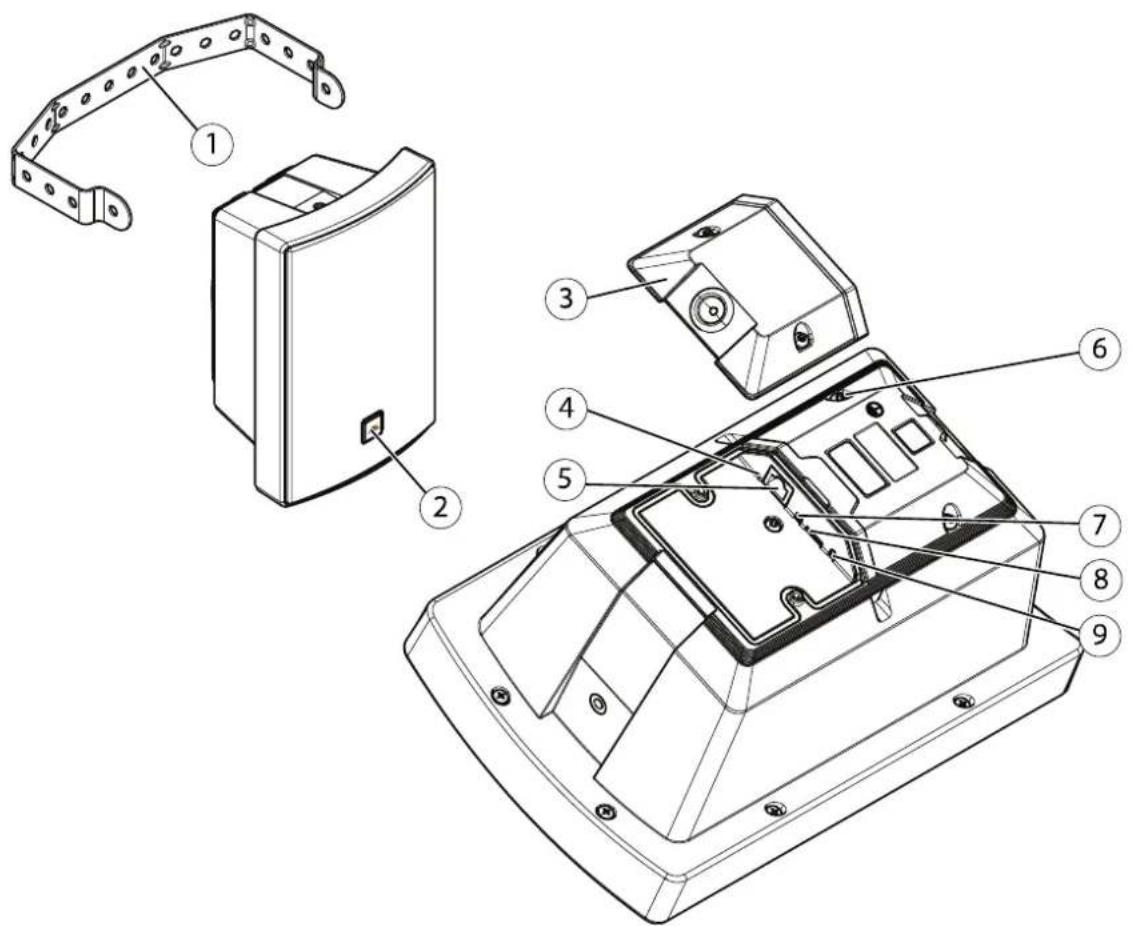
1 Bracket
2 Logotype(rotatable)
3 Hatch
4 LEDIndicatorsonpage38
5 Networkconnector
6 Protectiveearthterminal
7 Microphonedisableswitch
8 SDcardslotonpage39
9 Controlbutton
LEDIndicators
| StatusLED | Indication |
| UnlitUnlitfornormaloperation. | |
| GreenSteadygreenfornormaloperation. | |
| Amber | Steadyduringstartupandwhenrestoringsettings. |
| Red | Slowflashforfailedupgrade. |
| Red/GreenFlashesred/greenfast | whenidentifyinganaudiodeviceisselected. |
SDcardslot
NOTICE
- RiskofdamagetoSDcard.Donotusesharptools,metalobjects,orexcessiveforcewheninsertingorremovingthe SDcard.Useyourfingerstoinsertandremovethecard.
- Riskofdatalossandcorruptedrecordings.DonotremovetheSDcardwhiletheproductisrunning.UnmounttheSDcard fromtheproduct'swebpagebeforeremoval.
ForSDcardrecommendations,seeaxis.com.
micro SD, microSDHC, and microSDXC Logosaretrademarksof SD-3CLLC. microSD, microSDHC, microSDXC are trademarksor registered trademarksof SD-3C, LLC in the United States, other countries or both.
Buttons
Controlbutton
Thecontrolbuttonisusedfor:
- Calibratingthespeakertest.Pressandreleasethecontrolbuttonandatesttoneisplayed.
ResettingproductfactorydefaultsettingSeeResetofactorydefaultsettingspage35.
Microphonedisableswitch
Forlocationofthemicrophonedisableswitch,seeProductoverviewonpage38.
The microphonol disable switch used mechanically turrthemicrophone ON OFF The factory default setting this switch is ON.
Connectors
Networkconnector
RJ45EthernetconnectorwithPoweroverEthernet(PoE).
NOTIHD
The product shall be connected using a shielded network cable (STP). All cables connecting the product to thenetwork shall be intended for their specific use. Makes sure that thenetwork devices are installed in accordance with the manufacturer's instructions: information about regulatory requirements, such installation Guide at www.axis.com.
APIcommands
VAPIX®AxisbwnopenAPI(ApplicationProgrammingInterface)Youarcontrolalmostfunctionalityavailablen AxisdevicesthroughVAPIX®getaccessthecompleteVAPIX®documentationjoinAxisDevelopeCommunityat axis.com/developer-community
Entethe commands river browser and replace device IP with the address hostname of you device.
Important
TheAPIcommandsexecuteimmediately.Ifyourestoreorresetyourdeviceallsettingswillbelost.Forexampleactionrules.
Example
Restartthedevice
Request
http://
Example
Restorethe device.Therequest returnsmostsettingstodefaultvalues,butkeepsthelPnumber.
Request
http://
Example
Resetthedevice.TherequestreturnsallsettingsincludingIPnumbertodefaultvalues.
Request
http://
Example
Seealistofalldeviceparameters.
Request
http://
Example
Getadebugarchive
Request
http://
Example
Getaserverreport
Request
http://
Example
Captureanetworktraceof300seconds
Request
http://
Example
EnableFTP
Request
http://
Example
DisableFTP
Request
http://
Example
EnableSSH
Request
http://
Example
DisableSSH
Request
http://


- Solutionoverview
- Installation
- Getstarted
- Findthedeviceonthenetwork
- Browsersupport
- Accessthedevice
- Setanewpasswordfortherootaccount
- Securepasswords
- Important
- Additionalsettings
- Calibrateandrunaremotespeakertest
- Note
- SetupdirectSIP(P2P)
- SetupSIPthroughaserver(PBX)
- Setuprulesforevents
- Sendanemailifaspeakertestfails
- do the devic interface System Events Recipients.
- Playaudiowhenacameradetectsmotion
- Prerequisites
- Prepareanaudiocliplink:
- Createanactionrule:
- StopaudiowithDTMF
- GoSystemSIPSBettings.
- UndeDTMFclickDTMSequence.
- GoSystemEventsRulesandClickAddrule.
- SetupaudioforincomingSIPcalls
- EnableSIPsettings:
- QdSystemSIPSBettingandelecEnableSIP.
- PlayaudiowhenaSIPcallisreceived:
- Learnmore
- SessionInitiationProtocol(SIP)
- Peer-to-peerSIP(P2PSIP)
- PrivateBranchExchange(PBX)
- NATtraversal
- Applications
- Thedeviceinterface
- Status
- Audio
- Overview
- Devicesettings
- Stream
- Audioclips
- Listenandrecord
- Audiositesecurity
- Speakertest
- Recordings
- Apps
- System
- Dateandtime
- Network
- Friendlyname
- One-clickcloudconnection
- AllowO3C:
- Authenticationmethod:
- SNMP
- Connectedclients
- Security
- Certificates
- IEEE802.1x
- Preventbrute-forceattacks
- IPaddressfilter
- Custom-signedfirmwarecertificate
- Users
- Anonymoususers
- Events
- Schedules
- Manualtrigger
- MQTT
- MQTTclient
- MQTTpublication
- MQTTsubscriptions
- SIP
- Callhandling
- Ports
- Additional
- SIPtestcall
- Storage
- Networkstorage
- Tools
- Onboardstorage
- ONVIF
- ONVIFusers
- Role:
- Detectors
- Logs
- Reports
- Networktrace
- Remotesystemlog
- Plainconfig
- Maintenance
- Troubleshooting
- Resettofactorydefaultsettings
- Checkthecurrentfirmwareversion
- Upgradethefirmware
- Technicalissues,cluesandsolutions
- Performanceconsiderations
- Specifications
- Productoverview
- SDcardslot
- NOTICE
- Buttons
- Controlbutton
- Microphonedisableswitch
- Connectors
- Networkconnector
- NOTIHD
- APIcommands
- Request
Marque : AXIS
Modèle : C1004-E
Catégorie : Haut-parleur