
GF-Q900 - Compas de navigation Qstarz - Notice d'utilisation et mode d'emploi gratuit
Retrouvez gratuitement la notice de l'appareil GF-Q900 Qstarz au format PDF.


| Type de produit | Compas de navigation électronique avec GPS |
| Marque | Qstarz |
| Modèle | GF-Q900 |
| Dimensions (L x l x H) | 6,0 x 4,0 x 2,5 cm |
| Poids | 95 g (avec piles) |
| Écran | Écran LCD rétroéclairé |
| Alimentation | 2 piles AAA (LR03) 1,5 V |
| Autonomie | Jusqu'à 12 heures en utilisation normale |
| Fonctions principales | Boussole numérique, GPS, altitude barométrique, vitesse, cap, position |
| Précision GPS | Position : < 3 m (CEP), vitesse : 0,1 m/s |
| Récepteur GPS | MTK 3339 66 canaux |
| Mise à jour cartographique | Non applicable (pas de cartographie intégrée) |
| Étanchéité | Indice IPX7 (submersible jusqu'à 1 mètre pendant 30 minutes) |
| Température de fonctionnement | -10 °C à +60 °C |
| Connectivité | USB Mini-B pour transfert de données |
| Mémoire | Enregistrement jusqu'à 100 000 points de cheminement |
| Entretien et nettoyage | Essuyer avec un chiffon doux non pelucheux. Ne pas utiliser de solvants. |
| Sécurité | Ne pas exposer à des températures extrêmes. Éviter les chocs. |
| Pièces détachées et réparabilité | Piles remplaçables par l'utilisateur. Pour toute autre réparation, contacter le SAV Qstarz. |
| Garantie | 2 ans (selon les conditions du vendeur) |
FOIRE AUX QUESTIONS - GF-Q900 Qstarz
Questions des utilisateurs sur GF-Q900 Qstarz
0 question sur cet appareil. Repondez a celles que vous connaissez ou posez la votre.
Poser une nouvelle question sur cet appareil
Téléchargez la notice de votre Compas de navigation au format PDF gratuitement ! Retrouvez votre notice GF-Q900 - Qstarz et reprennez votre appareil électronique en main. Sur cette page sont publiés tous les documents nécessaires à l'utilisation de votre appareil GF-Q900 de la marque Qstarz.
MODE D'EMPLOI GF-Q900 Qstarz
QFinder User's Manual
A. Overview
QFinder utilizes the GPS technology to mark your desired locations and allows you to be back to the locations later at anytime by the precise digital compass with 8-directional arrows. It's a pretty practical tool in terms of hiking, camping, kayaking, fishing, parking, and traveling.
B. Product Notice
- QFinder must be used outdoors because it utilizes GPS technology to mark locations. Indoor environment will cause the device unable to receive satellite signals to find your location and movement, such as in am indoor parking garage
- For the first time use or not use after a long time of the device, it would need more time to get GPS fixed.
● The manufacturer assumes no responsibility for any damages and loss resulting from the use of this manual or from misuse of the product in any way - Please clean the unit with a dry and clean soft close. Do not use harsh cleaning solvents, chemicals, alcohol, or strong detergents
- Do not attempt to take apart the device by yourself. Unauthorized hacking may damage the unit, and void your warranty
C. Standard Package
-
QFinder
-
Neck Lanyard
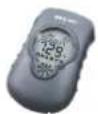
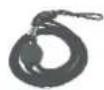
D. Features
● 4 location back points (A/B/C/D point)
● The estimate straight line distance measuring of the location back points
● LCD Display with Backlight
● Support Digital Compass with 8-directional arrow
● Support Temperature and Real Time (Time Zone adjustable)
● Adopts SiRF Star III GPS GPS chipset
● High sensitivity -159dBm and 20-Channel tracking
● Smart power saving and operates on 2 AAA batteries (not included)
● IPX-6 Water resistance
● Support standard NMEA-0183 protocol
| Power | |
| 2 x AAA batteries (for both alkaline and rechargeable) | |
| Operation Current | <55mA (Typical) |
| Operation Time | 12hrs, |
| Functionality | |
| E-Compass | 4 location back (A/B/C/D marks) |
| Temperature (°C / °F) | Time display |
| Accessories | |
| Lanyard | |
| Environmental | |
| Operating Temperature | 0 °C to + 60 °C |
| Storage Temperature | - 20 °C to + 70 °C |
| Water resistance | IPX-6 |
F. Appearance

Icon Indicators:
| Battery status | Compass mode | ||
| GPS Fix | Temperature Mode | ||
| GPS not Fix | A B C D | A/B/C/D location mode |
E. Product Specification
| General | |
| GPS Chip | SiRF Star III |
| Frequency | L1, 1575.42MHz |
| C/A Code | 1.023MHz chip rate |
| Channels | Support 20 channels |
| Antenna (Internal) | Built-in low noise antenna |
| Sensitivity | |
| To -159dBm Tracking, Superior Urban Canyon Performance | |
| Acquisition Rate | |
| Cold Start | 42 sec, average |
| Warm Start | 38 sec, average |
| Hot Start | 1 sec, average |
| Reacquisition 0.1sec | |
| Accuracy | |
| Position | <10 M at 2D RMS |
| Velocity | 0.1m/sec, without SA |
| Time | 1μs synchronized to GPS time |
| Datum | |
| WGS-84 | |
| Dynamic Conditions | |
| Altitude | <18,000m |
| Velocity | <515m/sec |
| Acceleration | <4G |
| Motional Jerk | 4 m/sec. |
| Display & Button | |
| LCM-ICON 33x42mm display size | |
| 2 Buttons (Power/Mode and Mark/Backlight) | |
| GPS Protocol | |
| Default: NMEA-0183 – GGA, GSA, GSV, GLL, RMC,VTG Baud rate 4800~38400 bps, Data bit : 8, stop bit : 1(Default) * | |
| Device Size | |
| 88Lx53Wx29D mm | |
| 100g (excluding battery) | |
G. Hardware Function
| Hardware Function | Description |
| Power on/off the device | Hold Mode/Power button for 1sec to power on; hold Mode/Power button again for 3sec to power off |
| Mode switch | After power on, short push Mode/Power button to switch among different modes |
| Mark location | Short push Mode/Power button to select either A/B/C/D location and hold Mark button for 3sec to mark |
| Setup time zone | 1. In compass mode, hold Mark button for 3sec2. Press Mode/Power button to change time zone3. Hold Mark button for 3sec to finish setup |
| Change temperature/distance Unit | In temperature/distance mode, hold both Mark and Mode/Power button for 3sec |
| 30 sec Backlight | Short push Backlight/Mark button to enable backlight for 30sec |
Note: The device will automatically power off after 30 minutes without pushing any button to save energy.
H. Battery Installation
- Rotate screw counterclockwise to open battery cover.

natural_image
Close-up of a blue mobile phone casing with a circular button and arrow indicating rotation (no text or symbols)- Insert 2 "AAA" alkaline or lithium batteries.
(Batteries are not included in package)

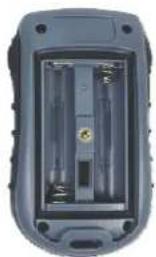
natural_image
Interior view of a gray handheld device showing internal components (no visible text or symbols)- Put the battery cover back and rotate screw clockwise to lock it.
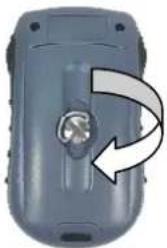
natural_image
Close-up of a gray mobile phone casing with a circular button and arrow indicating rotation (no text or symbols)I. Start to use
- Push Mode/Power button to power on the device
- Ensure you are outdoor under an open sky environment and wait until QFinder get fix with GPS indicator not flashing

GPS not fix
Blinking GPS indicator
No time display

GPS fix
Steady GPS indicator
Time display
- Compass Mode: QFinder can be a digital compass. Arrow will always point north.
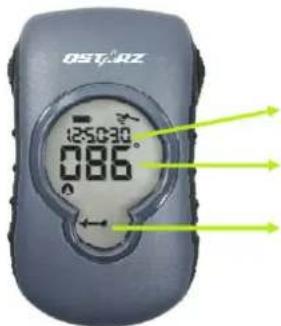
Current Time in 24-hour format
Current azimuth
Arrow points north
To setup time zone, hold Mark button for 3sec and Press Mode/Power button to change time zone. Hold Mark button for 3sec to finish setup
- Temperature Mode: Short push Mode/Power button to switch to temperature mode.

Current Time in 24-hour format
Current temperature in °C or °F
Arrow points north
To change temperature unit, hold both Mark and Mode/Power button for 3sec.
- Location Mode: Short push Mode/Power button to switch to location mode.

Current Time in 24-hour format
Current straight line distance from location A
Location A/B/C/D icon
Arrow points location A/B/C/D
To mark location, Short push Mode/Power button to select either A/B/C/D location, and hold Mark button for 3sec until the distance indicator becomes 0 and 8-direction arrows flash.
To change distance unit, hold both Mark and Mode/Power button for 3sec.
When arrive location, the distance will become 0 and 8-directional arrows will flash.
J. Trouble Shooting
| Problem Solution | |
| Unable to power on | 1. Check if the device is already out of battery2. Check if the battery may not installed properly. |
| Unable to display information | GPS may not get fix. Please make sure to have QFinder outside under open sky environment until the GPS indicator is steady. |
Spec. is subject to change without prior notice.
All rights reserved. All registered trademark is belong to their respected companies.
QSTARZ®
Beyond Navigation
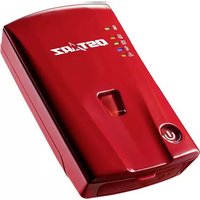



Marque : Qstarz
Modèle : GF-Q900
Catégorie : Compas de navigation