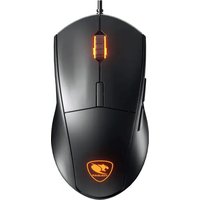
700M eSPORTS - Souris Cougar - Notice d'utilisation et mode d'emploi gratuit
Retrouvez gratuitement la notice de l'appareil 700M eSPORTS Cougar au format PDF.


| Type de produit | Souris gaming filaire |
| Marque | Cougar |
| Modèle | 700M eSPORTS |
| Dimensions (L x l x H) | 130 x 70 x 40 mm |
| Poids | 110 g |
| Alimentation | USB 2.0, câble tressé 1,8 m |
| Capteur | Optique, jusqu'à 6400 DPI |
| Nombre de boutons | 7 boutons programmables |
| Éclairage | RGB personnalisable |
| Fonctions principales | Réglage DPI, boutons programmables, molette cliquable, éclairage RGB |
| Compatibilité | Windows, Mac OS |
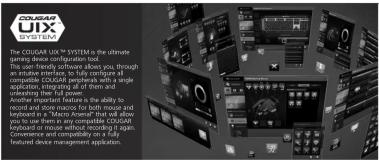
| Logiciel de configuration | Cougar UIX System (téléchargeable) |
| Entretien et nettoyage | Essuyer avec un chiffon doux légèrement humide. Ne pas utiliser de solvants. |
| Sécurité | Débrancher avant nettoyage. Utilisation conforme aux normes CE. |
| Pièces détachées | Câble USB, pieds en PTFE, patins de rechange |
| Réparabilité | Non réparable par l'utilisateur. Contacter le SAV Cougar. |
| Garantie | 2 ans |
FOIRE AUX QUESTIONS - 700M eSPORTS Cougar
Questions des utilisateurs sur 700M eSPORTS Cougar
0 question sur cet appareil. Repondez a celles que vous connaissez ou posez la votre.
Poser une nouvelle question sur cet appareil
Téléchargez la notice de votre Souris au format PDF gratuitement ! Retrouvez votre notice 700M eSPORTS - Cougar et reprennez votre appareil électronique en main. Sur cette page sont publiés tous les documents nécessaires à l'utilisation de votre appareil 700M eSPORTS de la marque Cougar.
MODE D'EMPLOI 700M eSPORTS Cougar

DEFAULT BUTTON ASSIGNMENT

[Non-Text]
Left Click Right Click
Wheel Click DPI Cycle
Forward Backward
Fire Button 45" Sniper Button
■ The division ■ 10% of division
TIP:
Five button and 45 ^2 spin buttons are dischl
Fire button and 45" Sniper button are disabled on default, please customize command by
COUGAR UIX™ SYSTEM.
DEUTSCH
• ALUMINIUMRAHIMEN • LASERSENSOR MIT 8200 DP
• 32-BIT-ARM-PROZESSOR
• S12 KB ON-BOARD-SPEICHER • ANPASSBARE HANDBALLEN
(WERKZEUGLOS)
- FIRE-BUTTON - 45°-SNIPER-BUTTON
• COUGAR UIX™ SYSTEM
ESPAÑOL
• ESTRUCTUR
• SENSOR LASER DE 8200 DPI
• PROCESADOR DE 32-BIT Y M INTERNA DE S12KR
• REPOSAMANOS AJUSTABLE
• BOTÓN DE DISPARO Y BOTO SPONSOTIRADO DE 161
FRANCUTIRADOR DE 45 • SOPORTA COUGAR UIX™ SY!
РУССКИЙ
•АЛЮМИНИЕВАЯ РАМКА МЫШИ
•ЛАЗЕРНЫЙ СЕНСОР 8200
•ПРОЦЕССОР 32-ВІТ И ВНАЧТЕННЕЙ ПАМЯТЬ НА
•РЕГУЛИРУЕМЫЕ ДЛЯ ЛАД
•КНОПКА ОГОНЬ И КНОП
45 SNIPER (CHAMPER) •Поддержка COUGAR UO
SYSTEM
FRANCAU
•STRUCTURE
BROSSE CARTEUR LASER, 8200 DRL
•CAPTEUR BASER 1200 BPT •PROCESSEUR 32 BITS ET
MÉMOIRE 512KB ON-BOAF
- REPOSE POURNET ADJUSTAB - FIRE BUTTON & 45" SNIPER
BUTTON
•COUGAR UIX™ SYSTEME
日本
MOLDURA DE ALUMINIO
·解像度8200 DPI
-32bitプロセッサ&512KB
オンボードメモリを括載 ・調整なバームリスト
・建射機能&45°スナイバー
•COUGAR UDX™ SYSTEM对
POLISH ALLUMINI
• LASEROWY SENSOR 821
• 32-BITOWY PROCESOR ARM
• 512 KB WBUDOWANEJ PAMIĘCI
DOSTUSOWANIE WYSOKOJCI OFARCIA DŁONI (BEZ UŻYCIA NARZEDZI)
- PRZYCISK SNIPER
(45°, PROGRAMOWALNY)
SYSTEM COUGAR OIX ^2
HUNGARIAN
HUNGARIAN ALUMONTUM KER
- 8200DFI PRECÍZIOS SZENZOR
TECHNOLOGIA
- 32 BITES ARM PROCESSZOR KÉTTEL ÁLLÍTUATO TEHNÉSTÁM
- REZZEL ALLITHATO TENTERTAIMASE (MAGAS / MÉLY)
• PROGRAMOZHATÓ 45°-OS LÖVÉSZ GOMB
COUGAR UIX ^10 RENDSZER
“”
中文
·3D铝合金架构 8200 D印激光传感器
- 6200 DPI曝光传感器 - 32 PIT处理器 & F12
32-017处理器及312KB极低内存可调节式累托设计
·火力臂 & 45" 阻击键
COUGAR UIXTM SYS
2、审议《关联交易协议》
CONTAINS
[Non-Text]
FEATURES
-8200 DPI PRO GAMING SENSOR
The ADNS-9800 high performance laser sensor provides qinopoint control.
2.1.2017
-32-BIT ARM PROCESSOR
Superior computing speed, ultra-fast response.
-ALUMINUM STRUCTURE
An aluminum frame contributes to the uniqueness of its
design and makes the 70
-MUZZLE BRAKE TUBE
A metallic tube inspired in 'weapons' muzzle brakes enhances
the cable's durability and prevents it from getting in your way
-PALM REST HEIGHT ADJUSTMENT
To optimize palm support and adjust to any grip style, the
arched frame that supports the palm rest can be raised or lowered by rotating the knot.
(1) 2017年1月
-FIRE BUTTON
This ergonomically designed button is located right on the top left of the primary square button, it allows to arrive.
top left of the primary mouse button. It allows to access an extra function almost instantaneously with minimal inde
in both human almost non-lingually with natural hand finger movement.
17.2020
-45 DEGREE SNIPER BUTTON This button silver powder to
This button allows gamers to quickly switch mouse DPI to adjust precision, especially useful when spring in EPS games.
30.251 problem, especially 32 for when spacing in 175 games
-8 PROGRAMMABLE BUTTONS
Assign commands, shortcuts or macros to any one of the 8 fully reorganously buttons.
Italy programme buttons.
·AERO-DYNAMICAL DESIGN
Keeps your hand cool and optimizes airflows' effect on
COUGAR UIXTM SYSTEM
The ultimate gaming peripheral management system.
(1)本次股东大会的召集人:李玉霞、王永生、张雪萍和吴志刚、周晓云等
-1000HZ POLLING RATE / IMS RESPONSE TIME
USB 123Hz-1000Hz Tine/tuning and lighting response
-512KB ON-BOARD MEMORY
Store up to 3 profiles on the mouse and bring you
configuration with you
-ON-THE-FLY DPI ADJUSTMENT
Quickly switch between different DPI settings on the go.
- SPICE RD LTD. RUSIL AV
-4-STAGE DPI LED DISPLAY Quickly confirm DPI stage without motion your hand
Quickly confirm On stage without moving your mind.
• MULTI-COLOR PROFILE BACKLIGHT SYSTEM
16.8 million colors for you to choose from.
:OMRON MICRO SWITCHES
5 million clicks of gaming life guaranteed.
(1) 2017年1月1日
•ANTI-SLIP DESIGN
the hexagonal pattern on the left and right sides improves gain stability.
5年10月2日
- ALPS GAMING-GRADE SCROLL WHEEL
The ALPS encoder and the rubberized scroll wheel provide accurate tactile feedback.
accounting for the accuracy.
•GAMING-GRADE MOUSE FEET
Best gliding performance and improved accuracy.
BRAUDED CABLE
STUDY and durable solutions for gaming.
(1) 2017年美国经济贸易与贸易
PORTUGUES
•ESTRUTORA DE MC •SENSOR LASER DE
• PROCESSADOR DE 32-
MEMÓRIA 512KB ON-BOARD
• POUSA PALMAS AJUSTAVEL • ROTÃO DE DISBARO E ROTÁM
BOTAS DE DESPARES E BOTAS FRANCO-ATIRADOR DE 45"
• SUPORTE COUGAR UIX™ SYS
特此公告。
한국어
·알루미들 프레어닝 구조
18200 DH 레이지 선저 32-BIT 프로세션 & 512KB ON.
·조점가능한 손욕 밤칠대
• FIRE BUTTON & 45" SNIPER BUTTON
• COUGAR UIX™ SYSTEM 지원
[Non-Text]
SPECIFICATIONS
| Product name | COUGAR 700M Gaming Mouse |
| Sensor | ADNS-9800 Laser gaming sensor |
| Resolution | 8200 DPI |
| Processor | 32-bit ARM Cortex-MO |
| Game type | FPS / MMORPG / MOBA / RTS |
| Polling rate | 1000Hz / 1ms |
| On-board memory | 512KB |
| Material | Aluminum / Plastic |
| Software | COUGAR UIXTM SYSTEM |
| Programmable buttons | 8 |
PACKAGE CONTAINS
| COUGAR 700M Gaming Mouse | |
| User Manual | COUGAR Sticker |
| To achieve optimal performance, it is highly recommended that you use this product with COUGAR Mouse Pads. | |
[Non-Text]
| Encoder ALPS | |
| Switching | OMRON gaming switches |
| Profile LED backlight | 16.8 million colors |
| Frame rate | 12000 FPS |
| Maximum tracking speed | 150 IPS |
| Maximum acceleration | 30 G |
| Interface | USB plug |
| Cable length | 1.8m braided |
| Dimension | 127(L) X 83(W) X 38(H) mm |
| Weight 110g |
The above specifications may vary by country or region
SYSTEM REQUIREMENTS
Works with Windows 7 32bit/64bit, Windows 8 32bit/64bit, Windows 8.1 32bit/64bit.
四、释义
BOW
-
1
[Table_Title]
[Non-Text]
L
项目信息
[Unreadable]
ENGLISH
1.Go to t
(http://
2.Downlo
from the
ESPAÑC
- Уропа
(http://www.cougargaming.com)
- Descar
SYSTEN
PORTUG
- Visite
(http://www.cougargaming.com)
- Transfi
SYSTEM
日本
1.COUG
(http://www.cougargaming.com)
- COUG
SYSTEM
INSTALLATION
INDI
•
1
-
m = 311
m = 311
1824
125
-
Flu: th
-
Plug in Operat
and th
-
Click a
-
WIX™ will check your device's fit
3.0D1
- The fir the co
the Company also
[Non-Text]
The Ground Truth image displays a single, solid horizontal line, which is a stylistic or background element (like a rule line on paper). According to Rule 2, such lines must be ignored by the OCR result. The provided OCR content is "____", which consists of underscores. Underscores are not equivalent to a solid line and are not permitted under the “Stylistic/Background Lines (Ignore)” rule. Outputting underscores for a stylistic line is incorrect because it misinterprets the line as a placeholder fill-in-the-blank area. Since the OCR output incorrectly rendered a stylistic line as underscores (which should be ignored), this violates the rule. Therefore, the OCR result is inconsistent with the Ground Truth.
[Non-Text]
[Non-Text]
[Non-Text]
[Non-Text]
[Non-Text]
[Non-Text]
[Non-Text]
[Non-Text]
[Non-Text]
[Non-Text]
[Non-Text]
[Non-Text]
[Non-Text]
[Non-Text]
[Non-Text]
[Non-Text]
[Non-Text]
[Non-Text]
[Non-Text]
[Non-Text]
[Non-Text]
[Non-Text]
[Non-Text]
[Non-Text]
[Non-Text]
[Non-Text]
[Non-Text]
[Non-Text]
[Non-Text]
[Non-Text]
[Non-Text]
[Non-Text]
[Non-Text]
[Non-Text]
[Non-Text]
[Non-Text]
[Non-Text]
[Non-Text]
[Non-Text]
[Non-Text]
[Non-Text]
[Non-Text]
[Non-Text]
[Non-Text]
[Non-Text]
[Non-Text]
[Non-Text]
[Non-Text]
[Non-Text]
[Non-Text]
[Non-Text]
[Non-Text]
[Non-Text]
[Non-Text]
[Non-Text]
[Non-Text]
[Non-Text]
[Non-Text]
[Non-Text]
[Non-Text]
[Non-Text]
[Non-Text]
[Non-Text]
[Non-Text]
[Non-Text]
[Non-Text]
[Non-Text]
[Non-Text]
[Non-Text]
[Non-Text]
[Non-Text]
[Non-Text]
[Non-Text]
[Non-Text]
[Non-Text]
[Non-Text]
[Non-Text]
[Non-Text]
[Non-Text]
[Non-Text]
[Non-Text]
[Non-Text]
[Non-Text]
[Non-Text]
[Non-Text]
[Non-Text]
[Non-Text]
[Non-Text]
[Non-Text]
[Non-Text]
[Non-Text]
COSY UI SYST 1. COULDING, design, design, design, design, design, design, design, design, design, design, design, design, design, design, design, design, design, design, design, design, design, design, design, design, design, design, design, design, design, design, design, design, design, design, design, design, design, design, design, design, design, design, design, design, design, design, design, design, design, design, and the 2. VOLUME OF WORKS 3. ENGLISH 4. GO to IT 5. Export 6. Downlink 7. From IT 8. ESPARC 9. VOLUME 10. Export 11. Design 12. SYSTEM 13. PORTUIC 14. VOLUME 15. Export 16. Design 17. SYSTEM 18. 19. 20. 21. 22. 23. 24. 25. 26. 27. 28. 29. 30. 31. 32. 33. 34. 35. 36. 37. 38. 39. 40. 41. 42. 43. 44. 45. 46. 47. 48. 49. 50. 51. 52. 53. 54. 55. 56. 57. 58. 59. 60. 61. 62. 63. 64. 65. 66. 67. 68. 69. 70. 71. 72. 73. 74. 75. 76. 77. 78. 79. 80. 81. 82. 83. 84. 85. 86. 87. 88. 89. 90. 91. 92. 93. 94. 95. 96. 97. 98. 99. 100.
[Non-Text]
[Non-Text]
[Non-Text]