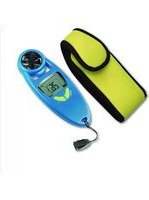
42.6000.06 - Anémomètre TFA - Notice d'utilisation et mode d'emploi gratuit
Retrouvez gratuitement la notice de l'appareil 42.6000.06 TFA au format PDF.


| Type de produit | Anémomètre |
| Marque | TFA |
| Modèle | 42.6000.06 |
| Dimensions (approx.) | 150 x 60 x 30 mm |
| Poids (approx.) | 150 g (avec pile) |
| Alimentation | 1 pile bouton CR2032 (3V) |
| Fonctions principales | Mesure de la vitesse du vent, température ambiante, direction du vent (en option) |
| Plage de mesure de la vitesse | 0,5 à 30 m/s |
| Précision de la vitesse | ±5 % de la valeur mesurée |
| Unités de mesure | m/s, km/h, mph, nœuds, ft/min |
| Affichage | LCD, 4 chiffres |
| Rétroéclairage | Oui |
| Plage de température | -10°C à +50°C |
| Précision de la température | ±1°C |
| Indice de protection | IP20 (usage intérieur) |
| Entretien et nettoyage | Nettoyer avec un chiffon doux et sec. Ne pas utiliser de produits abrasifs ou de solvants. |
| Sécurité | Ne pas immerger dans l'eau. Garder hors de portée des enfants. Retirer la pile en cas de non-utilisation prolongée. |
| Pièces détachées et réparabilité | Pile CR2032 remplaçable. Aucune autre pièce détachée disponible auprès du fabricant. |
| Garantie | 2 ans |
FOIRE AUX QUESTIONS - 42.6000.06 TFA
Questions des utilisateurs sur 42.6000.06 TFA
0 question sur cet appareil. Repondez a celles que vous connaissez ou posez la votre.
Poser une nouvelle question sur cet appareil
Téléchargez la notice de votre Anémomètre au format PDF gratuitement ! Retrouvez votre notice 42.6000.06 - TFA et reprennez votre appareil électronique en main. Sur cette page sont publiés tous les documents nécessaires à l'utilisation de votre appareil 42.6000.06 de la marque TFA.
MODE D'EMPLOI 42.6000.06 TFA
Hand held Anemometer
Operating Manual
Introduction:
Congratulations on purchasing this pocket-sized anemometer, this innovative product provides wind speed, wind chill and temperature information for any outdoor activities. The operation of this product is simple and straightforward and by reading this operating manual, users will receive the optimum benefits of all its features.
The Anemometer

Features:
• Wind speed measure in mph, Km/h, m/s or Knots
• Wind speed in Beauford wind scale bar graph
- Wind chill display
• Temperature display in degrees Celsius or Fahrenheit
- LCD back-light
- Auto power OFF
- Neck band included
- Water resistance
Setting up:
- Firstly, use a large coin to open the battery cover at the back of the anemometer as indicated above.
- Checking the correct polarization, insert 1 x 3V (CR2032) lithium cell, positive (+) pole up into the battery compartment and replace the cover.
- When the battery is inserted, all the segments of the LCD and back light will light up briefly.
Your anemometer is now operational.
Note:
After inserting the battery, test the anemometer by blowing directly at the Impeller for about 30 seconds. The reading on the LCD should change. If it is not the case, remove the battery. Wait for 30 seconds, and re-insert the battery again.
Lithium cell (CR2032)
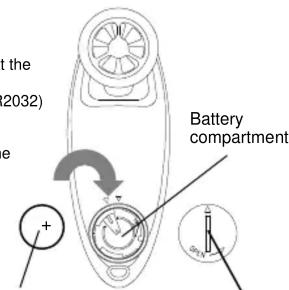
Battery cover
Function keys:
The anemometer uses the following keys:
MODE/§ key : To toggle between wind speed and temperature/wind chill display
: Power ON/OFF
: To enter the setting node
: Back-light-On
+ Key : To change operation mode
(PLUS) : To change parameter in setting mode
Back-light-On
Selection of operation mode
There are two modes, one is wind speed, and another is temperature. By pressing the
"MODE/§ " key the display will toggle between wind speed and temperature/wind chill
Wind speed Mode
The wind speed mode can be selected into 3 different displays at any time.

Current wind speed

Maximum wind speed Since power on
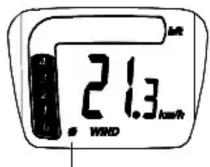
Average wind speed Since power on
To toggle between current wind speed, maximum wind speed and average wind speed, simply press the “+” key:
Beaufort wind scale (bft)
The Beaufort scale is displayed in bar graph (0-12). This is a system for estimating wind force without the use of instruments based on the visible effects of the wind on the physical environment.
| Force | Description | Kts | m/s | Km/h | mph |
| 0 | Calm | 0 | 0 | 0 | 0 |
| 1 | Light Air 1 0.5 1.8 | 1.1 | |||
| 2 | Light Breeze | 4 | 2.1 | 7.4 | 4.6 |
| 3 | Gentle Breeze | 7 | 3.6 | 13.0 | 8.1 |
| 4 | Moderate Breeze | 11 | 5.7 | 20.4 | 12.7 |
| 5 | Fresh Breeze | 17 | 8.8 | 31.5 | 19.6 |
| 6 | Strong Breeze | 22 | 11.3 | 40.8 | 25.4 |
| 7 | Near Gale | 28 | 14.4 | 51.8 | 32.3 |
| 8 | Gale | 34 | 17.5 | 63.0 | 39.2 |
| 9 | Strong Gale | 41 | 21.1 | 75.9 | 47.2 |
| 10 | Storm | 48 | 24.7 | 88.9 | 55.3 |
| 11 | Violent Storm | 56 | 28.8 | 103.7 | 64.5 |
| 12 | Hurricane | 64 | 32.9 | 118.5 | 73.7 |
Temperature and Wind chill Mode
The Temperature and wind chill modes can be selected into 2 different displays at any time.
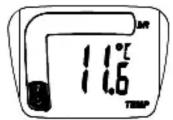
Temperature

Wind chill
By pressing the “+” key the display will toggle between temperature and wind chill. When the temperature is outside the range from -29.9°C to +59°C , there will be no wind chill measurement.
Wind chill
The anemometer calculates automatically wind chill, which can provide useful information for preparing outdoor activities in cold weather. "Wind chill" provides an indication of how cold it feels given the combined effects of the actual air temperature and the wind speed.
Power ON/OFF:
Press and hold down the "MODE/§" key for 2 seconds to switch ON/OFF.
Note:
The anemometer is automatically switched OFF when no key is pressed in 34 minutes.
Manual setting
Before entering the manual setting mode, switch off the anemometer. Press and hold down the “MODE/§” key for about 4 seconds, the speed unit will start flashing on the LCD when the manual setting mode is entered.
Measurement scale setting
- After entering the manual setting mode, press “+” key to set the measurement scale in Km/h (Kilometers per hour), mph (miles per hour), m/s (meters per seconds) or Kts (Knots).
- Now press the "MODE/§" key to confirm and enter the "°C and °F setting".
°C and °F setting:
- Following from the measurement scale Setting °C will be flashing, use the “+” key to toggle °C and °F.
- Once the desired temperature unit has been chosen, press the “MODE/§” key to confirm and enter the “Average time for current speed measurement setting”.
Average time for current speed measurement setting
The current wind speed can be measured in average wind speed in a time interval 2-10 seconds
1. Following from the °C and °F Setting, press “+” key to set the desired average time. The range runs from 2 to 10 seconds.
2. Once the desired average time has been chosen, press the “MODE/§” key to confirm and back to the normal mode.
LCD back-light:
The LCD back-light is automatically switched ON when any one of the 2 function keys are pressed and held down about 2 seconds. The back-light will be switched on for approximately 8 seconds before automatically switching OFF.
Fastening the necklace

The carry necklace is supplied with the anemometer.
To fasten, simply insert the clip of the necklace into the buckle end of the anemometer until it clicks into place.
To unfasten, simply press both sides of the clip until it can be removed from the buckle.
Battery change:
It is recommended to replace the battery in the unit on an annual basis to ensure optimum accuracy of this unit.

Please help in the preservation of the environment. Return used batteries to an authorised depot.
Maintenance:
- Avoid placing anemometer in areas prone to vibration and shock as these may damage and inaccurate readings.
- Avoid exposure to sudden changes in temperature such as direct sunlight, extreme cold and wet or moist conditions.
- When cleaning the display and casing, use a soft damp cloth only.
Do not use solvents or souring agents as they may mark the LCD and casing. - Do not make or attempts to make any repairs to the anemometer. Return it to its original point of purchase for repair by a qualified engineer. Opening and tampering with the unit may invalidate its guarantee.
Specifications:
Recommended operating temperatures
: -29.9°C to +59°C with 0.1°C resolution ("---" displayed if outside this range)
Temperature checking interval Wind speed measuring range
: every 10 seconds
Wind speed accuracy
Power source
: Minimum 0.2 m/s
Battery life
Maximum 30 m/s
Dimensions (L x W x H)
: ±5% or ± least significant digit
: 1 x 3V lithium cell (CR2032)
: Approximately 12 months (The battery life might be shorter than 12 months depending on the use of the backlight.)
: 50 x 18 x 137 mm
Liability Disclaimer:
- The manufacturer and supplier cannot accept any responsibility for any incorrect readings and any consequences that occur should an inaccurate reading take place.
• This product is not to be used for medical purposes or for public information. - The specifications of this product may change without prior notice.
• This product is not a toy. Keep out of the reach of children. - No part of this manual may be reproduced without written consent of the manufacturer.

- HAND HELD ANEMOMETER
- OPERATING MANUAL
- INTRODUCTION
- FEATURES
- SETTING UP
- NOTE
- FUNCTION KEYS
- SELECTION OF OPERATION MODE
- WIND SPEED MODE
- BEAUFORT WIND SCALE (BFT)
- TEMPERATURE AND WIND CHILL MODE
- WIND CHILL
- POWER ON/OFF
- MANUAL SETTING
- MEASUREMENT SCALE SETTING
- °C AND °F SETTING
- AVERAGE TIME FOR CURRENT SPEED MEASUREMENT SETTING
- LCD BACK-LIGHT
- FASTENING THE NECKLACE
- BATTERY CHANGE
- MAINTENANCE
- SPECIFICATIONS
- WIND SPEED ACCURACY
- DIMENSIONS (L X W X H)
- LIABILITY DISCLAIMER
Marque : TFA
Modèle : 42.6000.06
Catégorie : Anémomètre