
CMX 98 - Radio SCOTT - Notice d'utilisation et mode d'emploi gratuit
Retrouvez gratuitement la notice de l'appareil CMX 98 SCOTT au format PDF.


| Type de produit | Radio portable |
| Marque | Scott |
| Modèle | CMX 98 |
| Dimensions (L x H x P) | Environ 25 x 15 x 8 cm |
| Poids | Environ 1,2 kg |
| Alimentation | 4 piles R14/UM2 1,5 V ou adaptateur secteur (non fourni) |
| Gammes de fréquences | FM 87,5-108 MHz, AM 520-1710 kHz |
| Fonctions principales | Écoute AM/FM, haut-parleur intégré, prise casque, affichage numérique |
| Entretien et nettoyage | Nettoyer avec un chiffon doux et sec. Ne pas utiliser de produits abrasifs. |
| Sécurité | Ne pas exposer à l'humidité ou à des températures extrêmes. |
| Pièces détachées et réparabilité | Piles facilement accessibles, autres pièces à vérifier auprès du service client. |
| Informations générales | Notice d'utilisation disponible en téléchargement gratuit au format PDF. |
FOIRE AUX QUESTIONS - CMX 98 SCOTT
Questions des utilisateurs sur CMX 98 SCOTT
0 question sur cet appareil. Repondez a celles que vous connaissez ou posez la votre.
Poser une nouvelle question sur cet appareil
Téléchargez la notice de votre Radio au format PDF gratuitement ! Retrouvez votre notice CMX 98 - SCOTT et reprennez votre appareil électronique en main. Sur cette page sont publiés tous les documents nécessaires à l'utilisation de votre appareil CMX 98 de la marque SCOTT.
MODE D'EMPLOI CMX 98 SCOTT

REVISED 04:02/12/05 FOR FM ONLY, 24 HOURS MODEL CR19 / SCOTT CMX98 / ENGLISH I/M, 230V

SCOTT
CMX98
VERTICAL DIGITAL CLOCK RADIO
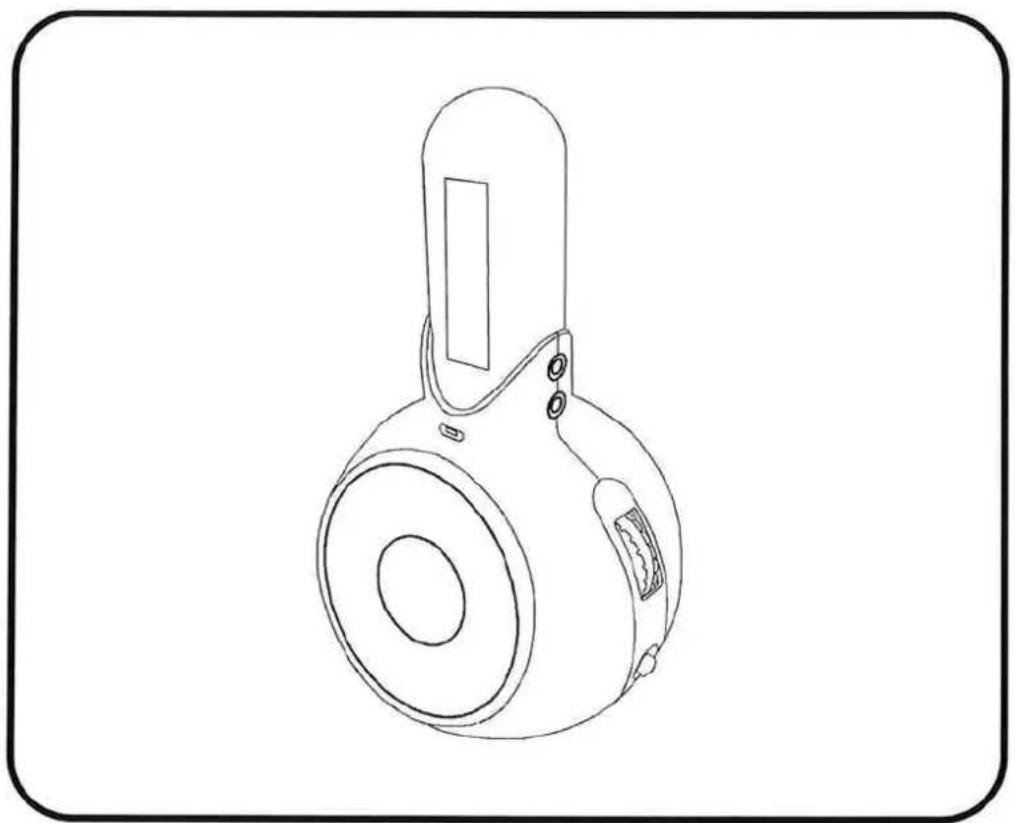
OPERATING INSTRUCTIONS

WARNINGS
CAUTION
RISK OF ELECTRIC SHOCK DO NOT OPEN
ATTENTION
To reduce the risk of electric shock, do not remove the cover. There are no user serviceable parts inside the unit. Refer all servicing to qualified personnel.

The lightening flash with arrowhead symbol within the triangle is a warning sign alerting the user of "dangerous voltage" inside the unit.

The exclamation point within the triangle is a warning sign alerting the user of important instructions accompanying the product.
WARNING
To reduce the risk of fire or electric shock, do not expose this appliance to rain or moisture.
IMPORTANT
DO NOT THROW BATTERIES IN FIRE I
THE APPARATUS SHALL NOT BE EXPOSED TO DRIPPING OR SPLASHING.
ENSURE A MINIMUM DISTANCE OF 5 CM AROUND THE APPARATUS FOR SUFFICIENT VENTILATION.
ENSURE THAT THE VENTILATION IS NOT IMPEDED BY COVERING THE VENTILATION OPENINGS WITH ITEMS, SUCH AS NEWSPAPERS, TABLE-CLOTHS, CURTAINS, ETC..
DO NOT PLACE NAKED FLAME SOURCES, SUCH AS LIGHTED CANDLES ON THE APPARATUS.
TAKE ATTENTION TO THE ENVIRONMENTAL ASPECTS OF BATTERY DISPOSAL.
USE THE APPARATUS ONLY IN MODERATE CLIMATES (NOT IN TROPICAL CLIMATES).
DO NOT EXPOSE THE APPARATUS TO DRIPPING OR SPLASHING.
DO NOT PLACE OBJECTS FILLED WITH LIQUIDS, SUCH AS VASES, ON THE APPARATUS.
IN CASE OF MISFUNCTION DUE TO ELECTROSTATIC DISCHARGE THE APPARATUS HAS TO BE RESET BY DISCONNECTING IT FROM MAINS SUPPLY.
PLEASE ENSURE TO PLACE YOUR CLOCK ON A STABLE STAND TO AVOID ANY RISK OF DROP.
ALWAYS KEEP YOUR CLOCK AWAY FROM THE EDGE OF THE FURNITURE TO PREVENT IT FALLING OFF WHEN YOU USE THE SNOOZE FUNCTION.
GB-1


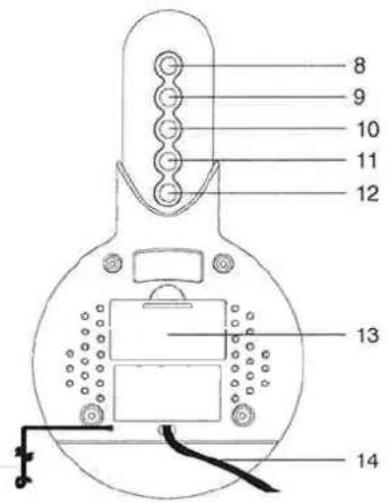
LOCATIONS OF PARTS AND CONTROLS
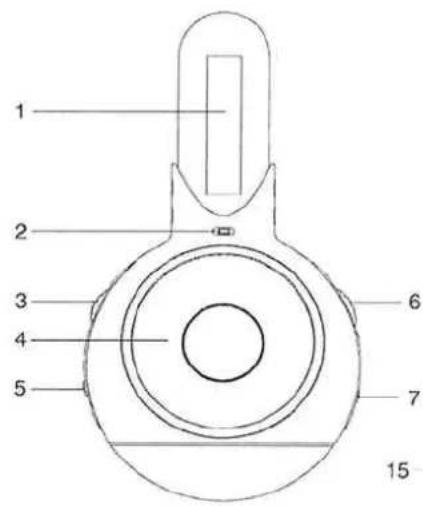
- LED display
- Alarm indicator
- Volume control
- Speaker
- Function / Alarm switch
- Tuning control
- Tone selector
-
Sleep button
-
Time set button
- Alarm set button
- Hour set button
- Minute set button
- Battery compartment
- AC power cord
- Wire Antenna
POWER SUPPLY
This unit is designed to operate from AC230 \~ 50Hz household mains supply. The 9V type (1x006p not included) battery is used for clock back up only.

LISTENING TO RADIO
- Slide the Function / Alarm Switch to "ON" position.
- Slide the Tone Selector to "HI" or "LO" position for desired high frequency.
- Adjust the Volume Control for a desired listening level and select your favourite station with the Tuning control.
- To turn off the radio, slide the Function / Alarm Switch to "AUTO or "AL" to set the radio or buzzer alarm.
TO SET THE TIME
- Press and hold the Time set button.
- Press the Hour set button to advance the hour display.
- Press the Minute set button to advance the minute display until the correct time appears on the time display.
- Release the Time set button. The correct time is shown on display.
GB-2
TO SET THE ALARM
- Press and hold the Alarm set button while repeating step 2 and 3 described under "TO SET THE TIME" to set the desired wake-up time.
- To check the correct alarm time, press the Alarm set button.
USING THE RADIO / BUZZER ALARM
- Set the alarm as shown in "TO SET THE ALARM".
- Follow the procedure in "LISTEN TO THE RADIO" to tune the desired station.
- Set the Volume Control to your required listening level.
- Slide the Function / Alarm Switch to "AUTO" position. The alarm indicator lights up and the radio will turn on to wake you up at the preset time.
- To wake to the buzzer instead of the radio, set the alarm as shown in "TO SET THE ALARM". Slide the Function / Alarm Switch to "ALARM" position. The buzzer will turn on to wake you up at the preset time.
6 Press the Alarm set button to turn off the alarm and wake at the same time tomorrow.
SWINGING SNOOZE FUNCTION
When the radio or buzzer sounds, swing the unit to switch off the alarm. Approximately 9 minutes later, the alarm will switch on again. This snooze cycle will be activated up to 5 times within an hour period. To stop the snooze cycle, slide the Function / Alarm switch to "OFF" position or press Alarm set button.
Note : The snooze switch makes a faint rattle when the unit is swung.

SLEEP FUNCTION
- Set the Function / Alarm Switch to "ALARM", "AUTO" or "OFF" position.
- Press the Sleep button. The clock display will show 59 minutes. The radio turns on and off automatically after 59 minutes.
- To reduce the automatic shut off time, hold down the Sleep button and press the Minute set button to adjust to the desired sleep time.
- To set the automatic play for up to 1 hour and 59 minutes, press and hold the Sleep button and press the Hour set button once. The clock will read 1 hour 59 minutes.
- To turn the radio off prior to the preset sleep time, simply swing the unit.
ANTENNA
The FM radio has a flexible wire antenna on the back of the unit, uncoil the wire and extend to its full length for best reception.
SPECIFICATIONS
Power Source:
AC:230V\~50Hz
DC:9V backup (1x006P)
Frequency range:
FM:87.5-108MHz
Dimension:
146(L) × 135(D) × 262(H) mm
Weight:
1.4Kg
Due to continuing improvement, the features and the design are subject to change without notice.

If at any time in the future you should need to dispose of this product please note that: Waste electrical products should not be disposed of with household waste. Please recycle where facilities exist. Check with your Local Authority or retailer for recycling advice. (Waste Electrical and Electronic Equipment Directive)

GB-3
CE

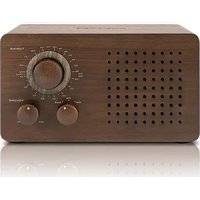


Marque : SCOTT
Modèle : CMX 98
Catégorie : Radio