VS-2008 VioStor NVR - Serveur QNAP - Notice d'utilisation et mode d'emploi gratuit
Retrouvez gratuitement la notice de l'appareil VS-2008 VioStor NVR QNAP au format PDF.


| Type de produit | Enregistreur vidéo réseau (NVR) 8 canaux |
| Marque | QNAP |
| Modèle | VS-2008 VioStor NVR |
| Dimensions (L x P x H) | 431 x 280 x 44 mm (1U rack) |
| Poids net | 4,5 kg |
| Alimentation | 100-240V AC, 50/60Hz, 250W |
| Processeur | Intel Atom D525 double cœur |
| Mémoire vive | 1 GB DDR2 |
| Baies de disque dur | 4 baies SATA 3.5" |
| Capacité maximale | 16 To (4 x 4 To) |
| Canaux d'enregistrement | 8 canaux IP |
| Résolution maximale | 5 MP par canal |
| Connectique réseau | 2 x Gigabit Ethernet RJ-45 |
| Ports USB | 3 x USB 2.0 |
| Fonctions principales | Enregistrement continu, programmé ou sur détection de mouvement ; visualisation à distance ; gestion multi-sites |
| Logiciel inclus | VioStor OS avec interface web |
| Entretien et nettoyage | Dépoussiérer régulièrement avec un chiffon doux ; éviter les liquides |
| Sécurité | Support de chiffrement AES 256 bits ; accès utilisateur par mot de passe |
| Pièces détachées et réparabilité | Ventilateur et bloc d'alimentation remplaçables ; disques durs interchangeables |
| Température de fonctionnement | 0°C à 40°C |
| Humidité admissible | 5% à 95% HR (sans condensation) |
| Garantie | 2 ans |
FOIRE AUX QUESTIONS - VS-2008 VioStor NVR QNAP
Questions des utilisateurs sur VS-2008 VioStor NVR QNAP
0 question sur cet appareil. Repondez a celles que vous connaissez ou posez la votre.
Poser une nouvelle question sur cet appareil
Téléchargez la notice de votre Serveur au format PDF gratuitement ! Retrouvez votre notice VS-2008 VioStor NVR - QNAP et reprennez votre appareil électronique en main. Sur cette page sont publiés tous les documents nécessaires à l'utilisation de votre appareil VS-2008 VioStor NVR de la marque QNAP.
MODE D'EMPLOI VS-2008 VioStor NVR QNAP

VS-2012/2008 UioStor NVR
Network Surveillance System for SOHO and SMB
QNAP Network Video Recorder for IP Cameras
Live Monitoring, Recording, and Video Playback over the Internet Anytime, Anywhere
Secure Life, Secure Property
Powerful All-in-one Recording Functions
• Continuous/ manual/ schedule recording
• Alarm recording (by motion detection or sensor triggered)
• Multiple alarm recording schedules
• High performance megapixel recording
• High quality H.264, MxPEG, MPEG-4, and M-JPEG recording
• Audio recording (vary by camera models)
Powerful Surveillance Features
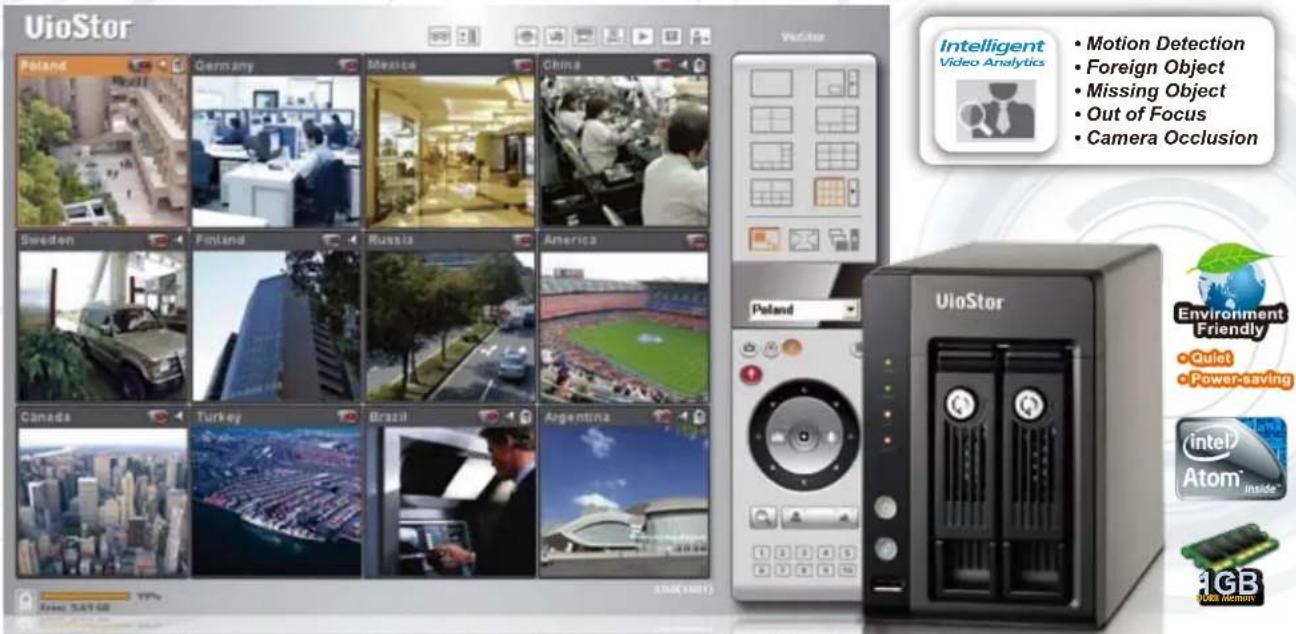
• Diversified modes for live monitoring
• Smart control of PTZ cameras and auto cruising
• Event notification on monitoring
• Real-time SMS and email alert
• Multi-channel playback at different speed
- Easy data search by date & time, timeline, event, and intelligent video analytics (motion detection, foreign object, missing object, out of focus, and camera occlusion)
• Enhanced file security by digital watermark
Easy to Use
- Trouble-free 6-step installation
- Intuitive web-based user interface
• Smart search of IP cameras for quick settings
• Drag and drop function on monitoring
High Reliability and Smart Features
- Intel Atom TM CPU and 1GB DDRII memory
• Advanced RAID(RAID 0/1/JBOD) with hot-swap design - Ultra large storage capacity (up to 4TB) for long-term recording
• Intelligent auto power on when power resumes after power outage
• Supports UPS for 24x7 service - Two Gigabit LAN ports for failover, load-balancing, or multi-IP setting
- Green NVR solution: Linux-embedded system, low power consumption (37\~44W)

High Performance Network Surveillance System for SOHO and SMB
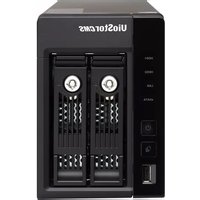
QNAP VS-2012/ 2008 NVR is the new generation 2-bay network surveillance system for the small and midsized business market. The NVR features Linux OS, Intel® Atom™ CPU and 1GB DDRII memory. It supports high quality real-time monitoring, megapixel recording, H.264, MxPEG, MPEG-4, and M-JPEG recording from popular IP camera brands such as AXIS, ACTi, Arecont Vision, AVTECH, Canon, D-Link, EDIMAX, ELMO, EtroVision, GANZ, Hikvision, iPUX, IQeye, LevelOne, Messoa, MOBOTIX, Panasonic BB/ BL/ i-Pro, SANYO, SONY, TOSHIBA, TRENDnet, VIVOTEK, and Y-CAM.
The VS-2012/ 2008 NVR houses 2 hot-swappable SATA hard drives which are capable of maximum 4TB storage capacity. The unique multi-server monitoring enables the users to monitor up to 120 IP cameras from multiple QNAP NVR servers without any extra software. Diversified recording features
such as schedule recording, alarm recording, alarm recording schedule, pre-alarm, and post-alarm recordings are also provided.
The NVR offers enhanced video search by intelligent video analytics (IVA), including motion detection, foreign object, missing object, out of focus, and camera occlusion. The NVR can be easily set up in 6 simple steps by the IE browser. An intuitive user interface is provided for the users to view the monitoring screens, connection and recording status, and the network bandwidth. The users can also play the recording data at different speed. Other class-leading server are also available, e.g. advanced data protection by RAID 0, RAID 1 and JBOD, Online RAID Capacity Expansion, Online RAID Level Migration, and two Giga LAN ports for network failover, load-balancing, and multi-IP setting.
Powerful Surveillance Features

• Diversified Monitoring Modes
• 1/4/6/8/9/10/12/16/20/25/36/42-channel display mode
- Sequential display mode
- Exclusive Picture-in-Picture mode
- Dual display mode

- Easy Drag and Drop Function on Monitoring
The VioStor NVR supports drag and drop function to change the display order of the monitoring channels.
• Smart Control of PTZ & Speed Dome Cameras
You can adjust the PTZ cameras directly by the web user interface.
- Preset Position Control and Auto Cruising
You can view different preset positions of the IP cameras by clicking the number buttons on the monitoring page. You can also configure auto cruising settings on the VioStor NVR for periodic monitoring of the preset positions of the PTZ cameras.
• Digital Zoom for Monitoring and Playback
The VioStor NVR supports digital zoom for more flexible monitoring and playback.
• Event Notification
When alarm recording is enabled and an event occurs, you can click the alarm icon on monitoring page to view the alert details.
- Video Snapshot
The snapshot function is supported on monitoring and playback page.
• E-map for Easy Preview of the Camera Location
You can upload the pictures of the monitoring location.
• Multi-server Monitoring
You can connect to the VioStor NVR and add other QNAP NVR servers to monitor up to 120 channels over LAN or WAN.
![graph TD subgraph Office 1 A["Router"] --> B["Headquarters"] C["Router"] --> B D["Router"] --> B E["Router"] --> B F["Router"] --> B end subgraph Office 2 G["Router"] --> B H["Router"] --> B I["Router"] --> B J["Router"] --> B end subgraph Office 3 K["Router"] --> B L["Router"] --> B M["Router"] -->…](/content/2026/06/1279226/images/a15d1ad44d5901b38e0c469de8bc3feff7a0f0e773676207678c4d8d18faea9b.jpg)
• All-in-one Recording Functions
- Continuous/ schedule*/ manual recording
- Alarm recording/ multiple alarm recording schedules*
• High quality H.264, MxPEG, MPEG-4, and M-JPEG recording - Up to 30 fps at D1 or VGA for each camera
• High performance megapixel recording
• Audio recording (vary by camera models)
* Up to 15 schedules are supported for each camera
• Generic IP Cameras Support
QNAP NVR provides an interface for you to enter the JPEG CGI command of IP cameras in order to monitor, record, and playback the video of the IP cameras on the NVR.
• Real-time SMS and Email Alert
The NVR sends SMS and e-mail alert to the administrator immediately in case of system error or emergent events.

• Authority Management
You can configure the monitoring, playback, PTZ control, and audio authority of specified cameras for up to 32 users.
• On-line User List and Host Access Control
You can specify the connections to be allowed and denied to access the VioStor NVR. You can also view the record of users currently logged on and previously logged on to the VioStor NVR.
• Schedule Remote Replication
The VioStor NVR supports schedule remote replication for secure data backup to a remote NAS in the local network.
• Advanced Event Logs
The VioStor NVR provides detailed event logs of system warning, hard disk error, network disconnection, UPS status, users' networking services, and recordings access record.
• Multi-channel Playback at Different Speed
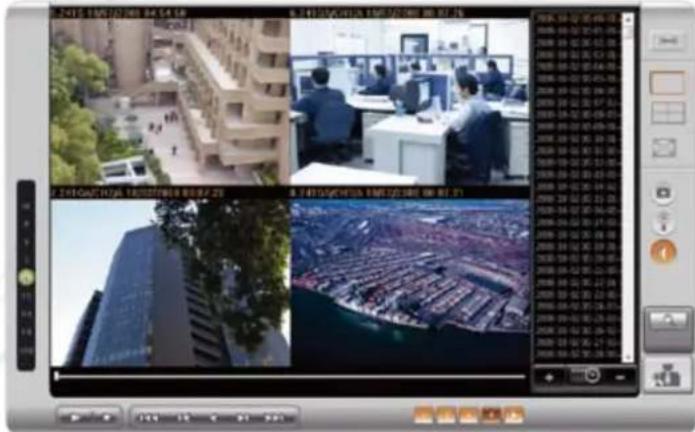
The VioStor NVR provides Express Quad View Playback that you can either divide the selected time equally into four playback views or play the video of four cameras at the same time.
• Enhanced File Security by Digital Watermark
The digital watermark technology allows you to check if the exported videos and snapshots of VioStor NVR are modified to enhance the file security.

- Data Search by Date & Time, Timeline, Event and Intelligent Video Analytics (IVA)
The VioStor NVR supports quick search of recording data by date and time, timeline, and events, and intelligent video analytics, including motion detection, foreign object, missing object, out of focus, and camera occlusion.
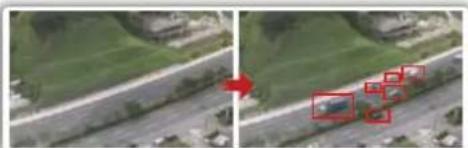
Motion Detection:
The moving objects of the searching area are highlighted in red brackets.
Foreign Object:
The foreign objects of the searching area are highlighted in yellow brackets.
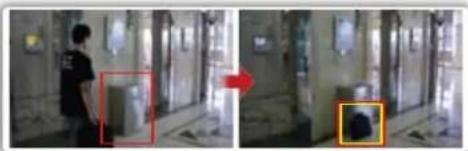
Missing Object:
The missing objects of the searching area are highlighted in yellow brackets.

Out of Focus:
Detects if the IP camera is out of focus.
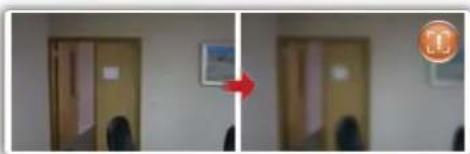
Camera Occlusion:
Detects if the IP camera is obstructed.

High Reliability and Smart Features
• Advanced RAID (0/1/JBOD) with Hot-swap Design
• Online RAID Capacity Expansion and Online RAID Level Migration
• Online RAID Capacity Expansion
The storage capacity of a RAID configuration can be expanded by replacing the hard drives with larger ones.
• Online RAID Level Migration
You can upgrade the disk configuration to higher RAID level with the data retained. There is no need to turn off the server during the process.
• Auto Logoff
The administrator can set the timeout period to log off the users when the idling time has reached in order to enhance secure management of the NVR.
• S.M.A.R.T. & Advanced HDD Health Scanning (HHS)
• Intelligent Automatic System Startup when Power Resumes after Power Outage
• Support UPS for 24x7 Service
With UPS, the NVR can function normally in case of power outage or unstable power supply.
- Convenient Video Backup to External USB Storage by One Touch Auto Video Backup Button
- DOM Architecture with Embedded Fail-safe Dual OS for Enhanced Reliability
Excellent Hardware Design
- Intel Atom TM CPU and 1GB DDRII Memory for Superior System Performance
• Green NVR Solution: Linux-embedded System with Low Power Consumption

- Up to 4TB Storage Capacity for Long-term Recording
- Lockable HDD Tray
- Two Gigabit LAN Ports for Failover, Load-balancing, or Multi-IP Setting
- Failover
Failover allows the VioStor NVR to sustain the failure of one network port to provide continuous services.
- Load-balancing
Bandwidth aggregation is supported to boost the file transfer speed (works with managed Ethernet switch with 802.3ad configured).
- Multi-IP Setting
The VioStor NVR can be deployed with two different IP settings for sharing among different workgroups in two different subnets.
![graph LR A["Computer"] --> B["Switch"] C["Computer"] --> B B --> D["LAN 2 LAN 1"] D --> E["Server"] E --> F["Camera"] style A fill:#f9f,stroke:#333 style C fill:#f9f,stroke:#333 style D fill:#ccf,stroke:#333 style E fill:#ccf,stroke:#333 style F fill:#dfd,stroke:#333](/content/2026/06/1279226/images/87a34ca20d8f2aad40a58536127c86ec3761542d5a17c6a3a9e7c013c3472663.jpg)
Powerful Network Services
• DDNS Support & Built-in NTP Server
- Convenient Data Access by Network Neighborhood (SMB/ CIFS) / Web File Management (HTTP) / FTP server
Application: Live Monitoring, Recording, and Video Playback over the Internet Anytime, Anywhere
• Business Service
• Live production line monitoring for
quality and security control
• Department store/ mall
monitoring
• Shipping process recording
• Crime prevention, e.g. shoplifting
- Parking lot monitoring
• Construction site monitoring
• Convenience store security
• Campus security
• Server room security
• Gas station security
• Hotel security
• Multiple remote offices/ factory sites
live monitoring
• Office Management
• Real-time office monitoring from remote locations
• In-house office monitoring
• Office security fortification
• False alarm identification
Home Care
• Home surveillance to secure life and property
• Enhanced protection for kids, elders, and pets
• Crime prevention
• Evidence or aid to police investigations

Network Cameras

VioStor NVR
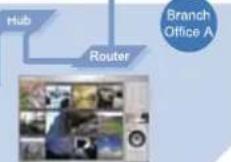


Network Cameras
Remote Monitoring, Recording and Playback
headquarters
VioStor NVR
or VPN

Network Cameras


Hardware Specifications
Processor
- Intel Atom TM
Memory
• 1GB DDRII RAM, 128MB flash (DOM)
HDD Capacity
- 2 x 3.5" SATA I/II HDD or 2 x 2.5" SATA HDD (the standard system is shipping without HDD)
HDD Tray
- 2 x hot-swappable and lockable tray
LAN Port
• 2 x Gigablt RJ-45 Ethernet port
LED Indicators
• HDD 1, HDD 2, LAN, eSATA
eSATA
- 2 x eSATA port (back); reserved
USB
- 3 x USB 2.0
Front: for USB storage device
(one touch auto video backup)
Back: for UPS device
Buttons
- One touch auto video backup button, power button, reset button
Form Factor
- Tower
Hardware Dimensions
- 150 (H) x 102 (W) x 216 (D) mm
- 5.91 (H) x 4.02 (W) x 8.5 (D) inch
Weight
- Net weight: 1.74 kg/ 3.84 lb
• Gross weight: 2.92 kg/ 6.44 lb
Operation Environment
- Temperature: 0\~40°C/32\~104°F - Humidity: 0%\~95% R.H.
Fan
- 1 x quiet cooling fan (7 cm, 12V DC)
Power Supply
- External power adaptor, 60W, input: 110\~240V
Power Consumption
• In operation: 37\~44W
Secure Design
• K-Lock security slot
VGA
• Reserved
Certification
- CE, FCC, VCCI, BSMI
Software Specifications
Video
Display Mode: 1/4/6/8/9/10/12/16/20/25/36/42-channel display, Picture-in-Picture mode, sequential mode, dual siaplay mode
Multi-server Monitoring:
Up to 120 channels monitoring from multiple QNAP NVR servers Recording Connection :
◆ VS-2012: Up to 12 channels
◆ VS-2008: Up to 8 channels
Compression Format:
H.264/ MxPEG/ MPEG-4/ M-JPEG (vary by camera models) Video Setting: Resolution, quality, frame rate
E-map: Upload E-map
Recording
Recording Mode:
◆ Continuous/ manual/ schedule x recording
- Alarm recording/ multiple alarm recording schedules* - Up to 15 schedules are supported for each camera
Buffer Storage for Alarm Images (before and after Events): Pre-recording: up to 300 sec; post-recording: up to 300 sec (Total 600 sec/10 min)
Recording Performance:
◆ Up to 30 fps at D1 or VGA for each camera * Real performance may vary in different environment Megapixel Recording: Supports megapixel cameras File format : AVI (QNAP codec is needed for playback)
Playback
Playback Channel: Max 4-channel playback at the same time
Playback Mode: Play, pause, stop, reverse play, next/ previous frame, next/ previous video file, different speed control
Display Mode: Single playback view, 4 playback views Search Mode: By date & time, timeline, event, and intelligent video analytics (IVA)
Playback Enhancement: Full screen display, video snapshot, digital zoom, digital watermark
Export: Convert multiple recording files to one avi file Download: Download recordings via the web
Package Contents

VioStor NVR

CD-ROM

Ethernet cable x 2

Quick Installation Guide Flat Poundscrew


Adaptor Hard disk lock

QNAP Systems, Inc.
TEL: 886-2-8698 2000 FAX: 886-2-8698 2270
Address: 21F, No. 77, Sec. 1, Xintai 5th Rd, Xizhi City, Taipei County, 221, Taiwan
For more detailed information, please visit QNAP website: http://www.qnapsecurity.com/
QNAP is a registered trademark of QNAP Systems, Inc. Microsoft and Windows are either registered trademarks of Microsoft® Corporation in the United States and other countries.
2009/10
Security
Operation System: Linux-embedded system
On-line Users List: Record of users currently logged on and previously logged on to the NVR
Host Access Control: Specify the connections to be allowed and denied to access the NVR
Authority Management: Configure different authority of specified cameras for max 32 users
Alert Notification: Buzzer, event notification, SMS, e-mail alert
Auto Logoff: The administrator can set the timeout period to log off the users when the idling time has reached
Digital Watermark: Enhanced file security by digital watermark
UPS: APC/MGE (USB type UPS)
Event Log: Detailed record of all events
Storage
Disk Management
◆ Single, RAID 0, RAID 1, JBOD/Linear
◆ Online RAID Capacity Expansion, Online RAID Level Migration
• HDD S.M.A.R.T., bad blocks scan
Services: Web File Manager, FTP, SMB/CIFS
Network
Support: HTTP, TCP/IP, SMTP, DHCP, static IP, DNS, DDNS, FTP,
NTP, UPnP, failover, load-balancing, multi-IP setting
Dual Gigabit LAN: Failover/load-balancing/multi-IP setting
Language Support
Danish/ Dutch/ English/ French/ Finnish/ German/ Hungarian/ Italian/ Japanese/ Korean/ Norwegian/ Polish/ Portuguese/ Russian/ Spanish/ Swedish/ Simplified Chinese/ Traditional Chinese
Client PC Requirements
(Suggested system requirements for better video performance) CPU: ◆M-JPEG format (up to 12 channels):
Intel® Pentium® 4 CPU 2.4 GHz or above
◆H.264/ MxPEG/ MPEG-4 format (up to 12 channels):
Dual core CPU 2.4 GHz or above
* For higher surveillance performance, please select
more advanced PC models
Memory: 1 GB or above
Operation System: Microsoft Windows XP/Vista
Browser: Internet Explorer 6.0 or later
Network Interface: 10/100/1000 Mbps
View Resolution: 1024 x 768 pixels or above
Utility Software
QNAP Finder: Discovery and quick setup for NVR
VioStor Player: Play the recording files on your Windows computer easily
Designs and specifications are subject to change without notice.
| Brand Models | VS-2012 | VS-2008 | |
| 12 channels | 8 channels | ||
| AXIS | 20GM 20/7 20/9W 20/10W 20/11W 20/12W (R) 20MPD(P) RJ 21B 210A 211A 211/211W 211W 212/213/214/215/216FX 216F/DJ 221/222M 225FDI 231/232/233D P131I P301T P334S P334Q Q175S Q740I Q740P M101I M101I W M103I W M103I Y M103IY M103IY M103IY M103IY M103IY M103IY M103IY M103IY M103IY M103IY M103IY M103IY M103IY M103IY M103IY M103IY M103IY M104I Q141Q 241AQ 241SA 243SA 247S | ● | ● |
| ACTI | ACM-123V: ACM-1232V: ACM-131V: ACM-143V: ACM-143Q: ACM-151V: ACM-300V: ACM-301V: ACM-321V: ACM-331V: ACM-340V: ACM-341 V: ACM-400V: ACM-400X: ACM-410Q: ACM-420Q: ACM-500V: ACM-560V: ACM-561V: ACM-571V: ACM-741V: ACM-811V: ACM-851V: CAM 520V: CAM 522V: CAM 530V: CAM 532V: CAM 650V: CAM 660V: DCS-661V: ACM-662V: CAM-663D: CAM-730V: CAM-732V: CAM-732Z: ACID-210D: ACD-220Q: ACD-23000: ACD-240V: ACD-2000Q: SED-210V: SED-212D: TCM-130V: TCM-5311 | ● | ● |
| Avsont Vision | AV130K: AV130S/ AV135S AV210G: AV210S: AV215S: AV215S: AV310V: AV310S: AV315S: AV5100V: AV510S: AV515S: AV615Q: AV618S: AV635Q: AV636S | ● | ● |
| AVTECH | AV201: AV202: AV203: AV204: AV302 | ● | ● |
| Canon | VB-C500: VS-C500S: VB-C500TV: VB-C50V: VB-C50FSI: VS-C50FF: VB-C500D: VB-C60 | ● | ● |
| Cisco | CIVS IPC-2500: CIVS IPC-2500W | ● | ● |
| D-Link | DCS 900AY: DCS 900(R)Y: DCS 900(R)Y: DCS 910C: DCS 920C: DCS 210Q: DCS 212Q: DCS 212V: DCS 3220(G)DCS 3420V: DCS 5220: DCS 5300(G) DCS 6620(G) | ● | ● |
| EDIMAX | IC-1510K: IC-1510WG: IC-3010V: IC-3010WG: IC-7300PT: IC-7300PTN | ● | ● |
| ELMO | PTC-43C-IP: PTC-402C-IP: SN223D-IP2: SN223D-IPW: SN233E: IP: T04112-IP: T04114-IP2 | ● | ● |
| EtnVision | EV313Q: EV313V: EV313A: EV383Q: EV613Q: EV630Q: EV653Q: EV6552A | ● | ● |
| GANZ | ZN-D204: ZN-PT304L: ZN-PT304WL: ZN-YH30S: ZV-S006 | ● | ● |
| Hilkvision | DS-2CD/92PF-E: DS-2CDR52AF-E: DS-2CG830PF-E | ● | ● |
| iPUX | ICS 100I/ICS 101I: ICS 100S: ICS 1013: ICS 1300V: ICS 1310C: ICS 130A: ICS 131A | ● | ● |
| iQeye | IQ040S: IQ040SF: IQ041S: IQ041SF: IQ042SF: IQ042SR: IQ051Q: IQ051T: IQ070I: IQ070J: IQ070S: IQ071Q: IQ071T: IQ075I: IQ075J: IQ075J: IQ075S: IQ092I: IQ093O: IQ095I: IQ095I: IQ095J: IQ095K: IQ095L: IQ095M: IQ095N: IQ095N: IQ095N: IQ095N: IQ095N: IQ095N: IQ095N: IQ095N: IQ095N: IQ095N: IQ095N: IQ095N: IQ095N: IQ095N: IQ095N: IQ095N: IQ095N: IQ040N: IQ040N: IQ040N: IQ040N: IQ040N: IQ040N: IQ040N: IQ040N: IQ040N: IQ040N: IQ040N: IQ040N: IQ040N: IQ040N: IQ040N: IQ040N: IQ040N: IQ300N: IQ300N: IQ300N: IQ300N: IQ300N: IQ300N: IQ300N: IQ300N: IQ300N: IQ300N: IQ300N: IQ300N: IQ300N: IQ300N: IQ300N: IQ300N: IQ300N:IQ300N: IQ300N: IQ300N: IQ300N: IQ300N: IQ300N: IQ300N: IQ300N: IQ300N: IQ300N: IQ300N: IQ300N: IQ300N: IQ300N: IQ300N: IQ300N: IQ300 N: IQ300N: IQ300N: IQ300N: IQ300N: IQ300N: IQ300N: IQ300N: IQ300N: IQ300N: IQ300N: IQ300N: IQ300N: IQ300N: IQ300N: IQ300N: IQ300N: IQ350N: IQ350N: IQ350N: IQ350N: IQ350N: IQ350N: IQ350N: IQ350N: IQ350N: IQ350N: IQ350N: IQ350N: IQ350N: IQ350N: IQ350N: IQ350N: IQ350N:IQ350N:IQ350N:IQ350N:IQ350N:IQ350N:IQ350N:IQ350N:IQ350N:IQ350N:IQ350N:IQ350N:IQ350N:IQ350N:IQ350N:IQ350N:IQ350N:IQ350 N:IQ350N:IQ350N:IQ350N:IQ350N:IQ350N:IQ350N:IQ350N:IQ350N:IQ350N:IQ350N:IQ350N:IQ350N:IQ350N:IQ350N:IQ350N:IQ350N:IQ360N:IQ360N:IQ360N:IQ360N:IQ360N:IQ360N:IQ360N:IQ360N:IQ360N:IQ360N:IQ360N:IQ360N:IQ360N:IQ360N:IQ360N:IQ360N:IQ360N:Q360N:IQ360N:IQ360N:IQ360N:IQ360N:IQ360N:IQ360N:IQ360N:IQ360N:IQ360N:IQ360N:IQ360N:IQ360N:IQ360N:IQ360N:IQ360N:IQ360 N:IQ360N:IQ360N:IQ360N:IQ360N:IQ360N:IQ360N:IQ360N:IQ360N:IQ360N:IQ360N:IQ360N:IQ360N:IQ360N:IQ360N:IQ360N:IQ360N:IQ350N:IQ350N:IQ350N:IQ350N:IQ350N:IQ350N:IQ350N:IQ350N:IQ350N:IQ350N:IQ350N:IQ350N:IQ350N:IQ350N:IQ350N:IQ350N:Q350N:IQ350N:IQ350N:IQ350N:IQ350N:IQ350N:IQ350N:IQ350N:IQ350N:IQ350N:IQ350N:IQ350N:IQ350N:IQ350N:IQ350N:IQ350N:IQ350 | ● | ● |
| LevelOne | FCS-3010C WCS-6010C FCS-6020C WCS-6025C FCS-1010C WCS-2010C FCS-1000C WCS-2030C FCS-1040C WCS-2040C FCS-1040C WCS-2050C FCS-1040C WCS-2060C FCS-1040C WCS-2070C FCS-1060C WCS-2070C FCS-1060C WCS-2080C FCS-1040C WCS-2090C FCS-1040C WCS-2095C FCS-1040C WCS-2100C FCS-1060C WCS-2100C FCS-1060C WCS-2100C FCS-1060C WCS-2100C FCS-1060C WCS-2100C FCS-1060C WCS-2100C FCS-1060C WCS-2100C FCS-1060C WCI-3021C FCS-5036 | ● | ● |
| Linksys | FVC-2500N: VWD-200N: WVC54CQA | ● | ● |
| MESSOA | NI2/880 H2: NIC835 HNS: NIC836 | ● | ● |
| MOBOTIX | D12D-IT: D12D-Ser: D22M-Basic: D22M-IT: D22M-Sec: M10D-Night: M12D-Ser: M12M-IT: M12M-Sec: M12M-IT: M12M-Sec: M12M-Sec: M12M-Wear: M22M-IT: M22M-Night: M22M-Sec: Q22M-Basic: Q22M-Sec: Q22M-Sec: Q24M-Sec | ● | ● |
| NAKAYO | iPCAMCH | ● | ● |
| Panasonic | BB-HCM100R BB-HCM110R BB-HCM911R BB-HCM331R BB-HCM371R BB-HCM381R BB-HCM420R BB-HCM481R BB-HCM511R BB-HCM531R BB-HCM515R BB-HCM515R BB-HCM515R BB-HCM515R BB-HCM515R BB-HCM515R BB-HCM515R BB-HCM515R BB-HCM515R BB-HCM515R BB-HCM515R BB-HCM515R BB-HCM515R BB-HCM515R BB-HCM515R BCL-HCM280X BC-LC-11B BC-LC-11B BC-LC-11B BC-LC-11B BC-LC-11B BC-LC-11B BC-LC-11B BC-LC-11B BC-LC-11B BC-LC-11B BC-LC-11B BC-LC-11B BC-LC-11B BC-LC-11B BC-LC-11B BC-11B BC-LC-11B BC-LC-11B BC-LC-11B BC-LC-11B BC-LC-11B BC-LC-11B BC-LC-11B BC-LC-11B BC-LC-11B BC-LC-11B BC-LC-11B BC-LC-11B BC-LC-11B BC-LC-299 | ● | ● |
| Panasonic L-Pro | NP287 NP284 NP302 NP302 NP302 NP302 NP302 NP302 NP302 NP302 NP302 NP302 NP302 NP302 NP302 NP302 NP302 NP302 NP302 NP302 NP302 NP302 NP302 NP302 NP302 NP302 NP302 NP304 NP304 NP304 NP304 NP304 NP304 NP304 NP304 NP304 NP304 NP304 NP304 NP304 NP304 NP304 NP304 NP304 NP304 NP304 NP304 NP304 NP304 NP304 NP304 NP304 NP302 NP302 NP302 NP302 NP302 NP302 NP302 NP302 NP302 NP302 NP302 NP302 NP302 NP302 NP302 NP302 NP302 NP302 NP302 NP302 NP302 NP302 NP302 NP302 NP3 | ||
| SANYO | VCC-100N VCC-P450V VCC-P470V VCC-P470V VCC-P470V VCC-P470V VCC-P470V VCC-P470V VCC-P470V VCC-P470V VCC-P470V VCC-P470V VCC-P470V VCC-P470V VCC-P470V VCC-P470V VCC-P470N VCC-P470N VCC-P470N VCC-P470N VCC-P470N VCC-P470N VCC-P470N VCC-P470N VCC-P470N VCC-P470N VCC-P470N VCC-P470N VCC-P470N VCC-P470N VCC-P470N VVCC-P470N VCC-P470N VCC-P470N VCC-P470N VCC-P470N VCC-P470N VCC-P470N VCC-P470N VCC-P470N VCC-P470N VCC-P470N VCC-P470N VCC-P470N VCC-P470N VCC-p470N VCC-p470N VCC-p470N VCC-p470N VCC-p470N VCC-p470N VCC-p470N VCC-p470N VCC-p470N VCC-p470N VCC-p470N VCC-p470N VCC-p470N VCC-p470N VCC-p480N VCC-p470N VCC-p470N VCC-p470N VCC-p470N VCC-p470N VCC-p470N VCC-p470N VCC-p470N VCC-p470N VCC-p470N VCC-p470N VCC-p470N VCC-p470N VCC-p470 N VCC-p470N VCC-p470N VCC-p470N VCC-p470N VCC-p470N VCC-p470N VCC-p470N VCC-p470N VCC-p470N VCC-p470N VCC-p470N VCC-p470N VCC-p470N VCC-p470N VVCC-p470N VCC-p470N VCC-p470N VCC-p470N VCC-p470N VCC-p470N VCC-p470N VCC-p470N VCC-p470N VCC-p470N VCC-p470N VCC-p470N VCC-p470N VCC-p470N VCCp470N VCC-p470N VCC-p470N VCC-p470N VCC-p470N VCC-p470N VCC-p470N VCC-p470N VCC-p470N VCC-p470N VCC-p470N VCC-p470N VCC-p470N VCC-p470N VCC-p4 | ||
*For the latest information of the supported cameras, please visit ONAP Security website: http://www.qnapsecurity.com/pro_compatibility_camera.asp
**All the other trademarks mentioned herein are the property of their respective companies.
***Designs and specifications are subject to change without notice.
- VS-2012/2008 UIOSTOR NVR
- NETWORK SURVEILLANCE SYSTEM FOR SOHO AND SMB
- QNAP NETWORK VIDEO RECORDER FOR IP CAMERAS
- POWERFUL ALL-IN-ONE RECORDING FUNCTIONS
- POWERFUL SURVEILLANCE FEATURES
- EASY TO USE
- HIGH RELIABILITY AND SMART FEATURES
- HIGH PERFORMANCE NETWORK SURVEILLANCE SYSTEM FOR SOHO AND SMB
- DIVERSIFIED MONITORING MODES
- EASY DRAG AND DROP FUNCTION ON MONITORING
- SMART CONTROL OF PTZ & SPEED DOME CAMERAS
- PRESET POSITION CONTROL AND AUTO CRUISING
- DIGITAL ZOOM FOR MONITORING AND PLAYBACK
- EVENT NOTIFICATION
- VIDEO SNAPSHOT
- E-MAP FOR EASY PREVIEW OF THE CAMERA LOCATION
- MULTI-SERVER MONITORING
- ALL-IN-ONE RECORDING FUNCTIONS
- GENERIC IP CAMERAS SUPPORT
- REAL-TIME SMS AND EMAIL ALERT
- AUTHORITY MANAGEMENT
- ON-LINE USER LIST AND HOST ACCESS CONTROL
- SCHEDULE REMOTE REPLICATION
- ADVANCED EVENT LOGS
- MULTI-CHANNEL PLAYBACK AT DIFFERENT SPEED
- ENHANCED FILE SECURITY BY DIGITAL WATERMARK
- DATA SEARCH BY DATE & TIME, TIMELINE, EVENT AND INTELLIGENT VIDEO ANALYTICS (IVA)
- MOTION DETECTION
- FOREIGN OBJECT
- MISSING OBJECT
- OUT OF FOCUS
- CAMERA OCCLUSION
- AUTO LOGOFF
- EXCELLENT HARDWARE DESIGN
- POWERFUL NETWORK SERVICES
- APPLICATION: LIVE MONITORING, RECORDING, AND VIDEO PLAYBACK OVER THE INTERNET ANYTIME, ANYWHERE
- HARDWARE SPECIFICATIONS
- PROCESSOR
- MEMORY
- HDD CAPACITY
- HDD TRAY
- LAN PORT
- LED INDICATORS
- ESATA
- USB
- BUTTONS
- FORM FACTOR
- HARDWARE DIMENSIONS
- WEIGHT
- OPERATION ENVIRONMENT
- FAN
- POWER SUPPLY
- POWER CONSUMPTION
- SECURE DESIGN
- VGA
- CERTIFICATION
- SOFTWARE SPECIFICATIONS
- VIDEO
- RECORDING
- RECORDING MODE
- PLAYBACK
- PACKAGE CONTENTS
- QNAP SYSTEMS, INC
- SECURITY
- STORAGE
- DISK MANAGEMENT
- NETWORK
- LANGUAGE SUPPORT
- CLIENT PC REQUIREMENTS
- UTILITY SOFTWARE
Marque : QNAP
Modèle : VS-2008 VioStor NVR
Catégorie : Serveur