
CarStudio CSM102 - Autoradio PHILIPS - Notice d'utilisation et mode d'emploi gratuit
Retrouvez gratuitement la notice de l'appareil CarStudio CSM102 PHILIPS au format PDF.


| Type de produit | Autoradio |
| Marque | Philips |
| Modèle | CarStudio CSM102 |
| Dimensions (L x H x P) | 180 mm x 50 mm x 160 mm (standard 1 DIN) |
| Poids | Environ 1,0 kg |
| Alimentation | 12 V DC (véhicule), masse négative |
| Fonctions principales | Radio AM/FM avec RDS, lecteur CD, affichage LCD, horloge, 30 présélections, entrée auxiliaire |
| Puissance de sortie | 4 x 20 W (max), 4 x 10 W RMS |
| Réglages d'égalisation | Préréglages rock, pop, classique, jazz |
| Connecteurs | Connecteur ISO pour haut-parleurs et alimentation, antenne DIN |
| Protection | Face avant amovible avec code de sécurité |
| Entretien et nettoyage | Nettoyer avec un chiffon doux et sec. Ne pas utiliser de produits abrasifs ou liquides. |
| Sécurité | Débrancher la batterie avant installation/section. Utiliser le fusible recommandé. |
| Pièces détachées et réparabilité | Pièces disponibles via le service après-vente Philips. Consulter la notice pour les références. |
| Informations générales | Autoradio conçu pour une installation en façade de véhicule. Température de fonctionnement : -10°C à +60°C. |
FOIRE AUX QUESTIONS - CarStudio CSM102 PHILIPS
Questions des utilisateurs sur CarStudio CSM102 PHILIPS
0 question sur cet appareil. Repondez a celles que vous connaissez ou posez la votre.
Poser une nouvelle question sur cet appareil
Téléchargez la notice de votre Autoradio au format PDF gratuitement ! Retrouvez votre notice CarStudio CSM102 - PHILIPS et reprennez votre appareil électronique en main. Sur cette page sont publiés tous les documents nécessaires à l'utilisation de votre appareil CarStudio CSM102 de la marque PHILIPS.
MODE D'EMPLOI CarStudio CSM102 PHILIPS
User manual
Register your product and get support at www.philips.com/support

2017 © Gibson Innovations Limited. All rights reserved.
This product has been manufactured by, and is sold under the responsibility of Gibson Innovations Ltd., and Gibson Innovations Ltd. is the warrantor in relation to this product.
Philips and the Philips Shield Emblem are registered trademarks of Koninklijke Philips N.V. and are used under license.
CSM102_12_UM_V4.0
Important
Read these instructions for use carefully before using the antenna and save them for future reference.

Warning
- Risk of injury: Never install the antenna and its accessories on the airbag cover.
- Risk of swallowing parts. Keep the antenna and accessories out of the reach of children

Caution
- Risk of electromagnetic interference: Do not install the GPS antenna over any sensors or vents.
- Risk of short circuit, malfunction, or damage to your car navigation system: Do not alter the GPS antenna cable or dismantle the antenna box.
- Risk of poor reception: Use the supplied metal sheet only, and never cut or distort it, do not paint the GPS antenna.
- Risk of damage to the GPS antenna cable: Never pull the antenna cable when you remove the antenna.
- Risk of scratching your car: The GPS antenna box has a magnet. When you install or remove it, do not drag it on any metal surface.
Notice
Any changes or modifications made to this device that are not expressly approved by Gibson Innovations may void the user's authority to operate the equipment.
Care of the environment

Your product is designed and manufactured with high quality materials and components, which can be recycled and reused.

This symbol on a product means that the product is covered by European Directive 2012/19/EU. Inform yourself about the
local separate collection system for electrical and electronic products. Follow local rules and never dispose of the product with normal household waste. Correct disposal of old products helps

prevent negative consequences for the environment and human health.
Environmental information
All unnecessary packaging has been omitted. We have tried to make the packaging easy to separate into three materials: cardboard (box), polystyrene foam (buffer) and polyethylene (bags, protective foam sheet.)
Your system consists of materials which can be recycled and reused if disassembled by a specialized company. Please observe the local regulations regarding the disposal of packaging materials, exhausted batteries and old equipment.
Copyright
2017 © Gibson Innovations Limited. All rights reserved.
Philips and the Philips' Shield Emblem are registered trademarks of Koninklijke Philips N.V. and are used by Gibson Innovations Limited under license from Koninklijke Philips N.V.
Specifications are subject to change without notice. Gibson reserves the right to change products at any time without being obliged to adjust earlier supplies accordingly.
Product information

Note
• Product information is subject to change without prior notice.
Antenna Build-in ceramic patch antenna
Supplying voltage 5 ± 0.2 V
Operating temperature -20 \~ +70 °C
Cold start 28 s (typical), < 50 s
Hot start 1 s (typical), < 3 s
Acquisition sensitivity -141 dBm (typical)
Navigation sensitivity -158 dBm (typical)
Tracking sensitivity -158 dBm (typical)
Antenna cable length 3.0 m
Dimensions of antenna box (W x H x D) 50 x 40 x 16 mm

What's in the box
Check and identify the contents of your package:
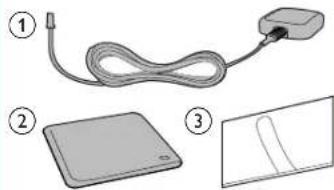
① GPS antenna
② Metal sheet
③ Clamp x 5

Connect the GPS antenna
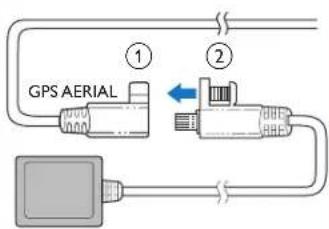
① Connect the GPS antenna to your car navigation system.
② Use the supplied screw to fasten the connectors.
2
Install the GPS antenna
natural_image
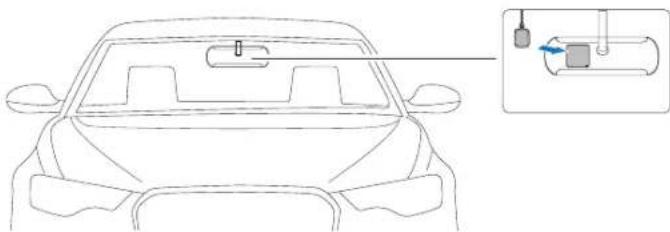
Line drawing of a car front view with a close-up inset showing internal components (no text or symbols)You can install the signal receptor of GPS antenna:
• On the dashboard cover
- On the back panel of rear-view mirror

Note
• Make sure that the contact surface that contacts with the metal sheet is free of moisture, dust, grime, oil, and any other dirt.
- If you remove the metal sheet, some adhesive may be left on the contact surface.
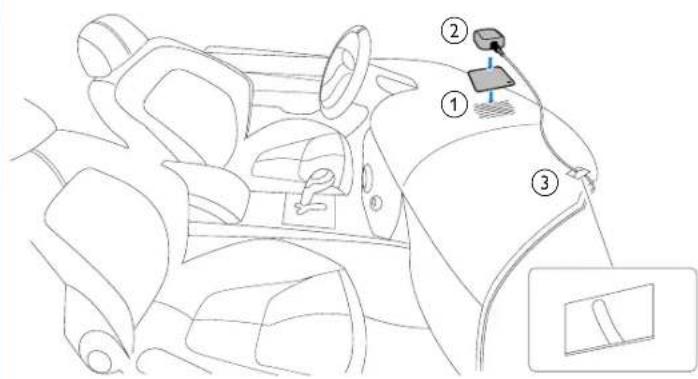
① Remove the protective cover of the metal sheet, and then affix it.
② Affix the antenna box onto the metal sheet.
③ Use clamps to secure the antenna cable.
Warranty against Defects
In this warranty
We or us means Gibson Innovations ABN 531 651 059 75, and our contact details are set out at the end of this warranty.
You means the purchaser or the original end-user of the Goods;
Supplier means the authorised distributor or retailer of the Goods that sold you the Goods in Australia, New Zealand or South Africa; and
Goods means the product or equipment which was accompanied by this warranty and purchased in Australia, New Zealand or South Africa.
If you require assistance with the operation of the product, its features or specifications please contact
Australia New Zealand South Africa
| DLGInternationalTelephone:1800 304 811 | DLGInternationalTelephone:0800 437 663 | ConnoisseurElectronics (Pty) LtdTelephone:0860100551Email: info@connoisseur.co.za |
Australia: Our Goods come with guarantees that cannot be excluded under the Australian Consumer Law. You are entitled to a replacement or refund for a major failure and for compensation for any other reasonably foreseeable loss or damage. You are also entitled to have the Goods repaired or replated if the goods fail to be of acceptable quality and the failure does not amount to a major failure. This is not a complete statement of your legal rights as a consumer.
New Zealand: Our Goods come with guarantees that cannot be excluded under the Consumer
Guarantees Act 1993. This guarantee applies in addition to the conditions and guarantees implied by that legislation
Additional Warranty:
In addition to the rights and remedies that you have under the Australian Consumer Law, Consumer Guarantees Act of New Zealand, South African Law, or any other applicable law, we provide the following warranty against defects:
- If, during the first 12 months from their date of purchase from the Supplier (Warranty Period), the Goods prove defective by reason of improper workmanship or materials and none of your statutory rights or remedies apply, we will repair or replace the Goods without charge.
2 We do not have to repair or replace the Goods under this Additional Warranty if the Goods have been used for a commercial purpose, misused, improperly or inappropriately installed, operated or repaired; abused, damaged; or not maintained in accordance with the manufacturer's instructions. -
Even when we do not have to repair or replace the Goods, we may decide to do so anyway. In some cases, we may decide to substitute the Goods with a similar alternative product of our choosing. All such decisions are at our absolute discretion.
-
All such repaired, replaced or substituted Goods continue to receive the benefit of this Additional Warranty for the time remaining on the original Warranty Period
- This Additional Warranty is limited to repair, replacement or substitution only. As far as the law permits, we will not be liable for any loss or damage caused to property or persons arising from any cause whatsoever.
- In order to claim under this Additional Warranty you must contact us within the Warranty Period:
| Australia New Zealand South Africa | ||
| DLG International Telephone 1800 304 811 | DLG International Telephone: 0800 437 663 | Connoisseur Electronics (Ply) Ltd Telephone: 0860100551 Email: info@ connoisseur.co.za |
You will be asked for details of the Goods, a description of the defect and your personal details. Upon accepting your claim, we shall assist you with either returning the Goods to the Supplier for replacement or to the most convenient Philips Authorized Service Centre for your Goods to be repaired. In some case we may require that you return to the Goods to us (at the address below) for repair, replacement or substitution
* All returned Goods must be accompanied by satisfactory proof of purchase which clearly indicates the name and address of the Supplier, the date and place of purchase and identifies product. It is best to provide a legible and unmodified receipt or sales invoice.
* You must bear any expense for return of the Goods or otherwise associated with making your claim under This Additional Warranty.
- This warranty is only valid and enforceable in Australia. New Zealand and South Africa.
Contact us or the place of purchase for further details.
Australia New Zealand South Africa
DLG DLG Connoisseur International International Electronics (Pty) Ltd 88 Enterprise Unit K 11 The Mediterranean Ave Echelon Place Conference Centre Berwick East Tamaki 72 Concorde Road 3086 2013 Fast Melbourne Bedfordview
Service: Service: Service: 1800 304 811 0800 437 663 0860100551 E-mail: Email: E-mail: service@ service@ info@connoisseur. digint.com.au digint.co.nz co.7a
November 2016
Marque : PHILIPS
Modèle : CarStudio CSM102
Catégorie : Autoradio