
APS-SL2 - SSD PIONEER - Notice d'utilisation et mode d'emploi gratuit
Retrouvez gratuitement la notice de l'appareil APS-SL2 PIONEER au format PDF.


| Type de produit | SSD (Solid State Drive) |
| Marque | Pioneer |
| Modèle | APS-SL2 |
| Facteur de forme | 2,5 pouces |
| Capacité | 240 Go |
| Interface | SATA III (6 Go/s) |
| Vitesse de lecture séquentielle | Jusqu'à 560 Mo/s |
| Vitesse d'écriture séquentielle | Jusqu'à 540 Mo/s |
| Dimensions (L x l x H) | 100 x 69,85 x 7 mm |
| Poids | Environ 45 g |
| Alimentation | Alimentation via SATA (5 V, 1 A max) |
| Température de fonctionnement | 0 °C à 70 °C |
| Fonctions principales | Prise en charge de TRIM, S.M.A.R.T., NCQ, faible consommation d'énergie |
| Entretien et nettoyage | Ne pas exposer à l'eau, éviter la poussière excessive. Nettoyer avec un chiffon sec et non pelucheux. |
| Sécurité | Éviter les chocs et les températures extrêmes. Ne pas ouvrir le boîtier. |
| Pièces détachées et réparabilité | Aucune pièce détachable. Le produit n'est pas réparable par l'utilisateur. |
| Garantie | 3 ans (sous réserve des conditions du fabricant) |
| Informations générales | SSD 2,5 pouces compatible avec les ordinateurs portables et de bureau équipés d'un port SATA. |
FOIRE AUX QUESTIONS - APS-SL2 PIONEER
Questions des utilisateurs sur APS-SL2 PIONEER
0 question sur cet appareil. Repondez a celles que vous connaissez ou posez la votre.
Poser une nouvelle question sur cet appareil
Téléchargez la notice de votre SSD au format PDF gratuitement ! Retrouvez votre notice APS-SL2 - PIONEER et reprennez votre appareil électronique en main. Sur cette page sont publiés tous les documents nécessaires à l'utilisation de votre appareil APS-SL2 de la marque PIONEER.
MODE D'EMPLOI APS-SL2 PIONEER
Pioneer Solid State Disk APS-SL2
User manual
Jednotka SSD Stručná instalační příručka Stručná instalační příručka | |
| Seznamte se prosím s podrobnými informacemi na oficiálním webu společnosti Pioneer.http://www.pioneer-dvd.com.tw/Manual/APS-SL2-Ver1.pdf | Obsah krabice 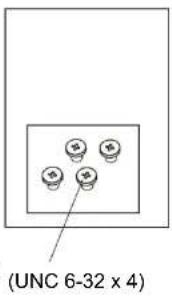 21. Jednotka SSD2. Šroubky 21. Jednotka SSD2. Šroubky |
Notebook Zasuňle jednotku SSD do správných slotů Zasuňle jednotku SSD do správných slotů | Stolní počítač Uživatel si musí připravít 3,5 palcový držák SSD Uživatel si musí připravít 3,5 palcový držák SSD |
Stolní počítač Připojte napájecí kabel a kabel SATA Připojte napájecí kabel a kabel SATA | ZásadyZabraňte páduNepoužívejte tento produkt blízkovodyNeotevírejte kryt Správně zapojte  |
Solid State Drive  | |
| Beknopte installatiehandleiding | |
| Raadpleeg de uitgebreide informatie op de officièle website van Pioneer.http://www.pioneer-dvd.com.tw/Manual/APS-SL2-Ver1.pdf | • Inhoud van de verpakking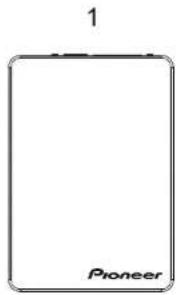  21. Solid State Drive2. Schroeven 21. Solid State Drive2. Schroeven |
• Laptop Steek de SSD in de juiste sleuven Steek de SSD in de juiste sleuven | • Bureaublad * De gebruiker moet de 3.5 inch SSD-beugel voorbereiden * De gebruiker moet de 3.5 inch SSD-beugel voorbereiden |
• Bureaublad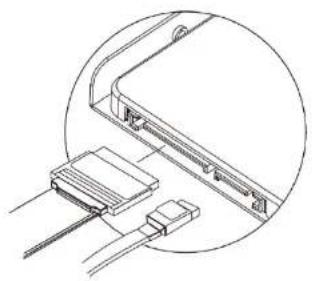 Sluit de voedingskabel en de SATA-kabel aanSSD (Solid State Drive) Sluit de voedingskabel en de SATA-kabel aanSSD (Solid State Drive)  Guide d'installation rapide Guide d'installation rapide | • VoorzorgsmaatregelenLaat het niet vallenGebruik dit product niet in de buurt van waterOpen de behuizing nietSluit op de juiste wijze aan |
| Veuillez vérifier les informations détaillées sur le site officiel Pioneer.http://www.pioneer-dvd.com.tw/Manual/APS-SL2-Ver1.pdf | • Contenu de l'emballage  21. SSD (Solid State Drive)2. Vis 21. SSD (Solid State Drive)2. Vis |
• Ordinateur portable Insérez le SSD dans le bon emplacement Insérez le SSD dans le bon emplacement | • Ordinateur de bureau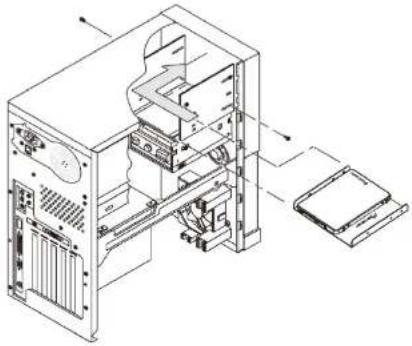 * L'utilisateur doit préparer le support de SSD 3,5 pouces * L'utilisateur doit préparer le support de SSD 3,5 pouces |
• Ordinateur de bureau Branchez le câble d'alimentation et le câble SATA Branchez le câble d'alimentation et le câble SATA | • Précautions[Ne pas laisser tomber Ne pas utiliser le produit près de l'eauNe pas ouvrir le couvercle Veuillez connecter correctement   [IMAGE] [IMAGE] |
| Solid-State-DriveInstallationskurzanleitung | |
| Bitte prüfen Sie die detaillierten Informationen auf der offiziellen Pioneer-Webseite.http://www.pioneer-dvd.com.tw/Manual/APS-SL2-Ver1.pdf | Lieferumfang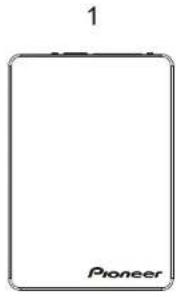  21. Solid-State-Drive2. Schrauben 21. Solid-State-Drive2. Schrauben |
Notebook | Desktop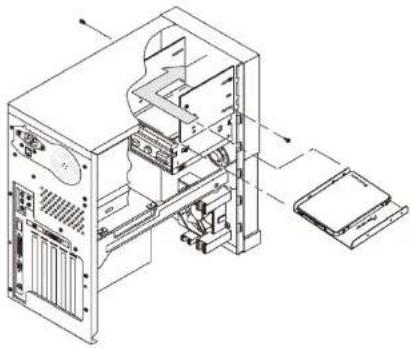 |
| SSD in die richtigen Steckplätze stecken | Nutzer muss die 3,5-Zoll-SSD-Hallerung vorbereiten |
Desktop | Warnhinweise[Nicht fallen lassen Produkt nicht in der Nähe von Wasser verwendenAbdeckung nicht öffnen Bitte richtig verbinden   |
| Netzkabel und SATA-Kabel anschließen | |
| Unità SSDGuida all'installazione rapida | |
| Controllare le informazioni dettagliate sul sito web ufficiale Pioneer.http://www.pioneer-dvd.com.tw/Manual/APS-SL2-Ver1.pdf | • Contenuto della confezione  21. Unità SSD2. Viti 21. Unità SSD2. Viti |
• Notebook Inserire l'SSD nelle fessure a destra Inserire l'SSD nelle fessure a destra | • PC L'utente deve preparare la staffa SSD da 3,5" L'utente deve preparare la staffa SSD da 3,5" |
• PC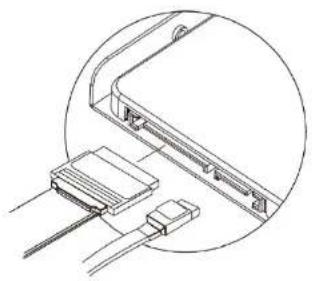 Collegare il cavo di alimentazione e il cavo SATA Collegare il cavo di alimentazione e il cavo SATA | • PrecauzioniEvitare che cada Non utilizzare il prodotto accanto all'acquaNon aprire il coperchio Collegare correttamente 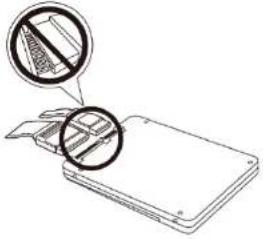 |
| Dysk Solid State DriveInstrukcja szybkiej instalacji | |
| Należy sprawdzić szczegółowe informacje na oficjalnej stronie internetowej Pioneer.http://www.pioneer-dvd.com.tw/Manual/APS-SL2-Ver1.pdf | Zawartość opakowania21. Dysk Solid State Drive2. Śruby |
| LaptopWłóż SSD do gniazd z prawej strony | Desktop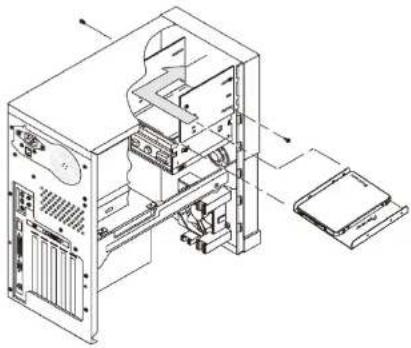 *Użytkownik powinien przygotować wspornik na 3,5 calowy dysk SSD *Użytkownik powinien przygotować wspornik na 3,5 calowy dysk SSD |
Desktop Podłącz kabel zasilający i kabel SATAUnidad de estado sólidoGuía de instalación rápida Podłącz kabel zasilający i kabel SATAUnidad de estado sólidoGuía de instalación rápida | Środki ostrożnościNie wolno dopuszczać do upadkuNie należy używać produktu w pobliżu wodyNie należy otwierać pokrywyNależy prawidłowo podłączyć   [IMAGE] [IMAGE] |
| Consulte la información detallada en el sitio web oficial de Pioneer.http://www.pioneer-dvd.com.tw/Manual/APS-SL2-Ver1.pdf | • Contenido del paquete 21. Unidad de estado sólido2. Tornillos |
• Equipo portátil Insertar la unidad de estado sólido en las ranuras correctas Insertar la unidad de estado sólido en las ranuras correctas | • Equipo de sobremesa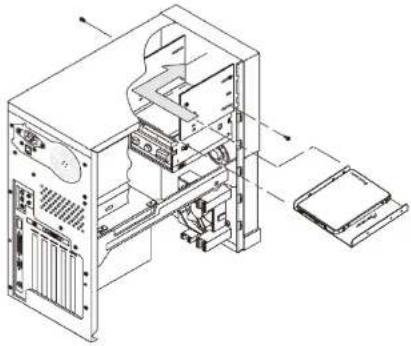 ^El usuario tiene que preparar el soporte de la unidad de estado sólido de 3,5" ^El usuario tiene que preparar el soporte de la unidad de estado sólido de 3,5" |
• Equipo de sobremesa Conectar el cable de alimentación y el cable SATA Conectar el cable de alimentación y el cable SATA | • Precauciones   |
| Katı Hâl SürücüsüHızı Kurulum Kılavuzu | Paket İçeriği21. Katı Hâl Sürücüsü2. Vidalar |
| Lütfen Pioneer resmî web sitesindeki ayrıntılı bilgileri inceleyin.http://www.pioneer-dvd.com.tw/Manual/APS-SL2-Ver1.pdf | |
| Dizüstü | Masaüstü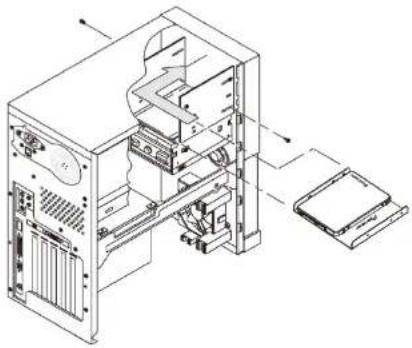 SSD'yi doğru yuvalara takın * Kullanıcının 3,5 inç SSD bağları parçasınıhazırlaması gerekir SSD'yi doğru yuvalara takın * Kullanıcının 3,5 inç SSD bağları parçasınıhazırlaması gerekir |
Masaüstü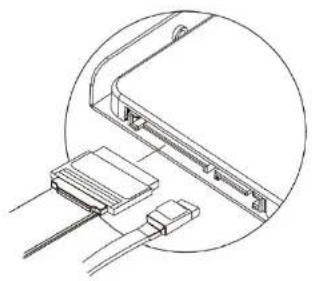 Güç ve SATA kablolarını bağlayın Güç ve SATA kablolarını bağlayın | ÖnlemlerDüşürmeYINÜrünü suya yakın yerdekullanmayınKapağı açmayın Lütfen doğru şekildebağlayın 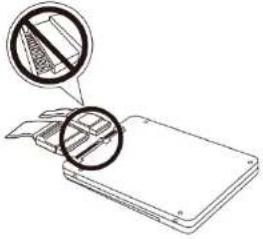 |
Твердотельный накопитель
Pioneer
Краткое руководство по установке
Подробная информация представлена на официальном веб-сайте Pioneer.
http://www.pioneer-dvd.com.tw/Manual/APS-SL2-Ver1.pdf
- Комплектность

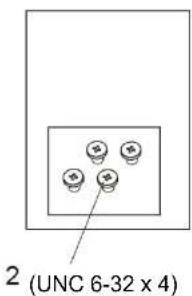
- Твердотельный накопитель
- Винты
• Ноутбук

natural_image
Technical line drawing of a laptop chassis showing the front panel and internal components (no text or symbols)Вставьте твердотельный накопитель в соответствующие разъемы
• Настольный ПК
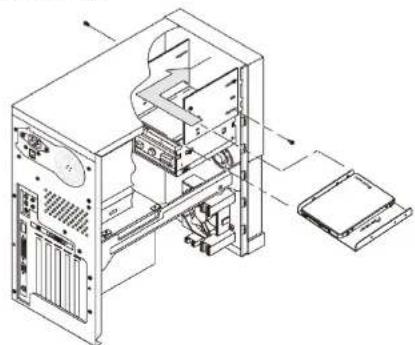
natural_image
Technical line drawing of a computer tower internal structure showing internal components and external casing (no text or labels)*Пользователь должен подготовить 3,5-дюймовый кронштейн для твердотельного накопителя
- Настольный ПК

natural_image
Technical line drawing of a device with connectors and cables, no text or symbols presentПодключите шнур питания и кабель SATA
- Предостережения
Не роняйте устройство
Не используйте устройство возле водоемов
Не открывайте крышку
Правильно выполняйте подключение


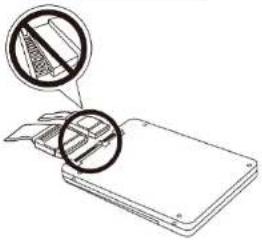

| 固態硬碟Pioneer快速安裝盒面 | |||||||
| 多國語言版本說明書,請至 Pioneer 官方網站下載http://www.pioneer-dvd.com.tw/Manual/APS-SL2-Ver1.pdf | · 内容物確認1Pioneer2 (UNC 6-32 x 4)1. 固態硬碟2. 程認 | ||||||
· 筆記型電盤 | · 桌上型電盤 | ||||||
| 固态硬盘Pioneer |  | ||||||
| 产品名称 | 产品中有毒有害物质或无菌品的医用设备 | ||||||
| 规格(个) | 数量(个) | 规格(个) | 片面值(μm) | 表面粗糙度(mm) | 本体上金属间距(%) | ||
| 10 | 水泥 | × | ○ | ○ | ○ | ○ | |
| 玻纤 | ○ | ○ | ○ | ○ | ○ | ||
| 塑料玻纤 | ○ | ○ | ○ | ○ | ○ | ||
 此标志在适用于在机床市场上销售的产品 此标志在适用于在机床市场上销售的产品 | |||||||
| 更多内容,请至先锋官网查看或下载http://www.pioneer-dvd.com.tw/Manual/APS-SL2-Ver1.pdf | [内装物品确认] 1. 固态硬盘2. 粘出/ 1. 固态硬盘2. 粘出/ | ||||||
笔记本电脑 | 台式电脑/ | ||||||
| 导体密封剂 | 部件名称 | 产品中有毒有害物质或无菌品的表面用量 | |||||
| 铅(%) | 汞(mg) | 镉(%) | 六价铬(Lb+) | 杀渣酸苯(PB6) | 水蒸二苯醚(PB6) | ||
| 水泥 | × | ○ | ○ | ○ | ○ | ○ | |
| 玻纤 | ○ | ○ | ○ | ○ | ○ | ○ | |
| 包装材料 | ○ | ○ | ○ | ○ | ○ | ○ | |
此标志仅适用于在欧洲市场上同类的产品
· 内装物品确认
算石硬盘
螺丝/
台式电脑/
| Solid State DrivePioneerQuick Installation Guide | |
| Please check the detailed information on Pioneer official website.http://www.pioneer-dvd.com.tw/Manual/APS-SL2-Ver1.pdf | Package Contents1(Pioneer)(UNC 6-32 x 4)1. Solid State Drive2 Screen |
• Laptop | • Deletion |
Marque : PIONEER
Modèle : APS-SL2
Catégorie : SSD