
300M - Souris Cougar - Notice d'utilisation et mode d'emploi gratuit
Retrouvez gratuitement la notice de l'appareil 300M Cougar au format PDF.


| Type de produit | Souris filaire gaming |
| Dimensions (L x l x H) | 130 x 70 x 40 mm |
| Poids | 100 g |
| Alimentation | USB, 5V / 100 mA |
| Longueur du câble | 1,8 m |
| Capteur | Optique, 4000 DPI max |
| Nombre de boutons | 6 boutons programmables |
| Molette | Oui, clicable |
| Éclairage | RGB, effets personnalisables |
| Fonctions principales | Réglage DPI, programmation des boutons, profil de jeu |
| Compatibilité | Windows 7/8/10/11, Mac OS X |
| Logiciel | Cougar UIX (téléchargeable) |
| Entretien et nettoyage | Chiffon doux sec, pas de solvants |
| Sécurité | Conforme aux normes CE, RoHS |
| Pièces détachées et réparabilité | Patins de glisse disponibles, câble USB remplaçable |
| Garantie | 2 ans |
| Informations générales | Marque : Cougar, Modèle : 300M |
FOIRE AUX QUESTIONS - 300M Cougar
Questions des utilisateurs sur 300M Cougar
0 question sur cet appareil. Repondez a celles que vous connaissez ou posez la votre.
Poser une nouvelle question sur cet appareil
Téléchargez la notice de votre Souris au format PDF gratuitement ! Retrouvez votre notice 300M - Cougar et reprennez votre appareil électronique en main. Sur cette page sont publiés tous les documents nécessaires à l'utilisation de votre appareil 300M de la marque Cougar.
MODE D'EMPLOI 300M Cougar

INTRODUCTION
The COUGAR 300M is a professional level gaming mouse that addresses directly gamers' needs. Its powerful appearance is the face of a state-of-the-art technology device that excels in all areas.
Internally, its 4000 DPI sensor provides reliable and accurate control even for competitive pro gaming standards, while its 1000Hz polling rate ensures an extremely fast reaction time. In addition, its OMRON switches guarantee an incredibly long life of at least 5 million clicks.
Those features would by itself would make the 300M a great mouse, but its virtues do not stop here. Its 7 fully programmable and ergonomically located buttons are designed to make them easily accessible and at the same time prevent accidental or erroneous clicks. Its 16.8 million color LED backlight will allow you to easily identify the configuration profile you are using and customize its appearance. Finally, its soft-touch surface makes it comfortable and gives you full control.
All the functions can be managed with the COUGAR UIX™ SYSTEM, a convenient and extremely powerful device management suite that will unleash all the power of your COUGAR devices. The 300M's on board memory will allow you to bring with you up to three full configuration profiles and use them wherever you go.
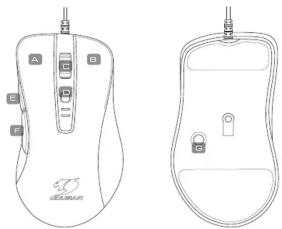
DEFAULT BUTTON ASSIGNMENT
natural_image
Line drawings of a computer mouse with front and side views (no text or symbols)A Left Click F Forward
B Right Click F Backward
Wheel click Mode Cycle
DPI Cycle
FEATURES
• 4000 DPI ULTRA-PRECISE GAMING SENSOR
The ADNS-3090 High Performance Optical Sensor provides you with pinpoint control
- 7 PROGRAMMABLE BUTTONS
Reassign commands or macros to any of the ergonomically located 7 programmable buttons
- COUGAR DIX - SYSTEM
A single software size allows you to manage all your COOSAT devices and include their full power. Macros, shortcuts, and a myriad of configurations in a convenient human-focused interface.
• 1000HZ POLLING RATE / 1MS RESPONSE TIME
125Hz-1000Hz Polling Rate Fine-tuning: Absolute control
- ON-BOARD MEMORY: PERSISTENT PROFILES
The on-board memory allows to store up to 3 profiles on the mouse, allowing you to keep your configuration anywhere you go.
• ON-THE-FLY DPI ADJUSTMENT
Change quickly and conveniently the DPI settings of your mouse, alternating between superior accuracy and ultra-fast movement at will.
• ERGONOMIC RIGHT-HANDED DESIGN
A comfortable design adapts perfectly to right-handed users, allowing you to focus on the game and not on the mouse.
DEUTSCH
- PRÄZISE 4000 DPI SENSOR TECHNOLOGIE
• DIREKTE EMPFINDLICHKEITSUMSCHALTUNG
- ZWEI ZOSATZLICHE VORWARTS/RUCKWARTS TASTEN
- OMRON MEKROSCHALTER - CUMMIERTES ANTIDUTSC
- GAMING GLIDES
ESPAÑOL
- TECNOLOGÍA CON SENSOR DE PRECISION PARA JUEGOS 4000DPI
• AJUSTE SOBRE LA MARCHA DPI
• DOS BOTONES ADICIONALES D
- MICROINTERRUPTORES OMRON
- DISENO DE REVESTIMIENTO DE GOMA A
• PIE DE RATON
ИЕГОРОЙ СЕНСОВ С РАЗРЕШЕНИЕМ 4000 ДРЛ
- НАСТРОЙКА ПРИ ВО ВРЕМЯ ИГРЫ
• ДВЕ ДОПОЛНИТЕЛЬНЫХ КНОПКИ: "ВПЕРЕД" / "НАЗАД"
• МИКРОПЕРЕКЛЮЧАТЕЛИ ОМRON
• TPOPE
日本
- ブレ像価4000DF1(シャープフロー構造の指揮コラドロール - 「オンザフライ」(ON-THE-FLY)という技術を採用し、ゲームプレイ中に解像度を切り替え - 「進む」と「昇る」のサイドボタンを装備している
- OMRON製ゲーミングスイッチ
- 滉り防止機能のラバーコーティング
・潤らかなゲーミングフィート
•DPI LED DISPLAY
Confirm quickly the current DPI mode without exiting your game or moving your hand.
[Non-Text]
• MULTI-COLOR BACKLIGHT SYSTEM
Freely choose 1 out of 10.8 million colors to easily identify each profile and personalize the mouse's appearance.
•OMRON MICRO SWITCHES
OMRON Switches provide absolute accuracy and an incredibly long life: With guaranteed
minimum of 5 million clicks, this mouse is going to serve you well for a long time.
•GAMIG-GRADE SCROLL WHEEL
ALPS encoder + First quality rubberized gaming wheel: 100% accurate tactile feedback
•SOFT TOUCH SURFACE
Its premium rubber coating is designed specifically bring optimal control to lift-off style gamers
during gameplay.
•GAMING MOUSE FEET
Mouse feet designed specially for gaming, with a large area and a surface designed to optimize the speed/control relation.
•BRAIDED CABLE
A sturdy and durable braided cable provides a durable and accurate solution for transmitting your input to the computer.
PORTUGUÊS
•TECNOLOGIA DE SENSOR PARA JOGOS COM PRECISÃO DE 4000PPP
• AJUSTE DE PP INSTANTÁNEO
•DOIS ATALHUS (SHORCOT) ADICIONAIS PARA AVANÇAR / VOLTAR(FORWARD/BACK)
• MICRO INTERROPTORES ONIKON •PROJETO COM REVESTIMENTO DE BORRACHA CONTRA DESUZAMENTO
FRANCAIS
•CAPTEUR 4000 [DP]
• AJUSTEMENT ON THE FLY
.BOUTON DE RACCOURCI FORWARD / BACKWARD
•OMRON MICRO SWITCH
GAMINO MOUSETLE
한국어
•4000DPI 정밀 게이밍 센서 기술
·사용 중 DPI 조정
-두 개의 추가 FORWARD / BACK 바로 가기
•OMRON 마이크로 스위치
•고우 코핑 ANTI-SUP 디자인
简体中文
·高效能4000DPI游戏组传感器技术
•ON-THF-ELY DPI灵敏度调整
·独立快捷键设计
·欧姆龙微动开关高达500万次以上的点击保证
·高阶防滑皮革烤漆设计
·游戏级滑顺支脚

DOWNLOAD INSTALLATIONGLISH

ESPAÑOL
- Vaya a la web oficial de COUGAR
(http://www.cougargaming.com)
- Descargue el instalador de COUGAR UIX™ 2. загрузите программу установки драивера
SYSTEM_300M de la pagina de descarga
500M.
PORTUGUES
-
Visite O website oficial da COUGAR (http://www.spyramming.com)
-
Transfira o programa de instalação
COUGAR UIX™ SYSTEM 300M a partir da SYSTEM 300M 설치 프로그램을
página de transferência 300M
日本
- COUGAR 公式サイトに移動します
(http://www.cougargaming.com)
- COOGAR_300M タワシロードベニッカ
COUGAR OIX SYSTEM_300Mの
(1) 2014年 , 7月 3日 , 7月 2日 , 7月 1日 ,
中文
1.连上COUGAR官方网站
( http://www.cougargaming.com )
- 进入300M的下载页面,下载CUGAR DB SYSTEM 300M
SYSTEM=
GLOBAL WARRANTY POLICY
WARRANTY PERIODS OF COUGAR GAMING DEVICES
Product : COUGAR 300M Gaming Mouse
Warranty: 1 Year
This warranty gives you specific legal rights. You may also have other rights granted
under local law. These rights may vary.
WARRANTY AGREEMENT
• If the product has defect in material and manufacture, COUGAR will provide product
repair and replacement service within the warranty period.
- Our warranty service is based on the date of the invoice or warranty card
(must Be affixed by the store stamp)
If you lose the undermentioned evidence, we will apply original shipping date of the product as the beginning date of warranty period. The shipping date will be identified
by the product serial number(S/N).
CONDITIONS WHERE FREE MAINTENANCE IS NOT PROVIDED
• Any fault or damage caused by natural disasters (including storm, fire, flood,
thunder, earthquake, etc)
• Any fault or damage caused by accidental factors and man-made reasons (including
hit, scrape, crash, moving, compression, stain, corrosion, computer virus, not, miruse, malicious damage, etc).
- Use in an improper operating environment (including high temperature, high humidity,
water inflow, etc).
- Unable to provide the product warranty card, purchase receipt or invoice to prove the
product still within the warranty period and the shipping date of the product is out of warranty.
• The warranty card or product serial number has been altered or its number is hard
to identify.
• The warranty period has expired
• Any fault or damage caused by non-compliance of regulations stated on the user
manual, or improper, rough and careless treatment.
• Any fault of
• The problem is caused by improper repair or adjustment by the buyer or any
manufacturer without authorization from the COUGAR original manufacturer.
• The product is not acquired from an authorized distributor of the company or is acquired from Witt courses.
• Paper carton, instruction and other accessories are not warranted.
[Non-Text]
DISCLAIMERS
• COUGAR product is not authorized for use as critical components in life support
device or for incorrect application software or malfunction of the product.
product is using as, including but not limited to, medical equipment, military equipment,
traffic equipment and disaster prevention system.
• COUGAR is not liable for any damages, expenses, lost data, lost revenues, lost savings.
lost profits, or any incidental or consequential damages due to using defect product
OF COOGAR.
If you have any question about the warranty, please feel free to contact us. Customer support: service@couargaming.com
-
- 3.
MANUFACTURER CONTACT
Compucase Enterprise Co., Ltd. More information you will find at
No. 225, Lane 54, An Ho Road Sec. 2 Taiwan, Taiwan, R.O.C.
Tokyo RBS 5.25
Service E-Mail: service@
[Non-Text]
flowchart
graph TD
    A["Setup Setup"] --> B["Configuration"]
    B --> C{Click & Install}
    C --> D["UIX SYSTEM"]
    D --> E["Finish"]
    E --> F["Firmware Updating..."]
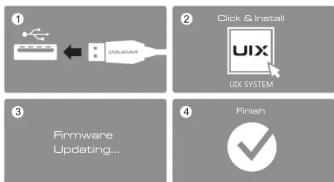
- Plug the USB connector of your COUGAR product into your computer's motherboard's
USB port and wait for the Operating System to finish installing the device driver.
The system will notify you when this process has been completed and the device is ready
to be
-
Click on the UIX installer and follow the on-screen instructions.
-
UIX™ will check your device's firmware version and automatically update it during the
installation process
- The firmware update process might take several minutes, please be patient and do not
disconnect the device or shut the computer down
SPECIFICATIONS
| Product name | COUGAR 300M Gaming Mouse | Switching | OMRON gaming switches |
| Sensor | ADNS-3000 Optical gaming sensor | Profile LED backlight | 16.8 million colors |
| Resolution | 420,800/200,1600 2000/2400,5200 40000PI | Frame rate | 6400 FPS |
| Game types | EPS / MMOBPG / MOBA / RTS | Maximum tracking speed | 60 IPS |
| Polling rate | 1000Hz / 1ms | Maximum acceleration | 20G |
| Ors-band memory | YES | Interface | USB plug |
| Software | COUGAR UIXT** SYSTEM | Cable length | 1.8m Braided |
| Programmable buttons | 7 | Dimension | 125 (L) X 70(W) X 39(H) mm |
| Encoder | ALPS | Weight | 95g |
The specification maybe varies depending on the country or region
PACKAGE CONTAINS
| COUGAR 300M Gaming Mouse |
| User Manual |
广力云智慧零售收银系统
SYSTEM REQUIREMENTS
Works withWindows 7 32bit/64bit,
Windows 8 32bit/64bit, Windows 8.1 32bit/64bit
LEGAL NOTICES
This manual was created by Compucase Enterprise and may not be completely
or partially copied, passed on, distributed or stored without written consent by
Compucase Enterprise.
COOGAR® is a registered brand of Compucase Enterprise Other product and company names mentioned in this documentation may be brands or trademarks of
their respective owners
Compucase Enterprise reserves the right to make changes concerning the
contents of the manual and the technical data of the product without previous

[Non-Text]
BASITION
Please do not directly look into the optical beam!


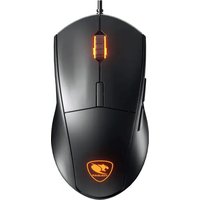

Marque : Cougar
Modèle : 300M
Catégorie : Souris