
RX1214RP - Serveur SYNOLOGY - Notice d'utilisation et mode d'emploi gratuit
Retrouvez gratuitement la notice de l'appareil RX1214RP SYNOLOGY au format PDF.


| Type de produit | Unité d'extension de stockage pour serveur NAS |
| Marque | Synology |
| Modèle | RX1214RP |
| Nombre de baies | 12 |
| Form factor | 2U rackable |
| Dimensions (H x L x P) | 88 mm x 430 mm x 650 mm |
| Poids | 17 kg (sans disques) |
| Alimentation | Redondante 500W |
| Type de connectivité | InfiniBand ou SAS 4x |
| Systèmes de fichiers supportés | Btrfs, ext4 |
| Gestion des disques | RAID 0, 1, 5, 6, 10, JBOD |
| Ventilateurs | 2 x 80 mm, remplaçables à chaud |
| Température de fonctionnement | 0°C à 40°C |
| Humidité de fonctionnement | 10% à 80% sans condensation |
| Alimentation redondante | Oui, 2 modules PSU |
| Entretien | Nettoyage régulier des grilles d'aération et des ventilateurs |
| Sécurité | Verrouillage des baies, fixation rack |
| Pièces détachées | Alimentations, ventilateurs, câbles de données |
| Garantie | 3 ans constructeur |
FOIRE AUX QUESTIONS - RX1214RP SYNOLOGY
Questions des utilisateurs sur RX1214RP SYNOLOGY
0 question sur cet appareil. Repondez a celles que vous connaissez ou posez la votre.
Poser une nouvelle question sur cet appareil
Téléchargez la notice de votre Serveur au format PDF gratuitement ! Retrouvez votre notice RX1214RP - SYNOLOGY et reprennez votre appareil électronique en main. Sur cette page sont publiés tous les documents nécessaires à l'utilisation de votre appareil RX1214RP de la marque SYNOLOGY.
MODE D'EMPLOI RX1214RP SYNOLOGY
Synology®
RX1214/RX1214RP User's Guide
Table of Contents
5 Chapter 1: Getting Started
5 Package Contents
6 Expansion Unit at a Glance
8 LED Indicator Behavior
9 Hardware Specifications
10 Safety Instructions
11 Chapter 2: Setting Up
11 Tools and Parts for Drive Installation
11 Install Drives
13 Connect with Synology RackStation
15 Confirm Connection and Manage Storage Spaces
16 Learn More
17 Chapter 3: Maintenance
17 Replace Malfunctioning Fan
Getting Started
Thank you for purchasing this Synology RX1214/RX1214RP expansion unit. This product is specially designed to expand the storage capacity of a Synology RackStation. In the chapters below, we'll provide instructions to set up and start using this expansion unit.
Package Contents
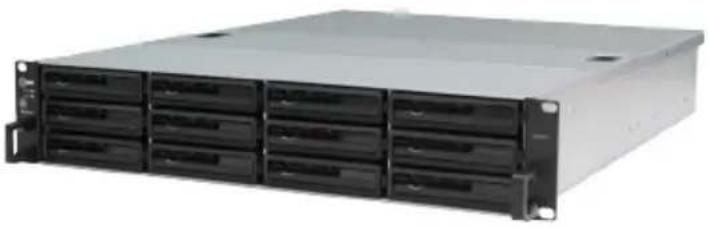
Before starting, please check the package contents to verify that you have received the items below.
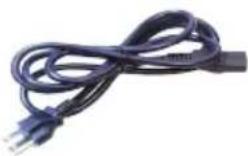
| Expansion unit x 1 | AC power cord(RX1214: x 1; RX1214RP: x 2) | |
 |  | |
| User's guide x 1 | ||
 | ||
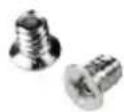
| Screws for 3.5" drives x 52 | Screws for 2.5" drives x 52 | Expansion cable(InfiniBand x 1) |
 | 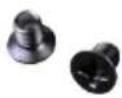 | 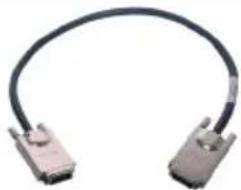 |
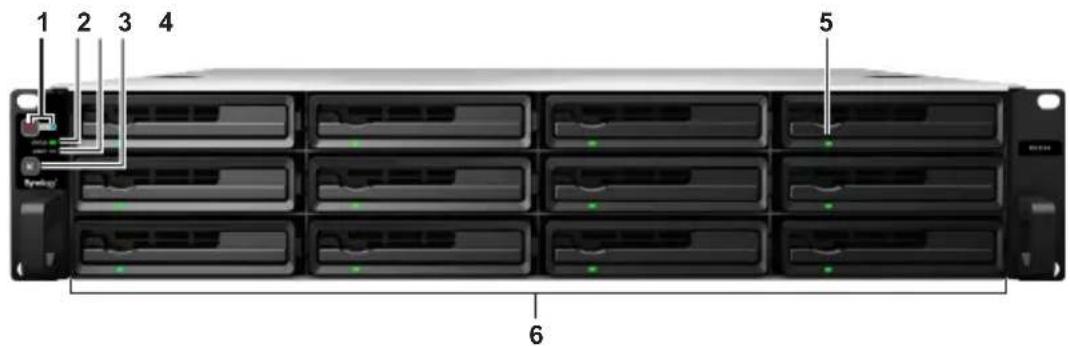
Front
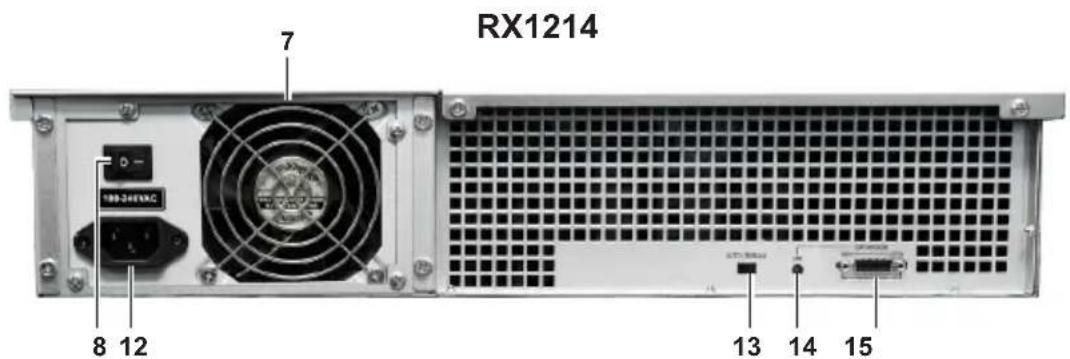
Back
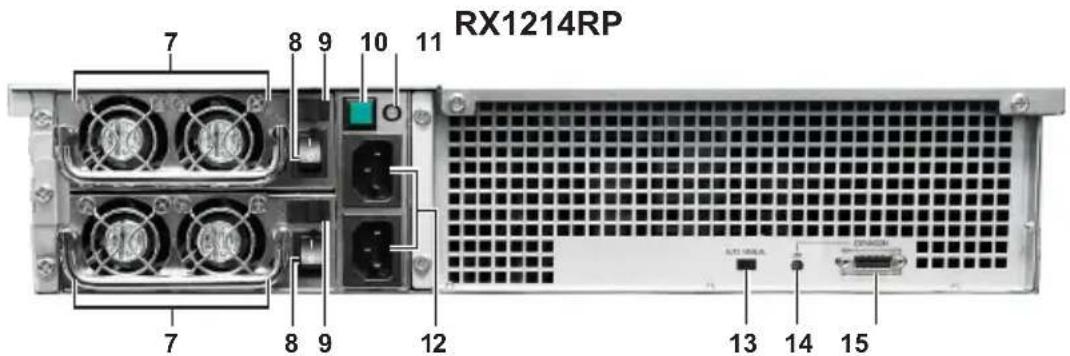
| Article Name Location Description | |||
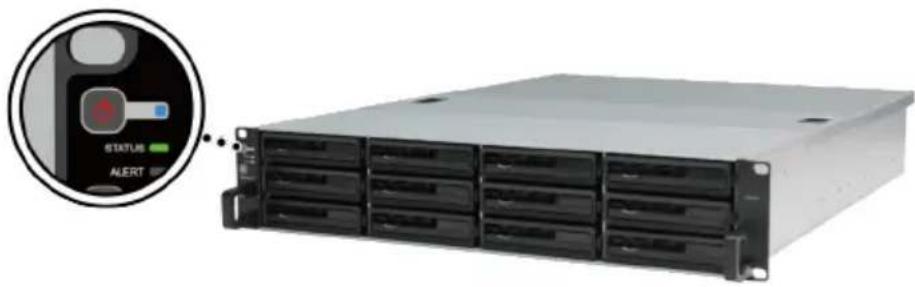
| 1 | Power Button and Indicator | Front | 1. Press to power on the expansion unit.2. Press and hold to shut down.Note:If the AUTO/MANUAL switch is switched to AUTO, the POWER button will not work, and the expansion unit will power on and off automatically when the linked RackStation does. |
| 2 | STATUS Indicator | Displays the status of the system. For more details, please see theLED Indicator Behaviortable below. | |
| 3 | ALERT Indicator | Displays warnings regarding fan or temperature status. For more details, please see theLED Indicator Behaviortable below. | |
| 4 | Beep Off Button | Press to deactivate the beeping sound that is emitted when a malfunction occurs. | |
| 5 | Drive Status Indicators | Displays the status of drives. For more details, please see theLED Indicator Behaviortable below. | |
| 6 | Drive Tray | Install drives (hard disk drives or solid state drives) here. | |
| 7 | PSU Fan | Back | Disposes of excess heat and cools the power supply unit. |
| 8 | PSU On/Off Switch | Press to switch the power supply unit on or off. | |
| 9 | PSU Safety Latch* | Secures the power supply unit in place. | |
| 10 | PSU Beep Off Button* | Press to deactivate the beeping sound that is emitted when a malfunction occurs. | |
| 11 | Redundant PSU Indicator* | Displays the status of the redundant power supply units. For more details, please see theLED Indicator Behaviortable below. | |
| 12 | Power Port | Connect power cords here. | |
| 13 | AUTO/MANUAL Switch | The AUTO/MANUAL switch is used to enable or disable automatic power on/off. If it is set to AUTO, the expansion unit will power on and off automatically when the linked RackStation does. | |
| 14 | LINK Indicator | Displays the status of the link between the expansion unit and main RackStation unit. | |
| 15 | EXPANSION Port | Connect the expansion unit to a Synology RackStation here. For compatible models, please visitwww.synology.com. | |
| * RX1214RP only. | |||
Indicator Color Status Description
| POWER | Blue | Static | Powered on |
| Blinking | Booting up or shutting down | ||
| Off | Powered off | ||
| STATUS | Green | Static | Volume normal or HDD hibernation |
| Blinking | Volume degraded | ||
| Off | No volume or volume crashed | ||
| ALERT | Orange | Blinking | System fan malfunctioning |
| Off System fan normal | |||
| Drive status (on trays) | Green | Static | Drive ready and idle |
| Blinking | Accessing drive | ||
| Red Static | Drive error | ||
| Off | No internal drive | ||
| Redundant PSU* | Green | Static | Both power supply units normal |
| Blinking | One power supply unit or fan malfunctioning | ||
| Orange | Static | Power supply unit is switched on, but expansion unit is powered off | |
| Off | No power supply or PSU switched off | ||
| LINK | Green | Static | Connected to Synology RackStation |
| Off Not connected to Synology RackStation | |||
| * RX1214RP only. | |||
Hardware Specifications
| Internal Drives | 3.5" or 2.5" SATA(II) x 12 |
| Expansion Port # | 1 x InfiniBand |
| Maximum Raw Capacity | 72TB (12 x 6TB drives) |
| Hot Swappable Drive Yes | |
| Size (HxWxD) (mm) | 88 x 445 x 570 mm |
| Weight (kg) | RX1214: 12 kg; RX1214RP: 14 kg |
| System Fan | RX1214: 4 x (80 x 80mm); RX1214RP: 4 x (80 x 80mm) |
| Power Fan | RX1214: 1 x (80 x 80mm); RX1214RP: 4 x (40 x 40mm) |
| Power Recovery | Synced with RackStation |
| AC Input Power Voltage | 100V to 240V AC |
| Power Frequency | 50/60Hz, Single Phase |
| Operating Temperature | 5°C to 35°C (40°F to 95°F) |
| Storage Temperature | -20°C to 60°C (-5°F to 140°F) |
| Relative Humidity | 5% to 95% RH |
| Certification | FCC Class A, CE Class A, BSMI Class A |
Note:
1 Please visit www.synology.com for the latest compatible models.
2 DSM needs to be upgraded to version 4.2 or above.
Safety Instructions

Keep away from direct sunlight and away from chemicals. Make sure the environment does not experience abrupt changes in temperature or humidity.
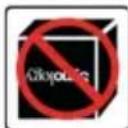
Place the product right side up at all times.

Do not place near any liquids.
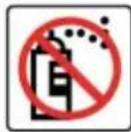
Before cleaning, unplug the power cord. Wipe with damp paper towels. Do not use chemical or aerosol cleaners.
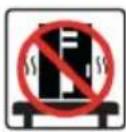
To prevent the unit from falling over, do not place on carts or any unstable surfaces.
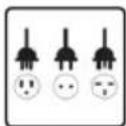
The power cord must plug in to the correct supply voltage. Make sure that the supplied AC voltage is correct and stable.
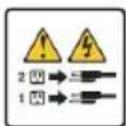
To remove all electrical current from the device, ensure that all power cords are disconnected from the power source.
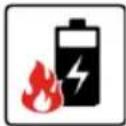
Risk of explosion if battery is replaced with an incorrect type. Dispose of used batteries appropriately.
Setting Up
Tools and Parts for Drive Installation
- A screwdriver
- At least one 3.5" or 2.5" SATA drive (please visit www.synology.com for compatible drive models.)
Warning: If you install a drive that contains data, the system will format the drive and erase all data. If you still need the data, please back it up before installation.
Install Drives
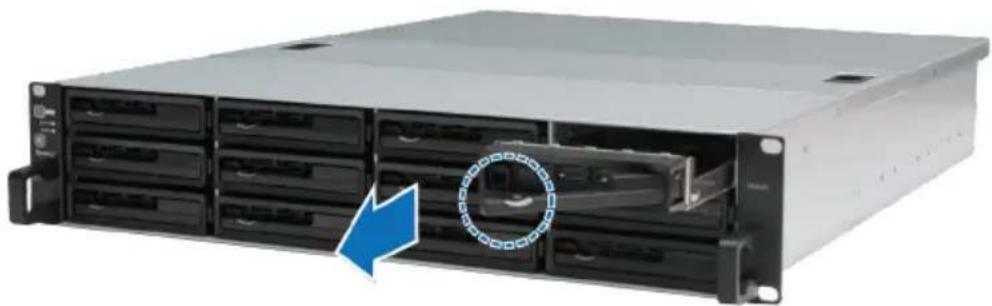
1 Find the small button located on the drive tray handle. Press the button down and pull the drive tray handle out as illustrated below.
natural_image
Front view of a server rack unit with multiple drive bays and a blue arrow indicating a component (no visible text or labels)2 Load drives in the drive trays:
- For 3.5" drives: Place the drive in the drive tray. Turn the tray upside down and tighten screws into the four spots indicated below to secure the drive.
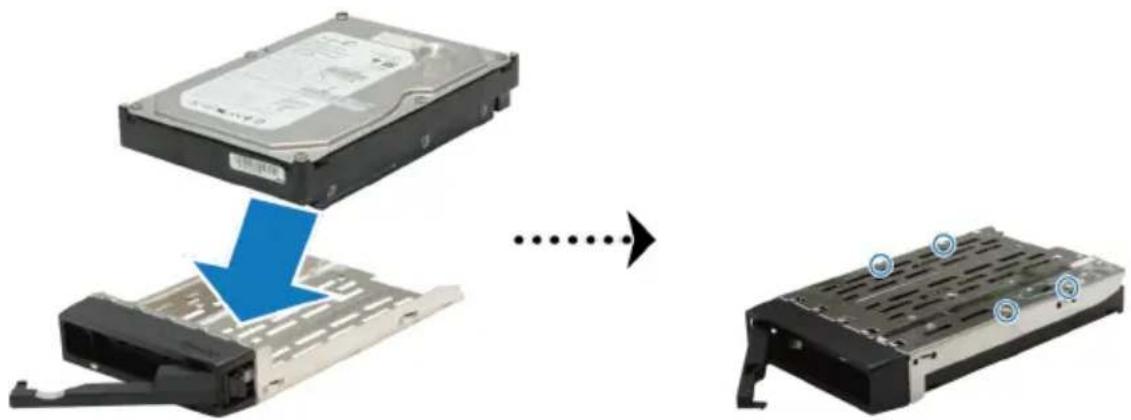
natural_image
Diagram showing a computer hard disk being transferred from an older case to a final hard drive (no text or symbols present)- For 2.5" drives: Place the drive in the drive tray. Turn the tray upside down and tighten screws into the four spots indicated below to secure the drive.
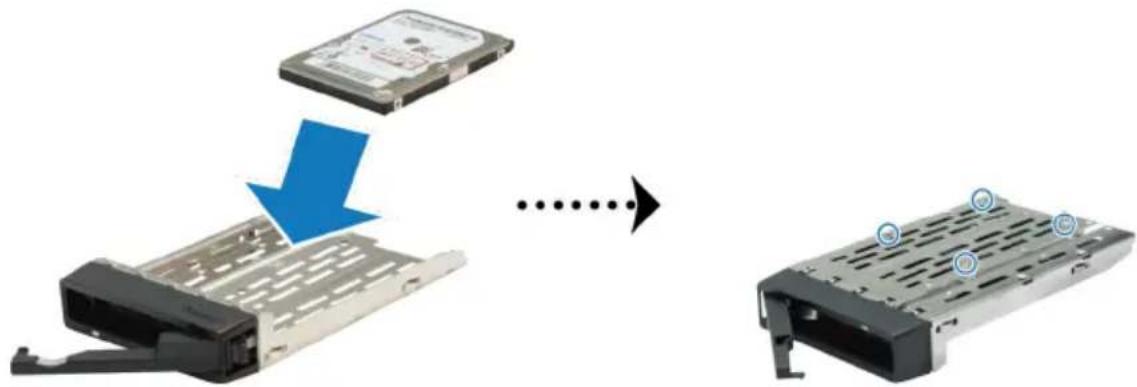
natural_image
Diagram showing a computer hard drive being processed into a storage chassis, with no visible text or symbols.3 Insert the loaded drive tray into the empty drive bay.
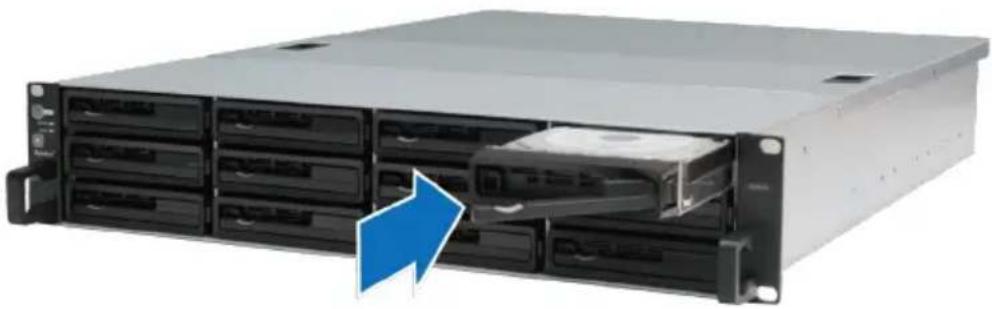
natural_image
Front view of a server rack with multiple drive bays and an open drive, showing a blue arrow pointing to a component (no text or symbols visible)Note: Make sure the tray is pushed in all the way. Otherwise, the drive might not be able to function properly.
4 Push the handle inward to secure the drive tray.
5 Repeat the steps above to assemble the other drives you have prepared.
6 Drives are numbered as shown below.
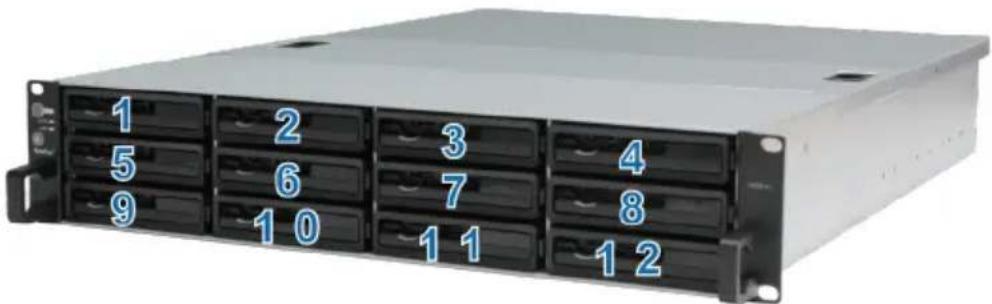
natural_image
Front view of a rack-mounted server unit with multiple drive bays and labeled ports (no text or symbols beyond numbers)Note: If you want to create a RAID volume, we recommend all installed drives be the same size in order to optimize drive capacity usage.
Connect with Synology RackStation
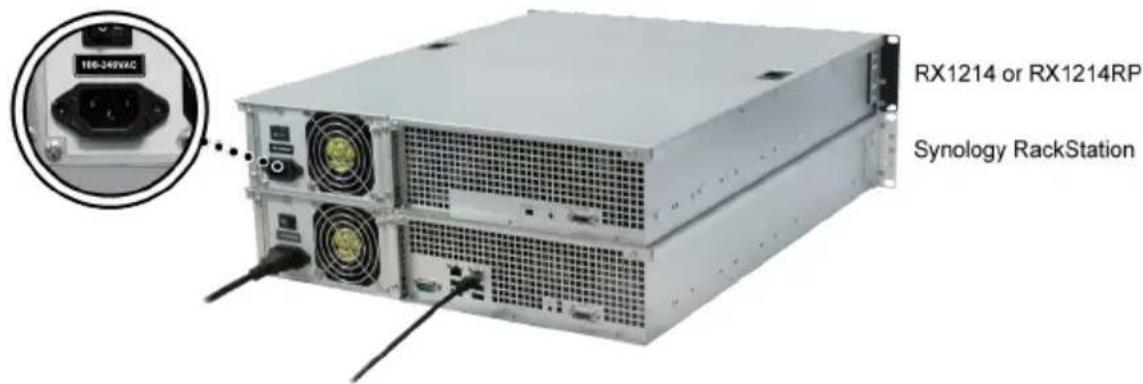
1 Connect one end of the power cord(s) to the power port of the expansion unit, and the other to the power outlet(s).
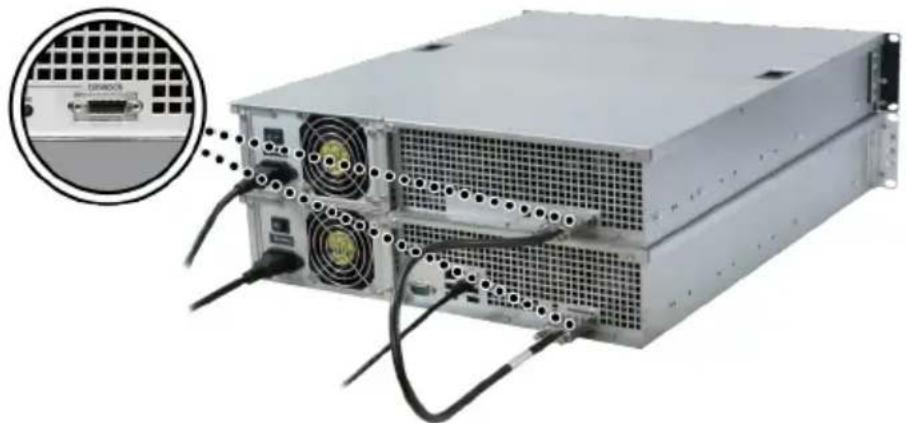
2 Connect one end of the expansion cable to the expansion unit, and the other to the main RackStation unit.
natural_image
Front view of a server rack with connected cables and ventilation grilles (no visible text or labels)3 Power on the expansion unit (make sure the redundant power supply unit is switched on first):
- If the AUTO/MANUAL switch is switched to AUTO, expansion unit will power on or off automatically when the linked RackStation powers on or off.
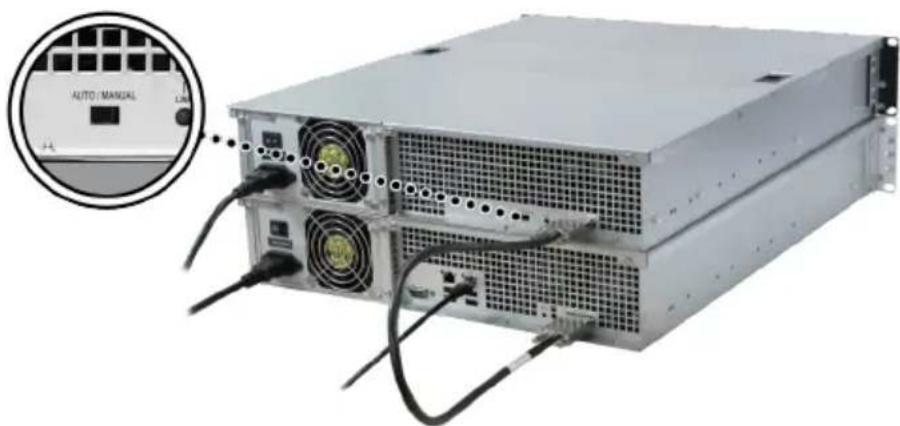
natural_image
Front view of a power supply unit with visible drive bays and external connectors, showing an inset close-up of its front panel (no text or symbols on the device itself)- If the AUTO/MANUAL switch is switched to MANUApress the POWER button located on the front panel to power on the expansion unit.
natural_image
Front view of a server rack unit with an inset showing a status bar and alert icon (no readable text or symbols on the rack itself)Note: To prevent any unexpected volume crashes, we recommend that you set the AUTO/MANUAL switch to AUTO.
Confirm Connection and Manage Storage Spaces
1 Login to the DiskStation Manager (DSM) of the main RackStation unit
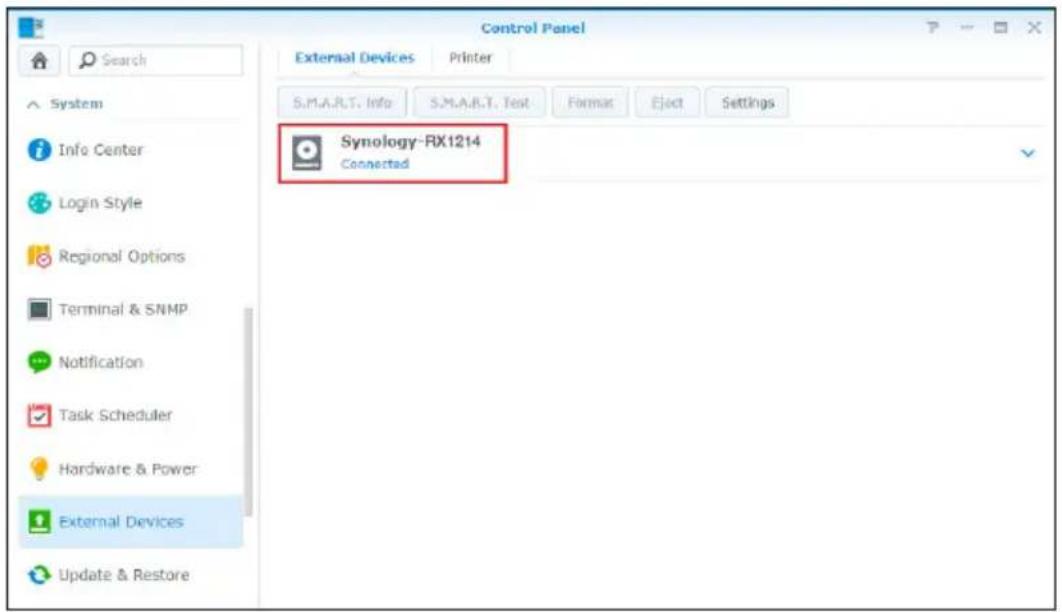
2 Go to Control Panel > External Devices > External Devices to confirm the expansion unit is successfully connected.
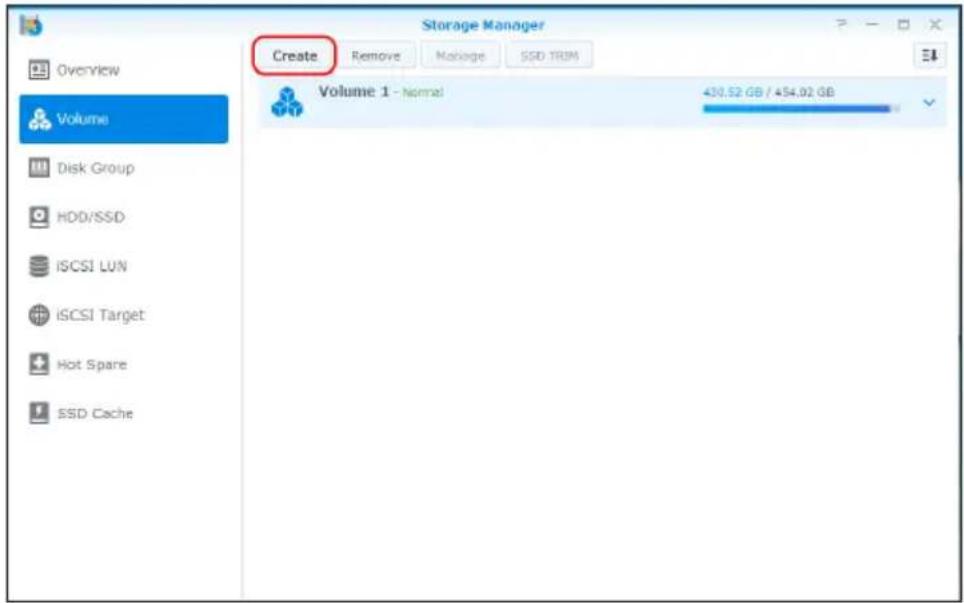
3 Go to Storage Manager to manage storage space creation or expansion.
- If you want to create a new volume on the expansion, click Create and follow the instructions of the wizard.
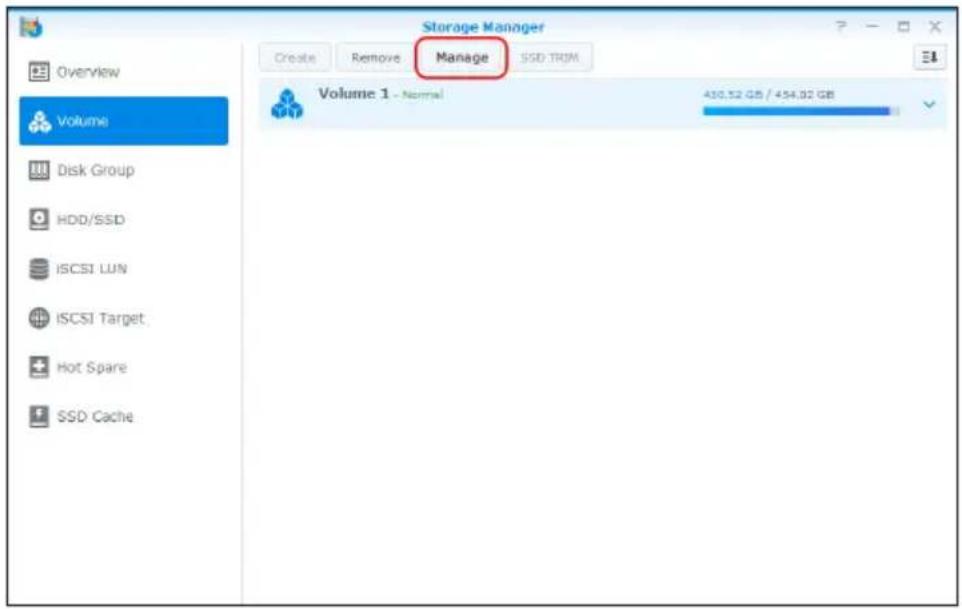
- If you want to expand an existing volume with expansion unit, select the volume you want to expand from the volume list, click Manage, and follow the instructions of the wizard.
For detailed information about volume management, go to Storage Manager and see DSM Help.
Limitations: Before using this expansion unit, please see the limitations below.
- This expansion unit can be linked to only one Synology RackStation at a time.
- The data of some DSM packages can be stored on the expansion unit only if you create an expanded volume with it. The data cannot be stored on the expansion unit if an independent volume has been created on it.
- Drives previously used in a Synology RackStation are not readable when directly inserting them into this expansion unit, and vise versa.
Learn More
Congratulations! Your expansion unit is set up now. For more information or online resources, please visit www.synology.com.
Maintenance
Replace Malfunctioning Fan
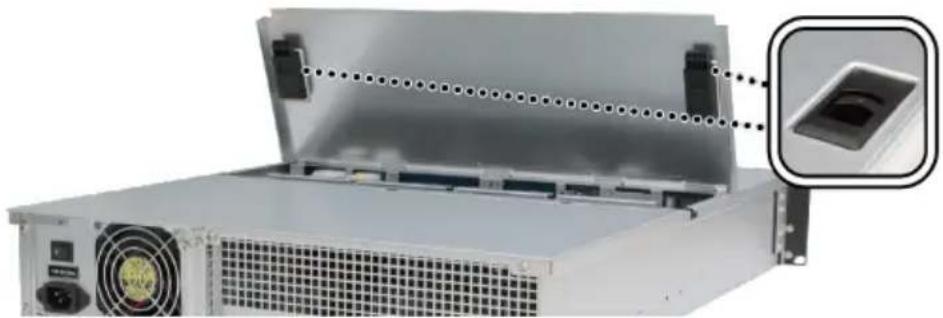
If a system cooling fan malfunctions, please see the instructions below to open the expansion unit and replace the malfunctioning fan
1 Slide the latches on the sides and lift to remove the fan cover.
natural_image
Exterior view of a server rack with ventilation grilles and a close-up inset showing a small component (no text or symbols visible)2 Cooling fans are numbered as below:
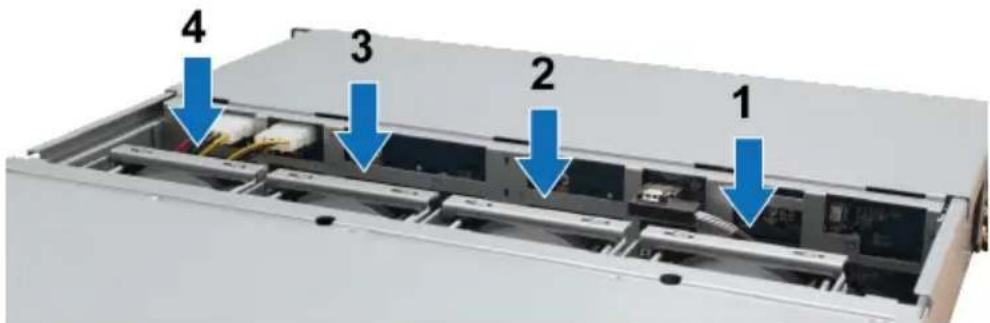
3 Find the malfunctioning fan. Lift the fan upward to remove it.
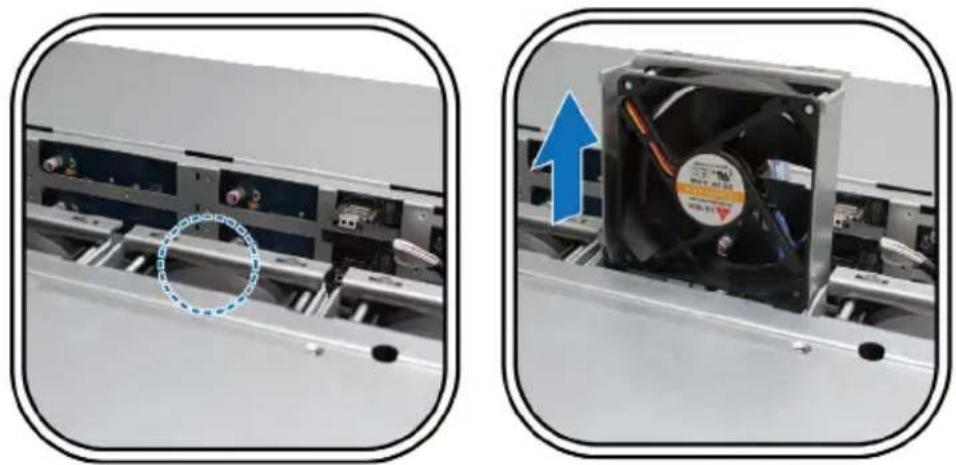
natural_image
Two-panel image showing a computer tower with an open fan and a magnified inset of its side panel (no text or symbols visible)4 Apply firm pressure to the power plug and slide it off the power port as shown below.
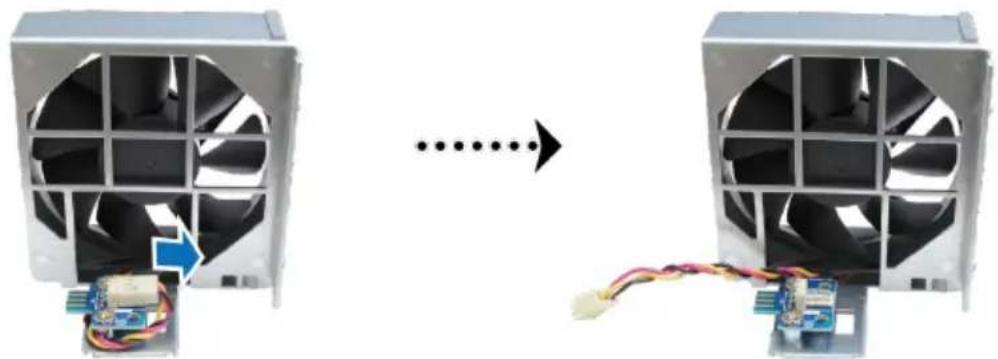
natural_image
Two computer fans with visible internal components and wiring, connected by a dotted arrow (no text or symbols)5 Remove the malfunctioning fan from the fan casing.
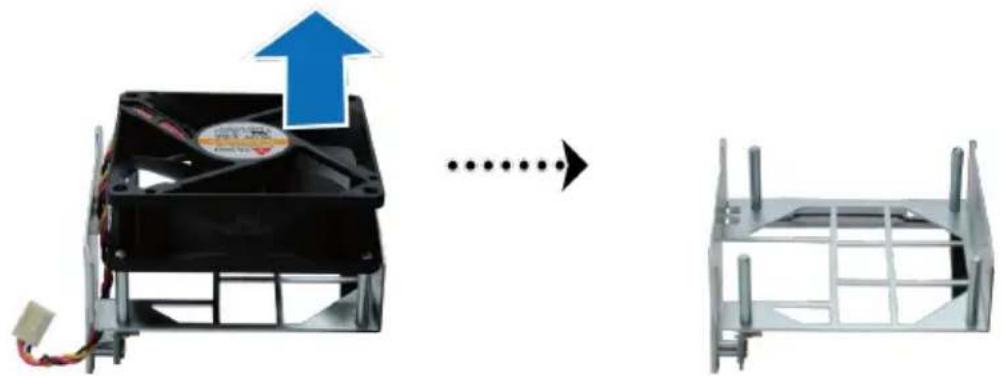
natural_image
Diagram showing a computer fan with an upward arrow and a wire fence structure, both without any text or symbols.6 Slide a new fan into the casing.
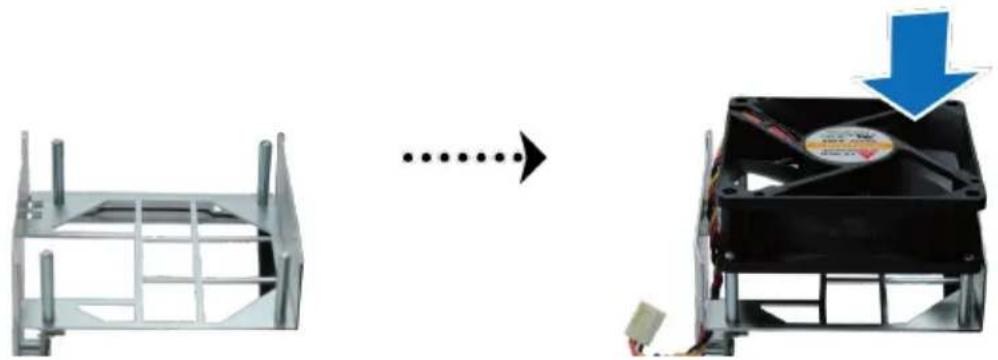
natural_image
Diagram showing a computer fan with a power adapter and a blue downward arrow indicating rotation (no text or symbols present)7 Apply firm pressure and slide the power cord onto the power port.
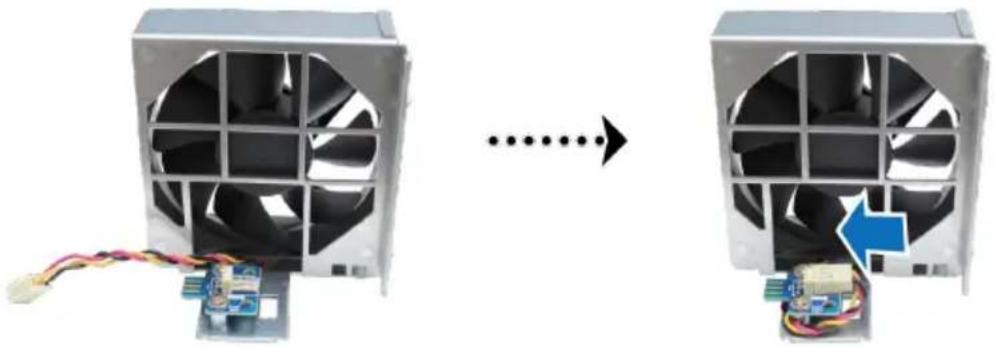
natural_image
Two computer fans with visible internal components and wiring, connected by a dotted arrow indicating transformation (no text or symbols)8 Slide the new cooling fan into the expansion unit. Make sure the power port is aligned properly.
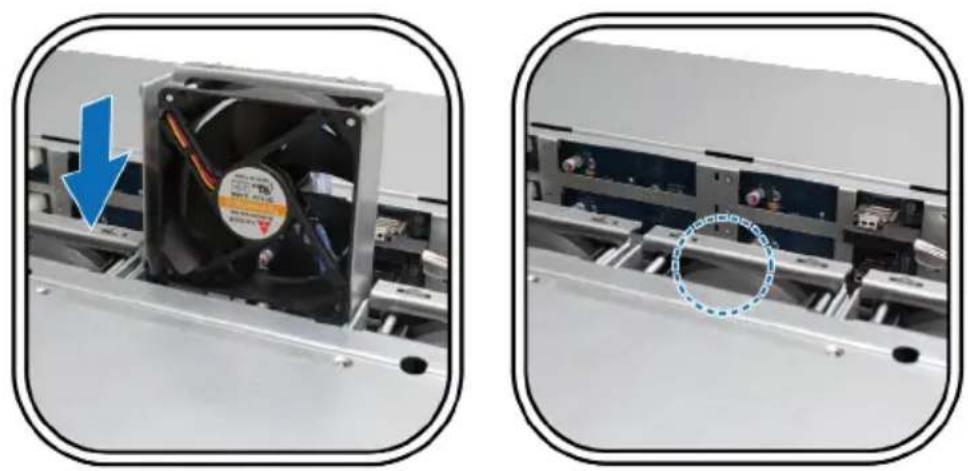
natural_image
Two views of a computer fan on a rack, one showing a blue arrow and the other showing a magnified view with a blue circle highlighting a component (no text or symbols present)SYNOLOGY, INC. END USER LICENSE AGREEMENT
IMPORTANT-READ CAREFULLY: THIS END USER LICENSE AGREEMENT ("EULA") IS A LEGAL AGREEMENT BETWEEN YOU (EITHER AN INDIVIDUAL OR A LEGAL ENTITY) AND SYNOLOGY, INC. ("SYNOLOGY") FOR THE SYNOLOGY SOFTWARE INSTALLED ONTO THE SYNOLOGY PRODU PUCHASED BY YOU (THE "PRODUCT"), OR LEGALLY DOWNLOADED FROM WWW.SYNOLOGY.COM, OR ANY OTHER CHANNEL PROVIDED BY SYNOLOGY ("SOFTWARE").
YOU AGREE TO BE BOUND BY THE TERMS OF THIS EULA BY USING THE PRODUCTS CONTAINING THE SOFTWARE, INSTALLING THE SOFTWARE ONTO THE PRODUCTS OR DEVICE CONNECTED TO THE PRODUCTS. IF YOU DO NOT AGREE TO THE TERMS OF THIS EULA, DO NOT USETHE PRODUCTS CONTAINING THE SOFTWARE OR DOWNLOAD THE SOFTWARE FROM WWW.SYNOLOGY.COM, OR ANY OTHER CHANNEL PROVIDED BY SYNOLOGY. INSTEAD, YOU MAY RETURN THE PRODUCT TO THE RESELLER WHERE YOU PURCHASED IT FOR A REFUND ACCORDANCE WITH THE RESELLER'S APPLICABLE RETURN POLICY.
Section 1. Limited Software License. Subject employed by Synology to control access to the e ter ms a nd c on d iti or components, t featuises or E fudtions , of the Product Synology grants you a limited, non-exclusive, non-or Software. Subject to the limitations specified in transferable, personal license to install, run and use this Section 5, you are not prohibited from providing one copy of the Software loaded on the a P ro services hosted by Synology NAS server to any or on your device connected to the Product solely third party for commercial purpose.
Section 2. Documentation. You may and use a reasonable number of copies documentation provided with the Software; provided that such copies will only be used for business purposes and are not to be republished or redistributed (either in hard copy or electronic form) to any third party.
Section 3. Backup. You may make a reasonable number of copies of the Software for backup archival purposes only.
Section 4. Updates. Any software provided to you by Synology or made available on the S website at www.synology.com ("Website") or other channel provided by Synology that up or supplements the original Software is governed by this EULA unless separate license terms provided with such updates or supplements, which case, such separate terms will govern.
Section 5. License Limitations. The license set forth in Sections 1, 2 and 3 applies only to the extent that you have ordered and paid for the Product and states the entirety of your rights with respect to the Software. Synology reserves all rights not expressly granted to you in this EULA. Without limiting
foregoing, you shall not authorize or permit Section 9. Limited Warranty. Synology provides third party to: (a) use the Software for any purpose a limited warrant that the Software will substantially other than that in connection with the Product conform to Synology's published specifications for license, distribute, lease, rent, lend, transfer, assign the Software, if any, or otherwise set forth on or otherwise dispose of the Software; (c) reverse Website, for a period required by your local law engineer, decompile, disassemble or attempt Synology will use commercially reasonable efforts discover the source code of or any trade secrets in Synology's sole discretion, either correct any related to the Software, except and only touch nonconformity in the Software or replace any extent that such conduct is expressly permitted Software that fails to comply with the foregoing by applicable law notwithstanding this limitation warranty, provided that you give Synology written (d) adapt, modify, alter, translate or create notice of such noncompliance within the warranty derivative works of the Software; (e) remove, alter period. The foregoing warranty does not apply to or obscure any copyright notice or other proprietary any noncompliance resulting from any: (w) use, rights notice on the Software or Product; production, distribution or disclosure not in circumvent or attempt to circumvent any methodance with this EULA; (x) any customization,
Section 6. Open Source. The Software may contain components licensed to Synology under the GNU General Public License ("GPL Components"), currently available at http://www.gnu.org/licenses/germln. The terms of the GPL will control with respect to the GPL Components to the extent that this EULA conflicts with the requirements of the GPL with respect to your use of the Components, and, in such event, you agree to be bound by the GPL with respect to your use of such and components.
Section 7. Audit. Synology will have the right to audit your compliance with the terms of this EULA. Synology you agree to grant Synology a right to accept any your facilities, equipment, books, records and data documents and to otherwise reasonably cooperate with Synology in order to facilitate any such audit by S. are Synology or its agent authorized by Synology.
Section 8. Ownership. The Software is a valuable property of Synology and its licensors, protected by copyright and other intellectual property laws and treaties. Synology or its licensors own all right titles and interests in and to the Software, including but not limited to copyright and any other intellectual property rights.
modification or other alteration of the Software by anyone other than Synology; (y) combination of the Software with any product, services or other provided by anyone other than Synology; or (z) your failure to comply with this EULA.
Section 10. Support. During the period specified in the Section 9, Synology will make you the support services. Following the expiration of the applicable period, support for Software may be available from Synology upon written request.
Section 11. Disclaimer of Warranties. EXCEPT AS EXPRES SLY SET FORT H ABOV E, SOFTWARE IS PROVIDED "AS IS" AND WITH ALL FAULTS. SYNOLOGY AND ITS SUPPLIER HEREBY DISCLAIM ALL OTHER WARRANTIES, EXPRESS, IMPLIED OR STATUTORY, ARISING BY LAW OR OTHERWISE, INCLUDING BUT NOT LIMITED TO ANY IMPLIED WARRANTIES OF MERCHANTABILI PARTICULAR PURPOSE OR USE, TITLE AND NONINFRINGEMENT, THE SOFTWARE. WITHOUT LIMITING THE FOREGOING, SYNOLOGY DOES NOT WARRANT THAT THE SOFTWARE WILL BE FREE OF BUGS, ERRORS, VIRUSES OR OTHER DEFECTS.
Section 12. Disclaimer of Certain Damages. IN NO EVENT WILL SYNOLOGY OR ITS LICENSORS BE LIABLE FOR ANY INCIDENTAL, INDIRECTS SPECIAL, PUNITIVE OR SIMILAR DAMAGE WHATSOEVER (INCLUDING, BUT NOT LIMITED TO LOSS OF DATA, INFORMATION, REVEN PROFIT OR BUSINESS) ARISING OUT OF RELATING TO THE USE OF OR INABLE TO USE THE SOFTWARE OR OTHERWISE UNDER OR IN CONNECTION WITH THIS EULAR OR THE SOFTWARE, WHETHER BASED ON CONTRACT, TORT (INCLUDING NEGLIGENCE), STRICT LIABILITY OR OTHER THEORY EVEN IF SYNOLOGY HAS BEEN ADVISED OF THE POSSIBILITY OF SUCH DAMAGES.
Section 13. Limitation of Liability. SYNOLOGY'S AND ITS SUPPLIERS' LIABILITY ARISING OUT OF OR RELATING TO THE USE OF OR INABILITY TO USE THE SOFTWARE OR OTHERWISE UNDER FOR IN CONNECTION WITH THIS EULA OF THE SOFTWARE IS LIMITED TO THE AMOUNT ACTUALLY PAID BY YOU FOR THE PRODUCT REGARDLESS OF THE AMOUNT OF DAMAGES YOU MAY INCUR AND WHETHER BASED CONTRACT, TORT (INCLUDING NEGLIGENCE), STRICT LIABILITY OR OTHER THEORY. The foregoing disclaimer of warranties, disclaimer certain damages and limitation of liability will apply to the maximum extent permitted by applicable law. The laws of some states/jurisdictions do not at the exclusion of implied warranties or the exclusion or limitation of certain damages. To the extent that those laws apply to this EULA, the exclusions and limitations set forth above may not apply to you.
Software, including without limitation the U.S. Export Administration Regulations.
items. Section 15. Termination. Without prejudice to any other rights, Synology may terminate this EULA if you do not abide by the terms and cond contained herein. In such event, you must cease available of the Software and destroy all copies of Software and all of its component parts.
Section 16. Assignment. You may not transfer or assign your rights under this EULA to any third party, except for that pre-installed in the Products. Any such transfer or assignment in violation of the foregoing restriction will be void.
Section 17. Applicable Law. Unless expressly prohibited by local law, this EULA is governed by and construed in accordance with the laws of the Republic of China (R.O.C. or Taiwan) without regard to any conflict of law principles to the contrary.
Section 18. Dispute Resolution. Any dispute, controversy or claim arising out of or relating to this EULA will be resolved exclusively and finally by arbitration conducted by three neutral arbitrators in accordance with the procedures of the R.O. Arbitration Law and related enforcement rules.. In such cases, the arbitration will be limited solely to the dispute between you and Synology The arbitration, or any portion of it, will not be consolidated with any other arbitration and will not be conducted on a class-wide or class action basis. The arbitration shall take place in Taipei, Taiwan, R.O.C., and the arbitration proceedings shall be conducted in English or, if both parties so agree, in Mandarin Chinese. The arbitration award shall be final and binding on the parties and may be enforced in any court having jurisdiction. You understand that, in the absence of this provision, you would have had a right to litigate any dispute, controversy or claim in a court, including the right to litigate claims on a class-wide or class-action basis, and you expressly and knowingly waives those rights and agrees to resolve any disputes through binding arbitration in accordance with the provisions of this Section 18. Nothing this Section shall be deemed to prohibit or restrict Synology from seeking injunctive relief or seeking such other rights and remedies as it may have law or equity for any actual or threatened brea of any provision of this EULA relating to Synology's intellectual property rights.
Section 19. Attorneys' Fees. In any arbitration, mediation, or other legal action or proceeding he enforce rights or remedies under this EULA, the prevailing party will be entitled to recover, in addition to any other relief to which it may be entitled, costs and reasonable attorneys' fees. allow
Section 20. Severability. If any provision of this EULA is held by a court of competent jurisdiction to be invalid, illegal, or unenforceable, the remainder of this EULA will remain in full force and effect.
Section 14. Export Restriction: acknowledge that the Software is subject to export restrictions. You agree to comply with applicable laws and regulations that apply
Section 21. Entire Agreement. This EULA Sets forth the entire agreement of Synology and you allwith respect to the Software and the sub tnattthe here of and supe rsedes all prior and
contemporaneous understandings and agreements whether written or oral. No amendment, modification or waiver of any of the provisions of this EULA will be valid unless set forth in a written instrument signed by the party to be bound thereby.
SYNOLOGY, INC.
LIMITED PRODUCT WARRANTY
THIS LIMITED WARRANTY ("WARRANTY") APPLIES TO THE PRODUCTS (AS DEFINED BELOW) OF SYNOLOGY, INC. AND ITS AFFILIATES, INCLUDING SYNOLOGY AMERICA CORP, (COLLECTIVELY, "SYNOLOGY"). YOU ACCEPT AND AGREE TO BE BOUND BY THE TERMS OF THIS WARRANTY BY OPENING THE PACKAGE CONTAINING AND/OR USING THE PRODUCT. IF YOU DO NOT AGREE TO THE TERMS OF THIS WARRANTY, DO NOT USE THE PRODUCT. INSTEAD, YOU MAY RETURN THE PRODUCT TO THE RESELLER WHERE YOU PURCHASED IT FOR A REFUND IN ACCORDANCE WITH THE RESELLER'S APPLICABLE RETURN POLICY.
Section 1. Definitions. (a) "New Product", as is" or with "no warranty" on Online Store. including: (1) "Category I Product" means Synology "Web Site" means the Synology web site located at product models RS810+, RS810RP+, RX410, www.synology.com.
all DS/RS NAS models with the XS+/XS suffix (except RS3413xs+) in or after 13-series, and all Section 2. Limited Warranty and Remedies
DX/RX expansion units with 12 drive bays 2. In Limited Warranty. Subject to Section 2.6, after 13-series. (2) "Category II Product" methodology warrants to Customer that each Product Synology product models RS3413xs+, RS3412xs, (a) will be free of material defects in workmanship RS3412RPxs, RS3411xs, RS3411RPxs, RS2211+, and (b) under normal use will perform substantially RS2211RP+, RS411, RS409RP+, RS409+, RS409, in accordance with RS408-RP, RS408, RS407, DS3612xs, DS3611xs, specifications for the Product during the Warranty DS2411+, DS1511+, DS1010+, DS710+, DS509+, Period. Synology warrants the Software as set forth DS5 08, E DS1 4, RX1 211, RX 1 2th IR the P, accompanying end user license agreement DX1211, DX510, DX5, VS240HD and RAM Module provided with the Product, if any. Synology provides (1GB/2GB/4GB/8GB). (3) "Category III Product" no warranty to Refurbished Product sold as "as is" means Synology product models that apply with the or with "no warranty" on Online Store.
2.2 Exclusive Remedy. If Customer gives notice of noncompliance with any of the warranties set forth in Section 2.1 within the applicable Warranty Period in the manner set forth below then, upon verification of the noncompliance by Synology, Synology will, at Synology's option: all other Synology product models purchased by Customer after March 1, 2008. (5) "Category Product" means all other Synology product models purchased by Customer before February 29, 2008. (b) "Refurbished Product" means all Synology products which have been refurbished and directly by Synology through Online Store, including those sold by an authorized Synology distributor or reseller. (c) "Customer" means original person or entity purchasing the Product from Synology or an authorized Synology distributor or reseller. (d) "Online Store" means an online shop operated by Synology or Synology's affiliate. "Product" means a New Product or a Refurbished Product and any hardware incorporated into Product by Synology and any accompanying documentation. (f) "Software" means the Synology proprietary software that accompanies the Product when purchased by Customer, is downloaded by Customer at the Web Site, or is pre-installed on the Product by Synology, and includes firmware, associated media, images, animations, video, audio, text and applets incorporated into the software or Product and any updates or upgrades
to such software. (g) "Warranty Period" 2.3 Return. Any Product returned by Customer the period commencing on the date the Product is under Section 2.2 must be assigned a Return purchased by Customer and ending (1) five year merchandise Authorization ("RMA") number by after such date for Category I Products; (2) three Synology before shipment and must be returned years after such date for Category II & III Products; in accordance with Synology's then current RMA or (3) two years after such date for Categories. Customer may contact any authorized IV Products; or (4) one year after such Systology distributor or reseller or Synology Support Category V Products; or (5) 90 days after such date to obtain assistance in obtaining an RMA, and for Refurbished Products, except for those sold as must provide proof of purchase and product serial
number when asking for such assistance. warranty claims, Customer must return the complete Product to Synology in accordance with this Section 2.3 to be eligible for coverage under this Warranty. Any Product returned without an RMA number, or any Product that has been disassembled under the direction of Synology) will be refused and returned to Customer at Customer's expense. Any Product that has been assigned a RMA must be returned in the same condition as received from Synology to the address designated by Synology, freight pre-paid, in packaging sufficient to protect the contents thereof and with the number prominently displayed on the outside of the box. Customer is responsible for insurance and risk of loss with respect to returned items until they are properly received by Synology. A Product issued a RMA number must be returned within fifteen (15) days after issuance of the applicable RMA number.
2.4 Replacement by Synology. If Synology elects to replace any Product under this Warranty set forth in Section 2.1, then Synology will ship a replacement Product at Synology's expense with the shipping method selected by Synology after receipt of the nonconforming Product returned in accordance with Section 2.3 and validation Synology that the Product does not conform to the warranty. In some countries, Synology may own discretion apply the Synology Replacement Service to certain Products, through which Synology will ship a replacement Product to Customer before its receipt of the nonconforming Product returned by Customer ("Synology Replacement Service").
2.5 Support. During the Warranty Period Synology will make available to Customer support services. Following the expiration of applicable Warranty Period, support for Products may be available from Synology upon written request.
2.6 Exclusions. The foregoing warranties and warranty obligations do not apply to any Product that (a) has been installed or used in a manner not specified or described in the Product specifications; (b) has been repaired, modified or altered by anyone other than Synology or its agent or designee; has been in any way misused, abused, or damaged; (d) has been used with items not provided. Synology other than the hardware or software which the Product is designed; or (e) otherwise fails to conform to the Product specifications and such failure is attributable to causes not with under Synology's control. Further, the foreg warranties will be void if (1) Customer disassembles the Product except as authorized by Synolo; (2) Customer fails to implement any correct modification, enhancement, improvement or other update made available to Customer by Synology; or (3) Customer implements, installs or uses a correction, modification, enhancement, improvement or other update made available by any third party. The warranty set forth in Section 2.1 will terminate upon Customer's sale or transfer of the Product to a third party.
2.7 Disclaimer of Warranties. T H WARRANTIES, OBLIGATIONS, AND LIABILITIES
OF OF S Y N O L O G Y A N D T H E CUSTOMER SET FORTH IN THIS WARRANTY A R E E X C L U S I V E A N D I N S FOR , AND C U S T O MER HER E BY W R E L E A S E S A N D D I S C L A I M S , A (e)WARRANTIES, OBLIGATIONS AND LIABILITIES OF SYNOLOGY AND A L L OTHER R I G H C L A I M S A N D R E M E D I E S O F N AGAINST SYNOLOGY, EXPRESS OR IMPLIED, t wARI S ING BY L A W O R O T H ERWISE RESPECT TO THE PRODUCT, ACCOMPANYING DOCUMENTATION OR SOFTWARE AND ANY R MATHER GOODS OR SERVICES DELIVERED U N D E R T H I S W A R R A N T BUT N O T L I M I T E D TO ANY: ( A W A R R A N T Y O F M E R C H FITNESS FOR A PARTICULAR PURPOSE OR USE; (B) IMPLIED WARRANTY ARISING FROM COURSE OF PERFORMANCE, COURSE OF DEALING, OR USAGE OF TRADE; (C) CLAIM GY OF INFRINGEMENT OR MISAPPROPRIATION; OR (D) CLAIM IN TORT (WHETHER BASED ON a NEGLIGENCE, STRICT LIABILITY, PRODUCT via LIABILITY OR OTHER THEORY). SYNOLOGY after MAKES NO GUARANTEE AND SPECIFICALLY ED DISCLAIMS ANY WARRANTY THAT THE DATA OR INFORMATION STORED ON ANY SYNOLOGY on BY PRODUCT WILL BE SECURE AND WITHOUT RISK at its OF DATA LOSS. SYNOLOGY RECOMMENDS TH AT C U S T O M E R T A K E S A I MEASURES TO BACK UP THE DATA STORED ON THE PRODUCT. SOME STATES/JURISDICTIONS DO NOT ALLOW LIMITATIONS ON IMPLIED WARRANTIES, SO THE ABOVE LIMITATION MAY
the Section 3. Limitations of Liability
3.1 Force Majeure. Synology will not be liable for, or be considered to be in breach of or default under this Warranty on account of, any delay or failure to perform as required by this Warranty as a result of any cause or condition beyond it reasonable control (including, without limitation, any act or failure to act by Customer).
3.2 Disclaimer of Certain Damages. IN NO EVENT WILL SYNOLOGY OR ITS SUPPLIERS BE LIABLE FOR THE COST OF COVER OR FOR ANY INCHYENTAL, INDIRECT, SPECIAL, PUNITIVE, CONSEQUENTIAL OR SIMILAR DAMAGES OR LIABILITIES WHATSOEVER (INCLUDING, BUT NOT LIMITED TO LOSS OF DATA, INFORMATION, REVENUE, PROFIT OR BUSINESS) ARISING OUT going OR RELATING TO THE USE OR INABILITY TO USE THE PRODUCT, ANY ACCOMPANYING DOCUMENTATION OR SOFTWARE AND ANY OTHER GOODS OR SERVICES PROVIDED UNDER THIS WARRANTY, WHETHER BASED ON CONTRACT, TORT (INCLUDING NEGLIGENCE), STRICT LIABILITY OR OTHER THEORY EVEN IF SYNOLOGY HAS BEEN ADVISED OF THE POSSIBILITY OF SUCH DAMAGES.
3.3 Limitation of Liability. SYNOLOGY'S AND ITS SUPPLIERS' LIABILITY ARISING OUT OF OR RELATING TO THE USE OR INABILITY TO USE THE PRODUCT, ANY ACCOMPANYING DOCUMENTATION OR SOFTWARE AND ANY
OTHER GOODS OR SERVICES PROVIDED relationship between Customers residing within UNDER THIS WARRANTY IS LIMITED TO THE United States and Synology will be resolve AMO U NT ACTU ALLY PAI D BY CUSTEMLUSERly and finally by arbitration under the FOR THE PRODUCT REGARDLESS OF THE Current commercial rules of the American Arbitration AMOUNT OF DAMAGES CUSTOMER MAY INCUR Association, except as otherwise provided below. AND WHETHER BASED ON CONTRACT, TORT The arbitration will be conducted before a sing (INCLUDING NEGLIGENCE), STRICT LIABILITY arbitrator, and will be limited solely to the dispute OR OTHER THEORY. The foregoing disclaimer of certain damages and limitation of liability will apply or any portion of it, will not be consolidated in to the maximum extent permitted by applicable law. Any other arbitration and will not be conducted on The laws of some states/jurisdictions do not allow class-wide or class action basis. The arbitration exclusion or limitation of certain damages. To shall be held in King County, Washington, U.S.A. extent that those laws apply to the Product by submission of documents, by telephone, online exclusions and limitations set forth above may not or in person as determined by the arbitrator at the apply to Customer. request of the parties. The prevailing party in any
Section 4. Miscellaneous
4.1 Proprietary Rights. The Product and reasonable attorneys' fees, including any arbitration any accompanying Software and documentation fee paid by the prevailing party. Any decision provided with the Product include proprietary and rendered in such arbitration proceedings will be intellectual property rights of Synology and its third final and binding on the parties, and judgment party suppliers and licensors. Synology retains and may be entered thereon in any court of competent reserves all right, title, and interest in the intellectual jurisdiction. Customer understands that, in the property rights of the Product, and no title abstance of this provision, Customer would have had ownership of any intellectual property rights in a right to litigate any such dispute, controversy or to the Product, any accompanying Software claim in a court, including the right to litigate claims documentation and any other goods provided under on a class-wide or class-action basis, and Customer this Warranty is transferred to Customer under this expressly and knowingly waives those rights and Warranty. Customer will (a) comply with the terms agrees to resolve any disputes through binding and conditions of the Synology end user licen abritration in accordance with the provisions of this agreement accompanying any Software furnished Section 4.5. For Customers not residing within the by Synology or an authorized Synology distributorUnited States, any dispute, controversy or claim or reseller; and (b) not attempt to reverse engineer described in this section shall be finally resolved by any Product or component thereof or accompanying arbitration conducted by three neutral arbitrators Software or otherwise misappropriate, circumvent or in accordance with the procedures of the R.O.C. violate any of Synology's intellectual property rights. Arbitration Law and related enforcement rules. The
4.2 Assignment. Customer will not assign any of its rights under this Warranty directly, by operation of law or otherwise, without the prior written consent of Synology.
4.3 No Additional Terms. Except as expressly court having jurisdiction. Nothing in this Section permitted by this Warranty, neither party will be deemed to prohibit or restrict Synology bound by, and each party specifically objects from seeking injunctive relief or seeking such other any term, condition or other provision that conflicts rights and remedies as it may have at law or equity with the provisions of this Warranty that is mostly actual or threatened breach of any provision by the other party in any purchase order, receipt, this Warranty relating to Synology's intellectual acceptance, confirmation, correspondence or property rights.
otherwise, unless each party specifically agrees to such provision in writing. Further, if this Warranty conflicts with any terms or conditions of any other agreement entered into by the parties with respect to the Product, this Warranty will prevail unless the other agreement specifically references the sections of this Warranty that it supersedes.
4.4 Applicable Law. Unless prohibited by local law, this Warranty is governed by the laws of the State of Washington, without regard to any conflict of law principles to the contrary. The 1980 U.N. Convention on Contracts for the International Sale of Goods or any successor thereto does not apply.
4.5 Dispute Resolution. Any products should be warranty is held by a court of competent jurisdiction to be invalid, illegal, or unenforceable, the remainder of this Warranty, the Product or services provided by Synology with respect to the Product or the
4.7 Export Restrictions. You acknowledge that the Product may be subject to U.S. expd restrictions. You will comply with all applicable laws and regulations that apply to the Product, including without limitation the U.S. Export Administration Regulations.
4.8 Severabili ty. If any provision of the Warranty is held by a court of competent jurisdiction to be invalid, illegal, or unenforceable, the remainder acting to of this Warranty will remain in full force and effect. Ided or the
4.9 Entire Agreement. This Warranty
constitutes the entire agreement, and supersedes any and all prior agreements, between Synology and Customer related to the subject matter hereof. No amendment, modification or waiver of any of the provisions of this Warranty will be valid unless set forth in a written instrument signed by the party to be bound thereby.
- Synology®
- RX1214/RX1214RP User's Guide
- Table of Contents
- Getting Started
- Package Contents
- Note:
- Safety Instructions
- Setting Up
- Tools and Parts for Drive Installation
- Install Drives
- Connect with Synology RackStation
- Confirm Connection and Manage Storage Spaces
- Learn More
- Maintenance
- Replace Malfunctioning Fan
- SYNOLOGY, INC. END USER LICENSE AGREEMENT
- SYNOLOGY, INC.
- LIMITED PRODUCT WARRANTY
- the Section 3. Limitations of Liability
- Section 4. Miscellaneous
- Entire Agreement. This Warranty
Marque : SYNOLOGY
Modèle : RX1214RP
Catégorie : Serveur