
AC4084 - Purificateur d'air PHILIPS - Notice d'utilisation et mode d'emploi gratuit
Retrouvez gratuitement la notice de l'appareil AC4084 PHILIPS au format PDF.


| Type de produit | Purificateur d'air avec humidificateur |
| Modèle | AC4084 |
| Marque | Philips |
| Filtres inclus | Pré-filtre, filtre HEPA, filtre à charbon actif, filtre d'humidification |
| Filtre multi-care | Vendu séparément (compatible AC4085) |
| Capteurs | Qualité de l'air (particules) et humidité |
| Indicateur de qualité de l'air | Bleu (bon), violet (moyen), rouge (mauvais) |
| Niveaux d'humidité réglables | 40 %, 50 %, 60 % |
| Modes de ventilateur | Auto, silencieux, manuel (3 vitesses) |
| Minuterie | 1, 4 ou 8 heures |
| Sensibilité du capteur de qualité de l'air | Standard, sensible, extra sensible |
| Verrou de protection air sain | Oui (arrêt automatique si filtre non remplacé) |
| Capacité du réservoir d'eau | Non spécifié (visible à travers une fenêtre) |
| Alimentation | 220-240 V, 50/60 Hz |
| Dimensions (approx.) | Hauteur: environ 60 cm, Largeur: environ 40 cm, Profondeur: environ 30 cm |
| Poids (approx.) | Environ 8 kg |
| Niveau sonore | Mode silencieux très bas |
| Surface recommandée | Jusqu'à 55 m² (estimation) |
| Entretien | Pré-filtre et filtre d'humidification lavables; autres filtres non lavables |
| Nettoyage | Corps avec chiffon doux sec; capteurs avec coton-tige |
| Remplacement des filtres | HEPA et charbon: tous les 2-3 ans; humidification: tous les ans (estimation) |
| Sécurité | Arrêt automatique si réservoir vide (purification seule) |
| Garantie | Consultez le livret de garantie |
| Pays de fabrication | Chine (probable) |
FOIRE AUX QUESTIONS - AC4084 PHILIPS
Questions des utilisateurs sur AC4084 PHILIPS
0 question sur cet appareil. Repondez a celles que vous connaissez ou posez la votre.
Poser une nouvelle question sur cet appareil
Téléchargez la notice de votre Purificateur d'air au format PDF gratuitement ! Retrouvez votre notice AC4084 - PHILIPS et reprennez votre appareil électronique en main. Sur cette page sont publiés tous les documents nécessaires à l'utilisation de votre appareil AC4084 de la marque PHILIPS.
MODE D'EMPLOI AC4084 PHILIPS
Register your product and get support at
www.philips.com/welcome
natural_image
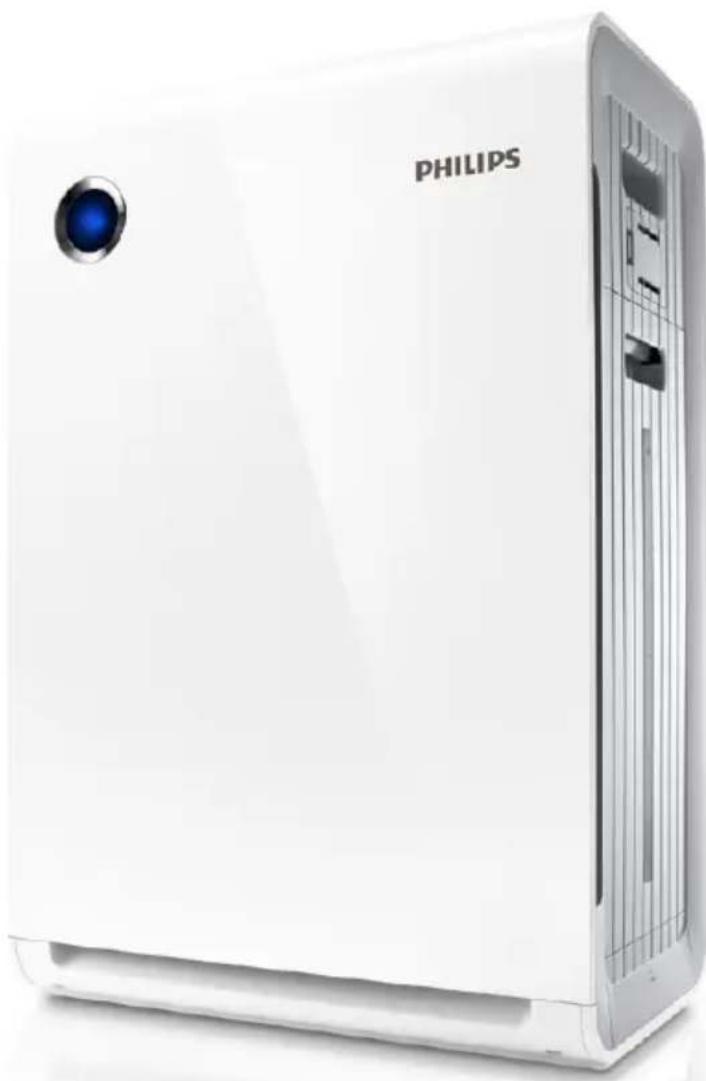
White Philips air conditioner unit with a blue LED, shown from front and back angles (no text or symbols on the device body)AC4084
AC4085
User manual 3
Contents
1 Important 4
Safety 4
2 Your combi air purifier and humidifier 6
What's in the box 6
3 Get started 7
Install filters 7
Prepare for humidification 8
4 Use the appliance 10
Understand the air quality light 10
Understand the humidity light indicator 10
Understand the auto mode 10
Understand the healthy air protect alert 10
Understand the healthy air protect lock 10
Switch on and off the appliance 11
Set the sensitivity of the air quality sensor 12
Change the fan speed 13
Auto 13
Manual 13
Silent mode 14
Set the timer 14
Set the humidity level 15
Water level 16
5 Clean your appliance 17
Clean the body of the appliance 17
Clean the air quality sensor and humidity sensor 17
Clean the water bucket 18
Clean the humidification filter tray 19
6 Clean the pre-filter and
humidification filter 20
Clean the pre-filter 20
Clean the humidification filter 22
Rinse the humidification filter 22
Descale the humidification filter 23
Cleaning schedule 24
7 Replace the filters 25
Replace the multi-care filter 25
Replace the activated carbon filter and the
HEPA filter 27
Replace the humidification filter 28
8 Add the multi-care filter 30
Activate the multi-care filter 30
9 Reset the filter lifetime counter 31
10 Troubleshooting 32
11 Guarantee and service 35
Order parts or accessories 35
12 Notices 36
Electomagnetic fields (EMF) 36
Compliance with EMF 36
Recycling 36
1 Important
Safety
Read this user manual carefully before you use the appliance, and save it for future reference.
Danger
- Do not let water or any other liquid or flammable detergent enter the appliance to avoid electric shock and/or a fire hazard.
- Do not clean the appliance with water, any other liquid, or a (flammable) detergent to avoid electric shock and/or a fire hazard.
- Do not spray any flammable materials such as insecticides or fragrance around the appliance.
- The water in the water bucket is not suitable for drinking. Do not drink this water and do not use it to feed animals or to water plants. When you empty the water bucket, pour the water down the drain.
Warning
- Check if the voltage indicated on the bottom indicated at the rear of the appliance corresponds to the local power voltage before you connect the appliance.
- If the power cord is damaged, you must have it replaced by Philips, a service center authorized by Philips, or similarly qualified persons in order to avoid a hazard.
- Do not use the appliance if the plug, the power cord, or the appliance itself is damaged.
- This appliance is not intended for use by persons (including children) with reduced physical sensory or mental capabilities, or lack of experience and knowledge, unless they have been given supervision or instruction concerning use of the appliance by a person responsible for their safety.
• Children should be supervised to ensure that they do not play with the appliance. - Do not block the air inlet and outlet, e.g. by placing items on the air outlet or in front of the air inlet.
Caution
- This appliance is not a substitute for proper ventilation, regular vacuum cleaning, or use of an extractor hood or fan while cooking.
- If the power socket used to power the appliance has poor connections, the plug of the appliance becomes hot. Make sure that you plug the appliance into a properly connected power socket.
• Always place and use the appliance on a dry, stable, level, and horizontal surface. - Leave at least 20cm free space behind and on both sides of the appliance and leave at least 30cm free space above the appliance.
- Do not place anything on top of the appliance and do not sit on the appliance.
- Do not place the appliance directly below an air conditioner to prevent condensation from dripping onto the appliance.
- Make sure all filters are properly installed before you switch on the appliance.
- Only use the original Philips filters specially intended for this appliance. Do not use any other filters.
- Avoid knocking against the appliance (the air inlet and outlet in particular) with hard objects.
• Always lift or move the appliance by both handles at the sides of the appliance. - Do not insert your fingers or objects into the air outlet or the air inlet to prevent physical injury or malfunctioning of the appliance.
- Do not use this appliance when you have used indoor smoke-type insect repellents or in places with oily residues, burning incense, or chemical fumes.
- Do not use the appliance near gas appliances, heating devices or fireplaces.
• Always unplug the appliance after use and before you clean it. - Do not use the appliance in a room with major temperature changes, as this may cause condensation inside the appliance.
- To prevent interference, place the appliance at least 2m away from electrical appliances that use airborne radio waves such as TVs, radios, and radio-controlled clocks.
- When the appliance is not used for a long time, bacteria may grow on the filters. Check the filters after a long period of disuse. If the filters are very dirty, replace them (see the chapter 'Replace the filters').
- The appliance is only intended for household use under normal operating conditions.
- Do not use the appliance in wet surroundings or in surroundings with high ambient temperatures, such as the bathroom, toilet, or kitchen.
- The appliance does not remove carbon monoxide (CO) or radon (Rn). It cannot be used a safety device in case of accidents with combustion processes and hazardous chemicals.
- Clean the water bucket every day to keep it clean.

Caution
- Only fill the water bucket with cold tap water. Do not use ground water or hot water.
- Do not put any substance other than water in the water bucket. Do not put fragrance in the water bucket.
- If you do not use the humidification function for a long time, clean the water bucket and humidification filter tray. Dry the humidification filter.
- If you need to move the appliance, disconnect the appliance from the power supply first. Then empty the water bucket. Carry the appliance horizontally by both handles on the sides of the appliance.
2 Your combi air purifier and humidifier
Congratulations on your purchase, and welcome to Philips!
To fully benefit from the support that Philips offers, register your product at www.Philips.com/welcome.
Read this user manual carefully before you install and use the unit. Save it for future reference.
What's in the box
Check and identify the contents of your package:
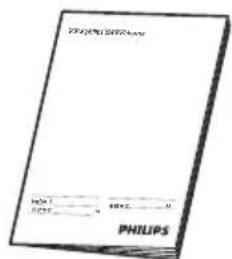
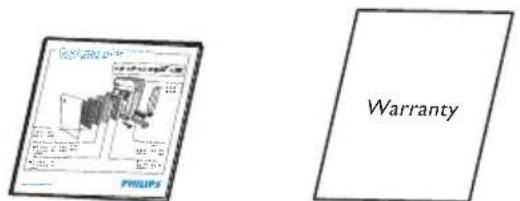
Quick start guideUser manual Warranty
3 Get started
Install filters
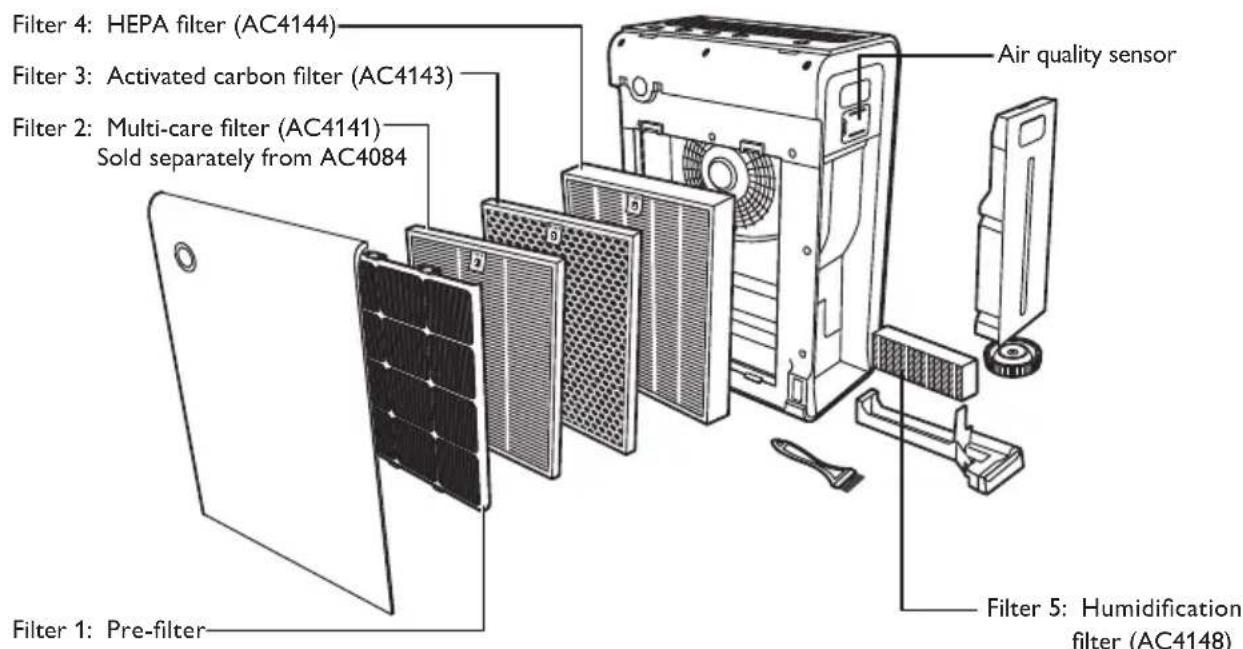
The appliance comes with all filters fitted inside. Remove the packaging of the filters before you can use the appliance. Remove all filters, unpack them, and place them back into the appliance described as follows:

Tip
- When you remove or insert filters, place the appliance against a wall for more stability.

Note
- Insert the filters in the correct position.
- Make sure that you place the filters in the order of HEPA filter, activated carbon filter, multi-care filter, and finally the pre-filter.
• The multi-care filter is sold separately from AC4084.
• Make sure that the side with the tag is pointing towards you.
1 Place your fingers in the recesses of the side panels.
2 Gently pull the top part of the front panel out, then lift the top part of the front panel towards you.
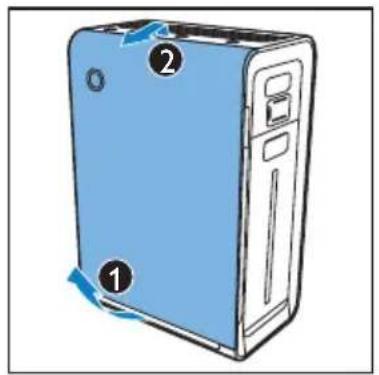
3 Remove all the filters from the appliance.
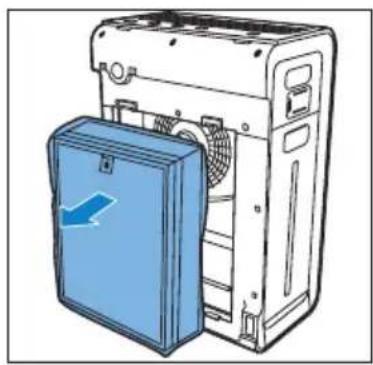
natural_image
Illustration of a refrigerator with a blue door and fan, no text or symbols present4 Remove all packaging material from the filters.
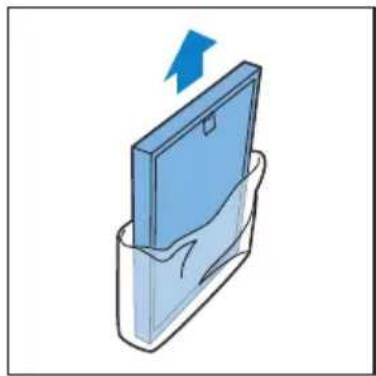
natural_image
Illustration of a blue folder with an arrow pointing upward, partially enclosed in a transparent container (no text or symbols)5 Put the filters back into the appliance.
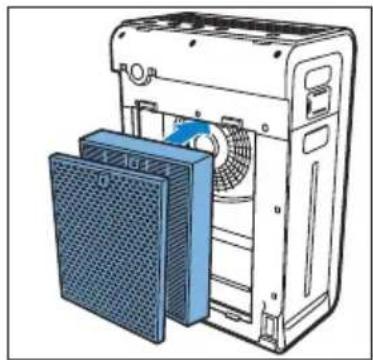
natural_image
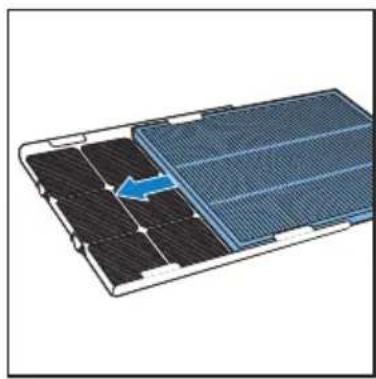
Illustration of a server rack with a fan and ventilation unit, showing no text or symbols6 Slide the multi-care filter (if available) into the pre-filter.
natural_image
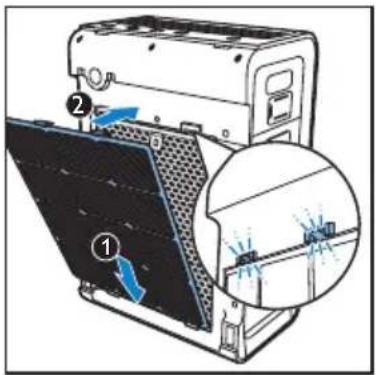
Diagram of a solar panel with an arrow indicating a component, showing internal structure without any text or symbols.7 Place the pre-filter in the appliance.

Note
- Make sure that the side with the two clips is pointing towards you, and that all hooks of the pre-filter are properly attached to the purifier.
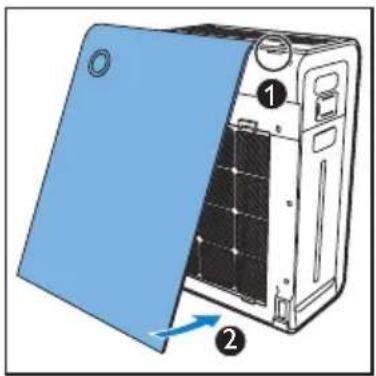
8 To reattach the front panel, mount the panel onto the top of the appliance first (1). Then, gently place the panel against the body of the appliance (2).
Prepare for humidification
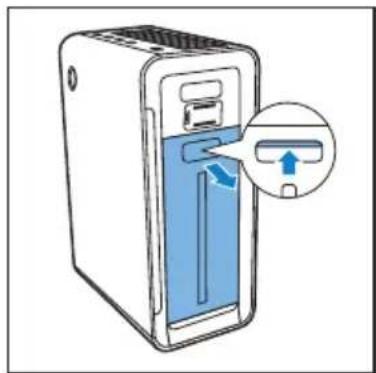
1 Pull the water bucket from the side of the appliance.
natural_image
Illustration of a server rack with a blue door and directional arrow indicating a device (no text or symbols present)2 Pull the humidification filter tray from the appliance.
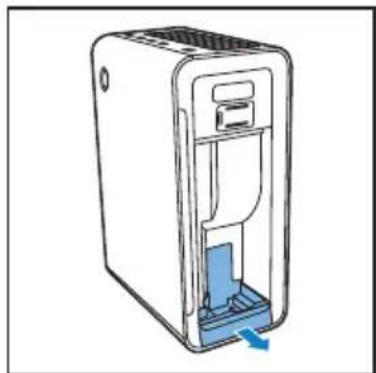
natural_image
Diagram of a device with a blue internal component and a blue arrow indicating direction (no text or symbols)3 Remove the packaging material from the humidification filter.
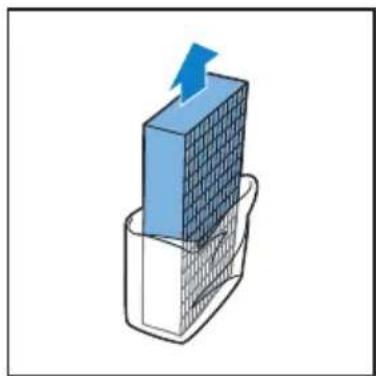
natural_image
3D diagram of a blue grid block with an upward arrow emerging from it, placed on a wire mesh base (no text or symbols)4 Put the humidification filter back and slide the humidification filter tray back to the appliance.
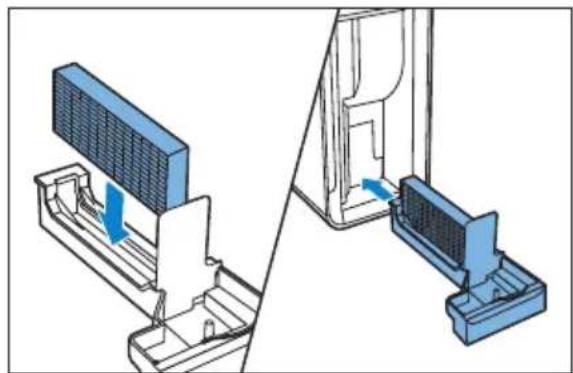
natural_image
Technical illustration of a device assembly showing a component being inserted into a housing (no text or symbols present)5 Unscrew the top cap of the water bucket.
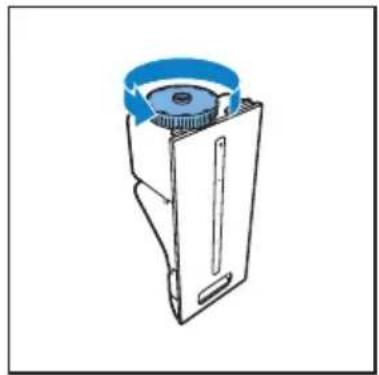
natural_image
Line drawing of a mechanical device with a blue circular component on top (no text or symbols)6 Fill the water bucket with cold tap water.
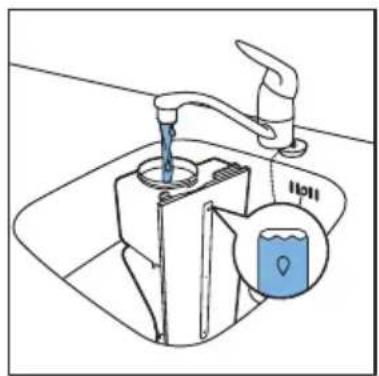
natural_image
Line drawing of a faucet with liquid being inserted into a sink, showing water level indicator (no text or symbols)7 Screw the top cap tightly back onto the water bucket until you feel and hear a rattling sound.
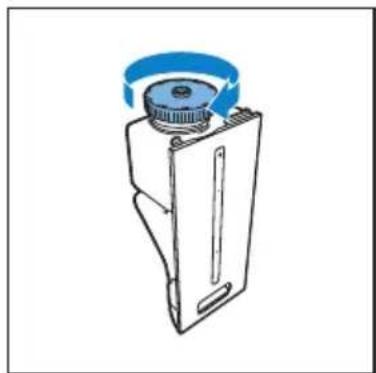
natural_image
Technical line drawing of a mechanical device with a blue circular component and a central hub (no text or symbols)8 Place the water bucket back into the appliance.
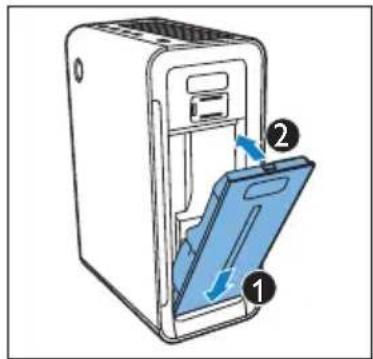
4 Use the appliance
Understand the air quality light
| Color of the air quality light Air quality level |
| Blue good |
| Purple fair |
| Red bad |
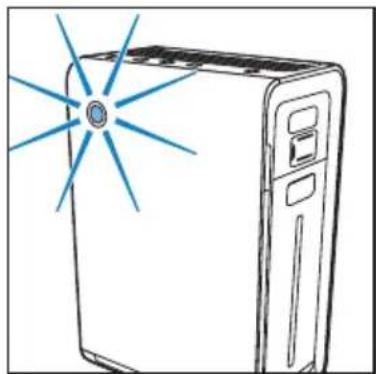
The air quality light automatically goes on when the appliance is switched on.

Note
- The built-in air quality sensor measures the air quality and automatically selects the appropriate color of the air quality light. When the air is clean, the color of the air quality light is in blue. When the air quality deteriorates, the color of the air quality light changes to purple or red.
Understand the humidity light indicator
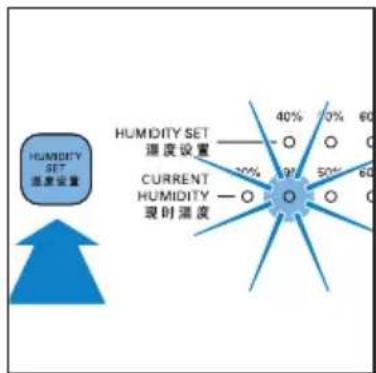
The appliance is equipped with a built-in humidity sensor. The CURRENT HUMIDITY lights (30%, 40%, 50% or 60%) show the current humidity.

Note
• The accuracy of the humidity indication is approximately plus or minus 5%.
- It takes some time to measure the humidity level in the room.
Understand the auto mode
The built-in air quality sensor automatically measures the ambient air quality, and selects the most appropriate fan speed.
Understand the healthy air protect alert
The filter lights indicate that the filter has to be cleaned or be replaced.
| Different healthy air protect alert lights | Follow this |
| Filter light 1/5 flashes. | Clean the pre-filter and descale the humidification filter. |
| Filter light 2 flashes. | Replace the multi-care filter. |
| Filter light 3/4 flashes. | Replace the activated carbon filter and the HEPA filter. |
| Filter light 5 flashes. | Replace the humidification filter. |
Understand the healthy air protect lock
This appliance is equipped with the Healthy air protect lock to make sure that the filters are in optimal condition when the appliance is operating. When the filter is almost full and has to be replaced, the specific filter light (2 / 3/4 / 5) start to flash.
When you do not replace the filter in time:
→The appliance stops operating and it is locked.
→The specific filter light (2 / 3/4) 5 illuminate continuously.

Note
- The appliance is locked after the filter light flashing for approximately 2 weeks.
- Approximately one day before the appliance locks, it beeps every 30 minutes to inform you that the filter needs to be replaced.
Switch on and off the appliance
The appliance always operates under air purification combined with humidification. If you want to operate the appliance only as an air purifier, you need to empty the water in the water bucket.
1 Plug the appliance into the power supply.
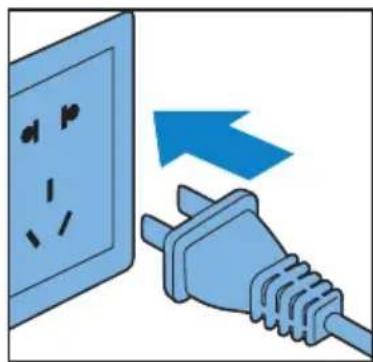
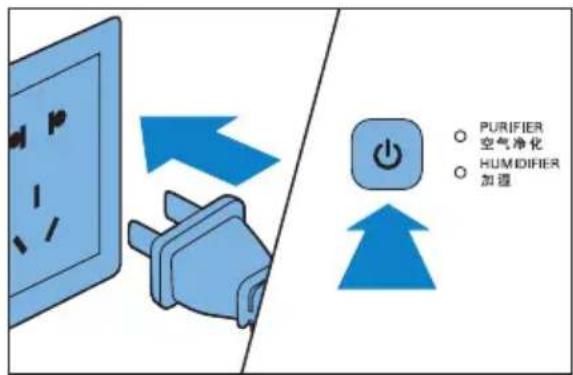
→All lights go on twice and you hear a beep. Then, the lights go out again.
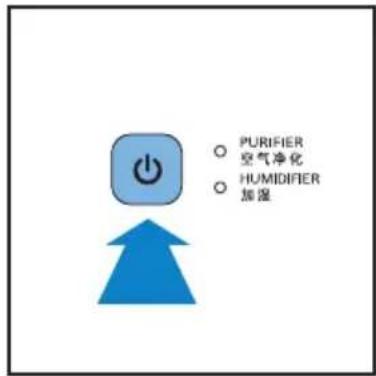
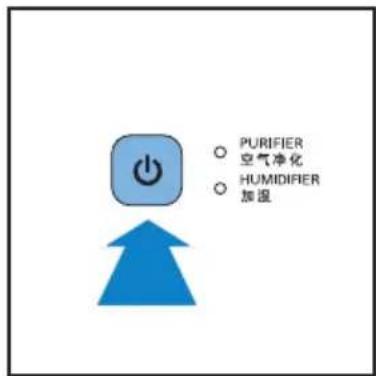
2 Press the ⏻ button to switch on the appliance.
→ The PURIFIER and HUMIDIFIER lights are on.
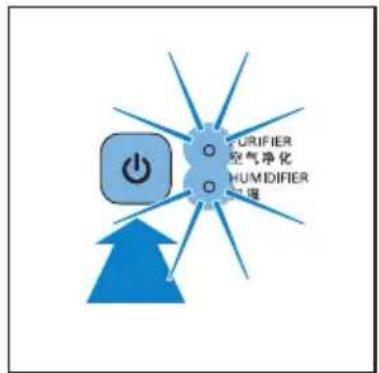
→The air quality light shows the current air quality.
natural_image
Line drawing of a server with a blue starburst light emitting a beam (no text or symbols)→ The CURRENT HUMIDITY light shows the current humidity level.
radar
| Category | Value (%) | |---|---| | HUMIDITY SET 温度设置 | 40 | | CURRENT HUMIDITY 现时湿度 | 30 | | HUMIDITY SET 温度设置 | 50 | | CURRENT HUMIDITY 现时湿度 | 60 |3 Press the ⏻ button to switch off the appliance.

Note
- Humidifier cannot be used alone without air purifier operating.
- If the water bucket is empty, the humidifier is switched off, but the air purifier still operates. In this way the appliance operates as an air purifier only (PURIFIER light and REFILL WATER light are on).
Set the sensitivity of the air quality sensor
People with certain health problems (for example: allergies or asthma) have a greater need for healthy air. For this reason, the appliance allows you to adjust the sensitivity of the air quality sensor. If you set it to higher sensitivity level, the appliance starts cleaning the air at lower pollution level.
There are 3 sensitivity levels:
- standard
- sensitive
- extra sensitive
The pollution sensor is set to standard sensitivity. You can adjust the sensitivity of the air quality sensor in the following way:

Note
- When it is set to a higher sensitivity, the appliance starts cleaning the air at lower pollution levels to make the air even cleaner.
1 Make sure the purifier is on.
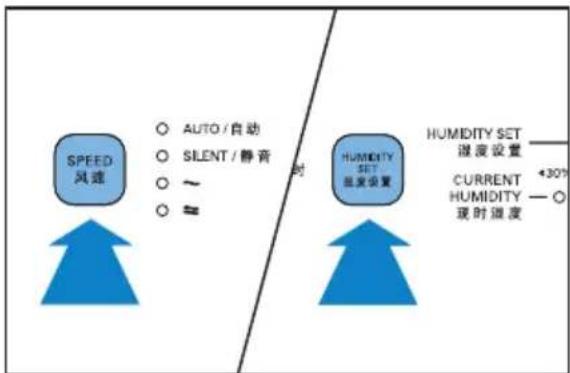
2 Press the SPEED and the HUMIDITY SET buttons simultaneously.
flowchart
graph LR
    A["SPEED 风速"] --> B["AUTO / 自动"]
    A --> C["SILENT / 静音"]
    A --> D["~"]
    A --> E["≈"]
    F["HUMIDITY SET 温度设置"] --> G["+30% CURRENT HUMIDITY — ○ 现时湿度"]
    H["HUMIDITY SET 温度设置"] --> G
    I["时"] --> G
→The purifier beeps twice and the fan speed light (≈) flashes to show the current sensitivity level of the air quality sensor.
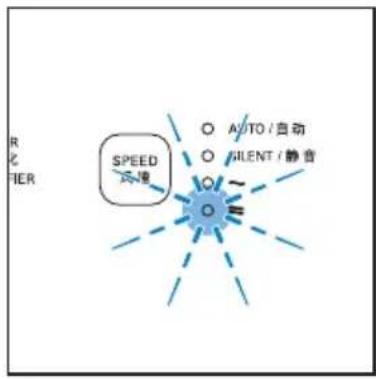
Fan speed light Sensitivity level
| SILENT extra sensitive | |
| ~ | sensitive |
| ≈ | standard |
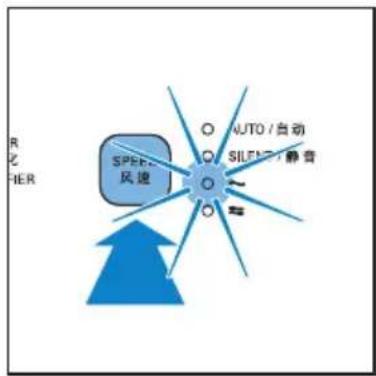
3 Press the SPEED button to adjust the sensitivity level of the air quality sensor.
→ One of the SPEED lights ( SILENT, \~, or ≈ ) goes on to show the preferred sensitivity level of the air quality sensor.
4 Press and hold the SPEED and HUMIDITY SET buttons again to confirm the setting.

Note
- When you change the sensitivity, the appliance automatically starts operating at the set sensitivity level whenever you switch on the appliance.
Change the fan speed
Auto
1 Press the ⏻ button to switch on the appliance.
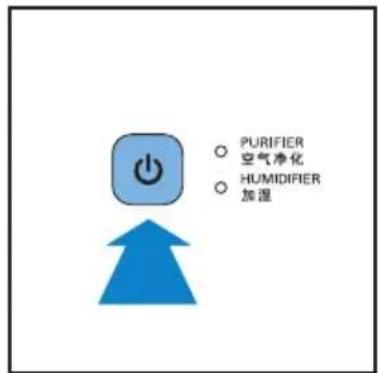
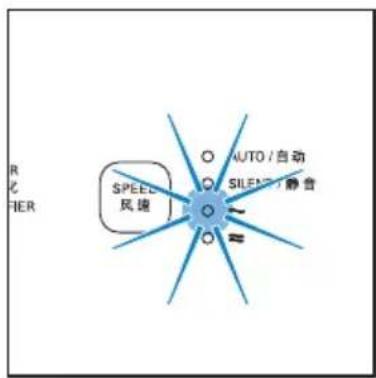
2 Press the SPEED button to select AUTO mode.
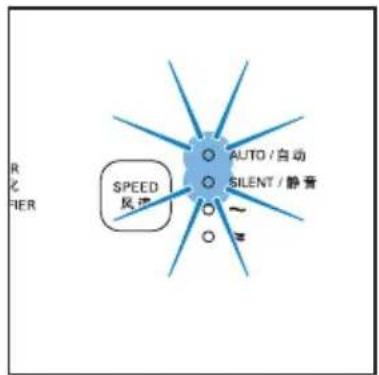

Note
- In auto mode, you can set the desired humidity level (40%, 50%, 60% in your room (see chapter 'Set the humidity level').
Manual
You can manually select the desired fan speed, which overrides the auto mode.
1 Press the ⏻ button to switch on the appliance.
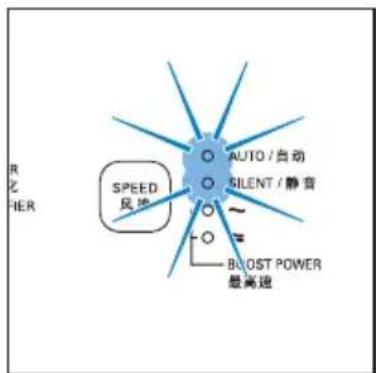
2 Press the SPEED button once or more times to select the desired fan speed (AUTO, SILENT, \~ or ≈).

Tip
- If the air quality light is in blue or in deep purple color, this means the air quality is good or excellent, and you can select a lower fan speed.
- On the other hand, if the air quality light is in red or in purple color, this means the air quality is bad or fair. You can select the fan speed ≈ to clean the air quickly.
Silent mode
In silent mode, the air filter operates very quietly.
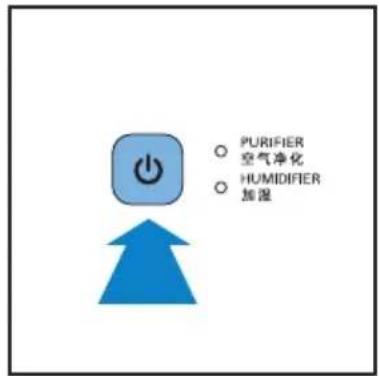
1 Press the ⏻ button to switch on the appliance.
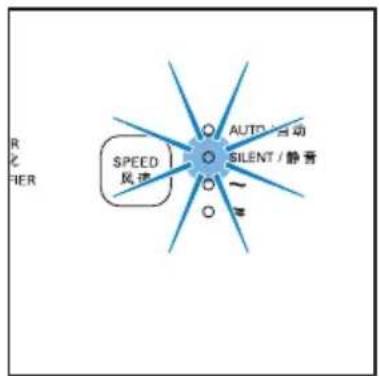
2 Press the SPEED button to select the silent mode.
→ The SILENT light goes on.
To change to another fan speed, press the SPEED button.
Set the timer
With the timer function, you can let the appliance operate for a set number of hours.
When the set time has elapsed, the appliance automatically switches off.
You can use the timer function in the following situations:
| Situations You will see | |
| Choose a fan speed manually (see ‘Manual’). | One of the SPEED lights (~ or ≈) and one of the TIMER lights (1,4 or 8) are on. |
| The appliance is in auto mode (see ‘Auto’). | The AUTO light is on. One of the SPEED lights (SILENT, ~ or ≈), and one of the TIMER lights (1,4, or 8) are on. |
| The appliance is in silent mode (see ‘Silent mode’). | The SILENT light and one of the TIMER lights (1,4 or 8) are on. |
1 Press the ⏻ button to switch on the appliance.
2 Press the TIMER button to activate the timer. → The TIMER light (1, 4 or 8) goes on.
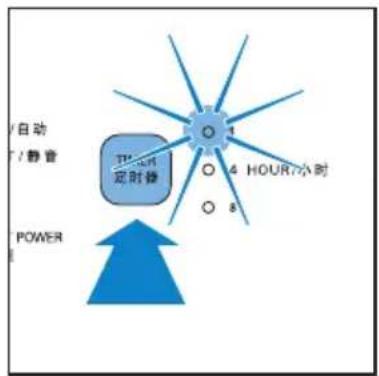
3 Press the TIMER button repeatedly to choose the number of hours you want the appliance to operate. The corresponding TIMER light goes on.
To deactivate the timer function, press the TIMER button repeatedly until the TIMER light (1, 4 or 8) is out.
Set the humidity level

Note
- Make sure that the water bucket is filled with water when you want to use the humidification function (see the chapter 'Get started', section 'Prepare for humidification').
You can set the desired humidity level only in AUTO mode. When the humidity of the room reaches the desired level, the humidity stays at this level constantly.
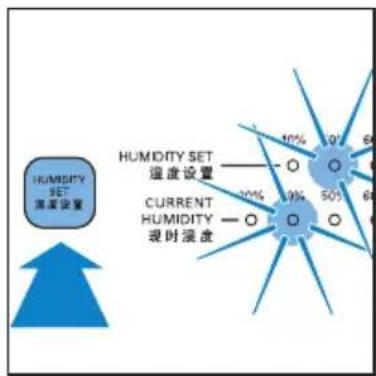
- Press the HUMIDITY SET button once or more times to set the desired air humidity to 40%, 50% or 60%.
→ The corresponding HUMIDITY SET light (40%, 50% or 60%) goes on.

Note
- If you do not set the humidity level, the HUMIDITY SET light goes off. The humidifier humidifies the air under AUTO mode and the preset humidity level is 50%.
- If you change the fan speed (SILENT, \~ or ≈), the humidifier automatically operates according to the fan speed level and the AUTO mode deactivates.
- If you want to increase the humidity level in shorter time, you can select higher fan speed.
- The appliance comes with a smart memory function, it can memorize the settings when the appliance is switched off (e.g. electricity shortage). When the appliance is plugged in/switched on again, it automatically starts at the previous setting.
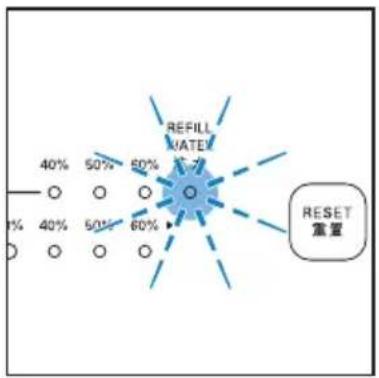
Water level
The water level in the water bucket is visible through the water level window on the side of the appliance. When there is not enough water in the water bucket, the REFILL
WATER light flashes to indicate that you have to refill the water bucket.

Note
- Appliance can operate under air purification only when the water in the bucket is out and the REFILL WATER light flashes. Humidification function can only be activated when the bucket is filled with water.
5 Clean your appliance

Note
• Always unplug the appliance before you clean it.
- Never immerse the appliance in water or any other liquid.
- Never use abrasive, aggressive, or flammable cleaning agents such as bleach or alcohol to clean any part of the appliance.
- Only the pre-filter and humidification filter are washable. Other air purifier filters are NOT washable nor vacuum cleanable.
Clean the body of the appliance
Regularly clean the inside and outside of the appliance to prevent dust from collecting.
1 Wipe away dust with a soft dry cloth from the body of the appliance.
2 Clean the air inlet and the air outlet with a soft dry cloth.
Clean the air quality sensor and humidity sensor
Clean the air quality and humidity sensors every month for optimal functioning of the appliance. Clean it more frequently if you use the appliance in a dusty environment.

Note
- When the humidity level in the room is very high, it is possible that condensation develops on the air quality sensor. As a result, the air quality light may indicate that the air quality is bad even though the air quality is good. In this case you have to clean the air quality sensor or use one of the manual speed settings.
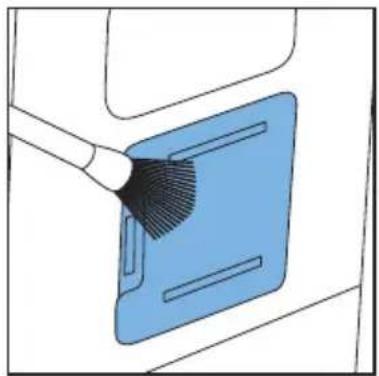
1 Clean the inlet and outlet of the air quality and air humidity sensors with a soft brush.
natural_image
Illustration of a blue plastic tray with a brush applying material to it, no text or symbols present2 Remove the cover of the air quality and air humidity sensors.
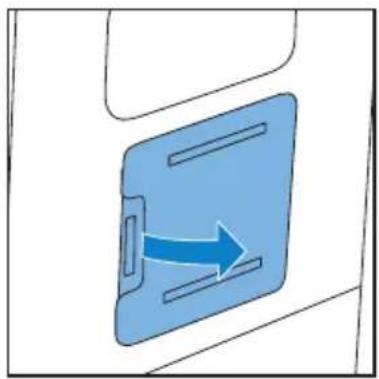
natural_image
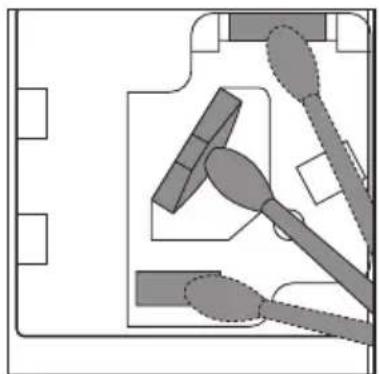
Blue arrow pointing right inside a blue rectangular device (no text or symbols)3 Clean the sensors, the dust inlet and the dust outlet with a lightly moistened cotton swab.
natural_image
Pure electrical circuit lines without any symbols4 Dry them with a dry cotton swab.
5 Reattach the sensor cover.
Clean the water bucket
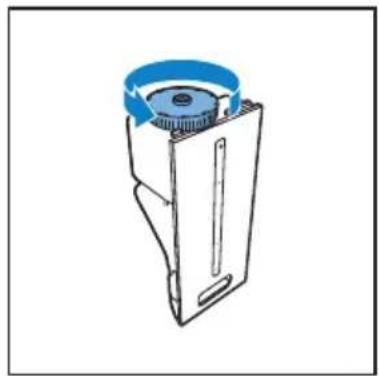
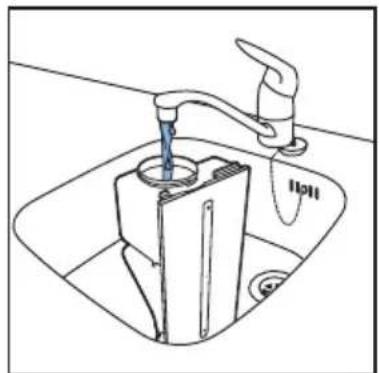
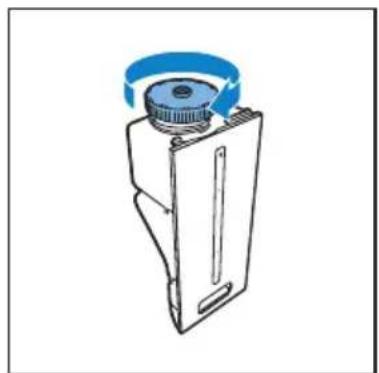
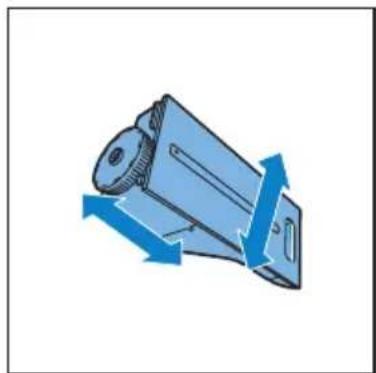
Clean the water bucket every day to keep it hygienic.
1 Unscrew the top cap of the water bucket.
natural_image
Line drawing of a mechanical device with a blue circular component on top (no text or symbols)2 Fill the water bucket for 1/3 with water.
natural_image
Line drawing of a hand washing machine with a water tap, no text or symbols present3 Add some mild washing-up liquid to the water in the water bucket.
4 Screw the top cap tightly back onto the water bucket.
natural_image
Technical line drawing of a mechanical component with a blue circular component on top (no text or symbols)5 Shake the bucket to and fro with both hands to clean the inside of the water bucket.
natural_image
Illustration of a mechanical component with blue arrows indicating direction (no text or symbols)6 Unscrew the top cap of the water bucket.
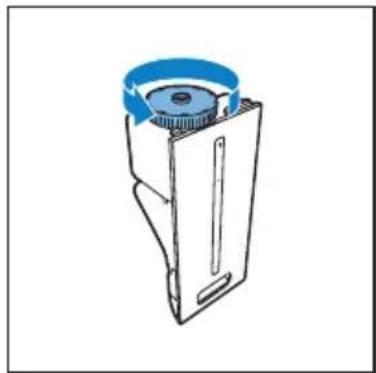
natural_image
Line drawing of a mechanical device with a blue circular component on top (no text or symbols)7 Empty the water bucket into a sink.
8 Rinse the inside of the water bucket with fresh water several times.
9 Screw the top cap tightly back onto the water bucket.
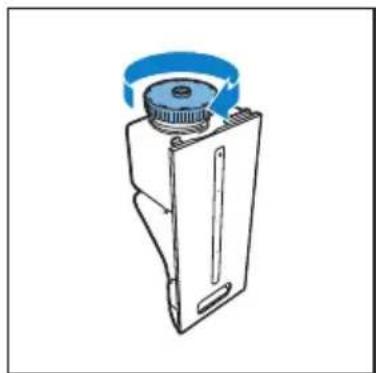
natural_image
Technical line drawing of a mechanical device with a blue circular component and a central hub (no text or symbols)Clean the humidification filter tray
Clean the humidification filter tray every week to keep them hygienic.
1 Remove the water bucket out of the appliance. Then remove the humidification filter tray from the appliance.
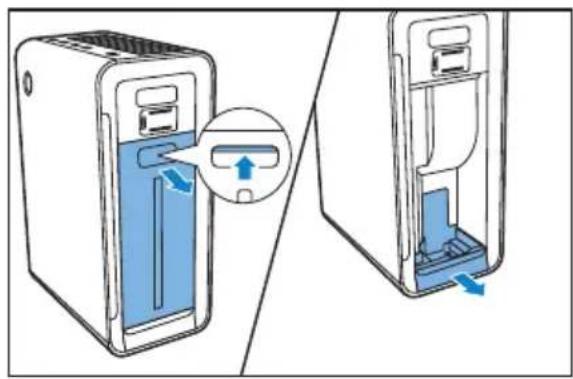
natural_image
Diagram showing a device being inserted into a container, with arrows indicating the process (no text or symbols present)
Note
- Remove the water bucket first before you can remove the humidification filter tray.
2 Take the humidification filter out of the humidification filter tray.
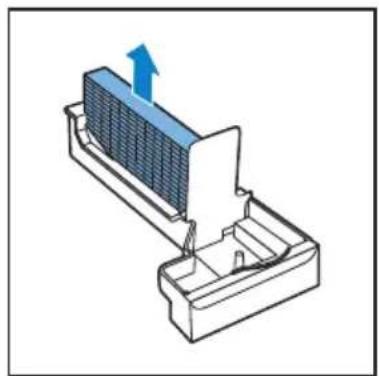
natural_image
Diagram of a heat exchanger or cooling unit with a blue arrow indicating upward flow (no text or symbols present)3 Rinse the humidification filter tray under a running tap.
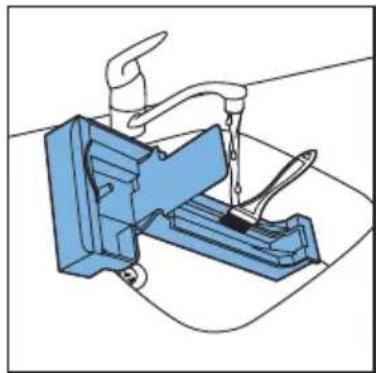
natural_image
Illustration of a blue mechanical device with a faucet and handle, no text or symbols present
Note
- If necessary, use a mild detergent to clean the humidification filter tray. In this case, rinse the humidification filter tray thoroughly.
4 Dry the humidification filter tray with a soft, dry cloth.
5 Place the humidification filter back and slide the humidification filter tray back to the appliance.
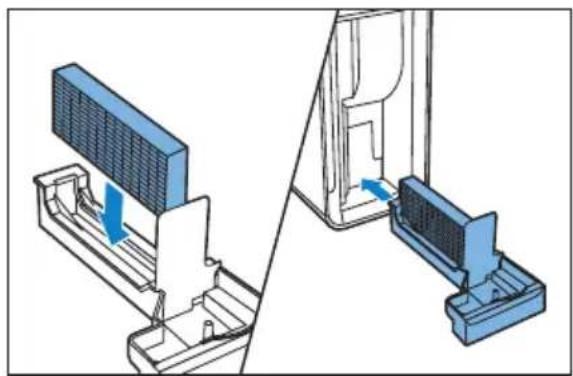
natural_image
Diagram showing a device assembly with a panel and a close-up view of the component (no text or symbols present)6 Clean the pre-filter and humidification filter

Note
- Only the pre-filter and humidification filter are washable. All other filters are not washable.
- Rinse the humidification filter every week to keep it hygienic.
- When the filter light ① / ⑤ flashes, you have to clean the pre-filter and descale the humidification filter.
- The light flashes approximately for every two weeks.
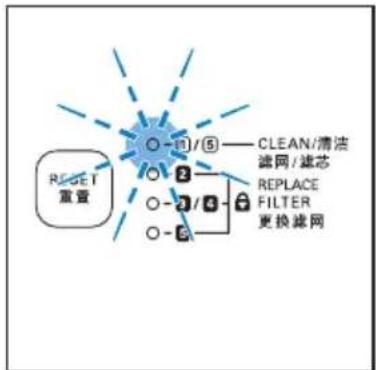
flowchart
graph TD
    A["RESET 重置"] --> B["○ -1/5"]
    B --> C["○ 2"]
    C --> D["○ -2/4"]
    D --> E["○ -3"]
    E --> F["○ -4"]
    F --> G["○ -5"]
    G --> H["○ -6"]
    H --> I["○ -7"]
    I --> J["○ -8"]
    J --> K["○ -9"]
    K --> L["○ -10"]
    L --> M["○ -11"]
    M --> N["○ -12"]
    N --> O["○ -13"]
    O --> P["○ -14"]
    P --> Q["○ -15"]
    Q --> R["○ -16"]
    R --> S["○ -17"]
    S --> T["○ -18"]
    T --> U["○ -19"]
    U --> V["○ -20"]
    V --> W["○ -21"]
    W --> X["○ -22"]
    X --> Y["○ -23"]
    Y --> Z["○ -24"]
    Z --> AA["○ -25"]
    AA --> AB["○ -26"]
    AB --> AC["○ -27"]
    AC --> AD["○ -28"]
    AD --> AE["○ -29"]
    AE --> AF["○ -30"]
    AF --> AG["○ -31"]
    AG --> AH["○ -32"]
    AH --> AI["○ -33"]
    AI --> AJ["○ -34"]
    AJ --> AK["○ -35"]
    AK --> AL["○ -36"]
    AL --> AM["○ -37"]
    AM --> AN["○ -38"]
    AN --> AO["○ -39"]
    AO --> AP["○ -40"]
    AP --> AQ["○ -41"]
    AQ --> AR["○ -42"]
    AR --> AS["○ -43"]
    AS --> AT["○ -44"]
    AT --> AU["○ -45"]
    AU --> AV["○ -46"]
    AV --> AW["○ -47"]
    AW --> AX["○ -48"]
    AX --> AY["○ -49"]
    AY --> AZ["○ -50"]
    AZ --> BA["○ -51"]
    BA --> BB["○ -52"]
    BB --> BC["○ -53"]
    BC --> BD["○ -54"]
    BD --> BE["○ -55"]
    BE --> BF["○ -56"]
    BF --> BG["○ -57"]
    BG --> BH["○ -58"]
    BH --> BI["○ -59"]
    BI --> BJ["○ -60"]
    BJ --> BK["○ -61"]
    BK --> BL["○ -62"]
    BL --> BM["○ -63"]
    BM --> BN["○ -64"]
    BN --> BO["○ -65"]
    BO --> BP["○ -66"]
    BP --> BQ["○ -67"]
    BQ --> BR["○ -68"]
    BR --> BS["○ -69"]
    BS --> BT["○ -70"]
    BT --> BU["○ -71"]
    BU --> BV["○ -72"]
    BV --> BW["○ -73"]
    BW --> BX["○ -74"]
    BX --> BY["○ -75"]
    BY --> BZ["○ -76"]
    BZ --> CA["○ -77"]
    CA --> CB["○ -78"]
    CB --> CC["○ -79"]
    CC --> CD["○ -80"]

Note
• The filter light ☑ keeps flashing for 24 hours.
• After you have cleaned the pre-filter and descale the humidification filter, the light stops flashing and the filter lifetime is reset automatically.
- When you turn off the appliance, the light stops flashing.
Clean the pre-filter

Note
- Clean the pre-filter when the filter light f flashes to ensure optimal functioning of the appliance.
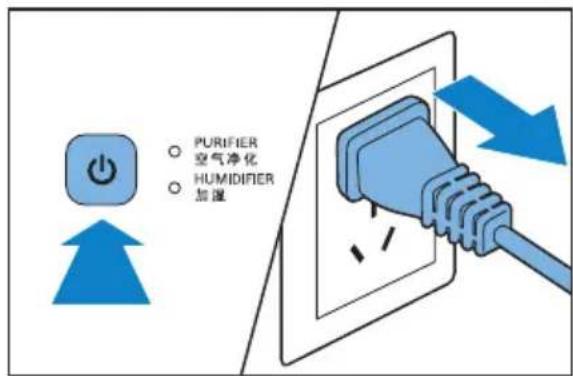
1 Switch off the appliance and unplug it.
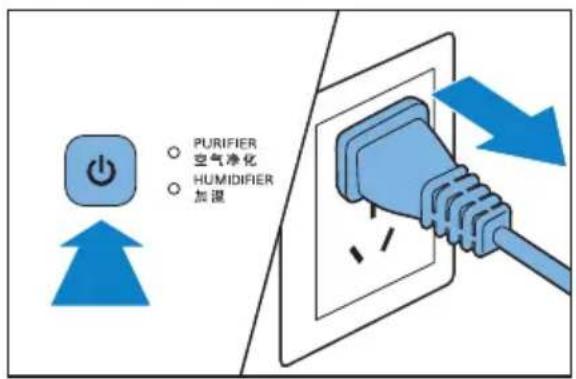
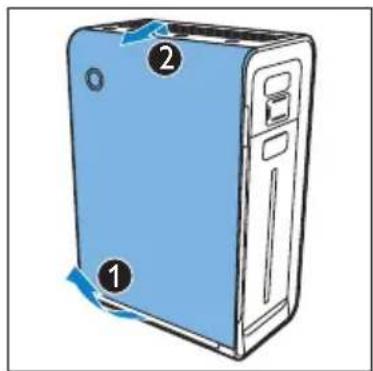
2 Place your fingers in the recesses of the side panels, then lift and detach the bottom of the font panel towards you. Gently lift the top part of the front panel out of the appliance.
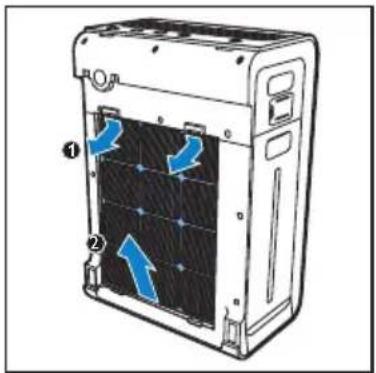
3 To remove the pre-filter, press the two clips down and pull the filter towards you.
natural_image
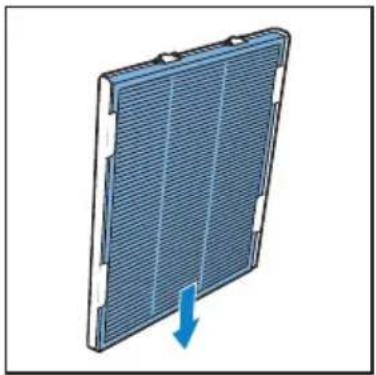
Diagram of a server rack with blue directional arrows indicating internal components (no text or symbols)4 Remove the multi-care filter from the pre-filter.
natural_image
3D diagram of a solar panel with a blue arrow indicating downward motion (no text or symbols)5 Wash the pre-filter under a running tap. If the pre-filter is very dirty, use a soft brush to brush away the dust.
6 Air dry the pre-filter.
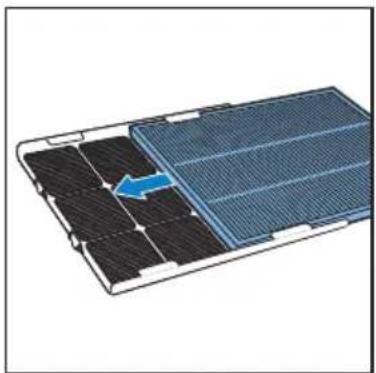
7 Slide the multi-care filter (if available) into the pre-filter.
natural_image
Diagram of a solar panel with an arrow indicating a component, showing internal structure without any text or symbols.8 Put the pre-filter back into the appliance. Attach all hooks properly to the appliance.
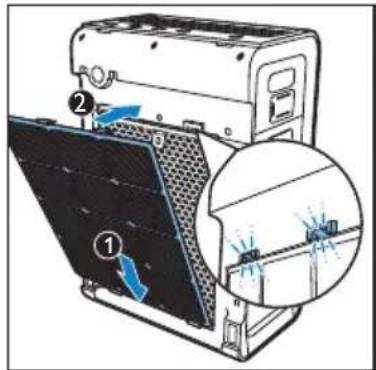
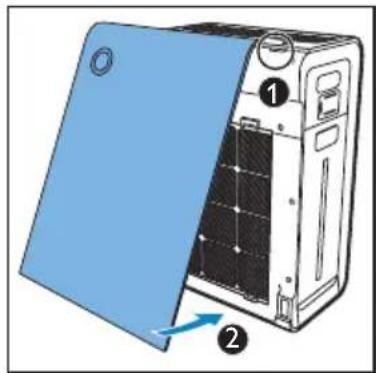
9 To reattach the front panel, insert the top hooks into the top of the air appliance first (1). Then, push the panel against the body of the appliance (2).
natural_image
Diagram of a server rack with blue insulation cover and labeled parts (no text or symbols)
Note
• Alternatively, you can clean the pre-filter by removing the dust with a vacuum cleaner.
- Make sure that the pre-filter is completely dry. If it is still wet, bacteria may multiply in it and shorten the lifetime of the pre-filter.
- Make sure that the side with two clips is pointing towards you, and that all hooks of the pre-filter are properly attached to the appliance.
Clean the humidification filter
Rinse the humidification filter every week to keep it hygienic. In addition, descale the humidification filter when the filter light ① / ⑤ flash.
Rinse the humidification filter
1 Switch off the appliance and unplug it.
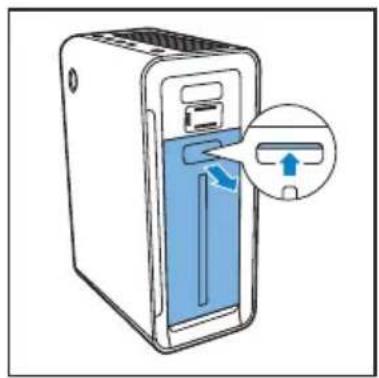
2 Remove the water bucket from the appliance.
natural_image
Illustration of a server rack with a close-up of the door and a blue arrow indicating a loading or insertion process (no text or symbols present)3 Remove the humidification filter tray from the appliance.
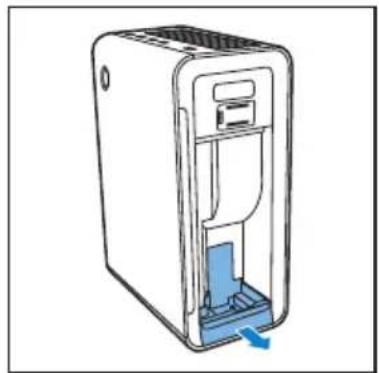
natural_image
Line drawing of a white electronic device with a blue internal component and a blue arrow indicating a flow or insertion (no text or symbols)4 Remove the humidification filter from the humidification filter tray.
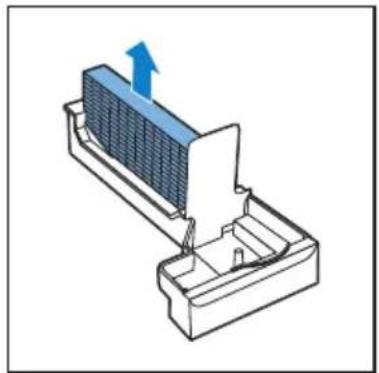
natural_image
3D diagram of a heat exchanger or cooling unit with a blue arrow indicating upward flow (no text or symbols present)
Note
- You have to remove the water bucket first before you can remove the humidification filter tray (see the chapter 'Prepare for humidification').
5 Clean the humidification filter gently with the cleaning brush supplied under a slowly running tap.
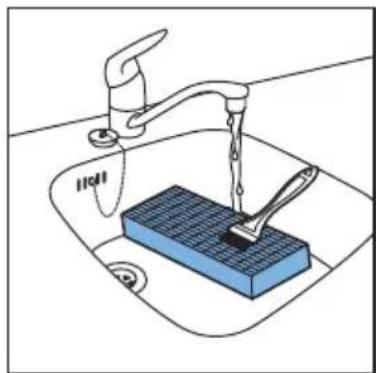
natural_image
Illustration of a kitchen sink with a blue soap dispenser and faucet, no text or symbols present6 Put the humidification filter back into the humidification filter tray.
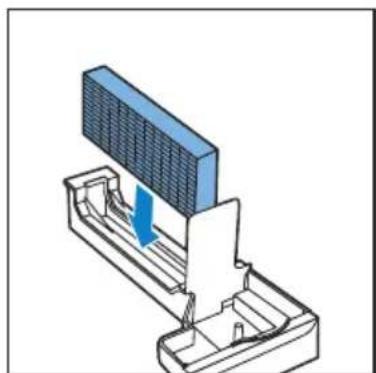
natural_image
3D mechanical assembly diagram showing a component with a blue arrow indicating direction (no text or symbols)Descale the humidification filter

Note
- It is important to descale the humidifying filter to avoid scale build-up, which seriously affects the humidifying performance.
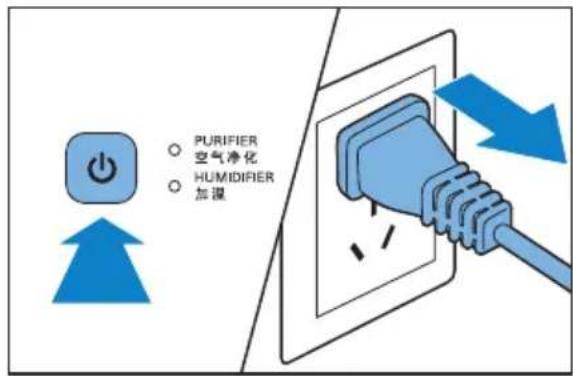
1 Switch off the appliance and unplug it.
2 Remove the water bucket from the appliance.
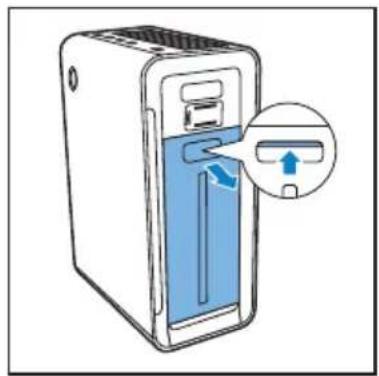
natural_image
Illustration of a server rack with a blue door and arrow indicating a port, no text or symbols present3 Remove the humidification filter tray from the appliance.
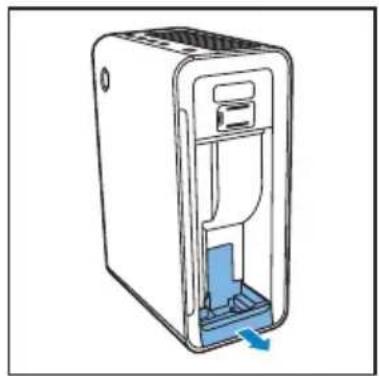
natural_image
Line drawing of a device with a blue internal component and a blue arrow indicating direction (no text or symbols)4 Remove the humidification filter from the humidification filter tray.
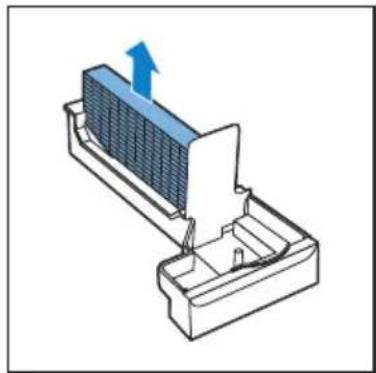
natural_image
3D diagram of a heat exchanger or cooling unit with a blue arrow indicating upward motion (no text or symbols present)
Note
- You have to remove the water bucket first before you can remove the humidification filter tray.
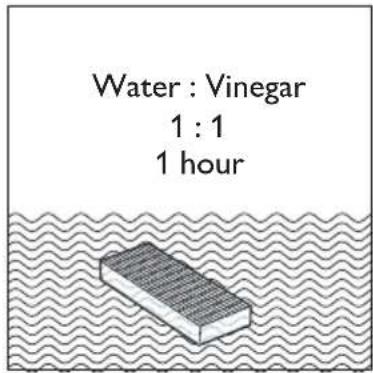
5 Mix the white vinegar (5ml/100 ml acetic acid) with an equal amount of tap water in a container that is large enough to soak the humidification filter in.

Note
- If there are white deposits (scale) on the filter, make sure that the side with the white deposits is immersed in the water.
6 Let the humidification filter soak in the solution for one hour.
7 Discard the water-vinegar solution.
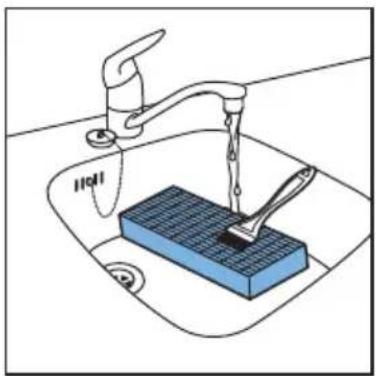
8 Rinse the humidification filter under the tap to rinse away vinegar residues. During rinsing, turn the humidification filter so that both the front and back sides are rinsed.
natural_image
Illustration of a kitchen sink with a blue square basin and a hand washing it, no text or symbols present.9 Let excess water drip off the humidification filter.
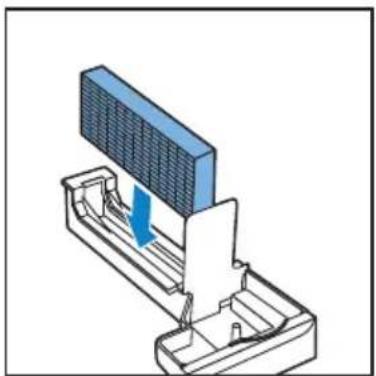
10 Put the humidification filter back into the humidification filter tray.
natural_image
3D diagram of a mechanical assembly with a blue arrow indicating direction (no text or symbols)Cleaning schedule
| Frequency Cleaning method | |
| Every day Rinse the water bucket. | |
| Every week | Rinse the humidification filter. |
| Clean the humidification filter tray. | |
| When the filter light 1 / 5 flashes | Clean the pre-filter. |
| Descale the humidification filter with the vinegar-water mixture. | |
| Every month | Clean the air quality sensor and air humidity sensor with a dry cotton swab. |
| When necessary | Wipe the surface of the appliance with a soft dry cloth. |
7 Replace the filters
The filter lights (2 3/4) indicate which filter has to be replaced.

Note
- If you remove the front panel for filter changing while the appliance is switched on, all lights on the control panel are off and the appliance stops operating.
- Once the front panel is placed back to the appliance, all lights flash twice. Then, the appliance returns to its operating state.
Replace the multi-care filter

Note
- The multi-care filter is available for AC4085 only. For AC4084, the multi-care filter is sold separately. - The multi-care filter is not washable nor vacuum cleanable.
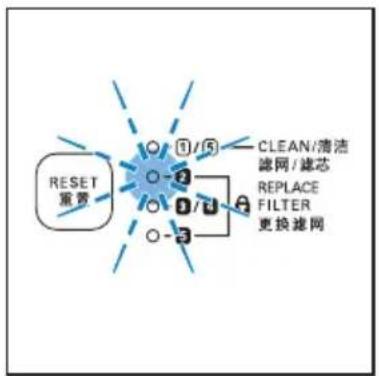
Replace the multi-care filter when the filter light 2 flashes.

Tip
- When you remove or insert filters, place the appliance against a wall for more stability.

Note
- Insert the filters in the correct position.
- Make sure that you place the filters in the order of HEPA filter, activated carbon filter, multi-care filter, and finally the pre-filter.
• Make sure that the side with the tag is pointing towards you.
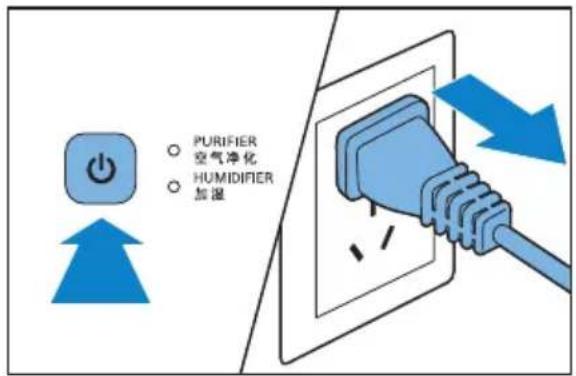
1 Switch off the appliance and unplug it.
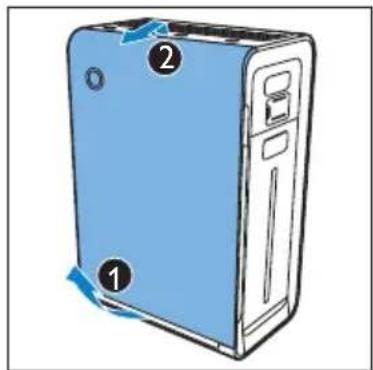
2 Place your fingers in the recesses of the side panels.
3 Gently pull the bottom of the panel out, then lift the top part of the front panel towards you.
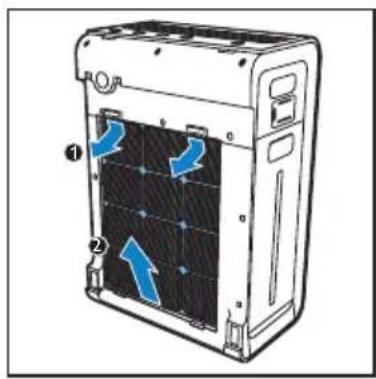
4 Remove the pre-filter from the appliance.
natural_image
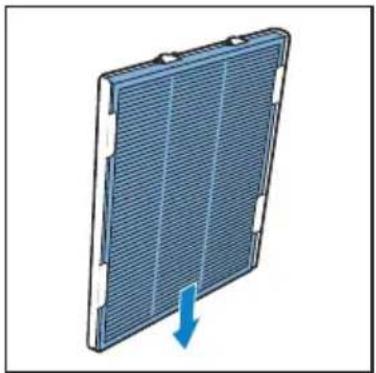
Diagram of a server rack with labeled components and directional arrows indicating internal flow (no text or symbols present)5 Remove the multi-care filter (if available) from the pre-filter.
natural_image
3D diagram of a solar panel with a blue arrow indicating downward motion (no text or symbols)6 Remove all packaging material from the new multi-care filter.
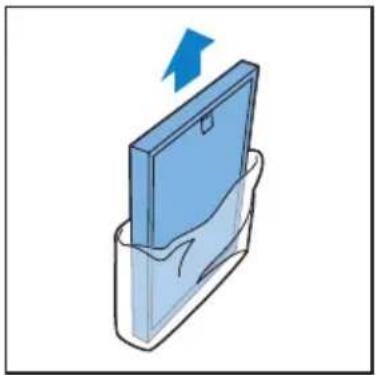
natural_image
Illustration of a blue folder with a blue arrow indicating upward motion (no text or symbols)7 Slide the new multi-care filter into the pre-filter.
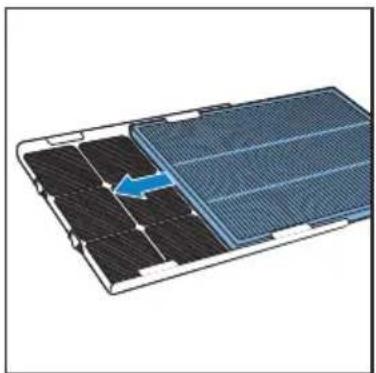
natural_image
Diagram of a solar panel with an arrow indicating a component, showing internal structure without any text or symbols.8 Place the filter back in the appliance.
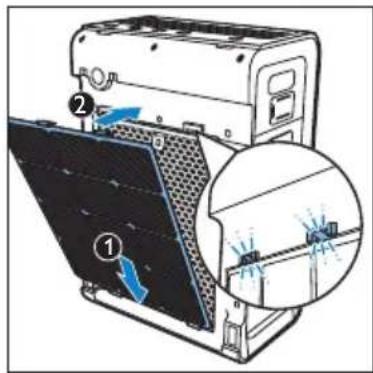

Note
- Make sure that the side with two clips is pointing towards you, and that all hooks of the pre-filter are properly attached to the appliance.
9 To reattach the front panel, mount the panel onto the top of the appliance first (1). Then, gently place the panel against the body of the appliance (2).
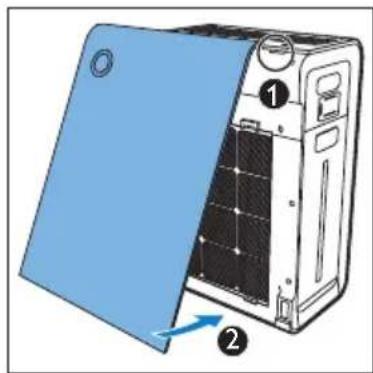
natural_image
Diagram of a server rack with blue insulation cover and labeled components (no text or symbols)10 Reset the multi-care filter lifetime (see the chapter 'Reset the filter lifetime counter').
Replace the activated carbon filter and the HEPA filter

Note
- The activated carbon and the HEPA filters are not washable nor vacuum cleanable.
Replace both the activated carbon filter and the HEPA filter when the filter light 3/4 flashes.
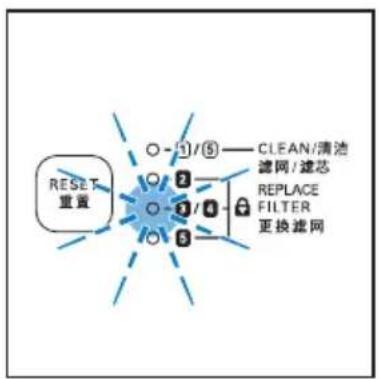
flowchart
graph TD
    A["RESET 重置"] --> B["○ - 1/5"]
    B --> C["○"]
    C --> D["○"]
    D --> E["○"]
    E --> F["○"]
    F --> G["○"]
    G --> H["○"]
    H --> I["○"]
    I --> J["○"]
    J --> K["○"]
    K --> L["○"]
    L --> M["○"]
    M --> N["○"]
    N --> O["○"]
    O --> P["○"]
    P --> Q["○"]
    Q --> R["○"]
    R --> S["○"]
    S --> T["○"]
    T --> U["○"]
    U --> V["○"]
    V --> W["○"]
    W --> X["○"]
    X --> Y["○"]
    Y --> Z["○"]
    Z --> AA["○"]
    AA --> AB["○"]
    AB --> AC["○"]
    AC --> AD["○"]
    AD --> AE["○"]
    AE --> AF["○"]
    AF --> AG["○"]
    AG --> AH["○"]
    AH --> AI["○"]
    AI --> AJ["○"]
    AJ --> AK["○"]
    AK --> AL["○"]
    AL --> AM["○"]
    AM --> AN["○"]

Tip
- When you remove or insert filters, place the appliance against a wall for more stability.

Note
- Insert the filters in the correct position.
- Make sure that you place the filters in the order of HEPA filter, activated carbon filter, multi-care filter (if available), and finally the pre-filter.
• Make sure that the side with the tag is pointing towards you.
1 Switch off the appliance and unplug it.
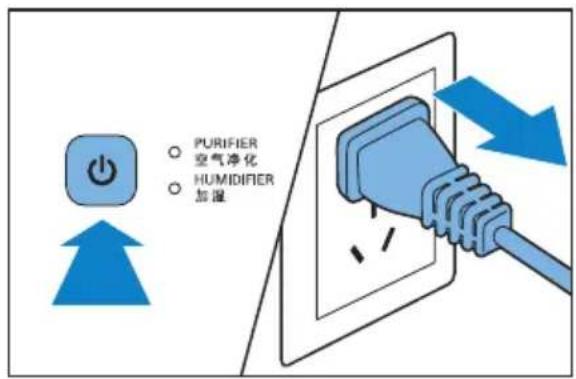
2 Place your fingers in the recesses of the side panels.
3 Gently pull the bottom of the panel out (1), then lift the top part of the front panel towards you (2).
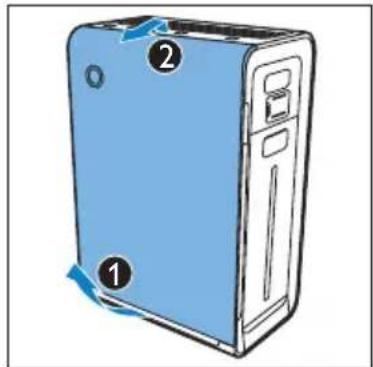
4 Remove all filters from the appliance.
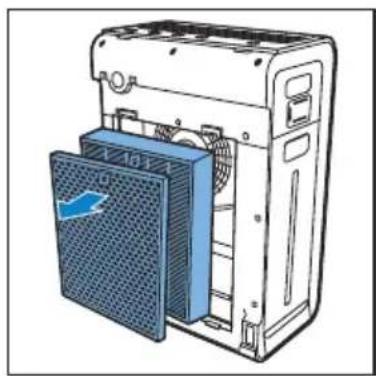
natural_image
Illustration of a server rack with a blue ventilation cover and fan base (no text or symbols)5 Remove all packaging material from the new filters.
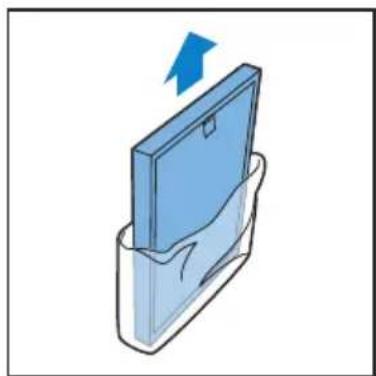
natural_image
Illustration of a blue folder with a blue arrow pointing upward, partially enclosed in a transparent container (no text or symbols)6 Place the new HEPA filter in the appliance first.
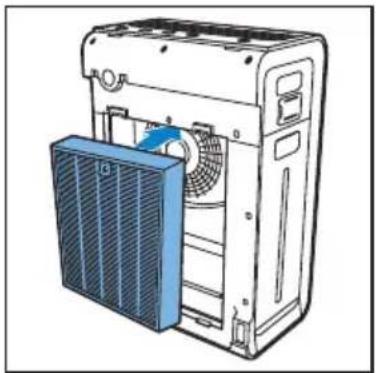
natural_image
Illustration of a server rack with a blue fan and ventilation unit (no text or symbols)7 Then, place the new activated carbon filter in the appliance.
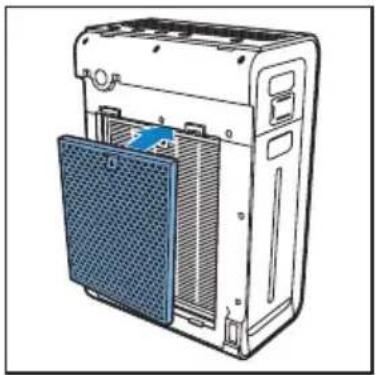
natural_image
Illustration of a server rack with a blue mesh cover and ventilation slots (no text or symbols)8 Place the pre-filter in the appliance.
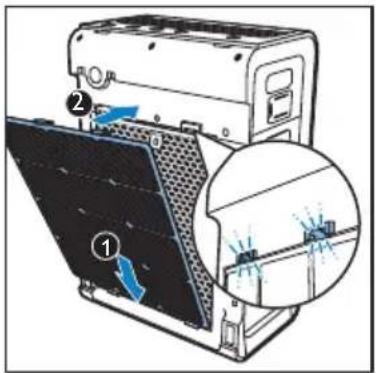

Note
• Make sure that the side with two clips is pointing towards you, and that all hooks of the pre-filter are properly attached to the appliance.
9 To reattach the front panel, mount the panel onto the top of the appliance first (1). Then, gently place the panel against the body of the appliance (2).
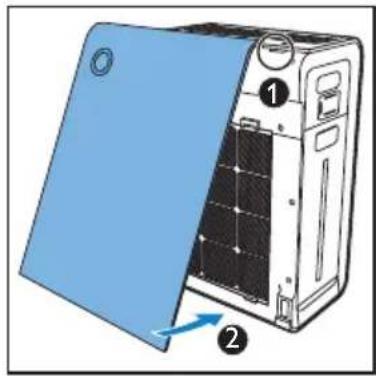
10 Reset the activated carbon filter and the HEPA filter lifetime (see the chapter 'Reset the filter lifetime counter').
Replace the humidification filter
Replace the humidification filter when the filter light 5 flashes.
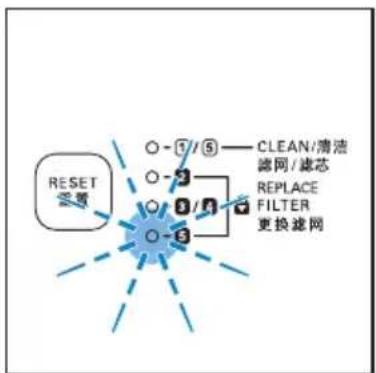
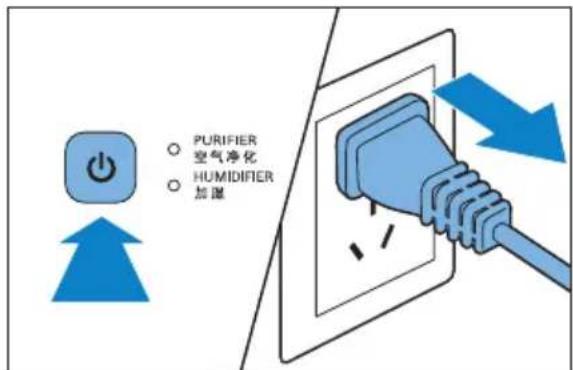
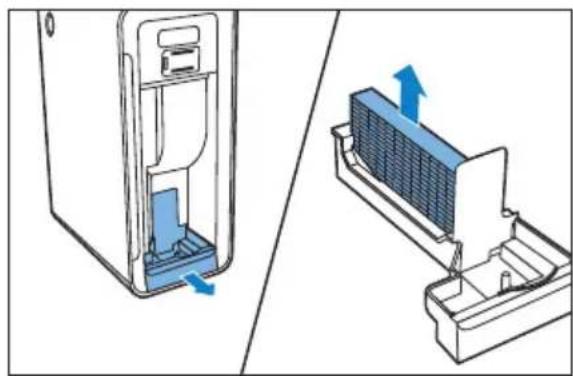
1 Switch off the appliance and unplug it.
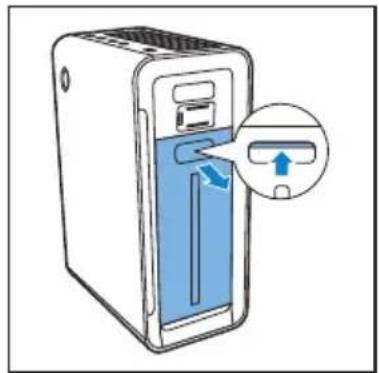
2 Remove the water bucket from the appliance.
natural_image
Illustration of a desktop computer with a blue internal panel and a magnified inset showing a device's left-side button (no text or symbols)3 Remove the humidification filter tray from the appliance.
natural_image
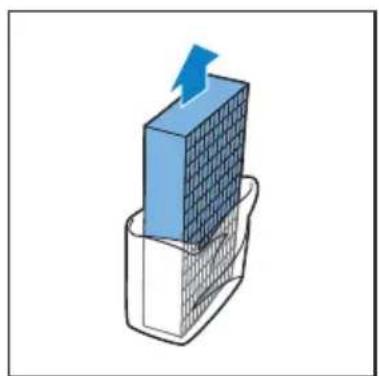
Technical illustration showing a computer tower internal structure being removed, with no visible text or symbols.4 Remove the packaging material from the humidification filter.
natural_image
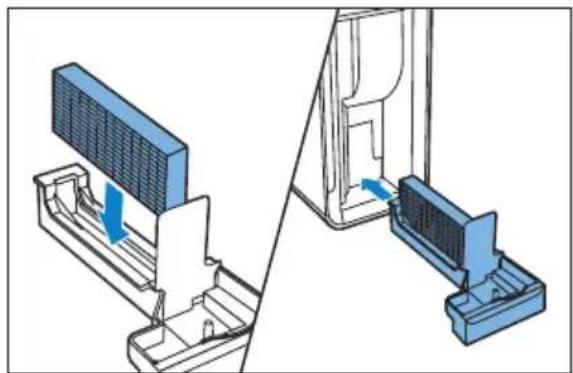
3D diagram of a blue grid block with an arrow pointing upward, placed on a wire mesh base (no text or symbols)5 Put the new humidification filter back and slide the humidification filter tray back to the appliance.
natural_image
Diagram showing a device assembly with a panel and base, no text or symbols present8 Add the multi-care filter

Note
• This is applicable only for AC4084.
AC4084 comes with the pre-filter, activated carbon filter and the HEPA filter. For this appliance, only the filter light 1 / 5 and the filter light 3/4 (activated carbon filter and HEPA filter) are activated.
To enjoy the benefits of the multi-care filter, you can purchase this filter separately. In combination with the HEPA filter, the multi-care filter filters out dust, pollen and ultra-fine particles.
Activate the multi-care filter
After you have installed the multi-care filter, you can activate it as follows:

Note
- For information of how to install the multi-care filter, see the chapter 'Replace the filters', section 'Replace the multi-care filter'.
1 Switch off the appliance.
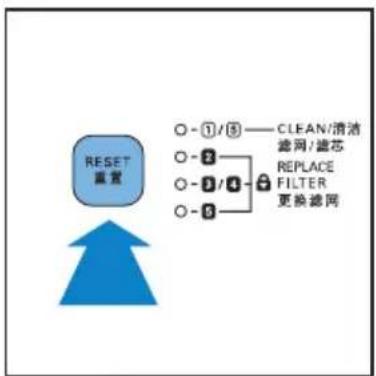
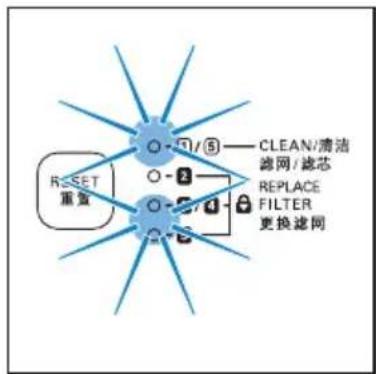
2 Press the RESET button once.
flowchart
graph TD
    A["RESET 渲置"] --> B["○ - ①/⑤ —— CLEAN/清洗"]
    A --> C["○ - ②"]
    A --> D["○ - ③/④"]
    A --> E["○ - ④"]
    A --> F["○ - ⑤"]
    G["REPLACE FILTER 更换滤网"] --> H["REPLACE FILTER"]
    style A fill:#4CAF50,stroke:#333
    style B fill:#E6F2FF,stroke:#333
    style C fill:#E6F2FF,stroke:#333
    style D fill:#E6F2FF,stroke:#333
    style E fill:#E6F2FF,stroke:#333
→The filter lights ^1 / 5, 3, 4 are 5 on. The filter light 2 is off.
flowchart
graph TD
    A["RESET 重复"] --> B["0"]
    B --> C["1/5"]
    C --> D["2"]
    D --> E["3"]
    E --> F["4"]
    F --> G["5"]
    G --> H["6"]
    H --> I["7"]
    I --> J["8"]
    J --> K["9"]
    K --> L["10"]
    L --> M["11"]
    M --> N["12"]
    N --> O["13"]
    O --> P["14"]
    P --> Q["15"]
    Q --> R["16"]
    R --> S["17"]
    S --> T["18"]
    T --> U["19"]
    U --> V["20"]
    V --> W["21"]
    W --> X["22"]
    X --> Y["23"]
    Y --> Z["24"]
    Z --> AA["25"]
    AA --> AB["26"]
    AB --> AC["27"]
    AC --> AD["28"]
    AD --> AE["29"]
    AE --> AF["30"]
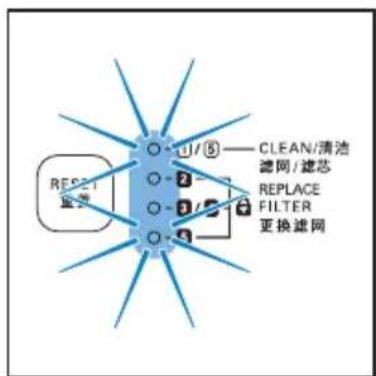
3 Press and hold the RESET button for two seconds.
→The multi-care filter lifetime is activated. The filter light 2 is on.

Note
- To deactivate the multi-care lifetime, press and hold the RESET button again for two seconds. Then the filter light is off.
9 Reset the filter lifetime counter
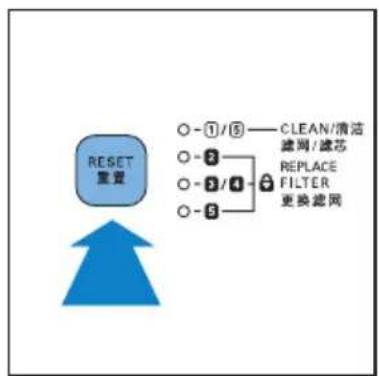
When you replace the filters, it is important that you also reset the filter lifetime counter afterwards. This allows the appliance to be in sync with the filter lifetime.

Note
- Reset the appliance when it is plugged in and switched on.
- Only replace the respective filters when you see the respective filter lights flash.
• After replacing the filters, the respective filter light still flashes or continuous on until you reset the filter lifetime counter.
After you have replaced the filter, reset the filter time:
1 Put the plug in the power socket and switch on the appliance again.
2 Press and hold the RESET button for two seconds.
flowchart
graph TD
    A["RESET 重置"] --> B["○-①/⑤"]
    B --> C["○-②"]
    C --> D["○-③/④"]
    D --> E["○-⑤"]
    E --> F["○-⑥"]
    F --> G["○-⑦"]
    G --> H["○-⑧"]
    H --> I["○-⑨"]
    I --> J["○-⑩"]
    J --> K["○-⑪"]
    K --> L["○-⑫"]
    L --> M["○-⑬"]
    M --> N["○-⑭"]
    N --> O["○-⑮"]
    O --> P["○-⑯"]
    P --> Q["○-⑰"]
    Q --> R["○-⑱"]
    R --> S["○-⑲"]
    S --> T["○-⑳"]
    T --> U["○-㉑"]
    U --> V["○-㉒"]
    V --> W["○-㉔"]
    W --> X["○-㉕"]
    X --> Y["○-㉖"]
    Y --> Z["○-㉗"]
    Z --> AA["○-㉘"]
    AA --> AB["○-㉙"]
    AB --> AC["○-㉚"]
    AC --> AD["○-㉛"]
    AD --> AE["○-㉜"]
    AE --> AF["○-㉹"]
    AF --> AG["○-㉺"]
    AG --> AH["○-㉚"]
    AH --> AI["○-㉛"]
    AI --> AJ["○-㉜"]
    AJ --> AK["○-㉝"]
    AK --> AL["○-㉟"]
    AL --> AM["○-㉟c"]
    AM --> AN["○-㉟d"]
    AN --> AO["○-㉟e"]
    AO --> AP["○-㉟f"]
    AP --> AQ["○-㉟g"]
    AQ --> AR["○-㉟h"]
    AR --> AS["○-㉟i"]
    AS --> AT["○-㉟j"]
    AT --> AU["○-㉟k"]
    AU --> AV["○-㉟l"]
    AV --> AW["○-㉟m"]
    AW --> AX["○-㉟n"]
    AX --> AY["○-㉟o"]
    AY --> AZ["○-㉟p"]
    AZ --> BA["○-㉟q"]
    BA --> BB["○-㉟r"]
    BB --> BC["○-㉟t"]
    BC --> BD["○-㉟u"]
    BD --> BE["○-㉟v"]
    BE --> BF["○-㉟w"]
    BF --> BG["○-㉟x"]
    BG --> BH["○-㉟y"]
    BH --> BI["○-㉟z"]
    BI --> BJ["○-㉟w"]
    BJ --> BK["○-㉟t"]
    BK --> BL["○-㉟u"]
    BL --> BM["○-㉟v"]
    BM --> BN["○-㉟y"]
    BN --> BO["○-㉟z"]
    BO --> BP["○-㉟t"]
10 Troubleshooting
This chapter summarizes the most common problems you could encounter with the appliance. If you are unable to solve the problem with the information below, contact the Consumer Care Center in your country.
| Problem Possible solution | |
| The appliance does not work. | The filter replacement light has been on continuously but you did not replace the corresponding filter, it is now locked. In this case, replace the filter and reset the filter time.Make sure that the front panel is closed properly. |
| The appliance does not work even though it is switched on. | The humidification filter tray is not placed properly. In this case the appliance does not work and the CURRENT HUMIDITY lights (30%, 40%, 50% or 60%) flash. Switch off the appliance. Remove the water bucket and then remove and slide the humidification filter tray back to the appliance. Then switch on the appliance and try again. |
| The water bucket leaks. | It is normal that the cap of the water bucket is slightly wet when you remove it from the appliance. However, if water drops keep dripping from the bottom of the water bucket, check if the cap has been screwed onto the water bucket tightly. If the problem persists, contact the Consumer Care Center in your country. |
| The water level in the water bucket drops very quickly after I empty the humidification filter tray. | This is normal. The water in the water bucket is used to fill the humidification filter tray the humidification filter also absorbs some of the water. |
| I do not see the current humidity indication change. | Make sure that you have put the humidification filter in the humidification filter tray.The humidification filter is dirty. Rinse and/or descale the humidification filter (see the chapter 'Clean the pre-filter and humidification filter', section 'Clean the humidification filter').Make sure that both the PURIFIER and HUMIDIFIER lights are on. |
| There are some white deposits on the humidification filter. | The white deposits are called scale and they consist of minerals from the water. Scale on the humidification filter affects the humidifying performance. Therefore you have to descale the humidification filter when the filter light 1 / 5 flashes (See the chapter 'Clean the pre-filter and humidification', section "Clean the humidification filter"). |
| No air comes out of the air outlet. | Plug the appliance into the power supply and switch on. |
| The fan speed does not change when the silent mode is activated. | In silent mode, the fan speed is set to a very low level. If you want to change the fan speed and leave the silent mode, press the SPEED button once or more times to set the desired fan speed. |
| The airflow that comes out of the air outlet is significantly weaker than before. | The pre-filter is dirty. Clean the pre-filter (see the chapter 'Clean your appliance', section "Clean the pre-filter and humidification filter").Make sure that you have removed all packaging material from the filters. |
| The air quality does not improve, even though the appliance has been operating for a long time. | One of the filters has not been placed in the appliance. Make sure that all filters are properly installed in the following order, starting with the innermost filter: 1) HEPA filter, 2) activated carbon filter, 3) multi-care filter (if available), and 4) pre-filter.The air quality sensor is wet. The humidity level in your room is high and causes condensation. Make sure that the air quality sensor is clean and dry (see the chapter 'Clean your appliance', section "Clean the air quality sensor and air humidity sensor'). |
| The color of the air quality light always stays the same. | The air quality sensor is dirty. Clean the air quality sensor (see the chapter "Clean your appliance", section 'Clean the air quality sensor and air humidity sensor' under).There is not enough ventilation in the room. Open a window, to improve the air circulation. |
| I do not see water vapor coming out of the appliance. Is it working? | When water vapor is very fine, it is invisible. This appliance has a specially designed humidification filter that produces very fine water vapor. Therefore, you cannot see the water vapor. |
| I want to check whether the air humidity sensor works or not. | Remove the cover of the air quality/humidity sensors and then gently blow moist air into the opening. After a while, the CURRENT HUMIDITY indication changes. Note that if the initial CURRENT HUMIDITY indication is already 60%, the indication cannot show an even higher humidity when you blow moist air towards the sensor. |
| The appliance produces a strange smell. | The first few times you use the appliance, it may produce a plastic smell. This is normal. However, if the appliance produces a burnt smell, contact your Philips dealer or an authorized Philips service centre. The appliance may also produce an unpleasant smell when one of the filters is dirty. In this case, clean or replace the filter concerned. |
| I need cleaner air because I have an allergy. | You can change the air quality sensor sensitivity (see the chapter ‘Use the appliance, section ‘Set the sensitivity of the air quality sensor’) to make the appliance clean the air even better. |
| The appliance is extra loud. | · You have not removed all packaging material from the filters. Make sure that you have removed all packaging material.· You can change the fan speed to lower fan speed level. |
| The appliance still indicates that I need to replace a filter, but I already did. | Perhaps you did not press the RESET button properly. Plug in the appliance, press the ⏻ button to switch on and press the RESET button for two seconds. |
11 Guarantee and service
If you need information or if you have a problem, please visit the Philips website at www.philips.com or contact the Philips Consumer Care Center in your country (you find its phone number in the worldwide guarantee leaflet). If there is no Consumer Care Centre in your country, go to your local Philips dealer.
Order parts or accessories
If you have to replace a part or want to purchase an additional part, go to your Philips dealer or visit 'www.philips.com/support. If you have problems obtaining the parts, please contact the Philips Consumer Care Center in your country (you find its phone number in the worldwide guarantee leaflet).
12 Notices
Electomagnetic fields (EMF)
This Philips appliance complies with all standards regarding electromagnetic fields (EMF). If handled properly and according to the instructions in this user manual, the appliance is safe to use based on scientific evidence available today.
Compliance with EMF
Koninklijke Philips Electronics N.V. manufactures and sells many products targeted at consumers, which, like any electronic apparatus, in general have the ability to emit and receive electromagnetic signals.
One of Philips' leading Business Principles is to take all necessary health and safety measures for our products, to comply with all applicable legal requirements and to stay well within the EMF standards applicable at the time of producing the products.
Philips is committed to develop, produce and market products that cause no adverse health effects. Philips confirms that if its products are handled properly for their intended use, they are safe to use according to scientific evidence available today.
Philips plays an active role in the development of international EMF and safety standards, enabling Philips to anticipate further developments in standardization for early integration in its products.
Recycling

Your product is designed and manufactured with high quality materials and components, which can be recycled and reused.
When you see the crossed-out wheel bin symbol attached to a product, it means the product is covered by the European Directive 2002/96/EC:
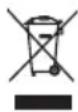
Never dispose of your product with other household waste. Please inform yourself about the local rules on the separate collection of electrical and electronic products. The correct disposal of your old product helps prevent potentially negative consequences on the environment and human health.
Environmental information
All unnecessary packaging has been omitted. We have tried to make the packaging easy to separate into three materials: cardboard (box), polystyrene foam (buffer) and polyethylene (bags, protective foam sheet.)
Your system consists of materials which can be recycled and reused if disassembled by a specialized company. Please observe the local regulations regarding the disposal of packaging materials, exhausted batteries and old equipment.
Specifications are subject to change without notice. Trademarks are the property of Koninklijke Philips Electronics N.V. or their respective owners. Philips reserves the right to change products at any time without being obliged to adjust earlier supplies accordingly.

- Contents
- Important 4
- Your combi air purifier and humidifier 6
- Get started 7
- Use the appliance 10
- Clean your appliance 17
- Clean the pre-filter and
- humidification filter 20
- Replace the filters 25
- Add the multi-care filter 30
- Reset the filter lifetime counter 31
- Troubleshooting 32
- Guarantee and service 35
- Notices 36
- Important
- Safety
- Danger
- Warning
- Caution
- Your combi air purifier and humidifier
- What's in the box
- Get started
- Install filters
- Tip
- Note
- Prepare for humidification
- Use the appliance
- Understand the humidity light indicator
- Understand the auto mode
- Understand the healthy air protect alert
- Understand the healthy air protect lock
- Switch on and off the appliance
- Set the sensitivity of the air quality sensor
- Change the fan speed
- Auto
- Manual
- Silent mode
- Set the timer
- Set the humidity level
- Water level
- Clean your appliance
- Clean the body of the appliance
- Clean the air quality sensor and humidity sensor
- Clean the water bucket
- Clean the humidification filter tray
- Clean the pre-filter and humidification filter
- Clean the pre-filter
- Clean the humidification filter
- Rinse the humidification filter
- Descale the humidification filter
- Switch off the appliance and unplug it.
- Remove the water bucket from the appliance.
- Remove the humidification filter tray from the appliance.
- Remove the humidification filter from the humidification filter tray.
- Mix the white vinegar (5ml/100 ml acetic acid) with an equal amount of tap water in a container that is large enough to soak the humidification filter in.
- Let the humidification filter soak in the solution for one hour.
- Discard the water-vinegar solution.
- Cleaning schedule
- Replace the filters
- Replace the multi-care filter
- Replace the activated carbon filter and the HEPA filter
- Replace the humidification filter
- Add the multi-care filter
- Activate the multi-care filter
- Reset the filter lifetime counter
- Troubleshooting
- Guarantee and service
- Order parts or accessories
- Notices
- Electomagnetic fields (EMF)
- Compliance with EMF
- Recycling
- Environmental information
Marque : PHILIPS
Modèle : AC4084
Catégorie : Purificateur d'air