
V-2971 - Interphone Valcom - Notice d'utilisation et mode d'emploi gratuit
Retrouvez gratuitement la notice de l'appareil V-2971 Valcom au format PDF.


| Type de produit | Interphone |
| Marque | Valcom |
| Modèle | V-2971 |
| Dimensions (approx.) | 150 x 80 x 30 mm |
| Poids (approx.) | 200 g |
| Alimentation | 12 V CC (via transformateur inclus) |
| Fonction principale | Communication audio bidirectionnelle avec fonction d'appel |
| Fonction secondaire | Déverrouillage de porte à distance (contact NO/NF) |
| Type de montage | Mural (encastré ou en saillie) |
| Couleur | Blanc ou gris (selon version) |
| Matériau du boîtier | Plastique ABS |
| Nombre de boutons | 1 (appel) + 1 (déverrouillage) |
| Indicateur lumineux | LED de statut (vert/rouge) |
| Entretien et nettoyage | Nettoyer avec un chiffon doux et sec. Ne pas utiliser de produits abrasifs. |
| Sécurité | Alimentation basse tension (12 V) - utilisation intérieure uniquement |
| Pièces détachées et réparabilité | Contacter le service client Valcom pour les pièces. Réparation par un professionnel recommandée. |
| Informations générales | Notice d'utilisation disponible en ligne au format PDF. Compatible avec la plupart des systèmes d'interphone standard. |
FOIRE AUX QUESTIONS - V-2971 Valcom
Questions des utilisateurs sur V-2971 Valcom
0 question sur cet appareil. Repondez a celles que vous connaissez ou posez la votre.
Poser une nouvelle question sur cet appareil
Téléchargez la notice de votre Interphone au format PDF gratuitement ! Retrouvez votre notice V-2971 - Valcom et reprennez votre appareil électronique en main. Sur cette page sont publiés tous les documents nécessaires à l'utilisation de votre appareil V-2971 de la marque Valcom.
MODE D'EMPLOI V-2971 Valcom
V-2970 EMERGENCY/NORMAL CALL SWITCH WITH VOLUME CONTROL
INTRODUCTION
The V-2970 is an Emergency/Normal Call Switch with Volume Control designed to be used with the Valcom Page Control Units and Intercom Systems.
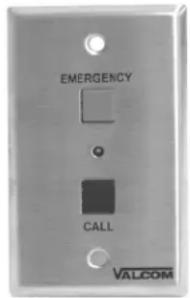
The V-2970 is provided with an "Emergency" call button and a "Normal" call button for connection to customer provided signaling equipment.
The "Emergency" button transposes a single press of the button into the four required closures required to generate an "Emergency" class of service call. The "Normal" call button allows a "Normal" class of service call.
DIMENSIONS/WEIGHT
- 4.50"H x 2.75"W x 1.00"D
(11.43cm H x 6.99cm W x 2.54cm D) - 0.2 lbs. (.09 kg)
FEATURES
- Designed to fit a single-gang electrical box
- No external power source required
- Red "Emergency" button for emergency call
- Black "Call" button for normal call
• Built-in Volume Control
CONNECTIONS/SETUP
- Connect switch inputs from control unit to V-2970 as shown in connection diagram.
- Connect Tip and Ring from control unit to V-2970 as shown in connection diagram.
- Connect V-2970 to Tip and Ring of 45 Ohm Talkback Speaker.
- Press either call button to test loudness of tone at speaker and adjust volume of tone through cut-out on the front of the V-2970 enclosure using a 1/16 inch flat tip screwdriver.
- Place V-2970 over standard single-gang electrical box and fasten in place using the two screws provided.
TECHNICAL ASSISTANCE
When trouble is reported, verify that power is being supplied to the unit and there are no shorts or grounds on cabling.
Assistance in troubleshooting is available from the factory. When calling, you should have a VOM and a telephone test set available and be calling from the job site. Call (540) 563-2000 and press 1 for Technical Support or visit our website at http://www.valcom.com.
Valcom equipment is not field repairable. Valcom, Inc. maintains service facilities in Roanoke, VA. Should repairs be necessary, attach a tag to the unit clearly stating company name, address, phone number, contact person and the nature of the problem. Send the unit to:
Valcom, Inc.
Repair and Return Dept.
5614 Hollins Road
Roanoke, VA 24019-5056
VALCOM LIMITED WARRANTY
Valcom, Inc. warrants its products to be free from defects in materials and workmanship under conditions of normal use and service for a period of one year from the date of shipment. The obligation under this warranty shall be limited to the replacement, repair or refund of any such defective device within the warranty period, provided that:
- inspection by Valcom, Inc. indicates the validity of the claim;
- the defect is not the result of damage, misuse or negligence after the original shipment;
- the product has not been altered in any way or repaired by others and that factory sealed units are unopened (a service charge plus parts and labor will be applied to units defaced or physically damaged);
- freight charges for the return of products to Valcom are prepaid;
- all units 'out of warranty' are subject to a service charge. The service charge will cover minor repairs (major repairs will be subject to additional charges for parts and labor).
This warranty is in lieu of and excludes all other warranties, expressed or implied and in no event shall Valcom, Inc. be liable for any anticipated profits, consequential damages, loss of time or other losses incurred by the buyer in connection with the purchase, operation or use of the product.
This warranty specifically excludes damage incurred in shipment. In the event a product is received in damaged condition, the carrier should be notified immediately. Claims for such damage should be filed with the carrier involved in accordance with the F.O.B. point.
Headquarters:
Valcom, Inc.
5614 Hollins Road
Roanoke, VA 24019-5056
Phone: (540) 563-2000
FAX: (540) 362-9800
V-2970 CONNECTIONS

NOTE: When utilizing the V-2970 volume control with 45 Ohm talkback speakers featuring an integrated volume control or volume preset capability, set the volume at the speaker to maximum. This will allow full volume range from the V-2970 volume control.

Marque : Valcom
Modèle : V-2971
Catégorie : Interphone