
Model B - Écran de projection DA-LITE - Notice d'utilisation et mode d'emploi gratuit
Retrouvez gratuitement la notice de l'appareil Model B DA-LITE au format PDF.


| Type de produit | Écran de projection sur trépied |
| Marque | Da-Lite |
| Modèle | Model B |
| Taille d'écran diagonale | 84 pouces (213 cm) |
| Format d'image | 4:3 |
| Type de toile | Blanc mat (Matte White) |
| Gain | 1.0 |
| Surface visible (L x H) | 170 x 128 cm |
| Mécanisme d'enroulement | Manuel à ressort |
| Trépied | Intégré avec niveau à bulle |
| Poids | Environ 8 kg |
| Dimensions plié (H x L x P) | 180 x 15 x 15 cm |
| Alimentation | Aucune (fonctionnement manuel) |
| Fonctions principales | Projection d'images fixes ou animées |
| Matériau du boîtier | Acier peint |
| Couleur | Noir |
| Accessoires inclus | Sac de transport, poignée |
| Entretien et nettoyage | Nettoyer avec un chiffon doux et sec. Ne pas utiliser de produits chimiques. |
| Sécurité | Utiliser sur une surface stable et plane. Ne pas laisser les enfants sans surveillance. |
| Pièces détachées disponibles | Toile de rechange, ressorts, patins en caoutchouc |
| Réparabilité | Toile et mécanisme remplaçables par l'utilisateur |
| Utilisation recommandée | Salles de réunion, salles de classe, présentations mobiles |
| Garantie | 2 ans |
FOIRE AUX QUESTIONS - Model B DA-LITE
Questions des utilisateurs sur Model B DA-LITE
0 question sur cet appareil. Repondez a celles que vous connaissez ou posez la votre.
Poser une nouvelle question sur cet appareil
Téléchargez la notice de votre Écran de projection au format PDF gratuitement ! Retrouvez votre notice Model B - DA-LITE et reprennez votre appareil électronique en main. Sur cette page sont publiés tous les documents nécessaires à l'utilisation de votre appareil Model B de la marque DA-LITE.
MODE D'EMPLOI Model B DA-LITE
LIMITED ONE YEAR WARRANTY ON DA-LITE PRESENTATION PRODUCTS
Milestone AV Technologies LLC warrants certain Da-Lite branded products to the original purchaser only, to be free from defects in materials and workmanship for a period of one (1) year from the date of purchase by the original purchaser, provided they are properly operated according to Da-Lite's instructions and are not damaged due to improper handling or treatment after shipment from the factory.
This warranty does not apply to equipment, showing evidence of misuse, abuse or accidental damage, or which has been tampered with or repaired by a person other than authorized Da-Lite personnel.
Da-Lite's sole obligation under this warranty shall be to repair or to replace (at Da-Lite's option) the defective part of the merchandise. Returns for service should be made to your Da-Lite dealer. If it is necessary for the dealer to return the screen or part to Da-Lite, transportation expenses to and from Da-Lite are payable by the purchaser and Da-Lite is not responsible for damage in shipment. To protect yourself against damage or loss in transit, insure the product and prepay all transportation expenses.
TO THE MAXIMUM EXTENT PERMITTED BY APPLICABLE LAW, THIS WARRANTY IS IN LIEU OF ALL OTHER WARRANTIES, EXPRESS OR IMPLIED, INCLUDING WARRANTIES AS TO FITNESS FOR USE AND MERCHANTABILITY. Any implied warranties of fitness for use, or merchantability, that may be mandated by statute or rule of law are limited to the one (1) year warranty period. This warranty gives you specific legal rights, and you may also have other rights, which vary from state-to-state, TO THE MAXIMUM EXTENT PERMITTED BY APPLICABLE LAW, NO LIABILITY IS ASSUMED FOR EXPENSES OR DAMAGES RESULTING FROM INTERRUPTION IN OPERATION OF EQUIPMENT, OR FOR INCIDENTAL, DIRECT, OR CONSEQUENTIAL DAMAGES OF ANY NATURE.
In the event that there is a defect in materials or workmanship of a Da-Lite product, you may contact our Sales Partners at PO Box 137, Warsaw, IN 46581-0137, (574) 267-8101, (800) 622-3737.
IMPORTANT: THIS WARRANTY SHALL NOT BE VALID AND DA-LITE BRANDED PRODUCTS SHALL NOT BE BOUND BY THIS WARRANTY IF THE PRODUCT IS NOT OPERATED IN ACCORDANCE WITH THE DA-LITE WRITTEN INSTRUCTIONS.
Keep your sales receipt to prove the date of purchase and your original ownership.

A Milestone AV Technologies Brand
3100 North Detroit Street
Warsaw, Indiana 46582
P: 574.267.8101 or 800.622.3737
F: 574.267.7804 or 877.325.4832
E: info@da-lite.com
www.da-lile.com
DL-0250 01.14
© 2013 Milestone AV Technologies LLC. Printed in U.S.A.
46420

natural_image
Empty white rectangular frame with black border (no text or symbols)INSTRUCTION BOOK FOR
Model B ^® and Class-Rite ^®

Installation
Care in mounting and care in correct operation will mean a long and satisfactory life for your Da-Lite wall/ceiling screen. Locate the screen where the audience can best see it and where other furnishings in the room permit. Mount the screen so that bottom of picture surface, when fully extended, will be above the heads of vicwers.
Built-In Hangers
Da-Lite wall/ceiling screens may be mounted on a wall, map rail, suspended from ceiling or extension brackets. Wall screens must be mounted level and with the case-back parallel to the wall.
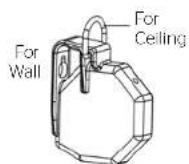

For Wall Mounting
Use the keyhole slot at the back of the hanging bracket for flush wall suspension. Position screws or other fasteners into the wall and hang screen by using the slots.
For Ceiling Suspension
If the screen is to be ceiling mounted, two screw hooks should be placed in a beam or other solid surface. For drop ceilings, Da-Lite's T-Bar Clips may be purchased.
For Map Rail Mounting
Use keyhole slots in flat brackets. Do not use "D" rings.
Operating Instructions
To Lower Picture Surface
Pull screen down all the way. HESITATE - then allow screen to retract VERY SLOWLY until it locks in place.
To Raise Picture Surface
Pull down on the pull bail, then raise quickly, as a window shade. Keep control of the picture surface. Do not allow it to roll uncontrolled into the case or damage will result.
Screen Accessories
Wall Brackets (75# per pair maximum)
Da-Lite No. 6 and No. 11 Non-adjustable wall brackets and No. 23 adjustable extension wall brackets are ideal for keystone elimination, clearance, or corner mounting. The screen brackets should be fastened to the studding or other solid surface and not in the plaster only. Suspend screen from "D" rings.

No. 23 Adjustable Wall Brackets
Screen can be extended 10'-24' from wall by wing nut and bolt adjustment.

T-Bar Cllp
For Drop Ceilings 50 lb. max. load capacity.
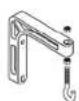
No. 6 Wall Brackets
Screen can be extended 6° from wall.

Tilt Lock
For Keystone Elimination Hold back bottom of screen in tilted position to eliminate keystoning.
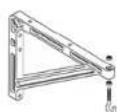
No. 11 Wall Brackets
Screen can be extended 10' or 14' from wall by changing position of bracket
Protect Your Screen by keeping it rolled in its protective case when not in use. Always examine both front and back of surface before re-rolling into case to make certain screen is free of dust, dirt or other foreign matter. Use a very soft duster to gently remove any foreign particles.
- LIMITED ONE YEAR WARRANTY ON DA-LITE PRESENTATION PRODUCTS
- TO THE MAXIMUM EXTENT PERMITTED BY APPLICABLE LAW, THIS WARRANTY IS IN LIEU OF ALL OTHER WARRANTIES, EXPRESS OR IMPLIED, INCLUDING WARRANTIES AS TO FITNESS FOR USE AND MERCHANTABILITY. Any implied warranties of fitness for use, or merchantability, that may be mandated by statute or rule of law are limited to the one (1) year warranty period. This warranty gives you specific legal rights, and you may also have other rights, which vary from state-to-state, TO THE MAXIMUM EXTENT PERMITTED BY APPLICABLE LAW, NO LIABILITY IS ASSUMED FOR EXPENSES OR DAMAGES RESULTING FROM INTERRUPTION IN OPERATION OF EQUIPMENT, OR FOR INCIDENTAL, DIRECT, OR CONSEQUENTIAL DAMAGES OF ANY NATURE.
- IMPORTANT: THIS WARRANTY SHALL NOT BE VALID AND DA-LITE BRANDED PRODUCTS SHALL NOT BE BOUND BY THIS WARRANTY IF THE PRODUCT IS NOT OPERATED IN ACCORDANCE WITH THE DA-LITE WRITTEN INSTRUCTIONS.
- A Milestone AV Technologies Brand
- Installation
- Built-In Hangers
- For Wall Mounting
- For Ceiling Suspension
- For Map Rail Mounting
- Operating Instructions
- To Lower Picture Surface
- To Raise Picture Surface
- Screen Accessories
- Wall Brackets (75# per pair maximum)
- No. 23 Adjustable Wall Brackets
- T-Bar Cllp
- No. 6 Wall Brackets
- Tilt Lock
- No. 11 Wall Brackets
Marque : DA-LITE
Modèle : Model B
Catégorie : Écran de projection