
Streichfett - Clavier MIDI WALDORF - Notice d'utilisation et mode d'emploi gratuit
Retrouvez gratuitement la notice de l'appareil Streichfett WALDORF au format PDF.


| Type de produit | Module de synthétiseur de cordes |
| Marque | Waldorf |
| Modèle | Streichfett |
| Catégorie | Clavier MIDI (contrôleur) |
| Dimensions (approx.) | 215 x 95 x 55 mm |
| Poids (approx.) | 400 g |
| Alimentation | Adaptateur secteur 12 V DC (centre positif) |
| Consommation électrique | Moins de 5 W |
| Connectivité MIDI | Entrée MIDI (DIN 5 broches), sortie MIDI (DIN 5 broches) |
| Sorties audio | 1 sortie jack 6,35 mm stéréo (casque/sortie ligne) |
| Fonctions principales | Synthèse de cordes polyphonique, section ensemble (crescendo, attaque, relâchement), section solo (basse, lead), effets intégrés (réverbération, chorus, delay) |
| Polyphonie | Jusqu'à 8 voix (selon le mode) |
| Entretien et nettoyage | Nettoyer avec un chiffon doux et sec. Ne pas utiliser de solvants ni de produits abrasifs. |
| Sécurité | Ne pas exposer à l'humidité, aux températures extrêmes ou à la lumière directe du soleil. Débranchez l'adaptateur en cas d'orage ou de non-utilisation prolongée. |
| Pièces détachées et réparabilité | Contactez le support Waldorf ou un revendeur agréé pour toute pièce de rechange. La réparation doit être effectuée par un technicien qualifié. |
| Informations générales | Synthétiseur numérique recréant le son des cordes classiques. Utilise la technologie de synthèse par table d'ondes et filtres analogiques. |
FOIRE AUX QUESTIONS - Streichfett WALDORF
Questions des utilisateurs sur Streichfett WALDORF
0 question sur cet appareil. Repondez a celles que vous connaissez ou posez la votre.
Poser une nouvelle question sur cet appareil
Téléchargez la notice de votre Clavier MIDI au format PDF gratuitement ! Retrouvez votre notice Streichfett - WALDORF et reprennez votre appareil électronique en main. Sur cette page sont publiés tous les documents nécessaires à l'utilisation de votre appareil Streichfett de la marque WALDORF.
MODE D'EMPLOI Streichfett WALDORF
Once upon a time,
there was no choice. If you wanted to create a wall of sound, you HAD to use a string machine. This was long before "real" polyphonic synthesizers were born. Long before composing was an occupation like doing your taxes while sitting in front of a big screen TV. These were the golden years of electronic music! A time when keyboard players simply plugged in and played instead of endlessly browsing sounds and loops from vast hard drive collections.
Now that you own Streichfett, the good old days are here again right on your desktop. Side-by-side with today's technology,
hand-in-hand inside your own personal space, this tiny black box will let you truly know what it means to pilot a REAL electronic instrument. It sounds raw, it sounds deep, it sounds wild and wide. And this magical experience will unfold in front of you with just a few knobs and switches.
If you own a vintage string machine, we invite you to do a little comparison. You'll be truly blown away by how WELL Streichtett creates the sound of those much-acclaimed vintage string machines that were behind so many massive hit records.

waldorf

VEROYOUNG
streichefett

natural_image
Exterior view of an old industrial power plant with multiple tall chimneys under a cloudy sky (no signage or text visible)waldorf
From Germany with Love
The following section is a reference to the previous section.
The quick brown fox jumps over the lazy dog.
公司于2017年1月1日召开的第十届董事会第十七次会议审议通过了《关于使用部分闲置募集资金进行现金管理的议案》。
(1) 2017年1月1日,公司与关联方发生的交易金额为人民币4,000万元。
(1) 2014年1月1日(星期六)至2014年1月3日(星期五)下午1:30-15:00
© Walber Music GmbH, Lüchfeld, 71 S3121 Rerogeni Germany
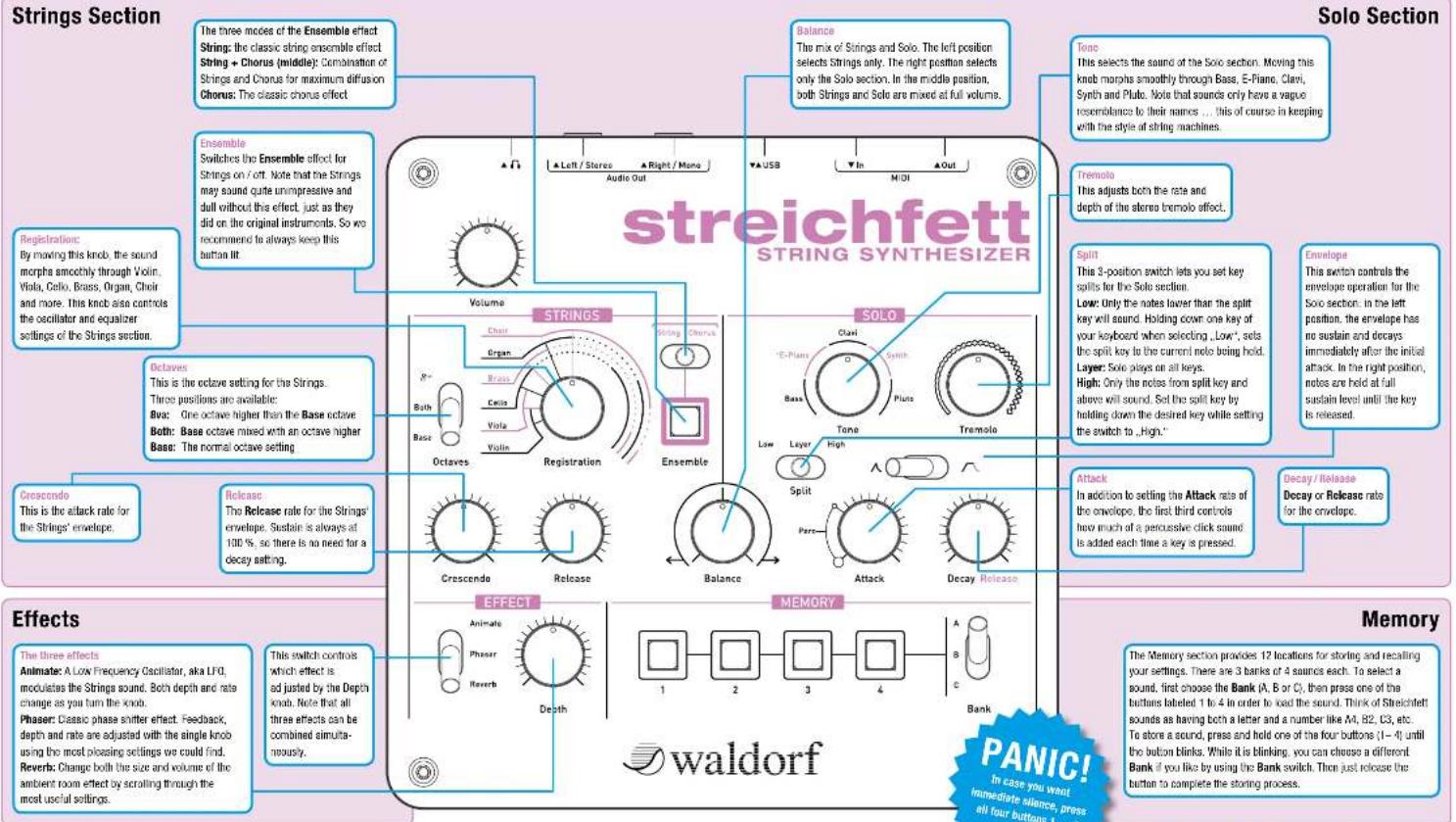
MIDI channel setting:
Press and hold all 4 buttons, then play one note using MIDI or USB. Streichfelt sets the MIDI channel for both MIDI in and MIDI Out based on the channel of the incoming Note On message. For Omni mode, hold down all 4 buttons when powering on Streichfelt. When a channel from 1 to 14 is selected, the Solo section can be triggered independently of the Strings section on the next
higher channel, ignoring the split settings. So for example, in order to play Strings on Channel 1 and Solo on Channel 2, do this:
Press and hold all 4 buttons (1-4), then play a note on MIDI Channel 1 to set the MIDI channel. Set the Balance knob to the middle position so you can hear both Strings and Solo.
Press and hold the lowest note available and set the Split switch to "Low." This sets the split key very low and prevents Solo from being mixed in if you play Strings on Channel 1.
Now you can play Strings on Channel 1 and Solo on Channel 2.
Pitch Bend Range:
Press and hold buttons 1–4, then move the Effect select switch to the desired position: Animate: 2 semitones (default)
Phaser: 7 semitones Reverb: 12 semilones (one octave)
To consult the full manual, please visit the download section of our website at www.waldorfmusic.de.
For Your complimentary Waldorf Edition LE, enter your credentials and this coupon on le.waldorfmusic.de LESTF-PU6L-8ERJ-XQEB-CL3F


Marque : WALDORF
Modèle : Streichfett
Catégorie : Clavier MIDI