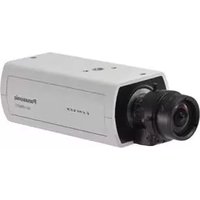
WV-SPN311 - Caméra de surveillance PANASONIC - Notice d'utilisation et mode d'emploi gratuit
Retrouvez gratuitement la notice de l'appareil WV-SPN311 PANASONIC au format PDF.


| Type de produit | Caméra de surveillance réseau |
| Marque | Panasonic |
| Modèle | WV-SPN311 |
| Résolution maximale | 1920 x 1080 pixels (Full HD) |
| Angle de vue | 100° horizontal |
| Vision nocturne | Oui, jusqu'à 30 mètres |
| Alimentation | PoE (Power over Ethernet) IEEE 802.3af |
| Consommation électrique | Environ 7 W |
| Dimensions (L x H x P) | 160 x 130 x 120 mm |
| Poids | Environ 1,2 kg |
| Indice de protection | IP66 (résistant aux intempéries) |
| Connectivité | Ethernet 10/100 Base-T, Wi-Fi optionnel |
| Fonctions principales | Détection de mouvement, alarme, enregistrement local sur carte SD, streaming vidéo |
| Stockage | Slot carte microSD jusqu'à 256 Go |
| Entretien et nettoyage | Nettoyer l'objectif avec un chiffon doux et sec. Vérifier les connexions régulièrement. |
| Sécurité | Cryptage SSL/TLS, authentification par mot de passe, filtrage IP |
| Pièces détachées et réparabilité | Disponibles auprès du service après-vente Panasonic. Réparation possible par un technicien agréé. |
| Température de fonctionnement | -20°C à 50°C |
| Garantie | 2 ans |
FOIRE AUX QUESTIONS - WV-SPN311 PANASONIC
Questions des utilisateurs sur WV-SPN311 PANASONIC
0 question sur cet appareil. Repondez a celles que vous connaissez ou posez la votre.
Poser une nouvelle question sur cet appareil
Téléchargez la notice de votre Caméra de surveillance au format PDF gratuitement ! Retrouvez votre notice WV-SPN311 - PANASONIC et reprennez votre appareil électronique en main. Sur cette page sont publiés tous les documents nécessaires à l'utilisation de votre appareil WV-SPN311 de la marque PANASONIC.
MODE D'EMPLOI WV-SPN311 PANASONIC

HD / 1,280 x 720 60 fps H.264 Network Camera featuring Super Dynamic
Key Features
• 720p HD images up to 60 fps*1
• Approximate 1/3 inches, high sensitivity MOS Sensor
- Multiple H.264 (High profile) streams (max. 4 streams) and JPEG streams ensure simultaneous real time monitoring and high resolution recording by new enhanced "UniPhier®", Panasonic's proprietary System LSI platform.
- Enhanced Super Dynamic ^*1 and ABS (Adaptive Black Stretch) technologies deliver 133 dB wider dynamic range compared to conventional cameras.
- Multi process NR & 3D-DNR ensures noise reduction in various conditions.
- High sensitivity with Day & Night (IR) function (WV-SPN311 only) : 0.01 lx (Color), 0.003 lx (B/W) at F1.4
- ABF (Auto Back Focus) ensures easy installation. (WV-SPN311 only)
- VIQS (Variable Image Quality on Specified area) technology allows the designated eight areas to retain higher image quality while the excluded area will have a decreased image quality, which enables to use lower image file size and bit rate.
- Cropping function enables to provide whole image and the part image simultaneously.
Up to 4 image capture areas can be specified, and it is also possible to control the sequence.
- Face Super Dynamic technology ensures clear face image.
- Electronic sensitivity enhancement: Auto (Up to 16/30s) / OFF
- Selectable light control modes :
Outdoor scene, Indoor scene (50 Hz) / Indoor scene (60 Hz), Fix shutter Indoor scene (50 Hz/60 Hz): Flicker caused by fluorescent lightning will be automatically compensated.
- 2x, 4x digital zoom controlled by browser
- VMD (Video Motion Detection) with 4 programmable detection areas, 15 steps sensitivity level and 10 steps detection size
- Privacy Zone can mask up to 8 private areas, such as house windows and entrances/exits.
- Camera title display: Up to 20 alphanumeric characters on the browser
- Alarm sources including 3 terminal input, VMD and Panasonic alarm command can trigger actions such as SDXC/SDHC/SD memory recording, FTP image transfer, E-mail notification, Indication on browser, Alarm terminal output, and Panasonic alarm protocol output.
• Full duplex bi-directional audio allows interactive communication between camera site and monitoring site. (WV-SPN311 only)
- JPEG Image compression ratio can be changed by alarm so that higher quality image can be provided.
- Prioritized stream control: One of the video streams can be prioritized when multiple recorders or client PCs are accessing the camera so that the recorder or the client PC can maintain the frame rate.
- Face detection function detects the position of human face and the information is sent by XML or video stream. (Extension Software)
- Can be added new intelligent extension software in addition to built-in VMD (Video Motion Detection), alarm function.
- Fog compensation function equipped as standard.
- Super Chroma Compensation function realizes a better color reproducibility even in low illumination. (WV-SPN311 only)
- H.264 max. bit rate/client and Total bit rate control allows flexible network traffic management. Frame rate priority mode controls bit rate and compression ratio to provide the specified frame rate.
- Internet mode : H.264 images can be transmitted over HTTP protocol.
- Multi-language : English / Italian / French / German / Spanish / Portuguese / Russian / Chinese / Japanese
• IPv4/IPv6 protocol supported
• Supports SSL, DDNS (viewnetcam, RFC2136)
- Still images (JPEG) can be viewed on mobile phones via Internet.
• HLC (High Light Compensation) :
If a bright light source such as car headlights points in the direction of a camera, the camera corrects for strong lights and their surroundings to provide clear images of the areas.
- Onvif compliant model
Specifications
| Camera | Image Sensor | Approx. 1/3 type MOS image sensor, Built-in primary color filter | |
| Effective Pixels | Approx. 1.3 mega pixels | ||
| Scanning Mode | Progressive scan | ||
| Scanning Area | 5.38 mm (H) x 3.02 mm (V) {7/32 inches(H) x 1/8 inches(V)} | ||
| Minimum Illumination | SPN311Color: 0.01lx BW: 0.003lx [F1.4, Maximum shutter: Max. Of(1/30s), Gain: On(High)]Color: 0.0007lx BW: 0.0002lx [F1.4, Maximum shutter: Max.16/30s, Gain: On(High)]SPN310Color: 0.01lx BW: 0.008lx [F1.4, Maximum shutter: Max. Of(1/30s), Gain: On(High)]Color: 0.0007lx BW: 0.0005lx [F1.4, Maximum shutter: Max.16/30s, Gain: On(High)] | ||
| White Balance | AWC (2,000 - 10,000 K), ATW1 (2,700 - 6,000 K), ATW2 (2,000 - 6,000 K) | ||
| Light Control Mode | Outdoor scene, Indoor scene (60 Hz) / Indoor scene (60 Hz): ELC / Fix shutter | ||
| Shutter Speed | [1.3 mega pixel (16 : 9) (60 fps mode)]OFF(1/60), 1/100, 1/120, 1/250, 1/500, 1/1000, 1/2000, 1/4000, 1/10000Other than [1.3 mega pixel (16 : 9) (60 fps mode)]OFF(1/30), 3/100, 3/120, 2/100, 2/120, 1/100, 1/120, 1/250, 1/500, 1/1000, 1/2000, 1/4000, 1/10000 | ||
| Super Dynamic? | On(High) / On(Normal) / Off | ||
| Face Super Dynamic | On/Off (only when Super Dynamic : On) | ||
| Adaptive Black Stretch | On/Off (only when Super Dynamic : Off) | ||
| Fog compensation | On/Off (only when Super Dynamic / Adaptive black stretch : Off) | ||
| High light compensation (HLC) | On/Off (only when Super Dynamic / Back light compensation : Off) | ||
| AGC | On (Low) / On (Mid) / On (High) / Off | ||
| Maximum shutter | max. 1/1000 s, max. 1/500 s, max. 1/250 s, max. 1/120 s, max. 2/120 s, max. 1/100 s, max. 2/100 s, max. 1/60 s, max. 1/30 s, max. 2/30 s, max. 4/30 s, max. 6/30 s, max. 10/30 s, max. 16/30 s | ||
| Day & Night | WV-SPN311(IR) : Off/On / Auto1 (Normal) / Auto2 (IR Light) / Auto3 (SCC)WV-SPN310(Electrical) : On/Off | ||
| Dynamic Range | 133 dB typ. (Super Dynamic : On) | ||
| Digital Noise Reduction | High / Low | ||
| Video Motion Detection | On/Off, 4 areas. Sensitivity : 15 steps, Detection size : 10 steps | ||
| Privacy Zone | On/Off (up to 8 zones available) | ||
| VIQS | On/Off (up to 8 zones available) | ||
| Camera Title (OSD) | On/Off, Up to 20 characters (alphanumeric characters, marks) | ||
| Auto focus (WV-SPN311 only) | Auto/ Preset/ Fix | ||
| Browser GUI | Cropping | Off / JPEG(1) / JPEG(2) / JPEG(3) / H.264(1) / H.264(2) / H.264(3) / H.264(4) / H.264(all)Alarm action : On/OffUp to 4 image capture areas can be specified | |
| Camera Control | Brightness. AUX On/Off | ||
| Display Mode | Spot, Quad : Image from 16 cameras can be displayed in 4 different Quad screens or 16 split screen (JPEG only). 20 characters camera title available. | ||
| Digital Zoom | 1x, 2x, 4x controlled by browser GUI | ||
| Clock Display | Time : 12H/24H, Date : 5 formats on the browser. Summer time (Manual) | ||
| Alarm Control | Reset | ||
| One Shot Capture | A still picture will be displayed on a newly opened window. | ||
| Audio | Mic (Line) Input : On/Off Volume adjustment : Low / Middle / HighAudio Output : On/Off Volume adjustment : Low / Middle / High | ||
| SD Memory Data Download | Still or motion Images recorded in the SDXC/SDHC/SD memory card can be downloaded. | ||
| GUI / Setup Menu Language | English, Italian, French, German, Spanish, Portuguese, Russian, Chinese, Japanese | ||
| System Log | Up to 100 (Internal)Up to 4,000 (SDXC/SDHC/SD memory when the recording format is set to JPEG, error logs | ||
| Supported OS *3 | Microsoft® Windows® 8.1, Microsoft® Windows® 8Microsoft® Windows® 7, Microsoft® Windows Vista® | ||
| Supported Browser | Windows® Internet Explorer® 11 (32-bit)Windows® Internet Explorer® 10 (32-bit)Windows® Internet Explorer® 9 (32-bit)Windows® Internet Explorer® 8 (32-bit)Windows® Internet Explorer® 7 (32-bit) | ||
| Network | Network IF | 10Base-T / 100Base-TX, RJ45 connector | |
| Image Resolution | Image Capture Mode:1.3 magulse (16S) (90Hz)ps | 1,280 x 720 / 640 x 360 / 320 x 180 / 160 x 90 | |
| Image Capture Mode:1.3 magulse (4S) (20Hz)ps | 1,280 x 960 / 800 x 600 / 640 x 480 / 400 x 300 / 320 x 240 / 160 x 120 | ||
| H.264*4 | Transmission Mode | Constant bitrate / VBR / Framerate priority / Best effort / Advanced VBR | |
| Frame Rate | 1 / 3 / 5 / 7.5 / 10 / 12 / 15 / 20 / 30 / 60 fps | ||
| Bit Rate/Client | 64 / 128 / 256 / 384 / 512 / 768 / 1,024 / 1,536 / 2,048 / 3,072 / 4,096 / 6,144 / 8,192 / 10,240 / 12,288 / 14,336 / 16,384 / 20,480 / 24,576 / 30,720 / 40,960 kbps | ||
| Image Quality | Constant bit rate, Best effort : Low(Motion priority) / Normal / Fine(Image quality priority)VBR : 0 Super fine / 1 Fine / 2 / 3 / 4 / 5 Normal / 6 / 7 / 8 / 9 Low | ||
| Refresh interval | 0.2 / 0.25 / 0.33 / 0.5 / 1 / 2 / 3 / 4 / 5s | ||
| Transmission Type | Unicast / Multicast | ||
| JPEG | Image Quality | 10 steps | |
| Refresh interval | 0.1 fps - 30 fps(JPEG frame rate will be restricted when displaying both JPEG and H.264 images.) | ||
| Transmission Type | Pull / Push | ||
| Audio Compression | G.726 (ADPCM) 32 kbps / 16 kbps, G.711 64 kbps / AAC-LC*5 | ||
| Audio Mode | Off / Mic input / Audio output / Interactive (Hsf duplex) / Interactive (Full duplex) | ||
| Authentication for Audio | Level 1 only / Level 2 or higher / All users | ||
| Bandwidth control | 64 / 128 / 256 / 384 / 512 / 768 / 1,024 / 2,048 / 4,096 / 8,192 kbps / Unlimited | ||
| Supported Protocol | IPv6 : TCP/IP, UDP/IP, HTTP, HTTPS, FTP, SMTP, DNS, NTP, SNMP, DHCPv6, RTP, MLD, ICMP, ARPIPv4 : TCP/IP, UDP/IP, HTTP, HTTPS, RTSP, RTP, RTP/RTCP,FTP, SMTP, DHCP, DNS, DDNS, NTP, SNMP, UPnP, IGMP, ICMP, ARP | ||
| FTP Client | Alarm image transmission, FTP periodic transmission(When the FTP transmission is failed, backup on an optional SDXC/SDHC/SD memory card is available.) | ||
| No. of Simultaneous Users | Up to 14 users (Depends on network conditions) | ||
| SDXC/SDHC/SDMemory Card (Option)* Manufactured by Panasonic(SD speed class 4 or higher)* Use the SD memory card that complies with UHS*Ultra High Speed-1 in the case of SD Speed Class 10. | H.264 recording : Manual REC / Alarm REC (Pre/Post) / Schedule REC / Backup upon network failure CompatibleJPEG recording : Manual REC / Alarm REC (Pre/Post) / Backup upon network failure Compatible SD (SDHC/SDXC) card: Panasonic2 GB, 4 GB*, 8 GB*, 16 GB*, 32 GB*, 64GB** model*SDHC card, ** SDXC card (except miniSD card and microSD card) | ||
| Network | Cellular Phone Compatibility | JPEG image, AUX control (by access level) |
| Mobile Terminal Compatibility6 | iPad, iPhone, iPod touch (iOS 4.2.1 or later), AndroidTM Terminal | |
| Alarm | Alarm Source | 3 terminals input, VMD, Command alarm, Audio detection alarm |
| Alarm Actions | SDXC/SDHC/SD memory recording, E-mail notification, HTTP alarm notificationIndication on browser, FTP image transfer, Panasonic protocol output | |
| Alarm Log | With SDXC/SDHC/SD memory card : Up to 50,000 logs for each SD memory card | |
| Schedule | Schedule mode | Alarm permission / VMD permission / Access permission / H.264 recording /Audio detection permission / Scene file / FTP periodic image transmission |
| Input / Output | Monitor Output(for adjustment) | VBS: 1.0 V [p-p] / 75 Ω, composite, RCA jackAn NTSC or PAL signal can be outputted from camera.(use the selector switch or software to select either NTSC or PAL signal). |
| Microphone Input(WV-SPN311 only) | 3.5 mm monaural mini jackInput impedance : Approx. 2 kΩ (unbalanced)Recommended applicable microphone : Plug-in power typeSupply voltage : 2.5 V ± 0.5 VRecommended sensitivity of microphone : -48 dB±3 dB (0 dB=1 V/Pa, 1 kHz) | |
| Built-in microphone(WV-SPN310 only) | Electret condenser microphone | |
| Line Input(WV-SPN311 only) | Input level : Approx. -10 dBV | |
| Audio Output(WV-SPN311 only) | 3.5 mm stereo mini jack (monaural output)Output impedance : Approx. 600 Ω (unbalanced)Output level : -20 dBV | |
| External I/O Terminals | WV-SPN311: ALARM IN 1 (DAY/NIGHT IN), ALARM IN 2 (ALARM OUT),ALARM IN 3 (AUX OUT)WV-SPN310: ALARM IN 1, ALARM IN 2 (ALARM OUT), ALARM IN 3 (AUX OUT) | |
| General | Safety | UL (UL60950-1), C-UL (CAN/CSA C22.2 No.60950-1), CE, IEC60950-1 |
| EMS | FCC (Part15 ClassA), ICES-003 ClassA, EN 55032 ClassB, EN55024 | |
| Power Source and Power Consumption | WV-SPN311 : DC 12 V : 350 mA / Approx. 4.2 WPoE DC 48 V : 140 mA / Approx. 6.8 W (Class 2 device)WV-SPN310 : DC 12 V : 310 mA / Approx. 3.8 WPoE DC 48 V : 120 mA / Approx. 5.8 W (Class 2 device) | |
| Ambient Operating Temperature | -10°C ~ +50°C (14 °F ~ 122 °F) | |
| Ambient Operating Humidity | 20 ~ 90 % (no condensation) | |
| Dimensions | 75.0 mm (W) x 57.0 mm (H) x 143.5 mm (D)(2-15/16 inches (W) x 2-1/4 inches (H) x 5-21/32 inches (D)) (excluding lens / power cord plug) | |
| Mass (approx.) excluding lens | WV-SPN311 : Approx. 400 g [0.88 lbs]WV-SPN310 : Approx. 370 g [0.82 lbs] | |
| Finish | Main body : PC / ABS resin (Sail white) |
*1 Converted value
*2 Super Dynamic function is automatically set off on 60 fps mode.
*3 For further information about PC system requirements and precautions for when using Microsoft® Windows® 8.1.
Microsoft® Windows® 6, Microsoft® Windows® 7, Microsoft® Windows Vista®, or Windows® Internet Explorer®
click "Manual" - "Open" from the supplied CD-ROM and refer to "Notes on Windows® / Internet Explorer® versions".
*4 Transmission for 4 streams can be individually set.
*5 When recording audio on an SD memory card, only AAC-LC (Advanced Audio Coding - Low Complexity) can be used.
*6 For further information about compatible devices, refer to our website
( http://security.panasonic.com/pss/security/support/info.html ).
Part Names and Functions
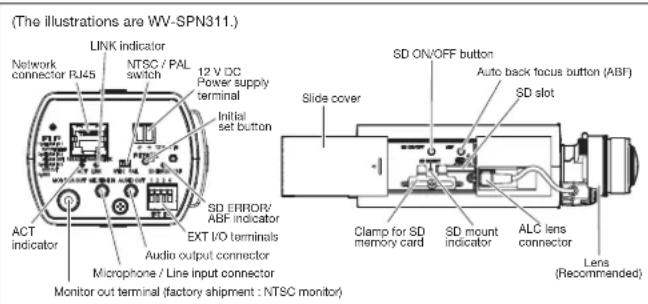
Appearance

Trademarks and registered trademarks
– Microsoft, and Windows are registered trademarks of Microsoft Corporation in the U.S. and other countries.
– iPad, iPhone and iPod touch are registered trademarks of Apple Inc.
– Android is a trademark of Google Inc.
– UniPhier is a registered trademark of Panasonic Corporation.
- "i-PRO SmartHD" logo is trademark or registered trademark of Panasonic Corporation.
- ONVIF and the ONVIF logo are trademarks of ONVIF Inc.
Important
– Safety Precaution: Carefully read the Important Information. Installation Guide and operating
instructions before using this product
– Panasonic cannot be responsible for the performance of the network and/or other manufacturers
products used on the network.
- Masses and dimensions are approximate. - Specifications are subject to change without notice.


Marque : PANASONIC
Modèle : WV-SPN311
Catégorie : Caméra de surveillance