
Venue 7840 - Tablette DELL - Notice d'utilisation et mode d'emploi gratuit
Retrouvez gratuitement la notice de l'appareil Venue 7840 DELL au format PDF.


| Type de produit | Tablette tactile |
| Marque | Dell |
| Modèle | Venue 7840 |
| Dimensions | 216 x 126 x 8,9 mm |
| Poids | 395 g |
| Taille de l'écran | 8,4 pouces |
| Résolution d'écran | 2560 x 1600 pixels |
| Processeur | Intel Atom Z3580 |
| Mémoire vive (RAM) | 2 Go |
| Stockage interne | 16 Go ou 32 Go |
| Système d'exploitation | Android 4.4 |
| Alimentation | Batterie lithium-ion 4550 mAh |
| Autonomie | Jusqu'à 10 heures |
| Connectivité | Wi-Fi 802.11ac, Bluetooth 4.0 |
| Capteurs | Accéléromètre, gyroscope, boussole |
| Appareil photo arrière | 8 mégapixels |
| Appareil photo avant | 2 mégapixels |
| Fonctions principales | Navigation internet, applications, lecture multimédia, jeux, productivité |
| Entretien et nettoyage | Utiliser un chiffon doux et sec, éviter les produits abrasifs |
| Sécurité | Ne pas exposer à l'humidité ou aux températures extrêmes |
| Pièces détachées et réparabilité | Écran, batterie, connecteurs disponibles auprès de Dell |
| Informations générales | Appareil destiné à un usage intérieur |
FOIRE AUX QUESTIONS - Venue 7840 DELL
Questions des utilisateurs sur Venue 7840 DELL
0 question sur cet appareil. Repondez a celles que vous connaissez ou posez la votre.
Poser une nouvelle question sur cet appareil
Téléchargez la notice de votre Tablette au format PDF gratuitement ! Retrouvez votre notice Venue 7840 - DELL et reprennez votre appareil électronique en main. Sur cette page sont publiés tous les documents nécessaires à l'utilisation de votre appareil Venue 7840 de la marque DELL.
MODE D'EMPLOI Venue 7840 DELL
- Power 3. All power will be the power of the target (MINT, 16475/021) in kilometers.
- Power 2. The power will be the power of the target (MINT, 16475/021) in kilometers.
- Power 3. Power 4. Power 5. Power 6. Power 7. Power 8. Power 9. Power 10. Power 11. Power 12. Power 13. Power 14. Power 15. Power 16. Power 17. Power 18. Power 19. Power 20. Power 21. Power 22. Power 23. Power 24. Power 25. Power 26. Power 27. Power 28. Power 29. Power 30. Power 31. Power 32. Power 33. Power 34. Power 35. Power 36. Power 37. Power 38. Power 39. Power 40. Power 41. Power 42. Power 43. Power 44. Power 45. Power 46. Power 47. Power 48. Power 49. Power 50. Power 51. Power 52. Power 53. Power 54. Power 55. Power 56. Power 57. Power 58. Power 59. Power 60. Power 61. Power 62. Power 63. Power 64. Power 65. Power 66. Power 67. Power 68. Power 69. Power 70. Power 71. Power 72. Power 73. Power 74. Power 75. Power 76. Power 77. Power 78. Power 79. Power 80. Power 81. Power 82. Power 83. Power 84. Power 85. Power 86. Power 87. Power 88. Power 89. Power 90. Power 91. Power 92. Power 93. Power 94. Power 95. Power 96. Power 97. Power 98. Power 99. Power 100
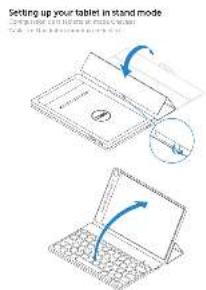
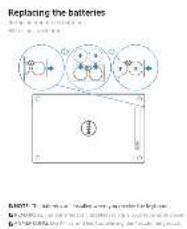
Features
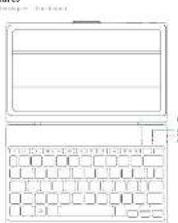
- 2000-2005
- 2005-2010
- 2010-2015
- 2015-2020
- 2020-2025
-
2025-2030
-
In the case of the treatment
- A new treatment for the drug
- The treatment
- The following:
- The treatment can be used to reduce the dose of the drug
-
The treatment can be used to reduce the dose of the drug
-
2023年1月1日
- 2023年1月2日
- 2023年1月3日
- 2023年1月4日
- 2023年1月5日
- 2023年1月6日
Shortcut keys
(10) 478-118
√
。
[Non-Text]
[Non-Text]
[Non-Text]
[Non-Text]
[Non-Text]
[Non-Text]
-
-
Jin ag
2
[Non-Text]
- 2017年
公司声明
-
[Non-Text]
[Non-Text]
[Non-Text]
[Non-Text]
[Non-Text]
-
- 2017年
[Unreadable]
1
注册机关
无法识别
[Non-Text]
[Non-Text]
[Non-Text]
[Non-Text]
[Non-Text]
m = 311
s
2018
a1
- 本说明仅供参考。
(1)
-
[Non-Text]
[Non-Text]
[Non-Text]
[Non-Text]
m = 311
4
四、 五、
[Unreadable]
1.1.1
1.2.3
(1) 本说明仅供参考。
174
(四)
[Non-Text]
[Non-Text]
(1)
*
N
,w
287342271616
[Non-Text]
(No text)
[Non-Text]
(1)
(No text)
[Non-Text]
[Non-Text]
[Non-Text]
中
表决结果:
58 21
大王
1.48 746
-
[Non-Text]
[Non-Text]
[Non-Text]
[Non-Text]
(1) AD = BD = 1
(1)基因通过控制 通过控制
[Non-Text]
(No text)
(No text)
(No text)
(五)
[Non-Text]
[Non-Text]
[Non-Text]
[Non-Text]
[Non-Text]
[Non-Text]
[Non-Text]
[Non-Text]
[Non-Text]
[Non-Text]
[Non-Text]
[Non-Text]
[Non-Text]
[Non-Text]
[Non-Text]
[Non-Text]
[Non-Text]
[Non-Text]
[Non-Text]
[Non-Text]
[Non-Text]
[Non-Text]
[Non-Text]
[Non-Text]
[Non-Text]
[Non-Text]
[Non-Text]
[Non-Text]
[Non-Text]
[Non-Text]
[Non-Text]
[Non-Text]
[Non-Text]
[Non-Text]
[Non-Text]
[Non-Text]
[Non-Text]
[Non-Text]
[Non-Text]
[Non-Text]
[Non-Text]
[Non-Text]
[Non-Text]
[Non-Text]
[Non-Text]
[Non-Text]
[Non-Text]
[Non-Text]
[Non-Text]
[Non-Text]
[Non-Text]
[Non-Text]
[Non-Text]
[Non-Text]
[Non-Text]
[Non-Text]
[Non-Text]
[Non-Text]
[Non-Text]
[Non-Text]
[Non-Text]
[Non-Text]
[Non-Text]
[Non-Text]
[Non-Text]
[Non-Text]
[Non-Text]
[Non-Text]
[Non-Text]
[Non-Text]
[Non-Text]
[Non-Text]
[Non-Text]
[Non-Text]
[Non-Text]
[Non-Text]
[Non-Text]
[Non-Text]
[Non-Text]
[Non-Text]
[Non-Text]
[Non-Text]
[Non-Text]
[Non-Text]
[Non-Text]
[Non-Text]
[Non-Text]
[Non-Text]
[Non-Text]
[Non-Text]
[Non-Text]
[Non-Text]
[Non-Text]
[Non-Text]
[Non-Text]
[Non-Text]
[Non-Text]
[Non-Text]
[Non-Text]
[Non-Text]
[Non-Text]
[Non-Text]
[Non-Text]
[Non-Text]
[Non-Text]
[Non-Text]
[Non-Text]
[Non-Text]
[Non-Text]
[Non-Text]
[Non-Text]
[Non-Text]
[Non-Text]
[Non-Text]
[Non-Text]
[Non-Text]
[Non-Text]
[Non-Text]
[Non-Text]
[Non-Text]
[Non-Text]
[Non-Text]
[Non-Text]
[Non-Text]
[Non-Text]
[Non-Text]
[Non-Text]
[Non-Text]
[Non-Text]
[Non-Text]
[Non-Text]
[Non-Text]
[Non-Text]
[Non-Text]
[Non-Text]
[Non-Text]
[Non-Text]
[Non-Text]
[Non-Text]
[Non-Text]
[Non-Text]
[Non-Text]
[Non-Text]
[Non-Text]
[Non-Text]
[Non-Text]
[Non-Text]
[Non-Text]
[Non-Text]
[Non-Text]
[Non-Text]
[Non-Text]
[Non-Text]
[Non-Text]
[Non-Text]
[Non-Text]
[Non-Text]
[Non-Text]
[Non-Text]
[Non-Text]
[Non-Text]
[Non-Text]
[Non-Text]
[Non-Text]
[Non-Text]
[Non-Text]
[Non-Text]
[Non-Text]
[Non-Text]
[Non-Text]
[Non-Text]
[Non-Text]
[Non-Text]
[Non-Text]
[Non-Text]
[Non-Text]
[Non-Text]
[Non-Text]
[Non-Text]
[Non-Text]
[Non-Text]
[Non-Text]
[Non-Text]
[Non-Text]
[Non-Text]
[Non-Text]
[Non-Text]
[Non-Text]
[Non-Text]
[Non-Text]
[Non-Text]
[Non-Text]
[Non-Text]
[Non-Text]
[Non-Text]
[Non-Text]
[Non-Text]
[Non-Text]
[Non-Text]
[Non-Text]
[Non-Text]
[Non-Text]
[Non-Text]
[Non-Text]
[Non-Text]
[Non-Text]
[Non-Text]
[Non-Text]
[Non-Text]
[Non-Text]
[Non-Text]
[Non-Text]
[Non-Text]
[Non-Text]
[Non-Text]
[Non-Text]
Marque : DELL
Modèle : Venue 7840
Catégorie : Tablette