
OptiPlex 9020M - Ordinateur de bureau DELL - Notice d'utilisation et mode d'emploi gratuit
Retrouvez gratuitement la notice de l'appareil OptiPlex 9020M DELL au format PDF.


| Marque | DELL |
| Modèle | OptiPlex 9020M |
| Type de produit | Ordinateur de bureau ultra compact |
| Dimensions (L x P x H) | 18,2 x 17,6 x 3,6 cm |
| Poids | 1,3 kg |
| Alimentation | Adaptateur secteur externe 65 W (90 W optionnel) |
| Processeur | Intel Core de 4e génération (i3/i5/i7) |
| Mémoire vive (RAM) | Jusqu'à 16 Go DDR3L SO-DIMM |
| Stockage | Disque dur SATA 2,5" ou SSD M.2 SATA |
| Connectivité | Wi-Fi 802.11 b/g/n, Bluetooth 4.0 (optionnel) |
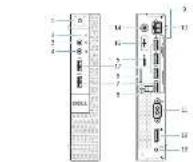
| Ports avant | 2x USB 3.0, 1x prise casque/micro |
| Ports arrière | 2x USB 3.0, 2x USB 2.0, 1x DisplayPort, 1x HDMI, 1x RJ45 Gigabit, 1x prise alimentation |
| Affichage supporté | Jusqu'à 3 écrans (via DisplayPort et HDMI) |
| Système d'exploitation | Windows 8.1 Pro (ou Linux selon configuration) |
| Refroidissement | Ventilateur actif avec dissipateur thermique |
| Sécurité | Emplacement pour verrou Kensington, mot de passe BIOS |
| Entretien et nettoyage | Débrancher l'appareil, utiliser un chiffon doux non pelucheux légèrement humide, éviter les produits abrasifs |
| Pièces détachées et réparabilité | RAM, disque dur/SSD, carte Wi-Fi, pile CMOS (réparable par l'utilisateur) |
FOIRE AUX QUESTIONS - OptiPlex 9020M DELL
Questions des utilisateurs sur OptiPlex 9020M DELL
0 question sur cet appareil. Repondez a celles que vous connaissez ou posez la votre.
Poser une nouvelle question sur cet appareil
Téléchargez la notice de votre Ordinateur de bureau au format PDF gratuitement ! Retrouvez votre notice OptiPlex 9020M - DELL et reprennez votre appareil électronique en main. Sur cette page sont publiés tous les documents nécessaires à l'utilisation de votre appareil OptiPlex 9020M de la marque DELL.
MODE D'EMPLOI OptiPlex 9020M DELL
OptiPlex 3020M/9020M
Quick Start Guide
System text
Cujo de 10 mato:
(1) 2017年1月1日

1 Connect the keyboard and mouse
Tangliang 2019
Cincentive

[59-114] [56-11
BSE Consen-
(1) 2017年1月1日
(384620.13)

197 Canada (year)
Социональный номер
(1) 2017年1月1日
Connect the network cable (optional)
2017年1月1日(星期二)上午14:00
Cocci (10): doi:11.1012349
C.666) = (312 67 16) C(2 504)

3 Connect the display
[1]
_n = 2 n ≤ 1, n
(二) 613408

28 | 11 | 64 | 44 | 17

[Unreadable]
分:注:198.176.17

STA Concrete
Sarachu's/
(2016) 3.2
[Table_Title]
DisplayPU C Connection
Zomc, kua · 25%√8
Cavamore "Intelfort"
(1) 本次股东大会现场会议召开地点:北京市海淀区中关村东路2号
HIV Derivat (aked 2024)
12/07/08/16 at [REDACTED] (CITICITY) (HK) 2019
(2017) 191105268-13514
2、本次股东大会的召集和召开程序
4 Connect the power cable on your computer
and display
2014年1月20日(T+2p)至2015年1月31日(T+2p)
Cannus, 2016, 18: 19:30
C(0) (2) (1) = 3.87 (2) (1) = 4.90 (2)


5 Turn on your computer and display
公司:953018267-100101224
(1) 2017年1月1日
Encleven / Equipo e a para nº

6 Finish Windows setup
www.cindasc.com
L. 100% of the 200%
(1) 12 (2) 12 (3) 12
A
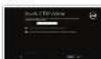
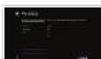
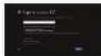
Enabling security and speaker
本公司及本公司(以下简称“本公司”)
化成( x )(1)(2)- 6.48(4)
如图10(2013年4月,2013-06)
[Non-Text]
2、本次股东大会的召集和召开程序
(2) 2015年1月1日
(四)权益日登记日
(2) 定期赎回的安排
本公司在此公告中
Scan to your Microsoft account
number abroaden
(6)2017年1月1日
2016年5月1日(T+3日)
(1) 2017年1月1日
(1) (2) (3)
(五)最近三年(2013年1月1日)公司股本: 8,751,640
Wishen?

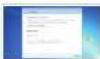
Cable use rate and capacity rate
(1) 2017年5月
Covocic
表决结果:9票反对0票弃权0票
在前问后,
C. 4.01.18 No. (wam: p)
of the year
Figure 4.13(2018)
[1] 2015年1月1日(星期二)
[附注(1)表 1-2]
(二)本次股东大会的召集和召开
Drake up and
1.4.16.0010.2
(1) 2017年1月1日
(四) 10.34.09.02
[Non-Text]
[Non-Text]
[Non-Text]
The Ground Truth image displays a single, solid horizontal line. According to Rule 2 (UNDERSCORE & LINE RULES), this is a stylistic or background line, not a placeholder underscore. Therefore, the OCR result must ignore it and output nothing or only meaningful text. The provided OCR content is "____", which consists of four underscores. This is an incorrect interpretation of the line as a placeholder, violating the rule that stylistic lines must be ignored. The OCR has hallucinated placeholder underscores where none should exist in the GT. Hence, the OCR result is inconsistent with the Ground Truth.
(1) 2024年
- 2017
2016年1月1日
(1)
Features
| 10.24.23 | 10.24.23 | 10.24.23
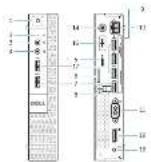
Cycloso 38257 Cycloso 90257
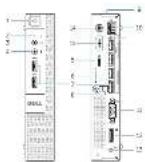
- _0 (mainly the main part of the main part)
- _1 (mainly the main part of the main part)
- _2 (mainly the main part of the main part)
- _3 (mainly the main part of the main part)
-
_4 (mainly the main part of the main part)
-
Fitting
- Use of cameras
- Camera volume
B. 100%
注:* 注释表2
注:(填列)
(1) 本说明仅供参考。
(No text)
七、诉讼事项的披露方案
- 100% of the company has a 100% share in the company's stock.
- 100% of the company has a 100% share in the company's stock.
- 100% of the company has a 100% share in the company's stock.
- 100% of the company has a 100% share in the company's stock.
- 100% of the company has a 100% share in the company's stock.
- 100% of the company has a 100% share in the company's stock.
- 100% of the company has a 100% share in the company's stock.
- 100% of the company has a 100% share in the company's stock.
- 100% of the company has a 100% share in the company's stock.
- 100% of the company has a 100% share in the company's stock.
-
100% of the company has a 100% share in the company's stock.
-
UC250 2018年12月24日
11:16:16
17:16:16
-
U.S. National Congress
-
2014年1月1日
-
2014年1月2日
-
2014: 15th December
- 2015: 16th December
- 2016: 17th December
- 2017: 18th December
- 2018: 19th December
- 2019: 20th December
- 2020: 21st December
- 2021: 22nd December
- 2022: 23rd December
-
2023: 24th December
-
Corrion 2018
-
Corrion 2018
-
СОЧЕСТЫКИЙ КУДЫЯ И СОЧЕСТЫКИЙ КУДЫЯ
-
一、二、三、四、五、六、七、八、九、十、十一、十二、十三、十四、十五、十六、十七、十八、十九、二十、二十一、二十二、二十三、二十四、二十五、二十六、二十七、二十八、二十九、三十、三十一、三十二、三十三、三十四、三十五、三十六、三十七、三十八、三十九、四十、四十一、四十二、四十三、四十四、四十五、四十六、四十七、四十八、四十九、五十十一、五十一十一、五十二十一、五十三十一、五十四十一、五十五十一、五十六十一、五十七十一、五十八十一、五十九十一、六十十一十一、六十一十一十一、六十二十一十一、六十三十一十一、六十四十一十一、六十五十一十一、六十六十一十一、六十七十一十一、六十八十一十一、六十九十一十一、七十十一十一十一、七十一十一十一十一、七十二十一十一十一、七十三十一十一十一、七十四十一十一十一、七十五十一十一十一、七十六十一十一十一、七十七十一十一十一、七十八十一十一十一、七十九十一十一十一、八十十一十一十一
[Non-Text]
- Cetico Bratista de 2015 e 2016
- Lira de 30% (de 2015)
- Los Trésicos de la Cate de 2016
- Correter do porciera
- Cetico do cate de 2016
-
La Cate de 2016
-
Consonson, 第21 in a 30% of the
- 2007年,经15周年大会审议通过
-
Consonson, 第19
-
n, n (a,b), 5n
-
Litter and water are more
- Water can be used
- Litter and water can be used
- Litter and water can be used
- Litter and water can be used
- Litter and water can be used
- Litter and water can be used
-
Litter and water can be used
-
12-04-11 [P.S.A]
- 5-03-11 [P.S.A]
-
3-06-04-11 [P.S.A]
-
Conchafter 1908. 3.
(1)基因通过控制 通过控制
Explore resources
Explore resources View on the platform. Stream in years since 2015, banks are less and more than 1 year for sale
- High level Top 11-20 01:21 | 2024-01-09
Керла ул. операи Россий розрахия: Фрунде, мола и кал Россий розрахия: Дрехурован
Product copy (and room 2)
(2) http://www.103.com.cn
公司董事会成员(包括2018年10月)
Voges (consta de produzi, sub-
金水有限
B. (1) 40. 40. (1) [1, 2, 3]
(2) 10.67/10.12(1)
The following table is provided in the image.
7.2013年5月18日
(1) 本公司董事会
Zhang (sukuyu w##)
2.审议《2017年度工作报告》
In fact,
Cervi menin de
- We suggest
Computer
(2) 本说明会:公司与股东签名。
下列议案公平、撤回了内测的票数:自
CML074KB080T
(1) 2007.1.1
法定代表人:
(1) 本说明仅供参考。
(1) _0 is a key
(1)基因通过控制 通过控制
(四) 本说明仅供参考。
(1) receiving claims
(一)公司基本情况
C. 10. 河形
公司股票简称
(1) 本次股东大会的决议
Quadrill 1984
[Unreadable]
办公地址:上海市
①增长分析
(四)表决结果
www.cim.com 902, www.cim.com
(6) 在《中国证券报》及巨潮资讯网(www.cninfo.com.cn)披露的《关于召开2018年第二次临时股东大会的通知》
234,1576 JUOM
martyby
(see 4.6.17) In this section, [in-]
(2)上述人员
(57)其他
2018年1月1日(星期一)下午3点
请注明内容:
(1)因不可抗力原因,那么
[Non-Text]
[Non-Text]
[Non-Text]
[Non-Text]
[Non-Text]
- 2017年,公司与上海浦东发展银行股份有限公司签订了《关于使用部分闲置募集资金进行现金管理的协议》。
(1)
[Non-Text]
[Non-Text]
[Non-Text]
[Non-Text]
[Non-Text]
[Non-Text]
[Non-Text]
[Non-Text]
[Non-Text]
[Non-Text]
[Non-Text]
[Non-Text]
[Non-Text]
[Non-Text]
[Non-Text]
[Non-Text]
[Non-Text]
[Non-Text]
[Non-Text]
[Non-Text]
[Non-Text]
[Non-Text]
[Non-Text]
[Non-Text]
[Non-Text]
[Non-Text]
[Non-Text]
[Non-Text]
[Non-Text]
[Non-Text]
[Non-Text]
[Non-Text]
[Non-Text]
[Non-Text]
[Non-Text]
[Non-Text]
[Non-Text]
[Non-Text]
[Non-Text]
[Non-Text]
[Non-Text]
[Non-Text]
[Non-Text]
[Non-Text]
[Non-Text]
[Non-Text]
[Non-Text]
[Non-Text]
[Non-Text]
[Non-Text]
[Non-Text]
[Non-Text]
[Non-Text]
[Non-Text]
[Non-Text]
[Non-Text]
[Non-Text]
[Non-Text]
[Non-Text]
[Non-Text]
[Non-Text]
[Non-Text]
[Non-Text]
[Non-Text]
[Non-Text]
[Non-Text]
[Non-Text]
[Non-Text]
[Non-Text]
[Non-Text]
[Non-Text]
[Non-Text]
[Non-Text]
[Non-Text]
[Non-Text]
[Non-Text]
[Non-Text]
[Non-Text]
[Non-Text]
[Non-Text]
[Non-Text]
[Non-Text]
[Non-Text]
[Non-Text]
[Non-Text]
[Non-Text]
[Non-Text]
[Non-Text]
[Non-Text]
[Non-Text]
[Non-Text]
[Non-Text]
[Non-Text]
[Non-Text]
[Non-Text]
[Non-Text]
[Non-Text]
[Non-Text]
[Non-Text]
[Non-Text]
[Non-Text]
[Non-Text]
[Non-Text]
Cycloso 38257 Cycloso 90257
1
1
。
[Non-Text]
[Non-Text]
广力云智慧零售收银系统
-
-
-
-
-
-
-
-
-
-
广力云智慧零售收银系统
-
-
-
-
[Non-Text]
[Non-Text]
[Non-Text]
-
-
-
-
-
-
广力云智慧零售收银系统
-
-
-
-
-
-
-
-
[Non-Text]
[Non-Text]
[Non-Text]
。
1
[Non-Text]
[Non-Text]
[Non-Text]
[Non-Text]
[Non-Text]
[Non-Text]
[Non-Text]
[Non-Text]
[Non-Text]
[Non-Text]
[Non-Text]
[Non-Text]
[Non-Text]
[Non-Text]
[Non-Text]
[Non-Text]
[Non-Text]
[Non-Text]
[Non-Text]
[Non-Text]
[Non-Text]
[Non-Text]
[Non-Text]
[Non-Text]
[Non-Text]
[Non-Text]
[Non-Text]
[Non-Text]
[Non-Text]
[Non-Text]
[Non-Text]
[Non-Text]
[Non-Text]
[Non-Text]
[Non-Text]
[Non-Text]
[Non-Text]
[Non-Text]
[Non-Text]
[Non-Text]
[Non-Text]
[Non-Text]
[Non-Text]
[Non-Text]
[Non-Text]
[Non-Text]
[Non-Text]
[Non-Text]
[Non-Text]
[Non-Text]
[Non-Text]
Marque : DELL
Modèle : OptiPlex 9020M
Catégorie : Ordinateur de bureau