
TA 10 - Recepteur Amplicom - Notice d'utilisation et mode d'emploi gratuit
Retrouvez gratuitement la notice de l'appareil TA 10 Amplicom au format PDF.


| Marque | Amplicom |
| Modèle | TA 10 |
| Type de produit | Récepteur téléphonique DECT |
| Dimensions (L x l x h) | 150 x 50 x 30 mm |
| Poids | 130 g (avec piles) |
| Alimentation | 2 piles AAA (Ni-MH recommandées) |
| Portée intérieure | Jusqu'à 50 m |
| Portée extérieure | Jusqu'à 300 m |
| Écran | LCD rétroéclairé |
| Fonctions principales | Appel, volume réglable, mise en sourdine, répertoire (100 contacts), rappel des derniers numéros, blocage des appels indésirables |
| Sonnerie | Polyphonique, 10 mélodies, réglable en volume |
| Compatibilité | Compatible avec toutes les bases DECT standard (GAP) |
| Entretien et nettoyage | Nettoyer avec un chiffon doux et sec. Ne pas utiliser de produits abrasifs. |
| Sécurité | Utiliser des piles recommandées. Ne pas exposer à l'humidité. Recycler les piles usagées. |
| Pièces détachées et réparabilité | Piles et chargeur disponibles. Réparation par un professionnel agréé. |
| Informations générales | Notice téléchargeable au format PDF sur le site Amplicom. |
FOIRE AUX QUESTIONS - TA 10 Amplicom
Questions des utilisateurs sur TA 10 Amplicom
0 question sur cet appareil. Repondez a celles que vous connaissez ou posez la votre.
Poser une nouvelle question sur cet appareil
Téléchargez la notice de votre Recepteur au format PDF gratuitement ! Retrouvez votre notice TA 10 - Amplicom et reprennez votre appareil électronique en main. Sur cette page sont publiés tous les documents nécessaires à l'utilisation de votre appareil TA 10 de la marque Amplicom.
MODE D'EMPLOI TA 10 Amplicom


natural_image
Exterior view of a white and gray electronic device labeled 'FOOST' with control knob (no additional text or symbols visible)TA 10 comes with these items:
Phone amplifier TA 10
Manual
Short cord
Feature Identification:
- Rotary volume
- ON/OFF Indicator
- Compatibility Switch
- Tone Control Switch
- Handset Jack
- Boost Button and LED
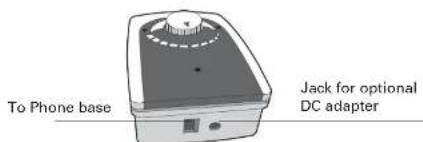
- Jack to phone
- Jack for optional DC adapter
- Battery cover
For operation a 9 V-batterie is necessary (not supplied).


Thank you for selecting the TA 10 phone amplifier. This unique amplifier is compatible with virtually any modular connected phone system. It enhances the clarity and increases incoming volume for louder and clearer conversations.
Safety instructions
Important: Your phone can produce very high sound when the amplifier is activated and the volume control is set to maximum. Please take care if the handset is used by others.
- Please make sure you read this user guide carefully and keep it for further use.
- Only use attachments recommended or sold by the manufacturer.
- Do not use outdoors. Do not use near water, for example, near a bath tub, wash bowl, kitchen sink or laundry tub, in a wet basement or near a swimming pool.
- Do not unplug by pulling on cord. To unplug, grasp the plug, not the cord.
- Do not operate any appliance with a damaged cord or plug, or after the appliance malfunctions or is dropped or damaged in any manner. Return appliance to the nearest authorized service facility for examination, repair, or electrical or mechanical adjustment.
- Use only the power cord (not supplied) and batteries indicated in the manual. Do not dispose of batteries in fire. They may explode.
- When using a power adapter (not supplied) plug it to the socket-outlet near the equipment and make sure it is easily accessible.
- Avoid using any telephone product during an electrical storm. There may be a remote risk of electric shock from lightning.
- Do not use the telephone to report a gas leak in the vicinity of the leak.
Intended use
The device is suitable for connection to a modular connected corded phone. Any other use is considered unintended use. Unauthorised modification or reconstruction is not permitted. Under no circumstances open the device or attempt any repair work yourself.
Installation and Operation
- Install a 9-volt battery (not included) and connect the TA 10 to your telephone handset as shown. Use a coin to ply open the battery door. Use only the provided "short cord" to connect TA 10 to the phone base. (Note: Ignore the ON/OFF indicator while doing any switch setting. It is not relevant at this time.) For your safety, always disconnect TA 10 from the phone base be fore replacing its battery.
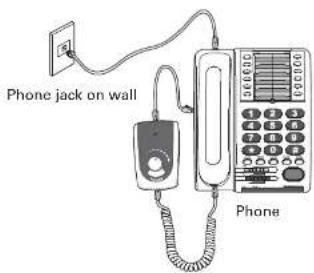
- Set Volume control to its mid-point. Set Tone Control Switch to Position 2.
Volume Control

- Setting the Compatibility Switch: There are 7 positions on this switch. Positions 1 to 6 are for compatibility setting use. Position 7 is a "by-pass" position and is not for normal setting use. Position 7 offers no amplification and should only be used in case of emergency when there is a total power outage.

A. Set Compatibility switch to Position 1 (Note: This is the most popular setting and is used by most phones. Ignore ON / OFF indicator status while setting this switch. It is not relevant at this time.)
B. Lift up the handset and verify you can hear a clear dial tone.
C. If there is no clear dial tone, hang up the handset and move the Compatibility switch to the next position and repeat Step B.
D. If you do get a clear dial tone, verify the dial tone loudness can be changed by rotating the volume control. If there is change in dial tone loudness, go to Step F.
E. If the dial tone loudness can not be changed by rotating the volume control, hang-up the handset and move the Compatibility switch over to the next position. Repeat Step B.
F. Use the telephone keypad to make a call and verify you can hear each other.
G. If you can hear each other, then the present Compatibility switch setting is the correct one and you are done. Record this switch setting for future reference. Go to Step 4.
H. If not, try the next Compatibility switch position until you can hear each other clearly. (Note: Feel free to experiment with any switching setting.)
4. While talking on the phone, verify you can vary the handset volume by rotating the volume control on the amplifier. (Caution: Lower the volume control if you notice there is squeal sound in the handset).
5. While on the phone, try different Tone control settings to find the one with the best incoming sound clarity. Lower the volume if you notice a squealing sound in the handset. Keep this setting for all future calls. You do not need to change this tone setting again. Record this tone setting for future reference.

- Press and hold the BOOST button down. Verify the incoming voice becomes louder and the BOOST LED is on. You must release this button when talking because your voice is muted if this button is held down.

- The ON / OFF indicator light should be on while the phone is in use. It will go off in 10 - 20 seconds after going on-hook (or if there is no sound / voice for 10 - 20 seconds).
- During normal usage, a 9-volt alkaline battery may last 6-12 months. Please replace the battery if the ON/OFF indicator becomes dim or if the receiver sound is distorted.
- An optional 9-volt DC adapter (not included) may be installed at this time. This adapter provides normal operating power while the battery serves as a back-up in case of power outage. The battery should be changed once every two years or sooner if you notice the ON / OFF indicator failed to come on during power outage.
Help and support / Troubleshooting guide
If you need some help and you're in the UK, please first check and see if your problem can be solved using the troubleshooting guide below. If it can't, please call us on 0844 800 6503 (using a UK landline, at the time of going to print: calls cost 6p for connection charge and then 5p a minute. Mobile costs may vary). Lines are open Monday to Friday, 9am to 5pm, excluding public holidays. If you've a claim on your 2-year guarantee, please contact your supplier.
- ON / OFF indicator is dim or does not ON: Replace the battery.
- Can not hear dial tone or can not hear each other: Make sure the Compatibility switch is at the proper setting. If necessary, repeat A to D of installation Step 3 above.
- There is a loud squealing sound in my handset: The volume or tone is set too high, lower volume or tone setting to stop the noise.
Specifications
Power source Battery consumption
9 volt alkaline battery (not included) 10 mA typical; automatic shut-off if there is no voice
Battery life
Amplification without Boost Amplification with Boost
6-12 months depending on usage
Auto shut off time (to save battery)
30 dB
Compatibility switch Indicators
45 dB
Controls
10 - 20 seconds if no sound or voice
Optional AC adapter
Operating temperature Storage temperature
(6 positions) + a "by-pass" position ON/OFF and BOOST
Volume, BOOST, Tone Control, Compatibility
9 V DC, 300 mA
(not provided)
0 to 45°C
-20 to 50°C

Disposal
You are obliged to dispose of consumable goods properly in accordance with the applicable legal regulations.

The symbol on this product indicates that electrical and electronic apparatus and batteries must be disposed of separately from domestic waste at suitable collection points provided by the public waste authorities.
Batteries can also often be disposed of at the point of sale. Packaging materials must be disposed of according to local regulations.

Maintenance
- Please clean your equipment's surfaces with a soft, fluff-free cloth.
• Never use cleaning agents or solvents.
Guarantee
AMPLICOMMS equipment is produced and tested according to the latest production methods. The implementation of carefully chosen materials and highly developed technologies ensure trouble free functioning and a long service life.
The terms of the guarantee do not apply where the cause of the equipment malfunction is the fault of the telephone network operator or any interposed private branch extension system. The terms of the guarantee do not apply to the rechargeable batteries or power packs used in the products. The period of guarantee is 24 months from the date of purchase.
All deficiencies resulting from material of production faults which occur during the period of guarantee will be eliminated free of charge. Rights to claims under the terms of guarantee are annulled following intervention by the purchaser or third parties. Damage caused as a result of improper handling or operation, incorrect positioning or storing, improper connection or installation, Acts of God or other external influence are not covered by the terms of guarantee.
In the case of complaints, we reserve the right to repair or replace defect parts or provide a replacement device. Replacement parts or devices become our property.
Rights to compensation in the case of damage are excluded where there is no evidence or intent or gross negligence by the manufacturer.
If your equipment shows signs of defect during the period of guarantee, please return to the sales outlet in which you purchased the AMPLICOMMS equipment together with the purchase receipt. All rights to claims under the terms of guarantee in accordance with this agreement must be asserted exclusively with regard to your sales outlet.
Two years after the purchase of our products, claims under the terms of guarantee can no longer be asserted.
Declaration of conformity

This device fulfils the requirements stipulated in the EU directive: 1999/5 EU directive on radio equipment and telecommunications terminal equipment and the mutual recognition of their conformity. Conformity with the above mentioned directive is confirmed by the CE symbol on the device.
To view the complete Declaration of Conformity, please refer to the free download available on our website www.amplicomms.eu

Marque : Amplicom
Modèle : TA 10
Catégorie : Recepteur