
Office 35 - Téléphone AASTRA - Notice d'utilisation et mode d'emploi gratuit
Retrouvez gratuitement la notice de l'appareil Office 35 AASTRA au format PDF.


| Type de produit | Téléphone fixe pour bureau |
| Marque | Aastra |
| Modèle | Office 35 |
| Dimensions (L x l x H) | 220 x 180 x 100 mm |
| Poids | 750 g |
| Alimentation | Via ligne téléphonique (RJ11) ou adaptateur secteur 9V |
| Type d'écran | Afficheur rétroéclairé LCD 2 lignes |
| Répertoire | Jusqu'à 100 noms et numéros |
| Fonctions principales | Composition abrégée, rappel, mise en attente, transfert d'appel, conférence |
| Haut-parleur | Mains-libres intégré |
| Compatibilité | Réseau analogique RJ11 |
| Numérotation | DTMF et décimale |
| Sonnerie | 10 mélodies réglables |
| Entretien et nettoyage | Essuyer avec un chiffon doux légèrement humide. Ne pas utiliser de solvants. |
| Sécurité | Ne pas exposer à l'humidité. Utiliser uniquement l'adaptateur fourni. |
| Pièces détachées et réparabilité | Cordon téléphonique et adaptateur disponibles en SAV. Réparation par centre agréé. |
| Informations générales | Garantie 2 ans. Fabriqué en Chine. |
FOIRE AUX QUESTIONS - Office 35 AASTRA
Questions des utilisateurs sur Office 35 AASTRA
0 question sur cet appareil. Repondez a celles que vous connaissez ou posez la votre.
Poser une nouvelle question sur cet appareil
Téléchargez la notice de votre Téléphone au format PDF gratuitement ! Retrouvez votre notice Office 35 - AASTRA et reprennez votre appareil électronique en main. Sur cette page sont publiés tous les documents nécessaires à l'utilisation de votre appareil Office 35 de la marque AASTRA.
MODE D'EMPLOI Office 35 AASTRA
Office 35 Quick User's Guide en
Key names:

ABC
ABC
Correction

Fox key

MENU
Menu

Info key


Absence key
End


Redial key
Configurable keys

Cursor keys


Display symbols:

Open listening

Microphone on/off

Hands-free mode

Scroll up/down

Alpha symbol; Text mode on keyboard is activated
Menu key: Repeated pressing easily takes you to further functions:
Press the Menu key several times if necessary in the idle state or during a call.
END key: Repeatedly pressing the End key returns you to the beginning.
Foxkey: The displayed functions in the lowermost display line can be selected directly with the Foxkey.
i in the Display: Press the Info key one or more times for more information.
+ in the Display: Press the Info key for the rest of the information.
Call diversion/ Absence Incoming calls are to be diverted:
key:
-
Diversion: enter number and press the Absence key.
-
Press the Absence key again to deactivate diversion. (When activated again, calls are diverted to the phone number last saved).
Connecting/
Transferring:
During a call:
- Press the Fox key under "Enquiry call".
- Enter the number and wait until the call is answered.
- Put the handset on-hook and the call is transferred (if nobody picks up, press the End key to reconnect the first call).
Brokering:
Switching between two callers and simultaneously conducting two calls.
During a call:
- Press the Fox key under "Enquiry call".
- Enter the number and wait until the call is answered.
- Press the Fox key under "Brokering" to switch callers.
Hands-free operation: You can telephone without holding the handset in your hand.
- Enter a number.
- Press the Loudspeaker key.
Conference call: You can connect several callers for a conference call.
During a call:
- Press the Fox key under "Enquiry call".
- Enter the number and wait until the call is answered.
- Press the Fox key under "Conference".
- Add participants via inquiry.
- Leaving a conference call: Put the handset on-hook.
Callback: Request callback: The person is busy or does not answer.
- Press the Fox key under "Callback".
- Put the handset on-hook, the display shows "Call expected...".
- Delete callback, press the Foxkey under "Reset".
Dialling by name - Select from all of the names stored in the telephone system:
Quickdial: With Quickdial you only need to press the digit keys once for each letter, even though each key is assigned three letters (the system administrator can tell you whether surname or first name has been entered first):
- To select a person to call, press the first couple of letter keys once (first name and surname can be separated using the Hash key).
- Press the ABC key to display matching names.
- Press the Fox key under "※" as often as necessary to display the desired name.
- Initiate call: Pick up the handset.
The telephone does not Pick-up the handset, and press the Star key once and 0 twice to reset all active function as desired: functions.
Further functions and settings of the telephone as well as the declaration of conformity are available in the extensive User's Guide. It is available from your system administrator or you can access it at:
https://pbxweb.aastra.com

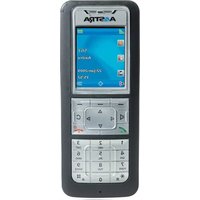

Marque : AASTRA
Modèle : Office 35
Catégorie : Téléphone