
WV-NW960 - Caméra de surveillance PANASONIC - Notice d'utilisation et mode d'emploi gratuit
Retrouvez gratuitement la notice de l'appareil WV-NW960 PANASONIC au format PDF.


| Type de produit | Caméra de surveillance réseau PTZ |
| Capteur | CCD 1/4 pouce, 768 x 494 pixels |
| Résolution maximale | VGA (640 x 480) |
| Objectif | Zoom optique 30x, 3,8 - 114 mm, F1,4 - 3,7 |
| Zoom numérique | 10x (300x au total) |
| Angle de vue | Horizontal : 52° (grand angle) - 1,9° (télé) |
| Sensibilité lumineuse | 0,5 lux (couleur), 0,04 lux (N/B) à F1,4 |
| Super Dynamic III | Oui, plage dynamique de 52 dB |
| Réduction de bruit adaptative | 2D/3D DNR |
| Mode Jour/Nuit | Oui, avec filtre IR commutateur |
| Rotation/Pan | 360° continu, 0,065°/s à 400°/s |
| Inclinaison/Tilt | -5° à 185°, vitesse identique au Pan |
| Positions préréglées | 256 |
| Suivi automatique | Oui |
| Compression vidéo | MPEG-4 et JPEG double flux |
| Audio | Full duplex, G.726 (ADPCM) 32/16 kbps |
| Stockage | Carte Mini SD (optionnelle) |
| Indice de protection | IP66 |
| Température de fonctionnement | -40°C à +50°C (avec ventilateur/chauffage intégrés) |
| Alimentation | PoE (IEEE 802.3af) ou 24 V AC |
| Sécurité | Authentification utilisateur (3 niveaux) et hôte |
| Langues du menu | Français, Anglais, Allemand, Espagnol, Italien, Russe |
| Accessoires inclus | Notice, CD-ROM, câble alarme, capuchons étanches |
FOIRE AUX QUESTIONS - WV-NW960 PANASONIC
Questions des utilisateurs sur WV-NW960 PANASONIC
0 question sur cet appareil. Repondez a celles que vous connaissez ou posez la votre.
Poser une nouvelle question sur cet appareil
Téléchargez la notice de votre Caméra de surveillance au format PDF gratuitement ! Retrouvez votre notice WV-NW960 - PANASONIC et reprennez votre appareil électronique en main. Sur cette page sont publiés tous les documents nécessaires à l'utilisation de votre appareil WV-NW960 de la marque PANASONIC.
MODE D'EMPLOI WV-NW960 PANASONIC

natural_image
Exterior view of a Panasonic security camera (no text or symbols visible on body)

Super Dynamic


Weather Resistant Dome Network Camera featuring 30x zoom and Super Dynamic III
Key Features
- Super Dynamic III technology delivers 128x wider dynamic range compared to conventional cameras.
- High sensitivity with Day-Night function: 0.5 lux (Color) at F1.4 (WIDE), 0.04 lux (B/W) at F1.4 (WIDE). IR cut filter switches on and off to ensure optimal picture quality in both color and B/W.
- Adaptive Digital Noise Reduction: 2D-DNR and 3D-DNR integration ensures reduced noise and motion blur in various conditions.
• Electronic sensitivity enhancement: Auto (Up to 32x) / OFF - 30x zoom lens: 3.8 mm \~ 114 mm (approx. 300x with digital zoom).
- Pan/Tilt speed of max. 400°/s at preset mode and 0.065°/s super fine control at manual mode
- Auto tracking: The camera automatically pans and tilts to follow a moving subject and keep it in the center of the image.
• Built-in Video Motion Detector with 4 programmable detection areas and 6 sensitivity levels - Scene Change Detection alarms when lens is covered, spray painted, removed or defocused.
- Various I/O terminals: ALARM IN 1 / BW IN, ALARM IN 2 / ALARM OUT, ALARM IN 3 / AUX OUT
- Alarm sources include Terminal 1 \~ 3, VMD and Panasonic alarm command. Alarm actions include Preset positions 1 \~ 256, PATROL 1 \~ 4, SD memory recording, FTP image transfer, E-mail notification, Indication on browser, Terminal output, Panasonic protocol output and Auto track.
- Auto image stabilizer for applications where vibration or wind is a concern
- Camera title display: 16 alphanumerics OSD and 20 alphanumerics on the browser
- Digital Slip-ring Transmission: The high speed digital video signal supplied by the Super Dynamic III DSP travels through the compact slip-ring without any DA/AD conversion process preventing image quality loss.
• Built-in MPEG-4/JPEG digital signal output at VGA image size with up to 30 ips - MPEG-4 and JPEG dual stream output for simultaneous live monitoring and high resolution recording
- Progressive output with motion adaptive interlace/progressive conversion allows every image to be clear even when the object is moving.
-
PTZ control can be made on the user-friendly GUI with 16 speeds pan/tilt and new "Drag and Zoom" operation enabling finer control. 256 speeds available for system with WV-CU950 system controller.
-
360° map shot: 8 thumbnail images at 45° intervals make it simple to direct the camera by clicking on a thumbnail.
- Multiscreen: Image from 16 cameras can be displayed in 4 different Quad screens or 16-screen (JPEG only).
- FTP client function enables periodic image data transfer or transfer upon alarm.
• Alarm notification via e-mail
• Full duplex 2-way audio allows interactive communication between camera site and monitoring site. - Alarm log, Manual REC log, FTP error log saved in the SD memory card is displayed on the browser GUI and can be downloaded to the client PC. Playback or Image data download through the log is also available.
- Multi-language GUI and setup menu: English, French, Italian, Spanish, German, Russian (PAL), English, French (NTSC), (Installation required except for English).
- SD memory card slot for Manual recording, Alarm recording and Backup upon network failure
- Scheduling function for Alarm / VMD / Access permission, Preset position call and Position refresh
- IP66 rated water and dust resistant. IEC60529 measuring standard compatible.
• Built-in fan/heater/sun shield for temperature changes of -40^ +50^ ( -40^ +122^ ).
Standard Accessories
- Operating Instructions .... 1 pc.
• CD-ROM 1 pc.
The IP setup software, the viewer software and the network operating instructions (PDF) are included on the CD-ROM.
The following items are for installation.
• 8P Alarm Cable .... 1 pc.
- Connector for 24 V AC (only for WV-MW964) .... 1 pc.
- Front/rear sun shield .... 1 set
- Front/rear sun shield mounting screws .... 2 pcs. (*one screw is a spare)
- Waterproof cap.... 3 pcs.
• RJ-45 junction connector .... 1 pc.
Optional Accessory
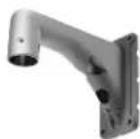
Wall Mount Bracket
WV-Q122
This catalog is provided for all over the world.
Some accessories may not be available in some countries.
Specifications
| TV System NTSC PAL | |||
| Camera | Image Sensor | 1/4-type interline transfer CCD | |
| Effective Pixels | 768 (H) x 494 (V) | ||
| Scanning Mode | 2 : 1 interface scan (with motion adaptive interface/progressive conversion) | ||
| Scanning Area | 3.59 (H) x 2.70 (V) mm | ||
| Minimum Illumination | Color (30IRE): 0.5 lux (Sens up: OFF), 0.02 lux (Sens up: 32x) at F1.4 BW (10IRE): 0.04 lux (Sens up: OFF), 0.0013 lux (Sens up: 32x) at F1.4 | ||
| White Balance | AWC (2,000 ~ 10,000 K), ATW1 (2,700 ~ 6,000 K), ATW2 (2,000 ~ 6,000 K) | ||
| Light Control | Automatic integration of ALC/ELC | ||
| AGC | ON (LOW, MID, HIGH) / OFF | ||
| Super Dynamic III | ON / OFF (With BLC masking 8 x 6 areas) | ||
| Dynamic Range | 52 dB typical (Super Dynamic III: ON, Shutter speed: OFF) | ||
| Electronic Shutter | OFF (1/60), AUTO, 1/100 | ||
| Electronic Sensitivity UP | OFF / AUTO (2x / 4x / 6x / 10x / 16x / 32x) | ||
| Digital Noise Reduction | High/Low, 2D/3D adaptive DNR | ||
| Black and White Mode | ON / OFF / Auto (High / Low), Wait time: 10 sec. - 5 min. | ||
| Digital Zoom | Up to 10x | ||
| Video Motion Detection | For preset position: 4 programable detection areas, Sensitivity: 6 stops Non-preset position: Detects entire screen except clock area, Sensitivity: 6 steps | ||
| Privacy Zone | Up to 8 zones, Gray / Mosaic | ||
| Auto Image Stabilizer | ON / OFF | ||
| Camera Title (OSD) Up to 16 characters (alphanumeric characters, marks) | |||
| Auto Focus | AUTO | ||
| Lens | Focal Length | 3.8 mm ~ 114 mm, 30x Zoom, 300x with 10x digital zoom. | |
| Zoom Speed | Manual: Approx. 6 sec. (WIDE - TELE) Preset Approx. 2 sec. (WIDE - TELE) | ||
| Angular Field of View | H: 1.9" (TELE) - 52.0" (WIDE), V: 1.4" (TELE) - 40.0" (WIDE) | ||
| Maximum Aperture Ratio | 1 : 1.4 (WIDE) ~ 3.7 (TELE) | ||
| Focusing Range | 1.5 m ~ ∞ | ||
| Aperture Range | F1.4 ~ 22, Close | ||
| Pan and Tilt | Panning Range | 360° endless | |
| Panning Spood | Manual: Approx. 0.065"/s ~ 120"/s, Up to 256 steps (depending on the controller) Preset: up to approx.400"/s | ||
| Tilting Range | -5" ~ 185" (upward-level-downward) Tiling angle limit: 0°/-1°/-2°/-3°/-4°/-5° | ||
| Tilting Speed | Manual: Approx.0.065"/s ~ 120"/s, Up to 256 steps (depending on the controller) Preset: up to approx.400"/s | ||
| Proportional Pan/Tilt Control | Yes | ||
| Number of Preset Positions | 256 | ||
| Auto Mode | OFF / preset sequence / auto pan / auto track / patrol | ||
| Auto Track | Standard Auto track | ||
| Patrol | 1 / 2 / 3 / 4 | ||
| Image Hold | ON / OFF | ||
| Digital Flip | Yes | ||
| PTZ Position Display ON | / OFF | ||
| Preset Position Setting | Preset ID / Auto focus / Dwell time / SDIII / ALC mask area | ||
| Map Shot | 360° map shot / preset map shot | ||
| Browser GUI | Camera Control | Pan/Tilt (16 steps), Zoom, Focus, Click centering, Drag zoom, Iris, Preset position call and program, Auto mode. | |
| Display Mode Image from | 16 cameras can be displayed in 4 different Quad screens or 16-screen (JPEG only). | ||
| Camera Title | Up to 20 alphanumeric characters | ||
| SD Memory Data Download | Images recorded in the SD memory card can be downloaded. | ||
| Clock Display | Time: 12H / 24H, Date: 5 formats on the browser, Summer time (Manual) | ||
| Alarm Control | Reset | ||
| GUI / Setup Menu Language | English, French (Installation required for French) | English, French, Italian, Spanish, German, Russian (Installation required except for English) | |
| System Log | Alarm log, Manual REC log, FTP error log (SD memory required) | ||
| Supported OS | Microsoft® Windows® XP Professional/Home SP2, Microsoft® Windows Vista The language of the OS must be same as selected GUI language. | ||
| Supported Browser | Microsoft® Internet Explorer® 7.0 Microsoft® Internet Explorer®6.0 SP2 Microsoft® Internet Explorer®6.0 SP1 (Only with Windows 2000 Professional SP4) | ||
| Network Network IF | 1) Base-T / 100Base-TX, RJ-45 connector | ||
| Image Resolution | VGA (640 x 480) / QVGA (320 x 240) | ||
| Image Compression | MPEG-4: Image quality: LOW / NORMAL / FINE Transmission type: UNICAST / MULTICAST JPEG: Image quality: 10 steps, Transmission type: PULL / PUSH MPEG-4 and JPEG dual streaming and JPEG multi-resolution supported. | ||
| Image Refresh Rate | 0.1 / 0.2 / 0.33 / 0.5 / 1 / 2 / 3 / 5 / 6 / 10 / 15 / 30 ips (Max rate will be 5 ips-VGA, 10 ips-QVGA when transmitting JPEG and MPEG-4 simultaneously) | ||
| Audio Compression | G.726 (ADPCM) 32 kbps / 16 kbps | ||
| Audio Mode | OFF / Mic input / Audio output / Interactive (Half duplex) / Interactive (full duplex) | ||
| Authentication for Audio | Level 1 only / Level 2 higher / All users | ||
| Total Bit Rate | 64 / 128 / 256 / 512 / 1,024 / 2,048 / 4,096 kbps / Unlimited | ||
| Max Bit Rate / Client (MPEG-4) | 64 / 128 / 256 / 512 / 1,024 / 1,536 / 2,048 / 3,072 / 4,096 kbps or Frame rate priority (4,096 kbps / Unlimited) | ||
| Supported Protocol | TCP/IP, UDP/IP, HTTP, FTP, SMTP, DHCP, DNS, DDNS, NTP, SNMP, RTP | ||
| FTP Client | Alarm image transfer, Periodic image transfer | ||
| No. of Simultaneous Users | Up to 8 users | ||
| Mini SD Memory Card (Option) | Manual REC / Alarm REC / Backup upon network failure.Compatible SD card: Panasonic mini SD card: 64 MB, 128 MB, 256 MB, 512 MB, 1 GB, 2 GB model, SDHC standard card not supported. | ||
| Alarm E-mail | Yes, Port number assignable. | ||
| User Registration Up to | 6 users | ||
| TV System NTSC PAL | |||
| Network User/Host Level 3 Levels: Administrator, Camera control, Live only | |||
| Security Measures | User authentication (ID 32 digit, PW 32 digit), Host authentication (IP address) | ||
| Alarm Alarm Source 3x Terminal inputs, VMD, Command alarm | |||
| Alarm Actions Preset position 1 ~ 256, PATROL 1 ~ 4, SD memory recording,FTP image transfer, e-mail notification, Indication on browser,Terminal output, Panasonic protocol output. Auto track | |||
| Alarm Log | With SD memory card: 5,000 logs, Without SD memory card: 1,000 logs | ||
| Schedule | Alarm / VMD / Access permission, Preset position call, Position refresh | ||
| Input / Monitor Output | 1.0 V [P-P] : 75 Ω, NTSC composite, BNC | 1.0 V [P-P] : 75 Ω, PAL composite, BNC | |
| Output Microphone Input MIC IN (Applicable microphone; Plug-in power type) | |||
Part Names and Functions

Appearance

Trademarks and registered trademarks
- Microsoft, and Windows are registered trademarks of Microsoft Corporation in the U.S. and other countries. Important
- Safety Precaution: carefully read the operating instructions and installation manual before using this product. - Panasonic can not be responsible for network performance and/or other manufacturer products that reside on the network.
- All TV pictures/menu are simulated.
- Weights and dimensions are approximate.
- Specifications are subject to change without notice.
• These products may be subject to export control regulations. - Product pictures shown in this catalog are all NTSC models.
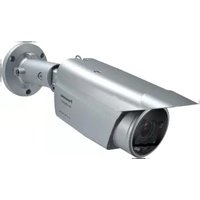


Marque : PANASONIC
Modèle : WV-NW960
Catégorie : Caméra de surveillance