
2945 000 - Lave-vaisselle Foster - Notice d'utilisation et mode d'emploi gratuit
Retrouvez gratuitement la notice de l'appareil 2945 000 Foster au format PDF.


| Type de produit | Lave-vaisselle encastrable |
| Marque | Foster |
| Modèle | 2945 000 |
| Largeur (cm) | 60 |
| Hauteur (cm) | 85 |
| Profondeur (cm) | 55 |
| Poids (kg) | 50 |
| Alimentation électrique | 220-240 V, 50 Hz, 10 A |
| Nombre de couverts | 12 |
| Programmes de lavage | Éco, Intensif, Rapide, Délicat, Auto |
| Consommation d'eau par cycle (L) | 9.5 L (programme éco) |
| Consommation d'énergie par cycle (kWh) | 1.05 kWh (programme éco) |
| Niveau sonore (dB(A)) | 44 |
| Classe énergétique | E (ancien A+) |
| Fonctions spéciales | Départ différé, Sécurité enfants, Détection de fuite |
| Entretien | Nettoyage régulier des filtres et des bras de lavage |
| Pièces détachées | Disponibles (filtres, joints, bras) |
| Réparabilité | Indice de réparabilité : 7.5/10 |
FOIRE AUX QUESTIONS - 2945 000 Foster
Questions des utilisateurs sur 2945 000 Foster
0 question sur cet appareil. Repondez a celles que vous connaissez ou posez la votre.
Poser une nouvelle question sur cet appareil
Téléchargez la notice de votre Lave-vaisselle au format PDF gratuitement ! Retrouvez votre notice 2945 000 - Foster et reprennez votre appareil électronique en main. Sur cette page sont publiés tous les documents nécessaires à l'utilisation de votre appareil 2945 000 de la marque Foster.
MODE D'EMPLOI 2945 000 Foster
! Attention: Please read the operating manual prior to operating the machine for the first time.

Foster


1 On / Off Key
2 Half Load Indicator
3 Salt Indicator
4 Start / Pause / Cancel Indicator
5 Start / Pause / Cancel Key
6 Time Delay Key
7 Time Delay Indicator
8 Rinse Aid indicator
9 Remaining Time / Time delay Indicator
10 Tablet Detergent Indicator
11 Programme Indicator
12 Half Load / Tablet Detergent Key
13 Programme Selection Key

Starting your machine
- Open the tap.
• Plug in to the socket. - Open the door of the dishwasher.
- Place the dishes in accordance with the instructions in the user manual.
• Make sure that the upper and lower impellers rotate freely. - Put sufficient amount of detergent in the detergent dispenser and close its lid.
• Make sure that indicators on programme display are illuminated by pressing On / Off key. - Check if the Salt and Rinse Aid indicators light and add salt and / or rinse aid if needed.

Since different salt brands in the market have different particle sizes and since the water hardness may vary, dissolution of the salt in water may take a couple of hours. Therefore, Salt Indicator remains on for a while after adding salt into the machine.
-
You may use Half Load / Tablet Detergent Key and Time Delay key features as necessary.
• Refer to "Table of Programme Data and Average Consumption Values" to select a suitable programme. -
Select the desired programme with Programme Selection key.
- Press Start / Pause / Cancel key to start the programme.

Pay attention not to open the door of the machine when it is running. If you need to open the door, safety system will stop your machine. There may be a rush of vapour when you open the door of your machine; be careful. The programme will resume running when you close the door.
- When the programme you have selected comes to an end, an audible warning signal with intervals of 8 seconds will warn you to turn off your machine. This audible signal will warn you 10 times before it turns off.
- Open the door of the dishwasher.
• Press On / Off key to turn off your machine.
• Indicator lights on the programme display will turn off. - Close the tap.
• Unplug the machine from the socket.

Leave your dishes in the machine for about 15 minutes after they are washed in order to have them cooled down. Your dishes will dry in a shorter time if you leave the door of your machine ajar during this period. This will increase the drying effectiveness of your machine.
Programme Table
| Programme number | 1 2 3 4 Reference* 5 6 7 8 | |||||||
| Programme name | Pre-wash | 30'30 Min | Delicate | Eco | 60'60min | Daily | Intensive | AUTOAuto |
| Cleaning temperature | - | 35°C | 40°C | 50°C | 60°C | 65°C | 70°C | 40°C - 65°C |
| Degree of Soiling | Suitable for removing the remnants on the soiled dishes that will be kept waiting in the machine for a few days, and thus, for preventing the bad odor buildup. | Suitable for lightly soiled daily dishes that are scraped or pre-cleaned. | Suitable for dishes that are not pre-cleaned but washed immediately. | Most economical washing program for the medium soiled daily dishes that are kept waiting. | Daily washing program at which the medium soiled dishes that are kept waiting are cleaned in the fastest way. | Suitable for heavily soiled dishes, pots and pans. | Suitable for the dishes which require extra hygiene such as articles for babies. Also suitable for heavily soiled dishes. | Determines the soiling degree of the dishes and sets the temperature and amount of the washing water as well as the washing time automatically. Suitable for all types of dishes. |
| - Few Few | Medium Medium | High High Medium to high | ||||||
| Detergents A=25 cm3/15 cm3 B=5 cm3 | - | A | A | A+B | A+B | A+B | A+B | A |
| Programme sequence (without options) | Pre-washEnd | WashCold rinseHot RinseEnd | Pre-washWashCold rinseHot RinseDryEnd | Pre-washWashCold rinseHot RinseDryEnd | WashCold rinseHot RinseDryEnd | Pre-washWashCold rinseHot RinseDryEnd | Pre-washWashCold rinseHot RinseDryEnd | The programme sequence is adjusted to the amount of soiling |
| Duration (min) | 15 | 30 | 71 | 155 | 60 | 136 | 124 | 78-156 |
| Water (l) | 4 | 10,2 | 13,2 | 13 | 10,2 | 14,8 | 17,8 | 10,4-14,0 |
| Energy (kWh) | - | 0,75 | 0,9 | 1,09 | 1,24 | 1,45 | 1,97 | 0,90-1,45 |
| Left-on mode / Off mode (W) *** | 0.85 / 0.09 | |||||||
The consumption values shown in the table were determined under standard conditions. Differences may therefore occur under practical conditions.
* Reference programme for testing institutes The tests in accordance with EN 50242 must be carried out with a full water softener salt dispenser and a full rinse aid reservoir, and using the test programme. *** Power consumption in off-mode and left-on mode are measured according to EN 62301.
On / Off Key
When you press On / Off key, indicator lights illuminate on the display for ON position. The lights turn off in OFF position.

Salt level indicator light
When this indicator light comes on, you must refill special salt (If applicable).
In machines which do not possess an electrical salt indicator, the salt content can be read on the container for the salt. When the visual fill indicator is dark, there is enough salt in the
container.
When the colour is light, open the container and add dishwasher salt.
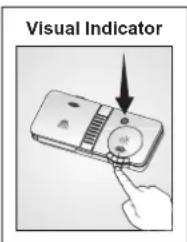
Rinse aid level indicator light
If this indicator light comes on, you have to refill rinse aid (If applicable).
You can also tell whether rinse aid must be refilled by looking at the rinse aid dispenser. When the visual fill indicator is dark, there is enough rinse aid in the dispenser.
When the colour is light, open the dispenser and refill rinse aid.
Programme Selection Key
Refer to "Table of Programme Data and Average Consumption Values" to select a programme suitable for your dishes. Select the desired programme with programme selection key.
Half Load / Tablet Detergent Key
Half Load / Tablet Detergent Key allows you to turn on and off the Half Load and Tablet Detergent functions of your machine.
Half Load Function
If you want to run your machine without loading it completely, place your dishes into the machine as you desire. Press On / Off key to turn on your machine. Press the Half Load / Tablet Detergent key after selecting the desired programme until Half Load Indicator lights up, then press Start / Pause / Cancel key and close the door of your machine. With the Half Load option you can use every part of your lower and upper baskets and you can save from both water and power.
Tablet Detergent Function
Depending on the hardness level of the tap water, the Tablet Detergent function allows obtaining a better drying performance from the multi-purpose detergents such as 2in1, 3in1, 4in1, 5in1, etc., called as all-in-one detergents. Tablet Detergent Indicator lights when the Tablet Detergent function is selected. Salt and Rinse Aid indicators turn off when this function is activated.
Turn on your machine by pressing the On / Off key to use the Tablet Detergent function. Press the Half Load / Tablet Detergent key after selecting the desired programme until Half Load Indicator lights up, then press Start / Pause / Cancel key and close the door of your machine.
To use the Half Load and Tablet Detergent functions concurrently, turn on your machine by pressing the On / Off key and then press the Half Load / Tablet Detergent key until Half Load and Tablet Detergent Indicators illuminate together.

If you have used the Half Load or Tablet Detergent features during the last programme you used, Half Load or the Tablet Detergent function will remain active in the next washing programme you will select. If you do not want to use these functions in the new programme you have selected, press the Half Load / Tablet Detergent key until the indicator of the relevant function turns off.
Changing Warning Sound Volume
Press and hold Half Load / Tablet Detergent key for 5 seconds until S:03 appears on the display. Every time you press the Half Load / Tablet Detergent key, the warning sound level will change as -- Off, S:01 Low, S:02 Medium, and S:03 High. Turn off your machine using the On / Off key to save it. Factory setting of your machine is S:03.
Time Delay
Using the Time Delay key, you may delay the starting time of your programme up to 9.5 hours with increments of 30 minutes. Press Start / Pause / Cancel key after setting the Time Delay and close the door of your machine. Once the time delay is over, the selected programme will start automatically.
Start / Pause / Cancel Key
When you press the Start / Pause / Cancel key, the washing programme you have selected will start. (Start / Pause / Cancel indicator lights in Start mode, and turns off in Pause mode)

To press the Start / Pause / Cancel key, wait for two seconds after you turn on the machine by pressing the On / Off key.
Canceling a programme
Press and hold Start / Pause / Cancel key for 3 seconds. Release the key as the Start / Pause / Cancel indicator starts flashing. Once you close the door of your machine, draining is completed in 2 minutes and the machine gives an audible warning when it is completed.

There might be residues of detergent or rinse aid left in the machine and / or on the pieces being washed depending on the step the programme you have cancelled was in.
Changing a Programme
To change your selection after the programme has started:
- Press Start / Pause / Cancel key to switch your machine in pause mode.
- Select the desired programme by pressing the Programme Selection key.
- Start the new programme by pressing Start / Pause / Cancel key again.

The new programme will start from the step where the previous one has stopped. For example, if the previous programme has remained in drying step, new one will start from the drying step as well.

If you want to run the new programme from the very beginning, first you must cancel the current programme and then select a new programme.
- Starting your machine
- On / Off Key
- Salt level indicator light
- Rinse aid level indicator light
- Programme Selection Key
- Half Load / Tablet Detergent Key
- Half Load Function
- Tablet Detergent Function
- Changing Warning Sound Volume
- Time Delay
- Start / Pause / Cancel Key
- Canceling a programme
- Changing a Programme
Marque : Foster
Modèle : 2945 000
Catégorie : Lave-vaisselle