
SW M7 CG - Lecteur/enregistreur de cd SCOTT - Notice d'utilisation et mode d'emploi gratuit
Retrouvez gratuitement la notice de l'appareil SW M7 CG SCOTT au format PDF.


| Type de produit | Lecteur/enregistreur de CD |
| Marque | Scott |
| Modèle | SW M7 CG |
| Dimensions (L x H x P) | 430 x 100 x 300 mm |
| Poids | 4 kg |
| Alimentation | 230 V ~ 50 Hz |
| Formats de lecture | CD audio, CD-R, CD-RW |
| Fonctions principales | Lecture, enregistrement, programme, répétition, lecture aléatoire |
| Connectique | Sortie audio RCA, entrée ligne, prise casque |
| Télécommande | Incluse |
| Affichage | Écran LCD avec indicateurs de piste et temps |
| Vitesse de lecture | Variable pour enregistrement |
| Entretien et nettoyage | Nettoyer avec un chiffon doux et sec. Ne pas utiliser de solvants. |
| Sécurité | Ne pas exposer à l'humidité ou à des températures extrêmes. Débrancher avant tout nettoyage. |
| Pièces détachées | Télécommande, câble audio, câble d'alimentation |
| Réparabilité | Indice de réparabilité : 7/10 (estimation) |
FOIRE AUX QUESTIONS - SW M7 CG SCOTT
Questions des utilisateurs sur SW M7 CG SCOTT
0 question sur cet appareil. Repondez a celles que vous connaissez ou posez la votre.
Poser une nouvelle question sur cet appareil
Téléchargez la notice de votre Lecteur/enregistreur de cd au format PDF gratuitement ! Retrouvez votre notice SW M7 CG - SCOTT et reprennez votre appareil électronique en main. Sur cette page sont publiés tous les documents nécessaires à l'utilisation de votre appareil SW M7 CG de la marque SCOTT.
MODE D'EMPLOI SW M7 CG SCOTT
MODEL CD30 MP3 / SCOTT SWM7 / ENGLISH STANDARD I/M, 230V, TCD08, W/CDR-RW, W / CDDA & MP3, W/BIN PARAGRAPH

SCOTT
SWM7
STEREO MP3/CD RADIO CASSETTE RECORDER
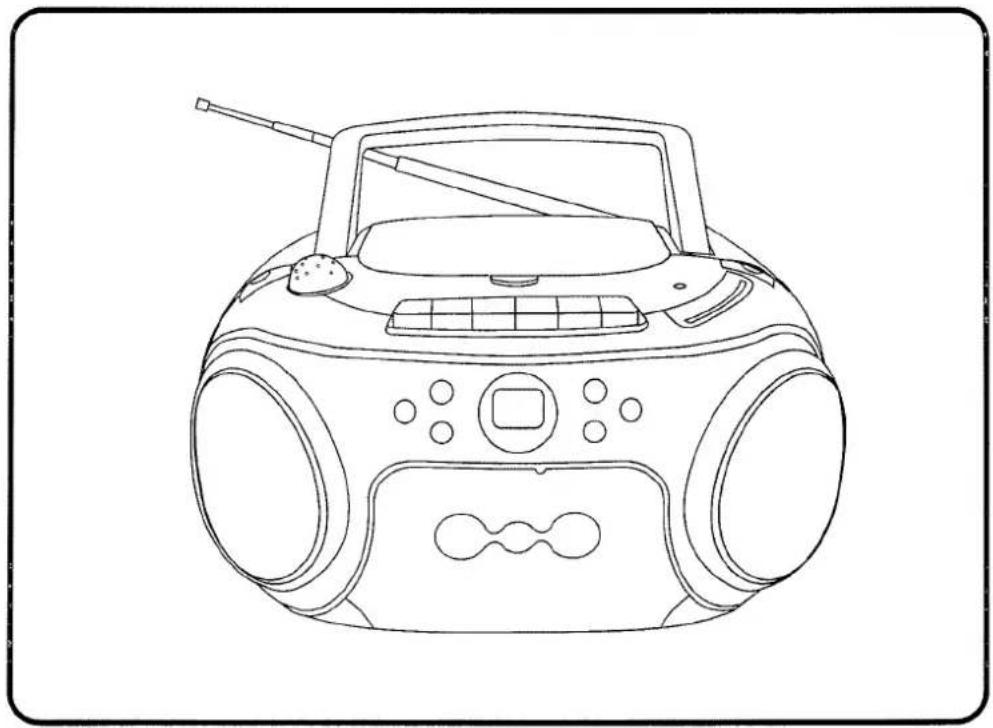
INSTRUCTION MANUAL
CE
WARNING
CLASS 1 LASER PRODUCT
CLASS 1 LASER PRODUCT APPAREIL À LASER DE CLASSE 1 PRODUCTO LASER DE CLASE 1
This product contains a low power laser device.
CAUTION
INVISIBLE LASER RADIATION WHEN OPEN AND INTERLOCKS DEFEATED. AVOID EXPOSURE TO BEAM

Warning: Do not touch the lens.
DO NOT THROW BATTERIES IN FIRE!
PRECAUTIONS
Follow the advice below for safe and appropriate operations.
ON PLACEMENT
• Do not use the unit in places which are extremely hot, cold, dusty, or humid.
- Place the unit on a flat and even surface.
- Do not restrict the air flow of the unit by placing it in a place with poor air flow, by covering it with a cloth, or by placing it on a carpet.
ON SAFETY
- When connecting and disconnecting the AC cord, grip the plug and not the cord itself. Pulling the cord may damage it and create hazard.
- When you are not going to use the unit for a long period of time, disconnect the AC power cord.
ON AC VOLTAGE
• Before use, check that the rated voltage of your unit matches your local voltage.
ON CONDENSATION
- When left in a heated room where it is warm and damp, water droplets or condensation may form inside the CD player.
- When there is condensation inside the unit, the unit may not function normally.
- Let it stand for 1 to 2 hours before turning the power on, or gradually heat the room up and dry the unit before use.
* Ensure a minimum distance of 5 cm around the apparatus for sufficient ventilation. - Ensure that the ventilation is not impeded by covering the ventilation openings with items, such as newspapers, table-cloths, curtains, etc..
Do not place naked flame sources, such as lighted candles on the apparatus.
Take attention to the environmental aspects of battery disposal.
* Use the apparatus only in moderate climates (not in tropical climates).
* Do not expose the apparatus to dripping or splashing.
Do not place objects filled with liquids, such as vases, on the apparatus.
Should any trouble occur, disconnect the AC power cord and refer servicing to qualified personnel.
The lightening flash with arrowhead symbol within the triangle is a warning sign alerting the user of "dangerous voltage" inside the unit.
CAUTION
RISK OF ELECTRIC SHOCK DO NOT OPEN
ATTENTION: To reduce the risk of electric shock, do not remove the cover. There are no user serviceable parts inside the unit. Refer all servicing to qualified personnel.

The exclamation point within the triangle is a warning sign alerting the user of important instructions accompanying the product.
In case of misfunction due to electrostatic discharge the apparatus has to be reset by disconnecting it from mains supply.
LOCATION OF CONTROLS

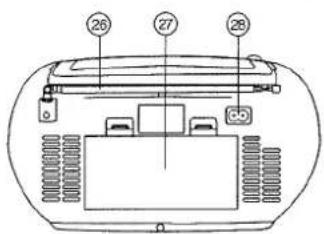
- VOLUME CONTROL
- FUNCTION SWITCH
- CARRYING HANDLE
- CASSETTE PAUSE II
- CASSETTE STOP/EJECT ■ ▲
- CASSETTE F.FWD
- CD OPEN BUTTON
- CD DOOR
-
CASSETTE REWIND ▶▶
-
CASSETTE PLAY ◀
-
CASSETTE RECORD ●
-
FM STEREO
-
DIAL SCALE
-
MODE SWITCH
-
TUNING CONTROL
-
LED DISPLAY
- SPEAKER
- CD NEXT BUTTON ▶▶
- CD PLAY / PAUSE BUTTON ▶II
- CD FOLDER UP BUTTON
- CASSETTE DOOR
- CD PLAY MODE BUTTON
- CD STOP BUTTON
- CD BACK BUTTON
- PHONES JACK
- TELESCOPIC ANTENNA
- BATTERY COMPARTMENT
- AC SOCKET
POWER SUPPLY
USING HOUSE CURRENT
Before use, check that the rated voltage of your unit matches your local voltage.
USING BATTERIES
Disconnect the AC power cord from the AC inlet of the unit. Battery power is cut automatically by the cord while it is connected.

battery door
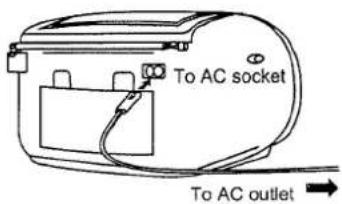
When the volume decrease, or the sound distorts, replace all of the batteries with new ones.

Insert eight UM-2 (size C) batteries.
ADJUSTING THE SOUND
TO ADJUST THE VOLUME
VOLUME

MIN. MAX.
VOLUME
WHEN RECORDING
The VOLUME control may be adjusted with no effect on the recorded signal.
FOR PRIVATE LISTENING
Plug in headphones (ø3.5 mm stereo mini-plug) to the PHONES jack.
When headphones are plugged in, the speakers are automatically disconnected.
LISTENING TO THE RADIO
-
Set to RADIO
FUNCTION

-
Tune in to a station.

-
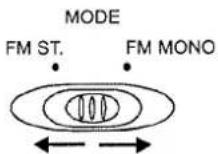
Select a mode.
-
Adjust the sound.

GB 2
FOR BETTER RECEPTION
FM
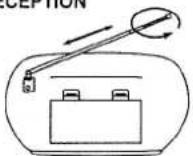
NOTE: 1. FM stereo LED indicator lights if receive FM stereo broadcast and the MODE switch set on "FM STEREO".
2. When too much noise is heard during FM STEREO reception, set MODE switch to FM mono.
AFTER LISTENING
Set the FUNCTION selector to TAPE.
COMPACT DISC PLAYBACK
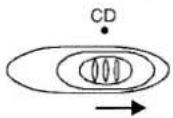
- Set to CD
FUNCTION
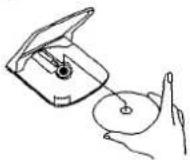
- Open the disc holder by pushing the CD door open button.

- Insert a disc with the label side facing up.
- Close the disc holder.
The disc will rotate and the total tracks of the disc will show on the display.
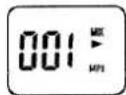
- Press the Play/Pause ▶ button. Track number "01", the symbol "▶" & "MP3" will be shown during MP3 playback. Track number "01" & the symbol "▶" will be shown during normal compact disc playback.
CD display

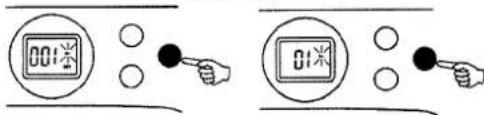
TO INTERRUPT PLAYBACK
Press the Play/Pause ▶ button and the symbol
"▶" will be flashed.
Press the button again to resume playback.
CD display
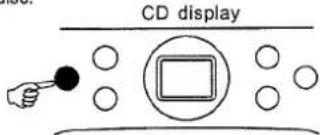
TO STOP PLAYBACK
Press the STOP button and the display shows the total tracks of the disc.
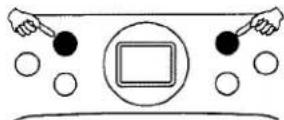
TO SKIP TO THE BEGINNING OF A TRACK
- Press either one of the |◀◀▶▶| skip buttons according to the desired skip direction.
• Play/back resumes from the selected track. - When the ◀ button is pressed once during play, the previous track starts again.
- When the ▶ button is pressed once during play, the next track plays.
SEARCHING FOR A PASSAGE WITHIN A TRACK
- Keep the ◄◀◀ or ▶▶▶ button pressed during playback, and release the button as soon as you recognise the desired passage. Then normal CD playback will resume from this point.
GB 3
REPEAT, REPEAT FOLDER AND MIX PLAYBACK
Press PLAY MODE button during stop mode. CD plays with a single track repeat, all tracks repeat or randomly.
FOR NORMAL COMPACT DISC PLAYBACK
Mode sequence REPEAT >> REPEAT ALL >> MIX >> CLEAR.

During Repeat 1 mode, the word "REP" will be flashed on the display.

During Repeat 2 mode, the word "REP" will be shown on the display.

During Mix mode, the word "MIX" will be shown on the display.
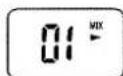
FOR MP3 PLAYBACK
Mode sequence REPEAT >> REPEAT FOLDER >> REPEAT ALL >> MIX >> CLEAR.
During Repeat 1 mode, the word "REP" will be flashed on the display.
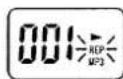
During Repeat 2 mode, the word "FOLDER" will be shown on the display.

During Repeat 3 mode, the word "REP" will be shown on the display.

During Mix mode, the word "MIX" will be shown on the display.
Note on CD-R/RW discs
- Because of non-standardized format definition/ production of CD-R/RW, playback quality and performance are not guaranteed.
- Manufacturer is not responsible for the playability of CD-R/RW due to recording conditions, such as PC performance, writing software, media ability, etc.
- Do not attach a seal or label to either side of the CD-R/RW disc. It may cause a malfunction.
FOLDER UP
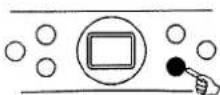
For MP3 playback, when the unit is at STOP mode, skip up to next folder/album at increasing order & it will show the folder/album number; press CD PLAY / PAUSE button to start the playback of the selected folder/album. When the unit is at MP3 PLAYBACK mode, skip up to next folder/album at increasing order & the folder/album number will flash for 3 seconds; then it will start playback of the selected folder/album.
TAPE PLAYBACK
- Set to TAPE

- Press the ◀ PLAY button.
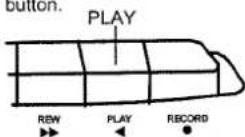
- Insert the cassette.
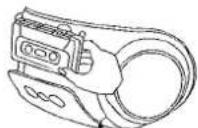
TO STOP PLAYBACK
Press the STOP / EJECT button.
TO INTERRUPT PLAYBACK
Press the PAUSE button.
To resume play, press the PAUSE button again.
TO FAST WIND
Press the REWIND or F.FWD button. Press the STOP/EJECT button to stop winding at the desired position.
RECORDING
USE ONLY NORMAL (TYPE I) TAPE FOR RECORDING.
- Insert the cassette tape.

- Press the PAUSE || button.
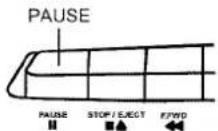
- Press the RECORD ● button.

- Prepare to play the source to be recorded and play it.
Recording from a CD

Recording from the radio

- Press the PAUSE || button.
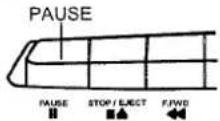
TO STOP RECORDING
Press the STOP / EJECT button.
TO INTERRUPT RECORDING
Press the PAUSE button.
To resume recording, press the PAUSE button again.
TO ERASE A RECORDED TAPE
-
Set the FUNCTION selector to TAPE.
-
Insert a tape with the side you want to erase facing you.
-
Press the RECORD button to start erasing.
MAINTENANCE
CLEANING CD
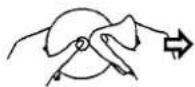
If the CD skips or will not play, the disc may need cleaning. Before playing, wipe the disc from the centre out with a cleaning cloth. After playing, store the disc in its case.
CLEANING THE TAPE HEADS
To maintain optimum sound quality, clean the playback/record heads (a), erasure head (b), pinch rollers (c), and capstans (d) regularly (every 10 hours of use). Use a cotton swab lightly moistened with cleaning fluid or denatured alcohol.

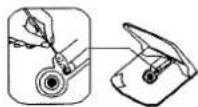
CLEANING THE CD LENS
If the CD lens is dusty, clean it with a brush-blower. Blow several times on the lens and remove the dust with the brush. Finger prints may be removed with a cotton swab moistened with alcohol.
CLEANING THE UNIT
Do not use volatile chemicals on this unit. Clean by lightly wiping with a soft cloth.
IMPORTANT NOTE
If an abnormal display indication or an operating problem occurs, disconnect the AC power cord and remove the batteries. Wait at least 5 seconds, then reconnect the AC power cord or reinstall the batteries.
WARNING
Should the CD door be opened before the reading of the CD completed, a jamming noise may occur. This is resolved by closing the CD door.
SPECIFICATIONS
CASSETTE SECTION
| Track format: | 2 track stereo |
| Recording system: | AC bias |
| Erasing system: | Magnetic erase 6 poles |
| Tape speed: | 4.75 cm / sec. |
| F.F. & REW time: | 170 sec. (F-60 tapes) |
| Frequency response: | 125 Hz - 8000 Hz (Normal tape) |
CD SECTION
| Channels: | 2 channels |
| S / N ratio: | 60 dB |
| Wow & Flutter: | undetectable |
| Sampling frequency: | 44.1 kHz 8 x over sampling |
| Quantization: | 1 bit D/A converter |
| Pick up light source: | Semi - conductor laser |
| Pick up wave length | 790 nm |
RADIO SECTION
| Tuning ranges: | FM 87.5 - 108 MHz |
| Antennas: | FM Rod antenna |
GENERAL
| Output power: | 0.95 W + 0.95 W (RMS) |
| Power consumption: | 9 W |
| Speaker: | 3" 8 OHM |
| Phones jack: | 3.5MM |
| Power source: | AC : 230V ~ 50HzDC : 12V ( 8 x 1.5V LR14/"C"/UM2 ) |
| Dimensions: | 288(L) x 242(D) x 155(H)mm |
| Weight | 2.1 KGS |
Due to continuing improvement, the features and the design are subject to change without notice.
Where to place the item :
Today's furniture is coated with a wide variety of lacquers and synthetic-coatings that are treated with an extensive range of cleaning products. Therefore, the possibility that some of these substances contain components that react adversely to the rubber feet of the item and soften them, cannot be completely excluded. The rubber feet of the appliance can cause discoloring to furniture surfaces. If necessary, place the appliance on a non-slide surface.

If at any time in the future you should need to dispose of this product please note that Waste electrical products should not be disposed of with household waste. Please recycle where facilities exist. Check with your Local Authority or retailer for recycling advice. (Waste Electrical and Electronic Equipment Directive)


- SCOTT
- STEREO MP3/CD RADIO CASSETTE RECORDER
- WARNING
- CLASS 1 LASER PRODUCT
- PRECAUTIONS
- ON PLACEMENT
- ON SAFETY
- ON AC VOLTAGE
- ON CONDENSATION
- LOCATION OF CONTROLS
- POWER SUPPLY
- USING HOUSE CURRENT
- USING BATTERIES
- ADJUSTING THE SOUND
- WHEN RECORDING
- FOR PRIVATE LISTENING
- LISTENING TO THE RADIO
- AFTER LISTENING
- COMPACT DISC PLAYBACK
- TO INTERRUPT PLAYBACK
- TO STOP PLAYBACK
- TO SKIP TO THE BEGINNING OF A TRACK
- SEARCHING FOR A PASSAGE WITHIN A TRACK
- REPEAT, REPEAT FOLDER AND MIX PLAYBACK
- FOR NORMAL COMPACT DISC PLAYBACK
- FOR MP3 PLAYBACK
- NOTE ON CD-R/RW DISCS
- FOLDER UP
- TAPE PLAYBACK
- TO FAST WIND
- RECORDING
- USE ONLY NORMAL (TYPE I) TAPE FOR RECORDING
- TO STOP RECORDING
- TO INTERRUPT RECORDING
- TO ERASE A RECORDED TAPE
- MAINTENANCE
- CLEANING CD
- CLEANING THE TAPE HEADS
- CLEANING THE CD LENS
- CLEANING THE UNIT
- IMPORTANT NOTE
- SPECIFICATIONS
Marque : SCOTT
Modèle : SW M7 CG
Catégorie : Lecteur/enregistreur de cd