
PPD71 - Podomètre Pyle - Notice d'utilisation et mode d'emploi gratuit
Retrouvez gratuitement la notice de l'appareil PPD71 Pyle au format PDF.


| Type de produit | Podomètre |
| Marque | Pyle |
| Modèle | PPD71 |
| Dimensions (L x l x H) | 4,5 x 3,5 x 1,2 cm |
| Poids | 20 g (avec pile) |
| Alimentation | 1 pile bouton CR2032 (incluse) |
| Autonomie de la pile | Environ 6 mois (utilisation normale) |
| Écran | LCD digital |
| Affichage | Pas, distance, calories, horloge |
| Fonctions principales | Comptage de pas, calcul de distance et calories, horloge 12/24h |
| Mémoire | Conserve les données lors du changement de pile |
| Réinitialisation | Bouton de remise à zéro |
| Clip de ceinture | Oui, intégré |
| Matériau | Plastique ABS |
| Couleur | Noir et argent |
| Garantie | 1 an limitée |
| Entretien | Nettoyer avec un chiffon doux et sec |
| Sécurité | Ne pas exposer à l'eau, garder hors de portée des enfants |
| Pièces détachées | Pile remplaçable (CR2032) |
| Réparabilité | Non réparable par l'utilisateur, remplacer la pile |
FOIRE AUX QUESTIONS - PPD71 Pyle
Questions des utilisateurs sur PPD71 Pyle
0 question sur cet appareil. Repondez a celles que vous connaissez ou posez la votre.
Poser une nouvelle question sur cet appareil
Téléchargez la notice de votre Podomètre au format PDF gratuitement ! Retrouvez votre notice PPD71 - Pyle et reprennez votre appareil électronique en main. Sur cette page sont publiés tous les documents nécessaires à l'utilisation de votre appareil PPD71 de la marque Pyle.
MODE D'EMPLOI PPD71 Pyle
30 14470 P0061-VB
- Doc2011
63mm
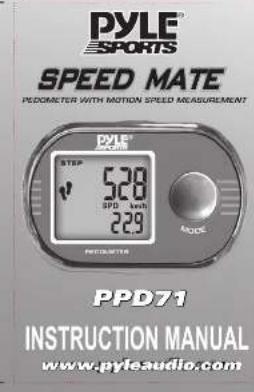
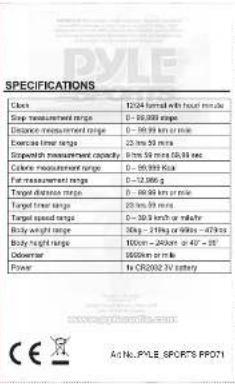
FEATURES
- Only Blog
• Daily Exercise Time
• Daily Distance
• Daily Calorie
- Daily Fat Burn
- Current Space
-Average Speed
• Maximum Space
- Target Training (Step / Time / Distance / Speed)
- 7 Days Memory
-Week Total Memory
• October
- Clock
-Stopwatch
- Kim / Mio. Unit
• 12/24 hsd format
• Redwood (Cassation)
• 2017-03-20
-1-
TURN ON/OFF Pedometer Function
PRESS SET key until the 2 foot print icon appear to turn on End-of-Date: August
To 1-m of PRESS SET key.

Note: Podometer can't be turned ON/OFF when it is in 11. Stopwatch mode and 2) Memory mode.
Operation Modes
The unit has 4 operation modes: Main, Exercise, Record.

Scrut Through the operation mode by pressing the MODE key.
7
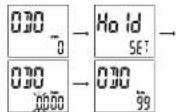
Odometer Save function
Before changing delivery of semi-compact local RBC. Please write down the accumulated distance travels and case this function to
input distance back to the perimeter
SAVE screen appear and first dial in the lower low start to
think, press SEL to choose desire number and SET to confirm. Repeat the procedure until desirable distance is entered.
(1) 2017年1月1日(星期二)星期四
Note:
battery charging
2 To avoid OOO Info lost during battery changing, user can
to-order the value in "set Operator" session above.
-13
BATTERY INSTALLATION
Remove the battery cover at the back of the case by sliding the direction shown below. Insert a new CR2032 battery into the battery compartment with the positive power facing up. Slide the battery door back on.

KEY ASSIGNMENT

Main Mode
By pressing the SEL Button in the main mode, you can see current information of STEP in upper display, and sub information in lower display as below.
• CLOCK
• EXERCISE TIMER
• D STANCE and

Note: Distance and Timer reset automatically every night at 0.95
Exercise Mode
By pressing the 8EI button in the Exercise mode, you can
choose between the sub functions
• Target Zone
02.1931
-进-
HOW TO USE THE CLIP

- Attach the clip to the
pedometer. Enc correct
alignment see the clin
the parameter and crop
the pocaneller and sina argome
银行存款

2 Attach the pedometer to
your bell or waistband. If
you attach it as shown, you
can read the values from
above when wearing it. Or
ABOVE WITH WOALING I. OF
you can put the product
without a clip in your
ACCESSORIES


Wearing clip
-3
Target Zone
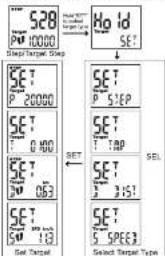
User can select one of the following targets for his own daily workout target: Distance, Speed, Step and Timer. The unit defaults as Target Step if user desire other workout diets, please HOLD SET key in Exercise Mode until SET appear on the upper row as in figure.
- Press SET to toggle between four target types, Press SET to confirm - Press SET to advance to desire target values, Press SET to confirm
- 早 -
INITIAL SETTING
After replacing battery, the unit enter First Use Setting Mode.
(No text)
HIL
OFFIC
0
F 回


SET CLOCK Press SET to toggle 12 or 24 bit format. Press SET to confirm and
advance to set HR.
Press SEC to advance to Be###s## PA, Press SE is continued and advances in net MIN.
Press SET to advance to desirable MIN. Press SET to confirm
and advance to the Wight


SET Weight and Height
The unit default the weight of upper to be 50KG or 110LB Press SET to advance to decrease weight. Press SET to confirm
and advance to set Height
Press SET to advance to determine Height. Press SET to confirm
and advance to Calibration Mode
Note: II is necessary to enter the correct weight to receive
a meaningful value of calorie consumption and fat burning.
-4
Target Alert
For Step, Timer and Distance, there will be an alert when target
Figure 1. The equation, H(r) is the sum of h(r) which is not a result.
The unit, excludes the following workout data.
Target Target 1 (box)
Target Distance: 5 KM/Mile
Target Speed: 0 Km/hr or Mio/hr
Once select
Activate/Deactivate Target Alert
Hold SEL key to Activate/Deactivate target Agent in Exercise
Mode

Aert symbol => is displayed = alert or Aert symbol not displayed = alert off
Note: It is strongly recommended that the user calibrate the pedometer to their personal movement pattern. Otherwise this unit will use any statistical data based on the height input by the user. The performance of the unit will not be in its full capacity.
Podometer Calibration
You can choose Yes and No between with the SEI button.
Choose YES and confirm with the SET button.
- The unit set allows into Calibrate RUNWALK mode, Press
5.1.1.2017年1月1日(星期五)至1月31日,公司召开2017年第一次临时股东大会,并于2017年3月29日
- Press SET to set the run distance, increment by 100 meter. Press SET to confirm the Distance. Now the unit is ready for Calibrate Running Stripe Length. Press SET and start running.
- At the free distance covered, across SET to stop. Display
DONE and SAVED appears; the calibration was correct
and Wate Sarefu
Note: It is important that you also perform its calibration for
walking, as described in the following section:
- Press SET again to confirm the calibration for running and
enter culmination for walking. Repeat above process for Walking
(四) 本次股东大会的决议
Calibration not Successful
In case the calibration was not successful, the display FAIL
BUNNING or WAN KING appears again and you can start a
new calibration.
Now After Callusion, if the height is changed, all
calculated data will be lost. And the stride length will be result
- 本次股东大会的召集和召开程序
-5.
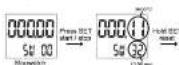
Stopwatch Mode
in Exercise Mode, user can change to Stopwatch model By
Daily Record Mode
Calorie, Fat Burr, Average Speed and Maximum Speed
substantially record daily. These date next every night at 0:30

Signed: Through the prospects by creation the REL key
Note: Features Reset - Including Daily Step, Training Timer Distance, Calorie, Fat Burnt, Average speed, Maximum speed. In Exercise and Record Mode, hard SET button to reset all daily data to 0.
The unit enter into Calibrate RUN mode, Press SET to confirm and advance to SET RUN Distance. Press SET to set the run distance, increment by 100 meter. Press SET to confirm the Distance. Now the unit is ready for Calibrate Running Stripe Length. Press SET and start running. At the time distance covered, press SET to stop. Press SET again to confirm the calibration for running and enter calibration for walking. Interest also processes for flight.

flowchart
graph TD
    A["CALL URL"] --> B["SET"]
    B --> C["PRESS STEP1"]
    C --> D["23 PIN"]
    D --> E["BONE CODE2"]
    E --> F["FALL PUT"]
After the initial setting, you are ready to go
。
Memory Mode
This unit will record the daily data (step, distance, fat burnt, carosis, timer) for the past seven days. 7 days accumulated data (total Step, total distance, total calorie, total fat burnt).
MEMORY MODE display sequence(part A)

Competition data ↑ Competition

MEMORY MODE display consensus(part B)

BCHJOGI
-12-
CAUTION
This will is not water resistant. Do not get the pedometer well
There are 4 resetting procedures for user to reset the data.
- Tots, Resort - RIVIDAL SETTING
Change batteries or Hold SET and SEL buttons, repeat INITIAL
SETTING procedure
- Reset Clock without resetting without data
Rampal process in a SETTING SECTION described
- Reset Weight/Height/Calibration
In clock function, Hold SET button to enter Calibration mode.
Repeat process in the PEOUMETER CALERATION
- Stock price
Distance, Calorie, Fat, Burt, Average speed, Maximin
spned. In Exercan and Record Mode, hold SET button is
resell at daily data to 0.
TROUBLESHOOTING
Why is the displayed covered distance incorrect? Have you performed a calibration? For optimum results the calibration has to be performed for "walking" as well as "running". A shuffling gait, bed area and varying surface can lead to inaccurate measurements. A lower distance is measured when climbing steps, because the watch is designed for even surfaces. Chosen the used during calibration speed when walking or running. Please note that the measurements of untrained persons can be inaccurate/irregular.
14
-30+
- 甘 -

BCHJOGI
-12-

Marque : Pyle
Modèle : PPD71
Catégorie : Podomètre