
WMP 100 - Recepteur Karma - Notice d'utilisation et mode d'emploi gratuit
Retrouvez gratuitement la notice de l'appareil WMP 100 Karma au format PDF.


| Type de produit | Récepteur radio FM/AM |
| Marque | Karma |
| Modèle | WMP 100 |
| Dimensions (L x H x P) | 20 x 12 x 10 cm |
| Poids | 0,5 kg |
| Alimentation | 220-240 V AC, 50 Hz |
| Consommation électrique | 10 W |
| Gammes de fréquences FM | 87,5 - 108 MHz |
| Gammes de fréquences AM | 530 - 1700 kHz |
| Nombre de stations préréglées | 20 (10 FM / 10 AM) |
| Types d'affichage | Affichage LCD avec rétroéclairage |
| Haut-parleur intégré | Oui, 1 x 3 W |
| Prise casque | Oui, jack 3,5 mm |
| Antenne | Antenne télescopique FM et antenne ferrite AM |
| Fonctions supplémentaires | Horloge, alarme, minuterie sommeil |
| Entrée auxiliaire | Oui, jack 3,5 mm |
| Entretien et nettoyage | Nettoyer avec un chiffon doux et sec. Ne pas utiliser de solvants. |
| Consignes de sécurité | Ne pas exposer à l'humidité. Débrancher avant nettoyage. |
| Piles de secours (horloge) | 1 pile CR2032 (non incluse) |
| Accessoires inclus | Câble d'alimentation, manuel d'utilisation |
| Réparabilité | Pièces détachées disponibles en ligne (contactez le fabricant) |
FOIRE AUX QUESTIONS - WMP 100 Karma
Questions des utilisateurs sur WMP 100 Karma
0 question sur cet appareil. Repondez a celles que vous connaissez ou posez la votre.
Poser une nouvelle question sur cet appareil
Téléchargez la notice de votre Recepteur au format PDF gratuitement ! Retrouvez votre notice WMP 100 - Karma et reprennez votre appareil électronique en main. Sur cette page sont publiés tous les documents nécessaires à l'utilisation de votre appareil WMP 100 de la marque Karma.
MODE D'EMPLOI WMP 100 Karma
ENGLISH
Thank you for selecting this WMP-100 stereo karaoke amplifier.
Please read this manual thoughtly before making connections and turning on the power.
To assure the finest performance, please read this manual carefully, keep it in safe place for future reference.
- Install this unit in a cool, place-away from window, heat source, source of excessive vibration, dust, moisture and cold. Avoid source of humming (transformers). To prevent fire or electrical shock, do not expose the unit to rain water.
- Never open the cabinet. If something drops into the set, contact your dearler.
- Do not use force on switches, controls or connection wires. When moving the unit, frist disconnect the power plug and the wires connected to other equipment. Never pull the wires themselves.
- Do not attempt to clean the unit with chemical liquid; this might damage the finish. Use a clean, dry cloth.
- When not planning to use this unit for long periods of time (ie., vacation, etc.), disconnect the AC power plug from the wall outlet.
- AC outlet: Do not connect audio equipment to the AC outlet on the rear panel if that equipment requires more power than the outlet is rated to provide.
DESCRIPTION:
- Multifunctional colour screen display
- Digital karaoke system
- HI-FI Stereo design
- Circle transformers supply, high power
- Dual professional VHF wireless microphones
DESCRIPTION OF FUNCTIONS:
Front panel:

1) Power switch
Use this switch to switch your device on.
2) Micro input
Input Jack 6.35mm. Plug you microphone on.
3) Microphone volume control
Use to adjust the volume level of the microphone
4) Microphone treble control knob
This potentiometer allows you to adjust the high tone of the microphone.
5) Screen display
6) Microphone bass control knob
This potentiometer allows you to adjust the low tone of the microphone.
7) VCD/DVD input selection
Use to select the item plug in the VCD/DVD input
8) CD1 input selection
Use to select the item plug in the CD 1 input
9) TUNER/ AUX input selection
Use to select the item plug in the Tuner input
10) TAPE input selection
Use to select the item plug in the tape input
11) RESET key
Use to reset all the setup you make (echo, balance, volume, ...)
12) CD2 input selection
Use to select the item plug in the CD 2 input
13) Karaoké off selection key
Use to switch the karaoke function off.
14) Karaoké on selection key
Use to switch the karaoke function on.
15) Echo control knob
Use to adjust the depth of the echo
16) Balance control knob
Use to adjust the left/right level of the master speakers.
17) Bass control knob
This potentiometer is used to adjust the low tone of the master signal
18) Treble control knob
This potentiometer is used to adjust the high tone of the master signal
19) Master volume
Use to adjust the volume level of the master signal.
Rear panel :
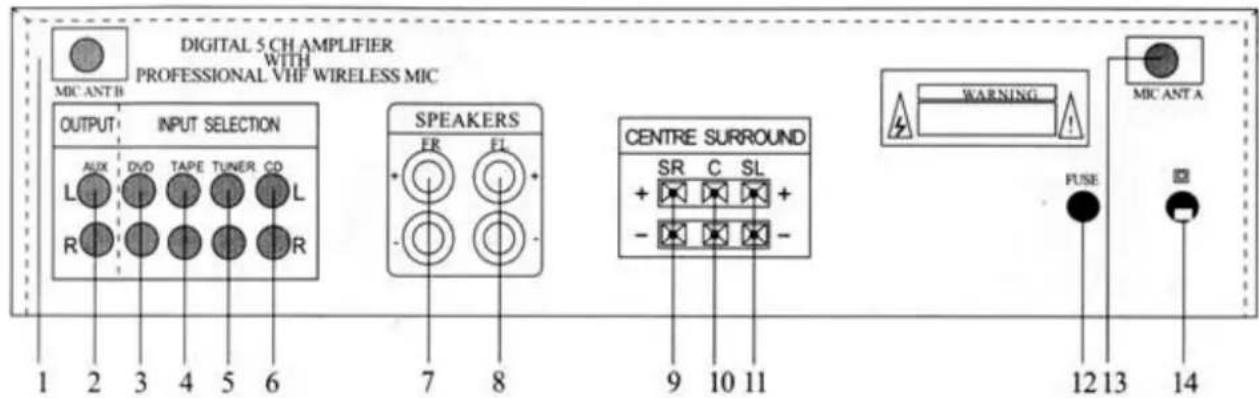
1) Wireless microphone B antenna
2) Aux output
Connect this output to another amplifier or other audio equipment input
3) DVD input
Connect this input to a DVD or a VCD output
4) Tape input
Connect this input to a tape player output
5) Tuner input
Connect this input to a tuner output
6) CD input
Connect this input to a CD or a minidisc output
7) Right master speaker output (front)
Connect this output to the right front speaker
8) Left master speaker output. (front)
Problems:
Connect this output to the left front speaker
9) Right surround speaker output
( rear )
Connect this output to the right rear speaker
10) Center speaker output
Connect this output to the center speaker
11) Left surround speaker output
( rear )
12) Fuse
220V\~230V/2A
Connect this output to the left rear speaker
13) Wireless microphone A antenna
14) Ac cord
Plus the AC cord to a wall socket. Check the power supply value before to plug
| PROBLEM | POSSIBLE CAUSE |
| No power | 1. The AC power cord is disconnected2. Poor connection at the wall socket or the wall socket is inactive |
| No sound | 1. The speakers and components is Disconnected2. Make sure you select the correct component on the unit3. Volume control at lowest level4. Speaker wire short or open |
| One master speaker No sound | 1. Bad or incorrect speaker connections2. Balance not in center3. Speaker wire short or open |
| Bad sound | 1.The place is unfit for the speakers2.Bad or in correct speakers connections3.Treble and bass control are too low |
| Microphone no sound | 1.Microphone volume is too low2.Microphone not turn on3.Microphone wire short or open4.Wireless microphone battery low |
| Severe hum or noise is heard | 1.Check the SPEAKERS and components are connected securely2.The plugs and jacks are dirty3.Microphone is too close to the speaker or microphone is face direct to the. speaker coil |
Specifications :
Power Max
| master speaker | 2x30W |
| center speaker | 20 W |
| surround speaker | 2x20W |
| total power | 120 W |
Tone
| Bass f=100Hz | ±8db |
| Treble f=10kHz | ±8db |
| Frequency wireless micro A | 191.6MKz or A: 204.4MHz |
| Frequency wireless micro B | 199.66MHz or B: 222.4MHz |
| S/N ratio | >71 dB |
| Weight | 5.5Kg |
| Power supply | AC220V/50Hz |
| Dimensions | 430x230x100(mm). |
WARRANTY CONDITIONS
KOOL SOUND equipment is covered by a 1-year warranty on parts and labour except for Crossfaders (90 days).
The following rules apply from the day the equipment leaves the factory in the limit of one year from the date on the invoice of your dealer.
The date on the invoice is considered to be the date at which the warranty begins.
Only companies approved by KOOL SOUND are allowed to work on the equipment. Warranty becomes void when other service technicians open the equipment.
During warranty period, defective equipment must be sent by pre-paid mail in the original box.
KOOL SOUND will return the goods by pre-paid mail during the first year of warranty; thereafter the mailing cost is to be paid by the recipient. Potentiometers have a limited lifetime and are not covered by the manufacturer for more than normal use.
For all service enquiries, refer to your local distributor, as he is best able to help you.

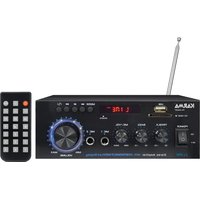

Marque : Karma
Modèle : WMP 100
Catégorie : Recepteur