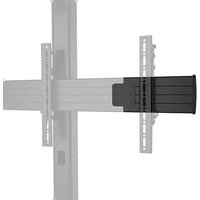
FCAX14 - Support écran plat Chief - Notice d'utilisation et mode d'emploi gratuit
Retrouvez gratuitement la notice de l'appareil FCAX14 Chief au format PDF.


| Type de produit | Support mural pour écran plat |
| Marque | Chief |
| Modèle | FCAX14 |
| Compatibilité VESA | 200x200 mm à 600x400 mm |
| Capacité de charge maximale | 56,7 kg (125 lb) |
| Poids net du support | 3,6 kg |
| Dimensions (L x H x P) | 65 x 35 x 5 cm |
| Matériau | Acier à haute résistance |
| Finition | Peinture époxy noire |
| Type de fixation | Murale (montants bois ou béton) |
| Inclinaison | Aucune (support fixe) |
| Rotation | Aucune |
| Distance au mur | 2,5 cm |
| Niveau à bulle intégré | Oui |
| Gestion des câbles | Non (recommandation : cache-câbles séparé) |
| Sécurité antivol | Non |
| Contenu de la boîte | Support, vis de montage, chevilles, niveau, notice |
| Garantie | 10 ans |
FOIRE AUX QUESTIONS - FCAX14 Chief
Questions des utilisateurs sur FCAX14 Chief
0 question sur cet appareil. Repondez a celles que vous connaissez ou posez la votre.
Poser une nouvelle question sur cet appareil
Téléchargez la notice de votre Support écran plat au format PDF gratuitement ! Retrouvez votre notice FCAX14 - Chief et reprennez votre appareil électronique en main. Sur cette page sont publiés tous les documents nécessaires à l'utilisation de votre appareil FCAX14 de la marque Chief.
MODE D'EMPLOI FCAX14 Chief
INSTALLATION INSTRUCTIONS

Video Wall Extenders
DISCLAIMER
Legrand | AV and its affiliated corporations and subsidiaries (collectively "Legrand | AV"), intend to make this manual accurate and complete. However, Legrand | AV makes no claim that the information contained herein covers all details, conditions or variations, nor does it provide for every possible contingency in connection with the installation or use of this product. The information contained in this document is subject to change without notice or obligation of any kind. Legrand | AV makes no representation of warranty, expressed or implied, regarding the information contained herein. Legrand | AV assumes no responsibility for accuracy, completeness or sufficiency of the information contained in this document. Chief® is a registered trademark of Legrand AV Inc.

IMPORTANT SAFETY INSTRUCTIONS

WARNING: A WARNING alerts you to the possibility of serious injury or death if you do not follow the instructions.

CAUTION: A CAUTION alerts you to the possibility of damage or destruction of equipment if you do not follow the corresponding instructions.

WARNING: Failure to read, thoroughly understand, and follow all instructions can result in serious personal injury, damage to equipment, or voiding of factory warranty! It is the installer's responsibility to make sure all components are properly assembled and installed using the instructions provided.

WARNING: Exceeding the weight capacity can result in serious personal injury or damage to equipment! Adding the FCAX video wall extenders allows for wider screens to be mounted but does not change the weight capacity listed for the mount. Consult (Table 1) for mounting system's weight capacity details.

WARNING: Use this mounting system only for its intended use as described in these instructions. Do not use attachments not recommended by the manufacturer.

WARNING: Never operate this mounting system if it is damaged. Return the mounting system to a service center for examination and repair.

WARNING: RISK OF SERIOUS INJURY OR DEATH! Use with televisions weighing more than the maximum weight indicated may result in the cart collapsing or overturning onto a person causing serious injury or death!
NOTE: The FCAX08, FCAX14 and FCAX20 are intended to be used with:
• LCM Video Wall Series
• LVM Video Wall Carts Series
• LBM Bolt-Down Video Wall Series
• LWM Wall-Mounted Menu Board Series
Table 1: Weight Capacities
| MODEL Max Weight Allowed for EACH Display | Max Weight Capacity of Mounting System | |
| LCM2X1U | 125 lbs(56.7 kg) | 250 lbs(113.4 kg) |
| LCM2X1UP | 125 lbs(56.7 kg) | 250 lbs(113.4 kg) |
| LCM2X1UP400 | 125 lbs(56.7 kg) | 250 lbs(113.4 kg) |
| LCM2X2U | 125 lbs(56.7 kg) | 500 lbs(226.8 kg) |
| LCM2X2UP | 125 lbs(56.7 kg) | 500 lbs(226.8 kg) |
| LCM3X1U | 125 lbs(56.7 kg) | 375 lbs(170.1 kg) |
| LCM3X1UP | 125 lbs(56.7 kg) | 375 lbs(170.1 kg) |
| LCM3X2U | 125 lbs(56.7 kg) | 750 lbs(340.2 kg) |
| LCM3X2UP | 125 lbs(56.7 kg) | 750 lbs(340.2 kg) |
| LCM3X3U | 85 lbs(38.6 kg) | 765 lbs(347.0 kg) |
| LVM2X2U | 125 lbs(56.7 kg) | 500 lbs(226.8 kg) |
| LVM3X2U | 125 lbs(56.7 kg) | 750 lbs(340.2 kg) |
| LVM3X3U | 100 lbs(45.4 kg) | 900 lbs(408.2 kg) |
| LVM3X1UP | 125 lbs(56.7 kg) | 375 lbs(170.1 kg) |
| LVM2X2UP | 100 lbs(45.4 kg) | 400 lbs(181.4 kg) |
| LVM3X2UP | 100 lbs(45.4 kg) | 600 lbs(272.2 kg) |
| LBM2X2U | 125 lbs(56.7 kg) | 500 lbs(226.8 kg) |
| LBM3X2U | 125 lbs(56.7 kg) | 750 lbs(340.2 kg) |
| LBM3X3U | 100 lbs(45.4 kg) | 900 lbs(408.2 kg) |
| LBM3X1UP | 125 lbs(56.7 kg) | 375 lbs(170.1 kg) |
| LBM2X2UP | 100 lbs(45.4 kg) | 400 lbs(181.4 kg) |
| LBM3X2UP | 100 lbs(45.4 kg) | 600 lbs(272.2 kg) |
| LCB2X1U | 100 lbs(45.4 kg) | 400 lbs(181.4 kg) |
| LCB2X1UP | 100 lbs(45.4 kg) | 400 lbs(181.4 kg) |
| WMK-073 | 125 lbs(56.7 kg) | 500 lbs(226.8 kg) |
| WMK-074 | 125 lbs(56.7 kg) | 750 lbs(340.2 kg) |
| WMK-075 | 100 lbs(45.4 kg) | 900 lbs(408.2 kg) |
| LWM2X1U | 125 lbs(56.7 kg) | 250 lbs(113.4 kg) |
| LWM3X1U | 125 lbs(56.7 kg) | 375 lbs(170.1) |
| LWM4X1U | 125 lbs(56.7 kg) | 500 lbs(226.87 kg) |
| LWM5X1U | 125 lbs(56.7 kg) | 625 lbs(283.5 kg) |
| LWM2X1UP | 125 lbs(56.7 kg) | 250 lbs(113.4 kg) |
| LWM3X1UP | 125 lbs(56.7 kg) | 375 lbs(170.1 kg) |
TABLE 1 CONTINUED....
NOTE: The FCAX08, 14, 20 have no serviceable parts.
NOTE: The UL Listed FCAX horizontal extension brackets may be used with UL Listed FCA2X1U, FCA3X1U, FCA3X1UP, LCM2X2UP, LCM3X2UP, WMK-073, WMK-074, WMK-075, LCM3X1U, LCM3X1UP, LCB2X1U, LCB2X1UP, LWM2X1U, LWM3X1U, LWM4X1U, LWM5X1U, LWM2X1UP, LWM3X1UP (not included).

WARNING: Do not use this product outdoors.
--SAVE THESE INSTRUCTIONS-
DIMENSIONS
FCAX08


![4.00 [101.6] 5.38 [136.5]](/content/2026/06/1257430/images/11b22f3f202d7a2291e6acc791b276076134201b46c705cb1f16383f855004be.jpg)
![4.00 [101.6]](/content/2026/06/1257430/images/491afb18b7328aacadd7070be4c0399bf769807d26d589bc7484703ce1a3866b.jpg)


![1.27 [32.2] 1.00 [25.4]](/content/2026/06/1257430/images/e969a399e3315bc3e99cf2b409dbc252a4664d89a3a0626c27928781389df872.jpg)
DIMENSIONS:
INCHES
[MILLIMETERS]
FCAX14


![7.00 [177.8] 5.38 [136.5]](/content/2026/06/1257430/images/819c740d860245e32f2315bbf081d96fb663228f08aeff1d9197a7671401ce15.jpg)
![7.00 [177,8]](/content/2026/06/1257430/images/b1fb906cc03df253306ba2535fe15648cba4c3c87084d1d129ca0d9585754b8f.jpg)


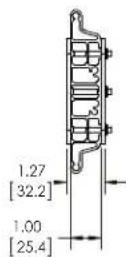
DIMENSIONS:
INCHES
[MILLIMETERS]
DIMENSIONS (continued)
FCAX20
![FCAX20 10.00 [254.0] 5.38 [136.5] 10.00 [254.0] 1.27 [32.2] 1.00 [25.4] DIMENSIONS: INCHES [MILLIMETERS]](/content/2026/06/1257430/images/7d910d1eba610a44c482f0aab15a29c47a31cb225cf28231a20ce25715c01ebb.jpg)
LEGEND
 | Tighten Fastener |  | Phillips Screwdriver |
| Apretar elemento de fijación | Destornillador Phillips | ||
| Befestigungsteil festziehen | Kreuzschlitzschraubendreher | ||
| Apertar fixador | Chave de fendas Phillips | ||
| Serrare il fissaggio | Cacciavite a stella | ||
| Bevestiging vastdraaien | Kruiskopschroevendraaier | ||
| Serrez les fixations | Tournevis à pointe cruciforme | ||
 | Loosen Fastener |  | Hex-Head Wrench |
| Aflojar elemento de fijación | Llave de cabeza hexagonal | ||
| Befestigungsteil lösen | Sechskantschlüssel | ||
| Desapertar fixador | Chave de cabeça sextavada | ||
| Allentare il fissaggio | Chiave esagonale | ||
| Bevestiging losdraaien | Zeskantsleutel | ||
| Desserrez les fixations | Clé à tête hexagonale |
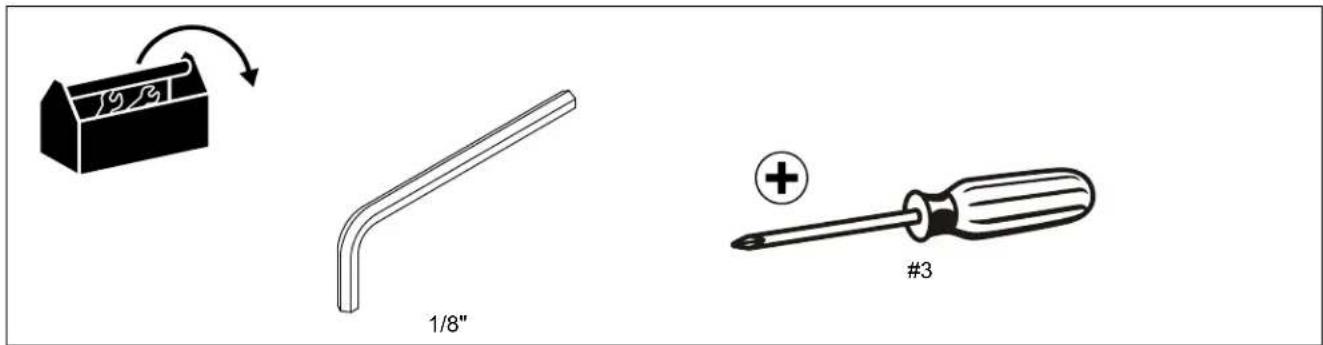
TOOLS REQUIRED FOR INSTALLATION
PARTS

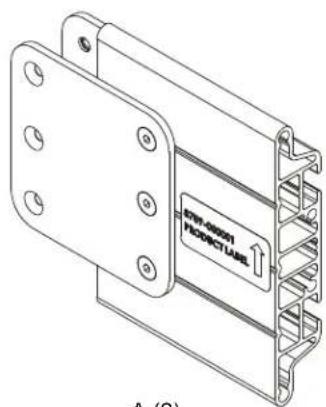
A (2) [extender bracket]
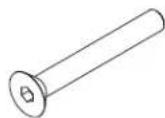
B (6)
10-24 x 1 1/2"

C (1)
1/8"
Assembly And Installation
- Assemble video wall mount according to installation instructions up to the point of installing displays to rails.
- Remove ends from rails by removing two screws holding ends to rails. (See Figure 1)
- Use three #10-24 x 1 1/2" flat head cap screws (B) to attach each extender (A) to rail. (See Figure 2)
- Reattach ends to rails using two screws removed in Step 2. (See Figure 2)
- Install displays to rails according to mount's installation instructions.

Figure 1

Figure 2

CHIEF®
A brand of legrand
8800-002392 Rev02
©2022 Legrand | AV
www.legrandav.com
08/2022
USA/International A 6436 City West Parkway, Eden Prairie, MN 55344
P 800.582.6480 / 952.225.6000
F 877.894.6918 / 952.894.6918
Europe A Franklinstraat 14, 6003 DK Weert, Netherlands
P +31 (0) 495 580 852
F +31 (0) 495 580 845
Asia Pacific A Office No. 918 on 9/F, Shatin Galleria
18-24 Shan Mei Street
Fotan, Shatin, Hong Kong
P 852 2145 4099
F 852 2145 4477
Marque : Chief
Modèle : FCAX14
Catégorie : Support écran plat