
Powershred PS-60 - Destructeur de documents FELLOWES - Notice d'utilisation et mode d'emploi gratuit
Retrouvez gratuitement la notice de l'appareil Powershred PS-60 FELLOWES au format PDF.


| Type de produit | Destructeur de documents |
| Marque | Fellowes |
| Modèle | Powershred PS-60 |
| Dimensions (L x P x H) | 38 x 25 x 30 cm |
| Poids | 4,5 kg |
| Alimentation électrique | 220-240 V, 50/60 Hz |
| Type de coupe | Coupe croisée |
| Niveau de sécurité | P-2 |
| Capacité de coupe | Jusqu'à 6 feuilles (70 g/m²) |
| Capacité de la corbeille | 15 litres |
| Cycle de fonctionnement | 2 minutes de marche, 30 minutes de repos |
| Largeur d'entrée | 220 mm |
| Vitesse de coupe | 6 m/min |
| Dimensions des particules | 4 x 40 mm |
| Arrêt automatique | Oui, en cas de surcharge ou bourrage |
| Protection contre la surchauffe | Oui |
| Entretien | Huilage régulier des lames |
| Nettoyage | Dépoussiérer l'extérieur avec un chiffon sec |
| Pièces détachées disponibles | Lames, moteur |
| Garantie | 1 an |
FOIRE AUX QUESTIONS - Powershred PS-60 FELLOWES
Questions des utilisateurs sur Powershred PS-60 FELLOWES
0 question sur cet appareil. Repondez a celles que vous connaissez ou posez la votre.
Poser une nouvelle question sur cet appareil
Téléchargez la notice de votre Destructeur de documents au format PDF gratuitement ! Retrouvez votre notice Powershred PS-60 - FELLOWES et reprennez votre appareil électronique en main. Sur cette page sont publiés tous les documents nécessaires à l'utilisation de votre appareil Powershred PS-60 de la marque FELLOWES.
MODE D'EMPLOI Powershred PS-60 FELLOWES
Help Line
| Australia | + |
| Canada | + |
| México | + |
| United States + 1-800-955-0959 | |
Fellowes
| Australia | + |
| Benelux | + |
| Canada | + |
| Deutschland | + |
| France | + |
| Italia | + |
| Japan | + |
| Korea | + |
| Malaysia | + |
| Polska | + |
| Spain | + |
| Singapore | + |
United Kingdom + 44-(0)-1302-836836
United States + 1-630-893-1600
www.fellowes.com
Fellowes
Australia
res. 1789 Norwood Avenue
Benelux
Itasca, Illinois 60043-1095
France Deutschland
630-893-1600
Itails Japan
Korea
Poin
http://www.fellowes.com
Singapore United Kingdom

POWERSHRED.
1 000 465 4329
1-800-234-1185
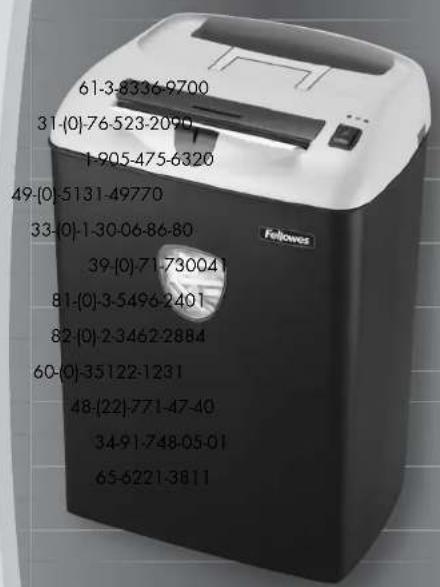
PS-60/PS-65C
Please read these instructions before use.
ENGLISH
Models PS-60/PS-65C
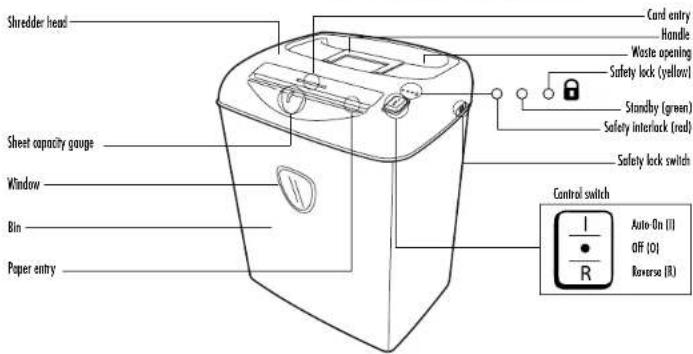
SET UP
Insert waste bag (Fellowes #36052) for easy disposal.
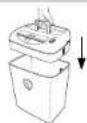
CAPABILITIES
Will shred: Paper, credit cards, staples and small paper clips
Will not shred: Continuous forms, adhesive labels, transparencies, newspaper, cardboard, large paper clips, laminates or plastic other than noted above
Paper shred size:
Strip-Cut 7/32" (5.8mm)
Confetti-Cut 5/32" x 2" (3.9 x 50mm)
Maximum:
Sheets per pass (Strip-Cut) 12*
Sheels per pass (Contelli-Cul) 8'
Passes per day 25-50 Cards per euro
Cards per pass ....1 Cards per day....10
Paper width 9"/229mm
Continuous operation 10 minutes
*20lb., 8.5"x11" (75g) paper at 120v, PS-60/PS-65C-2.0Amps; heavier paper,
humidity or other than rated voltage may reduce capacity.
IMPORTANT SAFETY INSTRUCTIONS — Read Before Using!
WARNING

- Keep away from children and pets. Always unplug or set safety lock when not in use.
- Keep foreign objects — gloves, jewelry, clothing, hair, etc. — away from shredder entries. In case of accident, press and hold Reverse (R) to back out object.
CAUTION
- Avoid touching exposed blades under Confetti-Cut shredder head. Use only designated entry for cards.

- Never use aerosol, petroleum-based or other flammable products on or near shredder.
- Do not use if damaged or defective. Do not open shredder head. Do not place near or over heat or water source.
OPERATION

Continuous operation: 10-minute maximum
NOTE: Shredder runs briefly after each pass to clear entry. Continuous operation beyond 10-minutes will trigger 20-minute cool down period.

Set to Off (0) and plug in
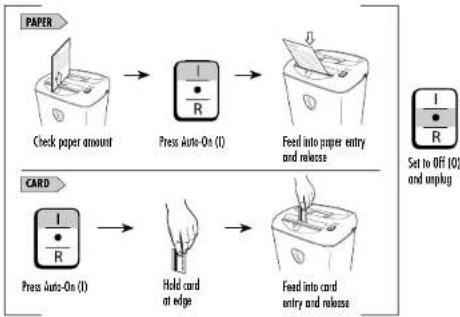
flowchart
graph TD
    A["Check paper amount"] --> B["Press Auto-On (I)"]
    B --> C["Feed into paper entry and release"]
    D["Press Auto-On (I)"] --> E["Hold card at edge"]
    E --> F["Feed into card entry and release"]

Safety Lock prevents accidental operation. To set, wait for shredding to stop, then slide switch toward back until yellow light goes on. For greater safety, always unplug shredder after use.
TROUBLESHOOTING
(Red)
Paper jam: Set to Off (0), lift head and empty bin. Replace head on bin and follow any or all of the below procedures.

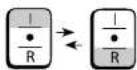

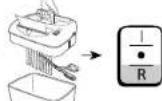
Press and hold Reverse (R)
Alternate slowly back and forth
Set to Off (O) and unplug
Lift head off bin and cut hanging sheets. Replace head. Plug in.
Press and hold Reverse (R)
MAINTENANCE
Confetti-Cut and Strip-Cut: Run regularly in reverse for one minute
Confetti-Cut only: Lubricate when bin is full, or immediately, il:
- Capacity decreases
- Motor sounds different, or
Shredder stops running
Follow oiling procedure below and repeat twice.

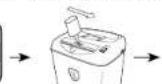
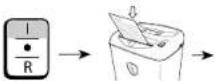

Press and hold
Reverse (R)
2-3 seconds
Apply oil across entry Press Auto-On (1)Set to OFF (0) Shred one sheet

Only use a non-aerosol vegetable oil in long nozzle container such as Fellowes 35250

WARRANTY
LIMITED WARRANTY Fellows, Inc. ("Fellovers") warrants the cutting blades of the machine to be free from defects in material and workmanship for 5 years from the date of purchase by the original consumer. Fellows warrants all other parts of the machine to be free of defects in material and workmanship for 1 year from the date of purchase by the original consumer. If any part is found to be defective during the warranty period, your sole and exclusive remedy will be repair or replacement, at Fellows' option and expense, of the defective part. This warranty does not apply in cases of abuse, mishandling, or unauthorized repair. ANY IMPLIED WARRANTY, INCLUDING THAT OF MERCHANTABILITY OR
FITNESS FOR A PARTICULAR PURPOSE, IS HEREBY LIMITED IN DURATION TO THE APPROPRIATE WARRANTY PERIOD SET FORTH ABOVE. In no event shall Fellowes be liable for any consequential or incidental damages attributable to this product. This warranty gives you specific legal rights. The duration, terms, and conditions of this warranty are valid worldwide, except where different limitations, restrictions, or conditions may be required by local law.
For more details or to obtain service under this warranty, please contact us or your dealer.
Marque : FELLOWES
Modèle : Powershred PS-60
Catégorie : Destructeur de documents