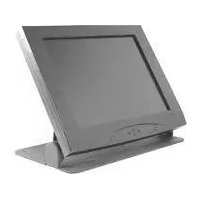
FSB018BLK - Support écran plat Chief - Notice d'utilisation et mode d'emploi gratuit
Retrouvez gratuitement la notice de l'appareil FSB018BLK Chief au format PDF.


| Type de produit | Support écran plat fixe |
| Marque | Chief |
| Modèle | FSB018BLK |
| Compatibilité VESA | 100x100 mm à 200x200 mm |
| Tailles d'écran supportées | 23 à 55 pouces |
| Capacité de charge maximale | 35 kg |
| Matériau | Acier à haute résistance |
| Couleur | Noir (BLK) |
| Dimensions du support (L x H x P) | 450 x 250 x 50 mm |
| Poids du support | 2,5 kg |
| Alimentation électrique | Aucune (support passif) |
| Fixation murale | Vis et chevilles fournies pour mur en béton ou bois |
| Niveau à bulle intégré | Oui |
| Inclinaison | 0° (fixe) |
| Rotation | Non |
| Distance du mur | 25 mm |
| Type de montage | Simple ou double stud (entraxe 400 mm) |
| Entretien | Nettoyer avec un chiffon doux et sec |
| Garantie | 10 ans |
| Contenu de l'emballage | Support, vis de fixation, chevilles, niveau, manuel |
| Certifications | UL, TÜV |
| Pays de fabrication | Chine |
FOIRE AUX QUESTIONS - FSB018BLK Chief
Questions des utilisateurs sur FSB018BLK Chief
0 question sur cet appareil. Repondez a celles que vous connaissez ou posez la votre.
Poser une nouvelle question sur cet appareil
Téléchargez la notice de votre Support écran plat au format PDF gratuitement ! Retrouvez votre notice FSB018BLK - Chief et reprennez votre appareil électronique en main. Sur cette page sont publiés tous les documents nécessaires à l'utilisation de votre appareil FSB018BLK de la marque Chief.
MODE D'EMPLOI FSB018BLK Chief
INSTALLATION INSTRUCTIONS
FSB-018
FLAT SCREEN TABLE STAND
The Flat Screen Table Stand is designed to attach directly to VESA FDMI standard 75mm or 100mm mounting pattern.

Figure 1
(1) FSB-018 Stand Assembly (4) M4 x 10mm Phillips Head Screw
(1) 75mm Adapter Bracket (4) M4 x 6mm Phillips Head Screw
(1) 100mm Adapter Bracket (4) 10-24 Nylock Nut
(4) 10-24 x 3/8" Phillips Head Screw
Unpack and check contents: Inspect the Flat Screen Table Stand carefully for shipping damage. If any damage is apparent, call your carrier claims agent.
CAUTION:
The maximum weight to be installed on the FSB018 is 20 lbs (9 kg). Do not use a power screwdriver to install screws. Use a hand screwdriver to prevent damage to your monitor.
NOTE: For 75mm VESA mounting, perform Step 1 first. For 100mm VESA mounting, perform Step 2 and Step 3 first.
For 75mm VESA Mounting Pattern
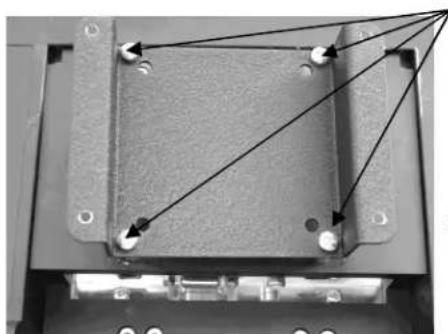
- Secure the 75mm adapter bracket to your monitor using four M4 x 6mm Phillips head screws (provided) (see Figure 2).
For 100mm VESA Mounting Pattern
-
Install 100mm adapter bracket using four provided M4 x 6mm or M4 x 10 Phillips head screws (see Figure 3).
-
Secure the 100mm adapter bracket to the 75mm adapter bracket (see Figure 4).
®Chief is a registered trademark of Milestone AV Technologies. All rights reserved.
VESA FDMI
Standard 75mm
VESA FDMI
Standard 100mm
Figure 2. 75mm Bracket Installation

Figure 3. 100mm Bracket Installation
- At the desired height, secure your monitor to the stand using four provided 10-24 x 3/8" Phillips head screws (see Figure 5).
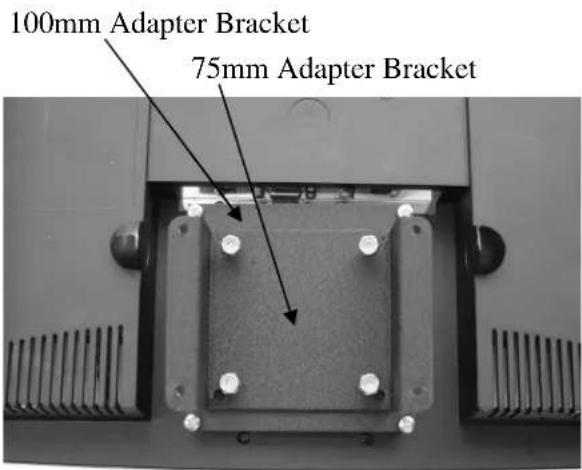
Figure 4. 100mm to 75mm Installation

Figure 5. Install Monitor to Stand
Marque : Chief
Modèle : FSB018BLK
Catégorie : Support écran plat