MODE D'EMPLOI 7B24 SEIKO
Thank you very much for choosing a SEIKO watch. For proper and safe use of your SEIKO watch, please read carefully the instructions in this booklet before using.
Keep this manual handy for easy reference.
* Length adjustment service for metallic bands is available at the retailer from whom the watch was purchased or SEIKO CUSTOMER SERVICE CENTER.
The service may also be available on a chargeable basis at other retailers, however, some retailers may not undertake the service.
Contents
| 1. About This Product |
| Handing cautions | 84 |
| Features | 86 |
| Display and button operation | 88 |
| How to use Button A and B | 90 |
| Crown | 91 |
| 2. Before Use |
| Before use | 92 |
| Checking the charging status | 92 |
| Checking the time and date | 93 |
| 3.How to Set the Time and Date (Radio Signal Reception) |
| Setting the time and date by receiving a radio signal ... | 94 |
| Mechanism of radio signal reception ... | 94 |
| Automatic reception and manual reception ... | 95 |
| About reception conditions | 96 |
| Radio signal reception range: In Japan (JUY) | 96 |
| Radio signal reception range: In China (BPC) | 97 |
| Radio signal reception range: In the United States (MUVS) | 98 |
| To enable the watch to easily receive a radio signal | 99 |
| Environments in which it is difficult to receive a radio signal | 100 |
| How to check the reception status | 102 |
| How to display the reception result | 102 |
| Time Zone Adjustment Function (Selecting transmitting station) |
| What is the time zone adjustment function? ... 104 |
| Features of time zone adjustment function ... 104 |
| Questions and answers regarding time zone adjustment function ... 105 |
| How to set the time zone (Selecting transmitting station) ... 106 |
| List of major time zones around the world ... 108 |
| 5. Solar Charging Function |
| About charging | 110 |
| How to charge the watch | 110 |
| The indication time for charging the watch | 111 |
| About energy | 112 |
| Energy depletion forewarning function | 112 |
| Power save function | 113 |
| 6. To Preserve the Quality of Your Watch |
| To preserve the quality of your watch | 114 |
| Daily care | 114 |
| Performance and type | 115 |
| Water resistance | 116 |
| Magnetic resistance | 120 |
| Band | 122 |
| Special clasps | 124 |
| Lumibrite | 129 |
| Power source | 130 |
| Guarantee | 132 |
| After-sales service | 134 |
| 7.Troubleshooting |
| How to conduct manual recognition (Price wigs a radio signal manually) ... 136 |
| Conditions in which the watch may be unable to receive radio signals ... 138 |
| How to manually set the time ... 138 |
| How to manually set the date ... 140 |
| Preliminary position ...... 142 |
| Things around you which generate magnetism ... 143 |
| How to set the preliminary position ... 144 |
| Setting the preliminary position of the close ... 144 |
| Setting the preliminary position of the hour and minute hands manually ... 146 |
| Troubleshooting ...... 148 |
| In case of an abnormal movement ... 156 |
| How to reset the Built-in IC system ... 156 |
| 8. Specifications |
| Specifications | 162 |
Handling cautions
About This Product
| WARNINGTo indicate the risks of serious consequences such as severe injuries unless the following safety regulations are strictly observed. |
| • Immediately stop wearing the watch in following cases.○ If the watch body or band becomes edged by corrosion etc.○ If the pins protrude from the band.※ Immediately consult the retailer from whom the watch was purchased or SEKO CUSTOMER SERVICE CENTER. |
| • Keep the watch and accessories out of the reach of babies and children.Care should be taken to prevent a baby or a child accidentally swallowing the accessories. If a baby or child swallows the battery or accessories, immediately consult a doctor, as it will be harmful to the health of the baby or child. |
※ Immediately consult the retailer from whom the watch was purchased or SEIKO CUSTOMER SERVICE CENTER.
CAUTIONS
| To indicate the risks of light injuries or material damages unless the following safety regulations are strictly observed. |
- Avoid the following places for wearing or keeping the watch.
-
Places where volatile agents (cosmetics such as polish remover, bug repellent, thinners etc.) are vaporizing
○ Places where the temperature drops below 5°C or rises above 35°C for a long time ○ Places of high humidity
○ Places affected by strong magnetism or static electricity ○ Dusty places
○ Places affected by strong vibrations
-
If you observe any allergic symptoms or skin irritation
Stop wearing the watch immediately and consult a specialist such as a dermatologist or an allergist
- Other cautions
Do not disassemble or tamper with the watch.
Keep the watch out of the reach of babies and children.
Extra care should be taken to avoid risks of any injury or allergic rash or itching that may be caused when they touch the watch
Features
| ■ Radio Signal Receiving Function ......→ pages 94 - 101 | This watch adjusts the time and the date precisely by automatically receiving radio signals daily.In addition, radio signals can be forcibly received with manual operation.This watch can receive official standard radio signals from Japan (from 2 transmitting stations), China, and the United States (the transmitting station for receiving radio signals can be selected using the time zone adjustment function). |
| ■ Display Function of Radio Signal Reception Level ......→ page137 | The movement of the second hand indicates the radio signal reception level during radio signal reception attempts. |
| ■ Display Function of Radio Signal Reception Results ......→ page 102 | The movement of the second hand indicates radio signal reception results (Yes/No). |
■ Time Zone Adjustment Function--- (Selecting Transmitting Station) → pages 104 - 109
■ Solar Charging Function...
→ pages 110-111
■ Energy Depletion Forewarning Function…
→ page 112
Power Save Function→page 113
■ Automatic Hand Position Alignment Function → page 142
This watch can display local time around the world by settling the appropriate time zone. In addition, settir the time zone enables the watch to receive official standard radio signals to set the time if the watch is worn in a radio signal reception range.
A solar cell underneath the dial converts any form of light into electrical energy to charge it. Once fully charged, the watch continues to run for approximate six months.
The movement of the second hand indicates that the battery should be charged.
This watch is equipped with a function which can suppress energy consumption when it is left without receiving an adequate light source for a certain length of time.
- When the hand positions display an incorrect time as a result of external influences such as magnetism, the watch automatically corrects the hand misalignment.
About This Product
About This Product
![Minute hand Hour hand Second hand Date Button A [Reception result confirmation] → page 102 [Manual reception] → page 136 [Time zone adjustment] → page 106 [Manual time and date setting] → page 138 Crown First click [Manual date setting mode] → page 140 Second click [Manual time setting mode] → page 138 * In case of a screw lock type crown, when the crown is unlocked, it is at the O-click position. Button B [Time zone adjustment mode (setting the time to a local time abroad)] → page 106](/content/2026/06/1254322/images/8808418e62f56be93df5600f46a8eea7b0b2d1dc03456e38516c57c2cdba01c4.jpg)
Reception Level Display
[manual reception]
H ...High reception level (50second position)
L ... Low reception level (40second position)
N ...Unable to receive radio signals (20second position)
※ "About the reception level display" refer to page 137
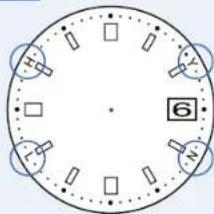
Reception Result Display
[Confirmation of
reception result)
Y ... Reception Successful (10second position)
N ... Reception Failed (20second position)
* 'Confirm reception result' refer to page 102
※ Positions of above displays may differ depending on the model.
About This Product
88 89
About This Product
Buttons A and B are recessed in the watchcase to improve the design and to prevent erroneous operation. Please refer to the following figures for how to press the buttons.

flowchart
graph LR
    A["Button has a handle"] --> B["User can use Press: It is a object with a long covered tip, etc."]
    B --> C["Button is only closed"]
    C --> D["Button is redacted in the watch case"]
    D --> E["User covers a touch case"]
    E --> F["Press with your finger"]
    F --> G["User covers a touch case"]
    G --> H["Button is not covered"]
Make sure to confirm "How to use Buttons A and B" as shown above before pressing the buttons. First, press Button B, and press Button A while pressing Button B so as to press them successfully.
- Both Buttons A and B have a hollow
Press the buttons using an object with a long tapered tip holding the watch as shown in the figure so that the watch does not move.
- Button A does not have a hollow, and Button B has a hollow Press Button A with your finger and Button B using an object with a long tapered tip.
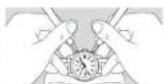
6 Press the buttons on a soft cloth of the like before operation in order to prevent damage to the watch.
Crown
There are two types of crowns, a normal crown and a screw-lock crown. Check the crown on your watch.
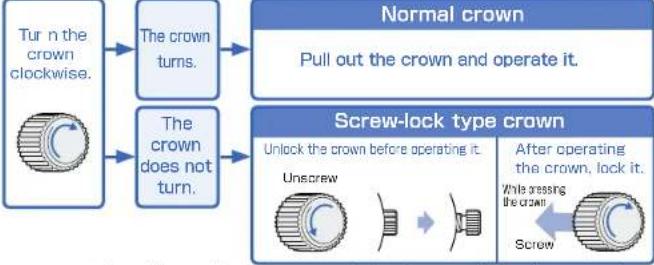
flowchart
graph TD
    A["Turn the crown clockwise."] --> B["The crown turns."]
    C["The crown does not turn."] --> D["The crown does not turn."]
    E["Normal crown"] --> F["Pull out the crown and operate it."]
    G["Screw-lock type crown"] --> H["Unlock the crown before operating it."]
    G --> I["Unscrew"]
    G --> J["After operating the crown, lock it."]
    G --> K["While pressing the crown"]
    G --> L["Screw"]
※ If your watch has a screw-lock crown, the crown screws into the watch to prevent malfunction and increase water resistance.
※ Be careful not to screw the crown in by force as it may damage the slots of the crown.
About This Product
91
90
Before use
Before Use
① Checking the charging status
When the movement of the second hand shows an energy depletion state, the battery requires charging.
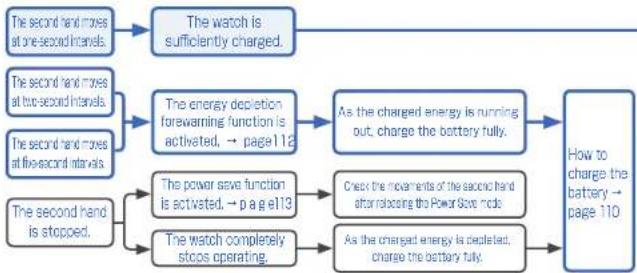
flowchart
graph TD
    A["The second hand moves at one-second intervals."] --> B["The watch is sufficiently charged."]
    C["The second hand moves at two-second intervals."] --> D["The energy depletion forawarming function is activated, → page 112"]
    E["The second hand moves at five-second intervals."] --> D
    F["The second hand is stopped."] --> G["The power save function is activated, → p a g e113"]
    F --> H["The watch completely stops operating."]
    I["As the charged energy is running out, charge the battery fully."] --> J["How to charge the battery → page 110"]
    K["Check the movements of the second hand after releasing the Power Stock mode"] --> J
    L["As the charged energy is depleted, charge the battery fully."] --> J
※ If the second hand does not move at one-second intervals even after fully charging the battery → At Trouble on page 150 93
② Checking the time and date
※ The hands of this watch cannot be moved by turning the crown. So when adjusting the time, refer to the following pages regarding the procedures.
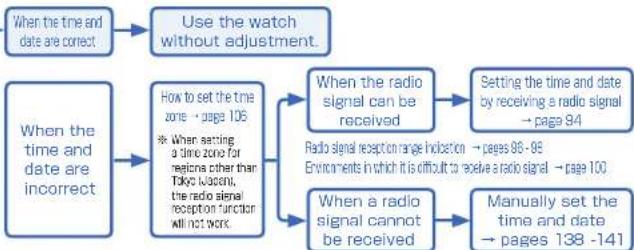
flowchart
graph TD
    A["When the time and date are correct"] --> B["Use the watch without adjustment."]
    C["When the time and date are incorrect"] --> D["How to set the time zone → page 106\n* When setting a time zone for medicine other than Tokyo Wagoni, the radio signal reception function all not work"]
    D --> E["When the radio signal can be received"]
    E --> F["Setting the time and date by receiving a radio signal → page 94"]
    D --> G["When a radio signal cannot be received"]
    G --> H["Manually set the time and date → pages 138 -141"]
※ When the watch is not displaying the precise time and date even after successfully receiving a radio signal → In this case, refer to Misalignment of the time and hands on page 152 and Misalignment of the date on page 154.
Before Use
Setting the time and date by receiving a radio signal
■ Mechanism of radio signal reception
The radio-controlled watch displays the precise time and date by automatically receiving and synchronizing itself with the radio signal of an official standard frequency.
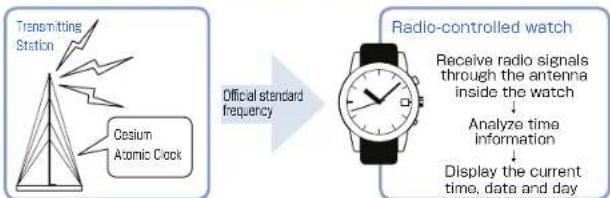
flowchart
graph LR
    A["Transmitting Station"] --> B["Cesium Atomic Clock"]
    B --> C["Official standard frequency"]
    C --> D["Radio-controlled watch"]
    D --> E["Receive radio signals through the antenna inside the watch"]
    E --> F["Analyze time information"]
    F --> G["Display the current time, date and day"]
Time signal transmitted by a standard frequency is based on a super accurate "Cesium Atomic Clock" that may have a 1 second loss or gain per one hundred thousand years.
■ Automatic reception and manual reception
This watch sets the time and date by automatically receiving a radio signal at a fixed time.
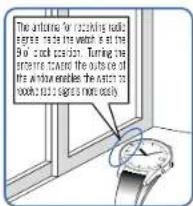
• Automatic reception
This watch automatically receives a radio signal at 2:00 AM.
If the watch fails to receive receives a radio signal at 2:00 AM, it will attempt to receive a radio signal at 3:00 AM. If it fails again, it will attempt to receive a radio signal at 4:00 AM.
When receiving radio signals, place the watch in a place where it can easily receive a radio signal.
- Manual reception
When this watch cannot automatically receive a radio signal due to a difficult receiving environment, it is possible to receive them arbitrarily at any time. How to conduct manual reception → pages 136-137
※ When setting a time zone for regions other than radio signal reception range, the radio signal reception function will not work. Check the setting of the time zone - How to set the time zone (Selecting transmitting station) or pages 106-107
- Radio signal reception results depend on a receiving condition. → Environments in which it is difficult to receive a radio signal on page 100
- This watch is unable to receive radio signals outside a reception range → Radio signal reception range indication on pages 95-98
When the watch is not displaying the precise time and date even at time and hands on page 152, Misalignment of the date on page 154.
How to Set the Time and Date (Radio Signal Recognition)
94
95
About reception conditions
■ Radio signal reception range: In Japan (JJY)
The reception range from each transmitting station is approximately 1,000 km (1,000 km radius of each station).
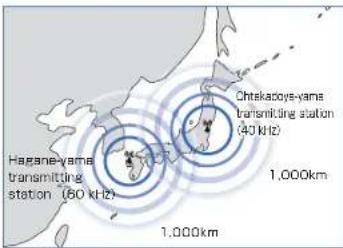
JJY is operated by the National Institute of Information and Communications Technology (NICT). JJY is transmitted from two stations in Japan. Each station transmits JJY in a different frequency. Fukushima (Ohtakadoya-yama transmitting station: 40 KHz) Kyushu (Hagane-yama transmitting station: 60 KHz)
※ NICT : National Institute of Information and Communications Technology
※ Whether the watch succeeds in receiving radio signals or not depends on the receiving conditions. Refer to 'Environments in which it is difficult to receive a radio signal' on page 100.
■ Radio signal reception range: In China (BPC)
The reception range from the transmitting station is approximately 1,500 km (1,500 km radius of the transmitting station).
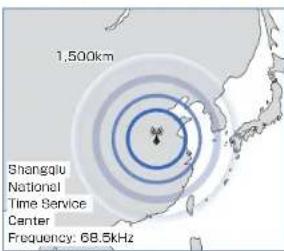
BPC is operated by NTSC.
Shangqiu National Time Service Center
Frequency: 68.5kHz
※ NTSC : National Time Service Center
The watch may be able to receive radio signals outside a reception range if the receiving conditions are favorable.
The watch may fail to receive radio signals depending on the reception conditions (weather, geographic locations, radio disturbances such as tall buildings, and orientation of the watch). Environments in which it is difficult to receive a radio signal on page 100.
Radio signal reception range: In the United States (WWVB)
The reception range from the transmitting station is approximately 1,500 km (1,500 km radius of Fort Collins radio station). There are four time zones within the reception range.
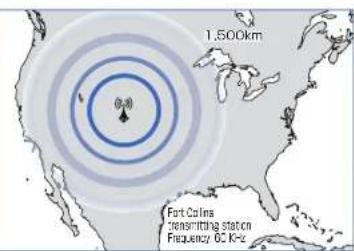
WWVB is operated by NIST.
Fort Collins transmitting station
Frequency: 60 KHz
※ NIST : National Institute of Standards and Technology
※ The watch may be able to receive radio signals outside a reception range if the receiving conditions are favorable.
※ The watch may fail to receive radio signals depending on the reception conditions (weather, geographic locations, radio disturbances such as tall buildings, and orientation of the watch).
Environments in which it is difficult to receive a radio signal on page 100.
■ To enable the watch to easily receive a radio signal
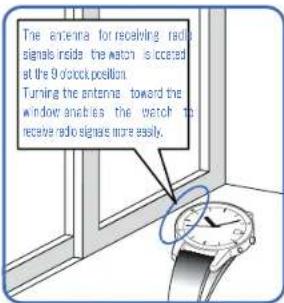
Place the watch where it can receive radio signals more easily, such as by the window.
In order to secure a stable radio signal reception, keep the watch stationary without changing the direction of the watch or tilting it during radio signal reception.
■ Environments in which it is difficult to receive a radio signal
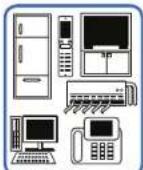
- Close to home electrical appliances such as TV's refrigerators or conditioners
- Close to CA devices such as mobile phones, personal computers or tax machines
- Close to steel desks or other furniture made of metal

In places generating radio interference, such as construction sites or places with heavy traffic.
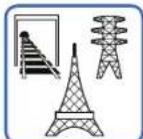
Close to overhead power lines, TV stations, train cables.
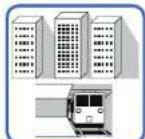
·Inade a building between tail buildings underground

• Inside a vehicle, train, or airplane
NOTICE
- The watch may display the wrong time if it fails to receive radio signals properly because of interference. The watch may also fail to receive radio signals properly depending on the location or radio wave receiving conditions. In this case, move the watch to another place where it can receive radio signals.
- When the watch is out of reception range, its accurate quartz movement will continue to keep the time.
- The time signal transmission may be stopped during maintenance of the facilities of each transmitting station or because of a lightning strike. In such a case, see each station's website for further information or contact SEIKO CUSTOMER SERVICE CENTER.
· Websites of transmitting stations (as of November, 2007)
Japan: NICT (Japan Standard Time Group) http://www.jjy.nict.go.jp/
China: NTSC http://www.ntsc.ac.cn
The United States of America: NIST http://www.boulder.nist.gov/timefreq/stations/wwvb.htm
SEIKO CUSTOMER SERVICE CENTER: 0120-612-911 (toll free in Japan)
How to check the reception status
How to display the reception results
This watch displays the latest reception results (Yes/No) of a radio signal for five seconds.
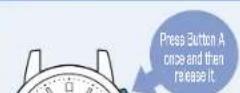
※ How to use button A and B → page 90
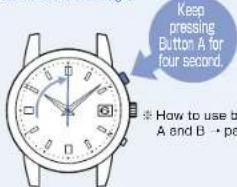
※ When Button A is kept pressed for three seconds or longer, the second hand starts to move to the "Zero Second Position," and then the watch switches to the Manual Reception Mode. In this case, press Button A again to display the time.
2 The second hand indicates the reception results.
If a reception was successful: The second hand points to Y (Yes; the 10 second position)

If a reception has failed: The second hand points to N (No; the 20 second position)

- EButton is pressed after the seconds or while the second and running to display the reaction results, the reaction results apply function is cancelled and the second and subsequent normal movement
If a reception was successful: The second hand points to Y
- A radio signal has been received successfully. Use the watch without any adjustments.
* When the watch is not displaying the precise time and date even after successfully receiving a radio signal → in this case, refer to Misalignment of the time and hands on page 152 and Misalignment of the date on page 154.
If reception has failed: The second hand points to N.
- Place the watch in a place where it can easily receive a radio signal, or change its direction. Even within the radio signal reception range, this watch may fail to receive a radio signal depending on the condition (due to the influence of weather, geographical features, buildings, or direction), → In this section, refer to Environments in which it is difficult to receive a radio signal on page 100. This watch is unable to receive radio signals outside a reception range → Radio signal reception range indication on pages 96 - 98.
- Attempt to receive a Radio Signal in a different time period (In the case of manual reception).
Receiving environments differ according to time periods even at the same place.
Due to radio signal characteristics, the watch is able to easily receive radio signals during nighttime hours.
- When manually adjusting the time even after successfully receiving a radio signal, reception results are reset to "N."
- When pulling the crown to the second click, the watch enters the manual time setting mode, and resets the receipt on results without adjusting the time.
- When the watch is unable to receive radio signals, it may move depending on the quartz movement.
- **Accuracy of loss / gain: ±15 seconds per month**
What is the time zone adjustment function?
Features of time zone adjustment function
0 second position; UTC
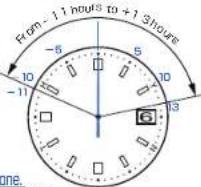
- This watch is able to be set to an overseas local time in one-hour units. Most of the regions around the world adopt time differences based on one-hour units. The watch set time difference based on UTC (Coordinated Universal Time). The range of time differences around the world centered from UTC is "from - 11 hours to + 18 hours."
- This watch can automatically display the local time of a desired area by selecting its time zone.
When the watch is set in the time zone adjustment mode, the second hand indicates the time zone.
Press the button to set the time zone referring to the position of the second hand.
This watch selects a radio signal transmitting station by setting the time zone. When the watch is used in Tokyo, set the second hand to "Tokyo (Japan); 9 second position" to receive the official standard frequency of Japan.
When the watch is used in China, set the second hand to "Hong Kong (China): 8 second position" to receive the official standard frequency of Japan.
If a time zone other than a radio signal reception range is selected, the radio signal reception function will not work.
→ How to set the time zone pages 106-107
→ List of major time zones around the world page 108
■ Questions and answers regarding time zone adjustment function
Q: When returning to Japan from overseas, is the time automatically set to Japan time?
A: Just moving cannot adjust the time to Japan time. After setting the time difference, radio signal reception is not performed. When wearing a watch in Japan, set to Japan time by use of the time zone adjustment function.
Q: The hands stop during operation of time zone setting, therefore, does time lag occur?
A: The internal circuit stores the time, therefore, no time lag occurs.
Q: How accurate is the watch while the time difference is being set.
A: While the time zone is being set, the watch has an accuracy of a normal quartz watch. (Monthly rate: ±15 seconds)
Q: How is adjustment made to a local time with a time difference of 15 minutes or 30 minutes?
A: The time can be adjusted on a 1 hour basis by use of the time zone adjustment function. When adjusting to a local time with a time zone difference of 15 minutes or 30 minutes, please refer to the "How to manually set the time" on pages 138-139.
104 105
How to set the time zone (Selecting transmitting station)
The second hand starts to move, and then the watch enters the time zone adjustment mode.
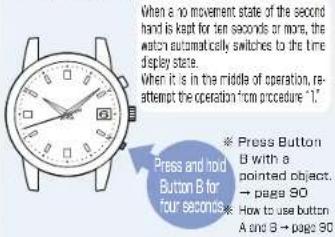
※ The buttons can be pressed continuously.
The radio signal transmitting station can be changed by setting the time zones. When setting a time zone for regions other than reception range, the radio signal reception function will not work.
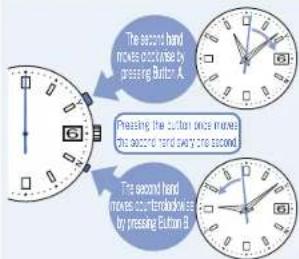
Set the time zone by moving the second hand.
The one-second movement of the second hand is equivalent to one hour in the time zone.
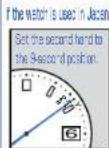
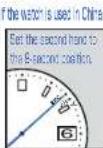
When the no movement state of the second hand is kept for ten seconds or more, the watch automatically switches to the time display state.
When it is in the middle of operation, re-attempt the operation from procedure "1"
③ The watch automatically terminates the mode.
When the no movement state of the minute and hour hands is kept for ten seconds, the watch automatically terminates the Time zone adjustment mode.
In the case that the date changes, the date display changes afterward.
※ During movement of the date, neither the buttons nor the crown can be operated.
107
List of major time zones around the world
When setting a time zone for a region where no receivable official standard frequency is mentioned in the table below, the radio signal reception function will not work.
| Position that the second hand indicates | Tiredifference with UTC | Name of representative city (Time zone) | Repositional BCD standards frequency |
| Second position | ± 0 hours | London/UTC ★ - | |
| 1-second position | +1 hours | Paris/Berlin ★ - | |
| 2-second position | +2 hours | Cairo ★ - | |
| 3-second position | +3 hours | Jeridian - | |
| 4-second position | +4 hours | Dubai - | |
| 5-second position | +5 hours | Kanschi - | |
| 6-second position | +6 hours | Chaka - | |
| 7-second position | +7 hours | Bangkok - | |
| 8-second position | +8 hours | Hong Kong (China) | BPC |
| 9-second position | +8 hours | Tokyo (Japan) | JUY |
| 10-second position | +10 hours | Sydney ★ | JUY △ |
| 11-second position | +11 hours | Noumaha - | |
| 12-second position | +12 hours | Wilmington ★ - | |
| 13-second position | +13 hours | (DST Wellington) - | |
| Position that the second hand indicates | Time distance in UTC | Name of representative city (this zone) | Possible office standard frequency |
| Oscopic position | ± 0 | London/UTC ★ | - |
| 5th-second position | -1 hours | Azores ★ | - |
| 5th-second position | -2 hours | (DST Rio de Janeiro) | - |
| 5th-second position | -3 hours | Rio de Janeiro ★ | - |
| 5th-second position | -4 hours | Santiago ★ | WWVB ▲ |
| 5th-second position | -5 hours | New York ★ | WWVB |
| 5th-second position | -6 hours | Chicago ★ | WWVB |
| 5th-second position | -7 hours | Denver ★ | WWVB |
| 5th-second position | -8 hours | Los Angeles ★ | WWVB |
| 5th-second position | -9 hours | Anchorage ★ | - |
| 5th-second position | -10 hours | Hanoiulu | - |
| 4th-second position | -11 hours | Midway Islands | - |
Daylight Saving Time (Summer Time) is in effect in time zones indicated with a "★" mark
(As of November 2007)
108
Please enable office standard frequency is no called with a "1" mark summer time in the time zone can be as by receiving the frequency, if the time zone is within the radio signal reception range.
There are time differences around the world based on "Coordinated Universal Time (UTC)." There are 24 regions (Time Zones) around the world with a time difference of one hour. This system has been adopted internationally by setting the total time difference around the world as 24 hours. In addition, Daylight Saving Time (Summer Time) is individually adopted in some regions.
[What is UTC (Coordinated Universal Time)?]
UTC is the universal standard time coordinated through international agreement. It is used as the official time around the world. UTC is determined by adding a leap second to GMT (Greenwich Mean Time), which is determined through astronomical measurement, in order to keep the precise time.
[What is summer time (DST)?]
Summer time is daylight saving time. Advancing the watch one hour to prolong daytime during longer daylight hours in summer. Daylight saving time has been adopted in about 80 countries, mainly in Europe and North America. The adoption and duration of daylight saving time vary depending on the country.
※ Time differences between regions and daylight saving time may change due to circumstances of a country or region.
※ A time difference established in 15 minute or 30 minute units is adopted in very limited regions (ex. India).
※ Each indication may differ depending on the model (design) of the watch. (As of April 2014)
About charging
How to charge the watch
To enjoy optimal performance of this watch, make sure that the watch is kept sufficiently charged at all times.
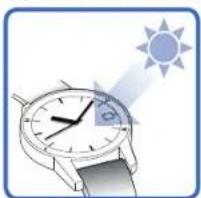
natural_image
Illustration of a wristwatch with a sun icon projecting the light (no text or symbols)
To charge the watch, expose the dial (solar cell) to adequate light.
* When changing the watch, keep the watch temperature under 60°C
* Before initially using the watch or when the watch has stopped as a result of complete depletion of stored power, charge the watch sufficiently.
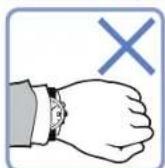
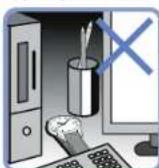
If the watch is concealed under a long sleeve shirt, or if it is used or stored continually under conditions where it cannot receive sufficient light, the power stored in the solar cell may be easily depleted because the watch cannot be sufficiently charged.
The indication time for charging the watch
Standard charging time
| Illumination (LUX) | Light source | Condition (Example) | Time required for fully changing the watch | The equal to closing the watch to sell now, the remainder is it | The equal to closing the hold to sell now |
| 500 | Fluorescent light | 60W 60cm | — — | 5 hours | |
| 700 | Fluorescent light | General offices | — — | 3 hours | |
| 1,000 | Fluorescent light | 30W 70cm | — | 120 hours | 2 hours |
| 3,000 | Fluorescent light | 30W 20cm | 90 hours | 30 hours | 30 minutes |
| 5,000 | Fluorescent light | 30W 12cm | 70 hours | 24 hours | 24 minutes |
| 10,000 | Fluorescent light | 30W 5cm | 25 hours | 8 hours | 9 minutes |
| 10,000 | Sunlight | Cloudy day | 25 hours | 8 hours | 9 minutes |
| 100,000 | Sunlight | Sunny day (Under the direct sunlight on a summer day) | 8 hours | 2 hours | 3 minutes |
★ The figures in the table above refer to the time required to charge the stopped watch by exposure to light until the watch moves at steady one-second intervals. Even if the watch is partially charged for a period shorter than the time provided in the above table, it will resume one-second interval movement; however, the one-second interval movement will change to two-second interval movement shortly. To avoid this and charge the watch to a sufficient level, use the charging time mentioned above as a measure.
The required charging time slightly varies depending on the model of the watch
The movement of the second hand checking the charging status → page 92
About energy
■ Energy depletion forewarning function
The energy depletion forewarning function is activated when the energy stored in the watch runs low. In such a case, the second hand moves at two-second intervals. If the watch continues to be in the state of two-second interval movement, the watch switches to five-second interval movement, followed by a completely stopped state. If the energy depletion forewarning function is activated, charge the watch sufficiently.
How to charge the watch… page 110
Standard charging time ....page 111
* Neither the buttons nor the crown can be operated while the second hand moves at two-second or five-second intervals (this is not a malfunction):
※ While the second hand moves at five-second intervals, the hour and minute hands, date and day stop operating.
* While the second hand moves at five-second intervals, the watch is unable to receive radio signals automatically. After the watch is charged sufficiently and the second hand returns to normal one-second interval movement, conduct the manual reception of radio signals to set the watch to the correct time. (Refer to 'How to set the time, date and day' on page 95.)
112 113
Power save function
This watch is equipped with a power save function (Power Saving) which can suppress energy consumption when it is left without receiving an adequate light source for a certain length of time.
| Power Save 1 | Power Save 2 |
| Condition | When the watch is exposed to a state without receiving an adequate light source for 72 hours or longer. | When the watch is in an insufficient charging state for a long time. |
| Situation | | |
Power Save 2
※ While the watch is being charged, the second hand moves at "Five-second Intervals."
During the "Five-second Interval Movement," neither the buttons nor the crown can be operated.
If the "Power Save 2" mode is probable, the secret power amount drops and the internal current time information stored will be lost. When the watch returns to its normal movement of one-second interval after sufficiently charging the battery, set the current time by receiving a radio signal (Refer to Setting the time and date by receiving a radio signal + page 95).
To preserve the quality of your watch

Daily care
• The watch requires good daily care
- Wipe away moisture, sweat or dirt with a soft cloth
- To clean the clearances (around the metallic band, crown or case back), a soft toothbrush is convenient.
• After soaking the watch in seawater, be sure to wash the watch in clean pure water and wipe it dry carefully.
• Turn the crown from time to time
• In order to prevent corrosion of the crown, turn the crown from time to time.
- The same practice should be applied to a screw lock type crown.
(No need to pull out the screw lock type crown.)
Crown → page 91
The case back shows the caliber and performance of your watch
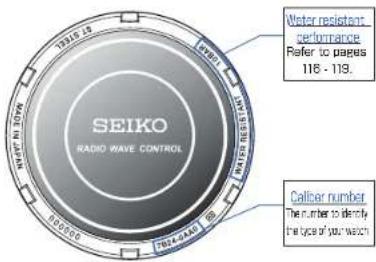
※ The figure above is one example. Performance of your watch is different from above sample.
114 115
Water resistance
Refer the table below for the description of each degree of water resistant performance of your watch before using.
(Refer to page 115")
| Indication on the case back | Water resistant performance | Condition of use |
| No indication Non-water resistance | Avoid drops of water or sweat |
| WATER RESISTANT | Water resistance for everyday life | The watch withstands accidental contact with water in everyday life. ⚠WARNING Not suitable for swimming |
| WATER RESISTANT 5 BAR | Water resistance for everyday life at 5 barometric pressures | The watch is suitable for sports such as swimming. |
| WATER RESISTANT 10(20) BAR | Water resistance for everyday life at 10(20) barometric pressures. | The watch is suitable for diving not using an air cylinder. |
116 117
WARNING

Do not use the watch in scuba diving or saturation diving.
The various tightened inspections under simulated harsh environment, which are usually required for watches designed for scuba diving or saturation diving, have not been conducted on the water-resistant watch with the BAR (barometric pressure) display. For diving, use special watches for diving.
CAUTION
※ If the inner surface of the glass is clouded with condensation or water droplets appear inside of the watch for a long time, the water resistant performance of the watch is deteriorated. Immediately consult the retailer from whom the watch was purchased or SEIKO CUSTOMER SERVICE CENTER (listed on the end of a book).

Do not turn or pull out the crown when the watch is wet.
Water may get inside of the watch.
CAUTION

Do not leave moisture, sweat and dirt on the watch for a long time.
Be aware of a risk that a water resistant watch may lessen its water resistant performance because of deterioration of the adhesive on the glass or gasket, or the development of rust on stainless steel.

Do not wear the watch while taking a bath or a sauna.
Steam, soap or some components of a hot spring may accelerate the deterioration of water resistant performance of the watch.

Do not pour running water directly from faucet.
The water pressure of tap water from a faucet is high enough to degrade the water resistant performance of a water resistant watch for everyday life.
118 119
■ Magnetic resistance
Affected by nearby magnetism,
a quartz watch may temporarily gain or lose time or stop operating.
When the hand positions deviate to display incorrect time as a result of influence of magnetism, this watch automatically corrects the hand alignment itself. (Refer to page 142)
| Indication on the case back | Condition of use |
| No indication | Keep the watch more than 10 cm away from magnetic products. |
| Keep the watch more than 5 cm away from magnetic products. (JIS level-1 standard) |
| Keep the watch more than 1 cm away from magnetic products. (JIS level-2 standard) |
Examples of common magnetic products that may affect watches


Cellular phone (speaker)
Magnetic health belt


Bag (with magnet buckle)
Magnetic necklace
AC-powered shaver
Magnetic health mat
Portable radio (speaker)
Magnetic health pillow
Magnetic cooking device etc
The reason why analogue quartz watch is affected by magnetism.
It is because the built-in motor of the watch, which harnesses magnetic power and external strong magnetism, affect each other to stop the motor or suppresses the turn of the motor.
120
121
Band
The band touches the skin directly and becomes dirty with sweat or dust. Therefore, lack of care may accelerate deterioration of the band or cause skin irritation or stain on the sleeve edge. The watch requires a lot of attention for long usage.
- Moisture, sweet or soil will cause rust even on a stainless steel band if they are left for a long time.
- Lack of care may cause a yellowish or gold stain on the lower sleeve edge of shirts.
- Wipe off moisture, sweat or soil with a soft cloth as soon as possible
- To clean the soil around the joint gaps of the band, wipe it out in water and then brush it off with a soft toothbrush.
(Protect the watch body from water splashes by wrapping it up in plastic wrap etc.)
- Because some titan bracelets use pins made of stainless steel, which has outstanding strength, rust may form in the stainless steel parts.
- If rust advances, pins may poke out or drop out, and the watch case may fall off the bracelet, or the clasp may not open.
- If a pin is poking out, personal injury may result. In such a case, refrain from using the watch and request repair.
• Leather band
- A leather band is susceptible to discoloration and deterioration from moisture, sweat and direct sunlight.
- Wipe off moisture and sweat as soon as possible by gently blotting them up with a dry cloth.
- Do not expose the watch to direct sunlight for a long time.
- Please take care when wearing a watch with light-colored band, as dirt is likely to show up.
- Refrain from wearing a leather band watch other than Aqua Free bands while bathing, swimming, and when working with water even if the watch itself is water-resistant enforced for daily use (10-BAR water resistant).
• Polyurethane band
- A polyurethane band is susceptible to discoloration from light and may be deteriorated by
solvent or atmospheric humidity
- Especially a translucent, white, or pale colored band easily adsorbs other colors, resulting in color smears or discoloration.
- Wash out dirt in water and clean it off with a dry cloth.
(Protect the watch body from water splashes by wrapping it up in plastic wrap etc.)
- When the band becomes less flexible or cracked, replace the band with a new one.
| Notes on skin irritation and allergy | Skin irritation caused by a band has various reasons such as allergy to metals or leathers, or skin reactions against friction on dust or the band itself. | |
| Notes on the length of the band | Adjust the band to allow a little clearance with your wrist to ensure proper airflow. When wearing the watch, leave enough room to insert a finger between the band and your wrist. |  |
122 123
Special Clasps
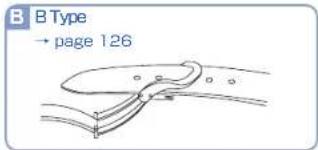
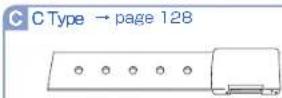
There are 3 type of special clasps as described below; If the clasp of the watch you purchased is one of them, please refer to the indications.
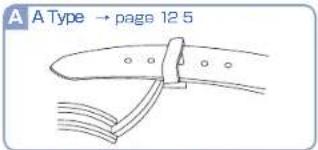
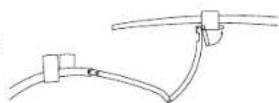
A A Type
1 Lift up the clasp to release the buckle.
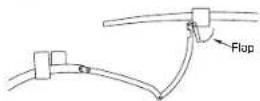
2 Open the flap.
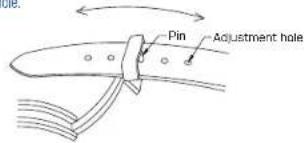
3 Take the pin cut of the adjustment hole, adjust the size of the strap by sliding it back and forth, and then put the pin back into the appropriate adjustment hole.
4 Close the flap.
124 125
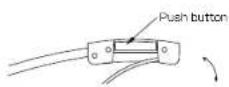
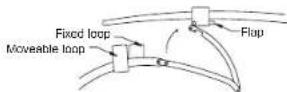
B B Type
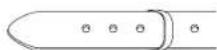
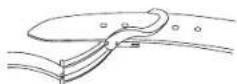
• How to wear or take off the watch
1 Press the button on both sides of the buckle; pull the buckle up.
The band will automatically come out of the loop.
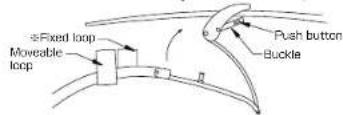
2 Place the tip of the band into the moveable loop and fixed loop, and fasten the clasp by pressing the frame of the buckle.
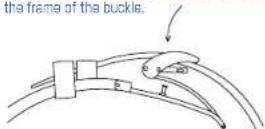
* No Fixed loop with Metal Bracelets.
• How to adjust the length of the leather band
1 With pressing buttons on both sides of the buckle, pull the leather band out of the moveable loop and fixed loop. Than open the clasp.
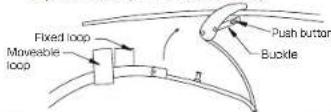
2 Press the push buttons again to unfasten the buckle.
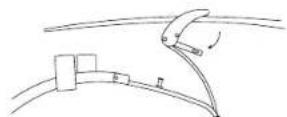
3 Pull the pin out of a adjustment hole of the band. Slide the band to adjust its length and find an appropriate hole. Place the pin into the hole.
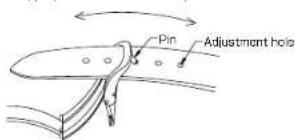
4 Fasten the buckle with pressing the push buttons.
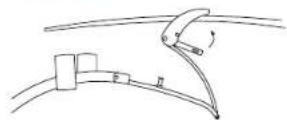
126 127

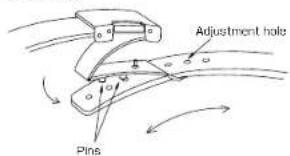
C Type
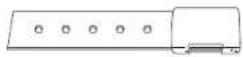
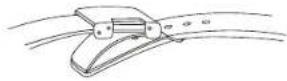
1 Press the button on the buckle, and lift to open the clasp.
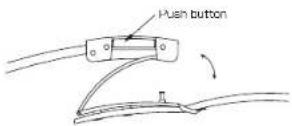
2 To adjust: Pull the pins out of the adjustment holes on the band. Slide the band to the appropriate length. Push the pins into the new holes on the band.

Lumibrite
If your watch has Lumibrite
Lumicrite is a luminous paint that is completely harmless to human beings and natural environment, containing no noxious materials such as radioactive substance.
Lumbrite is a newly-developed luminous paint that absorbs the light energy of the sunlight and lighting apparatus in a short time and stores it to emit light in the dark.
For example, if exposed to a light of more than 500 lux for approximately 10 minutes, Lumbrite can emit light for 3 to 5 hours. Please note, however, that, as Lumbrite emits the light it stores, the luminance level of the light decreases gradually over time. The duration of the emitted light may also differ slightly according on such factors as the brightness of the place where the watch is exposed to light and the distance from the light source to the watch.
| Condition | Illumination |
| Sunlight | Fine weather | 100,000 lux |
| Cloudy weather | 10,000 lux |
| Indoor (Window-side during daytime) | Fine weather | more than 3,000 lux |
| Cloudy weather | 1,000 to 3,000 lux |
| Rainy weather | less than 1,000 lux |
| Lighting apparatus(40-watt daylight fluorescent light) | Distance to the watch: 1 m | 1,000 lux |
| Distance to the watch: 3 m | 500 lx (average room unitance) |
| Distance to the watch: 4 m | 250 lux |
Power source
• Overcharge prevention function
When the secondary battery is fully charged, the overcharge prevention function is automatically activated to avoid further charging. There is no need to worry about damage caused by overcharging no matter how much the secondary battery is charged in excess of the "time required for fully charging the watch".
* Refer to "Standard charging time" on page 111 to check the time required for fully charging the watch.
NOTICE
(Notes on charging the watch)
- When charging the watch, do not place the watch in close proximity to an intense light source such as lighting equipment for photography, spotlights or incandescent lights, as the watch may be excessively heated resulting in damage to its internal parts.
- When charging the watch by exposure to direct sunlight, avoid places that easily reach high temperatures, such as a car dashboard.
· Always keep the watch temperature under 60°C
• Power source
The battery used in this watch is a special secondary battery, which is different from ordinary batteries. Unlike an ordinary silver oxide battery, the secondary battery does not require periodic replacement. However, if the secondary battery is charged or discharged repeatedly over an extended period of time, its life may shorten. (This condition changes depending upon usage condition and storage environment.) The secondary battery is an environmentally friendly, clean energy storage device.
NOTICE
- When replacing the secondary battery, make sure that the exclusive secondary battery for this watch is used. Installation of an ordinary silver oxide battery can generate heat that can cause bursting or ignition.
- Even when a silver oxide battery is substituted, electrical continuity cannot be obtained.
Guarantee
Within one year from the date of purchase, we guarantee free repair/adjustment service against any defects according to the following guarantee regulations, provided that the watch was properly used as directed in this instruction booklet.
• Guarantee coverage
The watch body (movement-case) and metallic band.
- Exceptions from guarantee
In following cases, repair/adjustment services will be at cost even within the guarantee period or under guarantee coverage.
- Change of leather/urethane/cloth band
- Troubles or damage caused by accidents or improper usage
• Scratches or grime caused by use
- Problems and damage caused by acts of god, natural disasters including fire, floods or earthquakes.
- The certificate of guarantee is valid only if all the necessary items are properly filled in. We will not honor an altered or tampered certificate of guarantee for free repair services.
Free repair services are guaranteed only under the period and conditions specified in the certificate of guarantee. It does not affect specific legal rights of a consumer. The certificate of guarantee is valid only in Japan.
• Procedure to claim free repair services
- For any defects under guarantee, submit the watch together with the attached certificate of guarantee to the retailer from whom the watch was purchased.
- If repair services cannot be provided by the retailer from whom the watch was purchased, contact SEIKO CUSTOMER SERVICE CENTER. In this case, the attached certificate of guarantee is also needed.
- Others
- The movements, case, dial, hands, glass, crown, button and bracelet, or parts thereof may be repaired with substitutes whose outward appearance may differ from the originals. If necessary, movements will be replaced.
- For length adjustment service of a metallic band, ask the retailer from whom the watch was purchased or SEIKO CUSTOMER SERVICE CENTER. Other retailers may undertake the service on a chargeable basis.
■ After-sale service
- Replacement parts
- SEIKO makes it a policy to typically keep a stock of replacement parts for this watch for 7 years. Replacement parts are those which are essential to maintaining the functional integrity of the watch. Please keep in mind that if original parts are not available, they may be replaced with substitutes whose outward appearance may differ from the originals.
- Notes on overhaul
Periodic inspection and adjustment by disassembly and cleaning (overhaul) is recommended approximately once every 3 to 4 years in order to maintain optimal performance of the watch for a long time. According to use conditions, the oil retaining condition of your watch mechanical parts may deteriorate, abrasion of the parts may occur due to contamination of oil, which may ultimately lead the watch itself to stop. As the parts such as gasket may deteriorate, water-resistant performance may be impaired due to intrusion of perspiration and moisture. Please contact the retailer from whom the watch was purchased for inspection and adjustment by disassembly and cleaning (overhaul). For replacement of parts, please specify "SEIKO GENUINE PARTS." When asking for inspection and adjustment by disassembly and cleaning (overhaul), make sure that the gasket and push pin are also replaced with new ones.
• Notes on guarantee and repair
- Contact the retailer the watch was purchased from or SEIKO CUSTOMER SERVICE CENTER for repair or overhaul.
- Within the guarantee period, present the certificate of guarantee to receive repair services.
- Guarantee coverage is provided in the certificate of guarantee. Read carefully and retain it.
How to conduct manual reception (Receiving a radio signal manually)
① Placing the watch
When receiving a radio signal, place the watch where it can easily receive a signal.
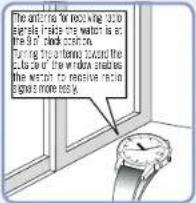
• To enable the watch to easily receive a radio signal page 99
When the second hand has moved to the zero second position, the watch will start to receive a radio signal
When the time difference is set for a region other than radio signal reception range, a radio signal cannot be received manually (The second hand does not move to the zero second position). Check the time difference set currently.
→ How to set the time zone pages 106-107
③ Do not move the watch while receiving a radio signal.
The reception of a radio signal cannot be conducted unless the watch is still.
It takes 12 minutes at the longest according to the receiving state of a radio signal.
After about one minute from the start of receiving a radio signal, the second hand will start to indicate the receiving level.
Display during reception
Receiving Level is High: The second hand points to H (High, the 50 second position)

Receiving Level is Low: The second hand points to L (Low, the 40 second position)

Reception level is updated by moving the second hand every one minute. ※ The minute hand moves by one minute along with the movement of the second hand.
4 The watch displays the time when receiving a radio signal and after receiving a signal.
▶ Check whether the receiving a radio signal has been successful. → page 102
During the movement of the date, neither the buttons nor the crown can be operated.
Not receivable
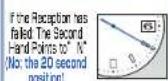
After five seconds, the watch will resume displaying the time.
※ It is difficult to receive the signals in some receiving conditions. → Environments in which it is difficult to receive a radio signal indication on page 103
※ This watch is unable to receive a radio signal outside a reception range → Radio signal reception range on pages 96-98
※ When the watch is unable to receive radio signals → If the Reception has failed: The second hand points to N on page 103.
Conditions in which the watch may be unable to receive radio signals
How to manually set the time
When the watch is used continuously in conditions in which the watch may be unable to receive a radio signal, it can be manually adjusted.
※ When the watch is unable to receive a radio sign, it can move depending on normal quartz movement (accuracy of loss / gain: ±15 seconds per month).
- When adjusting the time, the date will be accordingly adjusted.
- When the watch receives a radio signal after manual adjustment of the time, it displays the received time.
- When using the watch again in regions in which the watch is able to receive a radio signal, it is recommended to perform "Manual reception."
→ How to conduct manual reception on pages 136-137
1 Pulling the crown to the second click
The Second hand moves to point to the 'Zero second' position and the watch enters the manual time setting mode.
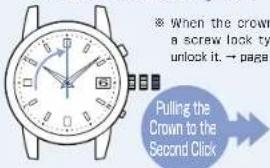
When the watch enters the manual time setting mode, the reception results will be indicated as "N," since the reception results data will be lost.
One minute Advance Press Button A once and then release it
Continuous Advance When Button A is kept pressed for two seconds or more, the hand will start to move. Press Button A again to stop.
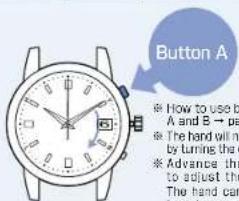
The point in which the date changes at 0:00 AM (12:00 PM)
Adjust the time taking into consideration that it is set during the AM and PM.
③ Push the crown back In.
▶ Operation has been completed.
The watch resumes its normal movement.
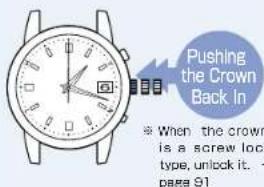
The watch will resume its normal movement after pushing the crown back in. Push the crown back in according to the time signal.
■ How to manually set the date
When the date is not changed due to an environment in which the watch is unable to receive a radio signal (when changing from months with 30 days to months with 31 days or less), adjust the date manually.
- The date can be adjusted independently regardless of the time.
- When the watch receives a radio signal after conducting manual adjustment of the date, it displays the received date.
- When using the watch again in regions in which the watch is able to receive the radio signals, it is recommended to perform "Manual Reception."
→ How to conduct manual reception on pages 136-137
When the date is not correct even if the watch successfully receives a radio signal, the preliminary position of the date may be misaligned. Setting the preliminary position for the date → page 144
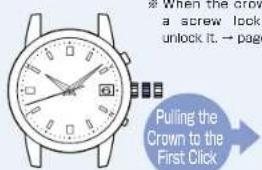
① Pulling the crown to the first click
The watch enters the manual date setting mode.
(The watch keeps moving.)
One day Advance Press Button A once and then release it
Continuous Advance When Button A is kept pressed for two seconds or longer, the data will start to move. Press Button A again to stop
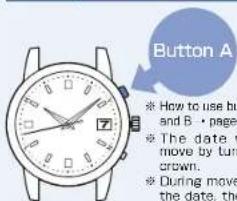
- Adjust the data by advancing the date. The date cannot be reversely moved.
③ Push the crown back in.
▶ Operation has been completed.
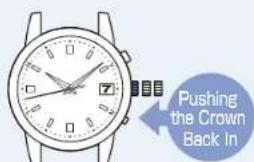
※ When the crown is a screw lock type, lock it. → page 91
Preliminary position
When the watch is unable to display the precise time or date even if it successfully receives a radio signal with the correct time zone setting, the preliminary position may be misaligned.
The radio-controlled watch can automatically adjust the time, however if the preliminary hand position is an improper one, the watch will be unable to display the precise time even when receiving a radio signal. When comparing the state of "Misaligned Preliminary Hand Position" to that of a weight scale, it is like "a scale which is unable to display the correct weight because its needle is not set to the zero position before weighing."
- When it is necessary to adjust the preliminary position
When displaying a wrong date after receiving a radio signal correctly, or when performing system reset, the preliminary position of the date must be adjusted.
→ How to set the preliminary position on page 144
- Function to automatically align the preliminary position of the hand (Automatic hand Position adjustment function)
The hand has an "A" operator's hand position adjustment function, which automatically contracts a wrong preliminary position.
Automatic hand position alignment function activates once a minute for the second and saw at 12:00 two for the AW and PM for the minute and hour hands.
* The preliminary position of the hour and minute hands can be adjusted manually.
Since the preliminary position of the date is not automatically adjusted, it must be adjusted manually.
* When the watch is not displaying the precise time and date even after successfully receiving a radio signal due to factors other than above mentioned ones → AC Trouble Misalignment of the time and the hands on page 152. Misalignment of the date on page 154.
(Misalignment of the time and date)
- In the case of having a strong impact: Misalignment of the time and date may occur when dropping or hitting the watch
- In the case of a magnetic influence: Misalignment of the time and date may occur when bringing the watch close to an object which generates magnetism.
Things around you which generate magnetism
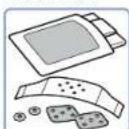
· Magnetic Clip
-Accessories using a magnet
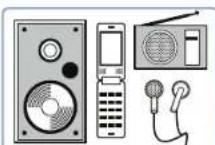
- Magnetic therapy devices (a heating pad, bedding, a lumbago band, etc.)
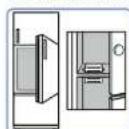
· Magnet of doors for a refrigerator or furniture
- Estators used for such as audiovisual apparatus, radio, earphones, and cellular stents.
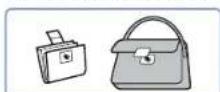
Clasps for a bag or wallet
How to set the preliminary position
Setting the preliminary position of the date
The preliminary position of the date is the "1st." When the preliminary position of the date is incorrect, the correct date cannot be displayed even if the watch receives a radio signal. Loss or gain of the date can be adjusted by setting the preliminary position of the date as the "1st."
In the case that the numerical number of the date does not locate at the center of the window, it also can be corrected by the same procedures as mentioned above.
When setting the preliminary position of the hour and minute to hands right after setting the preliminary position of the date, after completing procedure 2 of preliminary position setting of the date, go to procedure 2 on page 147
1 Press and hold Button A and Button B simultaneously until the second hand stops at the 13-second position (for four seconds).
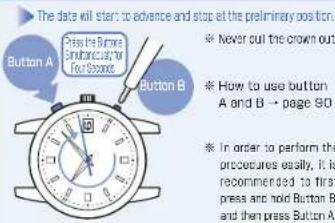
While dates are advancing, no button operation can be made. After the date stops, when the watch has no operation and no movement of the hands for ten seconds or longer, it automatically displays the time again. When it is in the middle of operation, re-stent the operation from procedure "1."
2 Pressing Button B to set the date to the "1."
Set the preliminary position to the precise date.
Adjust the date so that the position of "1" will locate at the center of the window.
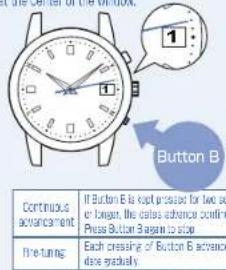
※ The date can only be advanced. It cannot be turned back.
③ Automatic mode termination
When the date movement stops, the preliminary position adjustment mode will be terminated in ten seconds.
Confirm whether the date is correct after the watch resumes displaying time. In the case that the date is not correct, adjust the date.
Adjusting the data by receiving a radio signal.
How to conduct manual reception → page 136
If the watch is unable to receive radio signals
How to manually set the date → page 140
Setting the preliminary positions of the hour and minute hands manually
No button operation is needed if setting the hands to the preliminary positions automatically.
→ Automatic hand position alignment function on page 142
Conduct the follow procedures when setting the hour and minute hands manually.
When setting the preliminary position of the hour and minute hands right after setting the preliminary position of the date, after completing procedure "2" of preliminary position setting of the date on page 145, go to procedure "2."
1 Press and hold Button A and Button B simultaneously until the second hand stops at the 13-second position (for four seconds).
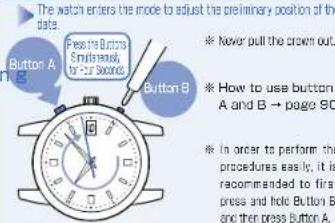
While dates are advancing, no button operation can be made. After the data stops, when the watch has no operation and no movement of the hands for ten seconds or longer, it automatically displays the time again. When it is in the middle of operation, re-estimate the operation from procedure 1."
② After the date stops, press and hold Button A until the second hand stops at the Q-second position (for two seconds).
Enter the mode to adjust the preliminary positions of the hour and minute hands.
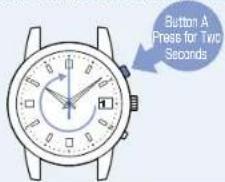
- While dates are advancing, no button operation can be made.
- After the date stops, when the watch has no operation and no movement of the hands for ten seconds or longer, it automatically displays the time again.
- When it is in the middle of operation, re-actem not the operator from procedure 1."
③ Press Button B Once.
The preliminary positions of the hour and minute hands are automatically adjusted. The hour and minute hands start to move, and then all hands will stop at the D-second position.
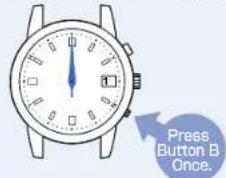
After 10 seconds when the all hands will stop at the 0-second position, the watch will return to display the time.
Troubleshooting
| Troubles Possible causes | Solutions | Reference page |
| Movement of the watch hands | The second hand moves at two-second intervals. | The energy depletion forewarming function is activated. (page 112)If this function is activated even though you wear the watch everyday, the watch may be unable to receive sufficient light because it is concealed under a long sleeve shirt, etc. | Sufficiently charge the watch until it starts moving at one-second intervals.Make sure that the watch is not concealed under a sleeve while you are wearing the watch. When taking the watch off, place the watch in a location as bright as possible. | page 110 |
| The second hand moves at five-second intervals. |
| The stopped second hand pointing to the 15-second position started moving. | The Power Save has been activated to limit energy consumption. (page 113)When the watch is used or stored continually under conditions where it cannot receive sufficient light. the cover save function is automatically activated in order to reduce unnecessary energy consumption. | Wait until the watch returns to the current time display.Use the watch as it is (this is not a malfunction). | - |
| The stopped second hand pointing to the 45-second position started moving. | The Power Save has been activated to limit energy consumption. (page 113)When the watch is used or stored continually under conditions where it cannot receive sufficient light. the cover save function is automatically activated in order to reduce unnecessary energy consumption. | 1 Sufficiently charge the watch until it starts moving at one-second intervals.2 Set the time, date and day. | page 110page 95 |
| The watch hands were fast-forwarded even though no button had been pressed, and then the watch resumed regular movement. | The Power Save function has been activated. (page 113)The automatic hand alignment function has been activated. (page 142)When the hand positions deviate to display incorrect time as a result of influence of various external sources, the watch automatically corrects the hand alignment itself. | Use the watch as it is (this is not a malfunction). | - |
| At trouble | Possible causes | Solution | Reference page |
| Reception of a radio signal | When the watch is unable to receive a radio signalThe reception results have failed and the second hand points to N (the watch does not receive a radio signal). | The watch was moved while it was receiving a radio signal. | Do not move the watch while it is receiving a radio signal.The reception of the radio signals cannot be conducted unless the watch is still. | page 99 |
| The watch was left where the radio signal was weak or where it was unable to receive a radio signal (page 100). | Place the watch where it is able to easily receive a radio signal. | page 99 |
| Transmitting stations may have stopped transmitting radio signals for some reason (Transmission stop). | Check the website of each transmitting station for further information concerning a transmission stop. Attempt to receive a radio signal again after a while. | page 101 |
| The watch is set to a time zone other than a radio signal reception range (a wrong transmitting station is selected). | 1 Check the time zone that the watch is currently set for (the transmitting station that is currently selected), and select the right time zone.2 When the watch is not displaying the precise time, receive a radio signal again if necessary. | page 106page 95 |
| Charging the solar battery | The stopped watch was exposed to an adequate light for longer than "the time required to fully change the watch," however, it does not resume its normal one-second interval movements. | The light is too weak or the manner of lighting the watch has been altered while the watch is being charged. | Charge the watch in an environment where the watch can be exposed to an adequate intensity of light in a stable condition. | page 110 |
| The Built-in IC of the watch has fallen into an unstable condition. | Refer to the "In Case of an Abnormal Movement" section and perform the operations as instructed. | page 156 |
| At Trouble | Possible causes | Solution | Reference pages |
| Misalignment of the time and hand positions | The watch temporarily gains or loses time. | The watch fails to receive a radio signal correctly as a result of external influence (incorrect reception). | 1 Place the watch where it is able to receive a radio signal more easily.2 Conduct manual reception if necessary. | page 99page 136 |
| The watch has been left in an extremely high or low temperature place for a long time. | 1 When the watch returns to a normal temperature, it will display the precise time as before.2 If the watch still gains or loses the time, conduct manual reception if necessary.3 The watch cannot ensure that the time is not after conducting the box mentioned process, consult the retailer for whom the watch was purchased. | —page 136— |
| The watch displays an incorrect time hour unit even though it displays the precise time of minutes and seconds | The watch may be set to a time in a different time zone from the region where the watch is currently used. | Check the time zone that the watch is currently set for, and select the right time zone. | page 106 |
| The reception results are successful, but the precise time is not displayed. | The hand positions were misaligned as a result of external influence. The hands are out of the preliminary position as a result of external influence. → Preliminary position on page 142 | 1 No crown or button operation is needed, since the automatic hand position adjustment function will be activated to align the hand positions. Automatic Hand Position Adjustment Function activates once a minute for the second hand and at 12:00 both for the AM and PM for the minute and hour hands.If you are in a hurry, the preliminary position of the hour and minute hands can be adjusted manually.2 If the misalignment of the hand is not corrected, refer to the 'In case of an abnormal movement' section and perform the operations as instructed.3 If the misalignment of the hand is not corrected even after performing the operations as instructed in the 3, consult the retailer from whom the watch was purchased. | page 142page 156— |
| The second hand position is not correctly aligned in "the reception results display" or "the reception level display." | The second hand is out of the preliminary position as a result of external influence.→ Preliminary position on page 142 |
| At Trouble | Possible causes | Solution | Reference pages |
| Misalignment of the date | The reception result display confirms successful reception, and the correct time is displayed, but the wrong date is displayed. | The date is out of preliminary position.This happens when the date is out of preliminary position as a result of influence of various external sources or after the built-in IC is reset. | Check if the date is set to the correct preliminary position. If not, correct the preliminary position for date. | page 144 |
| Operation | The crown or buttons cannot be operated. | The stored electric power is running short. | Sufficiently charge the watch until it starts moving at one-second intervals. | page110 |
| Date and day are moving right after a setting is carried out by the crown or button operation. | Wait for a while without doing anything. | - |
| You get lost in the middle of the operation. | ---- | Leave the watch as it is for a while. The watch resumes regular movement. If the crown is pulled out, push it back in. After a while, carry out the setting procedures again from the beginning. | - |
| Others | Blur on the dial glass persists. | Small amount of water has got inside the watch due to deterioration of the gasket, etc. | Contact the retailer from whom the watch was purchased. | - |
In case of an abnormal movement
In the case that the watch moves abnormally or that the watch does not move at one-second intervals even after fully charging the battery, perform the procedures from ① - ⑧ to re-establish normal function.
How to reset the Built-in IC, (① - ③)
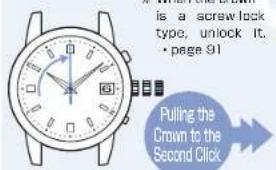
1 When pulling the crown to the second click, the second hand stops at the zero second position.
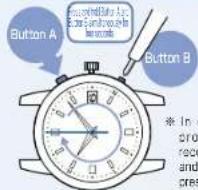
2 Press and hold Button A and Button B simultaneously for four seconds, and then release them.
In five seconds after releasing the buttons, the second hand makes a full rotation and stops at the zero second position. Then the hands of the hour and minute will start to move toward the Zero second position.
③ When all the hands return to the zero second position, push the crown back in.
The second hand will start to move from 0:0:0 AM
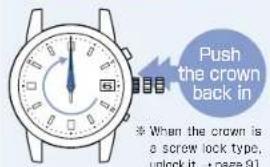
※ If the second hand does not start to move from "0:0:0 AM," the resetting of the Built-in IC may not activate. In such a case, re-attempt the operation from the procedure "2."
Adjusting the preliminary position of the date (4\~5)
4 Press and hold Button A and Button B simultaneously until the second hand stops at the 13-second position (for four seconds).
The watch enters the mode to adjust the preliminary position of the date.
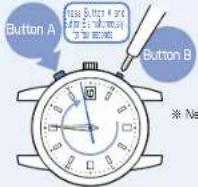
- When the watch has no operation for ten seconds or longer, the mode automatically terminates.
- When it is in the middle of operation, re-attempt the operation from procedure "4."
Go on to the next page
⑤ Pressing Button B to Set the Preliminary Position to the "1."
Adjust the date so that the position of "1" will locate at the center of the window.
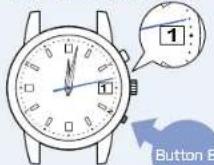
The preliminary position adjusting mode terminates 10 seconds after the procedure "5" has been completed.
Continuous enhancement. Each pressing of Button A advances the side of one day. If Button A is kept pressed for the dances advance continuous. Press Button A again to stop off. Continuous action movement: IF Button B is hour pressed by two seconds or longer the dances advance continuous. Press Button B again to stop off.
Setting the time zone (6\~7)
6 Press and hold Button B until the second hand moves (for four seconds) to the 0-second position.
The watch enters the time zone adjustment mode.
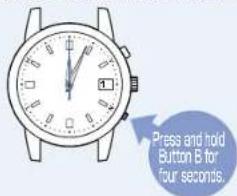
When a no movement state of the second hand is kept for ten seconds or more, the watch automatically switches to the time display state.
When it is in the middle of operation, re-attempt the operation from procedure '6.'
Go on to the next page
Set the time zone of the area where the watch is used.
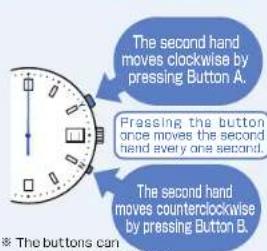
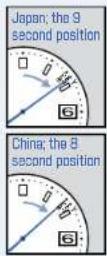
Other areas: List of major time zones around the world → page 108
The time zone adjusting mode terminates 10 seconds after the procedure "7" has been completed.
8 Set the Time
Set the time by receiving a radio signal.
How to conduct manual reception →page136
If the watch is unable to receive radio signals
How to manually set the time → page 138
The operation has been completed when setting the time.
Specifications
- Frequency of crystal oscillator ···· 32.768 Hz (Hz = Hertz ... Cycles per second)
- Loss/gain (monthly rate)....Loss / gain ± 15 seconds on a monthly rate (Except the case when the watch is used without an automatic time setting by receiving a radio signal and when it is worn on the wrist within a normal temperature range between 5°C and 35°C).
- Operational temperature range .... Between -10°C \~ +60°C
- Driving systems...... Step motor (Hour and minute hands, second hand, and the date)
- Power source ....Secondary battery, 1 piece
- Duration of operation .. Approximately six months (Fully charged, and the Power Save is not activated).
* If the Power Save is activated after it is fully charged, the watch continues to run for approximately one year and a half at maximum.
- Time setting by receiving the JJY-LF radio signal … Automatic reception (at 2:00 AM 3:00 AM and 4:00 AM)
- Reception attempts depend on the radio signal receiving conditions.
※ After having received a radio signal, the watch will start to move depending on the quartz movement until the next reception.
※ Manual reception is also possible
- IC (Integrated Circuit) … Oscillator, frequency divider and driving circuit C-MOS-IC, 3 pieces
The specifications are subject to change without prior notice for product improvement.
通話料無料 0120-612-911
お客様相談室
〒100-0005 東京都千代田区丸の内 3-1-1 国際ビル
〒550-0013 大阪市西区新町 1-4-24 大阪四ツ橋新町ビルディング
セイコーウオッチ株式会社
https://www.seikowatches.com/