
DM-450 - Dictaphone OLYMPUS - Notice d'utilisation et mode d'emploi gratuit
Retrouvez gratuitement la notice de l'appareil DM-450 OLYMPUS au format PDF.


| Type de produit | Dictaphone numérique |
| Marque | OLYMPUS |
| Modèle | DM-450 |
| Mémoire interne | 2 Go |
| Support de mémoire externe | Carte microSD/microSDHC (512 Mo à 16 Go) |
| Formats d'enregistrement | MP3, WMA |
| Formats de lecture | WAV, MP3, WMA |
| Microphone | Stéréo intégré |
| Haut-parleur | Dynamique rond 23 mm intégré |
| Dimensions (sans protubérances) | 110 x 38,9 x 16 mm |
| Poids (avec piles) | 84 g |
| Alimentation | 2 piles AAA (LR03) ou accumulateurs Ni-MH (BR401) |
| Autonomie enregistrement (piles alcalines) | Jusqu'à 51 h (mode LP WMA) |
| Autonomie lecture haut-parleur (piles alcalines) | Jusqu'à 19 h |
| Autonomie lecture écouteurs (piles alcalines) | Jusqu'à 58 h |
| Connectique | Prise micro 3,5 mm, prise écouteurs 3,5 mm, prise télécommande, USB 2.0 |
| Fonctions d'enregistrement | VCVA, filtre coupe-bas, zoom micro DVM, sélection de scène, minuterie |
| Fonctions de lecture | Réduction de bruit, EUPHONY, filtre vocal, contrôle de vitesse, répétition segment, marqueurs |
| Logiciel fourni | Olympus Sonority (Windows/Mac) |
| Sécurité | Verrouillage HOLD, verrouillage de fichier, témoin LED |
| Charge | Via USB ou adaptateur secteur USB (optionnel A514) |
FOIRE AUX QUESTIONS - DM-450 OLYMPUS
Questions des utilisateurs sur DM-450 OLYMPUS
0 question sur cet appareil. Repondez a celles que vous connaissez ou posez la votre.
Poser une nouvelle question sur cet appareil
Téléchargez la notice de votre Dictaphone au format PDF gratuitement ! Retrouvez votre notice DM-450 - OLYMPUS et reprennez votre appareil électronique en main. Sur cette page sont publiés tous les documents nécessaires à l'utilisation de votre appareil DM-450 de la marque OLYMPUS.
MODE D'EMPLOI DM-450 OLYMPUS
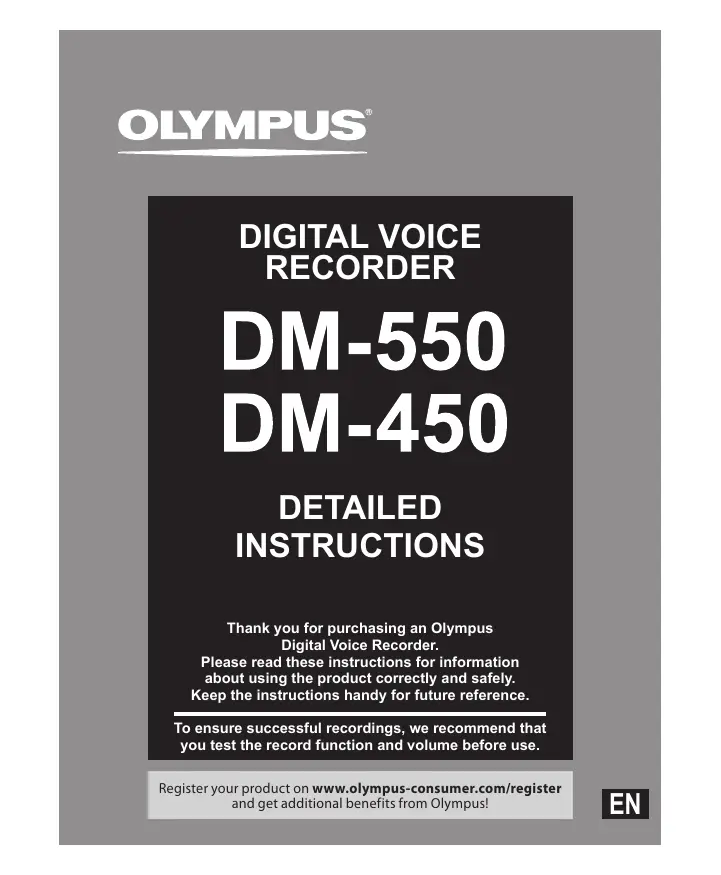
DIGITAL VOICE REORDER
DM-550 DM-450
DETAILED INSTRUCTIONS
Thank you for purchasing an Olympus Digital Voice Recorder. Please read these instructions for information about using the product correctly and safely. Keep the instructions handy for future reference.
To ensure successful recordings, we recommend that you test the record function and volume before use.
Introduction
- The contents of this document may be changed in the future without advanced notice. Contact our Customer Support Center for the latest information relating to product names and model numbers.
- The utmost care has been taken to ensure the integrity of the contents of this document. In the unlikely event that a questionable item, error, or omission is found, please contact our Customer Support Center.
- Any liability for passive damages or damage of any kind occurred due to data loss incurred by a defect of the product, repair performed by the third party other than Olympus or an Olympus authorized service station, or any other reason is excluded.
Trademarks and registered trademarks
- IBM and PC/AT are the trademarks or registered trademarks of International Business Machines Corporation.
- Microsoft, Windows and Windows Media are registered trademarks of Microsoft Corporation.
- Macintosh and iTunes are the trademarks of Apple Inc.
- microSD and microSDHC are the trademarks of SD Card Association.
- MPEG Layer-3 audio coding technology licensed from Fraunhofer IIS and Thomson.
- EUPHONY MOBILE™ is a trademark of DiMAGIC Corporation.
- DVM™ is a trademark of DiMAGIC Corporation.
- The product was developed based on noise-canceling technology under license from NEC Corporation.
Other product and brand names mentioned herein may be the trademarks or registered trademarks of their respective owners.




EUPHONY
MOBILE
| Table of Contents | P.4 |
| Safe and Proper Usage | P.6 |
| Getting Started | P.8 |
| About Recording | P.28 |
| About Playback | P.33 |
| Menu Setting | P.44 |
| Using the Recorder on Your PC | P.73 |
| Managing Files on Your PC | P.85 |
| Importing Content for Listening on the Recorder | P.94 |
| Other Information | P.120 |
Introduction
INDEX 3
Safe and proper usage.. 6
General Precautions 6
Batteries. 6
1 Getting Started
Main features.. 8
Identification of parts. 10
Display (LCD panel) [Recorder] Mode Display Screen.11
Display (LCD panel) [Music] [Podcast] [Audible] Mode Display Screen. 12
Power supply 14
Inserting batteries 14
Charging by connecting to a computer via USB 15
Connect to the USB connecting AC adapter (optional) to charge. 16
Turning on/off the power. 18
HOLD 19
Setting time and date [Time & Date] 20
Changing the time and date. 21
Inserting and Ejecting a microSD card..... 22
Inserting a microSD card 22
Ejecting a microSD card. 23
Notes on the folders 24
About the folders for voice recordings.24
About the folder for music playback 25
About the folder for Podcast Contents. 26
About the folder for Audible Contents. 26
Selecting the folders and files 27
2 About Recording
Recording 28
Recommended settings by recording condition 30
Recording from external microphone or other devices. 31
3 About Playback
Playback 33
Bookmark mode 36
Setting an index mark or a temp mark 38
How to begin segment repeat playback.....40
Erasing. 42
Partially erase a file (For DM-550) 43
4 Menu Setting
Menu setting method 44
File Menu 46
Rec Menu 47
Play Menu 50
LCD/Sound Menu 53
Device Menu 54
Rearranging files [Replace] 56
Moving/Copying Files [File Move/Copy] (For DM-550) 57
Splitting Files [File Divide] (For DM-550)....59
Timer Recording [Timer Rec] 60
Setting the Recording Scene [Rec Scene].....62
AlarmPlaybackFunction[Alarm] 64
Setting the Playback scene [Play Scene].....66
Guidance [Voice Guide] 68
Changing the USB Class [USB Settings] 69
Formatting the recorder [Format] 71
5 Using the Recorder on Your PC
Saving Files in Your PC 73
Operating environment. 74
Functions Available in the Olympus Sonority 75
Installing Software 76
Uninstalling Software 78
Using Online Help 79
Connecting to Your PC. 80
Connecting to your PC 80
Disconnecting from your PC. 81
Running Olympus Sonority 82
Window Names (Olympus Sonority) 83
6 Managing Files on Your PC
Download Voice Files from the Recorder ... 85
Play a Voice File 87
Using the Waveform Editing Function..... 88
Using the One-touch effect Function..... 88
Upload Voice Files to the Recorder 89
Copying Voice Guide Data 90
USB Microphone/USB Speaker. 91
Upgrade Function. 92
Functions Available in the Olympus Sonority Plus 93
Functions Available with the Music Editing Plug-in 93
7 Importing Content for Listening on the Recorder
Importing Content for Listening on the. Recorder.. 94
Using Windows Media Player 95
Window names 96
Copying music from CD 97
Transferring music file to the recorder. 98
Copying voice file to the CD. 101
Using iTunes. 103
Window names 103
Copying music from CD 104
Transferring music file to the recorder.....105
Copying voice file to the CD. 106
Importing Podcast Content. 107
Register a Podcast program 107
Update a program 108
Download the Content 109
Transfer Content to the Recorder 110
Program Guide Functions 111
To register programs. 111
Loading Audible Content 112
Installing AudibleManager 112
Adding Device to AudibleManager 113
Purchasing Audible Content. 113
Transferring Audible Content 114
Enjoy Audible Content with the Recorder 115
Audible Mode 115
Playback Position and Section 116
Operating Recorder in Audible Mode.....117
Using as external memory of the PC.....119
8 Other Information
Alarm message list 120
Troubleshooting. 121
Accessories (optional) 123
Specifications 124
Technical assistance and support. 127
Before using your new recorder, read this manual carefully to ensure that you know how to operate it safely and correctly. Keep this manual in an easily accessible location for future reference.
- The warning symbols indicate important safety related information. To protect yourself and others from personal injury or damage to property, it is essential that you always read the warnings and information provided.
General Precautions
- Do not leave the recorder in hot, humid locations such as inside a closed automobile under direct sunlight or on the beach in the summer.
- Do not store the recorder in places exposed to excessive moisture or dust.
- Do not use organic solvents such as alcohol and lacquer thinner to clean the unit.
- Do not place the recorder on top of or near electric appliances such as TVs or refrigerators.
- Avoid recording or playing back near cellular phones or other wireless equipment, as they may cause interference and noise. If you experience noise, move to another place, or move the recorder further away from such equipment.
- Avoid sand or dirt. These can cause irreparable damage.
- Avoid strong vibrations or shocks.
-
Do not disassemble, repair or modify the unit yourself.
-
Do not operate the unit while operating a vehicle (such as a bicycle, motorcycle, or go-cart).
- Keep the unit out of the reach of children.
It is recommended to back up and save important content to other media such as a computer hard disk.
Any liability for passive damages or damage of any kind occurred due to data loss incurred by a defect of the product, repair performed by the third party other than Olympus or an Olympus authorized service station, or any other reasons is excluded from the Olympus's liability.
Batteries

Danger:
- Batteries should never be exposed to flame, heated, short-circuited or disassembled.
- Never store batteries where they will be exposed to direct sunlight, or subjected to high temperatures in a hot vehicle, near a heat source, etc.
Warning:
- Do not solder lead wires or terminals directly onto a battery or modify it.
-
Do not connect the and terminals together. This may cause fire, overheating or electric shock.
-
When carrying or storing the batteries, be sure to put it in the provided case to protect its terminals. Do not carry or store the batteries with any metal objects (such as key rings). If this warning is not followed, fire, overheating or electric shock may occur.
- Do not connect the batteries directly to a power outlet or a cigarette lighter of an automobile.
- Do not insert the batteries with their and terminals reversed.
If any liquid from a battery gets into your eyes, promptly wash it off with clean water and consult your doctor at once. - Do not attempt to recharge alkaline, lithium or any other non-rechargeable batteries.
- Never use any batteries with a torn or cracked outer cover.
- Keep batteries out of the reach of children.
- If you notice anything unusual when using this product such as abnormal noise, heat, smoke, or a burning odor:
① remove the batteries immediately while being careful not to burn yourself, and;
② call your dealer or local Olympus representative for service.
- Do not expose the batteries to water. Do not allow water to contact the terminals.
-
Do not remove or damage the batteries insulating sheet.
-
Do not use the batteries if you find something wrong with them such as leakage, color change or deformity.
- Unplug the charger if the charging is still incomplete after the specified time it should take.
- Should any batteries liquid get on skin or clothing, promptly wash it off with clean water.
- Keep batteries away from fire.
Caution:
- Do not mix and use a charged battery with a discharged battery.
- Do not use dry cell batteries, batteries that have different capacities or are of different types and brands.
- Charge the two batteries simultaneously to use them.
- Do not subject batteries to strong shocks.
- When using rechargeable batteries that have not been used for a while, be sure to recharge them before use.
- Rechargeable batteries have limited lifetime. When the operating time becomes shorter even if the rechargeable battery is fully charged under the specified condition, replace it with a new one.
Main features
Supports the linear PCM format, which is capable of recording sound quality equivalent to or surpassing CD-level (For DM-550).
Capable of realistically recording various different sound sources. High resolution recording at a high sampling frequency equivalent or superior to that of a music CD (Sampling frequency 44.1 kHz, Bit count 16bit) is possible (P.47).
Supports a wide range of recording formats. Can handle the MP3 format (MPEG-1 Audio Layer 3), and the Windows Media Audio (WMA) format.
This device can save files in a highly compressed manner, thereby allowing for extended recording times (P.47). In addition, when connected to an external device, the recorder can encode incoming analog audio signals without a PC (P.32).
Supports high capacity recording media. Besides the 4GB (DM-550) or 2GB (DM-450) built-in memory, you can also record onto a commercially-available microSD card (E P. 22).
Check the OLYMPUS website regarding microSD cards which are confirmed operation with this recorder.
- You can playback WAV, WMA, and MP3 format files transferred from a computer in addition to files recorded by the device itself.
You can be enjoyed as a music player at any time.
It has a built-in Variable Control Voice Actuator (VCVA) function (P.48).
The Low Cut Filter minimizes air conditioner noise and other similar noises while recording (e P.48).
The recording level can be adjusted automatically or manually (For DM-550) (P. 47).
A Noise Cancel function (P. 50) and a Voice Filter function (P. 50) cut noise and enable clear audio playback.
For WMA-format recording, you can select one of 6 recording modes such as stereo or monaural (E. P. 47).
- Has built in recording scene setting (P. 62) and playback scene setting (P. 66) functions to register the recording or playback sound quality or mode according to different usages.
- You can move or copy files between the built-in memory and microSD card, and within the folders in the memory (For DM-550) (P. 57).
- You can split files (F P. 59), or delete a part of a file (F P. 43) recorded in PCM format in this recorder (For DM-550).
It has a backlight full-dot display (LCD panel) (P. 11).
It features various repeat functions (P.40, P.50).
- Index mark and temp mark features allow you to quickly find desired locations (P. 38).
The playback speed can be controlled as preferred (P. 51).
The guidance feature (in English and other languages) gives audio notification of operating conditions. Various functions can be operated easily (P. 68).
- You may assign your own names to folders (P. 54).
- Timer Rec (P. 60) and Alarm features (P. 64) enable automatic recording and playing at a set time.
- A directional microphone feature has been included that allows switching between broad stereo recording and recording with a highly directional quality (E. P. 48).
A convenient intro play feature has been included for when searching for a file that you want to listen to (For DM-550)(P. 53).
EUPHONY MOBILE has been included to produce a natural, realistic experience without degrading sound quality (P. 50).
- Fast forward and rewind are possible at set intervals (P. 52).
- Comes with "Olympus Sonority" software for Windows and Macintosh (P.75).
If you transfer voice files recorded with the recorder to a PC, you can easily playback, organize, and edit the files.
You can perform waveform editing, file joining, and file splitting.
If you connect the recorder to a computer, you can use it as a USB microphone or USB speaker (E&P P. 91).
The "Olympus Sonority" can be upgraded to a "Olympus Sonority Plus", which is equipped with a enhanced functionality (Option) (E&P, 1992).
In addition to the "Olympus Sonority" functions, editing of MP3 files and creation of music CDs can be performed.
This recorder is compatible with USB 2.0, enabling fast data transfer to a computer.
It has a USB charging function (P.15, P.16).
It is compatible with Podcasting (P.107).
If favorite Podcast URLs are registered in the "Olympus Sonority", the latest broadcasting content will be received automatically. Press the Podcast button on the recorder to quickly listen to the program (file) transferred from the "Olympus Sonority" to the recorder.
- Compatible with Audible broadcasting (P. 112).
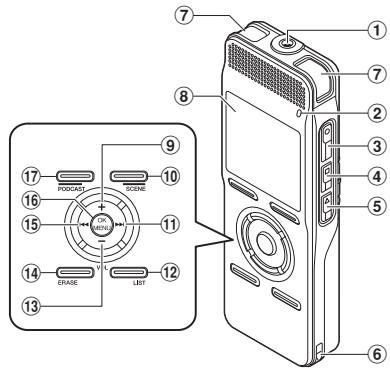
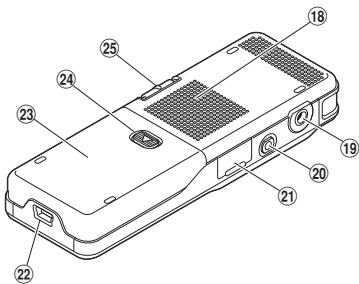
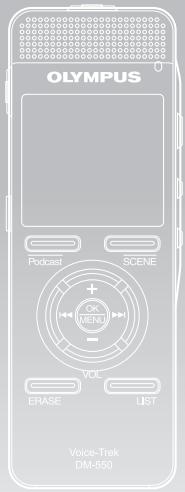
① MIC (Microphone) jack
② Record indicator light
③ RECO (Record) button
④ STOP button
⑤ PLAY▶ button
⑥ Strap hole
⑦ Built-in stereo microphone
⑧ Display (LCD panel)
⑨ + button
10 F2/SCENE button
①▶■ button
⑫ LIST button
⑬ - button
14 ERASE button
15 button
⑥ OK/MENU button
F1/PODCAST button
Built-in speaker
19 EAR (Earphone) jack
20 REMOTE jack
Connect the receiver of the exclusive remote control set (optional). The recorder's recording and stop functions can be operated through the remote control.
② Card cover
22 USB connector
23 Battery cover
24 Battery cover release button
25 POWER/HOLD switch
Display (LCD panel)
[Recorder] Mode Display Screen
Folder list display
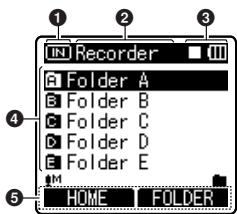
Recording media indicator
Current folder name
Recorder status indicator/ Battery indicator
4 Folder name
Function guide indicator
File list display
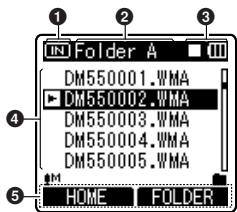
Recording media indicator
Current folder name
Recorder status indicator/ Battery indicator
4 File name
Function guide indicator
File display
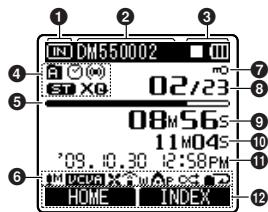
Recording media indicator
Current file name
Recorder status indicator/ Battery indicator
▶Play indicator
[Record indicator
[II]Pause indicator
[■]Stop indicator
[F]F. Play indicator
[S]S. Play indicator
4 Folder indicator/ Recording mode indicator/
[O] Timer indicator
[Alarm indicator
Remaining memory bar indicator/Playback position bar indicator
Icon display
[HH] Microphone sensitivity indicator
[VCVA] VCVA indicator
Low Cut Filter indicator
[Zoom Mic indicator
[Noise Cancel indicator]
Voice Filter indicator
[AF] EUPHONY indicator
[O] [D] Playback mode indicator
7 File Lock indicator
Current file number/ Total number of recorded files in the folder
Elapsed recording time/ Elapsed playback time
10 Remaining recording time/ File length
1 Recording date and time/ Level meter
Function guide indicator
Display (LCD panel)
[Music] [Podcast] [Audible] Mode
Display Screen
List display ①
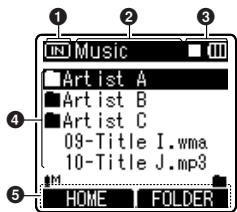
When there are files and folders in the folder
1 Recording media indicator
Current folder name
Recorder status indicator/ Battery indicator
4 Folder name/File name
Function guide indicator
List display ②
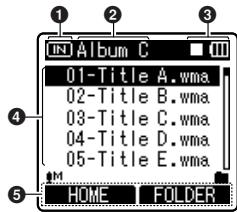
When there are only files in the folder
1 Recording media indicator
2 Current folder name
Recorder status indicator/ Battery indicator
4 File name
Function guide indicator
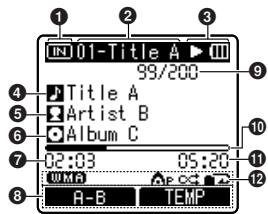
File display
Recording media indicator
Current file name
Recorder status indicator/Battery indicator
4 Title name
5 Artist name
6 Album name
7 Elapsed playback time
Function guide indicator
9 Current file number/ Total number of recorded files in the folder
10 Playback position bar indicator
1 File length
12 Icon display
[UMA] File format
[A_F] EUPHONY indicator
[O][O]Playbackmodeindicator
Inserting batteries
This recorder can be used with either Ni-MH Rechargeable Batteries or AAA Alkaline Batteries.
1 Slide the battery cover open while lightly pressing the battery cover release button.
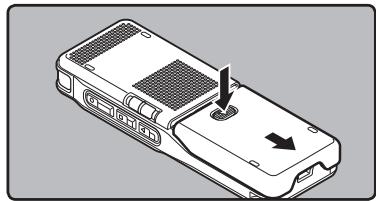
2 Insert battery, observing the correct and polarities.
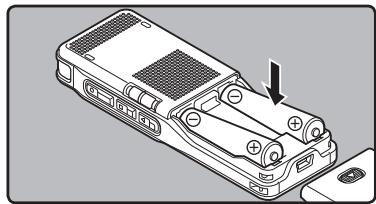
- When charging the recorder, be sure to use the supplied specified Ni-MH rechargeable (BR401) batteries.
- The supplied rechargeable batteries are not fully charged. Before using the unit the first time or after long periods of disuse, it is recommended that you charge them until full (€8) P.15, P.16).
3 Close the battery cover completely by pressing to the direction A, then sliding to the direction B.
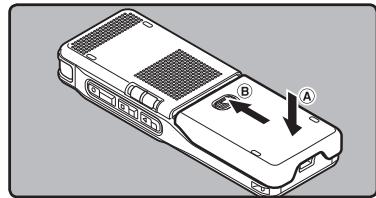
4 Slide the POWER/HOLD switch in the direction indicated by the arrow, and turn the power on.
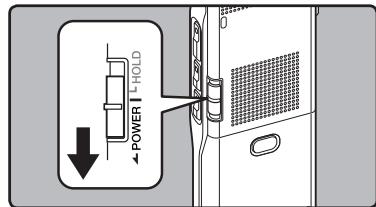
- If the "hour" indicator flashes in the display, see "Setting time and date [Time & Date]" (p.20).
Battery indicator
The battery indicator on the display changes as the batteries lose power.

- When [ ] appears on the display, replace the batteries as soon as possible. When the batteries are too weak, [ ] and [Battery Low] appears on the display, the recorder shuts down.
Notes
- Manganese batteries may not be used in this recorder.
- When changing batteries, AAA alkaline batteries or Olympus Ni-MH rechargeable batteries are recommended.
- Be sure to stop the recorder before replacing the batteries. Unloading the batteries while the recorder is in use may corrupt the file. If you are recording into a file and the batteries run out, you will lose your currently recorded file because the file header will not be able to close. It is crucial to change the batteries once you see only one Hash mark in the battery indicator.
- If it takes longer than 15 minute to replace the dead batteries or if you take the batteries in and out repeatedly at short intervals, you may have to reset the time when you have loaded fresh batteries (€3 P.20).
- Remove the batteries if you are not going to use the recorder for an extended period of time.
- When playing a voice/music file, the recorder may be reset due to the reduction of the voltage output of the batteries depending on the volume level even if [III] is displayed in the battery indicator. In this case, lower the volume of the recorder.
- When replacing rechargeable batteries, be sure to use Ni-MH rechargeable batteries. The use of other manufacturers' products can damage the recorder and should be avoided.
Charging by connecting to a computer via USB
You can charge the batteries by connecting to a PC's USB port. When charging, be sure to correctly place the rechargeable batteries (supplied) into the recorder (E85P.14).
Do not charge primary batteries such as alkali or lithium batteries. It may cause battery leakage heating and recorder malfunction.
1 Boot the PC.
2 Connect the USB connection cable to the USB port of the PC.
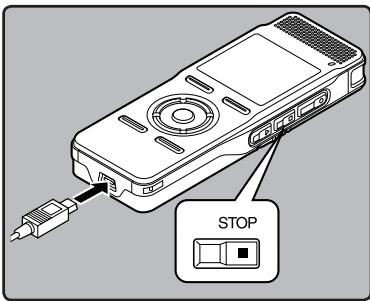
3 In the Stop or Hold status, connect the USB cable to the connecting terminal on the bottom of this recorder while pressing the STOP button.
[Batt.Charge mode] appears in the display while pressing the STOP button.
- Press and hold the STOP button until [Charging] appears in the display.
Connect to the USB connecting AC adapter (optional) to charge
It can be charged by connecting to the USB connecting AC adapter (A514) (optional). Before connecting the AC adapter, switch the USB Connection setting to [AC Adapter] (E53P.69).
Plug the AC Adapter into a socket for domestic power.
Plug the recorder's USB connecting cable into the AC Adapter.
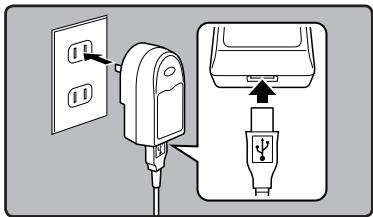
3 With the Power at OFF, connect the USB cable to the connecting terminal on the bottom of this recorder while pressing the STOP button.
[Batt. Charge mode] will be displayed on the screen.
- Charging will start when [Charging] appears in the display.
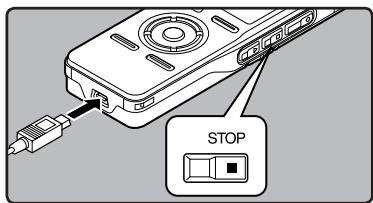
Notes
- Charging will stop temporarily during recording, playback or data transmission.
- The recorder cannot be charged when the PC is not turned on. Also, it may not be charged when the PC is not switched on, or when it is in the standby, hibernate or sleep mode.
- Do not charge the recorder with the USB hub connected.
- If [Cannot charge] is displayed, it means that a battery that cannot be charged is in the recorder. Replace the batteries with supplied ones at once (e ^注 P. 14).
-
Charging is completed when battery indication becomes to [F] (charging time: approximately 4 hours *).
-
It shows the approximate time when charging the rechargeable battery fully from no remaining power at the room temperature. The charging time will be changed depending on the remaining amount and the state of batteries.
-
You cannot charge when [Q]^1 or [H]^2 blinks. Charge the batteries at the temperature from 5^ to 35^ ( 41^ to 95^ ).
1 [8]: When surrounding temperature is low.
2 [1]: When surrounding temperature is high.
- When using time becomes notably short even after the batteries are fully charged, replace them with new ones.
- Be sure to push the USB connector all the way in. Otherwise, the recorder may not operate properly.
- Be sure to use the attached dedicated cable for the USB connection cable. If any other company's cable is used, it cause problems. Also, please do not connect this dedicated cable to any other company's product.
Cautions concerning the rechargeable batteries
Read the following descriptions carefully when you use the Ni-MH rechargeable batteries.
Discharging:
The rechargeable batteries self-discharge while this is not in use. Be sure to charge them regularly before use.
Operating temperature:
The rechargeable batteries are chemical products. The rechargeable batteries efficiency may fluctuate even when operating within the recommended temperature range. This is an inherent nature of such products.
Recommended temperature range:
When operating appliance:
0^ - 42^ / 32^ - 107.6^
Charging:
5^ - 35^ / 41^ - 95^
Storage for a long period:
-20^ - 30^ / -4^ - 86^
Using the rechargeable batteries outside the above temperature range may result in declining efficiency and shorter battery life. In order to prevent battery leakage or rust, remove the rechargeable batteries from the products when you will not be using them for a long time, and store them separately.
Notes
-
This recorder is designed to fully charge batteries regardless of their energy level. However, for best results when charging newly purchased rechargeable batteries or batteries that have not been used for a long time (more than one month), it is recommended to fully charge the batteries then discharge repeatedly for 2 to 3 times.
-
When disposing rechargeable batteries, always observe the local laws and regulations. Contact you local recycling center for proper disposal methods.
- If Ni-MH rechargeable batteries are not fully discharged, protect against short-circuiting (e.g. by taping the contacts) before disposing.
For customers in Germany:
Olympus has a contract with the GRS (Joint Battery Disposal Association) in Germany to ensure environmentally friendly disposal.
Turning on/off the power
When the recorder is not being used, turn the power off to reduce battery consumption to a minimum. Even if the power is turned off, existing data, mode settings, and clock settings will be maintained.
Turning on the power
While the recorder's power is off, slide the POWER/HOLD switch in the direction indicated by the arrow.
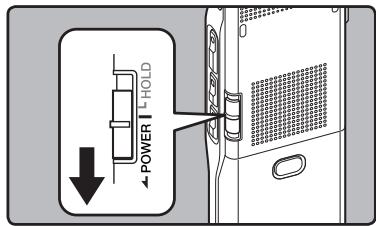
- The display will turn on, and the power will be turned on.
Turning off the power
Slide the POWER/HOLD switch in the direction indicated by the arrow for 0.5 seconds or longer.
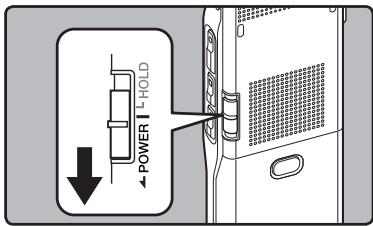
- The display shuts off, and the power will be turned off.
- The resume function remembers the stop position before the power is turned off.
Power save mode
If the recorder is on and stops for 10 minutes or longer (default), the display shuts off and it goes into power save mode. You can set the time to enter power save mode from among [5minutes], [10minutes], [30minutes], [1hour] and [Off] (P.54). To exit power save, press any button.
If you bring the POWER/HOLD switch to the HOLD position, the current conditions will be preserved, and all buttons and switches will be disabled. This feature is useful when the recorder has to be carried in a bag or pocket. Also, you can stop to prevent accident during recording.
Set the recorder to HOLD mode
Slide the POWER/HOLD switch to the HOLD position.
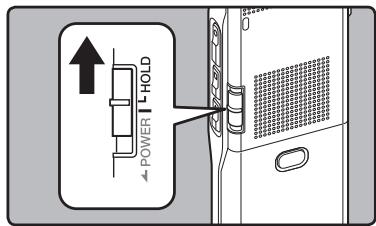
After [Hold] appears on the display, the recorder is set to HOLD mode.
Exit HOLD mode
Slide the POWER/HOLD switch to the A position.
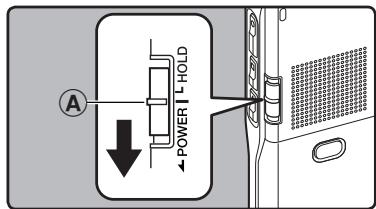
Notes
- If you press any button in HOLD mode, the clock display flashes for 2 seconds, but it will not operate the recorder.
- If HOLD is applied during playback (recording), operation is disabled with the playback (recording) state unchanged (When playback has ended and the recording has ended due to the remaining memory being used up, it will stop).
- This recorder can be effectively operated via the connected exclusive remote control set RS30W (optional), even when it is in HOLD mode.
Setting time and date [Time & Date]
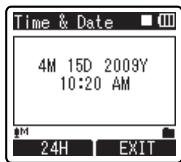
If you set the time and date beforehand, the information when the file is recorded is automatically stored for each file. Setting the time and date beforehand enables easier file management.
When you use this recorder for the first time after purchasing, or when you switch it on after removing the batteries for more than 15 minutes when exchanging batteries, etc, the [Set Time & Date] will appear. When the "hour" is flashing, conduct the setup from Step 1.
![OLYMPUS DM-450 - Setting time and date [Time & Date] - 1](/content/2025/01/125238/images/890290974fb425925901ea76b928329491cc7cc08f9e2274315d1a189e4b3aaf.jpg)
![OLYMPUS DM-450 - Setting time and date [Time & Date] - 2](/content/2025/01/125238/images/6b583b7b28e4d54fb46338e32feca1ee40fdf55cfee1c1d59b935c567dc4fce4.jpg)
Press the or button to select the item to set.
- Select the item from the "hour", "minute", "year", "month" and "day" with a flashing point.
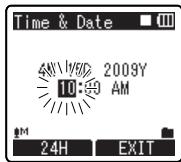
2 Press the + or - button to set.
- Follow the same steps by pressing the or button to select the next item, and press the + or - button to set.
- You can select between 12 and 24 hour display by pressing the F1 button while setting the hour and minute.
Example: 10:20 P.M

- You can select the order of the "month", "day" and "year" by pressing the F1 button while setting them.
Example: April 15, 2009
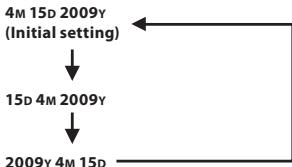
Press the OK button to complete the setting.
- The clock will start from the set date and time. Press the OK button according to the time signal.
Notes
- If you press the OK button during the setup operation, the recorder will save the items that were set to that point.
- After setup, a message will sound saying that if the guidance is not required, select [Off], and the screen goes into [Voice Guide] (P.68) setup. If you don't want the guidance feature, select [Off].
Changing the time and date
While the recorder is during stop mode, press and hold the STOP button to display the [Time & Date], and [Remain]. If the current time and date is not correct, set it using the procedure below.
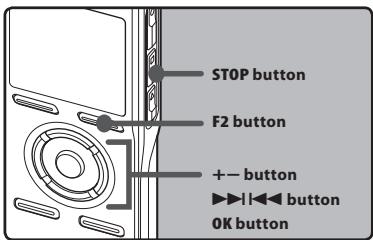
1 Select [Time & Date] from the menu in [Device Menu].
- [Time & Date] will appear on the display.
- For details on menu settings, please refer to P.44, P.45.
The "hour" will flash on the display, indicating the start of the Time and Date setup process.
The following steps are the same as Step 1 through Step 3 of "Setting time and date [Time & Date]" (eP.20).
![OLYMPUS DM-450 - Select [Time & Date] from the menu in [Device Menu]. - 1](/content/2025/01/125238/images/73db7cc0e839243dbe8200b37eb4a3e78bca1ec4500e7c9fef2fb1746109f877.jpg)
2 Press the F2 or STOP button to close the menu screen.
Inserting and Ejecting a microSD card
The "microSD" indicated in the instruction manual refers to both microSD and microSDHC.
This recorder can be used with commercially available microSD cards as well as the built-in memory.
Inserting a microSD card
While the recorder is during stop mode, open the card cover.

2 Face the microSD card the correct way and insert it into the card slot as shown in the diagram.
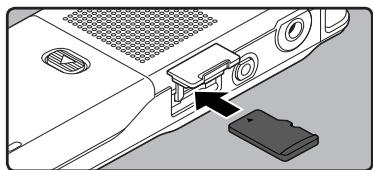
- Insert the microSD card keeping it straight.
- The microSD card stops with a click when it is inserted all the way.
- Inserting the microSD card the wrong way or at an angle could damage the contact area or cause the microSD card to jam.
- If the microSD card is not inserted all the way, data may not be written to the microSD card.
3 Close the card cover securely.
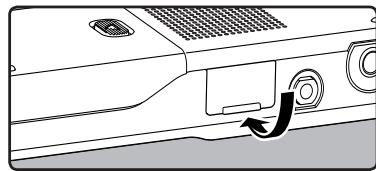
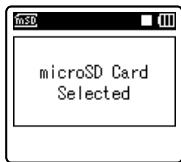
- When you insert the microSD card, the recording media changeover display will appear.
4 When you are recording to a microSD card, press the + or - button and select [Yes].
![OLYMPUS DM-450 - When you are recording to a microSD card, press the + or - button and select [Yes]. - 1](/content/2025/01/125238/images/3b372a49bfbcb06d2cc1da3aea529976233b329bec3e29e67e8bda9e6422a899.jpg)
Press the OK button to complete the setting.
Notes
- It is possible to switch the recording media over to the built-in memory (P.54).
- In some cases microSD card which have been formatted (initialized) by another device, such as a computer, cannot be recognized. Be sure to format them with this recorder before using (E3 P.71).
Ejecting a microSD card
While the recorder is during stop mode, open the card cover.
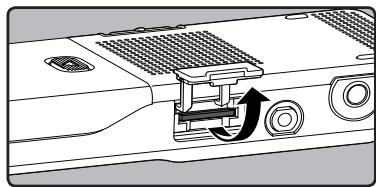
2 Push the microSD card inward to unlock it, and let it eject partially.
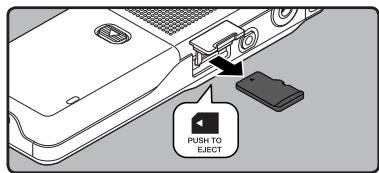
- The microSD card is visibly out of the slot and can be removed safely.
- When [Memory Select] is set to [microSD Card], [Built-in Memory Selected] will appear.
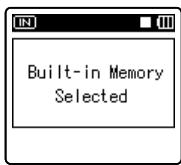
3 Close the card cover securely.
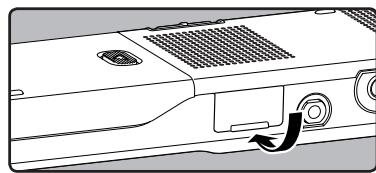
Notes
- Releasing your finger quickly after pushing the microSD card inward may cause it to eject forcefully out of the slot.
- Before inserting the microSD card, turn off the write protection function. Check the Olympus website regarding microSD cards which are confirmed operation with this recorder.
- This recorder may not recognize correctly on some microSD cards which are not compatible with this recorder.
- In the case when the microSD card cannot be recognized, remove the microSD card then put it in again to see if this recorder recognizes the microSD card.
- The processing performance reduces in a microSD card when you repeat writing and delete. In this case, format the microSD card (e35 P.71).
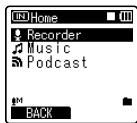
The built-in memory or the microSD card can be used for the recording media. Regardless of the recording media, voice file, music files, and contents files are separated and saved respectively into the [Recorder], [Music], [Podcast] and [Audible] folders organized in a branching tree-style.
When [Home] is displayed in the Function Guide display section, press the F1 key to return to the home screen. This is useful when switching the [Recorder], [Music], [Podcast] and [Audible] modes.
Note
- Files or folders located under the folder [Home] or [Recorder] will not be indicated on the recorder.
About the folders for voice recordings
[Folder A] - [Folder E] within the [Recorder] folder are the folders for voice recordings. When recording with this recorder, select any one of the five folders and then record.
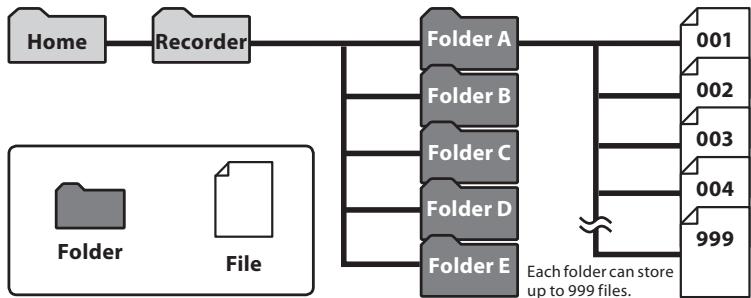
File names will be automatically created for files recorded by this recorder.


①UserID:
The user ID name that has been set on the Digital Voice Recorder. The user ID can be changed in the Olympus Sonority.
② File number:
A serial number automatically assigned by a Digital Voice Recorder.
(3) Extension:
These are the file name extensions for the recording format when recording with this device.
- Linear PCM format .WAV
- MP3 format.MP3
WMA format .WMA
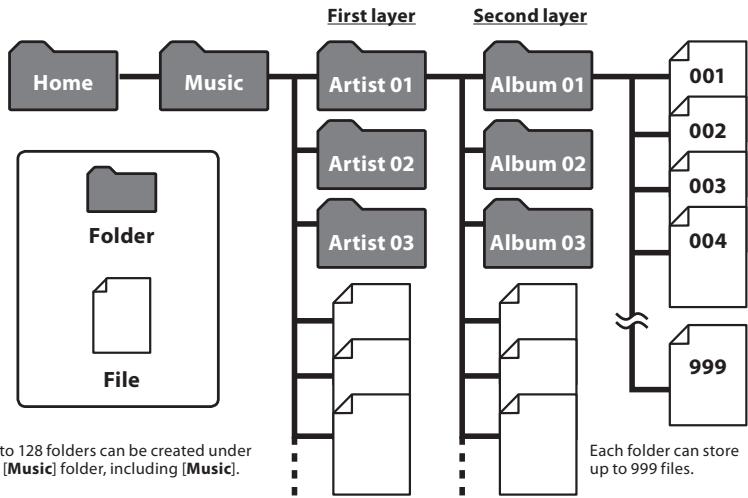
About the folder for music playback
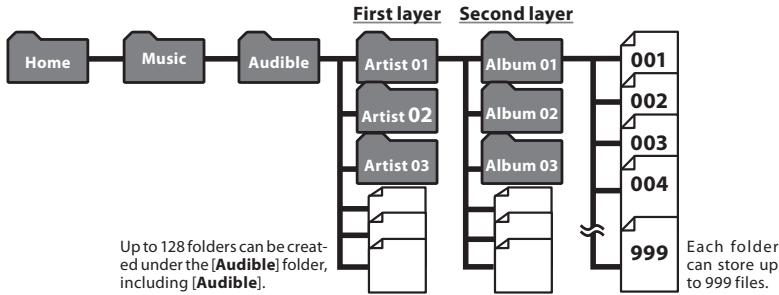
When transferring music files to the device using Windows Media Player, a folder is automatically created within the [Music] folder which has a layered structure as shown in the diagram below.
Music files that are in the same folder can be rearranged in preferential order and replayed (e.g. P.56).
About the folder for Podcast Contents
A [Podcast] folder, for saving files distributed (P.107) by Podcast, is prepared in advance inside the [Home] folder. Programs (files) transmitted from the "Olympus Sonority" can be played. With the recorder stopped, pressing the [Podcast] button for one second or longer will open the [Podcast] folder under the [Home] folder. A list of files and folders within the folder will appear. For "Podcast" please see P.107.
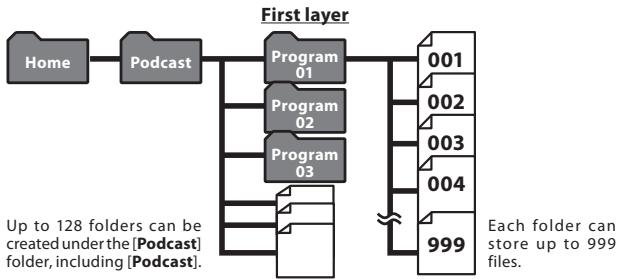
About the folder for Audible Contents
Audible files can be redirected from the Audible website to the recorder using the Audible Manager (P.112) or Windows Media Player.
When redirecting Audible files to this recorder using the Audible Manager, an [Audible] folder for playing Audible files will automatically be created in the [Music] folder, and the files stored there.
When redirecting Audible files to this recorder using the Windows Media Player, an [Artist] folder for playing will be created in the [Music] folder, just like for music files, and the files will be stored there.
Selecting the folders and files
Change folders while the operation is playing back or stopped. For information on the layered structure of the folders, see the section entitled "Notes on the folders" (P.24 to P.26).
Operation of the folders for voice recordings:
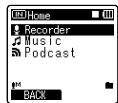
Home folder list display
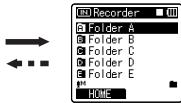
Folder list display
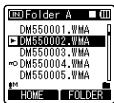
File list display
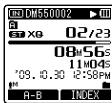
File display
Operation of the folders for music playbacks/Content playbacks:
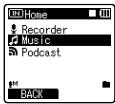
Home folder list display
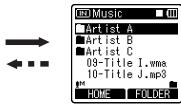
Folder list display (First layer)
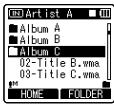
Folder list display (Second layer)
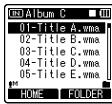
File list display
Moving through the levels
LIST button
Return

Each time you press this it returns up one level. The list display can be operated by the button.
When you press and hold the LIST button while moving in a hierarchy of folders, it will return to the file display.
OK button
Proceed

Each time you press this it opens the folder or file selected in the list display and proceeds down one level.
The list display screen can be operated by the button.
+or - button
Select the folder or file.
File display
Information of the selected file is displayed. Enters in playback standby mode.
List display
The folders and files recorded in this recorder are displayed.

File display
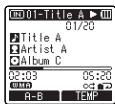
Recording
Before starting recording, select a voice recording folder between [B] to [E] in the [Recorder] folder. These five folders can be selectively used to distinguish the kind of recording; for example, Folder [B] might be used to store private information, while Folder [E] might be dedicated to holding business information.
1 Select the recording folder (P.24 to P.27).
How to change folders:
① Pressing the LIST button at the file display while stopped will return you to the next higher level. Pressing the LIST button repeatedly will bring you to the folder list display.
② Pressing the ^+ or - button at the folder list display will select the folders for voice recordings. Newly recorded audio will be saved as the last file in the selected folder.
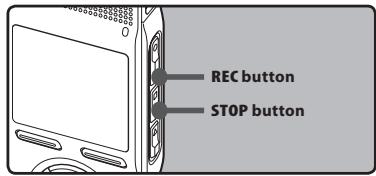
Press the REC button to start recording.
The recording indicator light glows and [●] will appear on the display.
- Turn the microphone in the direction of the source to be recorded.
Recording mode
Remaining memory bar indicator
Elapsed recording time
Remaining recording time
_i Level meter (change according to the recording level and recording function settings)
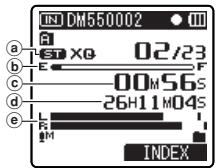
- [Rec Mode] cannot be changed in the recording standby mode or while recording. Configure this while the recorder is stopped (E P.47).
Press the STOP button to stop recording.
- [■] will appear on the display.
1 File length
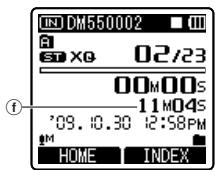
Notes
- When a microSD card is inserted in the recorder, be sure to confirm the recording media as either [Built-in Memory] or [microSD Card] so that there is no mistake (€35 P.54).
- If you select a folder other than A through E and press the REC button, a [Cannot record in this folder] message will flash. Select a folder from A through E and start recording again.
To ensure recording from the beginning, start speaking after you see the recording indicator light on. -
When remaining recording time is less than 60 seconds, the recording indicator light starts flashing. When the recording time is decreasing to 30 or 10 seconds, the light flashes faster.
-
When [Folder Full] appears, the recorder will not be able to record anymore. Delete any unnecessary files before recording any further (E&P P.42).
- Recorder will not be able to record anymore when [Memory Full] appears. Delete any unnecessary files before recording any further (E-P.42).
We recommend formatting the record media in the recorder before recording (eP.71).
To quickly check on the recorded contents
While the recorder is during recording mode, press the PLAY button.
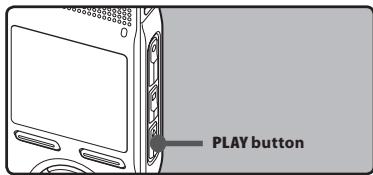
- [ ] will appear on the display.
- Stop recording and the file that was just recorded will be played back.
Pause
While the recorder is during recording mode, press the RECO button.
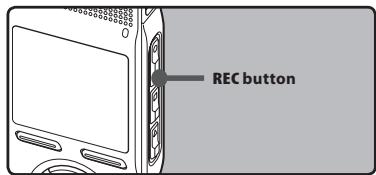
- [ ] will appear on the display.
- The recorder will time out after 120 minutes when left in "Rec Pause".
Resume Recording:
Press the REC button again.
- Recording will resume at the point of interruption.
Listening while audio is recorded
If you start recording after inserting the microphone into the EAR jack on the recorder, you can hear the sound being recorded. The recording monitor volume can be adjusted by pressing the + or - button.
Connect the earphone to the EAR jack on the recorder.

After recording has started, you can hear the sound being recorded through the microphone.
Notes
- Recording level cannot be controlled using the volume button.
- When using the earphones, do not set the volume too high. Listening at very high volume may lead to hearing loss.
- Do not place earphones near a microphone as this may cause feedback.
- When the external speaker is connected while recording, there is a risk that audio feedback will occur.
Recommended settings by recording condition
The recorder is initially set to the [ST XQ] mode so that you can make high quality stereo recordings immediately after purchasing it. The various functions relating to recording can be configured in detail to suit the recording conditions.
The following table shows the standard recording settings with the recording environment as an example.
| Recording condition | Recommended Settings | |||
| [Rec Mode] (P.47) | [Mic Sense] (P.47) | [Low Cut Filter] (P.48) | [Zoom Mic] (P.48) | |
| Recording for conferences and other large groups. | [PCM]: [44.1kHz] [ST XQ] [MP3]: [320kbps] | [High] | [On] | [Wide] |
| Meetings and business negotiations with a small number of people. | [ST XQ] [ST HQ] [MP3]: [256kbps] [MP3]: [192kbps] | [Middle] | [Wide] | |
| Dictation with a lot of background noise. | [HQ] | [Low] | [Off] | |
| Music playing, wild birds singing, and railway sounds. | [PCM]: [48kHz] [PCM]: [44.1kHz] | Set the microphone sensitivity according to the volume being recorded. | [Off] | [Off] |
| Dictation in a quiet environment. | It can be used in any type of setting. Select a setting for recording. | |||
Recording from external microphone or other devices
The external microphone and other devices can be connected and the sound can be recorded. Connect as follows by the device to be used.
- Do not plug and unplug devices into the recorder's jack while it is recording.
Recording with external microphone:
Connect an external microphone to the MIC jack of the recorder.
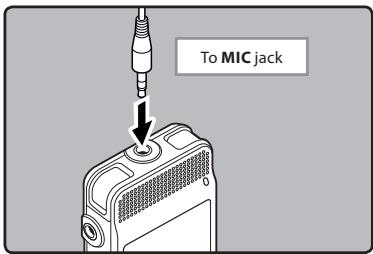
Applicable external microphones
2 channel microphone (omni-directional); ME30W
These are highly sensitive omnidirectional microphones supported by plug-in power which are well-suited to recording musical performances.
Highly sensitive noise-cancellation monaural microphone (unidirectional): ME52W
This microphone is used to record sound at a distance while minimizing surrounding noise.
Compact Gun Microphone (unidirectional): ME31
The directional microphones are useful for recordings such as outdoor recording of wild birds singing. The metal-cut body provides a sturdiness to the high rigidity.
Tie clip microphone (omni-directional): ME15
Small concealing microphone with a tie-clip.
Telephone pickup: TP7
Earphone type microphone can be plugged into your ear while phoning. The voice or conversation over the phone can be clearly recorded.
Notes
- Use the connecting cord sold separately for dubbing (KA333) to connect the recorder with other devices.
- The detailed input levels cannot be adjusted with this recorder. When you connect the recorder to an external device, execute a test recording and adjust the output level of the external device.
- The built-in microphone will become inoperable when an external microphone is plugged into the recorder's MIC jack.
- Microphones supported by plug-in power can also be used.
- When an external monaural microphone is used while [Rec Mode] is set to a stereo recording mode, it enables recording only with the L channel microphone (P.47).
Recording the sound of other devices with this recorder:
The sound can be recorded when connecting to the audio output terminal (earphone jack) of the other device, and the MIC jack of the recorder with the connecting cord KA333 (optional) for dubbing.

Note
- The detailed input levels cannot be adjusted with this recorder (P47). When external devices are connected, perform a test recording and then adjust the output level for the external devices.
Recording the sound of this recorder with other devices:
The sound of this recorder can be recorded to other devices when connected to the audio input terminal (microphone jack) of other devices and the EAR jack of this recorder, with the connecting cord KA333 (optional) for dubbing.
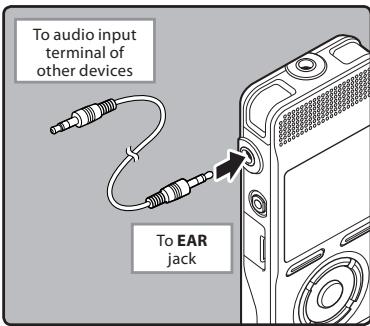
Note
- When you adjust the various sound quality settings related to playback on the recorder, the audio output signal sent out from the EAR jack will change as well (€50 P.50).
Playback
The recorder can playback WAV, MP3 and WMA format files. To playback a file recorded with other machines, you need to transfer (copy) it from a computer.
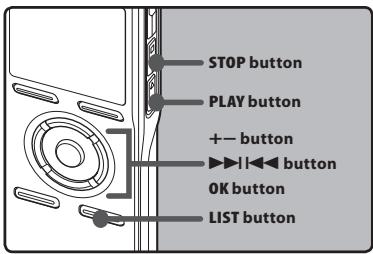
1 Select the folder which contains the files to be played back (P.24 to P.27).
How to change folders:
① Pressing the LIST button at the file display during playback or while stopped will return you to the next higher level. Pressing the LIST button repeatedly will bring you to the folder list display.
② Press the + or - button at the folder list display to select folder, and then press OK or▶▶I button.
2 In the File list display, press the + or - button to select the file that you want to playback.
- In the File display, press the or button to select a file.
Press the PLAY or OK button to start playback.
- [▶] will appear on the display.
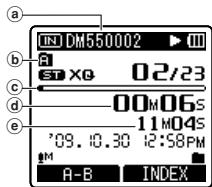
(a) File name
Folder indicator
Playback position bar indicator
d Elapsed playback time
File length
Press the + or - button to adjust to a comfortable listening volume.
- The volume can be adjusted within a range from [00] to [30].
Press the STOP button at any point you want to stop the playback.
- [■] will appear on the display.
- This will stop the file being played back midway. When the resume function is activated the stopped location will be registered, even if the power is turned off. The next time the power is turned on, playback may be resumed from the registered stopped location.
Forwarding
While the recorder is during stop mode in the file display, press and hold the button.
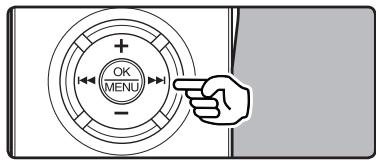
- [ ] will appear on the display.
- If you release the▶I button, it will stop. Press the PLAY▶or OK button to start playback from where it was stopped.
While the recorder is during playback mode, press and hold the button.
- When you release the▶▶I button the recorder will resume normal playback.
- If there is an index mark or temp mark in the middle of the file, the recorder will stop at that location (e38 P. 38).
- The recorder stops when it reaches the end of the file. Continue pressing the button to proceed with the cue from the beginning of the next file.
Rewinding
While the recorder is during stop mode in the file display, press and hold the button.
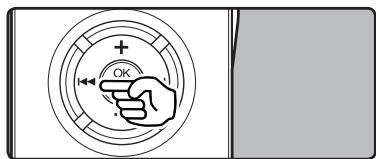
- [4] will appear on the display.
- If you release the button, it will stop. Press the PLAY or OK button to start playback from where it was stopped.
While the recorder is during playback mode, press and hold the 1 button.
- When you release the button the recorder will resume normal playback
- If there is an index mark or temp mark in the middle of the file, the recorder will stop at that location (w33 P. 38).
- The recorder stops when it reaches the beginning of the file. Continue pressing the I button to proceed with the review from the end of the previous file.
Locating the beginning of the file
While the recorder is during stop mode or playback mode, press the button.
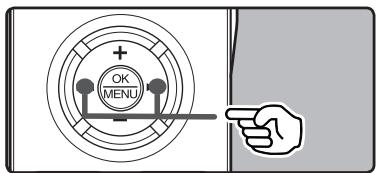
- The recorder skips to the beginning of the next file.
While the recorder is during playback mode, press the button.
- The recorder skips to the beginning of the current file.
While the recorder is during stop mode, press the button.
- The recorder skips to the beginning of the previous file. If the recorder stops the midway of the file, return to the beginning of the file.
While the recorder is during playback mode, press the button twice.
- The recorder skips to the beginning of the previous file.
Notes
- When you skip to the beginning of the file during playback, the recorder will stop at the position of the index mark and temp mark. The index mark and temp mark will be skipped when you perform the operation in stop mode (e ^- P. 38).
- When [Skip Space] set to other than [File Skip], the recorder will skip forward/ reverse the specified time, then will start playback (E5 P. 52).
Playback through earphone
An earphone can be connected to the EAR jack of the recorder for listening.
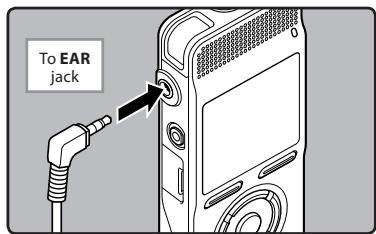
- When the earphone is used, the recorder speaker will be switched-off.
Notes
- To avoid irritation to the ear, insert the microphone after turning down the volume level.
- When you listen with the earphone during playback, do not raise the volume too much. It may cause hearing impairment and decrease in hearing ability.
Settings relating to playback
| [Segment repeat] (€P.40) | This function enables repeated playback of part of the file being played. |
| [Replace] (€P.56) | This changes the order of the files in the selected folder. It is useful for playing back files in a preferred order while in normal playback mode etc. |
| [Noise Cancel] (€P.50) | If recorded audio is difficult to understand because of noisy surroundings, adjust the Noise Cancel setting level. |
| [EUPHONY] (€P.50) | Level adjustments of the [EUPHONY] setting can be set to four stages according to preference. |
| [Voice Filter] (€P.50) | The recorder has a Voice Filter Function to cut low and high frequency tones during normal, fast, or slow playback, and enable clear audio playback. |
| [Play Mode] (€P.50) | You can select the playback mode that fits your preference. |
| [Play Speed] (€P.51) | The playback speed can be set to slow speed or fast speed playback. |
| [Skip Space] (€P.52) | The skip interval length can be set. |
| [Alarm] (€P.52) | The alarm playback function can be set to play a selected file at a pre-set time. |
| [Play Scene] (€P.52) | Playback settings of your choice can be saved to suit different sound qualities and playback methods. |
| [Intro Play] (For DM-550) (€P.53) | You can listen to the first few seconds of a file by touching the cursor to a file within a folder. |
About music file
In cases where the recorder is unable to playback music files that have been transferred to it, check to make sure that the sampling rate and bit rate are in the range where playback is possible. Combinations of sampling rates and bit rates for music files which the recorder can playback are given below.
| File format | Sampling frequency | Bit rate |
| WAV format | 44.1 kHz, 48 kHz | 16 bit |
| MP3 format | MPEG1 Layer3: 32 kHz, 44.1 kHz, 48 kHzMPEG2 Layer3: 16 kHz, 22.05 kHz, 24 kHz | From 8 kbps up to 320 kbps |
| WMA format | 8 kHz, 11 kHz, 16 kHz, 22 kHz, 32 kHz, 44.1 kHz, 48 kHz | From 5 kbps up to 320 kbps |
- Variable bitrate MP3 files (in which conversion bitrates can vary) may not play properly.
- For WAV files, this recorder can only playback those in the linear PCM format. WAV files other than these cannot be played back.
- This recorder is compatible with Microsoft Corporation DRM9, but not with DRM10.
Bookmark mode
The recorder has the bookmark mode in the contents file of the Podcast or Audible file which is transferred to the recorder. When the recorder is in bookmark mode, it automatically memorizes the last stop position as a [Playback Position]. Even the recorder is stopped while a file is being played back, the last stop position is recalled from the file, and the file can be played back from that position next time.
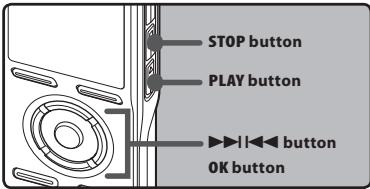
1 Selecting the content file in the [Podcast] or the Audible file in the [Music] folder.
Press the PLAY or OK button to start playback.
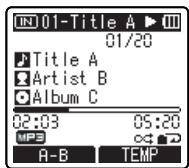
- [▶] will appear on the display.
When you play the file which you have previously played back, the playback starts from the last stop position.
Press the STOP or OK button at any point you want to stop the playback.
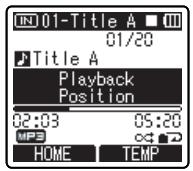
- Stop a file playback at any point. The stop position is memorized as a [Playback Position] in the file. In this status, even if you select an empty file, move to the other folder, or turn the recorder off, the playback starts from the last memorized position when you play the same file.
4 Playing back the contents file which has been played back halfway.
- Press the PLAY or OK button to start playing back from where it was stopped.
Forwarding
Press and hold the button while the recorder is stopped.
When you release the button, the recorder stops, but the [Playback Position] will not be updated. Press the PLAY or OK button to start playing back from where it was stopped.
Press and hold the button while playing a file.
When you release the▶I button the recorder will resume normal playback.
-
If a temp mark (P.38) or [Playback Position] is marked in the middle of the file, the playback stops once at that position.
-
The recorder stops when it reaches the end of the file. Continue pressing the button to proceed with the cue from the beginning of the next file.
Rewinding
Press and hold the button while the recorder is stopped.
When you release the button, the recorder stops, but the [Playback Position] will not be updated. Press the PLAY or OK button to start playing back from where it was stopped.
Press and hold the button while playing a file.
When you release the button the recorder will resume normal playback.
- If a temp mark (P.38) or [Playback Position] is marked in the middle of the file, the playback stops once at that position.
- The recorder stops when it reaches the beginning of the file. Continue pressing the 1 button to proceed with the review from the end of the previous file.
- If the button is kept pressed while the recorder is stopped at the start of the top file, the recorder will fast rewind starting from the end of the last file.
Locating the Beginning of the File
Press the button during playback, slow playback, or fast playback.
The next file is cued and playback starts at the previously set speed.
Press the 1 button during playback, slow playback, or fast playback.
The file being played is cued and playback starts at the previously set speed.
Press the button 2 times during playback, slow playback or fast playback.
The previous file is cued and playback starts at the previously set speed.
- If a temp mark (P.38) is marked in the middle of the file, it reproduces from the position.
- If the skip space is set at other than file skip (eP P.52), the recorder will F. Skip (forward skip) or R. Skip (reverse skip) for a set time before playback.
To skip a file
Press the button while the recorder is stopped.
It skips to the [Playback Position] of the next file.
Press the 1 button when the playback is stopped at the beginning of the file.
It skips to the [Playback Position] of the previous file.
Press the 1 button when the playback is stopped in the middle of the file.
It skips to the head of the file.
Notes
- The bookmark mode is compatible with the files within the [Podcast] folder and Audible files.
- If the file is deleted with this recorder, the [Playback Position] information is deleted simultaneously.
Management file for the [Playback Position] will be created for each file.
Setting an index mark or a temp mark
If index marks and temp marks are placed, you can quickly find a location you want to listen to in fast forward and fast rewind and when cuing a file. Index marks cannot be placed on MP3 files or files created on machines other than Olympus IC recorders, but temp marks can be placed instead to temporarily remember desired positions.
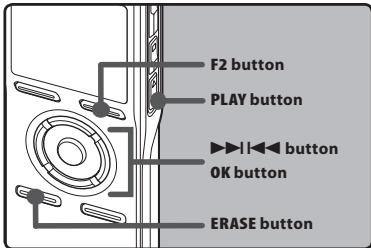
Press the F2 button during file recording, recording pause, playing, or playback pause.
Even after an index or temp mark is placed, recording or playback will continue so you can place index or temp marks in other locations in a similar manner.
- A number appears on the display and an index mark or temp mark will be placed.
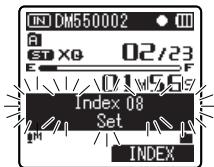
Clearing an index mark or a temp mark:
1 Locate the index or temp mark you want to clear.
Press the or button to select the index or temp mark to erase.
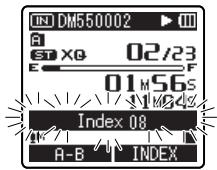
3 While the index or temp number appears for approximately 2 seconds on the display, press the ERASE button.
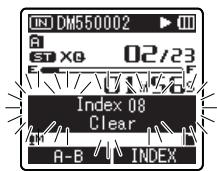
- The index or temp mark is erased.
- Index or temp numbers after the erased index or temp number will automatically move up.
Notes
- Temp marks are temporary markings, so if you transmit a file to the PC, or move it with a PC, they will be automatically erased.
- Up to 16 index and temp marks can be set in a file. If you try to place more than 16 index or temp marks, the [Index Full] message will appear for index marks, and [Temp Mark Full] for temp marks.
- Index or temp marks cannot be set or erased in a locked file (E P.46).
- When the index or temp marks are set, the management file will be created for each file.
How to begin segment repeat playback
This function enables repeated playback of part of the file being played.
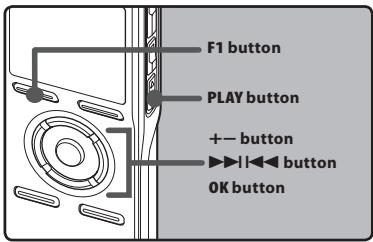
1 Select a file that has a segment you would like to playback repeatedly (P.24 to P.27).
2 In the File list display, press the + or - button to select the file.
- In the File display, press the or button to select a file.
3 Press the PLAY or OK button to start playback.
4 Press the F1 button at the point you want to start segment repeat playback.
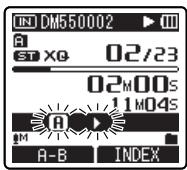
- A will flash on the display.
- Fast forwarding and rewinding can be conducted when [A] is flashing in the same manner as during normal playback, and you can quickly proceed as far as the end position (E-P.37).
- When it reaches to the end of the file while [R] is flashing, the point will become the end position, and repeat playback will start.
Press the F1 button again at the position where you want to end segment repeat playback.
- The recorder repeatedly plays back the segment until the segment repeats playback is cancelled.
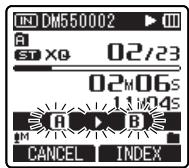
Note
- As in normal playback mode, playback speed can be changed during segment repeat playback as well (P.51). If an index mark and temp mark are inserted or eliminated (P.38) during segment repeat playback, segment repeat playback will be canceled and it will return to normal playback mode.
Cancel the segment repeat playback function
Pressing any of the following buttons will release the segment repeat playback.
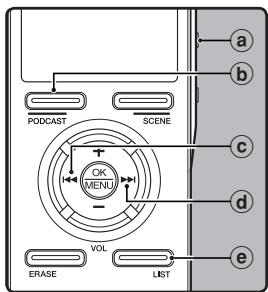
Press the STOP button
Pressing the STOP button will release segment repeat playback and stop playback.
Press the F1 button
Pressing the F1 button will release segment repeat playback, and it will return to normal playback mode.
Press the button
Pressing the button will release segment repeat playback, and reverse to the beginning of the current file.
D Press the▶I button
Pressing the button will release segment repeat playback, and fast forward and cue to the beginning of the next file.
Press the LIST button
Pressing the LIST button will release segment repeat playback, and it will return to the display of the file.
A selected file can be erased from a folder. Also, all files in a folder can be erased simultaneously.
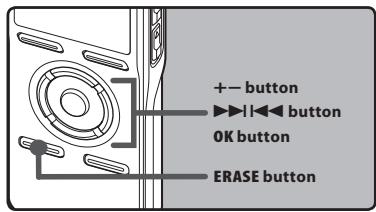
1 Select the folder or file you want to erase (P.24 to P.27).
In the File list display, press the + or - button to select the file you want to erase.
In the File display, press the or button to select a file.
3 While the recorder is during stop mode, press the ERASE button.
4 Press the ^+ or - button to select [Erase in Folder] or [File Erase].
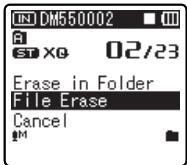
5 Press the OK button.
6 Press the ^+ button to select [Start].
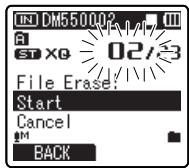
Press the OK button.
- The display changes to [Erase!] and erasing will start. [Erase Done] is displayed when the file is erased.
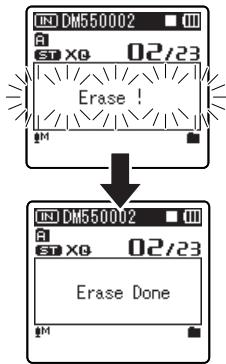
Notes
- The locked files and files set as read-only cannot be erased (P.46).
- If an action is not selected within 8 seconds, the recorder will return to stop status.
- It may take over 10 seconds to complete processing. Never remove batteries during this time because data may be corrupted. In addition, replace the batteries with new ones in order to ensure that the batteries will not run out while processing.
- [Recorder] folder (A-E) as well as [Music], and [Podcast] folders cannot be deleted.
Partially erase a file
(For DM-550)
Only a PCM file recorded in the recorder can be partially erased.
1 Play the file you want to partial erase.
- Forward a file to the position that shall be erased. If the file is long, use the▶按钮 to move to the position you want to delete.
2 At the starting position of the partial erase, press the ERASE button.
- [Erase start] will flash on the display.
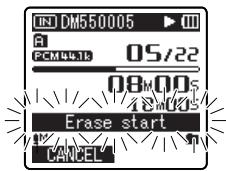
3 Press the ERASE button again.
- [Start point] and [End point] on the display flash alternatively. When the lights are flashing, playback continues and you can rewind or fast-forward as usual and fast-forward to the end of erase. If the file reaches the end during the flashing of the lights, that will be the position where erase ends.
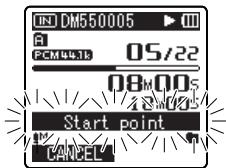
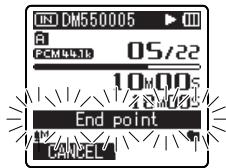
4 At the position you want to end partial erase, press the ERASE button again.
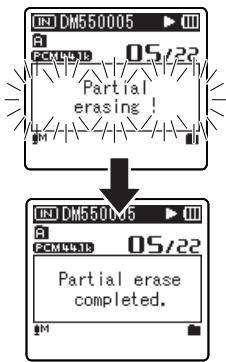
- The display will switch to [Partial erasing!] and start the partial erase. The deletion is completed when [Partial erase completed.] is displayed.
- Playback will stop at the end location of the partial erase.
Notes
- Partial erase is not applicable to files recorded in the WMA or MP3 formats.
- The File Created Date will not change even if the file is partially erased.
Menu setting method
Items in menus are categorized by tabs, so select a tab first and move to a desired item to quickly set it. You can set each menu item as follows.
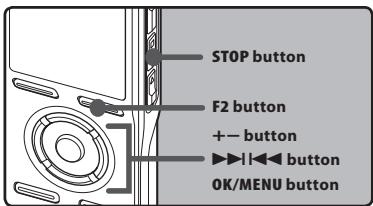
While the recorder is recording, playing or stopped, press the MENU button for 1 second or longer.
- The menu will appear on the display.
- Menu items can be set during a recording or playback (P.45).
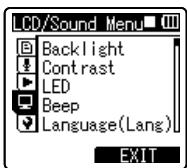
2 Press the ^+ or - button to move to the tab that contains the item you want to set.
- You can change the menu display by moving the settings tab cursor.
Press the OK or button to move the cursor to the item to set.
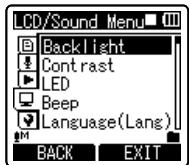
4 Press the ^+ or - button to move to the item you want to set.
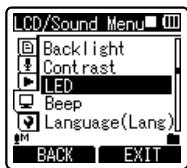
Press the OK or button.
- Moves to the setting of the selected item.
6 Press the + or - button to change the setting.
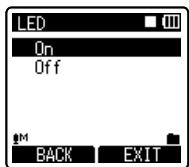
Press the OK button to complete the setting.
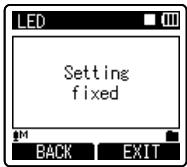
- You will be informed that the settings have been established via the screen.
- Pressing the F1 or 1 button without pressing the OK button will cancel the settings and return you to the previous screen.
Press the F2 or STOP button to close the menu screen.
- When in the menu screen during recording or playback, pressing the F2 button will allow you to return to the playback screen without interrupting recording or playback.
Notes
- The recorder will stop if you leave it idle for 3 minutes during a menu setup operation, when a selected item is not applied.
- When entering menu settings during recording or playback, the menu settings will be cancelled if 8 seconds elapse with no buttons being pressed.
Setting menu during recording:
| Function | Setting |
| Mic Sense | |
| Rec Level | |
| Zoom Mic | |
| Low Cut Filter | To menu item options |
| VCVA | |
| Backlight | |
| LED |
Setting menu during playback:
| Function | Setting |
| Property | |
| Noise Cancel | |
| EUPHONY | |
| Voice Filter | |
| Play Mode | To menu item options |
| Play Speed | |
| Skip Space | |
| Backlight | |
| LED |
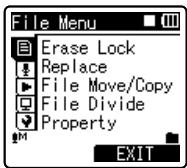
FileMenu
Erase Lock
Locking a file keeps important data from being accidentally erased. Locked files are not erased when you select to erase all files from a folder (P.42).
[On]:
Locks the file and prevents it from being erased.
[Off]:
Unlocks the file and allows it to be erased.
Replace
Refer to "Rearranging files [Replace]" (P.56).
File Move/Copy (For DM-550)
Refer to "Moving/Copying Files [File Move/Copy]" (E5P.57).
File Divide (For DM-550)
Refer to "Splitting Files [File Divide]" (E5 P.59).
Property
File and folder information can be confirmed from the menu screen.
When the file is selected:
[Name] (File name), [Date] (Time stamp), [Size] (File size), [Bit Rate]1 (File format) [Artist]2 (Artist name) and [Album]*2 (Album name) will appear on the display.
1 When a linear PCM format file has been selected, [Bit Rate] area displays the sampling frequency and bit rate.
2 When a file contains no tag information, [UNKNOWN_ARTIST], [UNKNOWN_ALBUM] will appear on the display. When voice file is selected, [Artist] and [Album] will not appear on the display.
When the folder is selected:
[Name] (File name), [Folder] (Number of folder) and [File]*1 (Number of file) will appear on the display.
*1 Files which cannot be recognized by this recorder are not included in the number of files.
- Select the files for which you would like to confirm information in advance before operating the menu.
RecMenu
MicSense
Microphone sensitivity is adjustable to meet recording needs.
[High]:
Highest recording sensitivity suitable for conferences with large crowds and recording audio at a distance or low volume.
[Middle]:
Suitable for recording meetings and seminars with a small number of people.
[Low]:
Lowest recording sensitivity suitable for dictation.
- When you would like to clearly record a speaker's voice, set [Mic Sense] to [Low] and hold recorder's built-in stereo microphone close to the speaker's mouth (5-10 cm) before recording.
RecMode
The recorder can record in the linear PCM format (For DM-550). High resolution recording at a high sampling rate and high bit rate equivalent or superior to that of a music CD is possible. Moreover, it also supports the MP3 and WMA formats.
1 Select the recording format.
[PCM]:
This is an uncompressed audio format which is used for music CDs and the like.
[MP3]:
MPEG is the international standard established by a working group of the ISO (International Organization for Standardization).
[WMA]:
This is an audio compression encoding method that was developed by the Microsoft Corporation in the US.
2 Select the recording rate.
[PCM]: [48kHz/16bit] or [44.1kHz/16bit]
[MP3]: [320kbps] to [128kbps]
[WMA]: [STXQ],[STHQ],[STSP], [HQ], [SP], [LP]
To record a meeting and lecture clearly, set other than [LP] in Rec Rate.
- When the external monaural microphone is used while [Rec Mode] is set to a stereo recording mode, it enables recording only with the L channel microphone.
Set the method for adjusting the recording level [Rec Level] (For DM-550)
You can set the device to automatically or manually adjust the recording level.
[Manual]:
Recording is performed by manually adjusting the recording level.
[Auto]:
Recording is performed by automatically adjusting the recording level. This is useful for when you will be recording right away.
Adjust the recording level:
Press the or button while the recorder is recording or paused to adjust the recording level.
- The recording level will be automatically adjusted when the recording level is set to [Auto]. Set the recording level to [Manual] to use the recording level adjustment feature.
-
When the unit is set to [Manual], the limiter function will be disabled. Distorted sound will be recorded during [OVER] is displayed. Adjust the recording level so that [OVER] is not displayed.
-
[OVER] may be displayed even when the indicator of the recording level meter does not reach or is over to the right. If sound distortions do not disappear even after the recording level has been adjusted, change the setting for microphone sensitivity (eP47) and adjust the recording level again.
- Inputting a very loud sound may produce noise even when the recording level is set to [Auto].
- The level can be adjusted from [01] to [16]. The higher the number, the higher the level and the larger the indicator position on the level meter.
Zoom Mic
The directional microphone function utilizes DiMAGIC's (DiMAGIC Co., Ltd.) DiMAGIC Virtual Microphone (DVM) technology. DVM is an audio pickup system which allows you to record by focusing on sound from any direction. From expansive stereo recording to high directivity recording, DVM represents the latest in directional control methods that allow you to switch to a single exclusive microphone.
[Zoom]:
Recording with monaural, however you can record high directivity sound.
[Narrow]:
Recording by a directivity stereo sound.
[Wide]:
Recording by an expansive stereo sound.
[Off]:
Disables this function.
Low Cut Filter
The recorder has a Low Cut Filter function to minimize low-frequency sounds and record voices more clearly. This function can reduce noise from air conditioners, projectors and other similar noises.
[On]: Enables the Low Cut Filter function.
[Off]: Disables this function.
VCVA
When the microphone senses that sounds have reached a preset threshold volume level, the built-in Variable Control Voice Actuator (VCVA) starts recording automatically, and stops when the volume drops below the threshold level. The VCVA feature extends recording time and conserves memory by stopping recording during silent periods, which helps the playback to be more efficient.
[On]: Enables the VCVA function. Will start recording in VCVA mode.
[Off]: Disables this function. Will resume recording in normal mode.
Adjust the start/stop actuation level:
1 Press the R recording.
- When the sound volume is lower than the preset threshold sound level, recording automatically stops after 1 sec approximately, and [Standby] flashes on the display. The recording indicator light glows when recording starts and flashes when recording pauses.
Press the or button adjust the start/stop actuation level.
The VCVA level can be set to any of 15 different values.
- The higher the value, the more sensitive the recorder to sounds. At the highest value, even the faintest sound will activate recording.
Level meter (varies according to the sound volume being recorded)
b Start level (moves to the right/left according to the set level)
Start level/Recording level switch button (Only when [VCVA]:[On],[Rec Level]:[Manual] is set, it is displayed.)
- Press the F1 button to change the recording level during VCVA recording. The recording level can be adjusted.
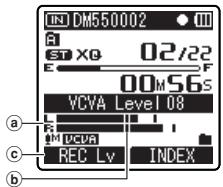
- The start/stop actuation level also varies depending on the selected microphone sensitivity mode (P47).
- If the starting level is not adjusted within 2 seconds, the display will return to the previous.
- If the surrounding noise is loud, the starting sensitivity of the VCVA can be adjusted according to the recording situation.
- To ensure successful recordings, prior testing and adjustment of the start/stop actuation level is recommended.
VCVA standby monitor setting:
When [Standby] is set to [On] with the menu setting, the recording will not be output from the microphone while in VCVA standby. When you monitor your recording with the microphone connected, you can check whether VCVA is launched or not by checking if an audio is output.
[On]:
Enables the Standby Monitor function.
[Off]:
Disables this function.
Timer Rec
Refer to "Timer Recording [Timer Rec]" (P.60).
RecScene
Refer to "Setting the Recording Scene [Rec Scene]" (P.62).
Play Menu
Noise Cancel!
If recorded audio is difficult to understand because of noisy surroundings, adjust the Noise Cancel setting level.
[High] [Low]:
Enables the Noise Cancel function. Noise will be reduced in the file when it's played back for better sound quality.
[Off]:
Disables this function.
- When [Noise Cancel] is set to [Low] or [High], [Voice Filter] [EUPHONY] and [Play Speed] functions will not function. To use these functions, set [Noise Cancel] to [Off].
EUPHONY
This recorder is equipped with "EUPHONY MOBILE", the latest in surround sound systems which combines bandwidth correction, expansion technology, and virtual acoustical source processing technology. In addition to its natural, expansive feel, the recorder is equipped with the exceptional feature wherein listeners are less prone to developing an compressed or closed-in feel, or to growing tired over extended listening.
On top of this, listeners are less prone to developing an oppressed or closed-in feel, or to growing tired over extended listening. Level adjustments of the [EUPHONY] setting can be set to four stages according to preference.
[Power]:
This mode focuses more on lower sound registers.
[Wide]:
This mode has an even more expansive feel.
[Natural]:
This mode achieves natural bandwidth correction and acoustical field expansion.
[Off]:
Disables this function.
The [EUPHONY] feature is not available while [Play Speed] (P.51), [Noise Cancel] (P.50) and [Voice Filter] is set.
Voice Filter
The recorder has a Voice Filter Function to cut low and high frequency tones during normal, fast, or slow playback, and enable clear audio playback.
[On]:
Enables the Voice Filter function.
[Off]:
Disables this function.
- When [Voice Filter] is set to [On], [Noise Cancel] and [EUPHONY] will not function. To use this functions, set [Voice Filter] to [Off].
Play Mode
You can select the playback mode that fits your preference.
Select the desired playback range:
7 Select [Play Area].
2 Select [File], [Folder] or [All].
[File]: Selects the current file.
[Folder]: Selects the current folder.
[All]: Selects all files in the internal memory.
Select the desired playback mode:
1 Select [Repeat] or [Random].
[Repeat]:
Sets to repeat playback mode.
[Random]:
Sets to random playback mode.
2 Select [On] or [Off].
[On]:
Sets the playback range to be played back repeatedly or randomly.
[Off]:
Disables this function.
- In [File] mode, when the recorder comes to the end of the last file in the folder, [End] flashes for two seconds on the display and the recorder stops at the start of the last file.
- In [Folder] mode, when the recorder comes to the end of the last file in the folder, [End] flashes for two seconds on the display and the recorder stops at the start of the first file in the folder.
- In [All] mode, after playing the last file in the folder, the recorder will start playing from the first file in the next folder. When it comes to the end of the last file in the recorder, [End] flashes for two seconds on the display and the recorder stops at the start of the first file in the recorder.
Play Speed
The playback speed of the file can be changed between [0.5] and [2] times speed. Change the speed according to need such as listening to meeting content at a fast speed or reviewing spots that you couldn't catch in a language lesson at a slow speed. The tone will be automatically adjusted digitally without changing the voice so it sounds natural.
1 Select [Slow Playback] or [Fast Playback].
2 Set the playback speed.
When [SlowPlayback] is selected: Speed at interval of 0.05 times can be selected between [x0.50] and [x0.95].
When [Fast Playback] is selected: Speed at interval of 0.05 times can be selected between [x1.05] and [x2.00].
Change Playback Speed:
Press the PLAY or OK button to start playback.
Press the PLAY▶ button to switch playback speed.
Every time the PLAY button is pressed, the playback speed will switch.
Even if playback is stopped, the changed playback speed will be retained. The next playback will be at that speed.
Normal playback: Playback at normal speed.
Slow playback:Playback speed slows down, and [串 ] will appear on the display (default at 0.75 times as fast).
Fast playback:Playback speed becomes faster,and [+] will appear on the display (default at 1.50 times as fast).
Restrictions on double speed playback: Normal operation may not be available depending on the sampling frequency and the bit rate of the file to be played back. In such a case, reduce the speed of the fast playback.
- As in normal playback mode, you can stop playback, cue a file, or insert an index mark (P.38) in slow playback and fast playback modes as well.
- The slow playback or fast playback is available even if either [Voice Filter] (E3, P.50) is set.
- The slow playback or fast playback is not available if either [Noise Cancel] (P.50) or [EUPHONY] (P.50) effect is set.
Skip Space
This function enables you to skip (forward) or reverse skip (rewind) a file being played for a set period. This function is convenient for quickly skipping to another playback position or repeatedly playing back short phrases.
1 Select [Forward Skip] or [Reverse Skip].
2 Set the skip space.
When [Forward Skip] is selected:
[File Skip] [10sec. Skip] [30sec. Skip]
[1min. Skip] [5min. Skip]
[10min. Skip]
When [Reverse Skip] is selected:
[File Skip] [1sec. Skip] - [5sec. Skip]
[10sec. Skip] [30sec. Skip]
[1min. Skip] [5min. Skip]
[10min. Skip]
Forward/Reverse Skip Playback:
Press the PLAY or OK button to start playback.
2 Press the or button.
-
The recorder will skip (forward) or reverse skip (rewind) a set space and start playing back.
-
If there is an index mark/temp mark or a cue closer than the skip space, the recorder will forward skip/reverse skip to that position.
Alarm
Refer to "Alarm Playback Function [Alarm]" (P.64).
Play Scene
Refer to "Setting the Playback scene [Play Scene]" (K3 P.66).
LCD/Sound Menu
Backlight
The display will remain lit for about 10 (Initial setting) seconds when a button on the recorder is pressed.
1 Select [Lighting Time] or [Brightness].
2 Set the lighting time.
[Off]:
Disables this function.
[5seconds] [10seconds] [30seconds]
[1minutes]:
Enables the Backlight function.
3 Set the brightness.
[High] [Low]:
Sets the brightness of the backlight when lit.
Contrast
Display contrast can be adjusted in 12 levels. You can adjust the LCD display contrast level from [01] to [12].
LED
You can set it so the LED indicator light does not turn on.
[On]:
LED light will be set.
[Off]:
Disables this function. LED light will be cancelled.
Beep
The recorder beeps to alert you to button operations or warn you of errors. System sounds may be turned off.
[Volume3]:
Increase the volume of beeps.
[Volume2]:
Return the volume of beeps to normal.
[Volume1]:
Decrease the volume of beeps.
[Off]:
Deactivate beeps.
Language (Lang)
You can select the display language for this recorder.
[English] [Français] [Deutsch] [Italiano]
[Espanol] [PyccknM] [中文]:
- The selectable language differs depending on the region.
Guidance
Refer to "Guidance [Voice Guide]" (P.68).
Intro Play (For DM-550)
You can listen to the first few seconds of a file by touching the cursor to a file within a folder. This feature is convenient when looking for files.
[10seconds]:
The first 10 seconds of a file will be played.
[Seconds]:
The first 5 seconds of a file will be played.
[Seconds]:
The first 3 seconds of a file will be played.
[Off]:
Disables this function.
Device Menu
Memory Select
When an microSD card is inserted you can select to record to either the built-in memory or to the microSD card (P.22). [Built-in Memory]:Built-in memory. [microSD Card]:microSD card.
Changing Power Save [Power Save]
Forgetting to turn the power off can be prevented. If the recorder remains in stop mode for over 10 minutes (Initial setting) while the power is turned on, the power will be turned off.
[5minutes] [10minutes] [30minutes]
[1hour]:
Set the length of time before the power will be turned off.
[Off]:
Disables this function.
- If any button is pressed, the elapsed time count before the power turns off will start over again.
Changing Folder Names [Folder Name]
You can change the folder names of Folder A to Folder B for audio recording into names preset in the template. You can also change folder names registered in the template with "Olympus Sonority".
[Settings]:
Sets a folder name from the preset template.
Time & Date
Refer to "Setting time and date [Time & Date]" (s.p. P.20).
USB Class [USB Settings]
Refer to "Changing the USB Class [USB Settings]" (E P.69).
Reset Settings
This returns the functions back to their initial settings (factory default).
[Start]:
Returns the settings to their initial values.
[Cancel]:
Takes you back to the [Device Menu].
- After resetting the settings, the time settings and file numbers will be preserved from before the reset and will not return to their initial settings.
Menu settings after setting reset (initial settings):
Rec Menu:
| [Mic Sense] | [Middle] |
| [Rec Mode] | |
| [Recording format] | [WMA] |
| [Recording rate] | [ST XQ] |
| [Rec Level] | [Auto] |
| [Zoom Mic] | [Off] |
| [Low Cut Filter] | [Off] |
| [VCVA] | |
| [On/Off] | [Off] |
| [Standby] | [Off] |
Play Menu:
| [Noise Cancel] | [Off] |
| [EUPHONY] | [Off] |
| [Voice Filter] | [Off] |
| [Play Mode] | |
| [Play Area] | [File] |
| [Repeat] | [Off] |
| [Random] | [Off] |
| [Play Speed] | |
| [Slow Playback] | [x0.75 Play] |
| [Fast Playback] | [x1.50 Play] |
| [Skip Space] | [File Skip] |
LCD/Sound Menu:
[Backlight]
[Lighting Time]
[Brightness]
[Contrast]
[LED]
[Beep]
[Language(Lang)]
[Voice Guide]
[ON/OFF]
[Speed]
[Volume]
[Intro Play]
[10seconds]
[Low]
[Level 06]
[On]
[Volume2]
[English]
[On]
[Speed3]
[Volume3]
[Off]
Device Menu:
[Memory Select]
[Power Save]
[Folder Name]
[USB Settings]
[USB Connect]
[USB Class]
[Built-in Memory]
[10minutes]
[Initial setting]
[PC]
[Storage Class]
Format
Refer to " Formatting the recorder [Format]" (P.71).
Memory Info.
The recordable capacity remaining and overall capacity of the recording media can be seen from the menu screen.
- When no microSD card is inserted only information for the built-in memory will seen.
- The domain area which uses the administrative files which the recorder uses is included in the remaining capacity for the recording media. For microSD cards in particular, in addition to this administrative domain the administrative domain area for the microSD card is added in as well. Owing to this, the remaining capacity will be displayed as less than the card's specified capacity, yet this is not abnormal.
System Info.
You can check the recorder's information on the menu screen. [Model] (Model Name), [Version] (System version) and [Serial No.] (Serial Number) appears on the display.
Rearranging files [Replace]
You can move a file in a folder to change the order of playback. First select the folder (file) for which you want to change the playback order. The song order can be changed by using the provided "Olympus Sonority" software.
![OLYMPUS DM-450 - Rearranging files [Replace] - 1](/content/2025/01/125238/images/fc7ffd091a453e0b43d55644872132b94124d2372d52b70c0e5b8063af41d193.jpg)
1 Select the folder for which you would like to rearrange the song order (P.24 to P.27).
2 Select [Replace] from the menu on the [File Menu].
- Please refer to P.44, P.45 for details on menu settings.
3 Press the ^+ or - button to select the file you want to move.
![OLYMPUS DM-450 - Rearranging files [Replace] - 2](/content/2025/01/125238/images/2623cc9f0b29c99352a504fd3312adc532fbc8dfe9b8c74dd47660b70570124d.jpg)
4 Press the OK or button.
- The cursor will flash to confirm that the file can be moved.
![OLYMPUS DM-450 - Rearranging files [Replace] - 3](/content/2025/01/125238/images/e3e22853220024a4ab3714afc4b2c9cd5a62fcd5e6361a2404f4c9ac1cc600d7.jpg)
Press the + or - button to select the location to move it to.
![OLYMPUS DM-450 - Rearranging files [Replace] - 4](/content/2025/01/125238/images/1d3e5c25e5db979a71ea1b778213f4f6afa7137b7cd1302735bfaa1895f6fc22.jpg)
6 Press the OK button to complete the setting.
- If there are more files to move, repeat Steps 3 through 6.
- Pressing the 1 button without pressing the OK button will cancel the settings and return you to the previous screen.
![OLYMPUS DM-450 - Rearranging files [Replace] - 5](/content/2025/01/125238/images/8fbded8e543b107e907b099126863fee3a68f542e97353bb6830022335bdc5e9.jpg)
7 Press the F2 or STOP button to complete the setting.
Moving/Copying Files [File Move/Copy] (For DM-550)
Files saved in the built-in memory or the microSD card can be moved or copied within the memory. Files can also be moved or copied between memory.
![OLYMPUS DM-450 - Moving/Copying Files [File Move/Copy] (For DM-550) - 1](/content/2025/01/125238/images/5a1757d650e5e8e65f9c5db2563d6967935de35470a2ac1f14f84dcc1e63387c.jpg)
1 Select the folder where the file you want to move or copy is saved.
2 Select [File Move/Copy] from the menu on the [File Menu].
- Please refer to P.44, P.45 for details on menu settings.
3 Press the + or - button to select the position to move or copy the file to.
![OLYMPUS DM-450 - Moving/Copying Files [File Move/Copy] (For DM-550) - 2](/content/2025/01/125238/images/97b944ff89cf44f6eadc5f557ebc9d7d4c6a0cddc9c09c7a78be56f92f29275c.jpg)
[move > memory]:
Move a file in the built-in memory or microSD card to another folder within the built-in memory.
[copy > memory]:
Copy a file in the built-in memory or microSD card to another folder within the built-in memory.
[move > microSD]:
Move a file in the built-in memory or microSD card to another folder in the microSD card.
[copy microSD]:
Copy a file in the built-in memory or microSD card to another folder in the microSD card.
4 Press the OK or button.
- [Move] will appear on the display.
![OLYMPUS DM-450 - Moving/Copying Files [File Move/Copy] (For DM-550) - 3](/content/2025/01/125238/images/2eadab24897e1ded1c7def8d10a3f1f8691cbfa81b0316ac751f22988f087169.jpg)
Press the ^+ or - button to select the number of files to move or copy.
[1file]:
Select only the specified file.
[Selected files]:
Select multiple files.
[All files]:
Select all files in the folder.
6 Press the OK or button to move to the respective setting.
When you select [1file]:
① Press the + or - button to select the file you want to move or copy.
② Press the OK button to select the file. Proceed to Step 8.
When you select [Selected files]:
① Press the + or - button to select the file you want to move or copy.
② Press the OK or button to check the file(s) selected.
![OLYMPUS DM-450 - When you select [Selected files]: - 1](/content/2025/01/125238/images/479793fd73629e3e3ce1a3c47b7e972a219b458c76c8af4ba7d69c329ae2bfc3.jpg)
When you select [All files]:
When all files are selected, all the files in the folder will be automatically selected and the recorder will move to the [Folder to move] screen. Proceed to Step 8.
7 Press the F2 button.
The recorder will move to the [Folder to move] screen.
Press the I, or + - button to select the folder you want to move or copy the file to.
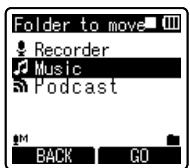
9 Press the F2 button.
- [Moving!] or [Copying!] will appear on the display and moving or copying will start. During the process, the progress status will be shown in percentage. The process is completed when [File move completed] or [File copy completed] is displayed.
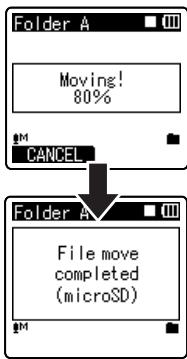
Notes
- The recorder cannot copy when the memory capacity is not sufficient.
The recorder cannot move or copy when the number of file exceeds 999. - Do not remove the batteries during moving or copying. This may damage the datas.
- A file cannot be moved or copied to the same folder.
- When the operation is cancelled during moving or copying, only the file that is being moved or copied is effective, all other files will become not effective.
- Files which are locked will remain so even after they are moved or copied.
- DRM files cannot be moved or copied.
- Files cannot be moved or copied directly under the [Recorder] folder.
Splitting Files [File Divide] (For DM-550)
PCM files recorded in this recorder can be split.
Files with large capacities and long recording times can be split so that they are easier to manage and edit.
![OLYMPUS DM-450 - Splitting Files [File Divide] (For DM-550) - 1](/content/2025/01/125238/images/4399a3501865d4fbb97e22948809bf2afefc7d0418dc6a954bd61210f34e04f3.jpg)
1 Select the PCM file you want to split, play or fast-forward the file and stop at where you want to split the file.
- Files with the recording mode of [PCM48k] or [PCM44.1k] are files recorded in the PCM format.
2 While file display appears, select [File Divide] in the [File Menu] in the menu.
- Please refer to P.44, P.45 for details on menu settings.
![OLYMPUS DM-450 - While file display appears, select [File Divide] in the [File Menu] in the menu. - 1](/content/2025/01/125238/images/ecfc284f14e10fbe70e655d56dbc75ce7a8d67662850e9ef021b657c0dfbdb67.jpg)
3 Press the ^+ button to select [Start] and then press the OK button.
- [Dividing!] will be displayed and file splitting will start. Splitting is completed when [File divide completed] is displayed.
![OLYMPUS DM-450 - Press the ^+ button to select [Start] and then press the OK button. - 1](/content/2025/01/125238/images/93673be1f17ab9cec0be0819ef2f220b344fdc720a2febdbfbf1f85800760e87.jpg)
Notes
- The file split cannot be done when the file list is displayed.
The recorder cannot split files when the number of files in the folder exceeds 998. - Locked files cannot be split.
After a file has been split, the original file will be renamed [File name_1.WAV] and the new file will be named [File name_2.WAV] - If a file has an extremely short recording time, it may not be split even if it is a PCM file.
- Do not remove the batteries during splitting file. This may damage the data.
Timer Recording [Timer Rec]
Timer recording is the function to execute a recording at a set time. You can program up to three desired settings (Preset 1-3) ([On/Off], [Day], [Time], [Rec Mode], [Folder], and [Mic Sense]).
![OLYMPUS DM-450 - Timer Recording [Timer Rec] - 1](/content/2025/01/125238/images/3758c79186f61254a7897b0628dbf9eb371bb9b3244a30c4d869762853cd6673.jpg)
1 Select [Timer Rec] from the menu in [Rec Menu].
- Please refer to P.44, P.45 for details on menu settings.
![OLYMPUS DM-450 - Select [Timer Rec] from the menu in [Rec Menu]. - 1](/content/2025/01/125238/images/3b6874de878371800c1e659649548563d9df35fbd8325ae2f4e93273c1212784.jpg)
Press the + or - button to select a preset number.
- Press the button to show the [Day] and the [Time] set for the preset number the cursor is pointing at.
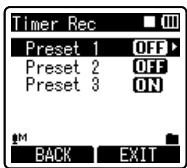
3 Press the OK button.
4 Press the + or - button to select the item to set.
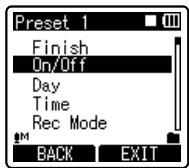
- Select items you want to set from among [On/Off], [Day], [Time], [Rec Mode], [Folder], and [Mic Sense].
- Select [Finish] to complete the setting and return to the preset number selection display in Step 2.
Press the OK or button to move to the respective setting.
[On/Off] setting:
① Press the + or - button to select between [On] and [Off].
[On]: Setting will be applied.
[Off]: Setting will not be applied.
② Press the OK button to exit [On/Off] selection.
[Day] setting:
① Press the + or - button to select from [One Time], [Everyday], and [Every Week].
[One Time]: Records only once at the specified time.
[Everyday]: Records every day at the specified time.
[Every Week]: Make a recording at a set time on a specified day of the week.
Select [Every Week] and press the OK button to move to the selection of [Day]. Press the + or - button to select a day of the week.
② Press the OK button to exit [Day] selection.
[Time] setting:
① Press the or button to select "Hour" and "Minute" in the [Start Time] and "Hour" and "Minute" in the [Stop Time].
(2) Press the + or - button to set.
③ Press the OK button to exit [Time] selection.
[Rec Mode] setting:
Regardless of the regular [Rec Mode] (P47), timer recording will start in a set recording mode.
① Press the + or - button to select a recording mode.
② Press the OK or button.
③ Press the + or - button to select a recording rate.
(4) Press the OK button to exit Recording mode selection.
[Folder] setting:
① Press the + or - button to select the destination to save to (Memory) (For DM-550)
② Press the OK or button to move to the [Folder] setting.
③ Press the ^+ or - button to select the destination to save to (Folder).
④ Press the OK button to exit [Folder] setting selection.
[Mic Sense] setting:
Regardless of the recorder's microphone sensitivity setting ( ^空 P.47), timer recording will start at a set microphone sensitivity.
① Press the + or - button to select from [High], [Middle], and [Low].
② Press the OK button to exit [Mic Sense] selection.
6 Completing the setting.
① Pressing + or - button to select [Finish].
② Press the OK button to complete the setup screen.
Programmed settings will be applied and the screen will return to the preset number selection menu. If the [On/Off] setting is set to [On], ON will appear on the display.
(a) When setting to [On]
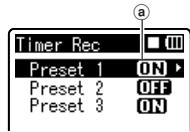
When setting other preset numbers, repeat Steps 2 through 6.
When the button is pressed in the Select in Advance Menu, the settings selected can be confirmed.
Press the F2 or STOP button to complete the setting.
- The will appear on the display.
Notes
- If the recorder is in use at the preset start time, the timer recording will start directly after stopping the recorder.
- Even if the power if turned off or the recorder is put on Hold, timer recording will start at a specified time.
- If three timer recordings have the same starting times, [Preset 1] has the highest priority and [Preset 3] has the lowest.
- If the starting time for timer recording and alarm playback (eP.64) is set for the same time, timer recording will have priority.
-
If the batteries run out while recording based on the timer setting, the recorder will stop recording. Check the battery power before starting the timer recording.
-
If the [Time & Date] is not correct, timer recording cannot be set at the specified time, so make sure the [Time & Date] is correct before setting timer recording. If it is not correct, reset [Time & Date] (P.20).
- The recorder will record in the built-in memory [Folder A] when the microSD card is selected as the recording destination and the microSD card is not inserted during Timer Recording.
Setting the Recording Scene [Rec Scene]
The recording setting can be selected from the [Dictation], [Conference], [Lecture] templates to suit the recording scene or situation. You can also save a recording setting of your choice.
![OLYMPUS DM-450 - Setting the Recording Scene [Rec Scene] - 1](/content/2025/01/125238/images/2d2db422a2587843674433076ed1246fcf6a8e704b647a64ef1b02093621c796.jpg)
1 Select [Rec Scene] from the menu in [Rec Menu].
- Please refer to P.44, P.45 for details on menu settings.
![OLYMPUS DM-450 - Select [Rec Scene] from the menu in [Rec Menu]. - 1](/content/2025/01/125238/images/ee889aef5e281362c11e8d2f92b347795f5827b2653ccdd7009d223856ab12bc.jpg)
Press the + or - button to select the item to set.
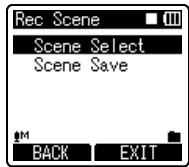
Press the OK or button to move to Settings.
When [Scene Select] is selected:
① Press the + or - button to select the recording scene you want to set.
② Press the OK button to complete the selection.
- To confirm the respective recording scene settings, press the + or - button in the [Scene Select] screen to select the item you want to confirm, then press the▶按钮 to confirm in the setting confirmation screen. To end the setting confirmation screen, press the F1 button and the display will return to the [Scene Select] screen.
- When the recorder is stopped, pressing and holding the F2 button will return the screen to [Scene Select].
![OLYMPUS DM-450 - When [Scene Select] is selected: - 1](/content/2025/01/125238/images/8d062e2982df2ab460892012e7dc69126d9b68a412a200b1e4801d444c4cdde3.jpg)
When [Scene Save] is selected:
Besides the [Rec Scene] templates found in the recorder, you can also save the menu settings of a recording you have set to your choice.
① Press the + or - button to select the [User Setting] you want to save.
② Press the OK button to complete the settings.
![OLYMPUS DM-450 - When [Scene Save] is selected: - 1](/content/2025/01/125238/images/51978e4386650a70989488abc2592529782276bef1d5e5b8b4f784d4a3a50d4e.jpg)
4 Press the F2 or STOP button to complete the setting.
Template for Setting a Recording scene
In [Scene Select], you can select a recording scene that is most suitable for the recording scene or situation from three templates. The recording settings for the respective recording scenes are as follows.
| Record Setting | Recording Scene | |||
| Off | Dictation | Conference | Lecture | |
| [Mic Sense] | Middle | Low | Middle | High |
| [Rec Mode] | ST XQ | HQ | ST XQ | ST XQ |
| [Rec Level] | Auto | Auto | Auto | Auto |
| [Zoom Mic] | Off | Off | Wide | Zoom |
| [Low Cut Filter] | Off | On | On | On |
| [VCVA] | Off | Off | Off | Off |
| [Standby] | On | On | On | On |
Alarm Playback Function [Alarm]
The alarm playback function can be set to play a selected file at a pre-set time.
You can program up to three desired settings (Preset 1-3) ([On/Off], [Day], [Start Time], [Volume], [Alarm Sound] and [Playback File]).
![OLYMPUS DM-450 - Alarm Playback Function [Alarm] - 1](/content/2025/01/125238/images/5d4b1d1abbc0d0e397fd78a96b1cbc3fa6c39995bbae5b2f1cc0b617dbda587c.jpg)
1 Select [Alarm] from the menu in [Play Menu].
- Please refer to P.44, P.45 for details on menu settings.
![OLYMPUS DM-450 - Select [Alarm] from the menu in [Play Menu]. - 1](/content/2025/01/125238/images/1cb6a75620d20541bf957b66a126715af361127b368500d306d7b6dea18c27e9.jpg)
Press the + or - button to select a preset number.
- Press the button to show the [Day] and the [Start Time] set for the preset number the cursor is pointing at.
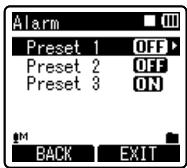
Press the OK button.
4 Press the + or - button to select the item to set.
- Select items you want to set from among [On/Off] [Day] [Start Time] [Volume] [Alarm Sound] [Playback File].
- Select [Finish] to complete the setting and return to the preset number selection display in Step 2.
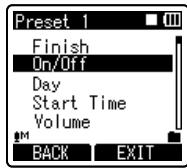
Press the OK or button to move to the respective setting.
[On/Off] setting:
① Press the + or - button to select between [On] and [Off].
[On]: Setting will be applied.
[Off]: Setting will not be applied.
(2) Press the OK button to exit [On/Off] selection.
[Day] setting:
① Press the + or - button to select from [One Time], [Everyday], and [Every Week].
[One Time]: Alarm Playback will be performed only once at the specified time.
[Everyday]: Alarm Playback will be performed at the specified time every day.
[Every Week]: Make a Alarm Playback at a set time on a specified day of the week.
Select [Every Week] and press the OK or button to move to the selection of [Day]. Press the + or - button to select a day of the week.
② Press the OK button to exit [Day] selection.
[Start Time] setting:
① Press the▶or I按钮 to select "Hour" and "Minute" in the [Start Time] and "Hour" and "Minute" in the [Stop Time].
② Press the + or - button to set.
③ Press the OK button to exit [Start Time] selection.
[Volume] setting:
① Press the + or - button to adjust the volume. Press the PLAY▶ button to check the volume.
② Press the OK button to exit [Volume] selection.
[Alarm Sound] setting:
① Press the + or - button to select an alarm sound from among [Alarm1], [Alarm2] and [Alarm3]. Press the PLAY button to check the alarm sound.
② Press the OK button to exit [Alarm Sound] selection.
[Playback File] setting:
① Press the ^+ or - button to select from [No File Play], [File Select]. [No File Play]: Sounds alarm only. [File Select]: Plays back a selected file after the alarm.
- When [File Select] is selected and the OK or button is pressed, the recorder will move to the [Memory Select] setting.
- Select the memory with an alarm playback file using the + or - button and press the OK or button. The recorder will move to the folder settings with the file with alarm playback.
- Select the folder using the + or - buttons and press the OK or button to move to file selection.Use the + or - button to select the file in the same way.
② Press the OK or button to exit [Playback File] selection.
6 Completing the setting.
① Pressing ^+ or - button to select [Finish].
② Press the OK or button to complete the setup screen.
Programmed settings will be applied and the screen will return to the preset number selection menu. If the [On/Off] setting is set to [On], ON will appear on the display.
a When setting to [On]
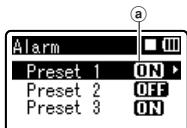
When setting other preset numbers, repeat Steps 2 through 6.
When the button is pressed in the Select in Advance Menu, the settings selected can be confirmed.
7 Press the F2 or STOP button to complete the setting.
The () will appear on the display.
Notes
- If [Everyday] is selected, the alarm will sound at the scheduled time every day unless alarm playback is canceled.
- The alarm will sound for five minutes and then stop. Even if a file is selected for AlarmPlayback, it will not be automatically played when the alarm sounds.
- If three alarm playback have the same starting times, [Preset 1] has the highest priority and [Preset 3] has the lowest.
- If the recorder is in use or if operations are being performed at the scheduled time, the Alarm Playback function will not be available.
- The alarm will sound at the scheduled time even if the power is turned off or the recorder is set to Hold mode. The recorder begins to play the selected file when you press any button, and stops playing when you press the STOP button.
- If the selected file is moved, erased or the microSD card removed, file playback will not be performed and only the alarm will sound.
- If the starting times for timer recording and alarm playback are set for the same time, timer recording will have priority.
- If the recorder is formatted (P.71), alarm data will also be erased, so you won't be able to set an alarm. When the data has been erased by accident, connect to PC and copy the alarm sound data to the recorder by using supplied "Olympus Sonority" (P.90).
Setting the Playback scene [Play Scene]
Voice files recorded in the recorder and music files downloaded from the PC can be saved in the playback settings of your choice to suit the different sound qualities and playback methods.
![OLYMPUS DM-450 - Setting the Playback scene [Play Scene] - 1](/content/2025/01/125238/images/661277bab16dde9fb1aea5d834febf0a59728324235bc31705068ca74e0efc5c.jpg)
1 Select [Play Scene] from the menu in [Play Menu].
- Please refer to P.44, P.45 for details on menu settings.
![OLYMPUS DM-450 - Select [Play Scene] from the menu in [Play Menu]. - 1](/content/2025/01/125238/images/d11514e281457b34db4e98a70d46cd5ede3d9057399968ae855966f426c2c028.jpg)
Press the ^+ or - button to select the item to set.
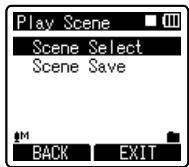
Press the OK or button to move to Settings.
When [Scene Select] is selected:
① Press the + or - button to select the playback scene you want to set.
② Press the OK button to complete the selection.
After purchase, all the settings from 1 to 5 of [User Setting] are the same (initial settings). Register the user settings in the [Scene Save] then select playback scene.
- To confirm the respective playback scene settings, press the + or - button in the [Scene Select] screen to select the item you want to confirm, then press the▶I button to confirm in the setting confirmation screen. To end the setting confirmation screen, press the F1 button and the display will return to the [Scene Select] screen.
![OLYMPUS DM-450 - When [Scene Select] is selected: - 1](/content/2025/01/125238/images/9694b43578e944c3a3450308bdf80b758e3981bed1a4c8457c5fc27cc28e4e43.jpg)
When [Scene Save] is selected:
You can save the menu settings of a playback you have set to your choice.
① Setting the menu of a playback in the recorder to your choice.
② Press the + or - button to select the [User Setting] you want to save.
③ Press the OK button to complete the settings.
- When the recorder is stopped, pressing and holding the F2 button will return the screen to [Scene Select].
![OLYMPUS DM-450 - When [Scene Save] is selected: - 1](/content/2025/01/125238/images/48f956a4e486992e46943a925c23f8d2e7dd9552afde11d4c8a3cfc913e6303a.jpg)
Press the F2 or STOP button to complete the setting.
Guidance [Voice Guide]
This feature gives audio announcements of recorder operating conditions. Adjust the speed and the volume of guidance announcements.
![OLYMPUS DM-450 - Guidance [Voice Guide] - 1](/content/2025/01/125238/images/0df3ac6a986967b24ef1d6dd25550318b9a5b3bdb17f3d9b08af23f1918908d1.jpg)
1 Select [Voice Guide] from the menu in [LCD/Sound Menu].
- Please refer to P.44, P.45 for details on menu settings.
![OLYMPUS DM-450 - Select [Voice Guide] from the menu in [LCD/Sound Menu]. - 1](/content/2025/01/125238/images/3b0fd9a9d69082794ae036e81231cb772a336f93762ec14ff30aba4ec20ce882.jpg)
2 Press the ^+ or - button to select the item to set.
- Select items you want to set from among [On/Off], [Speed] and [Volume].
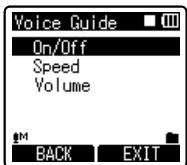
Press the OK or button to move to the respective setting.
[On/Off] setting:
① Press the + or - button to select between [On] and [Off].
[On]: Guidance will be provided.
[Off]: Guidance will be canceled.
② Press the OK button to exit [On/Off] selection.
[Speed] setting:
① Press the + or - button to select from [Speed5], [Speed4], [Speed3], [Speed2], and [Speed1].
② Press the OK button to exit [Speed] selection.
[Volume] setting:
① Press the + or - button to select from [Volume5], [Volume4], [Volume3], [Volume2], and [Volume1].
② Press the OK button to exit [Volume] selection.
4 Press the F2 or STOP button to complete the setting.
Notes
- The starting tune/closing tune when the power is turned On/Off (E P.18) can be canceled if you set the guidance to [Off].
- If the recorder is formatted (e35 P.71), when the data has been erased by accident, connect to PC and copy the guidance data to the recorder by using supplied "Olympus Sonority" (e35 P.90).
- Set the starting tune/closing tune at the guidance [Volume] setting.
Changing the USB Class [USB Settings]
Besides settings such as [PC], which is using the USB cable provided to connect to the PC to transmit files, etc. and [AC Adapter], which is connecting the USB Connecting AC Adapter (A514) (optional) for charging, the USB class can be switched to suit different usages.
![OLYMPUS DM-450 - Changing the USB Class [USB Settings] - 1](/content/2025/01/125238/images/616e02ec52918ca36202a6fb972822118aa667fe80f72f2ce6c8cc55d09ddbe1.jpg)
1 Select [USB Settings] from the menu in [Device Menu].
- Please refer to P.44, P.45 for details on menu settings.
![OLYMPUS DM-450 - Select [USB Settings] from the menu in [Device Menu]. - 1](/content/2025/01/125238/images/26f4bb6d72bf535f222750f52fffd34d7e07326709f3703a296d337b68286e10.jpg)
Press the + or - button to select [USB Connect] or [USB Class].
![OLYMPUS DM-450 - Press the + or - button to select [USB Connect] or [USB Class]. - 1](/content/2025/01/125238/images/4ce6170516b6419eb6ee4f2cfd331417501f42fbe941bc44f5984f4f6d171b31.jpg)
Press the OK or button to move to the respective setting.
4 Press the ^+ or - button to select the item to set.
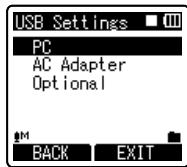
When [USB Connect] is selected:
[PC]: Setting for connecting to the PC using the USB cable provided. Connected as Storage or Composite.
[AC Adapter]: Setting for connecting to the USB connecting AC Adapter (A514) (optional) using the USB cable provided. The recorder can be operated on during charging.
[Optional]: Setting to confirm the connection method each time a USB connection is made.
When [USB Class] is selected:
[Storage Class]: Recognized as an external memory device from the PC.
[Composite]: Setting when connected to the PC and used as an external memory device, USB speaker or microphone.
Press the OK button to complete the setting.
- Pressing the F1 or l button will cancel the settings and return you to the previous screen.
6 Press the F2 or STOP button to complete the setting.
- When this recorder is connected to the computer for the first time under [Storage Class] or [Composite], the driver will be installed automatically to the computer. The display will show [Remote] when the recorder is connected to the PC.
Notes
- When the USB Connecting AC Adapter is connected in the [PC] status, the recorder will display [Please wait] and cannot be operated on. Only charging is possible.
- The PC cannot recognize when the recorder is connected to the PC when setting for the [USB Connect] is set to [AC Adapter].
- Even if the [Composite] setting is selected, the recorder will automatically switch to [Storage Class] when the connection to charge (E5P.15) is made.
- Switch to [Storage Class] when the recorder is not recognized as an external memory device by the PC even if the [Composite] setting is selected.
Formatting the recorder [Format]
If you format the recorder, all files will be removed and all function settings will return to defaults except date and time settings. Transfer any important files to a computer before formatting the recorder.
![OLYMPUS DM-450 - Formatting the recorder [Format] - 1](/content/2025/01/125238/images/591809ea47f63748e9ef240d69296e53d5dfde0d15bc497612a044128cd92bb6.jpg)
1 Select [Format] from the menu in [Device Menu].
- Please refer to P.44, P.45 for details on menu settings.
![OLYMPUS DM-450 - Select [Format] from the menu in [Device Menu]. - 1](/content/2025/01/125238/images/65f67b1e8598406b63d349729b901ec2ff82bc3dc6c6cb5f271fa799386c6393.jpg)
Press the + or - button to select the recording media to format.
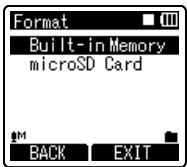
3 Press the OK button.
- [Start],[Cancel] will appear on the display.
4 Press the ^+ button to select [Start].
![OLYMPUS DM-450 - Press the ^+ button to select [Start]. - 1](/content/2025/01/125238/images/4d4b75069fc46cbe928ce1892978eb5e7ac5e4e64cbd2ec4c7ee634a0a8babc8.jpg)
5 Press the OK button.
After the [Data will be cleared] message is on for two seconds, [Start],[Cancel] will turn on.
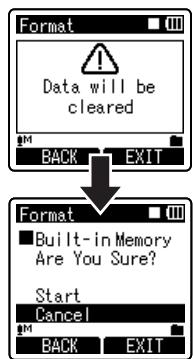
6 Press the ^+ button again to select [Start].
7 Press the OK button.
- Formatting begins and [Format!] flashes on the display.
- [Format Done] appears when formatting ends.
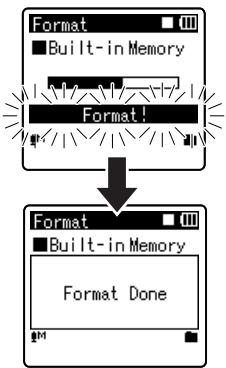
Notes
- When an microSD card is inserted in the recorder, be sure to confirm the recording media as either [Built-in Memory] or [microSD Card] so that there is no mistake (P.54).
- Never perform operations such as the following while processing, as they may damage the data. In addition, replace the batteries with two new ones in order to ensure that the batteries will not run out while processing.
(1) Unplugging the AC Adapter while processing.
② Removing the batteries while processing.
③ Remove the microSD card ard during processing when [microSD Card] is being used as the recording media. Performing any of these operations may damage the data.
- Never format the recorder from a PC.
- Once the recorder is formatted, the music files with DRM may not be transferred to the recorder again.
- When the recorder is formatted, all the saved data, including locked files and read-only files, are erased.
- After formatting, recorded voice file names may start from [0001].
- When returning the settings for the functions to their initial settings, use [Reset Settings] (w35-P.54).
- Formatting on the recorder will be Quick Format. If you format the microSD card, information of file management is refreshed and the data inside the microSD card is not deleted completely. When handing over and disposing the microSD card, be careful about the data leakage from the microSD card. We recommend the microSD card to be destroyed when you dispose the microSD card (P.22).
- If the recorder is formatted, when the data has been erased by accident, connect to PC and copy the guidance data to the recorder by using supplied "Olympus Sonority" (P.90).
Saving Files in Your PC
By being connected to a PC, the recorder enables you to do the following:
- Playback voice files on your PC (P.87). Voice files recorded using the recorder can be played using the "Olympus Sonority" software included on the provided CD-ROM or "Windows Media Player" (P.95).
- Voice files recorded on the recorder can be played and managed on the PC using the "Olympus Sonority".
- Using the "Windows Media Player", the stored WMA or MP3 files on your PC can be transferred and played back on this recorder.
- If an upgrade (Option) to the "Olympus Sonority Plus" is executed or a Music Editing Plug-in is added (Option), various additional functions can be utilized (E P.93).
Precautions on using the recorder connected to a PC
- When you are downloading a file from the recorder or uploading a file to the recorder, do not remove the USB cable even if the screen is indicating you can. Data is still being transferred while the recording indicator light is blinking. When removing the USB cable, be sure to follow the description in P.81. If the USB cable is removed before the drive is stopped, data may not be successfully transferred.
-
On a PC, do not format the drive of the recorder. Initialization is not successfully achieved on a PC. For initialization, follow the instructions in the [Format] screen of the recorder (E8 P.71).
-
Folder (directory) names displayed by file management tools such as Explorer in Microsoft Windows and Finder in Macintosh are different from the folder names that can be set with the recorder or the "Olympus Sonority".
- If folders or files stored on the recorder are moved or renamed by using a file management tool in Windows or Macintosh, the order of files may be changed or files may become unrecognizable.
- Data can be written or uploaded to the recorder even though the attribute of the recorder drive is shown as Read-only by the operating system of the PC.
- As the noise may cause adverse effects on electronics devices nearby the recorder, unplug the external microphone and earphone when you connect the recorder to a PC.
Important Notice on the Explanation of Software Functions
Function items that can be used in Windows will be displayed as Windows and function items that can be used in Macintosh will be displayed as Macintosh. Items that only have Windows or Macintosh indicated can only be supported by the target system.
Windows
Operating System:
Microsoft Windows XP Home Edition
Service Pack 2, 3
Microsoft Windows XP Professional
Service Pack 2, 3
Microsoft Windows XP Professional x64
Edition Service Pack 2
Microsoft Windows Vista Home Basic, Service Pack 1 (32bit/64bit)
Microsoft Windows Vista Home Premium, Service Pack 1 (32bit/64bit)
Microsoft Windows Vista Business, Service Pack 1 (32bit/64bit)
Microsoft Windows Vista Enterprise, Service Pack 1 (32bit/64bit)
Microsoft Windows Vista Ultimate, Service Pack 1 (32bit/64bit)
CPU:
32 bits (x86) of 1GHz and above or 64 bits (x64) processor
RAM: 512 MB or more
Hard drive space: 300 MB or more
Drive:
CD-ROM, CD-R, CD-RW, DVD-ROM drive
Browser:
Microsoft Internet Explorer 6.0 later
Display:
1024 x 768 pixels or more, 65,536 colors or more (1,6770,000 colors or more is recommended)
USB port: One or more free ports
Others:
Audio device
- Environment where the Internet can be utilized.
Macintosh
Operating System:
Mac OS X 10.4.11 - 10.5.
CPU:
PowerPC G5 or Intel Multicore Processor 1.5 GHz and above
RAM: 512 MB or more
Hard drive space: 300 MB or more
Drive:
CD-ROM, CD-R, CD-RW, DVD-ROM drive
Browser:
Macintosh Safari 2.0 later
Display:
1024 x 768 pixels or more, 32,000 colors or more (1,6770,000 colors or more is recommended)
USB port:
One or more free ports
Others:
Audio device
- Environment where the Internet can be utilized (Quick Time version 7.2 or more is recommended).
Notes
Windows
- The support service will not cover if your PC has been updated from Windows 95/98/Me/2000 to Windows XP/Vista.
- Any failure on a self-modified PC will not be covered under the operational warranty.
Macintosh
- Some functions in "Olympus Sonority" require QuickTime 7.2 and above. The latest version of QuickTime can be obtained from the MacOS Software Update.
Functions Available in the Olympus Sonority
Various functions such as file management and editing are installed in the "Olympus Sonority". For information on operating procedures and detailed settings, please refer to the respective items on online help (e.g. P. 79).
Waveform Editing Function
Using the Waveform Editing Function Tab, you can easily process the voice data. In the Waveform Editing Mode, you can also delete unnecessary parts, paste and re-save the data.
One-touch Effect Function
Using the One-touch Effect Function, you can easily apply special effects to the voice file and carry out noise reduction in any specified area.
Send Voice Files with E-mail
Voice files are stored in the Message folder on the hard disk. Voice file can be sent as an E-mail attachment.
Changing User ID
The user ID will be automatically given to files that are recorded with the recorder.
Changing a Folder Name
You can change a folder name. A folder name can be up to 12 characters long and cannot use \/:*?''<>|.
When changing the folder name using an OS in a language not supported by the main device, the words may sometimes be garbled.
Editing File Comments
It is possible to add comments to the files downloaded from the recorder by using the "Olympus Sonority".
Changing the file format to other format*
The current saved file format can be changed to other formats.
Joining Files*
In "Olympus Sonority", designated multiple voice files can be joined and one voice file can be created.
Splitting Files*
One designated voice file can be split into the two files in "Olympus Sonority".
- Changing to a MP3 format upgrade to the "Olympus Sonority Plus" is necessary (E 5 P. 92).
Before you connect the recorder to your PC and use it, you must first install the "Olympus Sonority" software from the included Software CD.
Be sure to confirm the following before installation:
- Exit all running applications.
- You need to log on as an Administrator.
Windows
1 Insert "Olympus Sonority" into the CD-ROM drive.
- The installation program will start automatically. Once the program starts, jump to step 4. If it does not, follow the procedures in steps 2 and 3.
2 Opening contents in the CD-ROM with [Explorer].
3 Double-click [Setup] in the CD-ROM.
4 When the "Olympus Sonority" launch screen is displayed, click the desired language to select it.
5 When [Olympus Sonority Setup] is clicked, the Installer Opening screen will start up. Follow the Installer Wizard instructions.
![OLYMPUS DM-450 - Opening contents in the CD-ROM with [Explorer]. - 1](/content/2025/01/125238/images/d5ce2f0d5363ebaa45312cdf16dc08f0821ddeec0d23eb1b5fc3e9affe4d8c3b.jpg)
6 Confirm your acceptance of the terms of the Licensing Agreement.
- You must accept the terms of the Licensing Agreement to install "Olympus Sonority". After checking the [Agree] box, click [Next].
7 [Registration of User Registration Information]
- Please enter your name, company name and serial number which is listed on the separate sheet. Click [Next] after entering.
8 [Select Setup Type]
- The installation destination can be changed. Click [Next] if you do not want to change (Select [Custom] if you want to change).
9 [Start Installation]
- Click [Install] to start installing. Do not carry out other operations before the installation is completed and the [Complete] screen is displayed.
10 [Installation Complete]
- When the installation is completed, the completed [Install Shield] screen will be displayed.
To connect the recorder to a PC, refer to "Connecting to your PC" (P.80), to start up the Olympus Sonority, refer to "Running Olympus Sonority" (P.82).
Macintosh
7 Insert "Olympus Sonority" into the CD-ROM drive.
- Proceed to step 3 when the content of CD-ROM is displayed, and go to step 2 and 3 when nothing is displayed.
2 Opening contents in the CD-ROM with [Finder].
3 Double-click [setup] in the CD-ROM.
4 When the "Olympus Sonority" launch screen is displayed, click the desired language to select it.
5 When [Olympus Sonority Setup] is clicked, the installer opening screen will start up. Follow the Installer wizard instructions.
6 Confirm your acceptance of the terms of the licensing agreement.
- You must accept the terms of the licensing agreement to install "Olympus Sonority". After checking the [Agree] box, click [Next].
[Changing the Installation Destination]
- The installation destination can be changed. Click [Next] if you do not want to change (Select [Change Installation Destination] if you want to change).
8 [Start Installation]
- When the installation is completed, the completed [Installer] screen will be displayed.
To connect the recorder to a PC, refer to "Connecting to Your PC" (E-P,80), to start up the "Olympus Sonority", refer to "Running Olympus Sonority" (E-P, 82).
After starting up the "Olympus Sonority", the serial number entry dialog box will appear. Serial number which is listed on the separate sheet. After entering, click [OK] and the "Olympus Sonority" will start up.
To uninstall any of the software component of the "Olympus Sonority" software installed on your PC, follow the steps below.
Windows
1 Exit "Olympus Sonority".
2 Select [Start] from [Control Panel] menu.
3 Click [Add/Remove programs] in the control panel window.
4 When the installed application list is displayed, select [Olympus Sonority].
5 Click [Change/Remove].
6 Confirmation of deleting the file.
- Click the [OK] button to start uninstalling. An additional message may appear, if so, read it carefully and follow the instructions given.
When the [Maintenance Complete] screen is displayed, click [Finish] to complete uninstalling.
Macintosh
1 Exit "Olympus Sonority".
2 Open [Finder] and double-click the [SonorityUninstaller pkg] in the application folder.
3 The Uninstaller will start up. Follow the wizard instructions.
4 When the administrator password is asked, enter the password then click [OK].
5 Uninstall will start and when [Successful] is displayed, click [Close].
Files left after uninstallation
The voice files you made are stored in the [MESSAGE] folder. If you don't need them, delete them.
You can confirm the location of the [MESSAGE] folder by clicking [Options] in the [Tools] menu before uninstalling.
Windows Macintosh
To open Online Help, you have the following options.
While "Olympus Sonority" is running, select [Contents] from the [Olympus Sonority Help] menu.
Search by Contents
1 Once the Online Help screen appears, click the Contents tab.
Double-click the icon of the desired topic heading.
3 Double-click the icon of the desired topic.
- An explanation of the topic is displayed.
Search by Key word
1 Open Online Help and click the [Index] item.
- Matching keywords are located automatically.
2 Click keyword.
- An explanation of the topic is displayed.
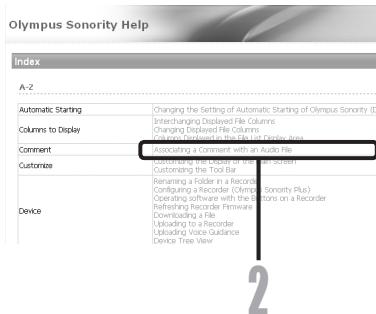
Note
- For more information on menus and operations, refer to Online Help. You will be able to use Online Help after Olympus Sonority is installed.
Connecting to your PC
Windows
Macintosh
Turn the recorder's power ON.
2 Connect the USB connection cable to the USB port of the PC.

3 Make sure that the recorder is stopped, and then connect the USB cable to the connecting port on the bottom of this recorder.
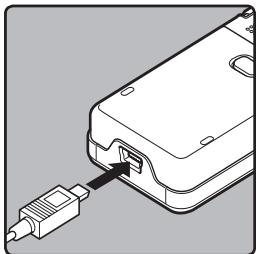
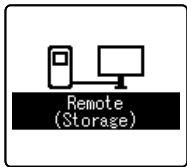
- [Remote (Storage)] is displayed on recorder if the USB cable is connected.
- When the recorder is using the USB connection setting, it will not be connected to the PC when [AC Adapter] is selected. Select [PC] in the USB connection setting (P.69).
Windows:
When you connect the recorder to a Windows and open [My Computer], it will be recognized by the drive name of the product name. If a microSD card is inserted, [Removable Disc] will be displayed.
Macintosh:
When you connect the recorder to a Mac OS, it will be recognized by the drive name of the product name on the desktop. If a microSD card is inserted, [Untitled] will be displayed.
Notes
- Be sure to use the included dedicated cable for the USB connecting cable. If any other company's cable is used, it will be the cause trouble. Also, please do not connect this dedicated cable to any other company's product.
- When connecting the recorder through an USB hub the operation may become unstable. In such cases, refrain from using a USB hub.
Disconnecting from your PC
Windows
1 Click [ ] on the task bar located at the lower-right corner of the screen. Click [ Safely remove USB Mass Storage Device].
- The drive letter will differ depending on the PC being used.

2 Confirm that the recorder display lamp is gone before disconnecting the USB cable.
Macintosh
1 Move the drive icon for this recorder that is appear on the desktop to the garbage bin by Drag & Drop it.
2 Confirm that the recorder display lamp is gone before disconnecting the USB cable.
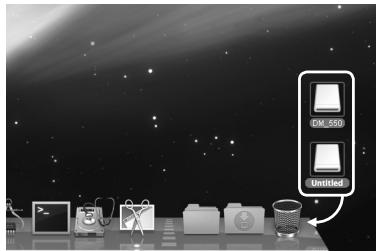
Notes
- NEVER disconnect the USB cable while the recording indicator light is flashing. If you do, the data will be destroyed.
- When the recorder is connected to a PC, the power will be supplied from the USB cable.
Refer to the user's manual for your PC regarding the USB port on your PC. - Be sure that you connect the USB cable either directly to the USB port on your PC.
- Be sure to push the cable connector all the way in. Otherwise, the recorder may not operate properly.
- Cancel Hold mode.
By connecting the recorder to your PC, you can automatically start the application.
Windows
Disabling automatic start
1 Right click on the [ ] of the taskbar on the lower right of the screen, and select [Setting].
- The application which enables setting will be displayed by dialog.
2 Click the [√] of the [Olympus Sonority].
- The check mark on [Olympus Sonority] disappears. For automatic start, select and click "Olympus Sonority" to reinstate again.
Manual start
1 Start Windows.
2 Click the [Start] button, select [All Programs], then [Olympus Sonority].
Information display area will appear.
After start up, a icon will be displayed in task bar in the bottom right of the screen.
Macintosh
Disabling automatic start
From the menu bar, click [ ] → [System Environment Setting] → [ ].
- The setting dialog box will appear.
2 Turn the automatic start up in the setting check box to [OFF].
Manual start
1 From Finder, double-click [Application] [Olympus Sonority] [Olympus Sonority].
- When starting up for the first time, the serial number registration dialog box will appear.
2 Enter the Serial Number.
- For the product serial number, refer to the serial number on the separate sheet.
The information Display Area will appear if the serial number is correct.
Notes
- You cannot run more than one "Olympus Sonority" program or multiple copies of the same program simultaneously.
- When other applications such as DSS Player, etc. are opened, close these applications first before starting up the "Olympus Sonority".
Olympus Sonority Browse Screen
This is the main screen of the "Olympus Sonority" (The display screen is the display screen in Windows).
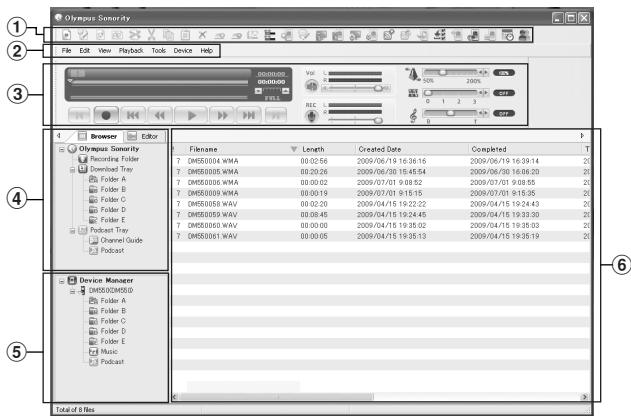
① Menu Bar
The OS standard menu bar.
② Tool Bar
Tool Bar to be used in the Browse Screen will be displayed.
③Playback Control Bar
Used to play selected files in the File Display Area.
(4) Main Tree View
Files downloaded from the recorder, files recorded in the "Olympus Sonority", etc., and folders containing voice/music files managed by the PC's "Olympus Sonority" will be displayed.
⑤ Device Tree View
Folders in the connected device will be displayed.
⑥ File List Display Area
Detailed information of the folders selected in the Main Treeview or Device Treeview and all voice files in the recorder will be displayed. The Information Display Area (Initial Setting) will be displayed when the "Olympus Sonority" is started up, and the basic information of the "Olympus Sonority" can be displayed, updated and upgraded (68 P.84).
Olympus Sonority Information Display Area
"Olympus Sonority" Information Display Area Update of the "Olympus Sonority" and confirmation and update of the firmware of the connected recorder can be carried out. Upgrade to the "Olympus Sonority Plus" and registration of Podcast programs can also be carried out.
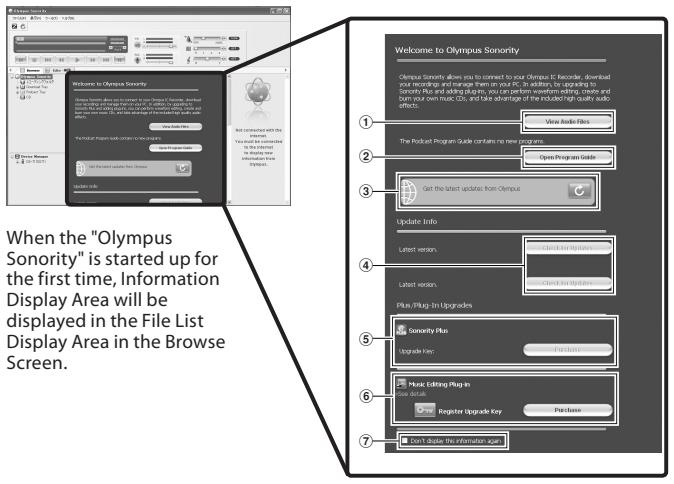
① Audio File List
Selects Folder A in the Main Treeview and displays the File List Display Area.
② Opening the Program Guide
Displays the latest information on the Podcast Program Guide.
③ Updating latest information
Updates the latest information from Olympus.
Viewing updated information
Confirms the updated information of the "Olympus Sonority" and recorder that is connected.
⑤ Registering the Upgrade Key Number
Registers the purchased upgrade key number.
⑥ Upgrade
Select the upgrade you want to purchase. When upgrade is completed, the button will be replaced by the upgrade key.
⑦ Display/Hide
Select to show or hide the Information Display Area the next time "Olympus Sonority" is started. When hide is selected, the File List Display Area (P. 83) will be shown.
Managing Files on Your PC
Download Voice Files from the Recorder
Windows Macintosh
There are 3 download options to transfer voice files from the recorder to the PC:
Download Selected Files
Download Folders
Download All
The following is an explanation of [Download Selected Files]. For explanations of [Download Folders] and [Download All], refer to Online Help (P. 79).
Download Selected Files
1 Select the folder.
- From the Device Tree View, select the folder that contains the voice file you would like to download. The illustration shows that [Folder A] has been selected.
2 Select the voice file.
- Select the voice file you want to download from the File List Display Area.
To select more than one file:
Windows
Hold either the [Ctrl] or [Shift] key and select files.
Macintosh
Hold either the [Command] key and select files.
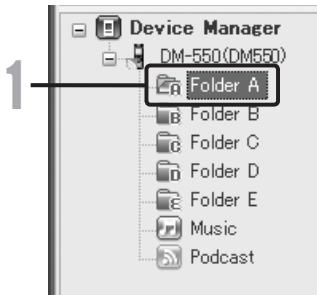
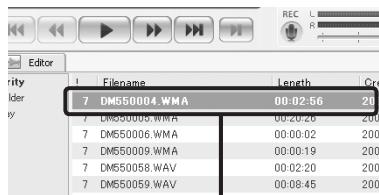
2
3 Download the voice file.
- From the [Device] Menu, select [Download Selected Files] or click on the Tool Bar.
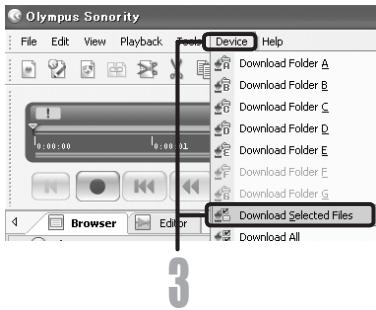
4 Download complete.
- Do not disconnect the USB cable while the record indicator light on the recorder is flashing. Disconnecting the USB cable when the recorder lamp is flashing will result in data loss or corruption (E P.81).
Notes
- NEVER disconnect the USB while the record indicator light is flashing. If you do, the data will be destroyed.
Depending on the size of the voice file and your PC, it may take some time to download the files. - The downloaded files will be stored in the download tray folder that corresponds to the folder in the recorder.
Example: A voice file downloaded from [Folder A] will be stored in download [Folder A] on the Main Treeview.
- When the same file name already exists, the new file is saved with another file name only when the contents are different. When the contents are the same, it will not be downloaded.
Windows Macintosh
1 Select the folder.
- Select the folder that contains the voice file you would like to play.
2 Select the voice file.
- Select the file to playback from the File List Display Area.
3 Play the voice file.
- Click the [play] button of the Play Control Bar.
Other playback control such as Rewind, Fast Forward, Stop, Speed Control, Volume Control, Time Axis and Index Skip are available from the Play Control Bar.
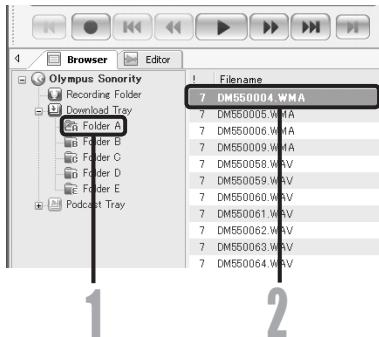
Using the Waveform Editing Function
Windows Macintosh
You can use the Waveform Editing Tab in the "Olympus Sonority" to easily process voice data. In the Waveform Editing Mode, you can also delete unnecessary parts, paste and re-save the data.
1 From the Browse screen, select the file you want to edit, select [File] [Edit].
- The waveform editing screen will appear and the waveform will be displayed.
2 Drag and select the waveform you want to delete.
- Selected parts will become grey in the waveform display.
3 Select [Cut] from the [Edit] Menu.
- The selected waveforms will be deleted.
4 Click on any waveform display part.
- Selected waveforms in the waveform display will become grey.
5 Select [Paste] from the [Edit] Menu.
- The waveforms that were cut previously will be inserted in the part selected.
6 Click the Write Track Zone [ ]
- The Save dialog box will appear.
Using the One-touch effect Function
Windows Macintosh
You can use the Waveform Editing Tab in the "Olympus Sonority" to easily process voice data. Using the One-touch Effect Function, you can easily apply special effects to the voice file. Here we show you how to carry out noise reduction in a specified area.
1 From the Browse screen, select the file you want to edit, select [File] [Edit].
- The waveform editing screen will appear and the waveform will be displayed.
Drag and select the waveform part you want to apply special effects on.
- Selected parts will become grey in the waveform display.
3 Press the noise reduction adjustment button [ ]
- Noise will be removed from the selected part.
4 Click the start location of the selected part and press the button on the Playback Control Bar.
- The part where noise has been reduced will start to play.
Windows Macintosh
"Olympus Sonority" has a feature to enable you to upload files from your PC to the recorder.
1 Select the folder.
- Select the folder that contains the voice file to upload from the Main Tree View.
2 Select the voice file.
- Select the file you want to transmit from the File List Display Area.
3 Select the folder to upload.
- From the [Device] menu select [Upload Selected Files] or click the Upload icon [ ] Once the folder list box where the file is to be uploaded is displayed, select the folder from which the file is to be uploaded.
4 Upload the voice file.
- Click [OK] to upload the voice file to the recorder.
5 Upload complete.
- Once the transmission screen closes and the record indicator light on the recorder is OFF, upload is completed.
You can also transmit a file by selecting the file you want to transmit from the File List Display Area, and then drag and drop it in the Device Treeview folder (move the mouse while pressing the left mouse button, and release the button at the destination).
Notes
- NEVER disconnect the USB while the record indicator light is flashing. If you do, the data will be destroyed.
- When the same file name already exists in the folder on the recorder, the new file is saved with another file name only when the contents are different. If contents are the same, it will not be uploaded.
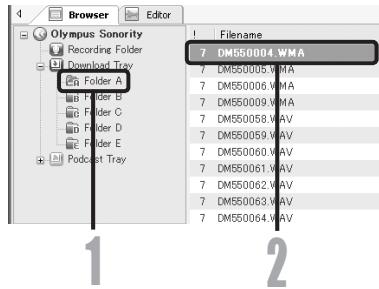
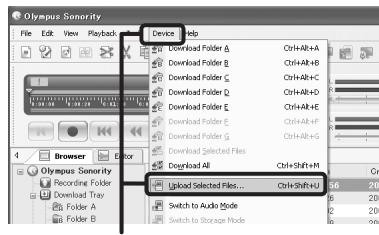
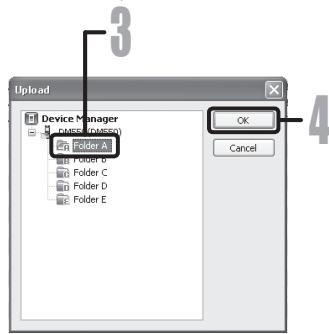
Windows
Macintosh
If you format the recorder and erase data by mistake, you can copy the voice guide data from "Olympus Sonority" to the recorder.
1 Make sure that the recorder's voice guide is set to [On].
- If the recorder's voice guide is set to [Off] the voice guide data cannot be copied.
2 Connect the recorder to a PC.
- For how to connect to a computer, see [Connecting to your PC] (E83 P.80).
3 Start "Olympus Sonority".
- If the recorder does not have voice guide data, the [File Transfer] dialog will appear.
4 Copy voice guide data.
- If you click the [OK] button in the [File Transfer] dialog, it will start copying voice guide data, and a window indicating copying progress will appear.
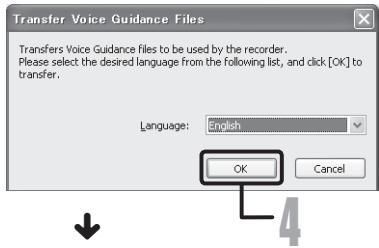
5 Copying of the voice guide data will be completed.
- Once the transmission screen closes and the record indicator light on the recorder is OFF, upload is completed.
Notes
- The alarm sound (P.64), the Starting tune that plays when the recorder is starting up, and the Closing tune that plays when the recorder is turning off (P.18), will be copied together with the guidance data.
- NEVER disconnect the USB while the record indicator light is flashing. If you do, the data will be destroyed.
Windows Macintosh
It is possible to use the recorder as a USB microphone or speaker with the "Olympus Sonority", to insert/add/overwrite recordings onto voice files downloaded onto a computer, or to save new recordings directly onto a computer. In addition, it is also possible to operate the "Olympus Sonority" using buttons on the recorder.
Audio setup
In order to use this recorder as a USB speaker or a USB microphone in the "Olympus Sonority", connect the recorder to the PC, then carry out the settings below. When connecting the recorder for the first time, the driver will be installed into the computer.
Start the "Olympus Sonority" and switch to the Waveform Editing Screen with the Waveform Editing Tab [ ]
Uses as a USB Speaker
When the recorder is being used as a USB speaker, it is possible to output the sound through the recorder, rather than from the speakers attached to a computer.
Select [Recorder Speaker] from the [Tool] Menu or click [ ] on the Tool Bar.
The recorder connected by USB connection can be used as a speaker.
Uses as a USB microphone
When the recorder is used as a USB microphone, it can be used to make recordings with the "Olympus Sonority", and can also be used to input data on a computer using voice recognition software or other applications.
Select [Recorder Microfone] from the [Tool] Menu or click [ ] on the Tool Bar.
The recorder connected to the PC by USB connection can be used as a microphone.
Note
- When using it as a USB microphone, regardless of the recording mode of this recorder, it becomes the USB stereo microphone. If you want to connect an external microphone to this recorder, use a stereo microphone.
Windows Macintosh
The "Olympus Sonority" can be upgraded to the Plus Version (Optional) to expand and improve its functions. In addition, in the "Olympus Sonority Plus", you can purchase a Music Editing Plug-in to enjoy high-quality effect editing. To add a Music Editing Plugin, you will need to upgrade the "Olympus Sonority Plus".
Purchase and Upgrade
To purchase "Olympus Sonority Plus" and to upgrade from "Olympus Sonority" is shown in the following procedures.
1 Start the "Olympus Sonority".
Please see P.82 for the starting method.
2 Select [Purchase Olympus Sonority Plus] in the [Help] Menu or click the [ ] button in the Tool Bar.
- The web browser will start and the purchase site of the "Olympus Sonority Plus" will be displayed. Please operate according to guidance on the screen. When the purchase procedure is completed, the Upgrade Key will be issued by mail.
3 Select [Upgrade to Olympus Sonority Plus] from the [Help] menu.
- The [Upgrade to Olympus Sonority Plus] dialog will be displayed.
4 In the [Upgrade to Olympus Sonority Plus] dialog, enter the Upgrade Key of your purchase, and click the [OK] button.
- When starting the application next time, "Olympus Sonority" will be upgraded to "Olympus Sonority Plus".
Upgrading to Olympus Sonority Plus
Click the root of the Main Treeview, [Olympus Sonority], in the Browse Screen to display the Information Screen. You can confirm that the upgrade key is registered. In addition, when [Version Information] in the [Help] Menu is selected, the upgrade key registered in "Olympus Sonority Plus" will be displayed. The Music Editing Plug-in includes more than 20 types of effect functions and spectrum analyzer functions. For details, please refer to the Online Help (€5 P. 79).
Notes
- To purchase the Upgrade Key, it requires an environment where the Internet can be utilized.
- Please see the details in the website regarding the purchase of the Upgrade Key.
Functions Available in the Olympus Sonority Plus
Besides the usual functions, the "Olympus Sonority Plus" also includes various functions to edit music files. For information on operating procedures and detailed settings, please refer to the Online Help (e-mail P. 79).
MP3 Editing
MP3 file and tag editing and writing function.
Creating Music CD
Function to create music CD from voice files registered in the CD writable folder.
Recorder Menu Setting
Function for settings in this recorder (detailed settings such as recording mode, alarm setting, timer recording, etc.).
Functions Available with the Music Editing Plug-in
By purchasing a Music Editing Plug-in, you can add high-quality functions to expand the music editing range in the "Olympus Sonority Plus". For detailed purchasing method and operating procedures, please refer to the Online Help (E&P P. 79).
Effect Functions
You can use more than 20 high-quality effect functions to edit your music files.
Spectrum Analyzer
Displays in the Waveform Display Screen the waveform distribution of an voice file being played in the real time.
Besides unrestricted track editing
It also removes the restriction on the number of tracks that can be edited.
Importing Content for Listening on the Recorder
Importing Content for Listening on the Recorder
You can transfer language content and music files imported from language CDs and the Internet using iTunes or Windows Media Player for playing on the recorder. You can also use "Olympus Sonority" to import and enjoy Podcast content found on the Internet. The recorder is compatible with WMA and MP3 language content. In addition, recorder is compatible with the Audible content of the ACELP and MP3 formats when recorder is in the Audible mode.
Import files using Windows Media Player
- Copy music files and language content from CDs to a computer.
Please see "Copying music from CD" (P.97) for details. - Transfer copied music files and language content from the computer to the recorder.
Please see "Transferring music file to the recorder" (P.98) for details.
Import files using iTunes
- Copy music files and language content from CDs to a computer.
Please see "Copying music from CD" (P.104) for details. - Transfer copied music files and language content from the computer to the recorder.
Please see "Transferring music file to the recorder" (P.105) for details.
Import files using Olympus Sonority
- Import Podcast content from the Internet to a computer.
Please see "Importing Podcast Content" (E S P.107) for details.
Download Audible content using the Audible Manager
- Download Audible content available from the Audible web site for a fee to a computer.
See "Loading Audible Content" (P.112) for details.
Directly record files to the Recorder
- Connect the recorder to another device to record directly to the recorder.
Please see "Recording the sound of other devices with this recorder" (e- P.32) for details.
Music files that have been imported to your computer from music CDs and acquired over the Internet can be transferred to and played back with this recorder. It supports WAV, MP3, and WMA format music files.
By using Windows Media Player, music files from music CDs can be converted (ripped) (P.97) and music files that you have bought from any music distribution sites can be easily transferred to the recorder (P.98).
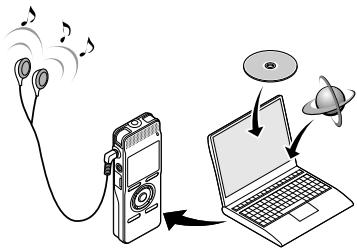
Copyright and copyright protection feature (DRM)
By the Copyright Act, any voice/music files and music CDs downloaded from the Internet without the copyright holder's permission may not be reproduced, distributed, publicized/re-publicized on the Internet, or converted into WAV,WMA or MP3 files for the purpose of commercial business or sale.
A WMA file may be provided with DRM (Digital Right Management) for copyright protection. DRM limits the file to copy or distribute music files that are converted (ripped) from a music CD or downloaded from music distribution services. To transfer a WMA file with DRM to the recorder, you need to use appropriate methods such as Windows Media Player. Copying the music files with DRM purchased from online music distribution service to a portable device such as this recorder may be restricted.
Note
- This recorder is compatible with Microsoft Corporation DRM9, but not with DRM10.
Window names
Windows Media Player 11
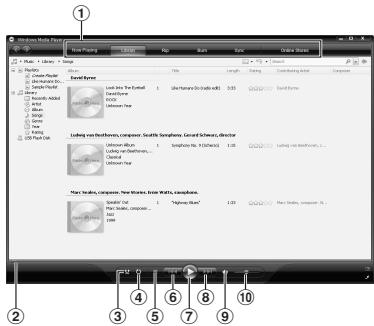
Windows Media Player 10

① Features taskbar
② Seek slider
③ Shuffle button
④ Repeat button
⑤ Stop button
(6) Previous button
⑦ Play button
⑧ Next button
Mute button
Volume slider
① Features taskbar
② Quick Access Panel button
③ Seek slider
④ Rewind button
⑤ Play button
⑥ Stop button
(7) Previous button
⑧ Next button
Mute button
Volume slide
⑪ Shuffle/Repeat button
⑫ Fast Forward button
Copying music from CD
1 Insert CD into the CD-ROM drive, and start Windows Media Player.
2 From the Features taskbar, click [Rip] menu.
After clicking [Rip] menu, click [View Album Info] for Windows Media Player 10 as necessary.
- If Internet connectivity is available, CD information is searched.
3 Put a check mark on the music file that you want to copy.
4 Click [Start Rip].
For Windows Media Player 10 Click [Rip Music].
- Files copied to a PC are stored in WMA format. Music files copied are categorized by artist, album, genre, etc. and added to the play list.
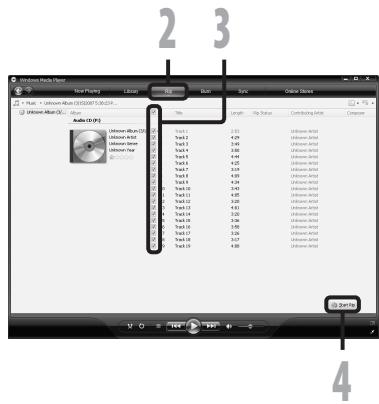
Windows Media Player 11
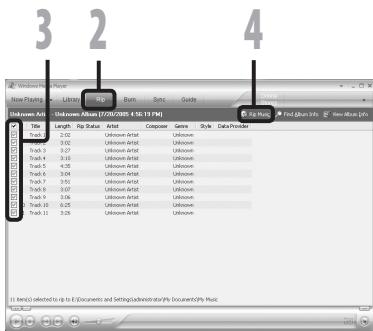
Windows Media Player 10
Transferring music file to the recorder
You can transfer the music files saved in your PC to this recorder. For how to copy the music files from the CD to your PC, see "Copying music from CD" (e ^3 P.97).
Windows Media Player 11
1 Connect the recorder to a PC, and start Windows Media Player.
2 From the Features taskbar, click [Sync].
3 Click [Sync] menu again to select [DVR] [Advanced Options] [Set Up Sync], and set as follows.
- Click on the [Create folder hierarchy on device] to check. If you uncheck and synchronize the file, it will be transferred under the folder [Home], and the file will not be indicated. 12
- The folder with artist name or album name is automatically created. This will make you find the file you want to listen to more easily.
1 If [Create folder hierarchy on device] is checked by default, click to uncheck the box once, and click it again to check.
2 After the synchronous transfer to the recorder, a file named "WMPInfo.xml" is created. If you delete this file, the *1 may need to be set again.

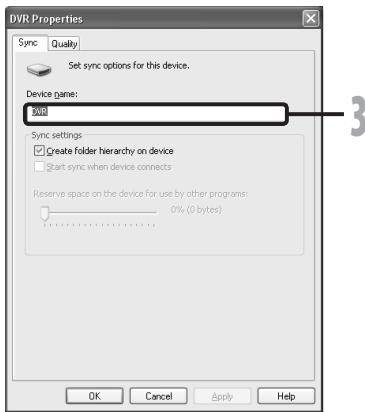
4 Select the desired category from [Library] on the left, and select music files or albums to transfer to the recorder, and Drag & Drop them in [Sync List] on the right.
5 Click [Start Sync].
- The file is transferred to the recorder.
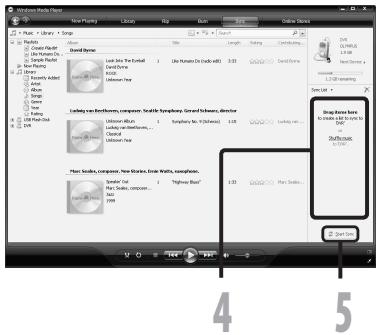
Windows Media Player 10
1 Connect the recorder to a PC, and start Windows Media Player.
2 From the Features taskbar, click [Sync].
3 From the pull down menu on the left side window, select the play list to be transferred to the recorder, and put the check marks on the music file that you want to transfer.
- The order of music pieces can be changed by Drag & Drop of the music file in the play list displayed.
4 From the pull down menu on the right side window, select the drive corresponding to the recorder.
- The recorder is recognized as a Removable Disk.
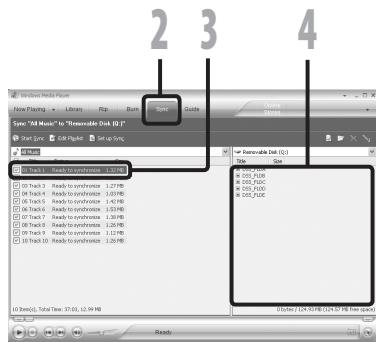
5 Click [ ] on the upper right corner, and set the synchronization options.
- Click on the [Create folder hierarchy on device] to check. If you uncheck and synchronize the file, it will be transferred under the folder [Home], and the file will not be indicated. 12
- The folder with artist name or album name is automatically created. This will make you find the file you want to listen to more easily.
1 If [Create folder hierarchy on device] is checked by default, click to uncheck the box once, and click it again to check.
2 After the synchronous transfer to the recorder, a file named "WMPInfo.xm1" is created. If you delete this file, the *1 may need to be set again.
6 Click [Start Sync].
- The file is transferred to the recorder. The music file transferred to the recorder is displayed in Item on Device.
![OLYMPUS DM-450 - Click [Start Sync]. - 1](/content/2025/01/125238/images/8fbeabaa57dde0f757035117f821f45d6dae4add61277de15a7af69f2331471e.jpg)
![OLYMPUS DM-450 - Click [Start Sync]. - 2](/content/2025/01/125238/images/c0b0bcf015d0b9ca9da60ea49a09997ccc64d63a0bc32b35def1a07affd01759.jpg)
Notes
- Copying the music files with DRM purchased online music distribution service to a portable device such as this recorder may be restricted.
- To transfer the files by using Windows Media Player 9, check the Olympus website.
- If the music files are transferred to the recorder until it reaches to the maximum memory, the message [Can't make the system file. Connect to PC and delete unnecessary file] may appear on this recorder's display. In such a case, erase the files to make free space (hundreds of KB to dozens of MB depending on the music file sizes) for the management file. (The more capacity for the management file will be necessary as the number of the music files increases).
Copying voice file to the CD
You can transfer the voice files in the recorder to your PC and copy them to CD. For how to copy the voice files from the recorder to your PC, see "Download Voice Files from the Recorder" (P.85).
Windows Media Player 11
Insert the blank CD-R/RW into the CD-R/RW drive, and start Windows Media Player.
2 From the Features taskbar, click the [Burn] menu.
3 Select the desired category from [Library] on the left, and select voice files or albums to copy to the CD-R/RW, and Drag & Drop them in [Burn List] on the right.
4 Click [Burn] menu again, and select [Audio CD] or [Data CD].
When [Audio CD] is selected:
- A file is converted and copied in music CD in order to play it by the audio equipment which can play CD-R/RW.
When [Data CD] is selected: - Copying files with the format to be recorded.
5 Click [Start Burn].
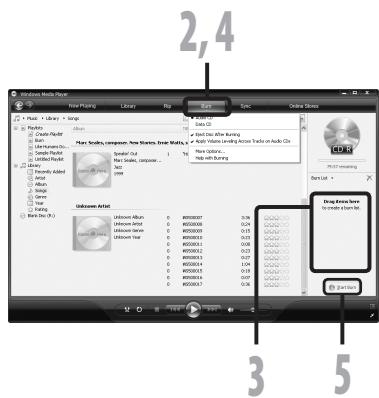
Windows Media Player 10
Insert the blank CD-R/RW into the CD-R/RW drive, and start Windows Media Player.
2 From the Features taskbar, click [Burn] menu.
- Click [Burn] as needed after clicking [Edit Playlist] menu.
- You can change the order of tracks by Drag & Drop files.
3 Put a check mark on the voice files that you want to copy.
4 Select format of CD before clicking [Start Burn].
When [Audio CD] is selected:
- A file is converted and copied in music CD in order to play it by the audio equipment which can play CD-R/RW.
When [Data CD] is selected: - Copying files with the format to be recorded.
5 Click [Start Burn].
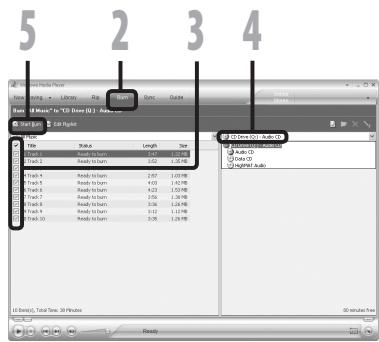
Notes
- Copying the music files with DRM purchased online music distribution service to a portable device such as this recorder may be restricted.
Refer to the online help of Windows Media Player for details.
Music files that have been imported to your computer from music CDs and acquired over the Internet can be transferred to and played back with this recorder.
By using iTunes, music files from music CDs can be converted (ripped) (P.104) and music files that you have bought from any music distribution sites can be easily transferred to the recorder (P.105).
Window names
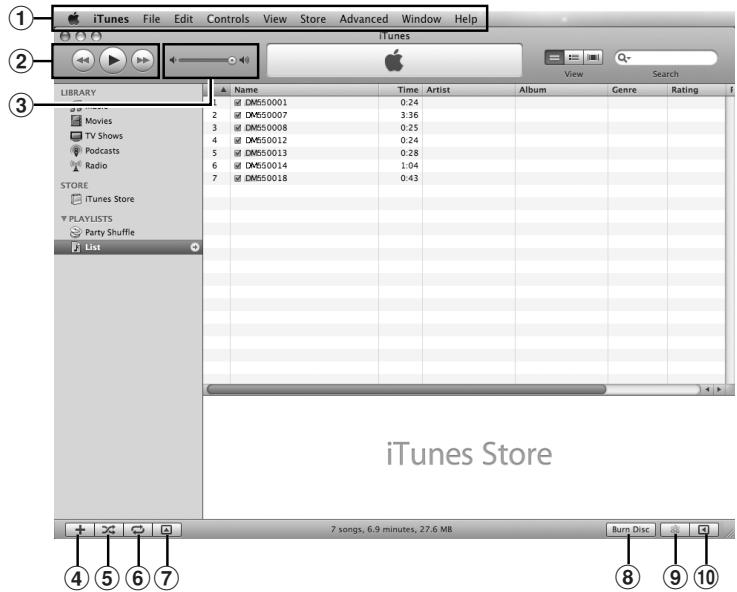
① Features taskbar
② Rewind button/Playback, Pause button/Fast Forward button
③ Volume slide
④ Playlist addition button
⑤ Shuffle button
⑥ Repeat button
⑦ Display change button
⑧ Disc create button
Genius button
10 Genius side button
Copying music from CD
1 Insert the CD into the CD-ROM drive, and start iTunes.
2 Click [iTunes] [Preferences].
3 Click [Advanced] tag.
4 Click [Importing] to set the file format and bit rate for copying music files to your PC, and click OK.
This recorder is compatible with music files in the MP3 and WAV formats (P.36).
[Import Using]:
Set the file format for copying music file from a CD. Please select [MP3] or [WAV].
[Setting]:
Set the bit rate for copying music file from a CD. You can select a bit rate between [128], [160] and [192].
Put a check mark on the music files that you want to copy.
6 Click [Import CD].
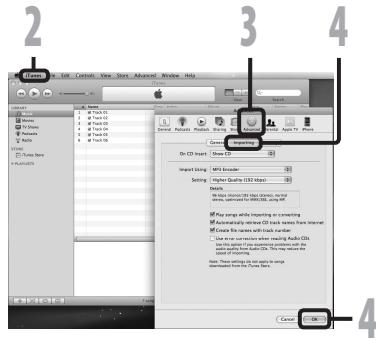
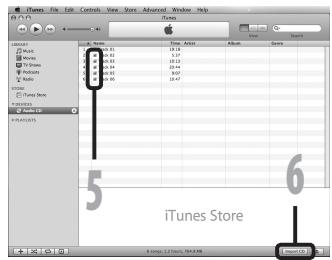
Transferring music file to the recorder
You can transfer the music files saved in your PC to this recorder. For how to copy the music files from the CD to your PC, see "Copying music from CD" (eP P.104).
1 Connect the recorder to a PC, and start iTunes.
2 Select the play list to be transferred to the recorder, and put the check marks on the music files that you want to transfer.
- The order of music pieces can be changed by Drag & Drop of the music file in the play list displayed.
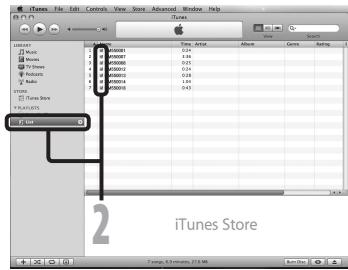
3 Double-click the corresponding drive with the recorder, and open [Music] folder.
- When you connect the recorder to a Mac OS, it will be recognized by the drive name of the product name on the desktop.
- Copy to [Music] folder of the recorder when transferring the music file.
- You can create up to 2 hierarchies in the [Music] folder. And up to 128 folders can be made including [Music] folder.
- Up to 999 files can be stored in each folder.
4 Select the desired files, and Drag & Drop them to [Music] folder.
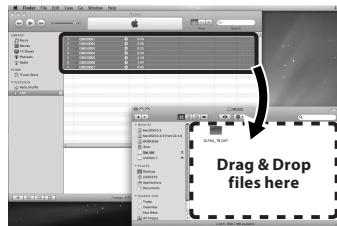
Copying voice file to the CD
You can transfer the voice files in the recorder to your PC and copy them to CD. For how to copy the voice files from the recorder to your PC, see "Download Voice Files from the Recorder" (P.85).
1 Insert the CD-R/RW into the CD-R/RW drive, and start iTunes.
2 Select the desired playlist, and put a check mark on the voice files to copy to the CD-R/RW.
3 Click [Burn Disc]
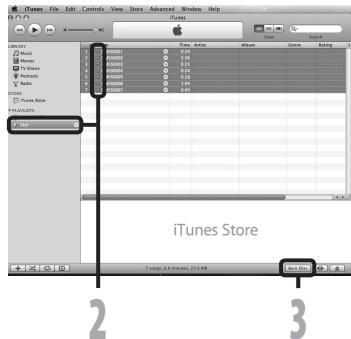
4 To set the CD format for copying voice files to CD-R/RW, and click [OK].
When [Audio CD] is selected:
A file is converted and copied in music CD in order to play it by the audio equipment which can play CD-R/RW.
When [MP3 CD] is selected:
Copying in MP3 format.
When [Data CD] is selected:
Copying files with the format to be recorded.
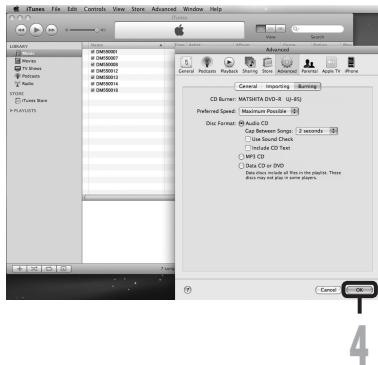
Windows
You can either drag and drop the Podcast Program Icon to retrieve Podcast contents or search and retrieve it by registering the content address.
This function is not supported in Macintosh. Use iTunes, etc. to retrieve Podcast contents.
Register a Podcast program
1 Start Olympus Sonority.
2 Open a web browser and go to a Podcasting site.
3 Drag the Podcast registration icon and drop it in the [Podcast] folder in Olympus Sonority.
- Podcast registration icons differ depending on Podcasting sites. Please check each Podcasting site for details.
4 Program registration will complete.
- When a program is registered, a list of broadcasting content provided by the program will appear in the [Podcast] folder's list view. By default, the latest content at the time of registration will be automatically downloaded.
Note
- About the file format which can be played back with the recorder, refer to P.36.
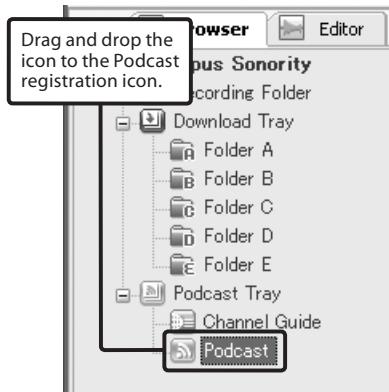
Update a program
Windows
By default, programs registered in "Olympus Sonority" will be automatically updated. To change update intervals, go to [Tools] menu then [Options], and change them in the Options dialog's Podcast tab. See the Online Help for details (eP P.79).
If you don't want to update programs automatically, you can update the using the following procedure.
Program registration, update and download functions are not available in Macintosh. Use iTunes or other applications for these functions.
1 Select the [Podcast] folder.
2 Select a program you want to update.
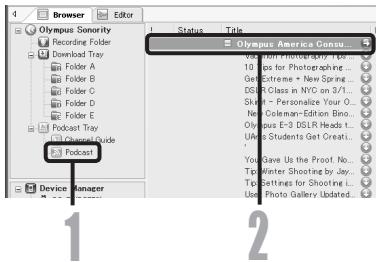
3 Select [Update Podcast] from the [Tools] Menu or press the [ ] in the Tool Bar.
- Updating program starts. Once the program has been updated the new content will be displayed in gray. The content displayed in gray has not yet been downloaded onto a computer.
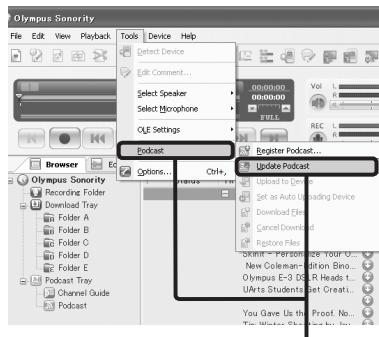
Download the Content
Windows
By default, if new content is found when a program is updated, the latest content will be automatically downloaded. This setting can be changed by selecting [Tools] then [Options] and going to the Options dialog's Podcast tab. See the Online Help for details (v3.7).
If you want to download manually, the content can be downloaded with the procedure described below.
Program registration, update and download functions are not available in Macintosh. Use iTunes or other applications for these functions.
1 Select the [Podcast] folder.
![OLYMPUS DM-450 - Select the [Podcast] folder. - 1](/content/2025/01/125238/images/1217bdf8a0ddf10cfc7982e0d17062d66b4ea3f7310bfe6e6baab1a927e43d08.jpg)
2 Click the [Download] button of the content you want to download.
- Content downloading will start. The status is displayed by the percentage while contents are being downloaded.
![OLYMPUS DM-450 - Click the [Download] button of the content you want to download. - 1](/content/2025/01/125238/images/33cc8a2ed29fbcfeef23009e5cf4510cebcc23abace436c9d32f24f1ed70776f.jpg)
3 Download will complete.
- Downloaded content can be played and transferred to the recorder.
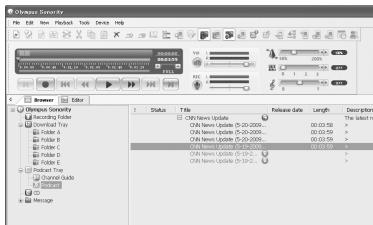
Transfer Content to the Recorder
Windows Macintosh
In the default setting, the content automatically transferred into the [Podcast] folder on the recorder when the recorder connects to a computer. This setting can be changed by selecting [Tools] under [Options], and by selecting the [Podcast] tab displayed on the Option dialog box. See the Online Help (E&P P.79) for details.
If you want to transfer content manually, follow the procedure below.
Podcast contents registered in iTunes, etc. can be transmitted to this recorder by dragging and dropping it in the recorder's [Podcast] folder.
1 Select the [Podcast] folder.
2 Select the content you want to transfer, and drag it to the [Podcast] folder of the recorder and drop it.
Content transfer will start. A progress window will appear during transfer.
3 Transfer will complete.
- Content transferred to the recorder will have an icon indicating a completed transfer. Press the PODCAST button on the recorder to easily open transferred files.
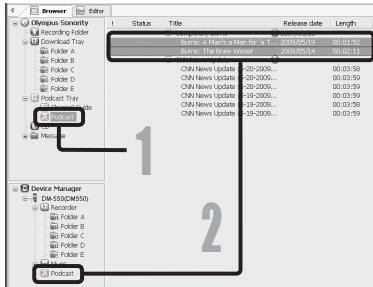
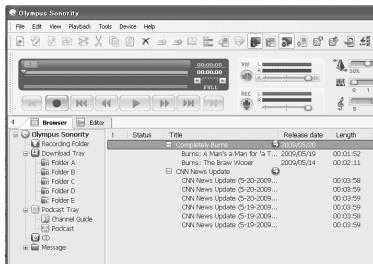
Note
- NEVER disconnect the USB while the record indicator light is flashing. If you do, the data will be destroyed.
Windows
OLYMPUS related podcast programs can be easily registered and new contents can be automatically downloaded on the "Olympus Sonority". New contents can also be redirected to the recorder by just connecting to the PC. Program guide functions are not available for Macintosh.
To register programs
1 Click [Channel Guide] in the online service of the Main Tree View.
Information of programs registered online will be displayed.
![OLYMPUS DM-450 - Click [Channel Guide] in the online service of the Main Tree View. - 1](/content/2025/01/125238/images/a39f984608a034558f086ba4b6e7b5e4953a0c7576af081ac3ccd1b706b974f1.jpg)
2 Click the program you desire from the program list.
- Detailed information on the program will be displayed in the Program Details View.
3 Click [Subscribe] to register on the podcast.
- Once the program is registered, the contents broadcast by the program will be displayed in the ListView of the [Podcast] folder.
Under the initial settings, the latest contents being broadcast will be automatically downloaded during registration.
![OLYMPUS DM-450 - Click [Subscribe] to register on the podcast. - 1](/content/2025/01/125238/images/6755a8ee5f3da56466da86b190b309ec5110cf2c26cbe7bca16cf88aa085e29d.jpg)
Windows
Use the AudibleManager to load Audible content onto the recorder.
Playback, management, and transfer of Audible content to the recorder can be done using the AudibleManager.
Installing AudibleManager
When AudibleManager is not installed on a computer, install the AudibleManager according to the procedure described below.
1 Access one of Audible web sites from the web browser and download the AudibleManager.
http://www.audible.com/ (United States)
http://www.audible.co.uk
(United Kingdom)
http://www.audit.fr (France)
http://www.audible.de (Germany)
2 Start up the downloaded executable file.
- The AudibleManager Setup screen will be displayed. Select the name of the device in use (OLYMPUS DM-550/450) and click the [Install] button.
3 When the [Audible Manager License Agreement] is displayed, click the [I Accept] button.
4 Installation starts.
- Wait until process has been completed. Once the installation has been completed AudibleManager starts up automatically.
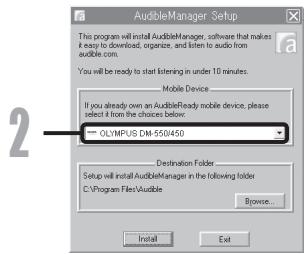
AudibleManager License Agreement
LICENSE AIGREEMENT
This is a legal agreement ("Agreement") between you, the party receiving a software product license, and Audible Inc., having offices located in the following states:
CLOSING YOUR ACCEPTANCE OF THIS AGREEMENT, OR BY THE FOLLOWING CHECKS:
1) IF YES, I WILL NOT BE ABORTED FROM THE CONTRACT.
2) THAT YOU HAVE READ ALL OF THE TERMS AND CONDITIONS OF THIS AGREEMENT, UNDERSTAND THEM. AND AGREE TO BE A PART OF THE TERMS OF THE CONTRACT.
3) THAT TERMS OF THIS AGREEMENT, YOU MAY NOT INSTALL OR USE ANYTHING OTHER THAN THE TERMS OF THIS AGREEMENT.
As used in this Agreement, "Software" means the Auditable software [product] accompanying this Agreement, including the associated user documentation, and any patches, files, updates, upgrades, and other versions of the software. Software may be purchased by Auditable from time to time, and any combination of the foregoing.
- GRANT OF SOFTWARE LICENSE; SCOPE OF USE. Subject to the
3
Accept
Cancel
Adding Device to AudibleManager
If AudibleManager has already been installed, add a device in order to handle the recorder in the AudibleManager. Follow the procedure described below.
1 Select [Add New Device] in the [Devices] menu.
2 When the dialog box displays, verify the internet connection and click the [Yes] button.
3 When the dialog box is displayed, check the name of the device in use (DM-550/450) and click the [OK] button.
4 Installation starts.
- Wait until the process has been completed. Once the installation has been completed, AudibleManager restarts. Verify that the device in use has been added to the [Mobile Devices] menu.
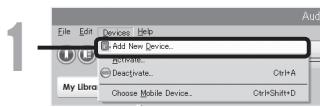
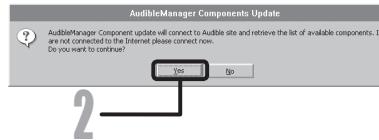
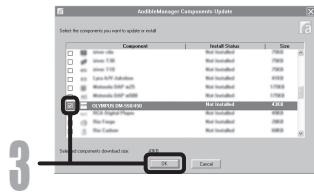
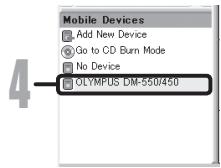
Purchasing Audible Content
Audible content can be purchased from the Audible web site. Access to the Audible web site using web browser and download the content by following the purchase procedures described on the web site.
With the existing setting, content downloads to the Library folder in the AudibleManager. When download has been completed, the AudibleManager starts up and purchased content displays on the contents list in the Library.
Windows
Audible content can be transferred into the [Audible] folder on the recorder by following the procedure described below.
1 Connect the recorder to a computer.
2 Select [Library] in the [Audible Folders] tree listing.
- A list of content stored in the [Library] displays on the right side.
3 Select the content to be transferred to the recorder and click the [Add to Device] button.
4 When the [Activate Your Device] entry screen is displayed, enter the user name and password for Audible and click the [OK] button.
5 The transfer begins.
- Wait until the transfer of the content has been completed. When it has been completed, the transferred content is displayed in the contents listing of the device. Also, the transferred content is displayed in the Library.
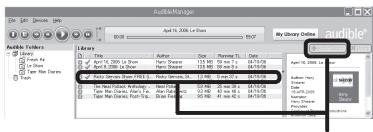
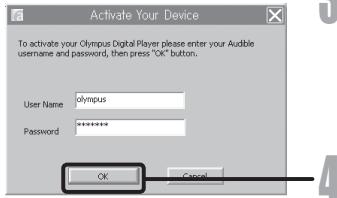
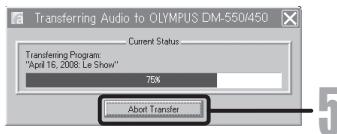
Notes
- When a content file is transferred to the recorder, a [.pos] file will be automatically created for each content file in the Audible folder.
- When the [^*.pos] file is deleted, using Explorer, the stored Playback Position will be deleted. The next time the file is selected, playback starts from the beginning of the file.
- When a content file is transferred to the recorder, a system file will be created as a hidden file inside the Audible folder. When this file is deleted using Explorer, it is no longer possible to playback the Audible content.
Enjoy Audible Content with the Recorder
Audible content that has been transferred into the [Audible] folder on the recorder from a computer can be enjoyed with an exclusive mode optimally suited for the operation of Audible content.
Audible Mode
When you select the [Audible] folder in the [Music] folder, the recorder automatically switches to the Audible mode. The Audible mode is an exclusive mode for enjoying Audible content (modes 3, and 4 formats*) transferred from a computer. The operating method for Audible mode differs from when other folders on the recorder are selected (Normal mode). See the "Operating Recorder in Audible Mode" (E5 P.117) for details.
File Display Screen in Audible Mode
In the Audible mode, [Play Mode] (P.50) becomes the [File] setting regardless of the menu settings and the recorder stops after playing back one file. In addition, icons (R3, R4) which indicate Audible files are also displayed on the File display screen.
See "Selecting the folders and files" (P.27) for details relating to the selection method of folders and files.
Audible file indicator
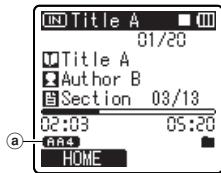
Re-playable Audible Files
Files of modes 3 and 4 formats can be played back in the Audible mode. Only those Audible files that have an [.aa] extension are displayed in the Audible mode (in the Audible folder on the recorder).
| Re-playable Audible files formats * | |
| Mode | Codec |
| 3(0x0c) | ACELP (16kbps) |
| 4(0x0c) | MP3 (32kbps) |
Playback Position and Section
In the Audible mode, the starting position can be moved easily by referring to the [Playback Position] which is the positional information stored from previous stops for each file, and by referring to "Section" where the content distributor has preset the position.
Playback Position
The Playback Position (positional information) is stored in the [.pos] file, which is created automatically by the recorder for each Audible content file ([.aa] file).
The Playback Position is initially located at the beginning of the file, and the stop position will be updated by playback or the use of S. Play (slow playback)/F. Play (fast playback).
Press the or button to move the stop position while the recorder is stopped. ThePlayback Position will not be updated.
Section
Up to a maximum 100 divisions (chapters of a story or segments of news) are set arbitrarily for each file by the distributor of the content.
Notes
- When a content file is transferred to the recorder, a [.pos] file will be automatically created for each content file in the Audible folder.
- You can not set the Index marks or the Temp marks in the Audible mode.
- When the [^*.pos] file is deleted, using Explorer, the stored Playback Position will be deleted. The next time the file is selected, playback starts from the beginning of the file.
- When a content file is transferred to the recorder, a system file will be created as a hidden file inside the Audible folder. When this file is deleted using Explorer, it is no longer possible to playback the Audible content.
Operating Recorder in Audible Mode
The operating method on the recorder is different in the Audible mode when the [Audible] folder or Audible file is selected, then while in the Normal mode.
Forwarding
Press and hold the button while the recorder is stopped.
- When the button is released fast forwarding stops. The Playback Position is not updated. When the PLAY or OK button is pressed playback resumes from that position.
Press and hold the button while playing a file.
When you release the▶I button the recorder will resume normal playback.
- If the starting position of a section (P.116) and the playback position are in the middle of a file, the recorder stops at that position.
- When the button is held down while the recorder is stopped, the recorder moves to the end of the file and then stops.
If the button is still held down, the recorder moves to the next file and continues fast forwarding from the beginning of the file. After fast forward reaches the end of the last file, the recorder stops at the beginning of the last file.
- When the button is held down during playback and the end of the file is reached, the recorder goes back to the beginning of the file and stops.
Rewinding
Press and hold the button while the recorder is stopped.
When the button is released fast rewinding stops. The Playback Position is not updated. When the PLAY or OK button is pressed playback resumes from that position.
Press and hold the button while playing a file.
When the button is released playback resumes from that position.
- If the starting position of a section (P.116) and the playback position are in the middle of a file, the recorder stops at that position.
- When the 1 button is held down while the recorder is stopped, the recorder returns to the beginning of the file and then stops. If the 1 button is still held down, the recorder moves back to the end of the previous file and continues fast rewinding.
- When the l button is held down during playback and the recorder reaches the beginning of the file, the recorder starts playback from the beginning of that file.
- If the button is kept pressed while the recorder is stopped at the start of the top file, the recorder will fast rewind starting from the end of the last file.
File Skip and Section Skip
Press the button while the recorder is stopped.
The recorder skips to a playback position or the starting position of a section, whichever is closer in the file, and stops.
After a stop position, if there is no playback position, or a starting position of a section, the recorder will skip to a playback position in the next file and stop.
Press the 1 button when the recorder has stopped at the beginning of a file.
The recorder skips to the Playback Position of the previous file and then stops.
Press the button if the recorder has not stopped at the beginning of a file.
The recorder skips to a playback position or the starting position of a section, whichever is closer in the file, and stops.
Press the button during playback.
The recorder skips three seconds forward, or to the starting position of the next section, whichever is closer, and starts to playback the file. After reaching the end of the file the recorder stops at the beginning of the file. The Playback Position is updated to the beginning position of the file at this time.
Press the button during playback.
The recorder skips three seconds back, or to the starting position of the current section, whichever is closer, and starts to playback the file. When the recorder reaches the beginning of a file the file plays from the beginning.
- The [Skip Space] (P.52) setting is invalid in the Audible mode.
Setting menu during playback
Press and the hold the MENU button for 1 second or longer while the file is playing.
Enter the Menu screen (P.44, 45) to set the [Play Speed] (P.51), [Noise Cancel] (P.50), and [Voice Filter] (P.50).
Using as external memory of the PC
In addition to its uses as an IC recorder and a music player, this recorder can also be used as external memory for a computer by storing data from a computer and reading it back out.
With the recorder connected to your PC, you can download data from the memory to your PC and upload data stored on your PC to the memory.
Windows
1 Connecting the recorder to your PC (P.80).
2 Open the Explorer window.
3 Open the product name folder.
- When you open [My Computer], it will be recognized by the drive name of the product name.
4 Copy the data.
5 Disconnect the recorder from the PC (P.81).
Macintosh
1 Connecting the recorder to your PC (P.80).
- When you connect the recorder to a Mac OS, it will be recognized by the drive name of the product name on the desktop.
Double-click the product name icon on the desktop.
3 Copy the data.
4 Disconnect the recorder from the PC (P.81).
Note
- While transmitting data, [Busy] is displayed, and the recording indicator light flashes. NEVER disconnect the USB while the recording indicator light is flashing. If you do, the data will be destroyed.
Alarm message list
| Message | Meaning | Explanation | Action |
| [Battery Low] | Low battery power. | Battery power is getting low. | Replace with new batteries (€3 P.14). |
| [File Protected] | Erase-locked. | Tried to delete a locked file. | Unlock the file (€3 P.46). |
| [Cannot record in this folder] | Not an audio-recording folder. | Recording has been attempted with a [Music] or [Podcast] folder. | Select a folder from [A] through to [B] and try recording again (€3 P.24, P.27). |
| [Index Full] | Index full. | The file is full of index marks (maximum of 16 marks). | Erase index marks that are no longer required (€3 P.39). |
| [Temp Mark Full] | Tempmark full. | The file is full of Temp-marks (maximum of 16 marks). | Erase Tempmarks that are no longer required (€3 P.39). |
| [Folder Full] | Folder full. | The folder is full of files (maximum of 999 files). | Erase unnecessary files (€3 P.42). |
| [Memory Error] | Error in the memory. | Error in the memory. | This is a malfunction, so go to the store where you purchased the recorder or an Olympus service station for repair (€3 P.127). |
| [Card Error] | Error in the memory. | microSD card is not recognized correctly. | Remove the microSD card then put it again (€3 P.22 to P.23). |
| [Licence Mismatch] | Illegally copied file. | The music files copied illegally. | Erase the file (€3 P.42). |
| [Memory Full] | Zero remaining memory. | No remaining memory. | Erase unnecessary files (€3 P.42). |
| [No File] | No file. | No files were found in the folder. | Select another folder (€3 P.24 to P.27). |
| [Format Error] | Formatting error. | There was an error while formatting the recorder's memory. | Reformat the memory (€3 P.71). |
| [Can't make the system file, Connect to PC and delete unnecessary file] | The management file cannot be created. | The file for management cannot be created due to a shortage of capacity for remaining memory. | Connect the recorder to a computer and delete any unnecessary files. |
| [Cannot play this file] | File which cannot be played. | Incompatible format. | Please confirm the file that can be played on this recorder. |
| [Please Select The File] | Unselected File | File is not selected. | Please select a file then carry out the operation. |
| [Same folder. Can't be moved(copied).] | File cannot be moved (copied). | Attempting to move (copy) into the same folder. | Please select another folder. |
| [Some files. Can't be moved(copied).] | File cannot be moved (copied). | File in the destination with the same name, or file with DRM. | Please select another file. |
| [This file can't be divided.] | File which cannot be split. | Attempting to split a file besides the PCM files recorded in this recorder. | Please select another file. |
Troubleshooting
| Symptom | Probable cause | Action |
| Nothing appears on the display | The batteries are not loaded properly. | Verify that the batteries' polarities ⊕ and ⊙ are correct (€3 P.14). |
| Battery power is getting low. | Replace with new batteries (€3 P.14). | |
| The power is off. | Turn the power on (€3 P.18). | |
| Won't start | Battery power is getting low. | Replace with new batteries (€3 P.14). |
| The power is off. | Turn the power on (€3 P.18). | |
| The recorder is in HOLD mode. | Release the recorder from HOLD (€3 P.19). | |
| Unable to record | Low remaining memory. | Erase unnecessary files (€3 P.42). |
| The maximum number of files has been reached. | Change to the another folder (€3 P.24 to P.27). | |
| No playback tone heard | The microphone is connected. | Unplug the earphones to use the internal speaker. |
| The volume level is set to [00]. | Adjust the volume level (€3 P.33). | |
| Recording level too low | The recording level has not been adjusted. | Adjust the recording level and then try recording once more (€3 P.47). |
| The microphone sensitivity is too low. | Set the microphone sensitivity to [High] or [Middle] mode and try again (€3 P.47). | |
| This could potentially be because the output level for the connected external devices are too low. | Adjust the output level for the connected devices. | |
| Voice files are not recorded in stereo | The connected external microphone is monaural. | When recording while an external monaural microphone is connected, sound will only be recorded by the L-channel. |
| [Rec Mode] is set to a monaural recording mode. | Set [Rec Mode] to the stereo recording mode (P.47). | |
| Cannot find the recorded Voice File | Wrong folder. | Switch to the correct folder (P.24 to P.27). |
| Noise heard during playback | The recorder was shaken during recording. | — |
| The recorder was placed near a cell phone or fluorescent lamp while recording or during playback. | Move the recorder. | |
| Unable to erase the file | The file is locked. | Unlock the file (P.46). |
| The file is read-only. | Unlock the file or cancel the read-only setting of the file on the PC. | |
| Unable to erase the folder | There are folders which cannot be recognized with the recorder. | Connect the recorder to PC for erasing folders. |
| Noise is audible through the recording monitor | Acoustic feedback is occurring. | When the built-in speaker amps and the like are connected there is a risk that audio feedback will occur while recording. It is recommended that you use earphones for the recording monitor. |
| Conduct adjustments like separating the earphones from the microphone further, do not point the microphone at the earphones, lower the volume on the recording monitor, and so on. | ||
| Unable to set index marks, tempmarks | The maximum number of marks has been reached. | Erase unnecessary marks (P.39). |
| The file is locked. | Unlock the file (P.46). | |
| The file is read-only. | Unlock the file or cancel the read-only setting of the file on the PC. | |
| Cannot charge | Contains batteries other than the Ni-MH rechargeable battery. | Please insert the chargeable batteries provided. |
| STOP button is not pressed. | Press and hold the STOP button and connect to the PC and AC Adapter. |
Accessories exclusive to the Olympus IC recorder can be purchased directly from Online Shop on our company's website. Sales of accessories are different according to the country.
- USB connecting AC adapter: A514 DC5V AC Adapter for USB connection
2 channel microphone (omni-directional): ME30W
Two ME30 monaural microphones come in a set with a miniature tripod and a connection adapter. These are highly sensitive omni-directional microphones supported by plug-in power which are well-suited to recording musical performances.
- Compact Gun Microphone (unidirectional): ME31
The directional microphones useful for recordings such as outdoor recording of wild birds singing. The metal-cut body provides a sturdyness to the high rigidity.
Highly sensitive noise-cancellation monaural microphone (unidirectional): ME52W
This microphone is used to record sound at a distance while minimizing surrounding noise.
- Tie clip microphone (omni-directional): ME15
Small concealing microphone with a tie-clip.
Exclusive remote control set: RS30W
When the receiver is plugged into the REMOTE jack the recorder's recording and stop functions can be operated through the remote control. The receiving position can be adjusted, thereby allowing you to operate the recorder from various different angles.
- Telephone pickup: TP7
Earphone type microphone can be plugged into your ear while phoning. The voice or conversation over the phone can be clearly recorded.
- Ni-MH rechargeable battery and charger set: BC400 (For Europe)
BC400 comes with an Ni-MH rechargeable battery charger (BU-400) and 4 Ni-MH rechargeable batteries (BR401) as a pack. This charger can quick charge Olympus AA or AAA Ni-MH rechargeable batteries.
- Ni-MH rechargeable battery: BR401
High-efficiency rechargeable long life batteries.
- Connecting cord: KA333
Connecting cord which has stereo mini-plugs (Ø3.5) with resistance at both ends. Use to connect from the earphone jack output of the recorder to the microphone input jack when recording. Converting plug adapters (PA331/PA231) which convert to the monaural mini plug (Ø3.5) or monaural mini plug (Ø2.5) are also enclosed.
- Carrying case: CS126 (supplied for the DM-550)
The carrying case for the DM-550, and DM-450 guards the recorder from sustaining impact or becoming dirty. A clip, mike stand and holes for a mini tripod are attached on the back of the case.This can also be used as a stand of the device (turn the tripod screws when fixing the tripod, and not the recorder).
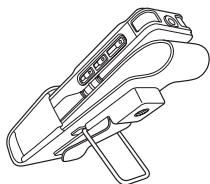
General points
Recording medium:
Built-in memory
DM-550:4GB
DM-450:2GB
microSD card (512 MB to 16 GB)
Recording format:
Linear PCM (Pulse Code Modulation)
(For DM-550)
MP3 (MPEG-1 Audio Layer3)
WMA (Windows Media Audio)
Input level:
[Mic Sense]:[Middle] - 60 dBv
Maximum working output:
320mW (8Ω speaker)
Maximum headphone output:
≤ 150 mV (according to EN 50332-2)
Wide band characteristic headphone output:
75mV≤ (according to EN 50332-2)
Speaker:
Built-in 23 mm round dynamic speaker
MICjack:
3.5 ~mm mini-jack, impedance 2.2 k
EAR jack:
0 3.5 mm mini-jack, impedance 8 Ω or more
Input power requirement:
Batteries: AAA battery (LR03) or
Olympus Ni-MH rechargeable battery
External power supply: USB connecting AC adapter(A514) 5 V
External dimensions:
110mm× 38.9mm× 16mm (without protrusions)
Weight:
84 g (including battery)
Operating temperature:
0^ - 42^
Overall frequency response
During recording or playback mode:
Linear PCM format
| Recording mode | Overall frequency response |
| 48 kHz | 40 Hz to 23 kHz |
| 44.1 kHz | 40 Hz to 21 kHz |
MP3 format
| Recording mode | Overall frequency response |
| 320 kbps | 40 Hz to 20 kHz |
| 256 kbps | 40 Hz to 20 kHz |
| 192 kbps | 40 Hz to 19 kHz |
| 128 kbps | 40 Hz to 17 kHz |
WMA format
| Recording mode | Overall frequency response |
| ST XQ | 40 Hz to 19 kHz |
| ST HQ | 40 Hz to 16 kHz |
| ST SP | 40 Hz to 9 kHz |
| HQ | 40 Hz to 13 kHz |
| SP | 40 Hz to 8 kHz |
| LP | 40 Hz to 3 kHz |
Built-in stereo microphone (During recording mode):
DM-550: 70 Hz to 20 kHz
DM-450: 100 Hz to 15 kHz
However, when recording by the MP3 format or the WMA format, the upper limit value of the frequency response depends on each recording mode (see above diagram).
Guide to recording times
Linear PCM format:
| Recording mode | Built-in memory (2 GB)(DM-450) | Built-in memory (4 GB)(DM-550) | microSD card | ||
| 1 GB | 2 GB | 4 GB | |||
| 48 kHz | - | 5h.45min. | 1h.15min. | 2h.45min. | 5h.30min. |
| 44.1 kHz | - | 6h.15min. | 1h.20min. | 3h. | 6h. |
MP3 format:
| Recording mode | Built-in memory (2 GB)(DM-450) | Built-in memory (4 GB)(DM-550) | microSD card | ||
| 1 GB | 2 GB | 4 GB | |||
| 320 kbps | 13h.30min. | 27h.45min. | 6h.30min. | 13h.30min. | 27h. |
| 256 kbps | 17h. | 34h.45min. | 8h. | 17h. | 34h. |
| 192 kbps | 22h.45min. | 46h.15min. | 11h. | 23h. | 45h. |
| 128 kbps | 34h. | 69h.30min. | 16h.30min. | 34h. | 68h. |
WMA format:
| Recording mode | Built-in memory (2 GB)(DM-450) | Built-in memory (4 GB)(DM-550) | microSD card | ||
| 1 GB | 2 GB | 4 GB | |||
| ST XQ | 33h. | 68h. | 16h. | 33h. | 66h. |
| ST HQ | 66h.30min. | 136h. | 32h. | 67h. | 133h. |
| ST SP | 133h. | 272h. | 65h. | 135h. | 266h. |
| HQ | 133h. | 272h. | 65h. | 135h. | 266h. |
| SP | 262h. | 535h. | 128h. | 267h. | 524h. |
| LP | 522h. | 1065h. | 255h. | 531h. | 1042h. |
It is possible to record exceeding 2GB
The recording will continue even if the volume of a single file exceeds 2 GB in the linear PCM format recording.
- The file is saved every 2 GB in separate files. It will be treated as multiple files when playing back.
- When the recording exceeds 2 GB, the number of files in the folder may exceed 999 files. The 1000nd file and later will not be recognized by the recorder, so check by connecting the recorder to a PC.
Notes
- The above values are strictly rough guides.
- Variations in the available recording time will arise as there may be differences in the available memory depending on the microSD card.
- Caution is required, since the differences in the available recording time will increase when the bit count and bit rate are low.
- Available recording time may be shorter if many short recordings are made (The displayed available recording time and recorded time are approximate indications).
Maximum recording time per file
Linear PCM format:
| 48 kHz | 3h. |
| 44.1 kHz | 3h.20min. |
MP3 format:
| 320kbps | 29h.40min. |
| 256kbps | 37h.10min. |
| 192kbps | 49h.40min. |
| 128kbps | 74h.30min. |
WMA format:
| ST XQ | 26h.40min. |
| ST HQ | 26h.40min. |
| ST SP | 53h.40min. |
| HQ | 26h.40min. |
| SP | 53h.40min. |
| LP | 148h.40min. |
Notes
- The maximum capacity for a single file is limited to approx. 4 GB for WMA and MP3, and approx. 2 GB for Linear PCM format (WAV).
- Regardless of the memory remaining amount, the longest sound recording time per file is restricted to the above value.
Guide to battery life
Alkaline batteries:
| Recording mode | Built-in stereo microphone (During recording mode) | Built-in speakers (During playback mode) | Earphone Playback |
| PCM 48kHz | 32h. | 18h. | 49h. |
| MP3 128kbps | 37h. | 19h. | 57h. |
| ST XQ | 38h. | 19h. | 58h. |
| LP | 51h. | 19h. | 58h. |
Ni-MH Rechargeable batteries:
| Recording mode | Built-in stereo microphone (During recording mode) | Built-in speakers (During playback mode) | Earphone Playback |
| PCM 48kHz | 27h. | 15h. | 39h. |
| MP3 128kbps | 30h. | 16h. | 45h. |
| ST XQ | 30h. | 16h. | 46h. |
| LP | 41h. | 16h. | 46h. |
Notes
- The above values are strictly rough guides.
- Battery life is measured by Olympus. It varies greatly according to the type of batteries used and the conditions of use.
Specifications and design are subject to change without notice.
Technical assistance and support
The following are contact information for technical support for Olympus recorders and software only.
- Technical Hotline Number in the U.S. and Canada
1-888-553-4448
- User Support E-mail address in the U.S. and Canada
distec@olympus.com
- Technical Hotline Number in Europe
Toll free number: 00800 67 10 83 00
available for Austria, Belgium, Denmark, Finland, France, Germany, Italy, Luxembourg, Netherlands, Norway, Portugal, Spain, Sweden, Switzerland, United Kingdom
Charged numbers for the Rest of Europe
+491805671083
+4940237734899
- User Support E-mail address in Europe
dss/support@olympus-europa.com
For customers in Europe

"CE" mark indicates that this product complies with the European requirements for safety, health, environment and customer protection.

This symbol [crossed-out wheeled bin WEEE Annex IV] indicates separate collection of waste electrical and electronic equipment in the EU countries. Please do not throw the equipment into the domestic refuse. Please use the return and collection systems available in your country for the disposal of this product. Applicable Product : DM-550/DM-450

This symbol [crossed-out wheeled bin Directive 2006/66/EC Annex II] indicates separate collection of waste batteries in the EU countries. Please do not throw the batteries into the domestic refuse. Please use the return and collection systems available in your country for the disposal of the waste batteries.
OLYMPUS
OLYMPUS IMAGING CORP.
Shinjuku Monolith, 3-1 Nishi-Shinjuku 2-chome, Shinjyuku-ku, Tokyo 163-0914, Japan. Tel. +81 (0)3-3340-2111
http://www.olympus.com
OLYMPUS IMAGING AMERICA INC.
3500 Corporate Parkway, P.O. Box 610, Center Valley, PA 18034-0610, U.S.A. Tel. 1-888-553-4448
http://www.olympusamerica.com
OLYMPUS IMAGING EUROPA GMBH
(Premises/Goods delivery) Wendenstrasse 14-18, 20097 Hamburg, Germany. Tel. +49 (0)40-237730
(Letters) Postfach 10 49 08. 20034 Hamburg, Germany.
http://www.olympus-europa.com
OLYMPUS IMAGING & AUDIO
KeyMed House, Stock Road, Southend-on-Sea, Essex, SS2 5QH, UK Tel. 0800-111-4777
http://www.olympus.co.uk