ZU12V - Télécommande Elite Screens - Notice d'utilisation et mode d'emploi gratuit
Retrouvez gratuitement la notice de l'appareil ZU12V Elite Screens au format PDF.


Questions des utilisateurs sur ZU12V Elite Screens
0 question sur cet appareil. Repondez a celles que vous connaissez ou posez la votre.
Poser une nouvelle question sur cet appareil
Téléchargez la notice de votre Télécommande au format PDF gratuitement ! Retrouvez votre notice ZU12V - Elite Screens et reprennez votre appareil électronique en main. Sur cette page sont publiés tous les documents nécessaires à l'utilisation de votre appareil ZU12V de la marque Elite Screens.
MODE D'EMPLOI ZU12V Elite Screens
ZU12V
Universal Wireless 12 Volt Projector Trigger
Product Introduction
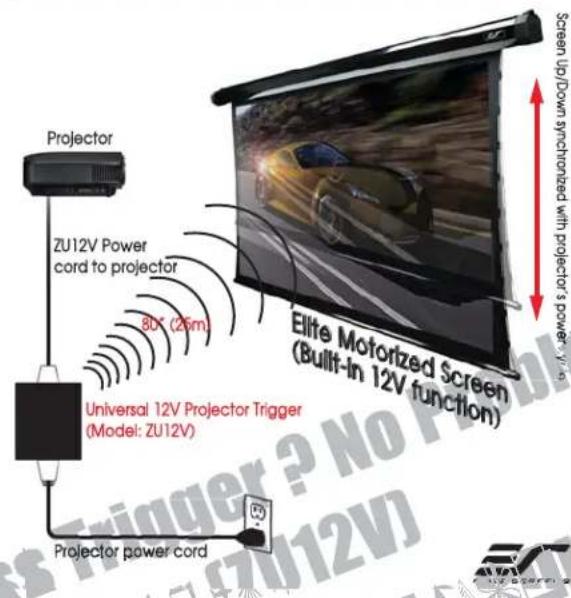
Product overview: The Elite Screens ZU12V is a wireless Radio Frequency trigger that synchronizes the projector's power cycle utilizing the power to wirelessly drop and raise all Elite Screens electric projection screens.
Trigger Diagram
text_image
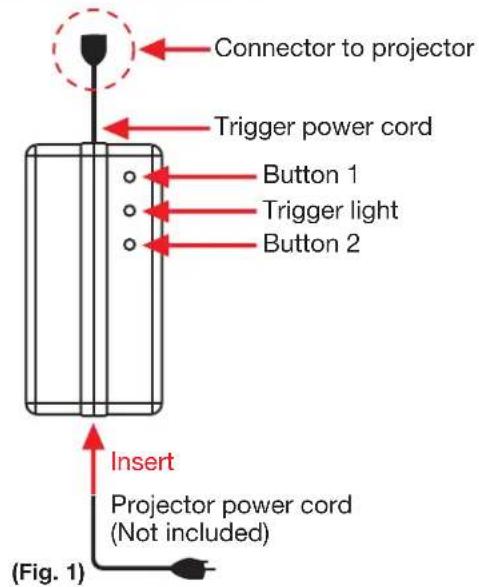
Connector to projector Trigger power cord Button 1 Trigger light Button 2 Insert Projector power cord (Not included) (Fig. 1)agram
text_image
Projector ZU12V Power cord to projector 80K (26m) Universal 12V Projector Trigger (Model: ZU12V) Projector power cord Elite Motorized Screen (Built-in 12V function) Screen Up/Down synchronized with projector's power v v is Trigger? NoInstructions
Disconnect the power cord from the power outlet on your Elite Screens electric screen. Unplug the projector's power cord and connect it to the trigger as shown above (Fig. 1). Follow by the synchronization process.
text_image
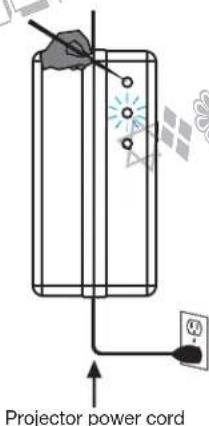
Projector power cord- Connect the trigger power cord, light turns red-afeer connection
- Press & hold [Button 1] with a shappobject, do not release until after step 4
- Connect the electric screen's power cord into the outlet while holding down [Button 1]
- Trigger light will start to blink red
- Release [Button 1] after 3 seconds (screen will drop automatically). Light blinks blue after release
text_image
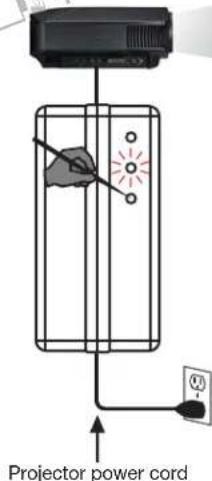
Projector power cord- Connect the trigger power cable to the projector
- Turn on the projector, press & hold [Button 2] for 3 seconds
- Light will blink red to indicate synchronization
- Synchronization is now complete. Test the synchronization by turning the projector off, screen will retract automatically if the synchronization is successful.