XD1228 - Autoradio DUAL - Notice d'utilisation et mode d'emploi gratuit
Retrouvez gratuitement la notice de l'appareil XD1228 DUAL au format PDF.


Questions des utilisateurs sur XD1228 DUAL
0 question sur cet appareil. Repondez a celles que vous connaissez ou posez la votre.
Poser une nouvelle question sur cet appareil
Téléchargez la notice de votre Autoradio au format PDF gratuitement ! Retrouvez votre notice XD1228 - DUAL et reprennez votre appareil électronique en main. Sur cette page sont publiés tous les documents nécessaires à l'utilisation de votre appareil XD1228 de la marque DUAL.
MODE D'EMPLOI XD1228 DUAL
text_image
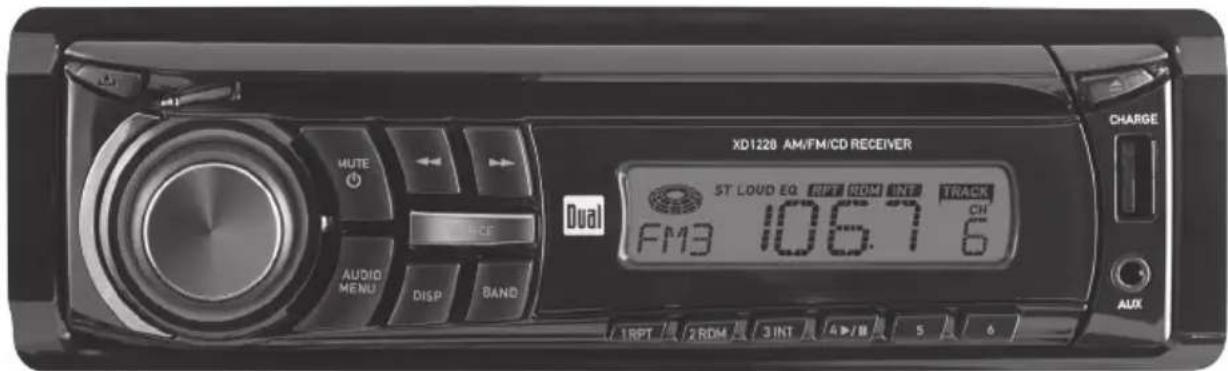
XD1220 AM/FM/CD RECEIVER ST LOUD EQ RPT ROM INT TRACK FM3 106.7 6 AUDIO MENU DISP BAND HUTE OFFICE DUAL CHARGE AUX 1RPT 2ROM 3INT 4J/M 5 6XD1228
INSTALLATION/OWNER'S MANUAL
AM/FM/CD Receiver




text_image
Dual®Preparation
Please read entire manual before installation.
Before You Start
- Disconnect negative battery terminal. Consult a qualified technician for instructions.
- Avoid installing the unit where it would be subject to high temperatures, such as from direct sunlight, or where it would be subject to dust, dirt or excessive vibration.
Getting Started
- Remove 2 transit screws located on top of the unit.
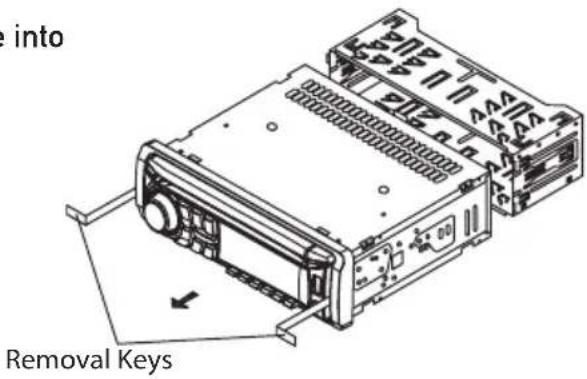
- Insert the supplied keys into the slots as shown, and slide the unit out of the mounting sleeve.
• Install mounting sleeve into opening, bending tabs to secure. - Connect wiring harness and antenna. Consult a qualified technician if you are unsure.
- Certain vehicles may require an installation kit and/or wiring harness adapter (sold separately).
- Test for correct operation and slide into mounting sleeve to secure.
- Snap trim ring into place.
text_image
into Removal Keys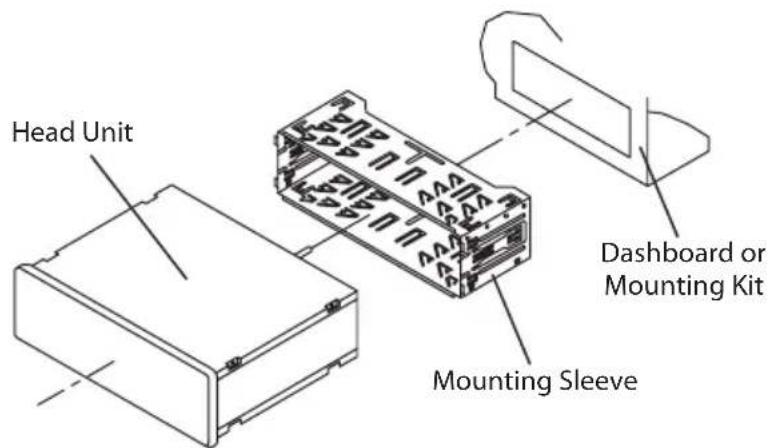
text_image
Head Unit Mounting Sleeve Dashboard or Mounting KitTYPICAL MOUNTING METHOD
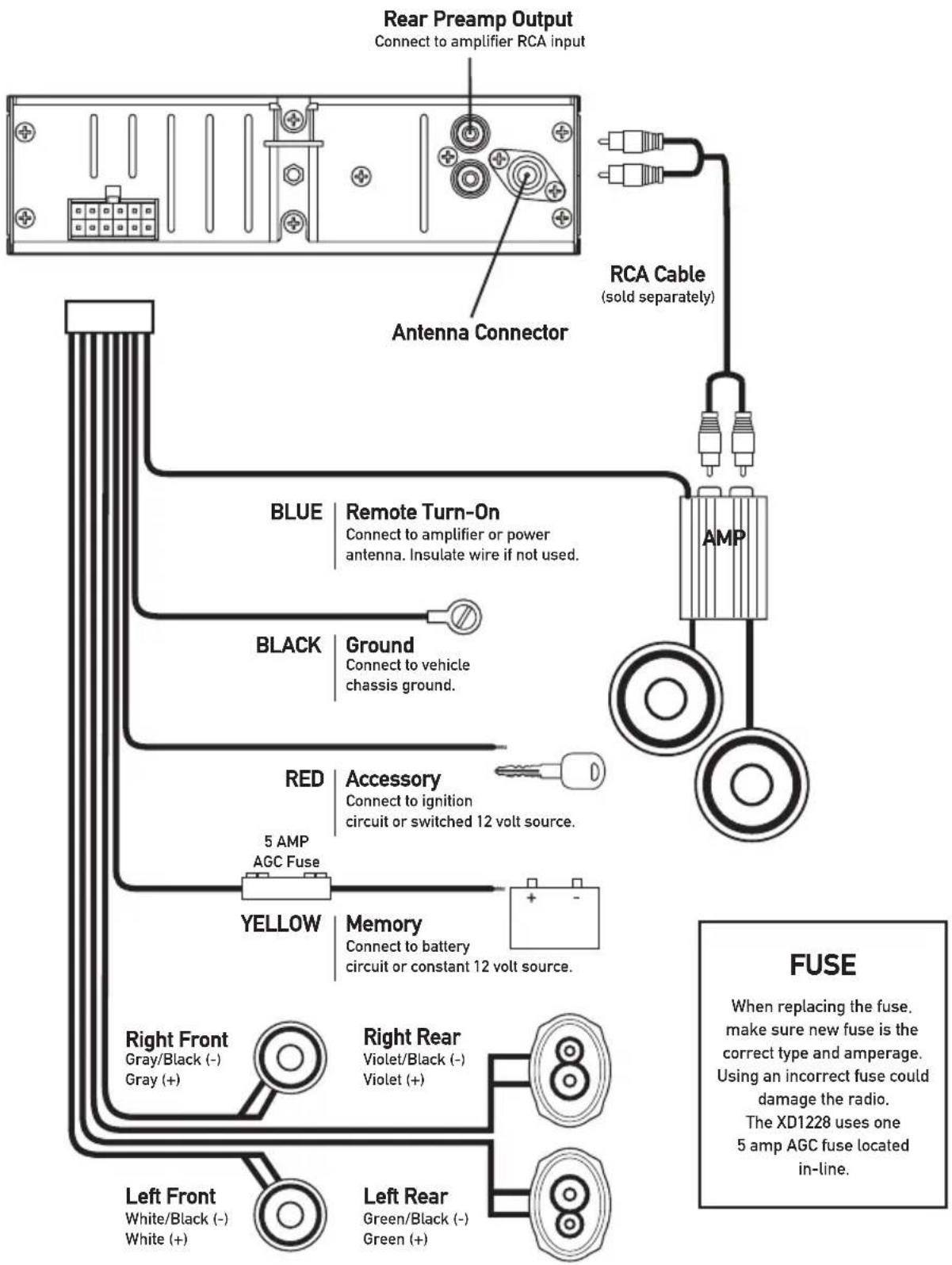
Wiring Diagram
flowchart
graph TD
    A["Antenna Connector"] --> B["Rear Preamp Output"]
    A --> C["Remote Turn-On"]
    A --> D["Ground"]
    A --> E["Accessory"]
    A --> F["Memory"]
    B --> G["RCA Cable (sold separately)"]
    C --> H["Blue"]
    C --> I["Black"]
    C --> J["RED"]
    C --> K["YELLOW"]
    D --> L["AMP"]
    E --> M["5 AMP AGC Fuse"]
    F --> N["Yellow"]
    F --> O["Right Front White/Black (-) White (+)"]
    F --> P["Left Front White/Black (-) White (+)"]
    G --> Q["FUSE"]
    H --> Q
    I --> Q
    J --> Q
    K --> Q
    L --> Q
    M --> Q
    N --> Q
    O --> Q
    P --> Q
    Q --> R["When replacing the fuse, make sure new fuse is the correct type and amperage. Using an incorrect fuse could damage the radio. The XD1228 uses one 5 amp AGC fuse located in-line."]
* Caution - Do not attach any speaker leads to ground as severe damage will occur.
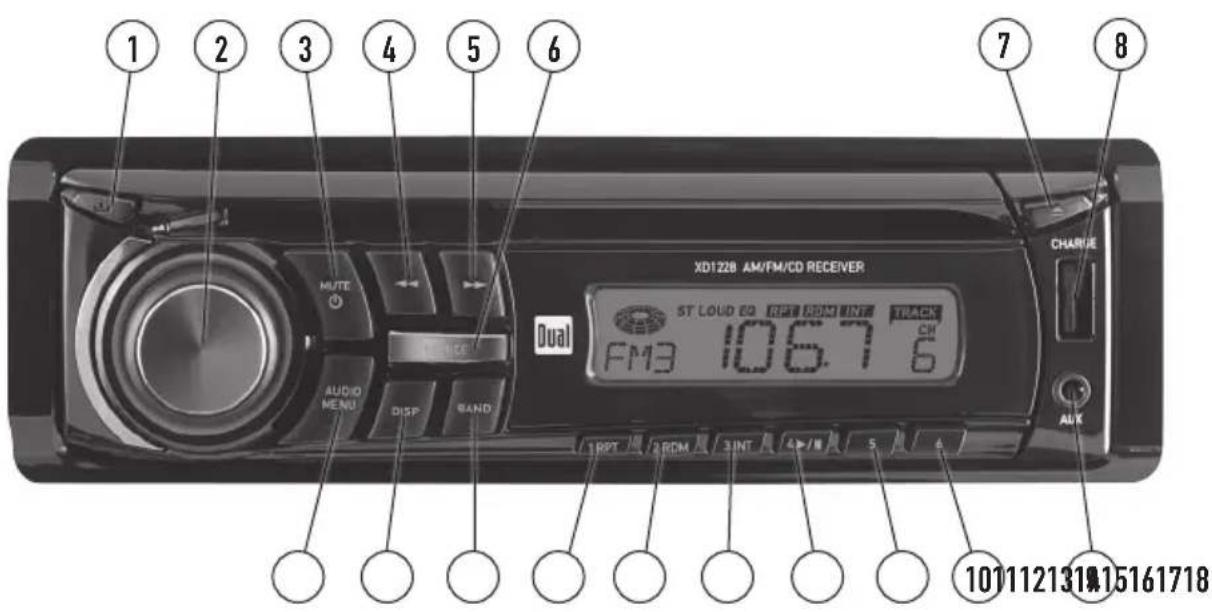
Control Locations
text_image
1 2 3 4 5 6 7 8 XD128 AM/FM/CD RECEIVER ST LOUD EQ RPT REM INT TRACK FM3 106.7 6 AUDIO MENU DISP BAND RPT 2 ROM 3 INT 4 INT 5 6 CH AUX 101112131915161718① Release
② Volume Knob
③ Mute / Power
4 Tune / Track Down
⑤ Tune / Track Up
6 Source
⑦ Eject
⑧ USB Charging Port
⑨ Auxiliary Input
10 Preset 6
11 Preset 5
12 Preset 4 / Play / Pause
13 Preset 3 / Intro
14 Preset 2 / Random
15 Preset 1 / Repeat
16 Band
17 Display
18 Audio / Menu
The XD1228 has an easy-to-use interface that provides a rewarding experience, as well as support for your favorite tunes. Audio CD-R and CD-RW disc playback ensures compatibility with your music collection, and the RCA preamp output provides the right connections to expand your system. From its front panel auxiliary input for connecting your MP3 player, to the detachable face for security assurance, this head unit has you covered.
General Operation
| Faceplate Removal | Press RELEASE and pull away from the left side to remove. To re-install, insert right side of faceplate first then push left side to secure. |
| Semi-permanent Faceplate Installation | Remove trim ring and install supplied #1 x 7/32" Phillips head screw through left side of mounting frame into faceplate. |
| Power On/Off | Press 🔊 to turn the unit on. Inserting a CD will turn the unit on automatically. Press and hold for three seconds 🔊 to turn the unit off. |
| Mode | Press MODE to select between AM/FM, CD or auxiliary input. Modes of operation are indicated in the display. |
| Auxiliary Input | Insert a 3.5mm connector in the front panel AUX port. Connect the other end of the 3.5mm connector to the headphone output of an audio device, MP3 player, etc. Press MODE to select AUX mode. |
| Volume | Adjust volume using the volume knob (00-46). |
| Display | The radio frequency (tuner mode) and CD track/elapsed time (CD player mode) will be shown by default. Press DISP to display the clock, and press DISP again to return to default display. |
| Set the Clock | Press and hold DISP for 2 seconds, the clock will begin to flash. Press TRACK ◀◀◀ to adjust the hours and TRACK ▶▶ to adjust the minutes. Press DISP or wait 5 seconds to save the clock settings. |
| 12/24-hour Clock | The clock will display 12-hour AM/PM time in USA frequency spacing mode (PM 10:00). In European frequency spacing mode, the clock will display 24-hour time (22:00). |
| Reset | Press and hold for more than 2 seconds to RESET the unit upon initial installation. The RESET button is located behind the faceplate. |
General Operation
Setup Menu
Press and hold AUDIO/MENU for more than 3 seconds to access the setup menu, then press AUDIO/MENU to cycle through menu options. When desired option appears in the display, rotate the volume knob left/right to adjust or activate the desired function.
| Menu FunctionOptionsAction | ||
| Loudness Curve | LOUD OFF Disables the loudness function. | |
| LOUD ON | Enables the loudness function. Activating this feature will enhance the bass and treble frequencies when listening to music at low volumes. | |
| Tuner Frequency Spacing | FRE USA | Programs the unit to USA tuner spacing.(200kHz for FM and 10kHz for AM). (Tuner mode only) |
| FRE EU | Programs the unit to European tuner spacing.(50kHz for FM and 9kHz for AM). (Tuner mode only) | |
| Local/Distance Tuning | LOC OFF Activates distance tuning. | |
| LOC ON Activates local tuning for strong station reception only. | ||
| Clock Display | CLK ON | Programs unit to display the clock when the power is off. |
| CLK OFF | Programs unit to not display the clock when the power is off. | |
| Beep Confirmation | BEEP OFF Disables the confirmation beep. | |
| BEEP ON Enables the confirmation beep. | ||
| Illumination Dimmer | ILLU HI Programs the LCD to the brightest illumination level. | |
| ILLU LO Lowers the LCD illumination level. | ||
USB Charging Port
Insert the USB connector of a battery powered USB device into the USB charging port on the front panel, which provides 5 volts DC and 1.0 amps. The USB device will immediately begin charging.
Note: The USB charging port may not be compatible with every device due to differences in power requirements.
Note: This USB port provides power only, and will not playback music from a USB device.
Audio
Press AUDIO to select between Volume (default), Bass, Treble, Balance, Fader and EQ.

flowchart
graph LR
    A["→"] --> B["BASS VOLUME TRIBLE BALANCE FADER→EQ"]
    B --> C["→"]
Audio Operation
| Bass | Press AUDIO until BAS appearsRotate the volume knob left/right to adjust(-6 minimum / 6 maximum) |
| Treble | Press AUDIO until TRE appearsRotate the volume knob left/right to adjust(-6 minimum / 6 maximum) |
| Balance | Press AUDIO until BAL appearsRotate the volume knob left/right to adjust(L12 - R12) "BAL R=L" represents equal balance. |
| Fader | Press AUDIO until FAD appearsRotate the volume knob left/right to adjust(F12 - R12) "FAD R=F" represents equal balance. |
| Preset EQ Curves | Press AUDIO until EQ appears. Rotate volume knob left/right to adjust between POP, CLS, ROC and OFF (default) equalization curves. Any adjustment to the Bass or Treble settings automatically cancels the current EQ curve.Tuner Operation |
| Seek Tuning | Press TUNE◄◄ or TUNE►► for more than 2 seconds to seek to the next strong station. |
| Manual Tuning | Press TUNE◄◄ or TUNE►► momentarily to change the radio frequency up or down one step at a time. Press and hold to advance quickly. |
| FM Stereo/Mono | Press BAND for more than 2 seconds to select mono or stereo (default) reception of the broadcast signal. |
| Band | Press BAND to select between FM1, FM2, FM3 and AM1, AM2 bands. |
| Storing and Recalling Station Presets | Up to 18 FM stations and 12 AM stations can be stored.To store a station, select the desired band and station.Press and hold the desired preset button for more than 2 seconds. When stored, the preset number will appear in the display. The station can be recalled anytime by pressing the corresponding preset button. |
CD Player Operation
| Insert CD | With the label facing up, insert a standard size CD into the CD slot. The CD will automatically begin playback. |
| Eject CD | Press the EJECT button to stop and eject the CD.The unit will change to tuner mode. |
| Track Select | Press TRACK ►► to skip to the beginning of the next track.Press TRACK ◀◀ to return to the beginning of the current track. Pressing TRACK ◀◀ again skips to the beginning of the previous track. |
| Fast Forward and Reverse | Press and hold TRACK ►► or TRACK ◀◀ to fast forward or reverse a track. |
| Pause | Press ►/ || to temporarily stop CD playback.Press ►/ || again to resume playback. |
| Intro | Press INT to play the first 10 seconds of each track.Press INT to cancel. |
| Repeat | Press RPT to continuously repeat selected track.Press RPT to cancel. |
| Random | Press RDM to play all tracks in random order.Press RDM again to cancel. |
| CD-R/CD-RW Compatibility | Some CD-Rs and CD-RWs may be incompatible with this unit, depending on media type and recording method.Note: CD-R recording sessions must be closed (finalized) for playback. |
Troubleshooting
| ProblemCauseAction | ||
| Unit will not turn on (no power) | Yellow wire not connected or incorrect voltage Red wire not connected or incorrect voltage | Check connections for proper voltage (11~16VDC) |
| Black wire not connected Check connection to ground | ||
| Fuse blown Replace fuse | ||
| Unit has power (but no sound) | Speaker wires not connected Check connections at speakers | |
| One or more speaker wires touching each other or touching chassis ground | Insulate all bare speaker wires from each other and chassis ground | |
| Unit blows fuses | Yellow or red wire touching chassis ground Check for pinched wire | |
| Speaker wires touching chassis ground Check for pinched wire | ||
| Incorrect fuse rating Use fuse with correct rating | ||
| Excessive skipping | Unit is not mounted correctly | Check mounting sleeve or add a backstrap support |
| Physical defect in media (CD, CD-R or CD- RW) Check media for scratches | ||
| Unit will not accept a disc | CD mechanism position out of alignment | Press EJECT for 3 seconds to reset CD mechanism position |
| CD transit screws still in place | Remove 2 transit screws located on top of the unit. | |
Error Codes
| Error CodeCauseAction | ||
| ER-1 appears on the display | Disc error | Press eject or RESET |
| ER-2 appears on the display | Mechanism error or disc is upside down Press eject or RESET | |
| ER-3 appears on the display | Servo Error Press eject or RESET | |
Limited One Year Warranty
This warranty gives you specific legal rights. You may also have other rights which vary from state to state.
Dual Electronics Corp. warrants this product to the original purchaser to be free from defects in material and workmanship for a period of one year from the date of the original purchase.
Dual Electronics Corp. agrees, at our option, during the warranty period, to repair any defect in material or workmanship or to furnish an equal new, renewed or comparable product (whichever is deemed necessary) in exchange without charges, subject to verification of the defect or malfunction and proof of the date of purchase. Subsequent replacement products are warranted for the balance of the original warranty period.
Who is covered? This warranty is extended to the original retail purchaser for products purchased from an authorized Dual dealer and used in the U.S.A.
What is covered? This warranty covers all defects in material and workmanship in this product. The following are not covered: software, installation/removal costs, damage resulting from accident, misuse, abuse, neglect, product modification, improper installation, incorrect line voltage, unauthorized repair or failure to follow instructions supplied with the product, or damage occurring during return shipment of the product. Specific license conditions and copyright notices for the software can be found via www.dualav.com.
What to do?
- Before you call for service, check the troubleshooting guide in your owner's manual. A slight adjustment of any custom controls may save you a service call.
- If you require service during the warranty period, you must carefully pack the product (preferably in the original package) and ship it by prepaid transportation with a copy of the original receipt from the retailer to an authorized service center.
- Please describe your problem in writing and include your name, a return UPS shipping address (P.O. Box not acceptable), and a daytime phone number with your shipment.
- For more information and for the location of the nearest authorized service center please contact us by one of the following methods:
• Call us toll-free at 1-866-382-5476
• E-mail us at cs@dualav.com
Exclusion of Certain Damages: This warranty is exclusive and in lieu of any and all other warranties, expressed or implied, including without limitation the implied warranties of merchantability and fitness for a particular purpose and any obligation, liability, right, claim or remedy in contract or tort, whether or not arising from the company's negligence, actual or imputed. No person or representative is authorized to assume for the company any other liability in connection with the sale of this product. In no event shall the company be liable for indirect, incidental or consequential damages.
FCC Compliance
This device complies with Part 15 of the FCC Rules. Operation is subject to the following two conditions:
(1) this device may not cause harmful interference, and
(2) this device must accept any interference received, including interference that may cause undesired operation.
Warning: Changes or modifications to this unit not expressly approved by the party responsible for compliance could void the user's authority to operate the equipment.
Note: This equipment has been tested and found to comply with the limits for a Class B digital device, pursuant to Part 15 of the FCC Rules. These limits are designed to provide reasonable protection against harmful interference in a residential installation. This equipment generates, uses and can radiate radio frequency energy and, if not installed and used in accordance with the instructions, may cause harmful interference to radio communications. However, there is no guarantee that interference will not occur in a particular installation. If this equipment does cause harmful interference to radio or television reception, which can be determined by turning the equipment off and on, the user is encouraged to try to correct the interference by one or more of the following measures:
• Reorient or relocate the receiving antenna.
- Increase the separation between the equipment and receiver.
- Connect the equipment into an outlet on a circuit different from that to which the receiver is connected.
- Consult the dealer or an experienced radio/TV technician for help.
Specifications
CD Player
Frequency response: 20Hz-20kHz Channel separation @ 1kHz: >65dB D/A converter: 1 Bit
FM Tuner
Tuning range: 87.5MHz-107.9MHz Usable sensitivity: 12dBf 50dB quieting sensitivity: 16dBf Stereo separation @ 1kHz: 40dB Frequency response: 30Hz-13kHz
AM Tuner
Tuning range: 530kHz-1710kHz Usable sensitivity: 30uV Frequency response: 80Hz-2kHz
General
Speaker output impedance: 4\~8 ohms Fuse: 5 amp AGC Dimensions: 7" x 7" x 2" (178 x 178 x 51 mm) Design and specifications subject to change without notice.

text_image
Amplifier Power Standard CEA CEA-2006 CompliantCEA-2006 Power Standard Specifications
(reference: 14.4VDC +/- 0.2V, 20Hz\~20kHz)
Power Output: 5 Watts RMS x 4 channels at 4 ohms and <1% THD+N Signal to noise ratio: 75dBA (reference: 1 watt into 4 ohms)

Dual Electronics Corp.
Toll Free: 1-866-382-5476