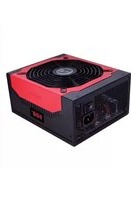
HCG-900 - Alimentation (PC) ANTEC - Notice d'utilisation et mode d'emploi gratuit
Retrouvez gratuitement la notice de l'appareil HCG-900 ANTEC au format PDF.


Choisissez votre langue et indiquez votre email : nous vous enverrons une version traduite specifiquement.
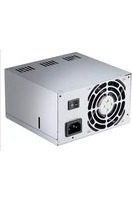
| Type de produit | Alimentation PC interne |
| Marque | Antec |
| Modèle | HCG-900 |
| Puissance nominale | 900 W |
| Certification d'efficacité | 80 PLUS Bronze (efficacité jusqu'à 87%) |
| Facteur de forme | ATX12V v2.3 / EPS12V v2.91 |
| Dimensions (approx.) | 150 mm (L) x 140 mm (l) x 86 mm (H) |
| Poids (approx.) | 2,5 kg |
| Entrée universelle | 100 ~ 240 V CA, détection automatique |
| Correction du facteur de puissance | PFC actif |
| Protections | OTP, OVP, SCP, OPP, OCP |
| Ventilateur | 135 mm double roulement à billes, silencieux |
| Connecteurs modulaires | Non modulaire (câbles fixes) |
| Connecteur principal | 1 x 24 (20+4) broches |
| Connecteur CPU | 1 x 8 (4+4) broches |
| Connecteurs PCI-E | 4 x 8 (6+2) broches |
| Connecteurs SATA | 9 |
| Connecteurs Molex | 6 |
| Connecteur disquette | 1 |
| Compatibilité SLI / CrossFire | NVIDIA SLI-Ready, ATI CrossFire certifié |
| Fonctions d'entretien | Aucun entretien nécessaire ; ventilateur auto-régulé |
| Sécurité | Arrêt sur défaut (latch) ; pas de fusible remplaçable |
| Pièces détachées et réparabilité | Non réparable par l'utilisateur ; contacter le support Antec |
| Informations générales | Garantie constructeur ; support technique Antec |
FOIRE AUX QUESTIONS - HCG-900 ANTEC
Comment installer l'Antec HCG-900 dans mon boîtier ?
Fixez l'alimentation à l'aide des quatre vis fournies, en l'orientant de sorte que le ventilateur aspire l'air de l'extérieur ou de l'intérieur selon la configuration de votre boîtier. Branchez ensuite les connecteurs sur la carte mère et les périphériques.
L'Antec HCG-900 est-il compatible avec une carte mère à connecteur 20 broches ?
Oui, le connecteur principal est un 24 broches composé de 20+4 broches. Si votre carte mère utilise un connecteur 20 broches, vous pouvez détacher les 4 broches supplémentaires. Attention, ces 4 broches ne peuvent pas être utilisées comme connecteur d'alimentation CPU.
Combien de cartes graphiques puis-je alimenter avec ce bloc ?
L'HCG-900 dispose de quatre connecteurs PCI-E 8 (6+2) broches, ce qui permet d'alimenter jusqu'à deux cartes graphiques haut de gamme (chacune pouvant nécessiter deux connecteurs) ou quatre cartes plus modestes.
L'alimentation est-elle modulaire ?
Non, l'Antec HCG-900 n'est pas modulaire. Tous les câbles sont fixés de manière permanente. Cela garantit une connexion fiable mais nécessite une gestion soignée des câbles dans le boîtier.
Quelle est l'efficacité de cette alimentation ?
L'HCG-900 est certifiée 80 PLUS Bronze, avec une efficacité d'au moins 82% à 20% de charge, 85% à 50% et 86% à 100% (d'après les tests). Cela réduit la consommation d'énergie et la chaleur dégagée.
Comment nettoyer l'alimentation ?
Débranchez l'alimentation et utilisez un jet d'air comprimé pour souffler la poussière par la grille du ventilateur. Ne l'ouvrez jamais, car il n'y a pas de pièces réparables par l'utilisateur.
Quelles sont les protections intégrées ?
L'HCG-900 est équipée de protections contre les surtempératures (OTP), surtensions (OVP), courts-circuits (SCP), surcharges (OPP) et surintensités (OCP). En cas de défaut, l'alimentation se verrouille et doit être débranchée puis rebranchée après correction du problème.
Le ventilateur est-il silencieux ?
Oui, le ventilateur de 135 mm à double roulement à billes est conçu pour être silencieux. Sa vitesse varie en fonction de la charge et de la température, ce qui le rend peu audible la plupart du temps.
Puis-je utiliser cette alimentation avec une prise 110 V ou 230 V ?
Oui, l'HCG-900 dispose d'une entrée universelle (100~240 V CA) avec détection automatique. Il n'y a pas de commutateur de tension à régler.
Que faire si l'alimentation ne s'allume pas ?
Vérifiez que l'interrupteur à l'arrière est sur la position '|' (marche), que le cordon d'alimentation est bien enfoncé et que la carte mère reçoit bien le signal de démarrage. Si le bloc ne démarre toujours pas, il peut être en protection : débranchez le cordon secteur pendant 30 secondes et réessayez. Si le problème persiste, contactez le support Antec.
Questions des utilisateurs sur HCG-900 ANTEC
0 question sur cet appareil. Repondez a celles que vous connaissez ou posez la votre.
Poser une nouvelle question sur cet appareil
Aucune question pour l'instant. Soyez le premier à en poser une.
Téléchargez la notice de votre Alimentation (PC) au format PDF gratuitement ! Retrouvez votre notice HCG-900 - ANTEC et reprennez votre appareil électronique en main. Sur cette page sont publiés tous les documents nécessaires à l'utilisation de votre appareil HCG-900 de la marque ANTEC.
MODE D'EMPLOI HCG-900 ANTEC

Assistant notice
Powered by Anthropic
En attente de votre message
Informations produit
Marque : ANTEC
Modèle : HCG-900
Catégorie : Alimentation (PC)