
PCCF 80211261 X - Cuisinière PRIVILEG - Notice d'utilisation et mode d'emploi gratuit
Retrouvez gratuitement la notice de l'appareil PCCF 80211261 X PRIVILEG au format PDF.


| Type de produit | Cuisinière électrique avec four multifonction |
| Marque | Privileg |
| Modèle | PCCF 80211261 X |
| Dimensions externes (H x L x P) | 850 mm x 600 mm x 600 mm |
| Poids (approx.) | 60 kg |
| Alimentation électrique | 220-240 V / 380-415 V 3N ~ 50 Hz, 10 kW max |
| Fusible recommandé | Min. 16 A x 3 |
| Type de câble | H05VV-FG 3 x 2,5 mm² / 5 x 1,5 mm², max. 2 m |
| Plaques de cuisson | 4 plaques : 1 simple (140 mm, 1200 W), 1 double (210/120 mm, 2200/750 W), 1 simple (180 mm, 1800 W), 1 étendue (170/265 mm, 1500/2400 W) |
| Type de four | Four multifonction avec chaleur tournante, gril, etc. |
| Classe énergétique du four | A |
| Fonctions du four | Chaleur tournante, chaleur voûte/sole, gril, gril+ventilateur, décongélation, boost |
| Éclairage du four | Lampe intérieure 15-25 W, résiste à 300 °C |
| Grill | Puissance 2,2 kW, thermostat réglable |
| Minuterie numérique | Avec programmation cuisson et alarme |
| Sécurité enfants | Verrouillage des touches (keylock) |
| Accessoires inclus | Grille, plaques de cuisson (grande, profonde, alu, petite), lèchefrite |
| Nettoyage | Nettoyer avec un chiffon doux et eau savonneuse ; ne pas utiliser de nettoyants agressifs ni de vapeur |
| Entretien | Porte amovible, lampe remplaçable |
FOIRE AUX QUESTIONS - PCCF 80211261 X PRIVILEG
Questions des utilisateurs sur PCCF 80211261 X PRIVILEG
0 question sur cet appareil. Repondez a celles que vous connaissez ou posez la votre.
Poser une nouvelle question sur cet appareil
Téléchargez la notice de votre Cuisinière au format PDF gratuitement ! Retrouvez votre notice PCCF 80211261 X - PRIVILEG et reprennez votre appareil électronique en main. Sur cette page sont publiés tous les documents nécessaires à l'utilisation de votre appareil PCCF 80211261 X de la marque PRIVILEG.
MODE D'EMPLOI PCCF 80211261 X PRIVILEG
Gebrauchsanweisung
Instructions for use
Mode d'emploi
Gebruiksaanwijzing
Istruzioni per l'uso
natural_image
Close-up of mechanical clamps or clips with no visible text or symbolsBrugsanvisning
Bruksanvisning
Käyttöohje
Manual de utilização
Instrucciones para el uso
natural_image
Close-up of a modern office building (no signage)
natural_image
Close-up of a glass bowl with a spoon, showing its interior and legs (no text or symbols visible)Οδηγίες χρήσης
Instrukcje użytkowania
Használati utasítás
Инструкция за употреба
natural_image
Close-up of a textured surface with grid pattern and scattered dark dots (no text or symbols)Návod k použití
Návod na použitie
Instrucțiuni de utilizare
Инструкции по эксплуатации
Please read this manual first.
Dear Customer,
We would like you to obtain best performance with your product that has been manufactured in modern facilities and passed through strict quality control procedures.
Therefore, we advise you to read through this User Manual carefully before using your product and keep it for future reference. If you hand over the product to someone else, deliver the User Manual as well.
The User Manual will help you use the product in a fast and safe way.
- Read the User Manual before installing and operating the product.
• You must strictly observe the safety instructions. - Keep this User Manual within easy reach for future reference.
• Also read other documents supplied with the product.
Remember that this User Manual may also be applicable for several other models.
Differences between models are explicitly identified in the manual.
Explanation of symbols
Throughout this User Manual the following symbols are used:
i Important information or useful hints about usage.
⚠ Warning for hazardous situations with regard to life and property.
⚠ Warning for electric shock.
Warning for risk of fire.
Warning for hot surfaces.
1 General information...... 4
Overview....4
Technical specifications .... 5
Accessories 6
2 Important safety instructions 8
General safety....8
Intended use 9
Safety for children....9
Safety when working with electricity10
3 Installation.... 11
Before installation....11
Installation and connection....12
Disposal 14
Disposing of packaging material .....14
Future Transportation ....14
Disposing of the old product .....15
4 Preparation 16
Tips for saving energy 16
Initial use....16
Initial time setting....16
First cleaning of the appliance......17
Initial heating....17
5 How to use the hob...... 19
General information about cooking ....19
Using the hobs....20
6 How to operate the oven ..... 22
General information on baking, roasting and grilling 22
How to operate the electric oven.....22
Operating modes....23
Using the oven clock....25
Using the keylock....26
Using the clock as an alarm...... 27
Cooking times table 28
How to operate the grill 29
7 Maintenance and care ...... 31
General information ....31
Cleaning the hob....31
Cleaning the control panel....32
Cleaning the oven 32
Removing the oven door....32
Replacing the oven lamp 33
8 Troubleshooting.... 34
1 General information
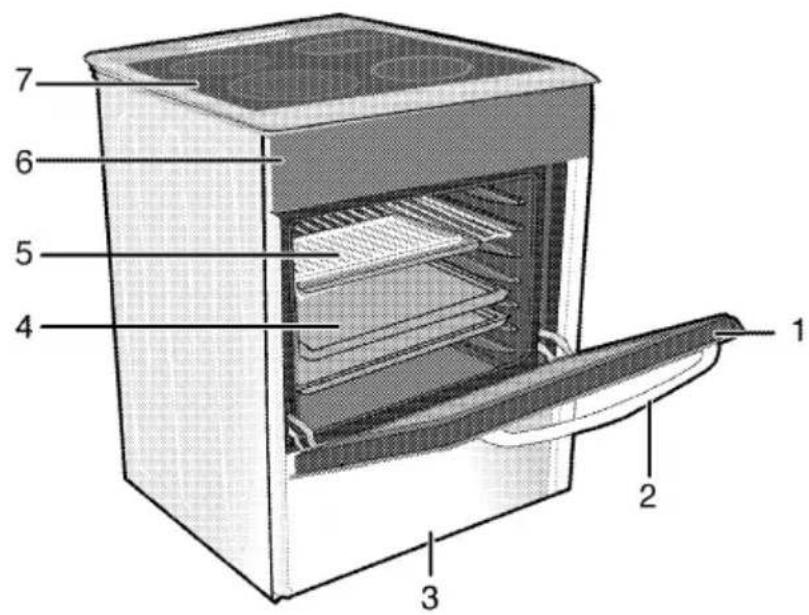
Overview
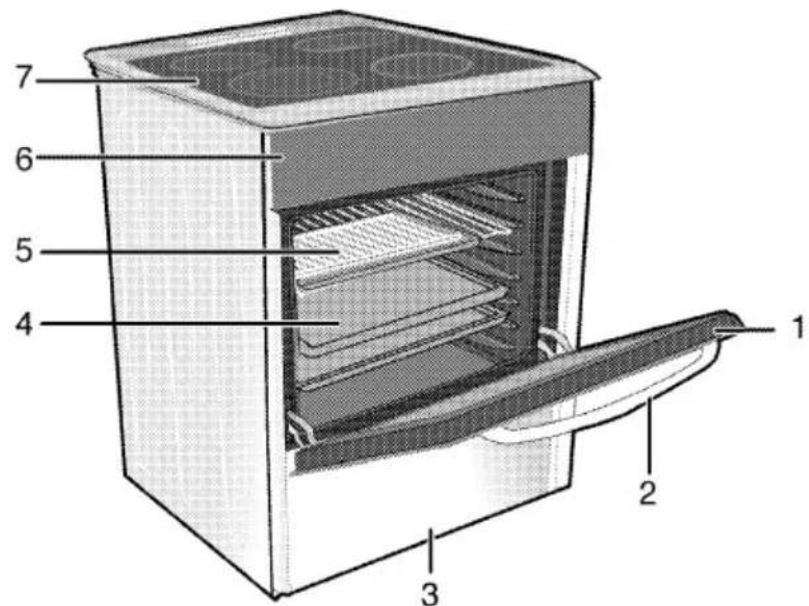
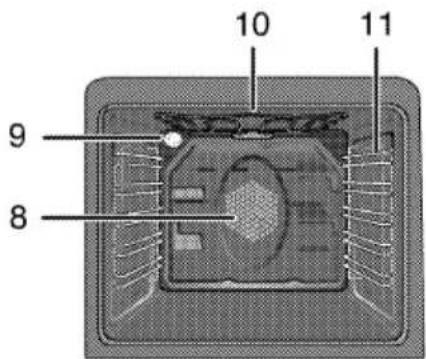
1 Front door
2 Handle
3 Bottom drawer
4 Tray
5 Wire shelf
6 Control panel
7 Burner plate
8 Fan motor (behind steel plate)
9 Lamp
10 Grill heating element
11 Shelf positions
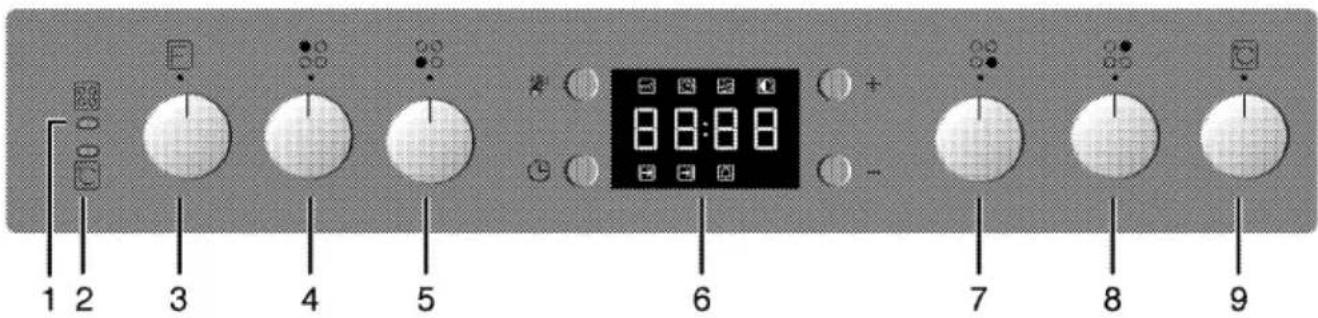
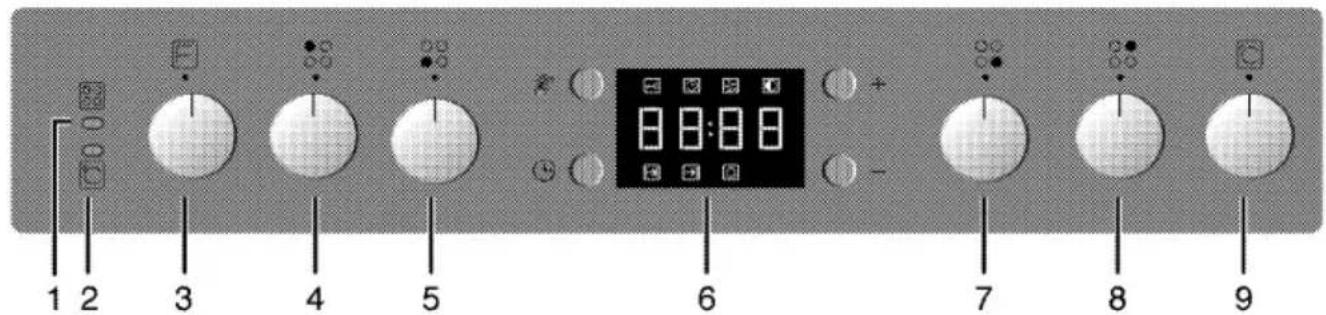
1 Warning lamp
2 Thermostat lamp
3 Function knob
4 Single-circuit cooking plate Rear left
5 Dual-circuit cooking plate Front left
6 Digital timer
7 Single-circuit cooking plate Front right
8 Extended cooking plate Rear right
9 Thermostat knob
Technical specifications
| GENERAL | |
| External dimensions (height / width / depth) | 850 mm/600 mm/600 mm |
| Voltage / frequency | 220-240 V / 380- 415 V 3N ~ 50 Hz |
| Total power consumption | 10 kW |
| Fuse | min. 16 A x 3 |
| Cable type / section | H05VV-FG 3 x 2,5 mm^2 / 5 x 1,5 mm^2 |
| Cable length | max. 2 m |
| HOB | |
| Burners | |
| Rear left | Single-circuit cooking plate |
| Dimension | 140 mm |
| Power | 1200 W |
| Front left | Dual-circuit cooking plate |
| Dimension | 210/120 mm |
| Power | 2200/750 W |
| Front right | Single-circuit cooking plate |
| Dimension | 180 mm |
| Power | 1800 W |
| Rear right | Extended cooking plate |
| Dimension | 170/265 mm |
| Power | 1500/2400 W |
| OVEN/GRILL | |
| Main oven | Multifunction oven |
| Energy efficiency class# | A |
| Inner lamp | 15–25 W |
| Grill power consumption | 2.2 kW |
Basics: Information on the energy label of electrical ovens is given in accordance with the EN 50304 standard. Those values are determined under standard load with bottom-top heater or fan assisted heating (if any) functions.
Energy efficiency class is determined in accordance with the following prioritization depending on whether the relevant functions exist on the product or not. 1-Cooking with eco-fan, 2- Turbo slow cooking, 3- Turbo cooking, 4- Fan assisted bottom/top heating, 5-Top and bottom heating. ** See. Installation, page 11.
i Technical specifications may be changed without prior notice to improve the quality of the product.
i Figures in this manual are schematic and may not exactly match your product.
Values stated on the product labels or in the documentation accompanying it are obtained in laboratory conditions in accordance with relevant standards. Depending on operational and environmental conditions of the product, these values may vary.
Accessories
i Accessories supplied can vary depending on the product model. Not every accessory described in the user manual may exist on your product.
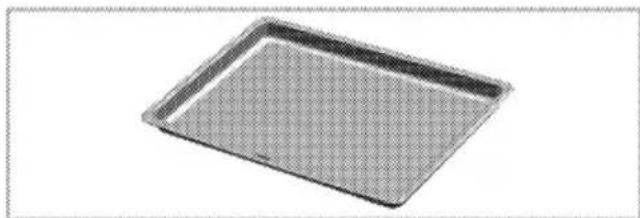
Oven tray
Used for pastries, frozen foods and big roasts.

natural_image
Exterior view of a square baking tray (no text or symbols)Deep tray
Used for pastries, large roasts, juicy dishes, and for collecting the fat while grilling.

natural_image
3D rendering of a rectangular baking tray with a mesh pattern (no text or symbols)Aluminium cake tray
Used for pastries such as cookies and biscuits.

natural_image
Simple line drawing of a rectangular tray or tray with rounded edges and a flat top (no text or symbols)Cake tray
Used for pastries such as cookies and biscuits.

natural_image
3D rendering of a square baking tray with a grid pattern (no text or symbols)Small oven tray
Used for small portions. This oven tray is placed onto the wire grill.

natural_image
3D rendering of a rectangular tray with a grid pattern (no text or symbols)Wire Shelf
Used for roasting and for placing the food to be baked, roasted or cooked in casserole dishes to the desired rack.

natural_image
Isometric view of a rectangular sheet with horizontal lines, no text or symbols present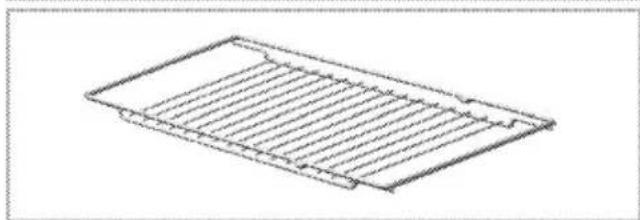
natural_image
Isometric line drawing of a rectangular metal grate or drain with parallel slats (no text or symbols)Placing the wire grill and tray onto the telescopic racks properly
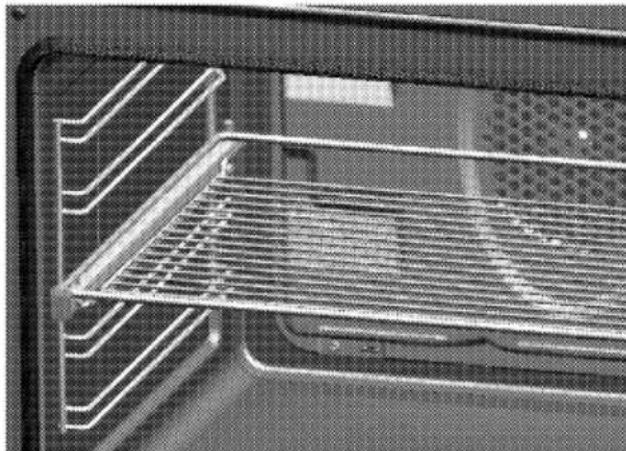
Telescopic racks allow you to install and remove the trays and wire grill easily.
When using the tray and wire grill with telescopic racks, make sure that the pins at the rear section of the telescopic rack stands against the edges of the wire grill and tray.
natural_image
Interior view of an oven with metal grating and ventilation grilles (no text or symbols visible)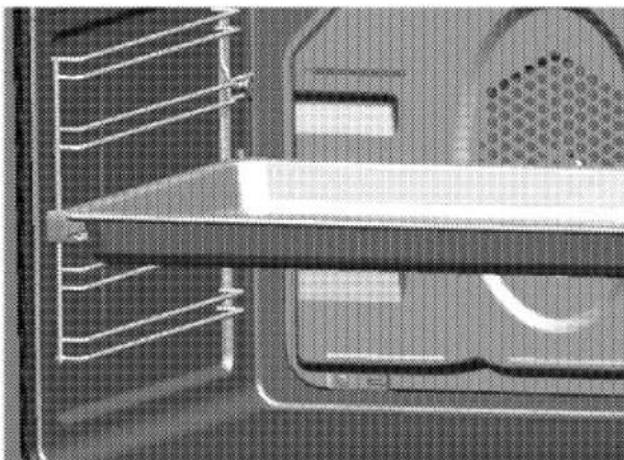
natural_image
Close-up of a mechanical component with internal channels and a textured surface (no visible text or symbols)2 Important safety instructions
This section contains safety instructions that will help you avoid risk of injury and damage. All warranties will become void if you do not follow these instructions.
General safety
- This product is not intended to be used by persons with physical, sensory or mental disorders or unlearned or inexperienced people (including children) unless they are attended by a person who will be responsible for their safety or who will instruct them accordingly for use of the product. Children must be supervised to prevent them from tampering with the product.
- Connect the product to an earthed outlet/line protected by a fuse of suitable capacity as stated in the "Technical specifications" table. Have the earthing installation made by a qualified electrician while using the product with or without a transformer. Our company shall not be liable for any problems arising due to the product not being earthed in accordance with the local regulations.
- Do not operate the product if the power cable or plug is damaged. Call Authorized Service Agent.
- Do not operate the product if it is defective or has any visible damage.
- Do not carry out any repairs or modifications on the product. However, you may remedy some
troubles that do not require any repairs or modifications. See Troubleshooting, page 34.
- Never wash down the product with water! There is the risk of electric shock!
- Never use the product when your judgment or coordination is impaired by the use of alcohol and/or drugs.
- Product must be disconnected from the mains during installation, maintenance, cleaning and repair procedures.
• Installation and repair procedures must always be performed by Authorized Service Agents. The manufacturer shall not be held responsible for damages arising from procedures carried out by unauthorized persons which may also void the warranty.
- Be careful when using alcoholic drinks in your dishes. Alcohol evaporates at high temperatures and may cause fire since it can ignite when it comes into contact with hot surfaces.
- Do not heat closed tins and glass jars in the oven. The pressure that would build-up in the tin/jar may cause it to burst.
- Do not place any flammable materials close to the product as the sides may become hot during use.
- Do not place baking trays, dishes or aluminium foil directly onto the bottom of the oven. The heat
accumulation might damage the bottom of the oven.
- Keep all ventilation slots clear of obstructions.
- Product may be hot when it is in use. Never touch the hot burners, inner sections of the oven, heaters and etc.
• Always use heat resistant oven gloves when putting in or removing dishes into/from the hot oven. - Do not use the product with front door glass removed or cracked.
- Rear surface of the oven gets hot when it is in use. Make sure that the gas/electrical connection does not contact the rear surface; otherwise, connections can get damaged.
- Do not trap the mains cable between the oven door and frame and do not route it over hot surfaces. Otherwise, cable insulation may melt and cause fire as a result of short circuit.
• Make sure that the product function knobs are switched off after every use. - Vapour pressure that build up due to the moisture on the hob surface or at the bottom of the pot can cause the pot to move. Therefore, make sure that the oven surface and bottom of the pots are always dry.
i Product must be installed by a qualified person in accordance with the regulations in force. Otherwise, the warranty shall become void.
The appliance is not intended to be operated by means of an external timer or separate remote control.
Intended use
This product is designed for domestic use. Commercial use will void the guarantee.
"CAUTION: This appliance is for cooking purposes only. It must not be used for other purposes, for example room heating."
This product should not be used for warming the plates under the grill, drying towels, dish cloths etc. by hanging them on the oven door handles. This product should also not be used for room heating purposes. The manufacturer shall not be liable for any damage caused by improper use or handling errors.
The oven can be used for defrosting, baking, roasting and grilling food.
Safety for children
- Electrical and/or gas products are dangerous to children. Keep children away from the product when it is operating and do not allow them to play with the product.
- Accessible parts of the appliance will become hot whilst the appliance is in use. Children should be kept away until the product has cooled down.
- "CAUTION: Accessible parts may be hot when the grill is in use. Young children should be kept away."
- Do not place any items above the appliance that children may reach for.
- When the door is open, do not load any heavy object on it and do not allow children to sit on it. It may overturn or door hinges may get damaged.
- The packaging materials will be dangerous for children. Keep the packaging materials away from children. Please dispose of all parts of the packaging according to environmental standards.
Safety when working with electricity
Defective electric equipment is one of the major causes of house fires.
- Any work on electrical equipment and systems should only be carried out by authorised and qualified persons.
- In case of any damage, switch off the product and disconnect it from the mains. To do this, turn off the fuse at home.
• Make sure that fuserating is compatible with the product.
3 Installation
Refer to the nearest Authorised Service Agent for installation of the product. Make sure that the electric and gas installations are in place before calling the Authorised Service Agent to have the product ready for operation. If not, call a qualified electrician and fitter to have the required arrangements made.
i Preparation of location and electrical and gas installation for the product is under customer's responsibility.
The product must be installed in accordance with all local gas and/or electrical regulations.
Prior to installation, visually check if the product has any defects on it. If so, do not have it installed.
Damaged products cause risks for your safety.
Before installation
To ensure that critical air gaps are maintained under the appliance, we recommend that this appliance is mounted on a solid base and that the feet do not sink into any carpet or soft flooring.
The kitchen floor must be able to carry the weight of the appliance plus the additional weight of cookware and bakeware and food.

- It can be used with cabinets on either side but in order to have a minimum distance of 400mm above hotplate level allow a side clearance of 65mm between the appliance and any wall, partition or tall cupboard.
- It can also be used in a free standing position. Allow a minimum distance of 750 mm above the hob surface.
- (*) If a cooker hood is to be installed above the cooker, refer to cooker hood manufacturer' instructions regarding installation height (min 650 mm).
- The appliance corresponds to device class 1, i.e. it may be placed with the rear and oneside to kitchen walls, kitchen furniture or equipment of any size. The kitchen furniture or equipment on the other side may only be of the same size or smaller.
- Any kitchen furniture next to the appliance must be heat-resistant (100 °C min.).
Installation and connection
Product can only be installed and connected in accordance with the statutory installation rules.
Do not install the appliance next to refrigerators or freezers. The heat emitted by the appliance will lead to an increased energy consumption of cooling appliances.
- Carry the product with at least two persons.
- Product must be placed directly on the floor. It must not be placed onto a base or a pedestal.
Material damage! The door and/or handle must not be used for lifting or moving the appliance.
Electrical connection
Connect the product to a grounded outlet/line protected by a fuse of suitable capacity as stated in the "Technical specifications" table. Have the grounding installation made by a qualified electrician while using the product with or without a transformer. Our company shall not be liable for any damages that will arise due to using the product without a grounding installation in accordance with the local regulations.
Risk of electric shock, short circuit or fire by unprofessional installation! The appliance may be connected to the mains supply only by an authorized qualified person and the appliance is only guaranteed after correct installation.
Risk of electric shock, short circuit or fire by damage of the mains lead! The mains lead must not be clamped, bent or trapped or come into contact with hot parts of the appliance. If the mains lead is damaged, it must be replaced by a qualified electrician.
The mains supply data must correspond to the data specified on the type label of the product. The rating plate is either seen when the door or the lower cover is opened or it is located at the rear wall of the unit depending on the unit type. Power cable of your product must comply with the values in "Technical specifications" table.
Risk of electric shock! Before starting any work on the electrical installation, please disconnect the appliance from the mains supply.
Connecting the power cable
- If a power cable is not supplied together with your product, a power cable that you would select from the table (Technical specifications, page 5) in accordance with the electrical
installation at your home must be connected to your product by following the instructions in cable diagram.
If it is not possible to disconnect all poles in the supply power, a disconnection unit with at least 3 mm contact clearance (fuses, line safety switches, contactors) must be connected and all the poles of this disconnection unit must be adjacent to (not above) the product in accordance with IEE directives. Failure to obey this instruction may cause operational problems and invalidate the product warranty.
i Additional protection by a residual current circuit breaker is recommended.
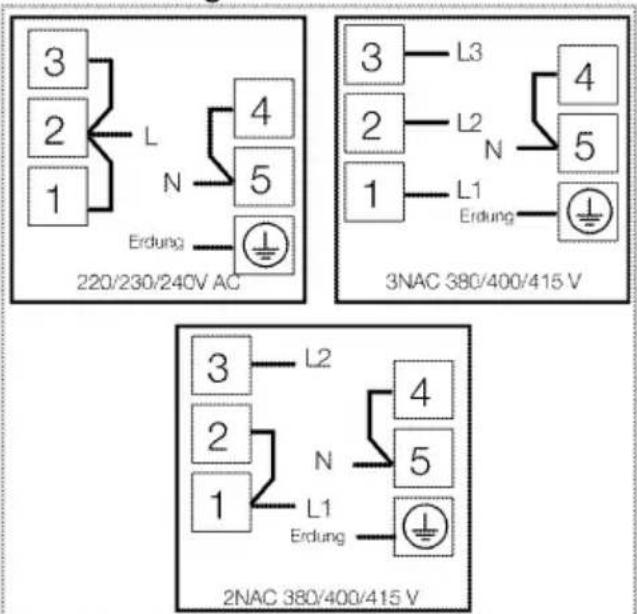
- Open the terminal block cover with a screwdriver.
- Insert the power cable through the cable clamp below the terminal and secure it to the main body with the integrated screw on cable clamping component.
- Connect the cables according to the supplied diagram.


- After completing the wire connections, close the terminal block cover.
- Route the power cable so that it will not contact the product and get squeezed between the product and the wall.
Power cable must not be longer than 2 m because of safety reasons.
- Push the product towards the kitchen wall.
• Adjusting the legs of oven
Vibrations during use may cause cooking vessels to move. This dangerous situation can be avoided if the product is level and balanced.
For your own safety please ensure the product is level by adjusting the four feet at the bottom by turning left or right and align level with the work top.
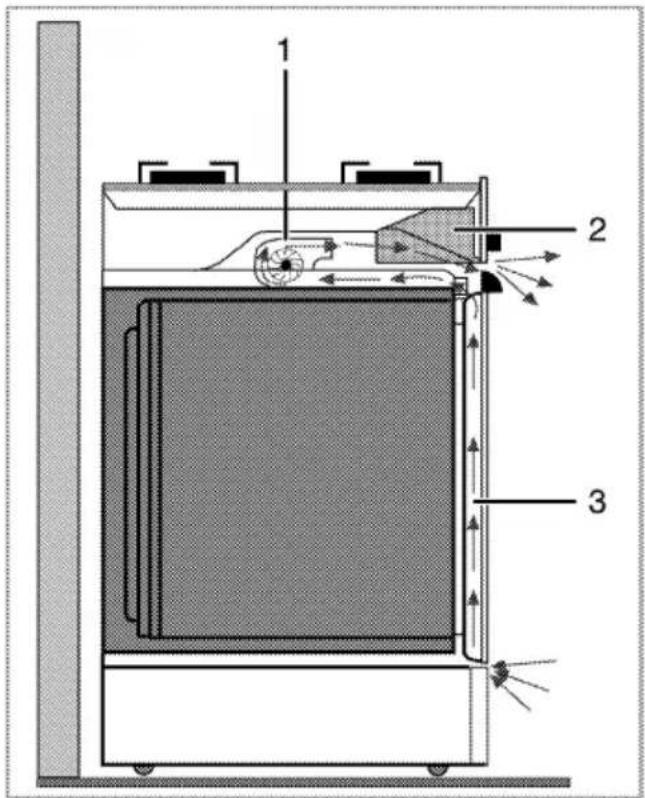
For equipment with a cooling fan

1 Fan
2 Control Panel
3 Door
The cooling fan cools both the control panel and the front of the appliance.
i Cooling fan continues to run for up to 20-30 minutes (approx.) even after the oven is turned off.
Final check
- Reconnect the product to the mains.
- Check electrical functions.
Disposal
Disposing of packaging material
Packaging materials are dangerous to children. Keep packaging materials in a safe place out of reach of children. Packaging materials of the product are manufactured from recyclable materials. Dispose of them properly and sort in accordance with recycled waste instructions. Do not dispose of them with normal domestic waste.
Future Transportation
- Keep the product's original carton and transport the product in it. Follow the instructions on the carton. If you do not have the original carton, pack the product in bubble wrap or thick cardboard and tape it securely.
- To prevent the wire grill and tray inside the oven from damaging the oven door, place a strip of cardboard onto the inside of the oven door that lines up with the position of the trays. Tape the oven door to the side walls.
- Do not use the door or handle to lift or move the product.
Do not place other items on the top of the appliance. The appliance must be transported upright.
Check the general appearance of your product for any damages that might have occurred during transportation.
Disposing of the old product
Dispose of the old product in an environmentally friendly manner. This equipment bears the selective sorting symbol for waste electrical and electronic equipment (WEEE). This means that this equipment must be handled pursuant to European Directive 2002/96/EC in order to be recycled or dismantled to minimize its impact on the environment. For further information, please contact local or regional authorities.
Electronic equipments not included in the selective sorting process are potentially dangerous for the environment and human health due to the presence of hazardous substances. Refer to your local dealer or solid waste collection centre in your area to learn how to dispose of your product. Before disposing of the product, cut off the power cable plug and make the door lock (if any) unusable to avoid dangerous conditions to children.
4 Preparation
Tips for saving energy
The following information will help you to use your appliance in an ecological way, and to save energy:
- Use dark coloured or enamel coated cookware in the oven since the heat transmission will be better.
- While cooking your dishes, perform a preheating operation if it is advised in the user manual or cooking instructions.
- Do not open the door of the oven frequently during cooking.
- Try to cook more than one dish in the oven at the same time whenever possible. You can cook by placing two cooking vessels onto the wire shelf.
- Cook more than one dish one after another. The oven will already be hot.
- You can save energy by switching off your oven a few minutes before the end of the cooking time. Do not open the oven door.
- Defrost frozen dishes before cooking them.
- Use pots/pans with cover for cooking. If there is no cover, energy consumption may increase 4 times.
- Select the burner which is suitable for the bottom size of the pot to be used. Always select the correct pot size for your dishes. Larger pots require more energy.
- Pay attention to use flat bottom pots when cooking with electric hobs.
Pots with thick bottom will provide a better heat conduction. You can obtain energy savings up to 1/3.
- Vessels and pots must be compatible with the cooking zones. Bottom of the vessels or pots must not be smaller than the hotplate.
- Keep the cooking zones and bottom of the pots clean. Dirt will decrease the heat conduction between the cooking zone and bottom of the pot.
- For long cookings, turn off the cooking zone 5 or 10 minutes before the end of cooking time. You can obtain energy savings up to 20% by using the residual heat.
Initial use
Initial time setting
Before using the oven the clock time must be set. If the clock time is not set, the main oven will not work.
While making any adjustment, related symbols on the clock will flash.
Press (5) or (6) keys to set the time after the oven in energized for the first time.

1 Program knob
2 Cooking time
3 Cooking end time
4 Alarm period
5 Minus key
6 Plus key
7 Screen brightness adjustment
8 Alarm volume
9 Current time
10 Keylock
11 Adjustment key
After setting the time, you can start and end the cooking by selecting the desired position with temperature button and function button.
If the current time is not set, time setting will start increasing/moving up from 12:00.
Clock symbol '9' will be displayed to indicate that the current time has not been set.
This symbol will disappear once the time is set.
Current time settings are cancelled in case of power failure. It needs to be readjusted.
To change the time of the day you have previously set:
-
Press (11) key to activate current time symbol '9'.
-
Press (5) or (6) keys to set the current time.
Changing screen brightness adjustment
-
Press (11) key to activate screen brightness symbol '7' for screen brightness adjustment.
-
Press (5) or (6) keys to set the desired brightness.
» Selected brightness level will appear as d-01, d-02 or d-03 on the display.
First cleaning of the appliance
The surface may get damaged by some detergents or cleaning materials. Do not use aggressive detergents, cleaning powder/cream or any sharp objects.
-
Remove all packaging materials.
-
Wipe the surfaces of the appliance with a damp cloth or sponge and dry with a cloth.
Initial heating
Heat up the product for about 30 minutes and then switch it off. Thus, any production residues or layers will be burnt off and removed.
Hot surfaces may cause burns! Do not touch the hot surfaces of the appliance. Use oven gloves. Keep children away from the appliance.
Electric oven
- Take all baking trays and the wire grill out of the oven.
- Close the oven door.
-
Select Static position.
-
Select the highest grill power; See How to operate the electric oven, page 22.
- Operate the oven for about 30 minutes.
- Turn off your oven; See How to operate the electric oven, page 22
Grill oven
- Take all baking trays and the wire grill out of the oven.
- Close the oven door.
- Select the highest grill power; see How to operate the grill, page 29.
- Operate the oven about 30 minutes.
- Turn off your grill; see How to operate the grill, page 29
i Smell and smoke may emit during first heating. Ensure that the room is well ventilated.
5 How to use the hob
General information about cooking

Risk of fire by overheated oil!
When you heat oil, do not leave it unattended.
Never try to extinguish the fire with water! When oil has caught fire, immediately cover the pot or pan with a lid. Switch off the hob if safe to do so and phone the fire service.
- Before frying foods, always dry them well and gently place into the hot oil. Ensure complete thawing of frozen foods before frying.
- Do not cover the vessel you use when heating oil.
- Place the pans and saucepans in a manner so that their handles are not over the hob to prevent heating of the handles. Do not place unbalanced and easily tilting vessels on the hob.
- Do not place empty vessels and saucepans on cooking zones that are switched on. They might get damaged.
- Operating a cooking zone without a vessel or saucepan on it will cause damage to the product. Turn off the cooking zones after the cooking is complete.
- As the surface of the product can be hot, do not put plastic and aluminum vessels on it.
Clean any melted such materials on the surface immediately.
Such vessels should not be used to keep foods either.
- Use flat bottomed saucepans or vessels only. - Put appropriate amount of food in saucepans and pans. Thus, you will not have to make any unnecessary cleaning by preventing the dishes from overflowing. Do not put covers of saucepans or pans on cooking zones. Place the saucepans in a manner so that they are centered on the cooking zone. When you want to move the saucepan onto another cooking zone, lift and place it onto the cooking zone you want instead of sliding it.
Tips about glass ceramic hobs
- Glass ceramic surface is heatproof and is not affected by big temperature differences.
- Do not use the glass ceramic surface as a place of storage or as a cutting board.
- Use only the saucepans and pans with machined bottoms. Sharp edges create scratches on the surface.
- Do not use aluminum vessels and saucepans. Aluminum damages the glass ceramic surface.

natural_image
Simple line drawing of a chimney with steam rising and crossed out by a diagonal line (no text or symbols)Spills may damage the glass ceramic surface and cause fire.
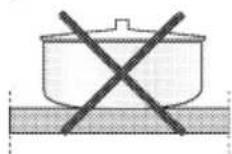
Do not use vessels with concave or convex bottoms.

Use only the saucepans and pans with flat bottoms. They ensure easier heat transfer.

If the diameter of the saucepan is too small, energy will be wasted.
Using the hobs

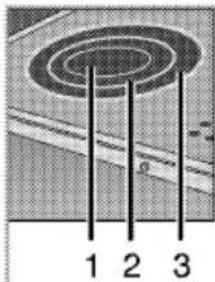
1 Single-circuit cooking plate 14-16 cm
2 Dual-circuit cooking plate 21-23/12-14 cm
3 Single-circuit cooking plate 18-20 cm
4 Extended cooking plate 17-19/26-28 cm is list of advised diameter of pots to be used on related burners.
Broken glass!
Do not let any objects fall onto the hob. Even small objects (e.g. salt shaker) may damage the hob.
Do not use glass ceramic hobs with cracks. Water may enter into the cracks and cause a short circuit.
If the surface is damaged in any way (e. g. visible cracks), switch off the device immediately to reduce the risk of an electric shock.
Quick heating glass-ceramic hobs emit a bright light when they are switched on. Do not stare at the bright light.
Turning on the ceramic plates
The hob control knobs are used for operating the plates. To obtain the desired cooking power, turn the hob control knobs to the corresponding level.
| Cooking level | 1 | 2 | 3 |
| warming | stewing, simmering | cooking, roasting, boiling |
Turning off the ceramic plates
Turn the plate knob to OFF (upper) position.
Using multi-segmented cooking zones
Multi-segmented cooking zones allows to cook with different size of saucepans on the same cooking zone. When these cooking zones are
activated, first the inward cooking zone turns on.
- To change the active cooking zone diameter, turn the control knob clockwise.
- A "click" will be heard as soon as the hotplate radius changes.
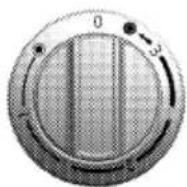

Turning off multi-segment cooking zones
- Turn the knob counter clockwise to OFF (upper) position to turn off the
oven. All segments of the cooking zone are turned off.

natural_image
Diagram showing two oval shapes labeled 1 and 2, with no text or symbols beyond labels1 Position 1
2 Position 2
3 Position 3
Position 2 and 3 of the multi-segment cooking zones do not operate independently.

How to operate the oven
General information on baking, roasting and grilling

Risk of scalding by hot steam! Take care when opening the oven door as steam may escape.
Tips for baking
- Use non-sticky coated appropriate metal plates or aluminum vessels or heat-resistant silicone molds.
• Make best use of the space on the rack. - Place the baking mold in the middle of the shelf.
- Select the correct rack position before turning the oven or grill on. Do not change the rack position when the oven is hot.
- Keep the oven door closed.
Tips for roasting
- Treating whole chicken, turkey and big-piece meats with dressings such as lemon juice and black pepper before cooking will increase the cooking performance.
- It lasts about 15 to 30 minutes longer to roast the meat with bones when compared to roasting the same size of meat without bones.
• Each centimeter of the meat thickness requires approximately 4 to 5 minutes of cooking time. - Let meat rest in the oven for about 10 minutes after the cooking time is over. The juice is better distributed all over the roast and does not run out when the meat is cut.
- Fish should be placed on the middle or lower rack in a heat-resistant plate.
Tips for grilling
When meat, fish and poultry are grilled, they quickly get brown, have a nice crust and do not get dry. Flat pieces, meat skewers and sausages are particularly suited for grilling as are vegetables with high water content such as tomatoes and onions.
- Distribute the pieces to be grilled on the wire shelf or in the baking tray with wire shelf in such a way that the space covered does not exceed the size of the heater.
- Slide the wire shelf or baking tray with grill into the desired level in the oven. If you are grilling on the wire shelf, slide the baking tray to the lower rack to collect fats. Add some water in the tray for easy cleaning.

Fire danger due to food which is unsuitable for grilling!
Only use food for grilling which is suitable for intensive grilling heat. Do not place the food too far in the back of the grill. This is the hottest area and fat food may catch fire.
How to operate the electric oven

Before using the oven the clock time must be set. If the clock time is not set, the main oven will not work.
Select temperature and operating mode

1 Function knob
2 Thermostat knob
Your oven is equipped with pop-out knobs that protrude when you press them.
- Press inwards to protrude the knob and then turn it to make the desired setting.

-
When the cooking process is finished, turn the knob to off (upper) position and press it inwards.
-
Set the Temperature knob to the desired temperature.
- Set the Function knob to the desired operating mode.
» Oven heats up to the adjusted temperature and maintains it. During heating, temperature lamp stays on.
Switching off the electric oven
Turn the function knob and temperature knob to off (upper) position.

natural_image
Cross-sectional diagram of a refrigerator interior showing internal components and a hand inserting a cable (no text or labels)Rack positions (For models with wire shelf)
It is important to place the wire shelf onto the side rack correctly. Wire shelf must be inserted between the side racks as illustrated in the figure.
Do not let the wire shelf stand against the rear wall of the oven. Slide your wire shelf to the front section of the rack and settle it with the help of the door in order to obtain a good grill performance.
Operating modes
The order of operating modes shown here may be different from the arrangement on your product.
Top and bottom heating

Top and bottom heating are in operation. Food is heated simultaneously from the top and bottom. For example, it is suitable for cakes, cookies and casseroles in baking trays. Cook with one tray only.
Bottom heating

Only bottom heating is in operation. It is suitable for pizza and for subsequent browning of food from the bottom.
Fan supported bottom/top heating

Top heating, bottom heating plus fan (in the rear wall) are in operation. Hot air is evenly distributed throughout the oven rapidly by means of the fan. Cook with one tray only.
Operating with fan

The oven is not heated. Only the fan (in the rear wall) is in operation. Frozen granular food is thawed slowly at room temperature and cooked food is cooled down.
Fan Heating

Fan assisted heating (in the rear wall) is in operation. Hot air is evenly distributed throughout the oven rapidly by means of the fan. In most cases, preheating is not required. Suitable for cooking your food in different rack levels. Suitable for cooking with multi trays.
Full grill

Large grill at the ceiling of the oven is in operation. It is suitable for grilling large amount of meat.
- Put big or medium-sized portions in correct rack position under the grill heater for grilling.
- Set the temperature to maximum level.
• Turn the food after half of the grilling time.
Grill+Fan

Grilling effect is not as strong as in Full Grill
- Put small or medium-sized portions in correct shelf position under the grill heater for grilling.
- Set the desired temperature.
• Turn the food after half of the grilling time.
Booster

This function is used to heat the oven rapidly; it is not suitable for cooking food.
- Select the desired temperature after selecting this function. Temperature light turns on and oven is heated.
• Light turns off after the heating process is completed. Now select the desired function to cook your food.
Using the oven clock

1 Program knob
2 Cooking time
3 Cooking end time
4 Alarm period
5 Minus key
6 Plus key
7 Screen brightness adjustment
8 Alarm volume
9 Current time
10 Keylock
11 Adjustment key
The maximum time to be set for the end of the cooking process is 23 hours and 59 minutes. In case of power cut, program will be canceled. Reprogram is needed.
While making any adjustments, related symbols will flash on the display. You must wait for a short time for the settings to take effect.
If semi-automatic or full automatic operation mode is, time of the day cannot be adjusted.
i Cooking time will be displayed once the cooking starts.
Activating semi-automatic operation mode
In this operation mode you may adjust how long the oven will automatically operate (cooking time) and the time it will be automatically turned off (end of cooking time).
- To adjust the cooking time, press Program key (1) and activate the Cooking Time symbol [2].
- Adjust the cooking time with Minus (5) and Plus (6) keys.
» Cooking Time symbol remains lit (displayed continuously) after setting the cooking time. - To set the End of Cooking Time, Press Program key (1) and activate the Cooking Time symbol (3).
- Press - (5) and + (6) keys to set the end of cooking time.
» Once the End of Cooking Time is set, End of Cooking symbol and Cooking symbol remain lit (displayed continuously). The End of Cooking Time symbol (3) will disappear as soon as the cooking starts. - Put your dish into the oven.
- Select operation mode and temperature.
» Oven timer automatically calculates the startup time for cooking by using the end of cooking time and the cooking period you have set. Selected operation mode is activated when the startup time of cooking has come and the oven is heated up to the set temperature. It maintains this
temperature until the end of cooking time.
-
After the cooking process is completed, "End" appears on the displayed and the alarm will sound.
-
Alarm signal will sound for 2 minutes. To stop the alarm signal, just press any key. Alarm will be silenced and current time will be displayed.
If you mute the alarm by pressing any key, the oven will restart operating. If you press any button at the end of the alarm period, the oven will restart operating.
- Turn off the oven with the Temperature knob and Function knob.
Switch on semi-automatic operation
In this operation mode, you may adjust the time period during which the oven will operate (cooking time).
-
To adjust the cooking time, Press Program key (1) and activate the Cooking Time symbol (2).
-
Press - (5) and + (6) keys to set the cooking time.
» Cooking Time symbol remains lit (displayed continuously) after setting the cooking time.
-
Put your dish into the oven.
-
Select operation mode and temperature.
» The oven will be heated up to the preset temperature and will maintain this temperature until the end of the cooking time you selected.
-
After the cooking process is completed, "End" appears on the displayed and the alarm will sound.
-
Alarm signal will sound for 2 minutes. To stop the alarm signal, just press any key.
Alarm will be silenced and current time will be displayed.
If you mute the alarm by pressing any key, the oven will restart operating. If you press any button at the end of the alarm period, the oven will restart operating.
- Turn off the oven with the Temperature knob and Function knob.
Using the keylock
Activating the keylock
You can prevent oven from being used by activating the Keylock function.

1 Program knob
2 Cooking time
3 Cooking end time
4 Alarm period
5 Minus key
6 Plus key
7 Screen brightness adjustment
8 Alarm volume
9 Current time
10 Keylock
11 Adjustment key
- Press the key (11) to activate Keylock symbol (10).
» "OFF" will appear on the display.
- Press Plus key (6) to activate the keylock.
» Once the keylock is activated, "On" appears on the display and the Keylock symbol (10) remains lit.
When the Keylock function is activated, control panel buttons except for the key (11) cannot be used.
Deactivating the keylock
- Press Adjustment key (11) to activate Keylock symbol (10).
» "On" will appear on the display.
- Press Minus key (5) to deactivate the keylock.
» "OFF" will be displayed once the keylock is deactivated.
Using the clock as an alarm
You can use the clock of the product for any warning or reminder apart from the cooking programme.
The alarm clock has no influence on the functions of the oven. It is only used as a warning. For example, this is useful when you want to turn food in the oven at a certain point of time.
Alarm clock will give a signal once the time you set is over.

1 Program knob
2 Cooking time
3 Cooking end time
4 Alarm period
5 Minus key
6 Plus key
7 Screen brightness adjustment
8 Alarm volume
9 Current time
10 Keylock
11 Adjustment key
Setting the alarm clock
- Press Program key (1) to activate the alarm time symbol (4).
The maximum alarm time can be 23 hours and 59 minutes.
- Adjust the alarm time using Minus (5) and Plus (6) keys.
» Alarm symbol will remain lit and the alarm time will appear on the display once the alarm time is set.
- At the end of the alarm time, Alarm Time symbol (4) will start flashing and the alarm signal is heard.
Turning off the alarm
- To stop the alarm, just press any key.
» Alarm will be silenced and current time will be displayed.
If you want to cancel the alarm:
- To reset the alarm time, press Program key (1) to activate the alarm time symbol (4).
- Press and hold the Minus (5) key until "00:00" is displayed.
i Alarm time will be displayed. If the alarm time and cooking time are set concurrently, shortest time will be displayed.
Changing alarm tone
- Press Setting key (11) to activate the Alarm Tone symbol (8).
- Adjust the desired tone using Minus (5) and Plus (6) keys.
| Recipe | Function | Preheating | Cooking level (from bottom) | Temperature (°C) | Time (min) | Accessories |
| Leavened cakes | CONVENTIONAL | Yes | 3 | 175 | 20 - 35 | drip-tray |
| FORCED AIR | Yes | 1 - 5 | 175 | 15 - 30 | Level 5: deep drip-tray | |
| Level 1: drip-tray | ||||||
| Biscuits/Tartlets | CONVENTIONAL | Yes | 3 | 175 | 20 - 40 | drip-tray |
| FORCED AIR | Yes | 1 - 5 | 175 | 20 - 35 | Level 5: deep drip-tray | |
| Level 1: drip-tray | ||||||
| Pizza | CONVENTIONAL | Yes | 2 | 225 | 12 - 20 | drip-tray |
| FORCED AIR | Yes | 1 - 5 | 225 | 15- 30 | Level 5: deep drip-tray | |
| Level 1: drip-tray | ||||||
| Sponge cake | CONVENTIONAL | Yes | 3 | 200 | 5 -15 | Level 3: cake tin on rack |
| FORCED AIR | Yes | 1 - 5 | 175 | 10 -25 | Level 5: cake tin on rack | |
| Level 1: cake tin on rack | ||||||
| Meat & potato pies (vegetable pie, quiche lorraine) | FAN | Yes | 2 | 175 - 200 | 30 - 50 | cake tin on rack |
| FORCED AIR | Yes | 1 - 3 | 175 - 200 | 35 - 55 | Level 3: cake tin on rack | |
| Level 1: cake tin on rack | ||||||
| Lasagna | CONVENTIONAL | Yes | 2 - 3 | 200 | 30 - 45 | Pan on rack |
| Lamb / Veal / Beef / Pork 1Kg | FAN | - | 3 | 25 min at 250, then at 180 - 190 | 80 - 120 | Drip-tray or pan on rack |
| Turkey / Goose 3 Kg" | FAN | - | 2 | 25 min at 250, then at 180 - 190 | 140 - 210 | Drip-tray or pan on rack |
| Roast chicken 1 - 1.3 Kg | FAN | - | 2 | 15 min at 250, then at 180 - 190 | 55 - 70 | Level 2: rack (turn food two thirds of the way through cooking if necessary)+ Pyrex |
| Level 1: I drip-tray with water | ||||||
| Leg of lamb / Shanks | FAN | - | 3 | 25 min at 250, then at 180 - 190 | 60 - 90 | Drip-tray or pan on rack (turn food two thirds of the way through cooking if necessary) |
| Fish fillets / steaks | FAN | - | 3 | 200 | 10 - 25 | Level 3: rack (turn food halfway through cooking) / drip-tray |
» Selected alarm tone will appear as "b-01", "b-02" or "b-03" on the display.
Cooking times table
The values indicated in the table below are data indicative. They may vary according to the type of food as well as your preferences of cooking.
Baking and roasting
Level 1 is the bottom level in the oven.
| Level 2: drip-tray with water | ||||||
| Fish fillets / steaks | GRILL | Yes | 4 / 5 | 200 - 225 | 20 - 30 | Level 4 / 5: rack (turn food halfway through cooking) |
| Level 3: drip-tray with water | ||||||
| Roast Beef underdone | GRILL | Yes | 4 / 5 | 200 - 225 | 25 - 35 | pan on rack (turn food two thirds of the way through cooking if necessary) |
| Toast | GRILL | Yes | 4 | 200 - 225 | 1 - 4 | rack |
| Sausages / Kebabs / Spare ribs / Hamburg-ers | GRILL | Yes | 5 | 200 - 250 | 20 - 40 | Level 5: rack (turn food halfway through cooking) |
| Level 4: drip-tray with water | ||||||
| Vegetables au gratin | GRILL | Yes | 3 | 200 | 10 - 20 | pan on rack |
| The times given in the table are approximate. Cooking times may vary depending on the dish and food pieces.When grilling it is advisable to arrange the food so as to leave the front portion of the rack free (6-7 cm).For grilled meat it is advisable to turn the food halfway through cooking. | ||||||
In a cooking that requires preheating, preheat at the beginning of cooking until the thermostat lamp turns off.
Tips for baking cake
- If the cake is too dry, increase the temperature by 10 and decrease the cooking time.
- If the cake is wet, use less liquid or lower the temperature by 10^ C.
- If the cake is too dark on top, place it on a lower rack, lower the temperature and increase the cooking time.
- If cooked well on the inside but sticky on the outside use less liquid, lower the temperature and increase the cooking time.
Tips for baking pastry
- If the pastry is too dry, increase the temperature by 10 and decrease the cooking time. Dampen the layers of dough with a sauce composed of milk, oil, egg and yoghurt.
- If the pastry takes too long to bake, pay care that the thickness of the pastry you have prepared does not exceed the depth of the tray.
- If the upper side of the pastry gets browned, but the lower part is not cooked, make sure that the
amount of sauce you have used for the pastry is not too much at the bottom of the pastry. Try to scatter the sauce equally between the dough layers and on the top of pastry for an even browning.
Cook the pastry in accordance with the mode and temperature given in the cooking table. If the bottom part is still not browned enough, place it on one lower rack next time.
Tips for cooking vegetables
- If the vegetable dish runs out of juice and gets too dry, cook it in a pan with a lid instead of a tray. Closed vessels will preserve the juice of the dish.
- If a vegetable dish does not get cooked, boil the vegetables beforehand or prepare them like canned food and put in the oven.
How to operate the grill
Before using the oven the clock time must be set. If the clock time is not set, the main oven will not work.
Hot surfaces may cause burns! Close oven door during grilling.
Switching on the grill
- Turn the Function knob to the desired grill symbol.
- Then, select the desired grilling temperature.
- If required, perform a preheating of about 5 minutes.
» Temperature light turns on.
Switching off the grill
- Turn the Function knob to Off (top) position.
Rack positions
Grill performance will decrease if the wire grill stands against rear part of the oven. Slide your wire grill to the front section of the rack and settle it with the help of the door in order to obtain the best grill performance.

natural_image
Interior view of a refrigerator with labeled floor levels and a hand inserting a cable (no text or symbols visible)Do not use the upper level for grilling.
i Fire danger due to food which is unsuitable for grilling!
Only use food for grilling which is suitable for intensive grilling heat. Do not place the food too far in the back of the grill. This is the hottest area and fat food may catch fire.
7 Maintenance and care
General information
Service life of the product will extend and the possibility of problems will decrease if the product is cleaned at regular intervals.
Risk of electric shock! Switch off the electricity before cleaning appliance to avoid an electric shock.
Hot surfaces may cause burns! Allow the appliance to cool down before you clean it.
- Clean the product thoroughly after each use. In this way it will be possible to remove cooking residues more easily, thus avoiding these from burning the next time the appliance is used.
- No special cleaning agents are required for cleaning the product. Use warm water with washing liquid, a soft cloth or sponge to clean the product and wipe it with a dry cloth.
- Always ensure any excess liquid is thoroughly wiped off after cleaning and any spillage is immediately wiped dry.
- Do not use cleaning agents that contain acid or chloride to clean the stainless or inox surfaces and the handle. Use a soft cloth with a liquid detergent (not abrasive) to wipe those parts clean, paying attention to sweep in one direction.
The surface may get damaged by some detergents or cleaning materials. Do not use aggressive detergents, cleaning powder/cream or any sharp objects.
Do not use steam cleaners for cleaning.
Cleaning the hob
Glass ceramic surfaces
Wipe the glass ceramic surface using a piece of cloth dampened with cold water in a manner as not to leave any cleaning agent on it. Dry with a soft and dry cloth. Residues may cause damage on the glass ceramic surface when using the hob for the next time. Dried residues on the glass ceramic surface should under no circumstances be scraped with hook blades, steel wool or similar tools. Remove calcium stains (yellow stains) by a small amount of lime remover such as vinegar or lemon juice. You can also use suitable commercially available products. If the surface is heavily soiled, apply the cleaning agent on a sponge and wait until it is absorbed well. Then, clean the surface of the hob with a damp cloth.
Sugar-based foods such as thick cream and syrup must be cleaned promptly without waiting the surface to cool down. Otherwise, glass ceramic surface may be damaged permanently.
Slight color fading may occur on coatings or other surfaces in time. This will not affect operation of the product. Color fading and stains on the glass ceramic surface is a normal condition, and not a defect.
Cleaning the control panel
Clean the control panel and control knobs with a damp cloth and wipe them dry.
i Damage of the control panel! Do not remove the control knobs for control panel cleaning.
Cleaning the oven
To clean the side wall
- Remove the front section of the side rack by pulling it in the opposite direction of the side wall.
- Remove the side rack completely by pulling it towards you.
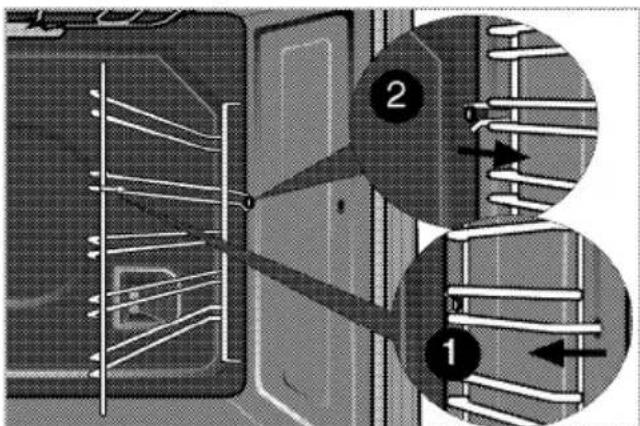
Clean oven door
To clean the oven door, use warm water with washing liquid, a soft cloth or sponge to clean the product and wipe it with a dry cloth.
Don't use any harsh abrasive cleaners or sharp metal scrapers for cleaning the oven door. They could scratch the surface and destroy the glass.
Removing the oven door
- Open the front door (1).
- Open the clips at the hinge housing (2) on the right and left hand sides of the front door by pressing them down as illustrated in the figure.
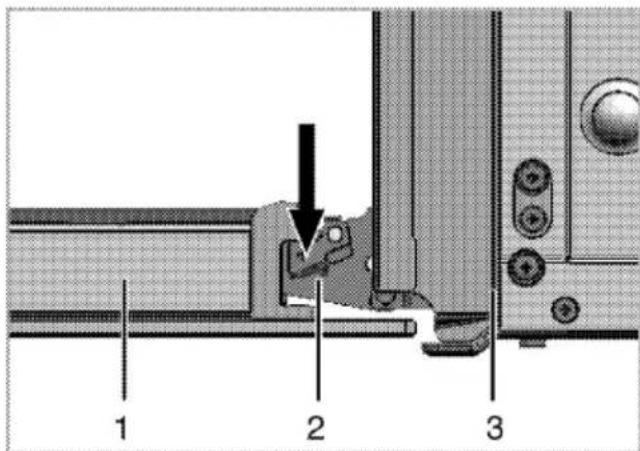
1 Front door
2 Hinge
3 Oven

natural_image
Technical diagram of a mechanical joint or bracket with a directional arrow indicating rotation (no text or symbols present)
- Move the front door to half-way.
- Remove the front door by pulling it upwards to release it from the right and left hinges.
i Steps carried out during removing process should be performed in reverse order to install the door. Do not forget to close the clips at the hinge housing when reinstalling the door.
Replacing the oven lamp
Hot surfaces may cause burns! Make sure that the appliance is switched off and cooled down in order to avoid the risk of an electrical shock.
The oven lamp is a special electric light bulb that can resist up to 300 °C. See Technical specifications, page 5 for details. Oven lamps can be obtained from Authorised Service Agents.
i Position of lamp might vary from the figure.
If your oven is equipped with a round lamp:
- Disconnect the product from mains.
- Turn the glass cover counter clockwise to remove it.

natural_image
Close-up of a hand holding a circular object over a mechanical component (no visible text or symbols)- Remove the oven lamp by turning it counter clockwise and replace it with the new one.
- Install the glass cover.

Troubleshooting
| Oven emits steam when it is in use. |
| It is normal that steam escapes during operation. This is not a fault. |
| Product emits metal noises while heating and cooling. |
| When the metal parts are heated, they may expand and cause noise. This is not a fault. |
| Product does not operate. |
| The mains fuse is defective or has tripped. >>> Check fuses in the fuse box. If necessary, replace or reset them.Product is not plugged into the (grounded) socket. >>> Check the plug connectionional buttons/knobs/keys on the control panel do not function. >>> Keylock may be enabled. Please disable it. (See. Using the keylock, page 26 ) |
| Oven light does not work. |
| Oven lamp is defective. >>> Replace oven lamp.Power is cut. >>> Check if there is power. Check the fuses in the fuse box. If necessary, replace or reset the fuses. |
| Oven does not heat. |
| Function and/or Temperature are not set. >>> Set the function and the temperature with the Function and/or Temperature knob/key.In models equipped with a timer, the timer is not adjusted. >>> Adjust the time.(In products with microwave oven, timer controls only microwave oven.)Power is cut. >>> Check if there is power. Check the fuses in the fuse box. If necessary, replace or reset the fuses. |
| (In models with timer) Clock display is blinking or clock symbol is on. |
| A previous power outage has occurred. >>> Adjust the time / Switch of the product and switch it on again. |

Consult the Authorised Service Agent or the dealer where you have purchased the product if you can not remedy the trouble although you have implemented the instructions in this section. Never attempt to repair a defective product yourself.
Bitte lesen Sie zuerst diese Anleitung.
Sehr geehrte Kundin, sehr geehrter Kunde,
Wir möchten, dass Sie mit der Leistung Ihres neuen Gerätes, das in modernen Produktionsstätten hergestellt wurde und strengste Qualitätsprüfungen durchlaufen hat, von Anfang an und auf lange Jahre rundum zufrieden sind.
Daher möchten wir Ihnen warm ans Herz legen, diese Bedienungsanleitung vor dem ersten Einsatz Ihres neuen Gerätes aufmerksam durchzulesen. Bewahren Sie die Anleitung auf, damit Sie später darin nachlesen können. Wenn Sie das Gerät an jemand anderen weitergeben, vergessen Sie bitte nicht, die Bedienungsanleitung ebenfalls weiterzugeben.
Die Bedienungsanleitung hilft Ihnen, Ihr Gerät schnell und sicher bedienen zu können.
- Lesen Sie die Bedienungsanleitung, bevor Sie das Gerät aufstellen und benutzen.
• Halten Sie sich strikt an die Sicherheitshinweise. - Bewahren Sie diese Bedienungsanleitung an einem gut erreichbaren Ort auf, damit Sie bei Bedarf darin nachlesen können.
- Lesen Sie auch die restlichen Dokumente, die mit dem Gerät geliefert wurden.
Bitte denken Sie daran, dass diese Bedienungsanleitung eventuell für mehrere Mo-delle geschrieben wurde.
Unterschiede zwischen den Modellen werden in der Anleitung klar und deutlich hervorgehoben.
Die Symbole
In dieser Anleitung nutzen wir die folgenden Symbole:
Wichtige Informationen oder nützliche Tipps zum Gebrauch.
⚠️Warnung vor gefährlichen Situationen, in denen es zu Verletzungen oder Sachschäden kommen kann.
⚠️Warnung vor Stromschlägen.
⚠️Warnung vor Brandgefahr.
Warning vor heißen Flächen.
1 Allgemeine Informationen ..... 4
Geräteübersicht 4
Technische Daten....5
Zubehör 6
2 Wichtige Sicherheitshinweise8
Sicherheit, allgemein 8
Bestimmungsgemäße Verwendung...9
Wenn Kinder in der Nähe sind......10
Sicherheit beim Umgang mit Elektrizität ....10
3 Installation.... 11
Vor der Installation....11
Einbauen und Anschließen .... 12
Entsorgung 14
Verpackungsmaterialien entsorgen .14
Transport....14
Altgeräte entsorgen 15
4 Vorbereitungen ...... 16
Tipps zum Energiesparen 16
Erste Inbetriebnahme .... 16
Erste Zeiteinstellung .....16
Erstreinigung des Gerätes .....17
Erstaufheizung 17
5 Bedienung Kochfeld ...... 19
Allgemeine Hinweise zum Kochen.....19
Kochfeld verwenden 20
6 Bedienung Backofen......22
Allgemeine Hinweise zum Backen, Braten und Grillen......22
So bedienen Sie den Backofen .....23
Betriebsarten 23
Ofenuhr verwenden 25
Tastensperre 26
Alarmfunktion 27
Garzeitentabelle 28
So bedienen Sie den Grill ....30
7 Pflege und Wartung ...... 32
Allgemeine Hinweise....32
Kochfeld reinigen 32
Bedienfeld reinigen 33
Backofen reinigen 33
Ofentür ausbauen 33
Ofenbeleuchtung auswechseln......34
8 Problemlösung 35
1 Allgemeine Informationen
Geräteübersicht

1 Ofentür
2 Griff
3 Bodenschublade
4 Blech
5 Rost
6 Bedienfeld
7 Brennerplatte
8 Lüftermotor (hinter der Stahlplatte)
9 Leuchte
10 Grill-Heizelement
11 Einschubpositionen
1 Warnleuchte
2 Temperaturleuchte
3 Funktionsknopf
4 Einzelkochplatte Hinten links
5 Doppelkochplatte Vorne links
6 Digitaltimer
7 Einzelkochplatte Vorne rechts
8 Erweiterte Kochplatte Hinten rechts
9 Temperaturknopf
Technische Daten
| ALLGEMEIN | |
| Außenabmessungen (Höhe/Breite/Tiefe) | 850 mm/600 mm/600 mm |
| Spannung/Frequenz | 220-240 V / 380- 415 V 3N ~ 50 Hz |
| Leistungsaufnahme gesamt | 10 kW |
| Sicherung | Minimum 16 A x 3 |
| Kabeltyp/Kabelquerschnitt | H05VV-FG 3 x 2,5 mm^2 / 5 x 1,5 mm^2 |
| Kabellänge | max. 2 m |
| KOCHFELD | |
| Kochzonen | |
| Hinten links | Einzelkochplatte |
| Abmessungen | 140 mm |
| Leistung | 1200 W |
| Vorne links | Doppelkochplatte |
| Abmessungen | 210/120 mm |
| Leistung | 2200/750 W |
| Vorne rechts | Einzelkochplatte |
| Abmessungen | 180 mm |
| Leistung | 1800 W |
| Hinten rechts | Erweiterte Kochplatte |
| Abmessungen | 170/265 mm |
| Leistung | 1500/2400 W |
| BACKOFEN/GRILL | |
| Hauptofen | Multifunktionsofen |
| Energieeffizienzklasse # | A |
| Garraumleuchte | 15–25 W |
| Leistungsaufnahme Grill | 2.2 kW |
Allgemeine Hinweise: Energieangaben von Elektroöfen werden gemäß der Richtlinie EN 50304 ermittelt. Die entsprechenden Werte werden unter üblichen Einsatzbedingungen bei Ober-/Unterhitze oder im Umluftbetrieb (sofern vorhanden) ermittelt. Die Energieeffizienzklasse wird gemäß folgender Prioritäten ermittelt; je nachdem, ob das Gerät mit den entsprechenden Funktionen ausgestattet ist. 1. Garen mit Eco-Umluft, 2. Turbo-Niedertemperaturgaren, 3. Turbogaren, 4. Ober-/Unterhitze mit Umluft, 5. Ober-/Unterhitze
** Siehe Installation, Seite 11.
Im Zuge der Qualitätsverbesserung können sich technische Daten ohne Vorankündigung ändern.
i Die Abbildungen in dieser Anleitung dienen lediglich der Veranschaulichung und können etwas vom tatsächlichen Aussehen des Gerätes abweichen.
Angaben am Produkt oder in der begleitenden Dokumentation wurden unter Laborbedingungen unter Berücksichtigung der zutreffenden Richtlinien ermittelt. Solche Werte können je nach Einsatzumgebung und Nutzungsweise des Gerätes abweichen.
Zubehör
Je nach Modell wird eventuell unterschiedliches Zubehör mitgeliefert. Daher kann es vorkommen, dass nicht sämtliches in der Anleitung erwähntes Zubehör mit Ihrem Gerät geliefert wird.
Backblech
Für Backwaren, Tiefkühlgerichte und große Braten.

natural_image
3D rendering of a square baking tray with a textured inner surface (no text or symbols)Tiefes Backblech/Tropfschale
Für Gebäck, große Braten, Gerichte mit viel Flüssigkeit und zum Fettauffangen beim Grillen.

natural_image
3D rendering of a rectangular baking tray with a mesh pattern (no text or symbols)Aluminium-Kuchenblech
Für Gebäck wie Kekse und Biskuits.

natural_image
Simple line drawing of a rectangular tray or tray with rounded edges and a flat top (no text or symbols)Kuchenblech
Für Gebäck wie Kekse und Biskuits.
natural_image
3D rendering of a rectangular baking tray with a grid pattern (no text or symbols)Kleines Backblech
Für kleinere Portionen. Dieses Backblech wird auf den Grillrost aufgelegt.

natural_image
3D rendering of a rectangular tray with a grid pattern (no text or symbols)Rost
Zum Rösten und Grillen und als Unterlage für Behälter, in denen unterschiedlichste Lebensmittel gegart werden können.

natural_image
Isometric view of a rectangular sheet with horizontal lines, no text or symbols present
natural_image
Isometric line drawing of a rectangular metal grate or tray with horizontal slats (no text or symbols)Rost und Backblech richtig in die Teleskopeinschübe einschieben
Durch die Teleskopeinschübe lassen sich Bleche und Rost besonders leicht einlegen und entfernen.
Achten Sie beim Einsatz von Blech und Rost mit den Teleskopeinschüben darauf, dass die Stifte am rückwärtigen Teil des Teleskopeinschubs die Kanten von Blech oder Rost berühren.

natural_image
Interior view of an oven with metal grating and ventilation grilles (no text or symbols visible)
natural_image
Close-up of a mechanical component with internal channels and a central shaft (no visible text or symbols)2 Wichtige Sicherheitshinweise
In diesem Abschnitt finden Sie wichtige Sicherheitshinweise, die dazu beitragen, dass es nicht zu Verletzungen und Sachschäden kommt. Sämtliche Garantieleistungen verfallen, falls Sie sich nicht an diese Hinweise halten sollten.
Sicherheit, allgemein
- Dieses Gerät darf nicht von Personen bedient werden, die unter körperlichen/geistigen Behinderungen oder Wahrnehmungsstörungen leiden oder denen es an der nötigen Erfahrung im Umgang mit solchen Geräten mangelt; dazu zählen auch Kinder. Eine Ausnahme kann gemacht werden, wenn solche Personen von einer verantwortlichen Person beaufsichtigt und gründlich in der Bedienung des Gerätes unterwiesen werden. Kinder müssen grundsätzlich gut im Auge behalten werden, damit sie nicht mit dem Gerät herumspielen.
- Schließen Sie das Gerät an eine geerdete Schutzkontaktsteckdose/Leitung an, die mit einer Sicherung passender Kapazität abgesichert wird – schauen Sie sich dazu die „Technische Daten“-Tabelle an. Lassen Sie die Erdung in jedem Fall von einem qualifizierten Elektriker vornehmen oder überprüfen. Der Hersteller haftet nicht bei Schäden, die durch den Einsatz des Gerätes ohne vorschriftsmäßige Erdung entstehen.
- Benutzen Sie das Gerät nicht, falls Netzkabel oder Netzstecker beschädigt sein sollten. Wenden Sie sich an den autorisierten Kundendienst.
- Nutzen Sie das Gerät nicht, falls es nicht ordnungsgemäß funktioniert oder sichtbare Beschädigungen aufweist.
- Versuchen Sie nicht, das Gerät selbst zu reparieren oder zu verändern. Allerdings lassen sich viele Probleme oder Schwierigkeiten auch ohne Reparatur oder professionellen Beistand beheben. Siehe Problemlösung, Seite 35.
- Waschen Sie das Gerät niemals mit Wasser oder anderen Flüssigkeiten ab! Es besteht Stromschlaggefahr!
- Verzichten Sie auf die Nutzung des Gerätes, wenn Ihr Einschätzungsvermögen durch Alkohol oder Drogen beeinträchtigt sein sollte.
- Bei Installation, Wartung, Reinigung und Reparatur muss das Gerät stets vollständig von der Stromversorgung getrennt sein.
- Installation und Reparaturen müssen grundsätzlich vom autorisierten Kundendienst ausgeführt werden. Der Hersteller haftet nicht für Schäden, die durch Aktivitäten nicht autorisierter Dritter entstehen; zudem kann dadurch die Garantie erlöschen.
- Gehen Sie besonders vorsichtig vor, wenn Sie alkoholhaltige Speisen zubereiten. Alkohol verdampft bei hohen Temperaturen und kann
sich beim Kontakt mit heißen Ge- genständen leicht entzünden.
- Erwärmen Sie keine Lebensmittel in geschlossenen Behältern oder in Gläsern im Ofen. Dadurch kann ein Überdruck entstehen, der den Behälter zum Platzen bringt.
- Achten Sie darauf, dass sich keine brennbaren Gegenstände in der Nähe des Gerätes befinden – die Seitenflächen können sich im Betrieb stark erhitzen.
- Backofenbleche, Geschirr oder Alufolie nicht direkt auf den Backofenboden legen. Der Hitzestau kann den Backofenboden beschädigen.
- Halten Sie sämtliche Belüftungsöffnungen stets frei.
- Das Gerät kann sich im Betrieb stark aufheizen. Berührung Sie niemals heiße Brenner, das Innere des Ofens, Heizelemente, und so weiter.
- Tragen Sie grundsätzlich hitzebeständige Schutzhandschuhe, wenn Sie etwas in den Ofen stellen oder herausnehmen.
- Nutzen Sie das Gerät nicht, falls das Türglas Sprünge aufweist oder herausgenommen wurde.
• Die Rückwand des Ofens erwärmt sich im Betrieb. Achten Sie darauf, dass insbesondere Gas- oder Stromleitungen nicht mit der Rückwand in Berührung geraten; andernfalls kann es zu Beschädigungen kommen.
- Sorgen Sie dafür, dass das Netzkabel niemals eingeklemmt und nicht über heiße Flächen verlegt wird. Andernfalls kann die Isolierung der Leitungen schmelzen,
Kurzschlüsse und damit Brände verursachen.
- Vergessen Sie nicht, das Gerät nach jedem Gebrauch abzuschalten.
- Durch Dampfbildung kann sich zwischen Kochgeschirr und Kochfeld ein Polster bilden, welches das Kochgeschirr springen lässt. Achten Sie daher darauf, dass sowohl Kochfeld als auch die Unterseite des Kochgeschirrs stets trocken sind.
Das Gerät muss von einer Fachkraft gemäß gültigen Bestimmungen installiert werden. Andernfalls erlischt die Garantie.
Das Gerät ist nicht zum Betrieb über externe Zeitschaltuhren oder separate Fernsteuersysteme vorgesehen.
Bestimmungsgemäße Verwendung
Dieses Gerät wurde für den reinen Hausgebrauch entwickelt. Eine gewerbliche Nutzung ist nicht zulässig. "Achtung: Dieses Gerät dient ausschließlich der Zubereitung von Speisen. Es darf nicht zu anderen Zwecken eingesetzt werden (z. B. zum Beheizen des Raumes)."
Missbrauchen Sie das Gerät nicht zum Vorwärmen von Tellern, hängen Sie keine Küchentücher, Handtücher und dergleichen zum Trocknen oder Anwärmen an die Griffe.
Für Schäden, die durch unsachgemäßen Gebrauch oder falsche Bedienung verursacht werden, haftet der Hersteller nicht.
Das Gerät ist zum Garen, Auftauen, Backen, Braten und Grillen von Lebensmitteln geeignet.
Wenn Kinder in der Nähe sind
- Elektro- und Gasgeräte können grundsätzlich eine Gefahr für Kinder darstellen. Halten Sie Kinder im Betrieb vom Gerät fern, achten Sie darauf, dass Kinder nicht mit dem Gerät spielen.
- Erreichbare Teile des Gerätes erhitzen sich im Betrieb; Kinder sollten ferngehalten werden, bis das Gerät abgekühlt ist.
- "Achtung „Beim Grillen können sich zugängliche Teile stark erhitzen. Halten Sie kleine Kinder fern."
- Stellen Sie nichts auf das Gerät, nach dem Kinder greifen könnten.
- Legen Sie keine schweren Gegenstände auf der geöffneten Tür ab, lassen Sie Kinder nicht darauf sitzen. Das Gerät kann umkippen, die Türscharniere können beschädigt werden.
- Das Verpackungsmaterial kann für Kinder gefährlich werden. Halten Sie Verpackungsmaterialien von Kindern fern. Entsorgen Sie bitte alle Verpackungsteile umweltgerecht.
Sicherheit beim Umgang mit Elektrizität
Defekte Elektrogeräte gehören zu den häufigsten Brandursachen in Privat-haushalten.
- Arbeiten an Elektrogeräten und -anlagen dürfen nur von autorisierten Elektrofachkräften durchgeführt werden.
- Bei Störungen oder Beschädigungen schalten Sie das Gerät ab und trennen es vollständig von der Stromversorgung. Dazu schalten Sie die entsprechende Haussicherung ab.
- Achten Sie darauf, dass die entsprechende Sicherung passend für das Gerät dimensioniert ist.
3 Installation
Lassen Sie das Gerät vom autorisierten Kundendienst in Ihrer Nähe installieren. Sorgen Sie dafür, dass die nötigen elektrischen oder Gasanschlüsse bereits vorbereitet sind, bevor Sie das Gerät durch den autorisierten Kundendienst betriebsbereit machen lassen. Falls noch etwas zu tun ist, wenden Sie sich an einen guten Elektriker oder Installateur und lassen die entsprechenden Vorbereitungen ausführen.
i Die Vorbereitung des Aufstellungsortes und der elektrischen und Gasanschlüsse ist Sache des Kunden.
Die Installation des Gerätes muss in Übereinstimmung mit sämtlichen zutreffenden Vorschriften zur Gas- und/oder Elektroinstallation erfolgen.
Schauen Sie sich das Gerät vor der Installation gut an, überzeugen Sie sich davon, dass es keine sichtbaren Defekte aufweist. Falls doch, darf es nicht installiert werden.
Beschädigte Geräte müssen grundsätzlich als Sicherheitsrisiko betrachtet werden.
Vor der Installation
Un sicherzustellen, dass unter dem Produkt genügend Abstand zur Oberfläche ist, empfehlen wir, dass das Produkt auf einer soliden Basis montiert wird und dass die Füße nicht auf einen Teppich oder eine andere weiche Oberfläche gestellt werden.
Der Küchenboden muss das Geräte- gewicht sowie zusätzlich das Gewicht von Koch- bzw. Backgeschirr und von Speisen mühelos tragen können.

- Der Ofen kann mit Schränken an beiden Seiten benutzt werden. Ein Abstand von mindestens 400 mm über der Herdplatte und ein Abstand von 65 mm zwischen Gerät und Wand oder Hochschrank muss eingehalten werden.
- Der Ofen kann auch freistehend benutzt werden. Achten Sie auf einen minimalen Abstand von 750 mm oberhalb des Kochfeldes.
(*) Wenn eine Dunstabzugshaube über dem Herd installiert werden soll, beachten Sie die Anweisungen des Herstellers zur Installationshöhe (mindestens 650 mm Abstand). - Das Gerät entspricht der Geräteklasse 1, d. h. es kann mit der Rückwand und einer Seitenwand an Küchenwände, Küchenmöbel oder Geräte beliebiger Höhe gestellt werden. An der anderen Seitenwand dürfen nur Küchenmöbel
oder Geräte mit gleicher oder ge- ringerer Höhe stehen.
- Angrenzende Küchenmöbel müssen hitzebeständig sein (bis mindestens 100 °C).
Einbauen und Anschließen
Das Gerät darf nur nach den gesetzlichen Installationsvorschriften angeschlossen und installiert werden.
Das Gerät nicht neben Kühl- oder Gefriergeräten aufstellen. Die Wärmeabgabe des Gerätes führt zu steigendem Energieverbrauch der Kühlgeräte.
- Tragen Sie das Gerät grundsätzlich mit mindestens zwei Personen.
- Das Gerät muss direkt auf dem Fußboden stehen. Es darf nicht auf einen Sockel oder eine andere Erhöhung gestellt werden.
Sachschaden! Tür und Türgriff dürfen nicht zum Anheben oder Bewegen des Ge- rätes missbraucht werden.
Elektrischer Anschluss
Schließen Sie das Gerät an eine geerdete Schutzkontaktsteckdose/Leitung an, die mit einer Sicherung passender Kapazität abgesichert wird – schauen Sie sich dazu die „Technische Daten“-Tabelle an. Lassen Sie die Erdung in jedem Fall von einem qualifizierten Elektriker vornehmen oder überprüfen. Der Hersteller haftet nicht bei Schäden, die durch den Einsatz des Gerätes ohne vorschriftsmäßige Erdung entstehen.
Stromschlag-, Kurzschluss-, Feuergefahr durch nicht fachgerechte Installation! Das Gerät darf nur von einer autorisierten Fachkraft an das Stromnetz angeschlossen werden. Der korrekte und sichere Betrieb des Gerätes kann nur nach ordnungsgemäßer Installation gewährleistet werden.
⚠ Stromschlag-, Kurzschluss-, Feuergefahr durch Beschädigung des Gerätanschlusskabels! Das Netzkabel darf nicht eingeklemmt, geknickt oder gequetscht werden oder mit heißen Geräteteilen in Berührung kommen. Falls das Netzkabel beschädigt sein sollte, muss es von einem qualifizierten Elektriker ausgetauscht werden.
Die Netzanschlussdaten müssen mit den Daten auf dem Typenschild des Gerätes übereinstimmen. An das Typenschild gelangen Sie nach Öffnen der Tür oder der unteren Abdeckung; je nach Modell kann es sich auch an der Rückwand des Gerätes befinden. Das Netzkabel des Gerätes muss den Angaben der „Technische Daten“-Tabelle entsprechend gewählt werden.
Stromschlaggefahr! Trennen Sie das Gerät von der Stromversorgung, bevor Sie an der Elektroinstallation arbeiten.
Netzkabel anschließen
- Falls bei Ihrem Produkt kein Netzkabel mitgeliefert wurde, wählen Sie bitte entsprechend der
Elektroinstallation bei Ihnen zuhause ein Netzkabel aus der Tabelle(Technische Daten, Seite 5); befolgen Sie zum Anschließen Ihres Produktes die Anweisungen im Kabeldiagramm.
Falls der Netzanschluss nicht vollständig getrennt werden kann, muss ein Trennschalter (Sicherung, Netzschalter oder dergleichen) mit mindestens 3 mm Kontaktabstand zwischengeschaltet werden (nicht darüber). Die IEE-Vorschriften sind dabei einzuhalten. Bei Nichtbeachtung kann es zu Betriebsstörungen und zum Erlöschen der Garantie kommen.
Wir empfehlen eine zusätzliche Absicherung mit einem Fehlerstromschutzschalter (FI-Schutzschalter).
- Öffnen Sie die Anschlussabdeckung mit einem Schraubendreher.
- Stecken Sie das Netzkabel durch die Kabelklemme unter dem Anschluss; befestigen Sie es mit der an der Kabelklemmkomponente integrierten Schraube am Hauptgerät.
- Schließen Sie die Kabel gemäß Abbildung an.
- Nach Abschluss der Verkabelung schließen Sie die Anschlussabdeckung.
- Verlegen Sie das Netzkabel so, dass es weder das Produkt berührt noch zwischen Produkt und Wand eingeklemmt wird.
i Die Länge des Netzkabels darf aus Sicherheitsgründen nicht mehr als 2 m betragen.
- Schieben Sie das Produkt an die Küchenwand.
• Füße des Ofens anpassen
Vibrationen während des Betriebs können das Kochgeschirr in Bewegung versetzen. Diese Gefahrensituation kann vermieden werden, wenn das Produkt ebenerdig steht.
Achten Sie zu Ihrer eigenen Sicherheit darauf, dass das Produkt gerade steht, indem Sie die vier Füße an der Unterseite nach links oder rechts drehen und dadurch die Ebenerdigkeit der Arbeitsoberfläche anpassen.
Bei Geräten mit Lüfter
1 Lüfter
2 Bedienblende
3 Tür
Der integrierte Lüfter kühlt das Bedienfeld und die Vorderseite des Gerätes.
Der Kühlungslüfter läuft auch nach dem Abschalten des Ofens noch etwa 20 bis 30 Minuten (ca.) lang nach.
Endkontrolle
- Schließen Sie das Gerät wieder an die Stromversorgung an.
- Elektrische Funktionen prüfen.
Entsorgung
Verpackungsmaterialien entsorgen
Verpackungsmaterialien können für Kinder gefährlich werden. Bewahren Sie Verpackungsmaterialien an einem sicheren Ort außerhalb der Reichweite von Kindern auf.
Die Verpackung des Gerätes besteht aus wiederverwertbaren Materialien. Entsorgen Sie diese vorschriftsgemäß und entsprechend sortiert. Entsorgen Sie solche Materialien nicht mit dem normalen Hausmüll.
Transport
- Bewahren Sie den Originalkarton auf, falls Sie das Gerät künftig transportieren müssen. Halten sich an die Hinweise auf dem Karton. Falls Sie den Originalkarton nicht mehr besitzen sollten, verpacken Sie das Gerät in Luftpolsterfolie oder starken Karton, anschließend gut mit Klebeband sichern.
- Damit Roste und Bleche nicht zu Beschädigungen der Ofentür führen, schützen Sie die Ofentür von innen mit einem passenden Stück Karton. Fixieren Sie die Ofentür mit Klebeband.
- Missbrauchen Sie die Tür/den Türgriff nicht zum Anheben oder Bewegen des Gerätes.
Keine sonstigen Gegenstände auf dem Gerät abstellen. Das Gerät muss aufrecht transportiert werden.
Schauen Sie sich das Gerät nach dem Transport gut an, überzeugen Sie sich davon, dass es nicht zu Beschädigungen gekommen ist.
Altgeräte entsorgen
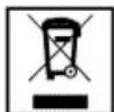
Entsorgen Sie Altgeräte grundsätzlich auf umweltfreundliche Weise. Dieses Gerät ist mit dem Sammelsymbol für elektrische und elektronische Altgeräte (WEEE) gekennzeichnet. Das bedeutet, dass das Gerät nach den Vorgaben der europäischen Direktive 2002/96/EC recycelt und zerlegt werden muss, damit die Umwelt möglichst
wenig beeinträchtigt wird. Weitere Informationen erhalten Sie bei Ihrer Stadtverwaltung.
Elektrogeräte, die nicht über spezielle Sammelstellen entsorgt werden, stellen durch das Vorhandensein gefährlicher Substanzen eine potentielle Gefahr für Umwelt und Gesundheit dar. Hinweise zur richtigen Entsorgung des Gerätes erhalten Sie von Ihrem Händler oder bei entsprechenden Sammelstellen in Ihrer Nähe.
Bevor Sie das Gerät entsorgen, schneiden Sie das Netzkabel ab und machen die Türverriegelung (sofern vorhanden) unbrauchbar, damit Kinder nicht in Gefahr geraten.
4 Vorbereitungen
Tipps zum Energiesparen
Mit den folgenden Hinweisen nutzen Sie Ihr Gerät umweltbewusst und energiesparend:
- Verwenden Sie am besten dunkles oder emailliertes Kochgeschirr – dies leitet die Wärme besser.
- Lassen Sie den Ofen vorheizen, wenn dies durch Bedienungs- oder Zubereitungsanleitung empfohlen wird.
- Verzichten Sie bei der Zubereitung auf häufiges Öffnen der Ofentür.
- Versuchen Sie, mehrere Gerichte gleichzeitig zuzubereiten, sofern dies möglich ist. Dazu stellen Sie einfach mehrere Behälter auf den Rost.
- Größere Gerichte und solche, deren Geschmack sich nicht gegenseitig beeinflussen soll, bereiten Sie nacheinander zu. Der Ofen ist dann bereits vorgeheizt.
- Sie können zusätzliche Energie sparen, indem Sie den Ofen ein paar Minuten vor Ende der Garzeit bereits abschalten. Verzichten Sie während der Zubereitung möglichst auf ein Öffnen der Ofentür.
- Tauen Sie gefrorene Gerichte vor der Zubereitung auf.
- Kochen Sie mit Deckel. Beim Kochen ohne Deckel kann der Energieverbrauch auf das Vierfache ansteigen.
- Wählen Sie stets die zum Boden-durchmesser des Kochgeschirrs passende Kochstelle. Entscheiden Sie sich immer für Kochgeschirr in
der passenden Größe. Größeres Kochgeschirr verbraucht mehr Energie.
- Achten Sie darauf, beim Kochen mit Elektroherden grundsätzlich Kochgeschirr mit flachem Boden zu verwenden.
Kochgeschirr mit dickem Boden leitet die Wärme besser und speichert diese eine Weile. Auf diese Weise können Sie bis zu ein Drittel Energie einsparen.
• Die Größe des Kochgeschirrs muss grundsätzlich zur Kochzone passen. Der Boden des Kochgeschirrs darf nicht kleiner als die Kochstelle sein. - Halten Sie das Kochfeld und den Boden des Kochgeschirrs sauber. Verschmutzungen verschlechtern die Wärmeübertragung zwischen Kochfeld und Kochgeschirrboden.
- Wenn die Zubereitung etwas länger dauert, schalten Sie die Kochzone 5 – 10 Minuten vor Ablauf der Garzeit ab. Durch Ausnutzung der Restwärme können Sie bis zu 20 % Energie einsparen.
Erste Inbetriebnahme
Erste Zeiteinstellung
i Bevor Sie den Ofen verwenden können, müssen Sie die Uhrzeit einstellen. Der Ofen arbeitet nicht, wenn die Uhrzeit nicht zuvor eingestellt wurde.
Bei der Ausführung von Einstellungen blinken die entsprechenden Symbole in der Anzeige.
Drücken Sie nach dem ersten Einschalten des Ofens zum Einstellen der Zeit (5) oder (6).

1 Programmknopf
2 Garzeit
3 Garzeitende
4 Alarmzeit
5 Minus-Taste
6 Plus-Taste
7 Anzeigehelligkeitseinstellung
8 Alarmlautstärke
9 Aktuelle Zeit
10 Tastensperre
11 Einstelltaste
Nach dem Einstellen der Zeit können Sie Zubereitungsbeginn und -ende mit Temperatur- und Funktionstaste wählen.
Wenn die aktuelle Zeit noch nicht eingestellt ist, beginnt die Zeiteinstellung bei 12:00. Das Uhrensymbol '9' erscheint und zeigt an, dass die aktuelle Zeit noch nicht eingestellt wurde. Das Symbol verschwindet nach der Zeiteinstellung.
Bei einem Stromausfall geht die Zeiteinstellung verloren. Eine Neueinstellung ist erforderlich.
So ändern Sie die zuvor eingestellte Uhrzeit:
- Mit (11) aktivieren Sie das Aktuelle Zeit-Symbol '9'.
- Stellen Sie die aktuelle Zeit mit den Tasten (5) / (6) ein.
Anzeigehelligkeit einstellen
- Drücken Sie die Taste (11); das Symbol zur Einstellung der Anzei- gehelligkeit '7' wird angezeigt.
- Stellen Sie die gewünschte Helligkeit mit den Tasten (5) / (6) ein.
» Die ausgewählte Helligkeitsstufe wird mit d-01, d-02 oder d-03 angezeigt.
Erstreinigung des Gerätes
Oberflächenbeschädigung durch Reinigungsmittel und -geräte. Keine scharfen Reinigungsmittel, Scheuerpulver, -milch oder spitzen Gegenstände verwenden.
- Entfernen Sie sämtliches Verpackungsmaterial.
- Geräteoberflächen mit einem feuchten Tuch oder Schwamm abwischen und mit einem Tuch trocknen.
Erstaufheizung
Lassen Sie das Gerät etwa 30 Minuten lang aufheizen, schalten Sie es anschließend ab. Auf diese Weise werden sämtliche Rückstände und Beschichtungen durch Abbrennen entfernt.
⚠️ Verbrennungsgefahr durch heiße Oberflächen! Heiße Oberflächen des Gerätes nicht berühren. Halten Sie Kinder vom Gerät fern, verwenden Sie Ofenhandschuhe.
Elektroofen
- Nehmen Sie sämtliches Zubehör (z. B. Backbleche und Rost) aus dem Ofen heraus.
- Schließen Sie die Ofentür.
- Wählen Sie die „Normal“-Einstellung.
- Wählen Sie die höchste Grillleistung; siehe So bedienen Sie den Backofen, Seite 23.
-
Lassen Sie den Ofen etwa 30 Minuten lang arbeiten.
-
Schalten Sie den Ofen ab; siehe So bedienen Sie den Backofen, Seite 23
Grill
- Nehmen Sie sämtliches Zubehör (z. B. Backbleche und Rost) aus dem Ofen heraus.
- Schließen Sie die Ofentür.
- Wählen Sie die höchste Grillleistung; siehe So bedienen Sie den Grill, Seite 30.
- Lassen Sie den Ofen etwa 30 Minuten lang arbeiten.
- Schalten Sie den Grill ab; siehe So bedienen Sie den Grill, Seite 30
Beim ersten Aufheizen des Ofens kann es zu Rauch- und Geruchsentwicklung kommen. Achten Sie auf gute Belüftung.
5 Bedienung Kochfeld
Allgemeine Hinweise zum Ko- chen
⚠️ Feuergefahr durch überhitzte Öle und Fette! Öle und Fette nicht unbeaufsichtigt erhitzen.
Auf keinen Fall mit Wasser löschen! Falls Öle oder Fette Feuer fangen, ersticken Sie die Flammen durch sofortiges Aufsetzen eines Deckels auf Topf oder Pfanne. Schalten Sie den Herd ab, sofern dies gefahrlos möglich ist, rufen Sie nötigenfalls die Feuerwehr.
- Vor dem Frittieren trocknen Sie die Lebensmittel gründlich und lassen sie langsam in das heiße Öl hinab. Achten Sie darauf, dass gefrorene Lebensmittel vor dem Frittieren restlos aufgetaut sind.
- Decken Sie das Kochgeschirr beim Frittieren nicht ab.
- Platzieren Sie das Kochgeschirr so auf dem Kochfeld, dass dessen Griffe oder Stiele nicht von anderen Kochstellen erhitzt werden. Stellen Sie keine Behälter auf das Kochfeld, die zum Kippen neigen.
- Stellen Sie kein leeres Kochgeschirr auf eingeschaltete Kochzonen. Es kann zu Beschädigungen kommen.
- Wenn Sie eine Kochzone verwenden, ohne Kochgeschirr darauf zu platzieren, verursacht dies Schäden am Gerät. Schalten Sie die Kochzonen nach dem Gebrauch aus.
- Da sich die Oberfläche des Gerätes erhitzt, legen Sie niemals Gegenstände aus Kunststoff oder Aluminium darauf ab. Entfernen Sie geschmolzene Rückstände solcher Materialien sofort von der Oberfläche. Übrigens sollten Lebensmittel grundsätzlich nicht in solchen Gefäßen gelagert werden.
- Verwenden Sie ausschließlich Kochgeschirr mit flachem Boden.
- Geben Sie die richtige Menge an Lebensmitteln in das jeweilige Kochgeschirr; nicht überfüllen. Dadurch ersparen Sie sich unnötige Reinigungsarbeit durch überlaufende Speisen.
Legen Sie die Deckel des Kochgeschirrs nicht auf den Kochzonen ab.
Stellen Sie Kochgeschirr so auf das Kochfeld, dass es exakt in der Mitte der Kochzone steht. Wenn Sie Kochgeschirr von einer Kochzone zur nächsten bewegen möchten, heben Sie das Kochgeschirr an, anstatt es über das Kochfeld zu schieben.
Tipps zu Glaskeramik-Kochfeldern
- Glaskeramik ist hitzefest und beständig gegen starke Temperatur-differenzen.
- Missbrauchen Sie die Glaskeramik nicht als Ablage oder als Schneidbrett.
- Verwenden Sie ausschließlich Kochgeschirr mit entsprechend bearbeitetem Boden. Scharfe Kan-
ten verursachen Kratzer auf der Oberfläche.
- Benutzen Sie kein Kochgeschirr aus Aluminium. Aluminium beschädigt die Glaskeramik.
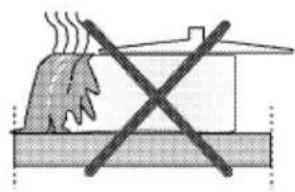
natural_image
Diagram of a fire extinguishing a chimney with a crossed-out X mark (no text or symbols)Überlaufende
Speisen können die Glaskeramik beschädigen und Brände verursachen.

Kein Kochgeschirr mit gewölbtem Boden verwenden.
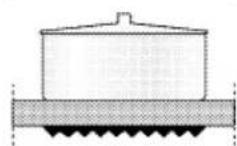
Ausschließlich
Kochgeschirr mit ebenem Boden verwenden. Dadurch wird die Hitze optimal übertragen.

Bei Kochgeschirr mit zu geringem Durchmesser verschwenden Sie Energie.
Kochfeld verwenden
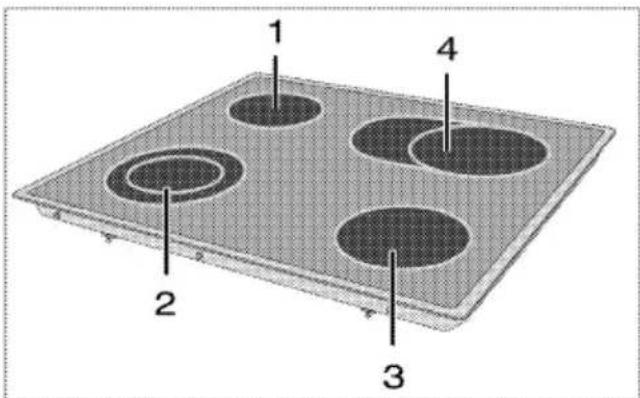
1 Einzelkochplatte 140 mm
2 Doppelkochplatte 210/120 mm
3 Einzelkochplatte 180 mm
4 Erweiterte Kochplatte 170/265 mm ist eine Liste mit für die jeweiligen Brenner empfohlenen Geschirr-durchmessern.
Glasbruch!
Keine Gegenstände auf das Kochfeld fallen lassen. Auch kleine Gegenstände (z.B. Salzstreuer) können das Kochfeld beschädigen.
Glaskeramik-Kochflächen mit Rissen nicht weiter verwenden.
Wasser kann durch die Risse dringen und einen Kurzschluss verursachen.
Ist die Oberfläche gerissen, ist das Gerät abzuschalten, um einen möglichen elektrischen schlag zu vermeiden.
Glaskeramik-Schnellkochstellen leuchten nach dem Einschalten hell auf. Nicht in das helle Licht schauen.
Glaskeramik-Kochzonen einschalten
Die Glaskeramik-Kochzonen werden mit den Kochzonentasten bedient.
Stellen Sie den jeweiligen Kochzonenregler auf die gewünschte Leistungsstufe ein.
| Leistungsstufe | 1 | 2 | 3 |
| Erhitzen | Sieden, Ruhen | Kochen, Braten |
Kochstellen abschalten
Drehen Sie den Regler der Kochstelle in die Aus-Position (oben).
Glaskeramik-Kochzonen abschalten Drehen Sie den Regler der Kochstelle in die Aus-Position (oben).
Mehrsegment-Kochzonen verwenden
Die Mehrsegment-Kochzonen ermöglichen Ihnen die Zubereitung mit unterschiedlich großem Kochgeschirr auf derselben Kochzone. Wenn diese Kochzonen aktiviert werden, schaltet sich zuerst die innere Kochzone ein.
- Drehen Sie den Regler zur Änderung des Durchmessers der aktiven Kochzone im Uhrzeigersinn.
- Sobald sich der Radius der Kochzone verändert, ertönt ein Klicken.

natural_image
Two circular mechanical components with internal grating and mounting holes, shown side by side (no text or symbols visible)Mehrsegment-Kochzonen abschalten
- Zum Abschalten der Kochzone drehen Sie den Regler gegen den Uhrzeigersinn in die Aus-Position (oben). Sämtliche Segmente der Kochzone werden abgeschaltet.

1 Position 1
2 Position 2
3 Position 3
Position 2 und 3 der Mehr-segment-Kochzonen arbeiten nicht unabhängig voneinan-der.

Bedienung Backofen
Allgemeine Hinweise zum Backen, Braten und Grillen

Verbrühungsgefahr durch heißen Dampf!
Öffnen Sie die Gerätetür im oder kurz nach dem Betrieb zuerst nur ein kleines Stück, um den Dampf abziehen zu lassen.
Tipps zum Backen
- Benutzen Sie Metallgeschirr mit Antihaftbeschichtung oder hitzebeständige Silikonformen.
- Nutzen Sie den Platz auf dem Rost gut aus.
- Stellen Sie Backformen in die Mitte des Rostes.
- Wählen Sie die richtige Einschubposition, bevor Sie Ofen oder Grill einschalten. Wechseln Sie die Einschubposition nicht, solange der Ofen heiß ist.
• Halten Sie die Ofentür geschlossen.
Tipps zum Rösten
- Eine Würzmischung aus Zitronen-saft und schwarzem Pfeffer sorgt für eine besonders schmackhafte Zubereitung von ganzen Hühnern, Puten und größeren Fleischportionen.
- Fleisch mit Knochen braucht etwa 15 – 30 Minuten länger zum Garen als dieselbe Menge Fleisches ohne Knochen.
- Jeder Zentimeter an Fleischdicke braucht etwa 4 – 5 Minuten mehr an Garzeit.
- Lassen Sie Fleisch nach Ablauf der Garzeit noch etwa 10 Minuten im
Backofen ruhen. Der Fleischsaft verteilt sich so gleichmäßiger im Braten und läuft beim Anschneiden nicht aus.
- Fisch stellen Sie auf einem hitzebeständigem Teller möglichst in der mittleren oder unteren Einschubposition in den Backofen.
Tipps zum Grillen
Fleisch, Geflügel und Fisch werden durch das Grillen schnell braun, bekommen eine schöne Kruste und trocknen dabei nicht aus. Insbesondere flache Stücke, Fleischspieße und Würstchen sowie Gemüse mit hohem Wasseranteil (wie Tomaten oder Zwiebeln) sind zum Grillen wie geschaffen.
- Verteilen Sie das Grillgut so auf dem Rost, dass es nicht über die Kanten des Rostes hinausragt.
- Schieben Sie den Rost (mit darunter eingeschobener Tropfschale) in die richtige Einschubposition. Vergessen Sie nicht, die Tropfschale beim Grillen in den untersten Einschub einzuschieben, damit das Fett aufgefangen wird. Geben Sie etwas Wasser in die Tropfschale – so erleichten Sie sich die Reinigung.
Feuergefahr durch ungeeignetes Grillgut!
Nur für die intensive Grillhitze geeignetes Grillgut verwenden. Grillgut nicht zu weit nach hinten in den Grill legen. Dort wird es besonders heiß, und fettes Grillgut kann in Brand geraten.
So bedienen Sie den Backofen
i Bevor Sie den Ofen verwenden können, müssen Sie die Uhrzeit einstellen. Der Ofen arbeitet nicht, wenn die Uhrzeit nicht zuvor eingestellt wurde.
Temperatur und Betriebsart einstellen
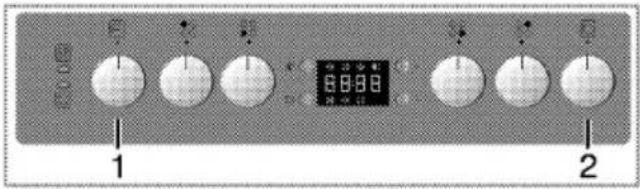
1 Funktionsknopf
2 Temperaturknopf
Ihr Ofen ist mit Knöpfen ausgestattet, die bei Betätigung herausspringen.
- Drücken Sie den Knopf zum Herausspringen nach unten; nehmen Sie dann die gewünschte Einstellung vor.

-
Nach Abschluss des Garens drehen Sie den Knopf in die Aus-Position (oben) und drücken ihn hinein.
-
Stellen Sie den Funktionswähler auf die gewünschte Temperatur ein.
- Stellen Sie den Funktionswähler auf die gewünschte Betriebsart ein.
» Der Ofen heizt sich auf die eingestellte Temperatur auf und hält diese aufrecht. Während des Aufheizens bleibt die Temperaturleuchte eingeschaltet.
Backofen ausschalten
Bringen Sie Funktions- und Temperatureinstellungsknopf in die obere Position (Aus).

natural_image
Cross-sectional diagram of a refrigerator internal structure, showing internal components and ventilation duct (no text or labels)Einschubpositionen (bei Modellen mit Grillrost)
Es ist wichtig, dass der Grillrost richtig in die Einschübe eingesetzt wird. Setzen Sie den Grillrost wie in der Abbildung gezeigt in den Einschub ein. Achten Sie darauf, dass der Grillrost nicht die Rückwand des Ofens berührt. Schieben Sie den Rost daher nur so weit ein, bis sich die Backofentür problemlos schließen lässt – so funktioniert der Grill am besten.
Betriebsarten
Die hier gezeigte Reihenfolge der Betriebsarten kann je nach Gerätemodell etwas abweichen.
Ober- und Unterhitze

Ober- und Unterhitze werden eingesetzt. Das Gargut wird gleichzeitig von oben und unten erhitzt. Diese Betriebsart eignet sich beispielsweise für Kuchen, Gebäck und Aufläufe. Nur ein Blech verwenden.
Unterhitze
Bei dieser Betriebsart wird lediglich das untere Heizelement eingesetzt. Geeignet z. B. für Pizza und zum Nachbräunen von unten.
Ober-/Unterhitze mit Umluft

Bei dieser Betriebsart werden Oberhitze, Unterhitze und Umluft (hinteres Heizelement) eingesetzt. Durch den Lüfter wird heiße Luft schnell gleichmäßig im Ofen verteilt. Nur ein Blech verwenden.
Umluftbetrieb

Der Backofen wird nicht beheizt. Nur der Lüfter (in der Rückwand) arbeitet. Gefrorene Lebensmittel werden langsam bei Zimmertemperatur aufgetaut, heiße Lebensmittel abgekühlt.
Umluft

Umluft (in der Rückwand) arbeitet. Durch den Lüfter wird heiße Luft schnell gleichmäßig im Ofen verteilt. Ein Vorheizen ist meistens nicht erforderlich. Eignet sich zum Garen auf unterschiedlichen Einschubebenen. Mehrere Bleche können verwendet werden.
Grill, groß

Der große Grill an der Decke des Ofens ist in Betrieb. Diese Betriebsart eignet sich insbesondere zum Grillen größerer Fleischmengen.
- Stellen Sie mittelgroße bis große Portionen auf dem richtigen Einschub direkt unter das Grillheizelement.
- Stellen Sie die maxi-male Temperatur ein.
- Wenden Sie das Grillgut nach der Hälfte der Garzeit.
Grill+Fan (Grill + Umluft)

Der Grilleffekt ist nicht so stark wie bei Flächengrill
- Kleine oder mittelgroße Portionen in der richtigen Einschubposition unter dem Grill-Heizkörper grillen.
- Stellen Sie die gewünschte Temperatur ein.
- Wenden Sie das Grillgut nach der Hälfte der Garzeit.
Schnellheizen
Diese Funktion dient dazu, den Ofen schnell aufzuheizen; sie eignet sich nicht zum Garen von Speisen.
- Stellen Sie nach der Auswahl dieser Funktion die gewünschte Temperatur ein. Die Temperaturleuchte schaltet sich ein, der Ofen wird aufgeheizt.
- Nach dem Aufheizen schaltet sich die Leuchte aus. Dann stellen Sie die gewünschte Funktion zum Garen ein.
Ofenuhr verwenden
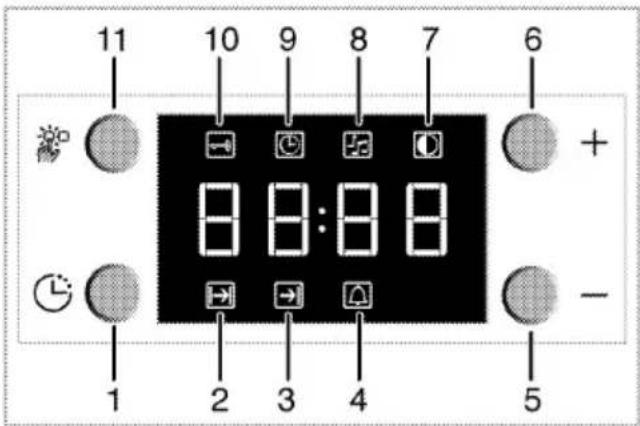
1 Programmknopf
2 Garzeit
3 Garzeitende
4 Alarmzeit
5 Minus-Taste
6 Plus-Taste
7 Anzeigehelligkeitseinstellung
8 Alamlautstärke
9 Aktuelle Zeit
10 Tastensperre
11 Einstelltaste
Für das Garende können Sie maximal 23 Stunden und 59 Minuten einstellen. Bei einem Stromausfall wird das Programm abgebrochen. Eine Neuprogrammierung ist erforderlich.
Wenn Sie Einstellungen ändern, blinken die entsprechenden Symbole in der Anzeige. Bitte warten Sie einen Moment ab, bis die Einstellungen in Kraft treten.
Während des halb- oder vollautomatischen Betriebes kann die Uhrzeit nicht eingestellt werden.
i Die Garzeit wird angezeigt, sobald das Gerät arbeitet.
Halbautomatischen Betrieb aktivieren
In diesem Betriebsmodus können Sie festlegen, wie lange der Ofen automatisch arbeiten soll (Garzeit) und wann er sich automatisch ausschaltet (Garzeitende).
- Drücken Sie zum Anpassen der Garzeit die Programmtaste (1) und aktivieren das Garzeitsymbol [2].
- Passen Sie die Garzeit mit der Minus- (5) und Plus-Taste (6) an.
» Nach dem Einstellen der Garzeit leuchtet das Garzeitsymbol weiter. -
Drücken Sie zum Einstellen des Garzeitendes die Programmtaste (1) und aktivieren das Garzeitsymbol (3).
-
Stellen Sie das Garzeitende mit den Tasten - (5) und + (6) ein.
» Nach dem Festlegen des Garzeitendes leuchten Garzeitende- und Gar-symbol weiter. Das Garzeitende-Symbol (3) verschwindet, sobald das Garen beginnt.
-
Schieben Sie die Lebensmittel in den Ofen.
-
Wählen Sie Betriebsart und Temperatur.
» Der Ofentimer berechnet die Garen-Startzeit anhand von Garzeitende und Garzeit automatisch. Beim Erreichen der Startzeit wird der ausgewählte Betriebsmodus automatisch eingestellt und der Ofen auf die festgelegte Temperatur vorgeheizt. Diese Temperatur wird bis zum Garzeitende beibehalten.
-
Nach Abschluss des Garens erscheint „End (Ende)“ in der Anzeige, Sie hören einen Signalton.
-
Das Tonsignal erklingt 2 Minuten lang. Zum Abstellen des Alarmsignals drücken Sie eine beliebige Taste. Das Signal verstummt, die aktuelle Zeit wird angezeigt.
Wenn Sie den Alarm durch Drücken einer beliebigen Taste abschalten, schaltet sich der Ofen wieder ein. Wenn Sie nach Abschluss des Alarms eine beliebige Taste drücken, schaltet sich der Ofen wieder ein.
- Schalten Sie den Ofen mit dem Temperaturknopf und Funktionswähler ab.
Halbautomatik-Betrieb einschalten In diesem Betriebsmodus können Sie vorgeben, wie lange der Ofen arbeiten soll (Garzeit).
-
Drücken Sie zum Anpassen der Garzeit die Programmtaste (1) und aktivieren das Garzeitsymbol (2).
-
Stellen Sie die Garzeit mit den Tas- ten - (5) und + (6) ein.
» Nach dem Einstellen der Garzeit leuchtet das Garzeitsymbol weiter.
-
Schieben Sie die Lebensmittel in den Ofen.
-
Wählen Sie Betriebsart und Temperatur.
» Der Ofen heizt sich bis zur vorgegebenen Temperatur auf und hält diese Temperatur bis zum eingestellten Garzeitende.
-
Nach Abschluss des Garens erscheint „End (Ende)“ in der Anzeige, Sie hören einen Signalton.
-
Das Tonsignal erklingt 2 Minuten lang. Zum Abstellen des Alarmsignals drücken Sie eine beliebige Taste.
Das Signal verstummt, die aktuelle Zeit wird angezeigt.
Wenn Sie den Alarm durch Drücken einer beliebigen Taste abschalten, schaltet sich der Ofen wieder ein. Wenn Sie nach Abschluss des Alarms eine beliebige Taste drücken, schaltet sich der Ofen wieder ein.
- Schalten Sie den Ofen mit dem Temperaturknopf und Funktionswähler ab.
Tastensperre
Tastensperre einschalten
Mit der Tastensperre können Sie die unerwünschte Bedienung des Ofens verhindern.

1 Programmknopf
2 Garzeit
3 Garzeitende
4 Alarmzeit
5 Minus-Taste
6 Plus-Taste
7 Anzeigehelligkeitseinstellung
8 Alarmlautstärke
9 Aktuelle Zeit
10 Tastensperre
11 Einstelltaste
- Drücken Sie zum Aktivieren des Tastensperre-Symbols (10) die Taste (11).
» „OFF (Aus)“ erscheint in der Anzeige.
- Aktivieren Sie die Tastensperre mit der Plus-Taste (6).
» Sobald die Tastensperre aktiviert ist, erscheint „On (Ein)“ in der Anzeige und das Tastensperre-Symbol (10) leuchtet weiter.
Bei aktiver Tastensperre sind sämtliche Tasten des Bedienfeldes mit Ausnahme der Taste (11) gesperrt.
Tastensperre ausschalten
- Drücken Sie zum Aktivieren des Tastensperre-Symbols (10) die Ein- stellttaste (11).
» „On (Ein)“ erscheint in der Anzeige.
2. Schalten Sie die Tastensperre mit der Minus-Taste (5) ab.
» Nach dem Abschalten der Tastensperre wird „OFF (Aus)“ angezeigt.
Alarmfunktion
Sie können die Alarmfunktion des Gerätes auch als Kurzzeitwecker einsetzen, wenn Sie sich an etwas erinnern lassen möchten.
Der Kurzzeitwecker hat keinen Einfluss auf die Funktionen des Backofens. Er wird lediglich zur Erinnerung eingesetzt. Dies ist beispielsweise sinnvoll, wenn Sie Speisen nach einer bestimmten Zeit wenden müssen. Nach Ablauf der eingestellten Zeit wird ein Tonsignal ausgegeben.

1 Programmknopf
2 Garzeit
3 Garzeitende
4 Alarmzeit
5 Minus-Taste
6 Plus-Taste
7 Anzeigehelligkeitseinstellung
8 Alamlautstärke
9 Aktuelle Zeit
10 Tastensperre
11 Einstelltaste
Alarmfunktion einstellen
- Drücken Sie zum Aktivieren des Alarmzeitsymbols (4) die Programmtaste (1).
Der Alarm kann auf maximal 23 Stunden und 59 Minuten eingestellt werden.
- Passen Sie die Alarmzeit mit der Minus- (5) und Plus-Taste (6) an.
» Das Alarmsymbol leuchtet weiter und die Alarmzeit erscheint in der Anzeige, sobald die Alarmzeit eingestellt ist. - Am Ende der Alarmzeit beginnt das Alarmzeitsymbol (4) zu blinken und der Signalton wird ausgegeben.
Alarm abschalten
- Drücken Sie zum Abstellen des Alarmsignals eine beliebige Taste.
» Das Signal verstummt, die aktuelle Zeit wird angezeigt.
Falls Sie die Alarmfunktion abbrechen möchten:
-
Zum Rücksetzen der Alarmzeit drücken Sie die Programmtaste (1); das Alarmzeitsymbol (4) leuchtet auf.
-
Halten Sie die Minus-Taste (5) gedrückt, bis "00:00" angezeigt wird.
i Die Alarmzeit wird angezeigt. Wenn sowohl Alarmzeit als auch Garzeit vorgegeben wurden, wird die jeweils kürzere Zeit angezeigt.
Signalton ändern
- Drücken Sie zum Aktivieren des Alarmtonsymbols (8) die Einstelltaste (11).
- Passen Sie den gewünschten Ton mit der Minus- (5) und Plus-Taste (6) an.
» Der ausgewählte Alarmton wird mit "b-01", "b-02" oder "b-03" angezeigt.
Garzeitentabelle
i Die angegebenen Werte wurden im Labor ermittelt. Die für Sie richtigen Werte können davon abweichen.
Backen und Braten
Einschubebene 1 ist die unterste Ebene im Backofen.
| Rezept | Funktion | Vorheizen | Einschubebene (von unten) | Temperatur (°C) | Zeit (min.) | Zubehör |
| Hefekuchen | OBER- UND UNTERHITZE | Ja | 3 | 175 | 20 - 35 | Fettpfanne |
| HEISSLUFT | Ja | 1 - 5 | 175 | 15 - 30 | Ebene 5: tiefe Fettpfanne | |
| Ebene 1: Fettpfanne | ||||||
| Plätzchen, Törtchen | OBER- UND UNTERHITZE | Ja | 3 | 175 | 20 - 40 | Fettpfanne |
| HEISSLUFT | Ja | 1 - 5 | 175 | 20 - 35 | Ebene 5: tiefe Fettpfanne | |
| Ebene 1: Fettpfanne | ||||||
| Pizza | OBER- UND UNTERHITZE | Ja | 2 | 225 | 12 - 20 | Fettpfanne |
| HEISSLUFT | Ja | 1 - 5 | 225 | 15 - 30 | Ebene 5: tiefe Fettpfanne | |
| Ebene 1: Fettpfanne | ||||||
| Sandkuchen | OBER- UND UNTERHITZE | Ja | 3 | 200 | 5 -15 | Ebene 3: Form auf Rost |
| HEISSLUFT | Ja | 1 - 5 | 175 | 10 -25 | Ebene 5: Form auf RostEbene 1: Form auf Rost | |
| Salzige Kuchen (Gemüsetorte, Quiche) | UMLUFT | Ja | 2 | 175 - 200 | 30 - 50 | Kuchenform auf Rost |
| HEISSLUFT | Ja | 1 - 3 | 175 - 200 | 35 - 55 | Ebene 3: Kuchenform auf Rost | |
| Ebene 1: Kuchenform auf Rost | ||||||
| Lasagne | OBER- UND UNTERHITZE | Ja | 2 - 3 | 200 | 30 - 45 | Form auf Rost |
| Lamm / Kalb / Rind / Schwein 1 kg | UMLUFT | - | 3 | 25 min. bei 250, dann bei 180 - 190 | 80 - 120 | Fettpfanne oder Form auf Rost |
| Puter / Gans 3 kg | UMLUFT | - | 2 | 25 min. bei 250, dann bei 180 - 190 | 140 - 210 | Fettpfanne oder Form auf Rost |
| Brathähnchen 1-1,3 kg | UMLUFT | - | 2 | 15 min. bei 250, dann bei 180 - 190 | 55 - 70 | Ebene 2: Rost (Gargut bei Bedarf nach zwei Dritteln der Garzeit wenden) |
| Ebene 1: Fettpfanne mit Wasser | ||||||
| Lammkeule, Schweins-haxe | UMLUFT | - | 3 | 25 min. bei 250, dann bei 180 - 190 | 60 - 90 | Fettpfanne oder Form auf Rost (Gargut bei Bedarf nach zwei Dritteln der Garzeit wenden) |
| Fischfilets, -stücke | UMLUFT | - | 3 | 200 | 10 - 25 | Ebene 3: Rost (Gargut nach halber Garzeit wenden) / Fettpfanne |
| Ebene 2: Fettpfanne mit Wasser | ||||||
| Fischfilets, -stücke | GRILL | Ja | 4 / 5 | 200 - 225 | 20 - 30 | Ebene 4 / 5: Rost (Gargut nach halber Garzeit wenden) |
| Ebene 3: Fettpfanne mit Wasser | ||||||
| Roastbeef roh | GRILL | Ja | 4 / 5 | 200 - 225 | 25 - 35 | Form auf Rost (Gargut bei Bedarf nach zwei Dritteln der Garzeit wenden) |
| Röstbrot | GRILL | Ja | 4 | 200 - 225 | 1 - 4 | Rost |
| Bratwurst, Fleisch-spieße, Rippchen, Hamburger | GRILL | Ja | 5 | 200 - 250 | 20 - 40 | Ebene 5: Rost (Gargut nach halber Garzeit wenden) |
| Ebene 4: Fettpfanne mit Wasser | ||||||
| Gratiniertes Gemüse | GRILL | Ja | 3 | 200 | 10 - 20 | Form auf Rost |
| Die in der Tabelle angegebenen Garzeiten sind nur Richtwerte. Die Garzeiten können abhängig vom Gargut und dessen Größe variieren. Beim Grillen wird empfohlen, vor dem Gargut einen Bereich von 6-7 cm auf dem Rost frei zu lassen. Es wird empfohlen, Grillfleisch nach halber Garzeit zu wenden. | ||||||
Wenn vorgeheizt werden muss, lassen Sie den Ofen zu Beginn vorheizen, bis die Temperaturleuchte erlischt.
Tipps zum Kuchenbacken
- Falls Gebäck zu trocken wird, erhöhen Sie die Temperatur etwas und vermindern gleichzeitig die Garzeit.
- Werden Kuchen zu feucht, reduzieren Sie die Flüssigkeiten oder senken die Temperatur um 10 °C.
- Sofern die Oberseite des Kuchens zu stark gebräunt wird, backen Sie etwas länger mit reduzierter Temperatur.
- Wenn der Kuchen außen gut gelingt, innen jedoch noch klebrig ist, geben Sie weniger Flüssigkeit hinzu, senken die Temperatur und verlängern dafür die Garzeit etwas.
Tipps für Gebäck
- Falls Gebäck zu trocken wird, erhöhen Sie die Temperatur etwas und vermindern gleichzeitig die Garzeit. Befeuchten Sie den Teig mit einer Mischung aus Milch, Öl, Ei und Joghurt.
- Sollte Gebäck sehr lange zum Garen benötigen, achten Sie darauf, dass das Gebäck nicht über
die Oberkante des Backblechs hinausragt.
- Wird Gebäck an der Oberseite gut gebräunt, innen jedoch nicht richtig gar, achten Sie darauf, dass sich Flüssigkeiten nicht am Boden des Gebäcks konzentrieren. Versuchen Sie, Flüssigkeitsmischungen gleichmäßig zwischen den Teigschichten zu verteilen; so erreichen Sie eine gleichmäßige Bräunung.
Halten Sie sich beim Backen an die Betriebsart- und Temperature- empfehlungen der Zubereitungs- tabelle. Falls die Unterseite nicht ausreichend gebräunt wird, nutzen Sie beim nächsten Mal den nächstniedrigeren Einschub.
Tipps zur Zubereitung von Gemüse
- Falls Gemüsegerichte zu trocken werden, bereiten Sie diese in einem Geschirr mit Deckel statt auf dem Blech zu. Geschlossene Behälter sorgen dafür, dass nicht zu viel Flüssigkeit verloren wird.
- Falls Gemüsegerichte nicht richtig gar werden, kochen Sie das Gemüse zuvor und geben es erst danach in den Ofen.
So bedienen Sie den Grill
i Bevor Sie den Ofen verwenden können, müssen Sie die Uhrzeit einstellen. Der Ofen arbeitet nicht, wenn die Uhrzeit nicht zuvor eingestellt wurde.
⚠️ Verbrennungsgefahr durch heiße Oberflächen! Schließen Sie beim Grillen die Ofentür.
Grill einschalten
- Drehen Sie den Funktionswähler auf das gewünschte Grillsymbol.
- Wählen Sie dann die gewünschte Grilltemperatur.
- Heizen Sie den Grill bei Bedarf etwa 5 Minuten vor.
» Die Temperaturleuchte schaltet sich ein.
Grill ausschalten
- Drehen Sie den Funktionswähler in die Aus-Position (oben).
Einschubpositionen
Die Grillleistung nimmt ab, wenn der Grillrost die Rückwand des Ofens berührt. Schieben Sie den Rost daher nur so weit ein, bis sich die Backofentür problemlos schließen lässt – so funktioniert der Grill am besten.
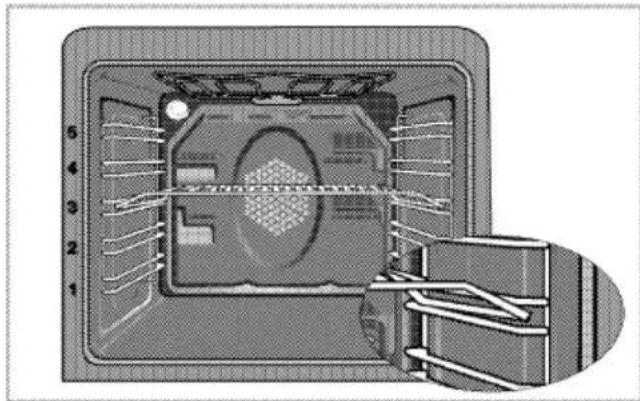
natural_image
Cross-sectional diagram of a device showing internal components and a hand inserting a component (no text or symbols)i Grillen Sie nicht auf der obersten Ebene.
Feuergefahr durch ungeeignetes Grillgut!
Nur für die intensive Grillhitze geeignetes Grillgut verwenden. Grillgut nicht zu weit nach hinten in den Grill legen. Dort wird es besonders heiß, und fettes Grillgut kann in Brand geraten.
7 Pflege und Wartung
Allgemeine Hinweise
Durch regelmäßiges Reinigen verlängern Sie die Lebenserwartung Ihres Gerätes und beugen Fehlfunktionen vor.
⚠ Stromschlaggefahr! Trennen Sie das Gerät vor dem Reinigen von der Stromversorgung, damit es nicht zu Stromschlägen kommt.
⚠️ Verbrennungsgefahr durch heiße Oberflächen! Lassen Sie das Gerät abkühlen, bevor Sie es reinigen.
- Reinigen Sie das Gerät nach je- dem Einsatz gründlich. Dadurch lassen sich Speisereste leichter entfernen und können sich beim nächsten Einsatz des Ofens nicht einbrennen. - Zur Reinigung benötigen Sie keine Spezialreiniger. Verwenden Sie am besten warmes Wasser mit etwas herkömmlichem Reiniger, ein wei- ches Tuch oder einen Schwamm. Anschließend mit einem Tuch trocknen.
- Achten Sie stets darauf, überschüssige und verschüttete Flüssigkeiten nach der Reinigung gründlich ab- bzw. aufzuwischen.
- Verzichten Sie auf Reinigungsmittel, die Säuren oder Chlor enthalten, wenn Sie Edelstahl und Griffe reinigen. Reinigen Sie diese Teile mit einem weichen Tuch und etwas Flüssigreiniger (kein Scheu-
ermittel); wischen Sie dabei am besten nur in eine Richtung.
Oberflächenbeschädigung durch Reinigungsmittel und -geräte. Keine scharfen Reinigungsmittel, Scheuerpulver, -milch oder spitzen Gegenstände verwenden.
Benutzen Sie keine Dampfreiniger zur Reinigung.
Kochfeld reinigen
Glaskeramik
Wischen Sie die Glaskeramik mit einem mit kaltem Wasser angefeuchteten Tuch sauber. Anschließend mit einem weichen Tuch trocknen. Achten Sie darauf, dass keine Rückstände auf der Glaskeramik verbleiben; andernfalls kann das Kochfeld bei der nächsten Nutzung beschädigt werden. Versuchen Sie niemals, Rückstände mit Messern, Stahlwolle und ähnlichen Hilfsmitteln von der Glaskeramik zu entfernen.
Entfernen Sie Kalkflecken (beige bis gelbe Flecken) mit etwas Kalkentferner; Essig oder Zitronensaft funktionieren ebenfalls. Alternativ können Sie entsprechende handelsübliche Produkte verwenden.
Bei hartnäckigen Verschmutzungen tragen Sie Reinigungsmittel mit einem Schwamm auf und warten ab, bis das Mittel richtig in den Schmutz eingezogen ist. Anschließend wischen Sie die Glaskeramik des Kochfeldes mit einem feuchten Tuch sauber.
i Stark zuckerhaltige Lebensmittel müssen sofort entfernt werden, bevor die Glaskeramik abkühlt. Andernfalls kann die Glaskeramik dauerhaft beschädigt werden.
Mit der Zeit kann es zu leichten Farbveränderungen der Glaskeramik und der Markierungen kommen. Die Funktion des Gerätes wird dadurch nicht beeinträchtigt.
Farbveränderungen und sonstige leichte optische Veränderungen sind bei Glaskeramik normal; es handelt sich nicht um einen Defekt.
Bedienfeld reinigen
Reinigen Sie Bedienfeld und Tasten mit einem weichen Tuch; anschließend trockenreiben.
i Beschädigung der Bedienblende! Zum Reinigen der Bedienblende die Knöpfe nicht abziehen.
Backofen reinigen
So reinigen Sie die Seitenwand
- Lösen Sie den vorderen Bereich der seitlichen Halterungen, indem Sie diese in Gegenrichtung zur Seitenwand schieben.
- Ziehen Sie die seitliche Halterung komplett zu sich hin heraus.
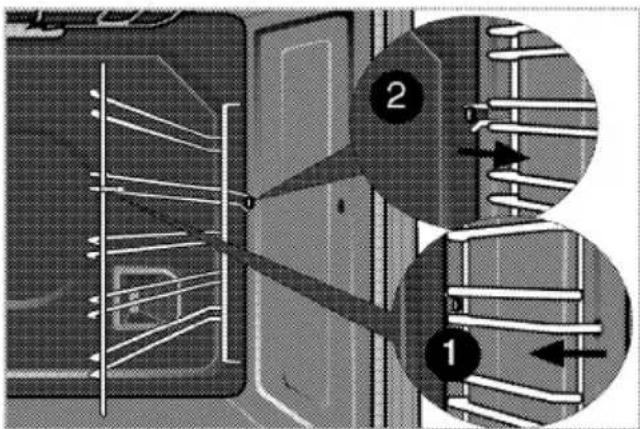
Ofentür reinigen
Verwenden Sie zum Reinigen der Ofentür am besten warmes Wasser mit etwas herkömmlichem Reiniger, ein weiches Tuch oder einen Schwamm. Anschließend mit einem Tuch trocknen.
Verzichten Sie bei der Reinigung der Ofentür auf aggressive Reinigungsmittel und auf scharfkanti- ge Schaber aus Metall. Solche Hilfsmittel können die Oberflä- chen zerkratzen und das Glas beschädigen.
Ofentür ausbauen
- Öffnen Sie die Ofentür (1).
- Öffnen Sie die Clips am Scharniergehäuse links und rechts der Ofentür, indem Sie sie wie in der Abbildung gezeigt nach unten drücken.

1 Ofentür
2 Scharnier
3 Ofen

- Öffnen Sie die Ofentür zur Hälfte.
- Nehmen Sie die Ofentür heraus, indem Sie sie etwas anheben und von den Scharnieren rechts und links lösen.
Zum Einbau führen Sie die obi-gen Schritte wieder in umgekehr-ter Reihenfolge aus. Vergessen Sie nicht, die Clips am Schar-niergehäuse nach dem Wieder-einsetzen der Tür wieder zu schließen.
Ofenbeleuchtung auswechseln
⚠️ Verbrennungsgefahr durch heiße Oberflächen! Vor dem Auswechsein der Lampe sicherstellen, dass das Gerät abgekühlt und abgeschaltet ist, um einen möglichen elektrischen schlag zu vermeiden
Als Leuchtmittel wird eine spezielle Glühlampe eingesetzt, die für Temperaturen bis 300 °C ausgelegt ist. Weitere Hinweise finden Sie in Technische Daten, Seite 5 Passende Leuchtmittel erhalten Sie beim autorisierten Kunden-dienst.
i Die Position der Leuchte kann etwas von der Abbildung abweichen.
Wenn Ihr Ofen mit einer runden Leuchte ausgestattet ist:
- Trennen Sie das Gerät vollständig von der Stromversorgung.
- Schrauben Sie die Glasabdeckung gegen den Uhrzeigersinn ab.
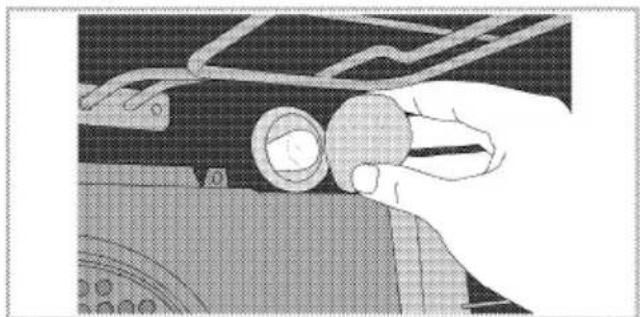
natural_image
Close-up of a hand adjusting a mechanical component with a circular component (no visible text or symbols)- Drehen Sie die Ofenlampe gegen den Uhrzeigersinn heraus, setzen Sie eine neue Lampe ein.
- Glasabdeckung wieder anbringen.

Problemlösung
| Aus dem Ofen tritt im Betrieb Dampf aus. |
| i Während des Betriebs ist ein Dampfaustritt normal. Dies ist kein Fehler. |
| Beim Aufheizen und Abkühlen sind metallische Geräusche zu hören. |
| i Wenn sich die Temperatur von Metallteilen ändert, dehnen sich diese aus oder ziehen sich zusammen – dabei entstehen Geräusche. Dies ist kein Fehler. |
| Das Gerät funktioniert nicht. |
| Die Sicherung ist durchgebrannt oder ausgelöst. >>> Kontrollieren Sie die Sicherungen im Sicherungskasten. Bei Bedarf austauschen oder zurücksetzen.Das Gerät ist nicht richtig an die (geerdete) Steckdose angeschlossen. >>> Überprüfen Sie die Steckerverbindung.Die Tasten/Knöpfe am Bedienfeld funktionieren nicht. >>> Die Tastensperre ist eventuell aktiv. Bitte abschalten. (Siehe Tastensperre, Seite 26 ) |
| Die Ofenbeleuchtung funktioniert nicht. |
| Das Leuchtmittel ist defekt. >>> Tauschen Sie das Leuchtmittel aus.Die Stromversorgung wurde unterbrochen. >>> Überprüfen Sie die Stromversorgung. Kontrollieren Sie die Sicherungen im Sicherungskasten. Sicherungen bei Bedarf austauschen oder zurücksetzen. |
| Backofen heizt nicht. |
| Falsche Funktion ausgewählt und/oder Temperatur nicht richtig eingestellt. >>> Stellen Sie Funktion und Temperatur entsprechend ein.Bei Modellen mit Timer ist der Timer eventuell nicht richtig eingestellt. >>> Stellen Sie die richtige Zeit ein.(Bei Produkten mit Mikrowellenofen kontrolliert der Timer nur die Mikrowelle.)Die Stromversorgung wurde unterbrochen. >>> Überprüfen Sie die Stromversorgung. Kontrollieren Sie die Sicherungen im Sicherungskasten. Sicherungen bei Bedarf austauschen oder zurücksetzen. |
| (Bei Modellen mit Timer:) Die Uhrzeitanzeige blinkt oder das Uhrensymbol leuchtet. |
| Es gab einen Stromausfall. >>> Stellen Sie die aktuelle Uhrzeit ein, schalten Sie das Gerät aus und anschließend wieder ein. |

Falls sich ein Problem nicht mit den obigen Hinweisen lösen lassen sollte, wenden Sie sich bitte an den autorisierten Kundendienst oder an den Händler, bei dem Sie das Gerät gekauft haben. Versuchen Sie niemals, ein defektes Gerät selbst zu reparieren.

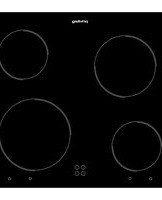

- Gebrauchsanweisung
- Brugsanvisning
- Käyttöohje
- Οδηγίες χρήσης
- Návod k použití
- Instrucțiuni de utilizare
- Please read this manual first.
- The User Manual will help you use the product in a fast and safe way.
- Explanation of symbols
- General information...... 4
- Important safety instructions 8
- Installation.... 11
- Preparation 16
- How to use the hob...... 19
- How to operate the oven ..... 22
- Maintenance and care ...... 31
- Troubleshooting.... 34
- General information
- Basics: Information on the energy label of electrical ovens is given in accordance with the EN 50304 standard. Those values are determined under standard load with bottom-top heater or fan assisted heating (if any) functions.
- Accessories
- Oven tray
- Deep tray
- Aluminium cake tray
- Cake tray
- Small oven tray
- Wire Shelf
- Placing the wire grill and tray onto the telescopic racks properly
- Important safety instructions
- General safety
- Intended use
- Safety for children
- Safety when working with electricity
- Installation
- Before installation
- Installation and connection
- Electrical connection
- Connecting the power cable
- For equipment with a cooling fan
- Final check
- Disposal
- Disposing of packaging material
- Future Transportation
- Disposing of the old product
- Preparation
- Tips for saving energy
- Initial use
- Initial time setting
- Changing screen brightness adjustment
- First cleaning of the appliance
- Initial heating
- Electric oven
- Grill oven
- How to use the hob
- General information about cooking
- Tips about glass ceramic hobs
- Broken glass!
- Quick heating glass-ceramic hobs emit a bright light when they are switched on. Do not stare at the bright light.
- Turning on the ceramic plates
- Turning off the ceramic plates
- Using multi-segmented cooking zones
- Turning off multi-segment cooking zones
- How to operate the oven
- General information on baking, roasting and grilling
- Tips for baking
- Tips for roasting
- Tips for grilling
- Fire danger due to food which is unsuitable for grilling!
- How to operate the electric oven
- Select temperature and operating mode
- Switching off the electric oven
- Rack positions (For models with wire shelf)
- Operating modes
- Top and bottom heating
- Bottom heating
- Fan supported bottom/top heating
- Operating with fan
- Fan Heating
- Full grill
- Grill+Fan
- Booster
- Using the oven clock
- Activating semi-automatic operation mode
- Switch on semi-automatic operation
- Using the keylock
- Activating the keylock
- Deactivating the keylock
- Using the clock as an alarm
- Setting the alarm clock
- Turning off the alarm
- If you want to cancel the alarm:
- Changing alarm tone
- Cooking times table
- Baking and roasting
- Tips for baking cake
- Tips for baking pastry
- Tips for cooking vegetables
- How to operate the grill
- Switching on the grill
- Switching off the grill
- Rack positions
- Maintenance and care
- General information
- Cleaning the hob
- Glass ceramic surfaces
- Cleaning the control panel
- Cleaning the oven
- To clean the side wall
- Clean oven door
- Removing the oven door
- Replacing the oven lamp
- If your oven is equipped with a round lamp:
- Troubleshooting
- Bitte lesen Sie zuerst diese Anleitung.
- Die Bedienungsanleitung hilft Ihnen, Ihr Gerät schnell und sicher bedienen zu können.
- Die Symbole
- Allgemeine Informationen ..... 4
- Wichtige Sicherheitshinweise8
- Vorbereitungen ...... 16
- Bedienung Kochfeld ...... 19
- Bedienung Backofen......22
- Pflege und Wartung ...... 32
- Problemlösung 35
- Allgemeine Informationen
- Allgemeine Hinweise: Energieangaben von Elektroöfen werden gemäß der Richtlinie EN 50304 ermittelt. Die entsprechenden Werte werden unter üblichen Einsatzbedingungen bei Ober-/Unterhitze oder im Umluftbetrieb (sofern vorhanden) ermittelt. Die Energieeffizienzklasse wird gemäß folgender Prioritäten ermittelt; je nachdem, ob das Gerät mit den entsprechenden Funktionen ausgestattet ist. 1. Garen mit Eco-Umluft, 2. Turbo-Niedertemperaturgaren, 3. Turbogaren, 4. Ober-/Unterhitze mit Umluft, 5. Ober-/Unterhitze
- Zubehör
- Backblech
- Tiefes Backblech/Tropfschale
- Aluminium-Kuchenblech
- Kuchenblech
- Kleines Backblech
- Rost
- Rost und Backblech richtig in die Teleskopeinschübe einschieben
- Wichtige Sicherheitshinweise
- Sicherheit, allgemein
- Bestimmungsgemäße Verwendung
- Wenn Kinder in der Nähe sind
- Sicherheit beim Umgang mit Elektrizität
- Vor der Installation
- Einbauen und Anschließen
- Elektrischer Anschluss
- Netzkabel anschließen
- Endkontrolle
- Entsorgung
- Verpackungsmaterialien entsorgen
- Transport
- Altgeräte entsorgen
- Vorbereitungen
- Tipps zum Energiesparen
- Erste Inbetriebnahme
- Erste Zeiteinstellung
- Anzeigehelligkeit einstellen
- Erstreinigung des Gerätes
- Erstaufheizung
- Elektroofen
- Grill
- Bedienung Kochfeld
- Allgemeine Hinweise zum Ko- chen
- Tipps zu Glaskeramik-Kochfeldern
- Kochfeld verwenden
- Glaskeramik-Kochzonen einschalten
- Kochstellen abschalten
- Mehrsegment-Kochzonen verwenden
- Mehrsegment-Kochzonen abschalten
- Bedienung Backofen
- Allgemeine Hinweise zum Backen, Braten und Grillen
- Tipps zum Backen
- Tipps zum Rösten
- Tipps zum Grillen
- Feuergefahr durch ungeeignetes Grillgut!
- So bedienen Sie den Backofen
- Temperatur und Betriebsart einstellen
- Backofen ausschalten
- Einschubpositionen (bei Modellen mit Grillrost)
- Betriebsarten
- Ober- und Unterhitze
- Unterhitze
- Ober-/Unterhitze mit Umluft
- Umluftbetrieb
- Umluft
- Grill, groß
- Grill+Fan (Grill + Umluft)
- Schnellheizen
- Ofenuhr verwenden
- Halbautomatischen Betrieb aktivieren
- Tastensperre
- Tastensperre einschalten
- Tastensperre ausschalten
- Alarmfunktion
- Alarmfunktion einstellen
- Alarm abschalten
- Falls Sie die Alarmfunktion abbrechen möchten:
- Signalton ändern
- Garzeitentabelle
- Backen und Braten
- Tipps zum Kuchenbacken
- Tipps für Gebäck
- Tipps zur Zubereitung von Gemüse
- So bedienen Sie den Grill
- Grill einschalten
- Grill ausschalten
- Einschubpositionen
- Pflege und Wartung
- Allgemeine Hinweise
- Kochfeld reinigen
- Glaskeramik
- Bedienfeld reinigen
- Backofen reinigen
- So reinigen Sie die Seitenwand
- Ofentür reinigen
- Ofentür ausbauen
- Ofenbeleuchtung auswechseln
- Wenn Ihr Ofen mit einer runden Leuchte ausgestattet ist:
- Problemlösung
Marque : PRIVILEG
Modèle : PCCF 80211261 X
Catégorie : Cuisinière